12 Content Repurposing Plays That Turn Blogs Into Traffic

Key Takeaways
- Run all 12 plays on a single 1,500-word post, and expect a 30-45% lift in organic and referral traffic.
- Doing that by hand takes roughly 12-15 hours per article. Most teams stall after three plays.
- Short-form clips for TikTok and Reels project the biggest single-play gain at 8-10%, for about 60 minutes of work.
- Email newsletter features and X threads are the easiest plays (difficulty 1), at 30 and 25 minutes each.
- LinkedIn carousels return a 6-8% bump in 45 minutes at difficulty 2. A strong early win.
- Whitepapers and eBooks sit at difficulty 5 and take three hours for a projected 3-5%.
- FAQ and snippet pages built for Google earn 4-6% in 45 minutes, aimed straight at search visibility.
Quick Summary
Repurposing one blog post across a dozen channels is the fastest way to turn one article into traffic. The 12 plays below take a 1,500-word post and spread it across social, video, email, and search. Run all of them and the traffic compounds.
Here’s the honest part: doing every play by hand is a time sink. Most marketing teams cannot absorb it. So they pick three, run out of hours, and call it done. The better move is to front-load the high-impact, low-effort wins, then automate the rest.
Which 12 Plays Turn a Blog Into Traffic?
Each play targets a different channel with a format built for that platform. The table maps time, difficulty, and expected lift so you can sequence by what you've actually got.
| # | Repurposed Format | Ideal Platform | Avg. Time | Difficulty (1-5) | Projected Traffic ↑ |
|---|---|---|---|---|---|
| 1 | LinkedIn carousel | 45 min | 2 | 6-8% | |
| 2 | Short-form video clips | TikTok / Reels | 60 min | 3 | 8-10% |
| 3 | Email newsletter feature | 30 min | 1 | 5-7% | |
| 4 | X thread | X | 25 min | 1 | 3-5% |
| 5 | Infographic | 90 min | 3 | 4-6% | |
| 6 | Podcast episode | Spotify / Apple | 2 hrs | 4 | 3-5% |
| 7 | YouTube explainer | YouTube | 2.5 hrs | 4 | 5-7% |
| 8 | Slide deck | SlideShare | 60 min | 2 | 2-4% |
| 9 | Quote graphics | 40 min | 2 | 2-4% | |
| 10 | Interactive checklist | Web / lead magnet | 75 min | 3 | 4-6% |
| 11 | Whitepaper / eBook | Gated landing page | 3 hrs | 5 | 3-5% |
| 12 | FAQ / snippet page | 45 min | 2 | 4-6% |
Difficulty guide: 1-2 = anyone on the team can ship it same-day. 3 = needs a design or editing pass. 4-5 = requires audio editing, gated assets, or specialist time. Sequence the low numbers first.
What Are the Top 3 High-Impact, Low-Effort Plays?
Start with the LinkedIn carousel, short-form clips, and the email newsletter feature. Best return per hour, and together they cover the whole funnel.
- Turn the post into a LinkedIn carousel (Play 1). Under an hour, and publishing on LinkedIn builds credibility while pulling referral clicks back to the article.
- Cut short-form video clips (Play 2). Video gets shared 1,200% more than text and images combined, so this is your top-of-funnel reach play.
- Feature it in your email newsletter (Play 3). Subscribers are more engaged than social followers, and email returns roughly $36 for every dollar spent. This is your conversion play.
These three are not competing for the same spot. Video pulls reach, the carousel drives consideration, and email closes. Same blog post, three funnel stages.
Key Takeaways
Most repurposing fails because it's just cross-posting. Only 35% of marketers repurpose systematically per HubSpot's 2026 State of Marketing report, even though far more claim they do. The gap is platform-native adaptation, which manual workflows cannot do at scale.
- Prioritize by difficulty rating. Ship all the 1s and 2s first for fast wins, then batch the 4s and 5s when you have specialist time.
- Automate SEO content in your voice. A provider like AnyPost.ai generates ready-to-rank articles in your brand's voice and auto-publishes to WordPress, LinkedIn, and X, freeing the team for the video and audio work.
- Watch the icons: 🤖 = automatable, 🎨 = needs design skill, 🎧 = requires audio editing. Plays 6 and 7 carry 🎧; plays 5 and 11 carry 🎨.
Run the full set, and one article stops being one article. It becomes a dozen entry points, each adapted to how people actually search and scroll.
Why Repurposing Beats Writing More
One blog post never reaches everyone who'd read it. Some people want video. Some want a five-minute podcast on the commute. Some only ever open your newsletter. Reshape a single article for each format, and you multiply the traffic it earns without writing anything new.
The numbers hold up. Repurposing can drive up to a 50% increase in traffic, and 46% of marketers call it their single most effective strategy, ahead of both new content and refreshing old posts. So why do so few teams do it well? Most "repurposing" is accidental, not systematic. That gap between casual reuse and a real playbook is where the traffic is hiding.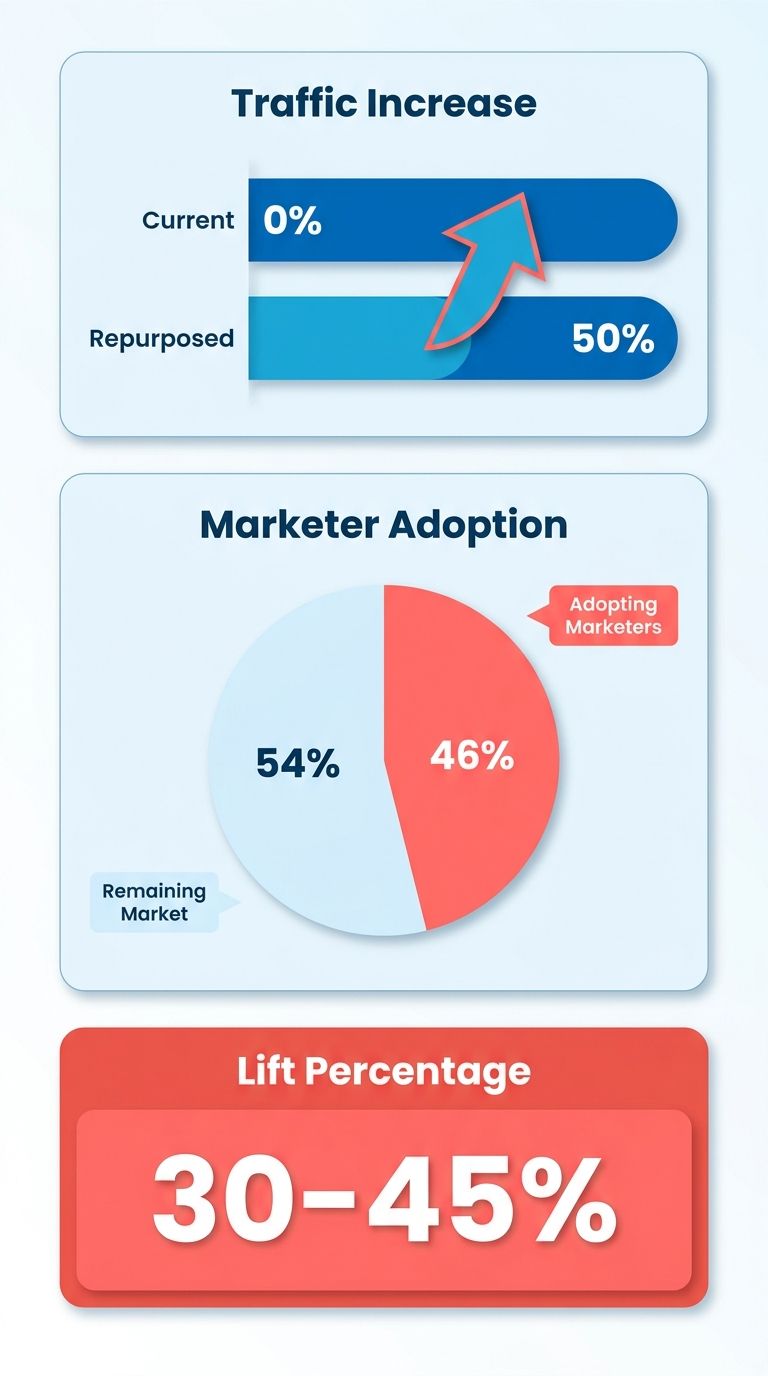
Why Do Fresh Formats Beat Republishing?
Search engines and audiences both reward format variety. Google indexes video transcripts and podcast show notes, which creates secondary ranking shots for the same core idea. One article can surface in web results, video carousels, and audio search at once. Each format opens a door the plain text never could.
Watch how the formats feed each other. Video wins top-of-funnel reach and shares. Email wins depth and conversion, with segmented campaigns driving 760% more revenue than one-size-fits-all sends. They are not rivals. They are different jobs in the funnel, and a good pipeline feeds both from the same source.
- Turn your post into a short video or clip. A blog turned into video earned 3× the engagement of the original text.
- Pull show notes from any audio version, giving search engines a second indexable asset to rank.
- Extract key stats into an infographic. Visuals carry 75% of the information your brain processes, and they get shared far more than plain text.
Which Repurposing Play Has the Biggest SEO Payoff?
FAQ schema markup is the outlier here. One case study applying FAQ schema across 1,000+ pages produced a 9,210% organic traffic increase and lifted click-through from 0.1% to 1.3%. That dwarfs the ~50% lift general repurposing delivers.
Pair a blog audit with FAQ extraction, and you've got a repeatable SEO multiplier. Audit for posts already ranking on question-intent keywords, pull the FAQ pairs, and apply schema. Zero new content, pure upside.
- Audit existing posts to find which ones already rank for question-style queries worth expanding.
- Extract question-and-answer pairs and mark them up with FAQ schema for richer search results.
- Break a long guide into a focused series, the way a 3,000-word post becomes five LinkedIn articles.
What Makes a Systematic Playbook Worth It?
A playbook beats ad-hoc repurposing because it solves the three things that stall teams: time, skill gaps, and cross-channel tracking. More than half of marketers already spend over four hours drafting a single post. Doing that work once and adapting it everywhere is the only way the math works.
A consistent voice across formats builds trust and improves lead quality, but hand-editing every variant to sound "on brand" is where most teams quietly give up. Modern systems handle this by mapping your existing content into a context graph, so you can generate and publish aligned assets across platforms from one dashboard.
Play 1‑4: Visual & Video Repurposing
Visual and video formats are where a single post earns its widest reach. Video keeps viewers on a page 88% longer, and product pages with video convert up to 80% better than those without. These four plays turn one article into assets built for the platforms where people actually spend their attention.
The smart sequencing: start with the format that matches where your best content already ranks, then let voice-consistent variations flow to every other channel from that same source. That's the difference between a real pipeline and a pile of one-off exports. Each play below covers the tactic, tooling notes, and what to expect.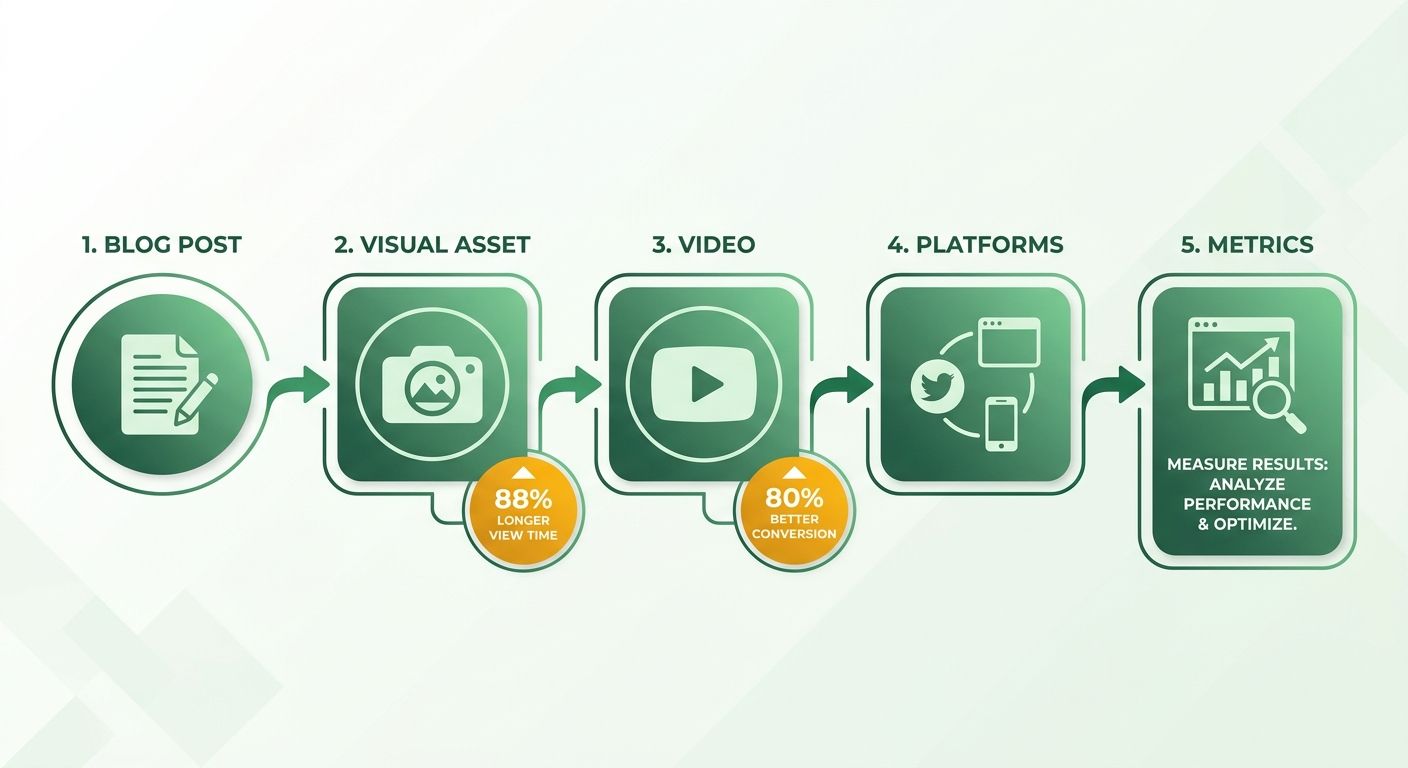
How Do You Turn a Blog Post Into Video?
Blog-to-video means scripting your article's key points, adding visuals, and publishing with search-optimized titles and descriptions. It works because 93% of marketers report good ROI from video, and visual storytelling clarifies concepts that read dry in text.
- Script the blog into a long-form YouTube video. Pull your headings into a spoken outline, add screen recordings or stock visuals, and write a keyword-rich title and description. In one case, a two-minute blog-to-video lifted referral traffic by 22%.
- Optimize the metadata before you hit publish. Titles, descriptions, and chapter timestamps are what surface your video in search. Skip this, and even a strong video stays invisible.
Which Short-Form Clips Actually Get Views?
Short-form clips are 30-second highlight reels cut from your video or blog, formatted vertically for TikTok, Reels, and YouTube Shorts. This is your top-of-funnel reach engine. Well-cut tech clips average 1.8M views each, reach no long-form asset can match on its own.
- Cut 3-5 highlight reels from each long-form video. One strong stat or one contrarian take per clip. Don't try to explain the whole article in 30 seconds.
- Reframe vertically and add captions. Around 85% of short-form views happen on mute, so on-screen text carries the message. A clip should stand on its own, not just be the long version trimmed down.
Why Do Infographics and Slide Decks Still Win?
Infographics and slide decks turn your data into visual assets that get read and linked. Visuals are processed roughly 60,000× faster than text, and colored graphics increase a reader's willingness to read a piece by 80%.
- Extract your data tables and key stats into a shareable infographic. A data-rich graphic pulls backlinks that plain text won't. One SaaS benchmark report drove 3× more backlinks after going visual, and a single infographic saw over 500 shares.
- Convert your headings into slide titles for LinkedIn and SlideShare. Each heading becomes a slide, each stat gets its own frame. A well-built deck generates 1,200+ slide impressions and keeps working long after your post scrolls out of a feed.
Infographics and video do different jobs. Video wins top-of-funnel shares; infographics win backlinks and long-tail search. Run both from the same source article and you cover both ends of the funnel without writing anything new. Automate the generation and you scale these without hitting a production bottleneck.
Play 5‑8: Audio & Webinar Repurposing
Audio and webinar formats reach the people your written posts never touch. Commuters, multitaskers, and buyers who want a human voice before they trust a brand all live in these channels. The four plays below turn one blog post into a podcast, short audio clips, a live session, and an on-demand replay, all from the same source article.
This is where these formats earn their keep: they catch attention at moments text can't. Someone driving to work won't read your 1,500-word post, but they'll press play on a 12-minute episode covering the same ideas. Let one article feed all four and the voice stays consistent while production time stays low.
How Do You Turn a Blog Post Into Audio Content?
Record a conversational reading of your post, then slice that recording into short clips for social audio. The full episode works as a podcast; the clips work as teasers. Both point back to the original article.
- Podcast Episodes: Record a conversational reading, add an intro and outro, and publish on the major platforms. Podcast transcripts can lift organic search traffic by 15% because they give search engines a fresh, keyword-rich page tied to your existing post.
- Audio Snippets: Cut 60-second soundbites from that recording for Twitter Spaces or LinkedIn Audio Events. A single well-timed snippet can drive 800+ engagements, feeding top-of-funnel reach the way short video does.
One caveat worth stating plainly: a podcast episode should stand on its own, not read like a robot narrating a URL. Repurposed content that's just a copy of the original underperforms. Add a spoken aside, a fresh example, a question you answer live. That small human touch is what makes the audio version worth someone's commute.
Do Webinars Actually Convert, or Just Fill a Calendar?
Webinars convert when the blog post already answers a question your buyers keep asking. Use the post's outline as your slide script, host a live session, then edit the recording into an evergreen asset. Live builds pipeline; on-demand builds authority.
- Live Webinar: Turn the blog outline into a 30-minute slide deck and host a live session. These sessions generate 120 qualified leads on average, because a live format lets you answer objections in real time.
- On-Demand Webinar Repurposing: Edit the recording, add chapter markers, and embed it on a landing page. Chapter markers push time-on-page up by 3-4 minutes, and that dwell signal helps the page rank.
Run the live session first, then let the recording work forever. The live event drives the leads; the edited replay quietly compounds. And because both trace back to one post, you can pull a fresh blog summary from the webinar and drive viewers to the full replay, closing the loop between formats.
This is the payoff of a structured pipeline over one-off exports. When every format flows from a single source, your voice stays consistent whether someone reads, listens, or watches. Centralizing the core content makes it far easier to spin off these audio and video assets systematically.
Play 9‑12: Social, Email & Interactive Repurposing
The last four plays move your blog into the channels where audiences already spend their days: their feeds, their inboxes, and their idle-scroll moments. These are the highest-conversion plays in the whole playbook because they meet people mid-behavior instead of waiting to be found.
Most teams say they repurpose, but a ReferralRock survey found the reality is thinner than the claim: a link pasted to LinkedIn counts as "repurposing" for most people. A real pipeline turns one post into voice-consistent variants for every feed at once. That's what these four plays automate.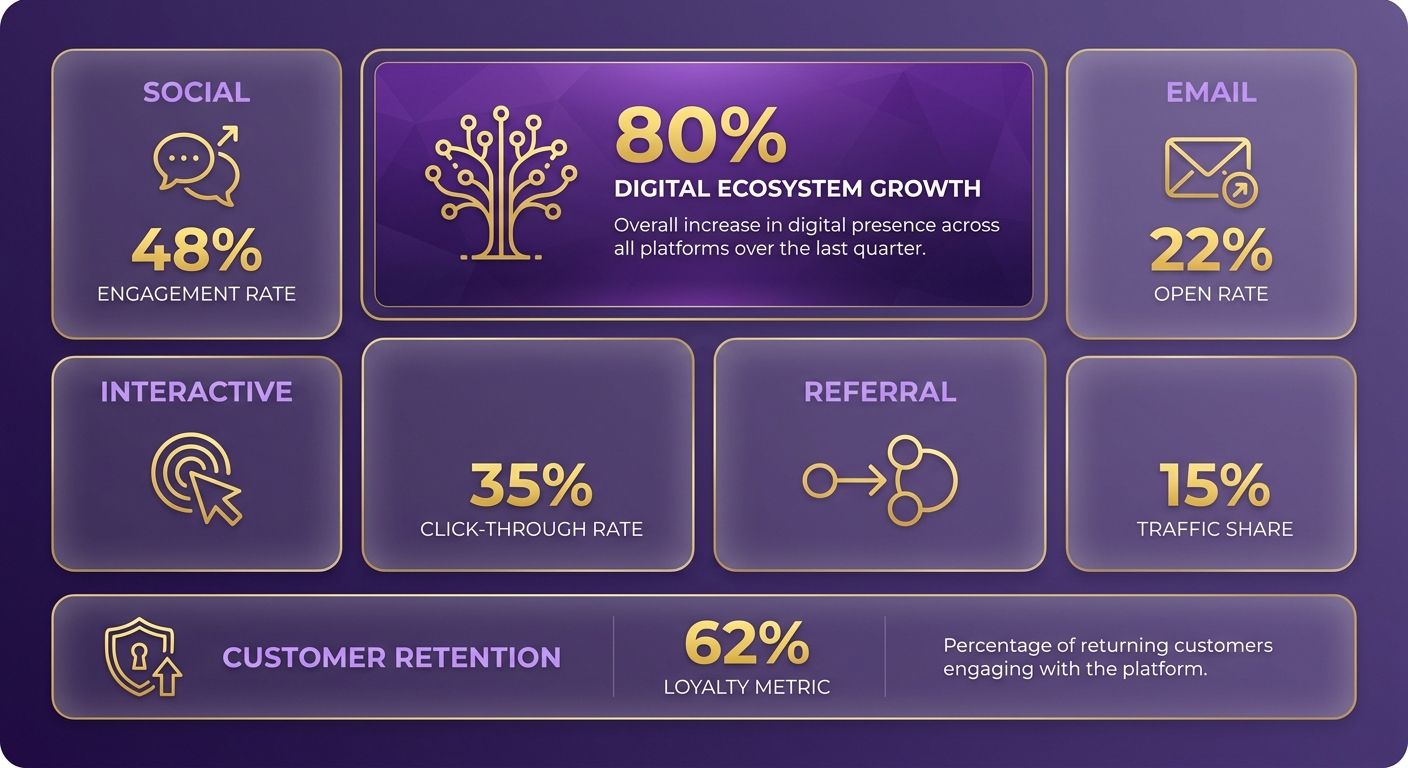
How Do You Turn a Blog Post Into Social Posts?
Break each blog section into a self-contained slide or tweet, then let the format do the reach. Carousels and threads work because they force the reader to keep tapping, and every tap signals engagement to the algorithm.
- Build a 10-slide carousel from your blog's main sections for LinkedIn or Instagram. Carousels earn far higher click-through than single-image posts because each slide is a stopping point that pulls the reader deeper.
- Turn each sub-heading into a tweet and schedule the set as one thread. A well-structured thread can pull over a thousand engagements from a post that already exists in full on your site.
- Pull one data point into a standalone graphic. Infographics are 30 times more likely to be read than plain articles, and visual posts consistently out-share text-only ones.
Match the play to the job. Social wins top-of-funnel reach and shares; it's not your best direct-traffic driver. That job belongs to email.
Why Does Email Still Beat Social for Traffic?
Email converts because subscribers are more engaged than social followers, and the click-through rates back that up. Email marketing sees an average click-through of around 2.6%, well above the fraction of a percent most organic social posts manage. So treat newsletters as the traffic engine, not the afterthought.
- Split one blog post into a 5-email mini-course and automate it as a drip. Segmented sends earn roughly 30% higher open rates, so slice by interest, not send-all.
- Feature your best-performing post in the newsletter rather than a fresh idea. Start with content that already proved its value through engagement, then send it to your most captive audience.
What Makes Interactive Content the Sleeper Play?
Interactive formats keep people on the page longer and pull them back to the source. Interactive content generates 52.6% more engagement than static posts, with users spending about 13 minutes on it versus 8.5 for static.
- Convert a how-to post into a quiz like "What's your SEO maturity level?" A diagnostic question gives readers a reason to interact, which can lift engagement and pull them closer to becoming customers.
- Redirect quiz completers to the full blog post. A well-placed quiz can drive thousands of completions and funnel a solid slice of them straight back to your original article.
One caveat: skip the quiz for thin posts. If the article doesn't hold a diagnostic result worth reading, the quiz feels like a gate with nothing behind it. Build interactive plays on your genuinely deep content, and use automated templates to spin off the social and email variants so the core messaging stays aligned across channels.
Measurement, Optimization & Checklist
Repurposing without measurement is just guessing. What follows is what to track, what to test, and how to run a full 30-day sprint so every play earns its place. Track four core KPIs per channel: unique visitors, referral traffic, time on page, and lead conversion rate. Anything you can't tie back to one of these four is a vanity metric.
Here's why measurement gets skipped: most teams ship repurposed assets and never check which format actually converts. Google Analytics tells you which posts already earn engagement, so start with the assets already winning. Set a baseline before you repurpose, then compare the new variants against it after 14 days of live data.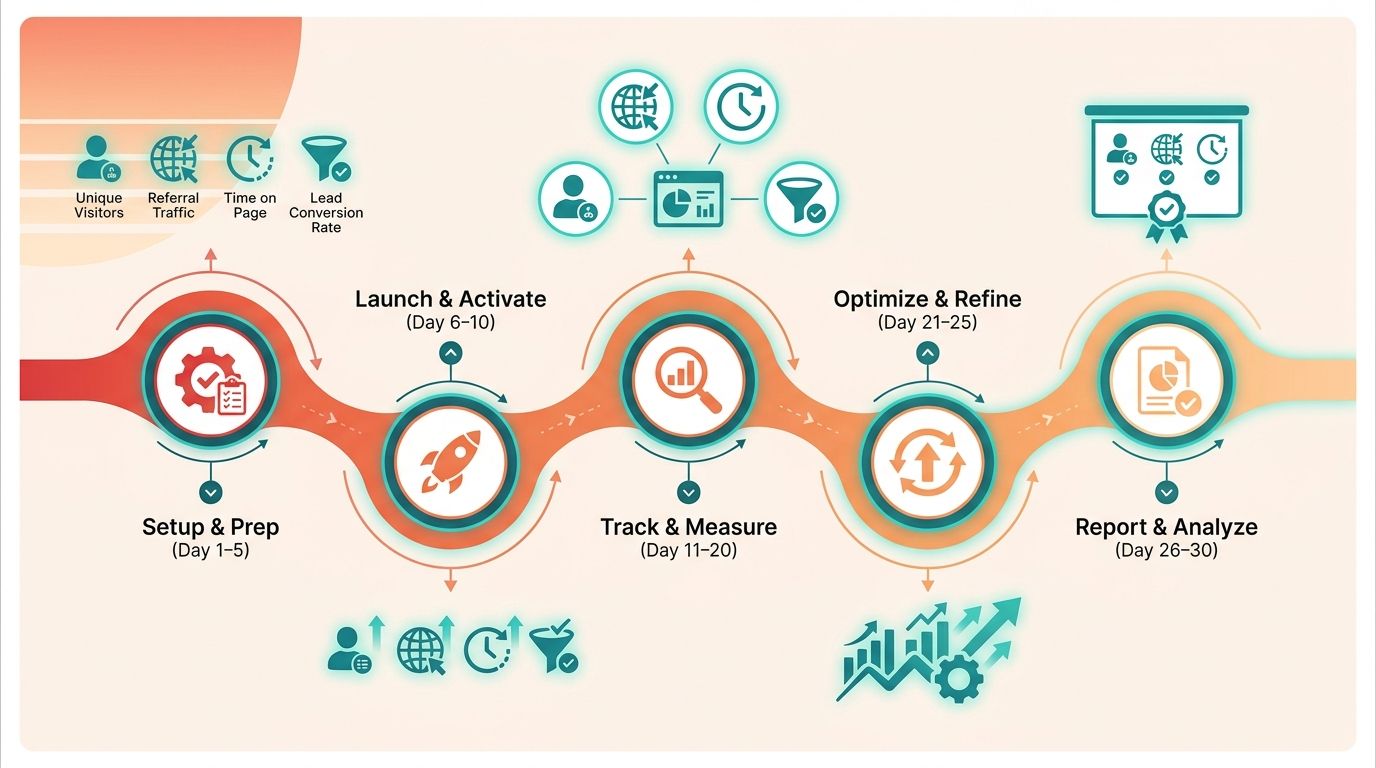
What Should Your Pre-Launch Audit Cover?
Every asset needs a quick check before it ships, because a video with no thumbnail or an email with no CTA leaks the traffic you worked to create. Run this list for each format.
- Confirm SEO tags and meta descriptions carry the target keyword so search can find the repurposed asset.
- Write platform-native captions that stand on their own; a repurposed asset shouldn't read as a copy of the original blog.
- Design a custom thumbnail for video and social, since the click happens before anyone sees your content.
- Place one clear CTA per asset that routes back to a conversion page or newsletter signup.
Which A/B Tests Actually Move the Needle?
Test one variable at a time, or you won't know what caused the lift. These three give you the fastest read on what your audience responds to.
- Run thumbnail vs. title on the same video to see which drives more clicks from the same reach.
- Compare short-form vs. long-form video, since one wins on shares and the other on watch time.
- Move your quiz or interactive element above and below the fold to find where it captures the most time on page.
A word on the funnel: video, interactive content, and email are not competing channels. They are an escalation ladder. Video earns reach and shares. Interactive content holds attention longer. Email closes with the deepest engagement. Give each stage its own success metric instead of judging every channel on conversion. A video that fuels 10x the shares is doing its job even if it converts less than your email list.
How Do You Run a 30-Day Repurposing Sprint?
Repurpose one blog across all 12 plays in 30 days by front-loading production and automating distribution. The workflow is simple: generate scripts once, match voice in bulk, schedule, then optimize weekly.
- Days 1-5: Feed the blog URL into a one-click generator to output a YouTube script, podcast outline, and social captions from a single source.
- Days 6-15: Use the Persona Engine to match brand voice across video narration, infographic copy, and email copy so every variant sounds like you.
- Days 16-20: Export finished assets to your scheduler or CRM for automated publishing across channels.
- Days 21-30: Watch the real-time dashboard, then iterate the copy weekly on whichever asset underperforms.
Front-loading production and automating distribution is what makes the full sprint work. Integrated platforms that handle draft generation, tone matching, and real-time analytics let you monitor performance alongside your search console data. The lesson is plain: manual execution across a dozen channels gets unsustainable fast for small teams. If your team publishes fewer than one post a month, skip the full sprint and focus on manually optimizing your top two or three performers instead.
For deeper tooling notes, see our guide on SEO automation tools for content repurposing.
Frequently Asked Questions
1. How many blog posts should I have before repurposing is worth the effort?
A systematic repurposing program is most effective when you have a steady baseline of content production. If your publishing schedule is light, focus your energy on your existing high-performing assets. Analyze your traffic data to identify posts that already attract consistent organic interest, as expanding on topics that have already proven their value yields a much higher return on your time than trying to redistribute every post indiscriminately.
2. Can I repurpose a blog post that's shorter than 1,500 words?
Yes, shorter articles are highly adaptable for quick-consumption formats like social media threads, single-image graphics, or brief email highlights. However, avoid complex interactive formats like diagnostic quizzes or comprehensive whitepapers for brief articles, as these require a deep informational foundation to feel valuable to the user. For shorter posts, focus on extracting single, high-impact takeaways that can be digested in under a minute.
3. Which single play gives the fastest SEO return?
Implementing FAQ schema markup is highly effective because it directly targets rich results in search engine results pages (SERPs). By structuring your content into clear question-and-answer pairs, you make it easier for search crawlers to understand the direct utility of your page. This enhanced visibility in search results helps capture user attention and can significantly improve your organic click-through rates without requiring you to write entirely new articles.
4. Why do most teams stall after just three plays?
The primary bottleneck is operational friction. Moving from writing a blog post to designing graphics, editing video, and recording audio requires constant context-switching and different software tools. Without a structured workflow, creative fatigue sets in quickly. To prevent this, separate your tasks by format type and tackle the low-barrier social and email formats first before dedicating specialized time to resource-heavy production like video or audio editing.
5. Should I judge every repurposed format on conversion rate?
Evaluating every distribution channel by direct conversions ignores how modern buyers interact with brands across different touchpoints. Top-of-funnel formats like short-form video or social graphics are designed to build initial awareness and earn shares, whereas middle- and bottom-of-funnel formats like newsletters or interactive tools are built for deeper engagement and lead capture. Assign distinct performance indicators to each format based on its position in the customer journey.
6. How long should I wait before measuring a repurposed asset's performance?
The measurement timeline depends heavily on the platform. Social media posts and email newsletters yield almost immediate data within the first few days of publishing, whereas search-focused formats like FAQ pages or YouTube videos require several weeks to be indexed and start ranking. Begin your initial review of social metrics within a week, but allow at least a month of data to accumulate before drawing conclusions about search-driven or long-tail traffic performance.
7. What keeps my brand voice consistent across a dozen different formats?
Maintaining consistency requires a clear framework for your brand's tone, vocabulary, and formatting rules. When scaling content across multiple channels, establish a centralized style guide that defines your brand's perspective and preferred phrasing. Using templates and advanced content generation systems that map to your existing published work can help ensure that automated drafts remain aligned with your established editorial standards across every platform.
