Ahrefs Automated Queries in 2026: A Practical Workflow for Keyword, Content, and AI Search Research

Key Takeaways
- Ahrefs tracks 41.9 billion keywords and indexes 170 trillion pages. That's the raw dataset every automated workflow leans on.
- Agent A runs in the cloud and connects straight into WordPress, GitHub, and Slack for hands-off draft generation.
- API access, Brand Radar mention tracking, and the rate limits scheduled automation needs live on the higher Ahrefs tiers.
- The workflow ties together five pieces: the Ahrefs dataset, Agent A, AI Content Helper drafts, Brand Radar, and webhook bridges.
- Automated queries pull keyword lists, SERP data, and declining-page alerts on cron schedules you set after the initial wiring.
- A human still signs off before anything publishes. Automation handles generation; your team keeps final approval through Slack.
- You'll need API credentials, a webhook platform like Zapier or Make, and publishing credentials to route data into your content systems.
Quick Summary
Running Ahrefs automated queries means wiring data into your content pipeline. You move away from manual exports and onto a schedule. After that, batch jobs run on recurring cadence.
What you need before you start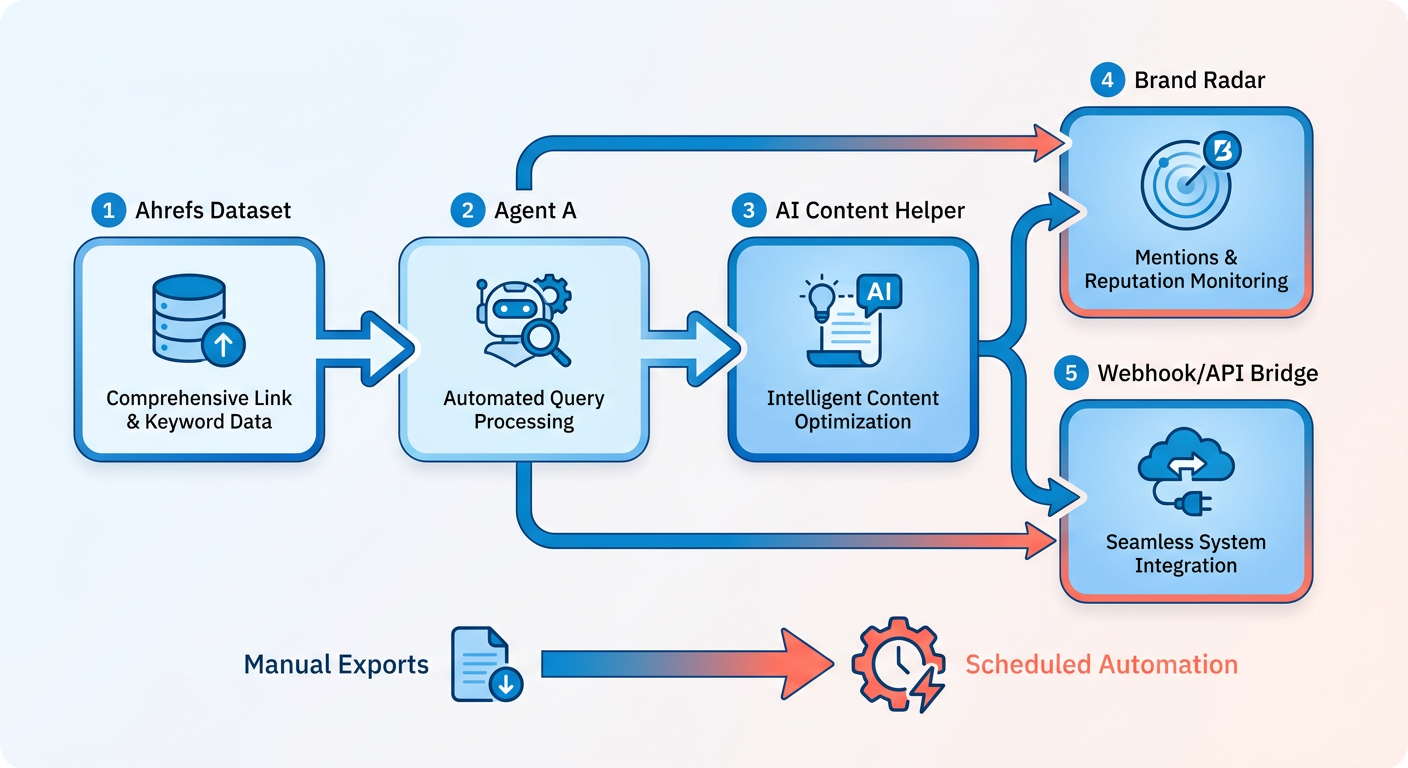
Start with an Ahrefs subscription that supports programmatic access. On top of the account, you need API credentials from your dashboard, a middleware platform to route data, and publishing credentials for the CMS or channels you're targeting.
Because everything executes off-site, you're not babysitting local hardware. The system stages drafts in your repo or CMS and pings your team channel when a piece is ready. Your editors keep full oversight before anything ships.
Core workflow components
| Component | Purpose | Setup Steps |
|---|---|---|
| Automated Queries | Pull keyword lists, SERP data, or declining-page alerts on schedule | Connect API token; define query parameters; set cron schedule |
| AI Keyword Explorer | Surface low-difficulty, high-intent keywords by niche | Input seed keywords; filter by KD < 30 and search intent |
| AI Content Helper | Draft outlines or full articles from keyword clusters | Feed keyword list + target URL; review SERP structure; approve draft |
| Brand Radar | Track brand mentions across web and social in real-time | Add brand terms; configure Slack or email alerts |
| API / Webhook Bridge | Push Ahrefs outputs to external systems (CMS, analytics, voice engine) | Authenticate webhook endpoint; map data fields |
The Blog Freshness tool sits inside Agent A and flags pages losing traffic, ranking them by current search volume and crawl budget impact. When a page slips, Agent A can auto-pull fresh SERP data, draft a refresh, and queue it for review. No manual exports, no spreadsheet pivots.
Metrics worth tracking
Once the workflow is live, watch three numbers. Keyword discovery rate (viable keywords surfaced per week), content ideation speed (time from cluster to publish-ready draft), and AI-search visibility lift (citations in ChatGPT, Perplexity, or Gemini). Freshness keeps you in the results. That is why the refresh loop matters: queries catch staleness, the system prioritizes updates, and republishing keeps pages competitive.
Once things stabilize, the time savings on manual research are real. The first stretch feels slow while you debug webhook payloads and tune filters. Then you settle into daily batches feeding a steady content engine.
Quick-reference checklist
- Set up Ahrefs API access and check the rate limits on your plan tier.
- Install Agent A (if your account has it) or configure scheduled exports through the web interface.
- Define keyword clusters in Keywords Explorer, filtering by difficulty and intent.
- Connect a webhook platform or custom script to route Ahrefs outputs into your CMS or content queue.
- Enable Brand Radar alerts for brand mentions and competitor activity in real time.
- Run your first automated batch and log the time from trigger to output. That's your baseline to optimize against.
- Review draft outputs in staging before publishing; adjust settings if the generated content drifts from your standards.
- Monitor declining-page alerts via Blog Freshness and schedule refresh cycles by traffic impact.
One connection the sources leave implicit: pairing automated data retrieval with direct CMS staging lets you queue drafts and notify editors instantly. You get scale and editorial control at once. It's not fully hands-off, but it compresses most manual research and drafting into a short weekly review.
Why manual keyword research stopped scaling
Manual keyword research broke the moment search stopped being ten blue links. In 2026, 15% of daily searches are brand new queries with zero historical data. AI Overviews also reduce clicks to sites. When the terrain shifts daily, automated queries aren't a nice-to-have. They're how you keep pace.
The shift is easy to see. AI Overviews now appear for over 13% of queries, so AI assistants increasingly sit between your content and your reader. Automating keyword and freshness checks keeps you visible across search and AI answers. It also feeds cleaner data into a voice-matching engine for newsletters and social posts.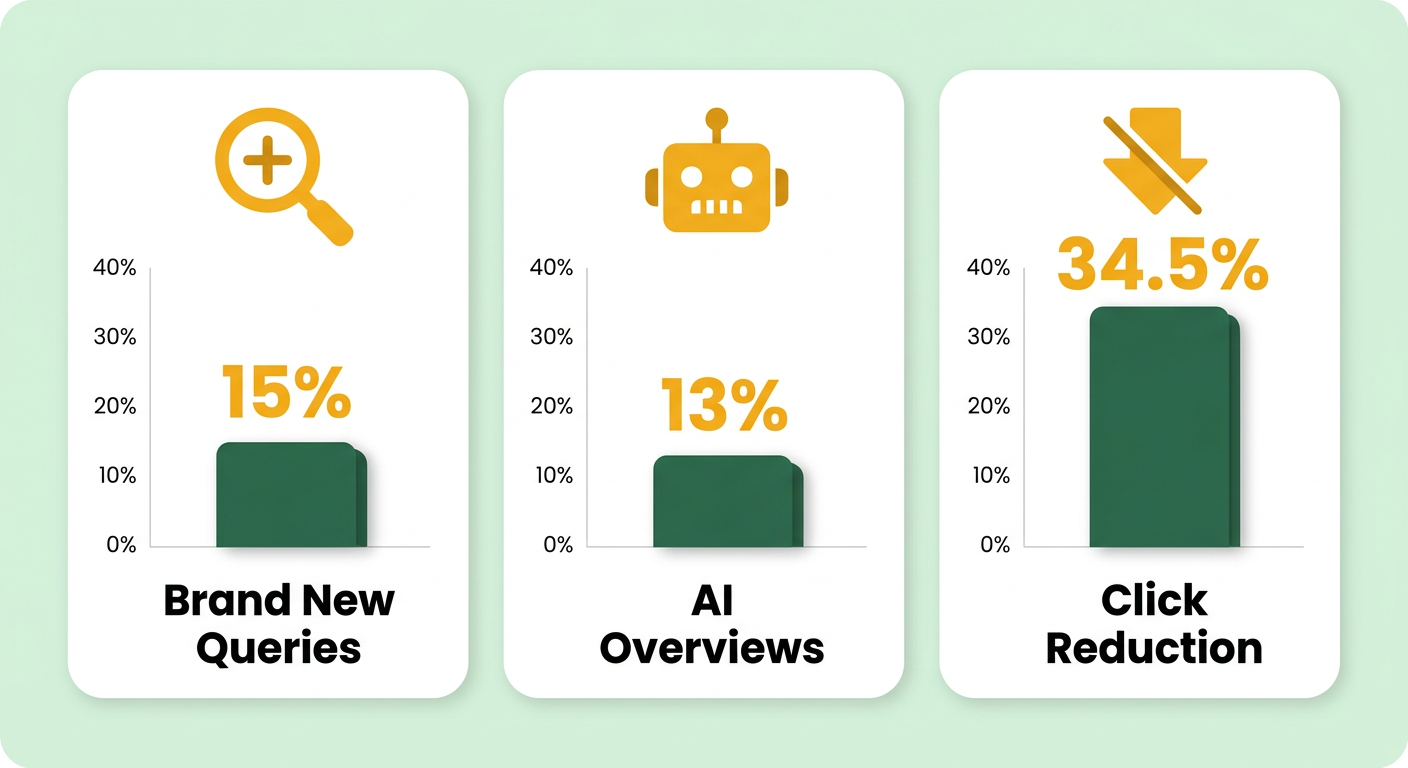
Why manual workflows hit a ceiling
Manual research fails because the flood of new, low-signal queries has outrun what any person can export and sort by hand. Ahrefs' automated workflows run keyword research at a scale no manual export touches, so the bottleneck was never data availability. It was human throughput.
Old-school keyword research says target proven demand. The 2026 AEO view says chase Zero Search Volume long-tail queries with no history at all. Both are right, just for different rooms. Google organic still rewards demonstrated demand. AI Overviews reward semantic authority on questions nobody has asked yet.
So let automation split the work. Point scheduled queries at proven-volume terms for your money pages, and reserve a second bucket for ZSV and action-oriented queries competitors ignore. Then pipe both into content generation so nothing dies in a spreadsheet.
What automation actually buys SaaS and agency teams
Speed to publish. SEO leads convert well, so the faster you turn a query into a live, on-brand post, the faster that pipeline fills. SaaS and agency teams get the most out of it because they're publishing across many topics and clients at once.
There's a freshness loop worth building here too. Automated workflows flag declining pages so you can update them before they lose ground. A multi-hop research engine that pulls current insights from blogs, Reddit, X, YouTube, and research papers keeps refreshed content well-sourced instead of stale.
One honest caveat: don't assume AI visibility equals revenue yet. Roughly 26% of brands have zero mentions in AI Overviews, and closing that gap builds reach. But conversions still lean on traditional search. Track both, and don't let a vanity spike in mentions pull attention off the pages that actually close deals.
Who should skip this
Skip full automation if you publish a handful of pages a year and never touch fresh topics. At that scale, the setup cost outweighs the return. Automated queries earn their keep when you have volume, velocity, and a genuine need to stay current.
For everyone else, the math is simple. You can't control the whole search landscape, but you can control how fast and how consistently your own content ships. Feeding automated Ahrefs data into a system that writes in your style closes the gap between "we found the keyword" and "we published the post."
Setting Up Ahrefs Automated Queries: Account, Permissions, and API Access
Automated Keyword Discovery & Long‑Tail Mining
Turning thousands of keywords into topic clusters
Run automated queries against a few thousand keywords and the raw list turns unmanageable fast. Topic clustering gives it structure by grouping keywords around shared intent and SERP overlap. The system chains queries to pull SERP data for each keyword, then scores semantic similarity across the result sets to figure out which terms belong together. Every piece you publish then targets a full intent cluster instead of one lonely term.
How SERP overlap does the clustering
Ahrefs uses SERP similarity as the clustering signal. When two keywords return mostly the same top-ten results, Google is telling you they satisfy the same need. Automated workflows run this check at scale: pull Keywords Explorer data for your seed list, then score overlap percentages across result URLs.
Set a threshold. 70% overlap is a common starting point. Below that, you're looking at separate intent. Above it, the keywords belong in one cluster and should share a page or a content series.
The practical edge: instead of eyeballing SERPs for 500 keywords, the system runs the batch overnight and hands back a CSV with cluster IDs, primary keywords, and supporting long-tails. Once you've got that structured data, a content platform can generate cluster-specific pieces that cover the full semantic range while keeping your brand's tone.
Mapping clusters to content types and calendar slots
With clusters in hand, assign each one a content format: blog post, landing page, FAQ module, newsletter series. The workflow can add metadata columns for average keyword difficulty, search volume per cluster, and dominant SERP features like featured snippets or video carousels. That tells you which clusters need deep guides and which can run as programmatic pages.
One team used Ahrefs' content gap analysis to find competitor clusters they hadn't touched. The automation pulled keywords their top three competitors ranked for, filtered out terms the team already targeted, then clustered the gaps by intent. That became the roadmap for the next quarter, every new piece filling a validated hole.
The workflow I'd recommend: export the cluster map with publish dates and a content owner on each cluster. From there you build the calendar and generate drafts that target each cluster systematically. Automated generation handles the volume; you decide what publishes and when.
Checking whether a cluster is worth chasing
Not every cluster earns a draft. Cluster health comes down to three checks: average keyword difficulty, intent diversity, and traffic potential. Scripts calculate these automatically by averaging KD across the cluster, then flagging any cluster where informational and transactional terms mix. Those usually need to be split.
A healthy cluster has KD variance under 15 points, one dominant intent, and enough volume to justify the work. If half your keywords sit at KD 20 and the other half at KD 60, you've got two audiences with different needs. Split it, or run the lower-difficulty subset first.
The system can draft cluster-specific content in a staging branch and flag it for approval, keeping the publish step in your hands. Editorial control stays, generation stays automated. It pairs well with a content platform that matches your brand's style: clustering handles semantic coverage at scale, the writing makes every piece read like your team wrote it.
Using Ahrefs AI Content Helper and Content Grader for ideation and drafting
Run automated queries at scale and the raw keyword list is only the starting line. Next you decide which topics deserve full drafts and what angle each should take. Ahrefs' AI Content Helper automates that decision layer, taking keyword clusters and generating outlines aligned to search intent. The Content Grader then scores each draft on a 0–100 benchmark, giving you a number to judge which pieces are ready and which need another pass.
How the Content Helper turns clusters into outlines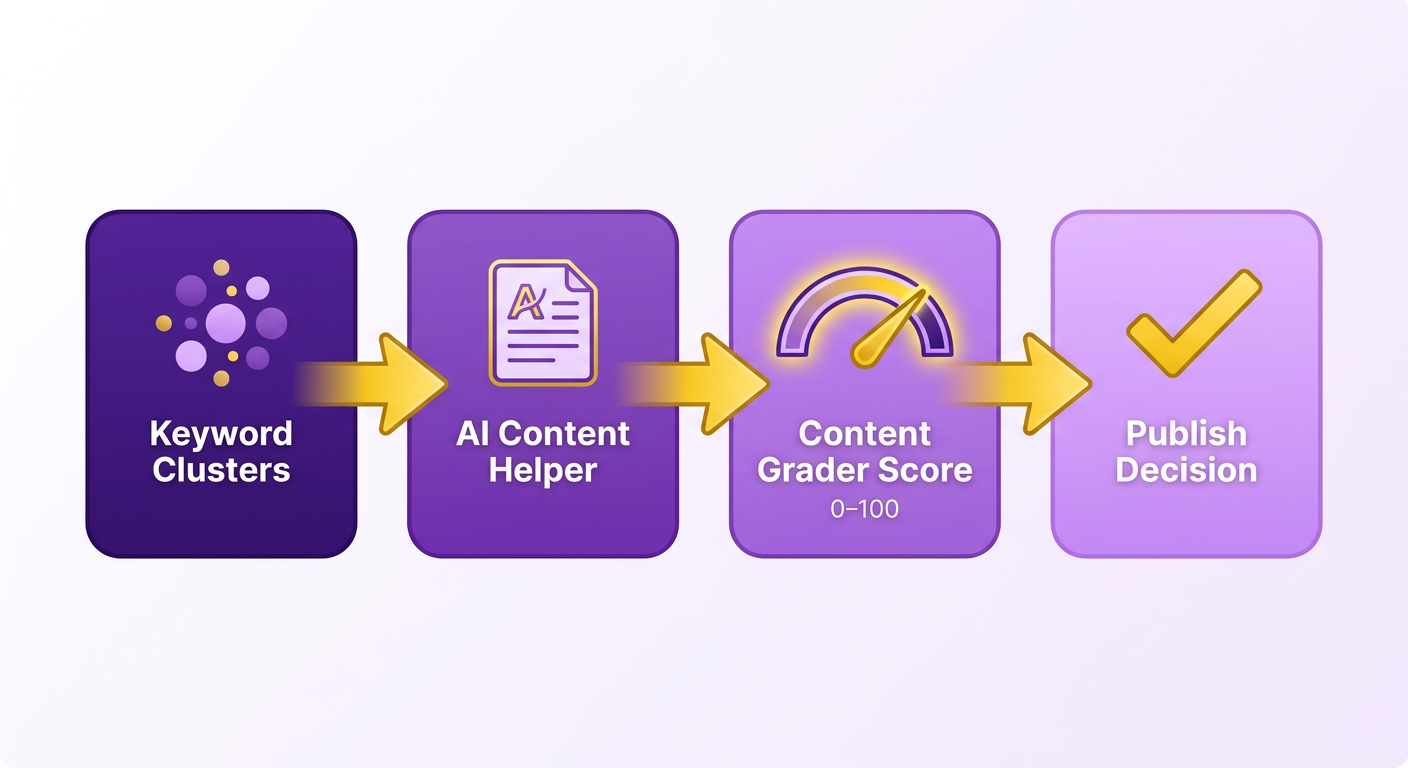
The AI Content Helper takes natural-language prompts that reference your keyword data, competitor URLs, and target audience. You're not writing the content by hand. You're describing what it should accomplish, and the tool returns a structured outline. The goal is comprehensive topic coverage, not keyword stuffing. That matters when you're automating, because a prompt built around exact-match phrases produces shallow, repetitive drafts.
In practice you can structure prompts around three inputs: the primary keyword cluster, the top three ranking URLs for that cluster, and the specific questions users ask in forums or in Google's "People also ask" box. A prompt might read: "Generate an outline for 'ahrefs automated queries' covering workflow setup, API integration, and common troubleshooting. Reference the structure at [competitor URL] but add a section on feeding results into a CMS." The Helper returns a hierarchical outline with H2 and H3 headers, suggested word counts per section, and a list of semantic terms to include.
One Ahrefs colleague used this workflow to improve traffic. The trick was layering keyword clusters with competitor gap analysis so every outline addressed a topic no rival had fully covered. Automate this step and you're not just generating content, you're spotting white space in the SERP and building to fill it first.
Setting Grader thresholds that trigger full drafts
The AI Content Grader scores drafts on a 0 to 100 scale based on how thoroughly they cover the topic against top-ranking pages. A 75 means your draft hits most of the subtopics Google expects; a 90 means you've matched or beaten the depth of the current top ten. Teams commonly set thresholds at 80 for evergreen guides and 70 for news-driven posts, where speed matters more than exhaustive coverage.
The grader outputs JSON feedback listing missing subtopics, weak sections, and chances to add tables or lists. That structured output makes drafts easy to route programmatically: clear your threshold, the draft moves to refinement; fall short, you revise the prompt to cover what's missing before regenerating.
Here's the practical payoff. Companies often use a review process for AI content and don't publish raw output. The grader gives you the quantitative signal for deciding which drafts are safe to finalize and which need a human. Running queries for hundreds of keywords, that triage is what holds quality steady without burning editorial hours.
Feeding Grader feedback into your workflow
The grader's JSON includes a severity flag for each missing subtopic: "critical" means the SERP uniformly covers it, "recommended" means half the top ten mention it, and "optional" means it's a differentiator only one or two sites include. Route drafts on that breakdown. If every missing item is "optional," the draft may be ready for final review. If two or more are "critical," it gets flagged for manual editing before you commit.
AnyPost's Persona Engine learns your brand voice from your existing content, so every published article matches your tone and messaging. Once you've refined a draft using Ahrefs' feedback, AnyPost can rewrite it in your style, adjust sentence length to fit your cadence, and prep it for automated publishing across your site, newsletter, and social channels.
For teams running multiple brands or client accounts, this scales cleanly. Set one grader threshold per brand, then feed the query results into production. A new cluster surfaces, the Helper drafts an outline, the Grader scores it, and you decide whether to refine by hand or route it straight to publishing.
Monitoring AI Search Visibility with Brand Radar via Automated Queries
Wiring automated queries into the AnyPost.ai end‑to‑end workflow
The full workflow runs five stages in a straight line: automated queries pull keyword data, that data feeds draft generation, drafts route through human approval, approved content publishes, and analytics loop back to trigger the next run. Each stage eats the output of the one before it. Wire the connections once and scheduled queries run on their own, keeping the pipeline moving.
The piece most guides skip is the handoff between raw data and brand-consistent output. The workflow connects to the Ahrefs keyword database through the Model Context Protocol, so it gets live search volume and difficulty numbers instead of stale exports. Clean data is exactly what an engine needs to turn a keyword cluster into a newsletter or social post that sounds like you wrote it.
Routing data from Ahrefs into content generation
Chain the queries first, then pass structured output downstream. The system runs keyword research, clusters the results by semantic meaning, and hands off a finished topic map. That map becomes the input for draft generation, where the engine applies your brand tone.
A practical setup: the automation drafts into a staging branch, then flags the piece for review. The process keeps moving without manual intervention at every step.
Watch your rate limits when chaining. Every keyword you push through Keywords Explorer costs an API call, and running hundreds in one job hits caps fast. Batch queries into scheduled windows instead of firing them all at once.
Should automated drafts publish themselves?
No. Keep a human between generation and publication. Tools can draft and manage updates on their own, but autonomous generation and final publishing are two different decisions. The right pattern lets automation do the heavy lifting while a person signs off before anything goes live.
Automation handles generation; you handle approval. The draft-to-staging, flag-for-review, publish-after-sign-off pattern satisfies both the automation need and the brand control the engine is built to protect. That approval gate is where you confirm the post actually sounds like your brand before it ships.
Closing the loop with freshness and backlinks
Feed analytics back into your query schedule so the pipeline refreshes itself. The system spots declining pages and suggests updates from current SEO data, ranking those fixes so you update the pages that actually move numbers.
Here's how it stitches together. Automated queries catch a page slipping, the system ranks it against every other candidate, and the engine regenerates the copy. Republishing keeps the page eligible for AI Overview citations, which now show up in Site Explorer's history view so you can check whether the refresh worked.
The same loop drives backlinking. Sync the filtered list into your outreach schedule, and the recurring run keeps surfacing fresh prospects instead of forcing another manual export. Batch those filtered reports into your scheduled windows and the reporting side runs without repeated manual pulls.
Scaling, maintenance, and keeping the pipeline honest
Keeping an automated pipeline reliable at scale comes down to four habits: watching your API quota, catching failed runs fast, checking your data for rot, and auditing your query logic on a schedule. Get these right and your automated queries keep feeding clean keyword data into the engine without silent breakage.
The failure mode nobody warns you about is quiet. A scheduled job runs, hits a rate limit or returns stale numbers, and your newsletter still ships a perfectly on-brand draft built from bad data. So the goal here isn't more automation. As the keyword-research automation guides put it, "the win isn't more keywords; it's better decisions at scale." Reliable inputs are what make those decisions good.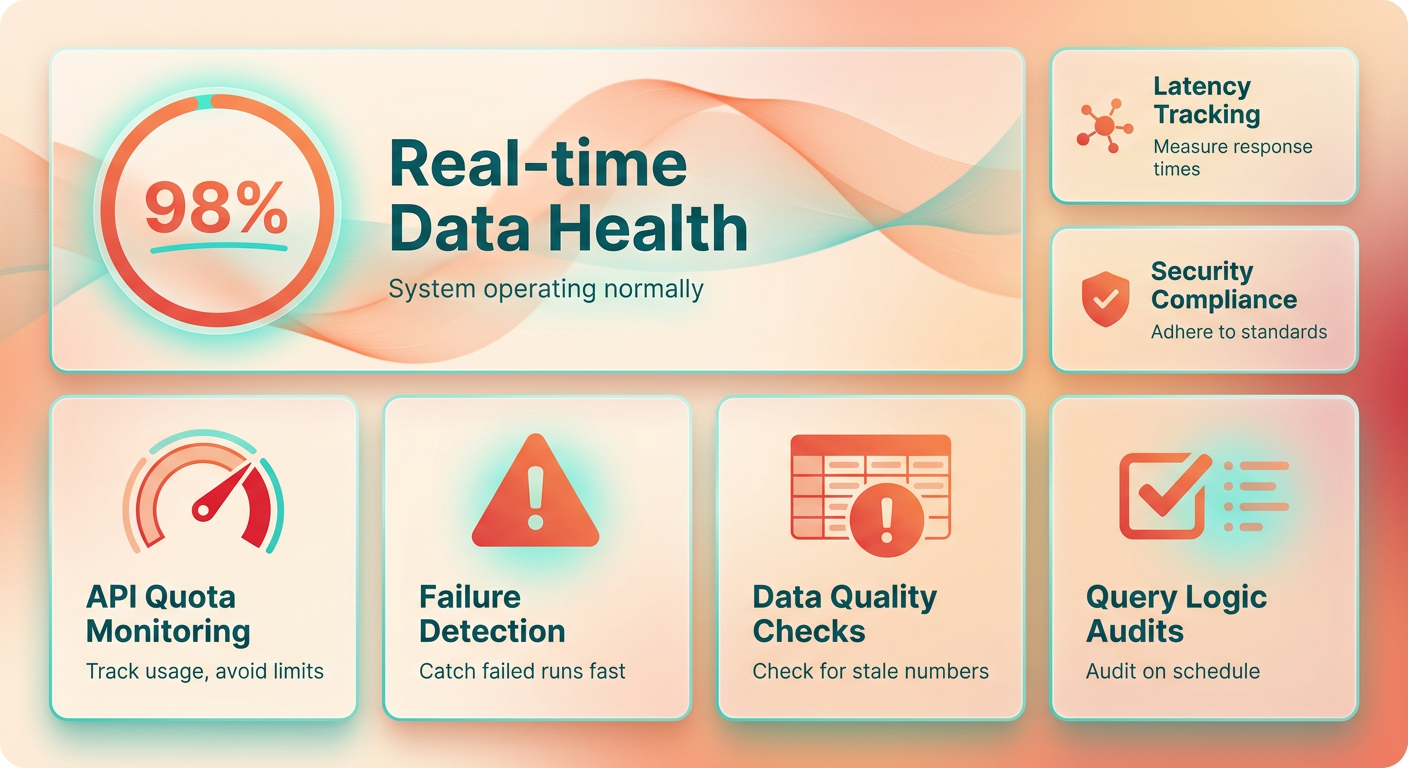
Handling API quota and failed queries at scale
Watch two things: how close each batch runs to your rate limit, and whether jobs finish at all. As keyword volume grows, a job that ran fine on 200 terms starts timing out at 2,000. Scaling volume usually means adjusting your plan, not just your code.
For catching failures, wire error monitoring into every scheduled run. General-purpose tools that capture exceptions and alert on failed executions let you see a broken job the moment it dies instead of the next morning. The system runs on your schedule with no local hardware watching the process, so external alerting is the only way you'll know something broke.
Route those alerts to your team channel, so a failed refresh pings the same place where you approve drafts.
Data-quality checks worth running every cycle
Validate three things before keyword data reaches a draft: remove duplicates, flag outdated search volume, normalize variants. AI agents already generate long-tail variants and normalize them for programmatic use, so fold that same normalization into your quality gate. Duplicate terms inflate cluster counts and waste draft budget.
Stale search volume is the sneakier problem. Search demand shifts constantly, so a number pulled six months ago may describe demand that no longer exists. Set a freshness threshold and re-pull volume for any keyword older than it.
Then pair the freshness check with a content-refresh loop. Automated queries detect which published pages have decaying volume, the system prioritizes updates, and republishing keeps those pages competitive. No single guide lays out this loop end to end, but the pieces are already in your stack.
Your audit and future-proofing checklist
Review query logic on a fixed cadence, not when something breaks. Run these checks:
- Weekly: scan error-monitor alerts and re-run any failed batches.
- Monthly: audit cluster logic and remove duplicate or dead keywords.
- Quarterly: version your query scripts in Git so every change to your automation is reviewable and reversible.
- Per release: when Ahrefs ships new AI features, test them against a small keyword set before wiring them into production.
One practice worth adding: log every automated decision that affects which keywords reach a draft. When Agent A skips a term because volume dropped below threshold, or merges two clusters because semantic similarity crossed 0.85, write that to a structured log. Six months later, when you're debugging why a high-value topic never made your calendar, that log is the only artifact that tells you whether the automation called it right or needs recalibration.
Frequently Asked Questions
1. Can Agent A run automated queries if I'm on a lower-tier Ahrefs subscription?
Access to advanced automation features depends on your plan's specific API permissions. Lower tiers may lack the credentials and real-time tracking features needed for scheduled automation. Check your plan's API availability in your dashboard before attempting to configure automated workflows.
2. What happens if an automated query hits the API rate limit mid-batch?
The job fails silently and returns incomplete data, which then feeds downstream into draft generation. The safer approach is batching queries into scheduled windows rather than running hundreds simultaneously. Monitor your quota usage after each run to avoid silent failures.
3. Do I need to manually approve every draft Agent A generates before it publishes?
Yes. While the system can auto-generate drafts and stage them in your repository or CMS, human approval remains required before publication. The workflow flags drafts for team review, ensuring editorial control while automation handles generation. Publishing without final sign-off risks tone drift and factual errors.
4. How does the Blog Freshness tool decide which declining pages to prioritize?
The tool ranks declining pages by current search volume and crawl budget impact, not just traffic loss percentage. A page losing 20% of high-volume traffic ranks higher than one losing 50% of minimal traffic. The system uses this prioritization to auto-queue the highest-impact refreshes for review first.
5. Will refreshing a declining page guarantee it appears in AI Overviews?
No. Refreshing keeps a page eligible for AI Overview citations, but eligibility does not guarantee inclusion. Many brands have zero mentions in AI Overviews despite publishing fresh content. Track both AI visibility and traditional search conversions, because citation reach does not always translate to revenue.
6. Can I run Ahrefs automated queries without using a webhook platform like Zapier?
You can export data manually via the web interface, but scheduled automation requires either a webhook platform or custom scripts to route Ahrefs outputs into your CMS. Direct integrations can also eliminate the need for middleware if those match your target systems.
7. How do I prevent automated drafts from drifting away from my brand voice?
Set Content Grader thresholds per brand and route low-scoring drafts to manual editing before publication. Training your generation tools on your existing content ensures every draft matches your tone, sentence cadence, and messaging. Review the first ten automated outputs closely to tune settings before scaling the workflow.
