Ahrefs Content Explorer Alternative for AI Powered Content Research

Key Takeaways
- AI Content Helper spits out topic ideas, a draft, a title, a meta description, and a few internal-link suggestions in minutes. It doesn't give you a post you'd publish as-is.
- Its research pulls from public SERP snippets and nothing else. No multi-source input, which is where AnyPost.ai pulls ahead.
- Keyword clustering groups related terms, but it won't drop them into your headings or alt text for you. That part stays on you.
- Plan for an editing pass after the draft lands: tone, keyword density, schema markup. The draft is a start, not a finish.
- AnyPost.ai carries the workflow through to publishing. That skips the manual research-to-publish handoff AI Content Helper leaves behind.
- For B2B teams, three things separate these tools: research depth, automation level, and total workflow time.
Alternative 1: AI Content Helper
Compare Ahrefs Content Explorer with AI Content Helper, and one difference stands out: how far each one carries you from keyword to live post. AI Content Helper turns raw ideas into a draft, then hands you the wheel. It won't ship a fully SEO-ready article on its own. AnyPost.ai takes the workflow through publishing.
What AI Content Helper actually does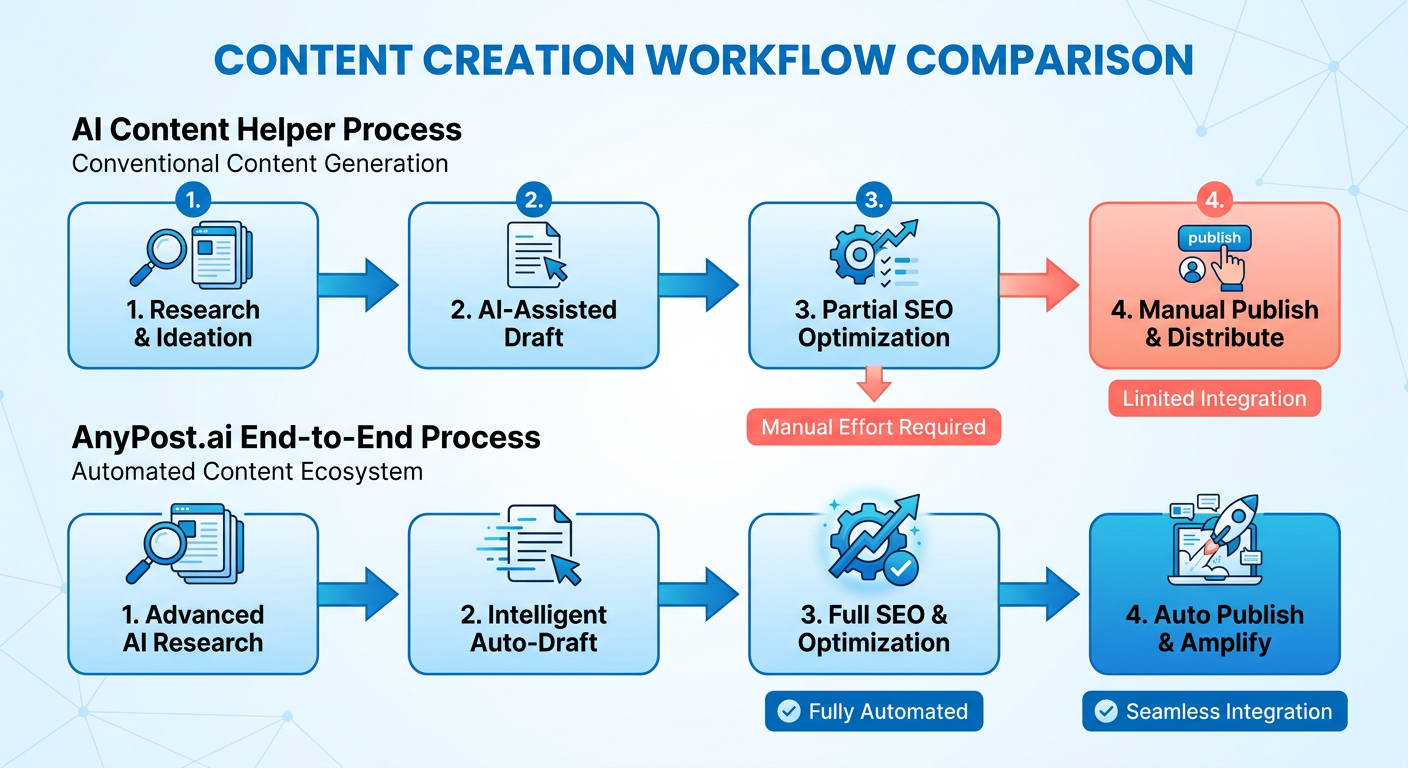
It generates topic ideas, writes drafts, and suggests basic on-page tweaks. Under the hood, it scrapes public SERP snippets and feeds them to a language model, which returns a short article in a couple of minutes. You get a title, a meta description, and a handful of internal-link suggestions. All of it needs polishing before use.
So teams treat the draft as a starting point. Then they spend time editing for tone, keyword density, and schema. The keyword-clustering feature groups related terms, but it stops there. It won't place them in your H2s or your alt text. If you already run a tight content workflow, the helper speeds up ideation. The SEO work at the end stays manual.
How it stacks up against AnyPost.ai
Here's the comparison on what B2B marketers actually weigh: research depth, automation, and total workflow time.
| Feature | AI Content Helper | AnyPost.ai |
|---|---|---|
| Research source | Public SERP snippets only | Multi‑source content integration with proprietary trend analysis |
| Draft generation | LLM‑based, single click | LLM‑based with SEO‑score feedback |
| On‑page optimization | Manual suggestions | Auto‑filled meta tags, headings, and schema |
| One‑click publishing | No | Yes – auto‑publish to your chosen platforms |
| Pricing (monthly) | $49 / user | Tiered plans starting at $79 / user (includes unlimited posts) |
The one-click publishing feature removes the research-to-publish handoff that stalls campaigns. AnyPost.ai moves content from generation to a live page.
Is it worth $49 a month?
If a dedicated SEO specialist already touches every post before it ships, AI Content Helper works fine as a cheap brainstorming partner. Small teams that need fast drafts, without paying for a full publishing suite, get their money's worth. But if you're chasing end-to-end automation, from research to optimization to distribution, those extra manual steps quietly eat the time you thought you were saving.
AI Content Helper is good at fast ideation. It leaves a gap for anyone who wants a straight click-to-publish pipeline. That's the gap AnyPost.ai fills.
Alternative 2: Surfer
Surfer gives you a real-time content editor that scores every on-page factor as you write. You can see how a draft measures against top-ranking SERP results without leaving the page. Finish a paragraph, and it flags missing LSI terms, internal-link gaps, and word-count mismatches on the spot. Great for teams that already own a publishing workflow. It just won't push the finished post live for you.
Surfer is built for content optimization, and it still needs a manual handoff to your CMS. That's the seam AnyPost.ai closes. It moves a finished, optimized article to your platform without the copy-paste ritual.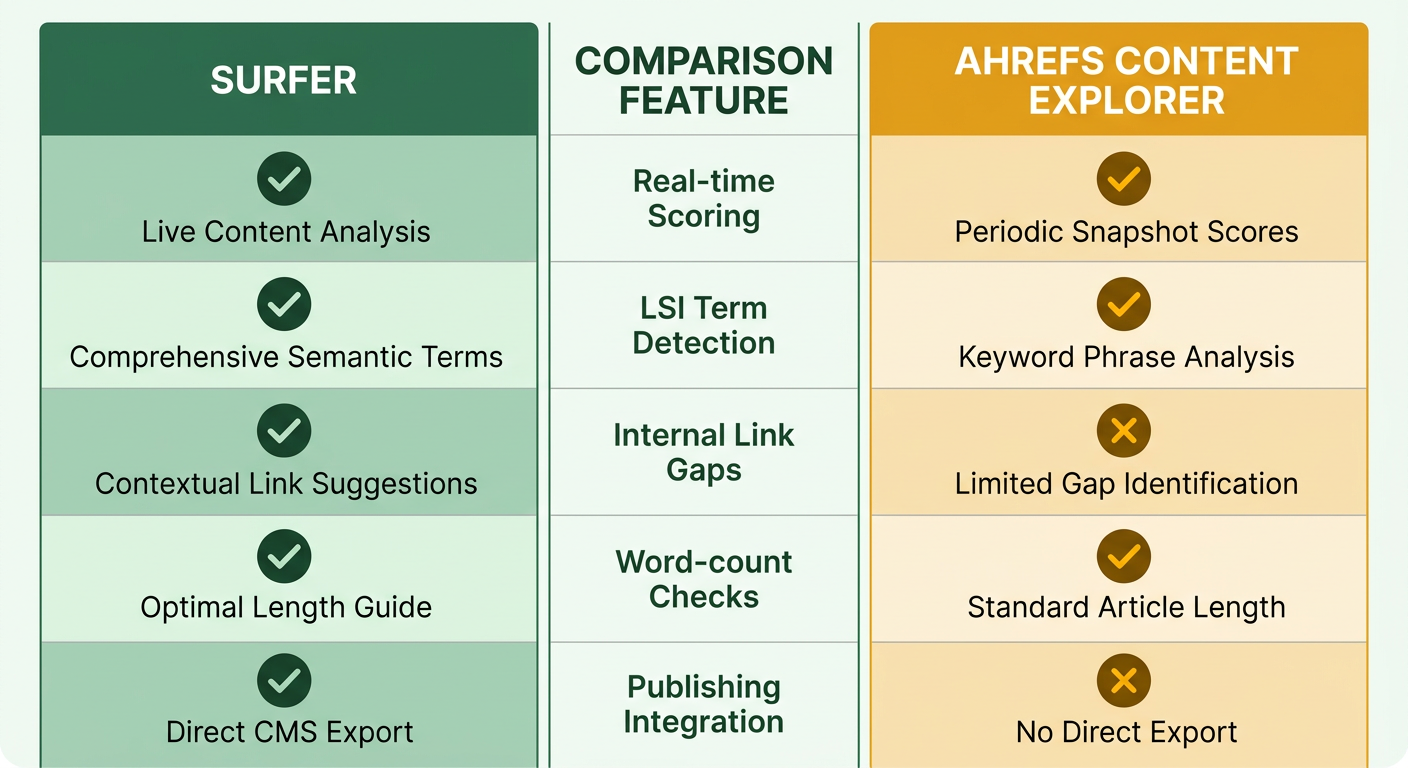
Surfer vs. Ahrefs Content Explorer
Surfer's edge is its scoring editor, which rates a page 0 to 100 and suggests concrete edits. Ahrefs Content Explorer plays a different game: it's built to find high-performing topics and backlink data, and it won't give you an in-app optimization score. In practice, you'd use Ahrefs to spot the gap, then jump into Surfer to tighten the draft. The catch: once you're done optimizing, you're manually moving that text into your CMS.
The strengths and the friction
Surfer's instant, data-backed recommendations keep writers in flow, and the visual heatmap makes over-optimized and under-optimized sections easy to spot. G2 reviewers keep calling the editor "laser-sharp" on keyword placement. The recurring complaint is the lack of native CMS integration, which leaves teams juggling two tools. If you've already got a publishing system, Surfer's narrow focus is a feature. If you don't, you'll burn time bridging the gap.
How full publishing automation compares
| Feature | Surfer | Clearscope | Semrush | AnyPost.ai |
|---|---|---|---|---|
| Automated content generation | ✖︎ | ✖︎ | ✖︎ | ✔︎ |
| SEO‑optimized publishing | ✖︎ | ✖︎ | ✖︎ | ✔︎ |
| Auto‑publish to CMS | ✖︎ | ✖︎ | ✖︎ | ✔︎ |
| Persona Engine for tone matching | ✖︎ | ✖︎ | ✖︎ | ✔︎ |
| Real‑time performance analytics | ✖︎ | ✖︎ | ✖︎ | ✔︎ |
When you're optimizing for speed from insight to live post, the automation layer separates the tools. Surfer hands you a polished draft, and you still push it downstream by hand. Teams that want one continuous pipeline tend to pair optimization with publishing in the same place.
Who Surfer fits
SEO specialists and content editors with an existing publishing stack who want granular optimization while they type. If you're a small team running research, drafting, and publishing from one dashboard, that manual export step turns into a bottleneck. Worth asking whether the time saved by automated rollout beats the convenience of Surfer's editor.
Surfer is a strong optimization engine that leaves the last step to you. AnyPost.ai folds research, drafting, and deployment into one interface.
AnyPost.ai: research, draft, and publish in one place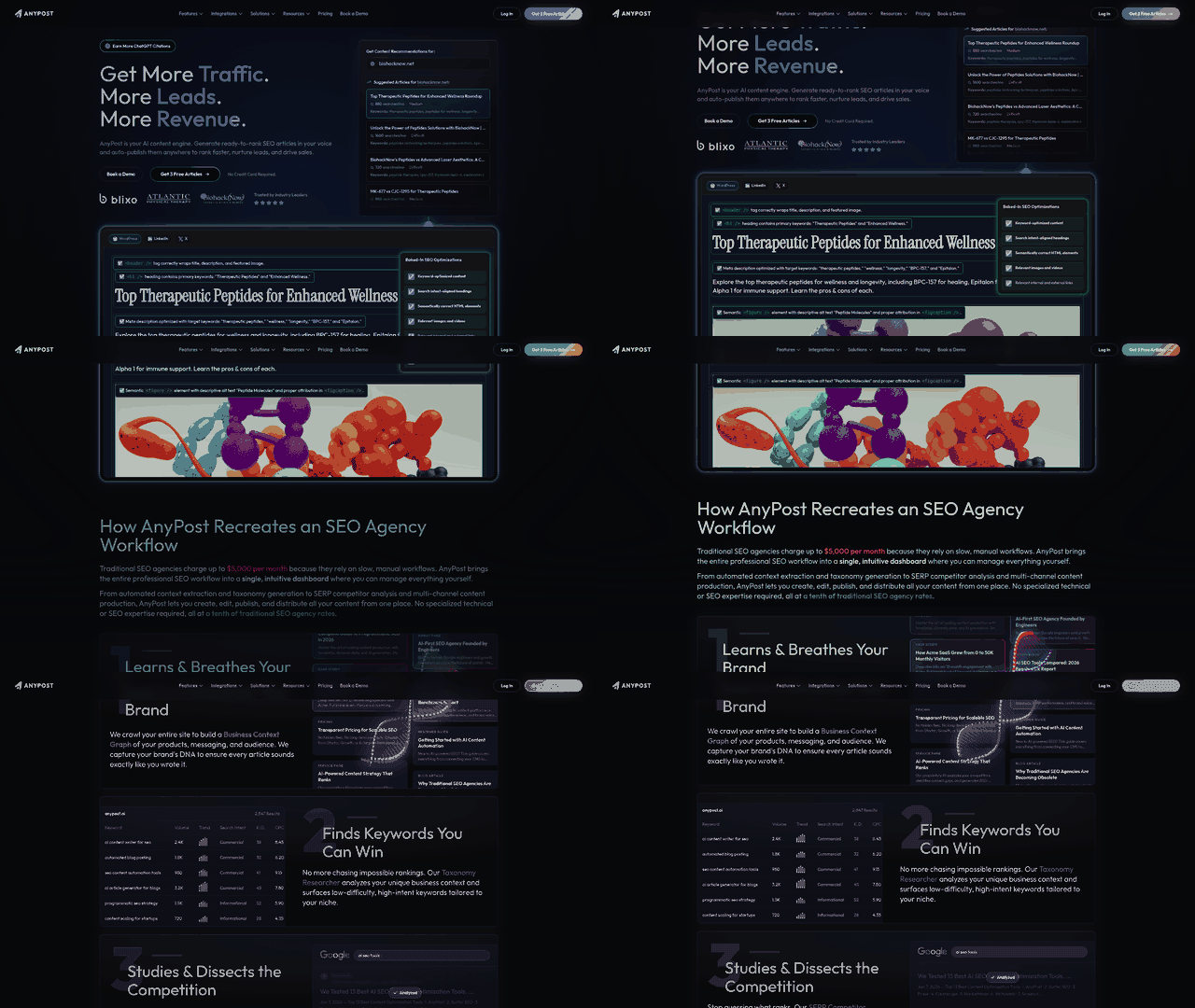
We pull SERP research, AI drafting, on-page SEO, and a single publish step into one flow. Marketers usually lose hours dragging a keyword idea toward a finished post. Our platform collapses that gap, so the content goes live as soon as the AI finishes cleaning it up.
Three stages:
- Research – The system reads SERP data to surface relevant topics and content gaps.
- Generation – A language model drafts a structured article, works in LSI terms, and writes the metadata.
- Publishing – The finished, optimized page ships to WordPress, HubSpot, or a static site generator, no manual export.
Where we differ from traditional research tools
We hand you a workflow, not a data dump. Conventional research tools are excellent at surfacing high-performing URLs and keyword difficulty, then they stop at the insight. We take that insight, write the copy, and publish it, so you never leave the dashboard to paste into a CMS.
- Research tools give you raw metrics. We turn them into AI-driven outlines.
- Most stacks need a separate editor for drafting. We produce a ready-to-publish draft in minutes.
- Publishing usually means manual steps. We trigger a one-click push to your platform.
What the end-to-end workflow looks like
It starts with a topic query. The system surfaces the relevant SERP results and flags content gaps. The AI then builds a hierarchy, writes each section, and adds internal-link suggestions from the same research data. Last, it runs an SEO audit, adjusts keyword density, and publishes straight to the connected CMS.
Step 1 – Data extraction. The system parses top-ranking SERP structures to map competitive headings and search intent. Step 2 – Contextual drafting. The engine turns those structural signals into a full draft with semantic keywords worked in. Step 3 – Automated QC. A scoring engine checks readability, keyword distribution, and image metadata, then applies corrections programmatically. Step 4 – Live deployment. The finished asset goes to your CMS, and the internal link registry updates to connect new and existing pages.
Pricing and support
Subscriptions scale with how many posts you publish a month, starting at a competitive rate that includes unlimited research queries and AI drafts. Higher tiers add team collaboration, custom branding, and API access for enterprise pipelines. A success team walks you through integration, backed by live chat and onboarding videos.
| Feature | AnyPost.ai |
|---|---|
| SERP research & content gap analysis | ✅ |
| AI‑generated draft | ✅ |
| Real‑time SEO scoring | ✅ |
| One‑click publishing | ✅ |
| Team collaboration | ✅ |
| API for automation | ✅ |
Pulling these tasks into one place frees marketing teams to work on strategy instead of babysitting five disconnected tools.
Comparative Analysis: which AI content research tool fits
Ahrefs is excellent at deep backlink and keyword analytics, and its job ends at data collection. AnyPost bridges analysis and execution by delivering the finished, optimized article straight to your CMS. Teams on that unified approach report shorter production cycles and fewer bottlenecks.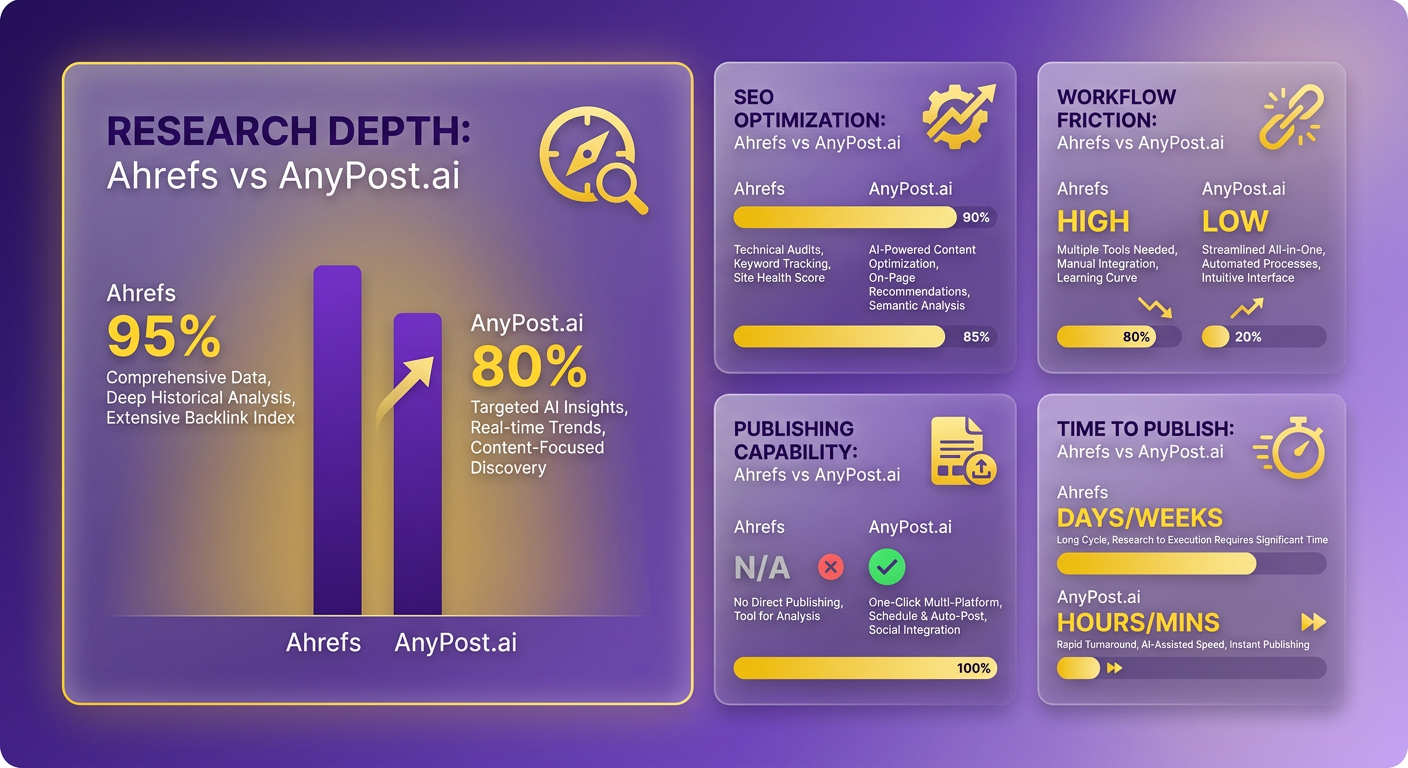
Semrush, SimilarWeb, and Clearscope bring strong data or content grading, but none of them manage the jump from research to live publication. AnyPost handles that with a single pipeline that turns research into live pages.
What sets each platform apart
| Feature | Ahrefs Content Explorer | Semrush | Clearscope | Surfer | AnyPost |
|---|---|---|---|---|---|
| Core strength | Backlink & keyword database | All‑in‑one SEO suite | Real‑time content grading & AI draft | Live SEO editor with SERP scores | Research + AI generation + SEO + one‑click publish |
| Automation | Manual export only | Manual export only | Manual export only | Manual export only | Automated publishing to WordPress, HubSpot, static sites |
| Pricing (per month) | Comparable to $100‑$130 range | $117.33 | $125 | $129 | Pricing varies by plan; contact sales for details |
| User reviews | ★★★★☆ (G2) | ★★★★☆ (G2) | ★★★★★ (G2) | ★★★★☆ (G2) | AnyPost.ai |
| Best for | Deep SERP research | Teams needing a full SEO stack | Content teams focused on grading | Editors who want live optimization scores | Marketers who want a seamless, publish‑ready pipeline |
Pricing and feature summaries are drawn from recent market analyses of Ahrefs alternatives.
How to pick the one that matches your workflow
Match the tool to the furthest point you need to reach. If you've already got a clean CMS handoff, Surfer or Clearscope may be enough. If you want to kill that handoff, AnyPost bakes publishing into the workflow.
Semrush shines for agencies that want a modular dashboard and deep competitor gap analysis, with integrations that feed data into existing reporting. One B2B SaaS firm we worked with mapped keyword opportunities across several product lines in Semrush, then exported to a custom BI layer.
Clearscope earns its keep when real-time content grading is the priority. A tech blog we partnered with leaned on its AI draft feature for outlines that scored high on relevance, and cut draft time noticeably.
Surfer fits writers who want a live editor flagging missing LSI terms as they type. The trade-off stays the same: you still plan a manual transfer to get that text live.
AnyPost removes that friction. A mid-size e-commerce brand moved off a fragmented stack, Ahrefs for research, a separate AI writer, and manual WordPress uploads, onto a single workflow. Once they consolidated, organic traffic climbed as posts shipped faster with consistent on-page signals.
When to skip a tool
Skip the extra automation if your process already publishes automatically, or if budget makes it hard to justify. A pure research tool is cheaper in those cases.
If you run a headless CMS that already pulls from a content hub over API, one-click publishing adds little, so a focused research platform like Ahrefs or Semrush covers you. Flip it around, though: for teams with no publishing pipeline, a tool that stops at draft generation becomes a bottleneck and quietly waters down the ROI of your AI research.
Implementation Tips and Best Practices for AI-Powered Content Research
Ahrefs gives you a solid base of raw SERP data. Feed those insights into AnyPost.ai's drafting engine and you move from discovery to a structured draft without a hard stop in between. Import your keyword clusters and the articles come out with SEO-friendly headings, internal-link suggestions, and brand-matched tone already in place. Deep analytics on one end, automated execution on the other.
Start by configuring the research feed so the AI knows what to target. Import your Ahrefs keyword list (CSV export) into AnyPost.ai's prompt library, then map each keyword to a brief with search intent, target word count, and brand voice. The built-in Taxonomy Researcher and SERP Competitor Analyzer enrich that brief with relevant topics and competitive signals. When the draft's ready, the platform can auto-publish to WordPress, LinkedIn, or X in one action.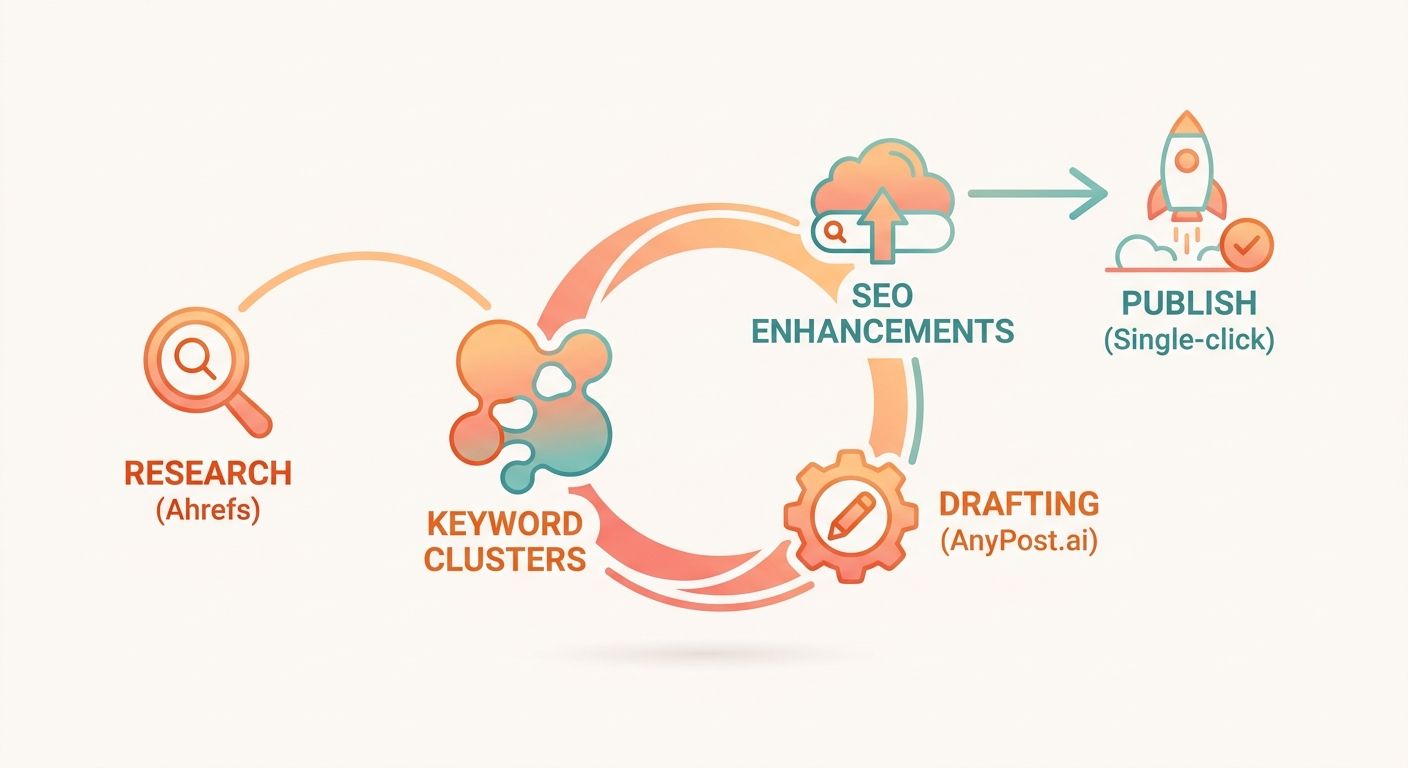
The configuration steps that matter
- Set clear content goals – decide up front whether the piece is chasing traffic, lead capture, or authority, so the AI knows how to weight keyword density and calls-to-action.
- Map keyword metadata – tag each imported term with a search-intent category and target word count, which tells the engine how to structure depth and layout.
- Turn on the publishing integration – connect your CMS or social accounts so article sections map to the right fields, with metadata, internal links, and schema added automatically.
Skip any of these and you'll leave gaps that pull you back into a manual edit cycle.
The pitfalls worth avoiding
- Skipping validation – trust but verify the first draft. Check keyword placement and hold it to your quality bar.
- Vague prompts – precise brief parameters keep the Persona Engine on your brand voice.
- No post-publish check – schedule a quick audit of rankings, click-through, and bounce after publishing so problems surface early.
End-to-end automation, tool by tool
| Tool | Research Depth | AI Drafting | On‑Page SEO | Internal‑Link Suggestions | Publishing Integration |
|---|---|---|---|---|---|
| Ahrefs Content Explorer | High (backlink & keyword data) | None | Manual | Manual | No |
| Surfer SEO | Medium (real‑time editor) | None | Strong (grade) | Suggested | No |
| AI Content Helper | Low (topic ideas) | Yes (draft) | Basic | Few suggestions | No |
| AnyPost.ai | Research via Taxonomy Researcher & SERP Analyzer | Full article generation | Semantic tags & SEO checklist | Built‑in linking suggestions | Auto‑publish to WordPress, LinkedIn, X |
The pattern in that table is the point: moving from insight to live page inside one environment cuts friction and speeds up indexing. Run research, drafting, SEO, and publishing through AnyPost.ai's workflow and you spend your time scaling results instead of stitching tools together.
Frequently Asked Questions
1. Can AnyPost.ai import existing keyword lists from Ahrefs or other SEO tools?
Yes. AnyPost.ai features a universal importer that parses standard CSV and Excel exports from major SEO platforms. Once uploaded, the system allows you to bulk-assign parameters like target audience personas and primary search intent, instantly converting raw keyword lists into structured content briefs.
2. How does Surfer handle schema markup compared to AnyPost.ai?
Surfer does not generate schema markup; it only flags missing LSI terms and on‑page factors. AnyPost.ai runs an automated schema builder that adds FAQ, article, and breadcrumb JSON‑LD based on the draft’s structure, reducing manual coding. This difference can cut post‑publish validation time by half.
3. Is it possible to use AnyPost.ai’s publishing feature with a headless CMS like Contentful?
AnyPost.ai connects to headless systems through its REST API and webhook endpoints, allowing you to push the fully optimized HTML, meta tags, and JSON‑LD directly into Contentful entries. You configure the target content model once, then each generated article is published automatically without intermediate copy‑paste steps.
4. What security considerations apply when using AI Content Helper for confidential brand information?
AI Content Helper processes input on external servers and retains snippets for model improvement, so confidential brand guidelines should be stripped before upload. Use anonymized placeholders for proprietary data, and verify the provider’s data‑retention policy; otherwise, sensitive information could be exposed in future model outputs.
5. How can a small team measure ROI after switching from Ahrefs + manual workflow to AnyPost.ai?
Track the time saved per article, the number of posts published per month, and organic traffic lift after deployment. Small teams often see a 30‑40 % reduction in production hours and a 10‑15 % increase in click‑through rates within three months, directly boosting ROI.
6. Does Surfer offer any integration for automated publishing, and if not, what workaround exists?
Surfer lacks native publishing, but you can export the optimized draft as HTML and trigger a Zapier or Integromat workflow that posts to WordPress or HubSpot. This adds a manual step, yet many teams automate it with a single webhook, achieving near‑real‑time publishing without switching platforms.
