Ahrefs Content Explorer Explained: Find Traffic, Backlinks, and Content Gaps

Key Takeaways
- Content Explorer indexes 21.5 billion pages, so you can see which content earns traffic and links in your niche before you write a word.
- The index refreshes 300 million pages a day. That surfaces what ranks now and what competitors abandoned years ago.
- Pair a high-traffic filter with a low referring-domains cap, and you find topics that rank without heavy backlink support.
- A single referring-domains search usually turns up 5 to 12 new linking domains worth chasing for outreach or PR.
- The publication-date filter exposes stale competitor pages. Those are often the easiest to beat with fresher, deeper content.
- A first session gets you a usable 20-topic list in about 15 to 20 minutes, plus your first backlink prospects.
- Word count and author filters tighten your link-prospect list for targeted outreach.
Quick Summary
Ahrefs Content Explorer is a searchable index of 21.5 billion pages. It shows which content earns traffic and links in any niche. Treat it as a research layer that surfaces proven winners and stale gaps before you write anything. The table below is our quick read on what the tool does and where it fits into an automated content workflow.
The basic loop is simple: run a topic search, filter by traffic and backlinks, then pull a list of opportunities. Because the index refreshes 300 million pages daily, it flags both what's ranking and what competitors have walked away from. That gives you two kinds of opportunity from one query: immediate wins and longer plays.
| Feature | What it does | Typical use-case | Time to master | Difficulty | KPI impact |
|---|---|---|---|---|---|
| Topic search | Surfaces pages ranking for a keyword | Build a 20-topic list (~15-20 min) | 30 min | Easy | Traffic pipeline |
| Traffic filter | Isolates high-traffic pages | Find proven demand | 20 min | Easy | Organic traffic |
| Referring domains filter | Shows backlink volume per page | Find 5-12 new linking domains/search | 45 min | Medium | Domain Rating |
| Low-backlink + high-traffic combo | Flags winnable topics | Content-gap scoring | 1 hr | Medium | Ranking speed |
| Publication date filter | Exposes outdated content | Refresh abandoned pages | 20 min | Easy | Gap capture |
| Word count / author filters | Narrows link prospects | PR and outreach | 30 min | Medium | Backlinks |
What can you get done on day one?
You can get a usable topic list and your first backlink prospects in one session. Start with a broad seed keyword, apply the traffic filter, then add a referring-domains cap to find pages that rank without heavy link support. That combination is where the quick wins hide.
Our first-day checklist:
- Run three seed searches in your core niche.
- Set a traffic floor (say, 500+ monthly visits) to cut the noise.
- Cap referring domains low to expose the winnable topics.
- Sort by publication date to find stale pages worth beating.
- Export the top 20 into your content queue.
How does this feed an automated content engine?
The metrics that make Content Explorer good for research are the same signals an automated system needs to decide what to write. High-traffic plus low-backlink queries aren't a browsing habit; they're a repeatable scoring rule. And a scoring rule is what turns a topic list into a publishing pipeline.
In practice, the topic feed becomes the input, an AI drafting layer writes each article in your brand voice, and publishing happens without manual queuing. Because the index catches pages that haven't been updated in years, the same data that finds proven winners also hands you a refresh backlog your competitors abandoned. This is the workflow AnyPost automates end to end — generating SEO-ready articles in your voice and auto-publishing them to WordPress, LinkedIn, and X without manual queuing.
One honest carve-out: skip the heavy backlink-prospecting filters if you're starting a blog with no domain authority yet. Chasing link data before you have publishable content is backwards. Nail your topic list first, then layer in outreach once you have pages worth linking to.
Why this beats brainstorming topics
Content research is the biggest bottleneck in most content workflows, and a dedicated research tool clears it. The idea is proof-first: instead of guessing which topics might work, you start from pages that have already earned real traffic and links. That's why it beats a whiteboard session or a gut feeling.
Most wasted content spend goes toward topics nobody searches for. Start from a database of pages with known performance, and you stop betting on instinct. You work from evidence instead. That's where teams get their wasted hours back.
Why data-driven research beats guesswork
It filters out low-search-volume topics before you commit any writing effort. You can sort by website traffic, domain rating, referring domains, and publication date, so every idea you pursue has a measurable reason to exist.
Two filters do most of the work. Look for pages that perform well despite minimal external links, and low-competition opportunities fall right out. One pattern replaces hours of manual browsing with a scored shortlist.
The alternative is expensive. Ignore the data, and you spend real budget ranking for terms with no audience. That's the quiet failure mode most teams never even measure.
How refresh frequency exposes content gaps
Because the database updates hundreds of millions of pages a day, it reliably flags content nobody has touched in years. The same index that surfaces proven winners also exposes stale, abandoned pages your competitors have stopped maintaining.
Two queries, two kinds of gap. One returns what ranks today. A publication-date filter returns what used to rank and now sits neglected. Both are yours to fill.
With 10 million new pages discovered daily, the index also catches emerging topics early. You see momentum before it's obvious, which is exactly when a well-timed article earns the most.
Who actually needs this?
SMBs, SaaS firms, agencies, and e-commerce brands that need to scale output get the most from it. If you publish a handful of posts a year, the tooling overhead is hard to justify. Skip it until volume is your real constraint.
For everyone else, the value is throughput. The tool finds the high-traffic idea. The next step is turning that idea into a finished, SEO-optimized article without drafting it by hand.
That's where AnyPost closes the loop. Once you've validated a topic, AnyPost generates ready-to-rank articles in your brand voice and auto-publishes them to your existing site and channels. A validated idea becomes published content without manual drafting. The return per article goes up, because every piece starts from a topic the data already vouched for.
AnyPost builds a Business Context Graph by crawling your whole site, so every draft sounds like you wrote it. Research finds the opening. Automation fills it.
Getting started: an interface walkthrough
Getting into Content Explorer takes two clicks. Log into your Ahrefs dashboard, then pick Content Explorer from the top nav. You land on a single search field that queries billions of documents, drawing on a database that grows by millions of fresh entries a day.
Four panels drive the workflow. The search bar runs your topic query. The filters sidebar narrows results by metric. The results table lists matching pages. The preview pane shows traffic and backlink trends for any page you click.
What each panel actually does
Each panel answers a different question, and you use them in sequence. The search bar defines your topic. The filters sidebar defines your quality bar. The results table ranks what survives both. The preview pane confirms a single page is worth the effort before you act on it.
Start broad, then tighten. Search a topic, scan the results table, and open the preview pane on the top few pages. That tells you whether the traffic is real and whether backlinks are the reason a page ranks at all.
Customizable columns: the columns you add to the results table decide what you can sort on. We switch on Traffic, Referring domains, and Social shares first, every time. Traffic shows demand. Referring domains show how hard a page is to beat. Social shares show which angles spread.
How to build a low-competition filter
To find accessible opportunities, aim your parameters at pages that pull organic visits without a huge backlink profile. Set Traffic > 2K, DR > 40, Language = English, and Published in the last 30 days. It's a shortcut most tutorials skip right past.
High traffic plus few referring domains means the topic works, but nobody strong has claimed it. Sort by traffic to see the biggest prizes. Sort by referring domains, ascending, to find the easiest wins.
Because the index updates constantly, you can isolate assets nobody has touched in years. Those abandoned pages are gaps your competitors ranked for and then walked away from.
How to save research for recurring cycles
Save any filter combination as a preset, then reuse it on a schedule. Once your "high traffic, low DR" filter works, save it and rerun it weekly or monthly. Group related searches into a Project so a client or campaign keeps its own research history in one place.
Quick-filter presets like High traffic, Newly published, and English are shortcuts for the same rules. Use Newly published to catch trending topics early. Use High traffic for evergreen demand.
Once the opportunities are identified, the next step is execution. Instead of drafting each piece by hand, feed the validated topics straight into an automated publishing pipeline to hold a steady cadence. That keeps your site capturing search visibility without turning production into a bottleneck.
A practical loop for turning research into content:
- Confirm which saved Content Explorer filters surface the strongest opportunities.
- Prioritize the topics with real demand and beatable competition.
- Bring those topics into AnyPost.ai to generate articles.
- Publish on a cadence that matches your research cycle, weekly or monthly.
Mining high‑traffic content ideas
High-traffic ideas come from stacking two filters: organic traffic and referring domains. Set the traffic threshold high, set the backlink count low, and Content Explorer hands you topics that pull clicks without demanding a big link-building budget. That single query pattern is the fastest way we know to build a shortlist worth writing about.
Treat the tool as a scoring engine, not a search directory. Instead of scrolling results by hand, you set repeatable rules and let the database do the lifting. Manual browsing is where a lot of teams quietly lose their hours.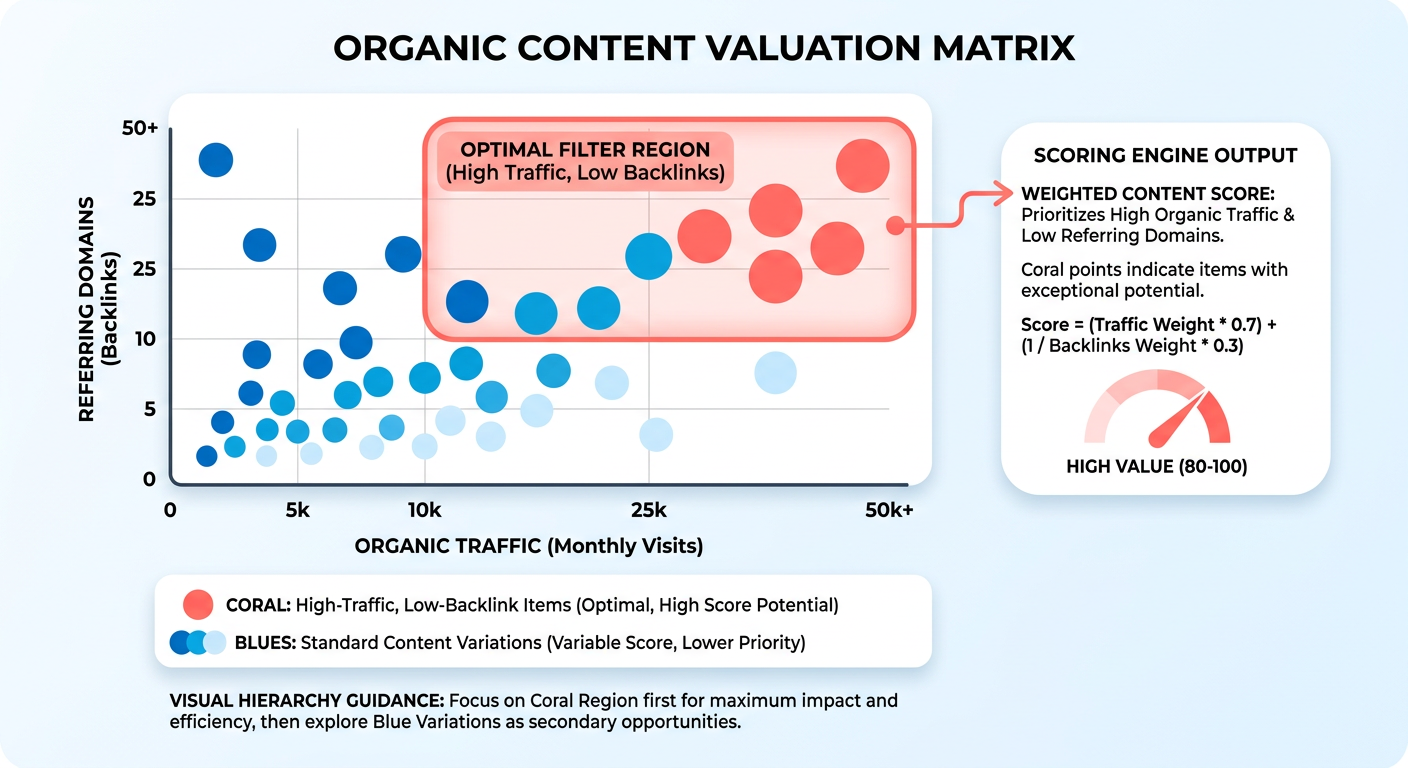
Setting the filters for high-impact ideas
Start with a topic query, then push the Organic traffic filter above 5,000 visits per month. That floor cuts the long tail and leaves pages already proven to earn steady clicks. Pair it with a low referring-domains cap to expose the low-competition, high-reward pockets.
The Top-10 domains filter shows who already ranks for your topic. Click through, and you see their referring-domain profiles side by side. If the top ten are all high-authority giants, skip that keyword. If a few thin pages sneak into the top results, that's your opening.
Traffic value: the estimated ad spend a page's traffic would cost to buy through paid search. We read it as a monetization proxy. A topic with modest traffic but high traffic value often converts better than a high-volume page worth pennies a click.
Which topics deserve a spot in the queue
Run a simple three-axis check: traffic potential, competition level, brand relevance. A page can score huge traffic and still be wrong if it doesn't fit your audience. We rate each candidate on all three before anything reaches the queue.
Cross-check the shortlist against seasonality before you commit. A topic that spikes once a year needs different timing than an evergreen one. This step catches the false winners that look strong in a static snapshot but go dark for ten months.
Layer in the publish date filter to sharpen the queue further. Restrict results to pages older than three years, and you surface topics where the ranking articles are dated, thin, or factually stale. Those aging leaders are the easiest to outrank, because a fresh, well-researched piece beats a neglected one on relevance and depth both.
From shortlist to published article on autopilot
Once you have a list of high-potential topics, you scale production by automating the drafting. Align the output with your brand guidelines, and you can generate drafts that match your site's tone, then publish them across your channels without bottlenecking your editorial team. That's the bridge between raw data and live, traffic-driving pages.
Export your top-20 list to CSV and import it straight into the content queue. This is the handoff that closes the gap between research and published article. You stop copying titles by hand and start filling proven gaps on autopilot. For a deeper walkthrough of wiring this into an automated workflow, see our guide on Ahrefs Content Explorer for SEO automation.
Uncovering backlink opportunities & link‑building
Backlink prospecting starts with one filter: set Referring domains > 10 and watch the results table collapse to pages that already earn links. Those are your outreach targets. The point is to work only with assets that have already proven they attract links. A page with dozens of referring domains has shown people link to it. Replicate the format, pitch the same linkers, and you inherit part of that proven demand instead of guessing what might earn a link.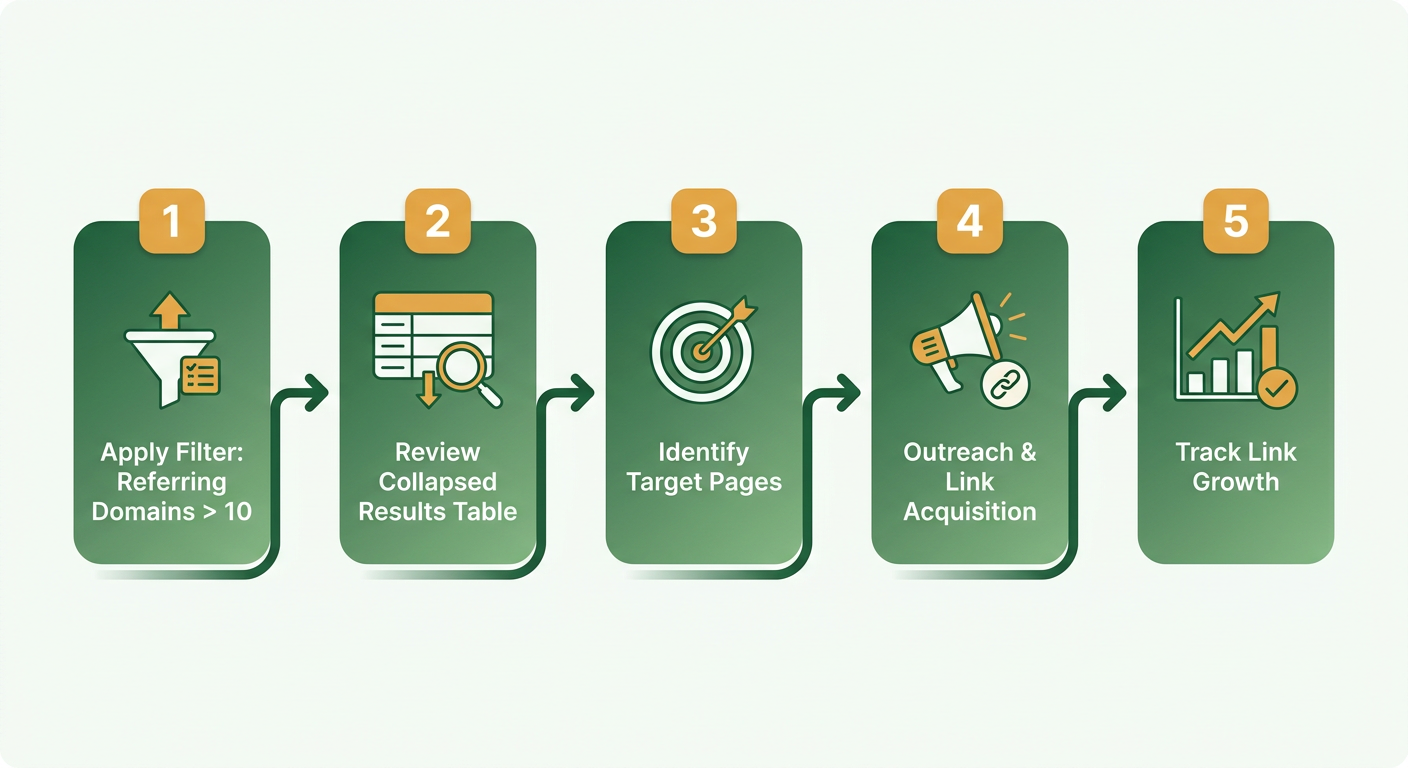
Reading the Backlinks tab for outreach angles
The Backlinks tab shows two things that shape every pitch: anchor-text distribution and link-type breakdown. Anchor text tells you the exact phrases sites use when they reference a topic. Link type tells you whether links come from editorial mentions, resource lists, or broken references you can reclaim.
Read the anchor cloud first. If a cluster of sites link with the same descriptive phrase, that phrase is your content's angle. Match it and you speak the language linkers already use.
Then scan for broken-link opportunities. Content Explorer surfaces dead pages that still hold referring domains. Recreate that content, then tell every linking site their link now points nowhere. That's the cleanest outreach angle we know, because you're fixing a problem, not begging for a favor.
What makes content actually link-worthy
Link-worthy content tends to fall into three formats that consistently pull referring domains: how-to guides, case studies, and data-driven posts. They earn links because other writers cite them as evidence. A stat, a documented process, or a real result gives someone a reason to reference you.
Filter for pages older than a couple of years with high referring-domain counts. Sort by first-published date to surface content that's held its links for years without an update. An outdated stats post still holding high-quality links is an ideal target for a refresh. Publish a fresher version and the outreach writes itself.
How the backlinking workflow runs
The workflow turns a filtered list into ready-to-publish content in four steps. Here's the sequence we run:
- Export the list. Pull every page above your referring-domain threshold into a spreadsheet with anchor text and DR attached.
- Generate the replacement content. Draft an updated, more thorough version of the target page so you have a superior asset to pitch.
- Build the anchor context. Use the anchor-text data from your export to shape how your new piece frames the core ideas.
- Run the outreach. Launch your campaigns to secure placements as the fresh content goes live.
Track two metrics only: new referring domains per month and the DR of each acquired link. Rising referring domains means the format works. Rising average DR means you're winning better sites. For a deeper build, see our guide on Ahrefs Content Explorer for SEO automation.
One caveat: filter hard against low-quality domains. A high referring-domain count means nothing if those links come from spammy directories. Set a DR floor, drop anything below it, and skip the whole tactic for pages whose links are clearly link-farm noise. Volume isn't the goal. Authority is.
Spotting content gaps for a competitive edge
Content gaps are the topics your competitors rank for and you don't. The fastest way to find them is a Domain vs. Domain comparison in Content Explorer: feed it a competitor's domain and your own, then let the index surface every query where they pull traffic and your site scores zero.
It works as a straight comparative read. Instead of guessing where your coverage falls short, you get a prioritized list of established search demand — traffic your competitors currently enjoy unchallenged.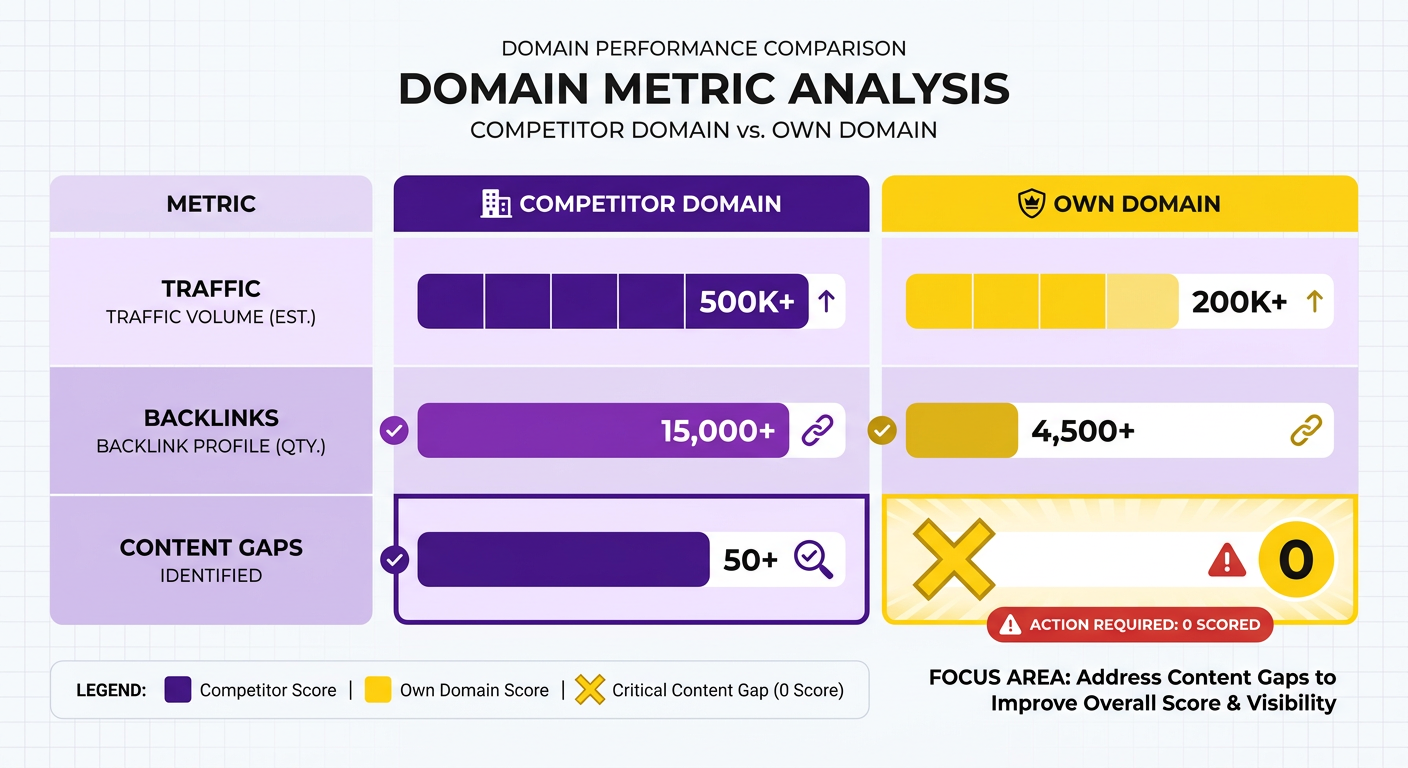
Running a Domain vs. Domain gap analysis
Start with a comparison query, then filter for the gaps that matter. Set the competitor's page traffic above 10,000 and your own site's hits to zero. What's left is a clean list of pages earning real traffic where you have no presence at all.
From there, quantify the prize. Ahrefs attaches a traffic estimate to every page, so you can add up the monthly visits sitting in that gap. That number is your uplift ceiling if you filled every missing topic. We treat it as a rough scoreboard, not a promise, since ranking speed varies with domain strength.
The constant index updates keep you looking at active, relevant competitor pages. If a competitor ranks with an article nobody's updated in years, that's a gap you can win faster than a fresh, well-linked one.
Which gaps to fill first
Prioritize by search intent, not raw traffic. A commercial query near a purchase decision converts harder than an informational one, even at lower volume. Sort your gap list into three buckets: informational, commercial, transactional. Then hit the commercial and transactional gaps first.
A B2B software platform, for example, might find competitors ranking for specific integration guides. Spot those precise technical queries and the team can produce targeted documentation to capture that high-intent traffic fast. The lesson: a small, intent-sorted gap list beats a giant undifferentiated one.
Automation helps you work through these systematically. Turn the identified keywords into structured drafts that line up with your product, and you expand topical authority without burying your writers.
Your content gap sprint checklist
Run every gap through the same loop:
- Research: Pull the Domain vs. Domain list, filter competitor traffic above 10,000 and your hits at zero.
- AI-write: Generate a draft for each gap, sorted by intent.
- SEO-optimize: Match the search intent, structure, and internal links to the query.
- Publish: Ship in batches so you can track cohorts, not one-offs.
- Measure: Watch ranking speed, traffic capture, and conversion lift per article.
Measurement closes the loop. Track how fast each new page ranks and which intent buckets convert best. That feedback tells you where to point the next sprint, so the engine sharpens with every batch instead of guessing again.
Turning insights into action: integration & best practices
The value of all this research lies in execution. Too often it stays trapped in spreadsheets. Build a direct bridge between data collection and content production, and the high-potential opportunities actually get acted on.
Structured workflows pay off most when you're scaling. If your publishing volume is low, manual execution may be fine. As output demands grow, automation is what keeps production from becoming a bottleneck.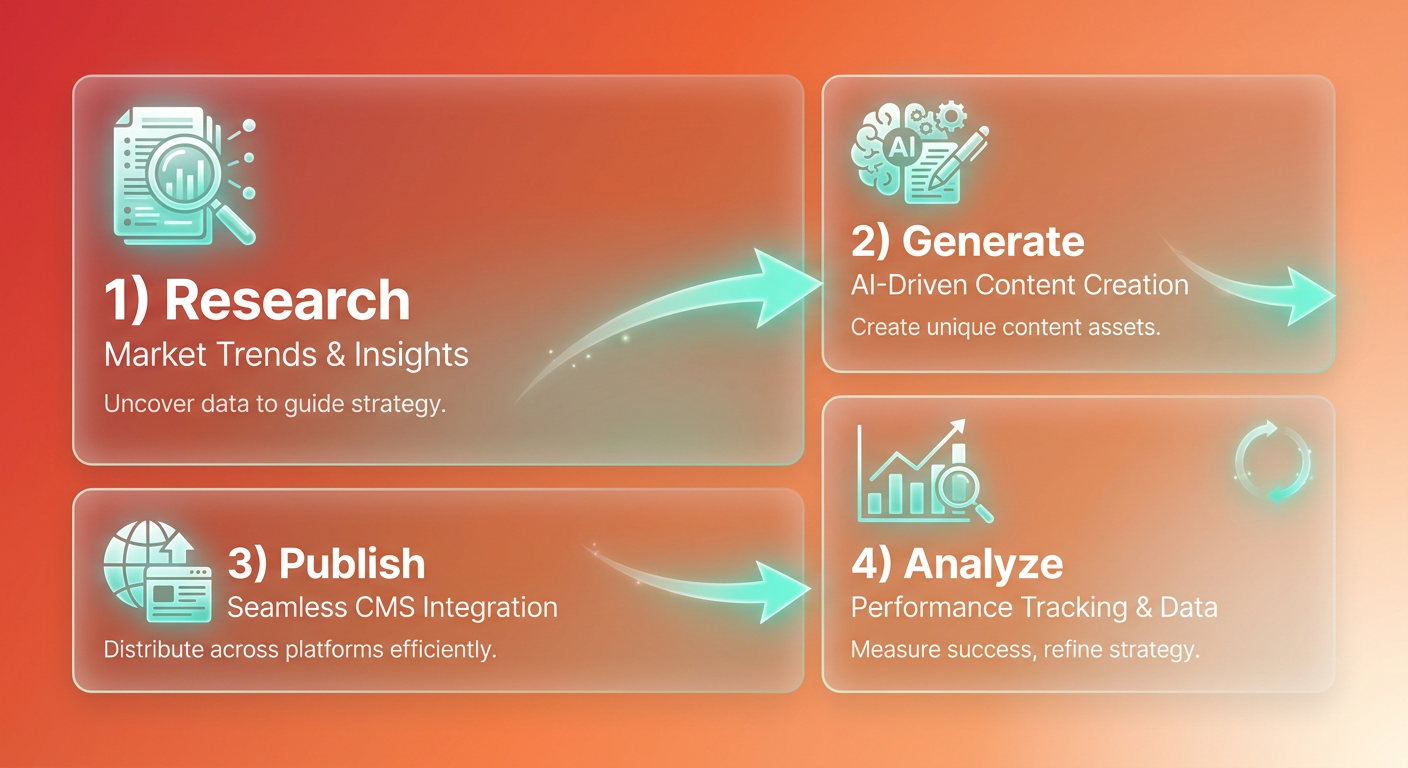
How to turn research into published content
The workflow runs in six stages: research → export → AI-write → SEO-optimize → schedule → publish. You define the query pattern once, then AnyPost handles the repetitive middle.
Start by exporting your filtered lists of low-competition, high-traffic topics. Those exports feed straight into your content generation, so new drafts are built around the exact search intent you found during research.
The same parameters that reveal new topics will also flag older, underperforming pages on your own site. That lets you run a dual track: publish fresh content while systematically updating legacy pages to hold their search visibility. One query powers both.
Link prospects follow a parallel track. The referring-domain data you mined for outreach pairs with AnyPost's automated backlinking, so pitches rotate on a cadence instead of dying in a to-do list.
Which KPIs prove the workflow is working
Track four numbers, in this order: organic traffic, SERP position, backlink growth, and lead conversion. Traffic tells you the topic landed. Position tells you the optimization worked. Backlink growth confirms the content earned links. Conversion tells you it drove revenue.
Watch the trap here. Chasing traffic alone produces pages that rank and convert nobody. A topic with 8,000 monthly visits but zero buyer intent is worse than a 400-visit page that closes deals. Weight your dashboard toward conversion, not raw sessions.
The best-practice cadence
Run research weekly, audit content gaps monthly, and rotate backlink outreach in batches so no prospect list goes cold. That rhythm keeps the pipeline fed without overwhelming it.
Weekly research: Pull fresh high-traffic, low-backlink topics. With millions of new pages indexed daily, search landscapes shift fast, and older gap analyses go stale.
Monthly gap audit: Re-run your competitor comparison. Topics competitors abandon become your refresh queue.
Rotating outreach: Split link prospects into weekly batches. Consistent small pushes beat one giant blast.
Two pitfalls sink most teams: ignoring search intent and letting evergreen content rot. A page that matches the query but not the searcher's goal ranks and bounces. A top-ranking article left untouched slowly slides down the SERP. Fold a regular update schedule into your standard operations, and you head off that decay.
Wire these numbers into a Search Console integration, and you get clear visibility into which optimizations are actually driving business growth.
Frequently Asked Questions
1. Does Ahrefs Content Explorer replace keyword research tools like Ahrefs Keywords Explorer?
Content Explorer complements keyword tools rather than replaces them. It surfaces published pages proven to earn traffic and backlinks, while keyword tools focus on raw search volume. Use Content Explorer to find winning content formats and stale gaps, then validate specific keyword targets separately for a complete research picture.
2. What DR floor should I set to filter out spammy backlink prospects?
A common practice is to set a minimum Domain Rating (DR) of 30 or 40. This filters out low-quality directories and spam networks, ensuring your outreach efforts are focused on websites that possess genuine editorial authority.
3. Should a brand-new blog with no domain authority use the backlink-prospecting filters?
For newer sites, it is generally more effective to focus on finding low-competition topics first. Building a solid foundation of helpful, search-optimized content should precede active link-building campaigns, as other webmasters need a compelling reason to link to your pages.
4. How do I decide which content gaps to fill first after a Domain vs. Domain analysis?
Focus on queries that indicate strong user intent to buy or compare solutions. While informational topics often boast higher search volumes, pages targeting commercial or transactional intent typically yield much higher conversion rates and business value.
5. What's the difference between traffic and traffic value when evaluating a topic?
Estimated traffic represents the volume of monthly visitors a page receives. Traffic value, on the other hand, calculates what that organic traffic would cost if acquired through paid search ads. A high traffic value indicates that the ranking keywords are highly competitive and commercially lucrative.
6. How does AnyPost use Content Explorer research to produce published articles?
AnyPost integrates with your research by importing your target topic lists and automatically generating drafts tailored to your brand's specific messaging and audience profile. By handling the initial drafting and formatting, it allows your team to focus on final editorial reviews before publishing.
7. When is this automated content workflow overkill for a team?
If your content strategy involves publishing only one or two highly specialized pieces per month, manual production is perfectly adequate. Automation becomes highly valuable when you need to scale output across multiple categories or maintain a high-frequency publishing schedule.
