
Ahrefs Content Explorer vs Site Explorer for Topic Research and Link Prospects

Key Takeaways
- Content Explorer indexes 1.1 billion web pages by backlinks, traffic, and social shares.
- Site Explorer analyzes 21.4 billion pages and 35 trillion live backlinks.
- Content Explorer asks, "What should I write, and who might link to it?"
- Site Explorer asks, "Who's winning this topic, and why?"
- Content Explorer requires the Standard plan at $249 per month.
- Site Explorer is available on the Lite plan at $139 per month.
- Content Explorer's broken-page filter supports link building and topic discovery.
- Site Explorer excels at keyword gap analysis, traffic sources, and domain health.
- Both tools serve different stages of the content workflow.
Quick Comparison Summary
When deciding between Ahrefs Content Explorer and Site Explorer, you're choosing between two research modes. Content Explorer focuses on individual pages across the web. It sorts results by engagement and authority metrics. Site Explorer takes a top-down view. It analyzes entire domains, including top pages, keyword rankings, and backlink profiles.
Content Explorer answers, "What should I write, and who might link to it?" Site Explorer answers, "Who's already winning this topic, and how?" You'll likely use both, but at different points in your workflow.
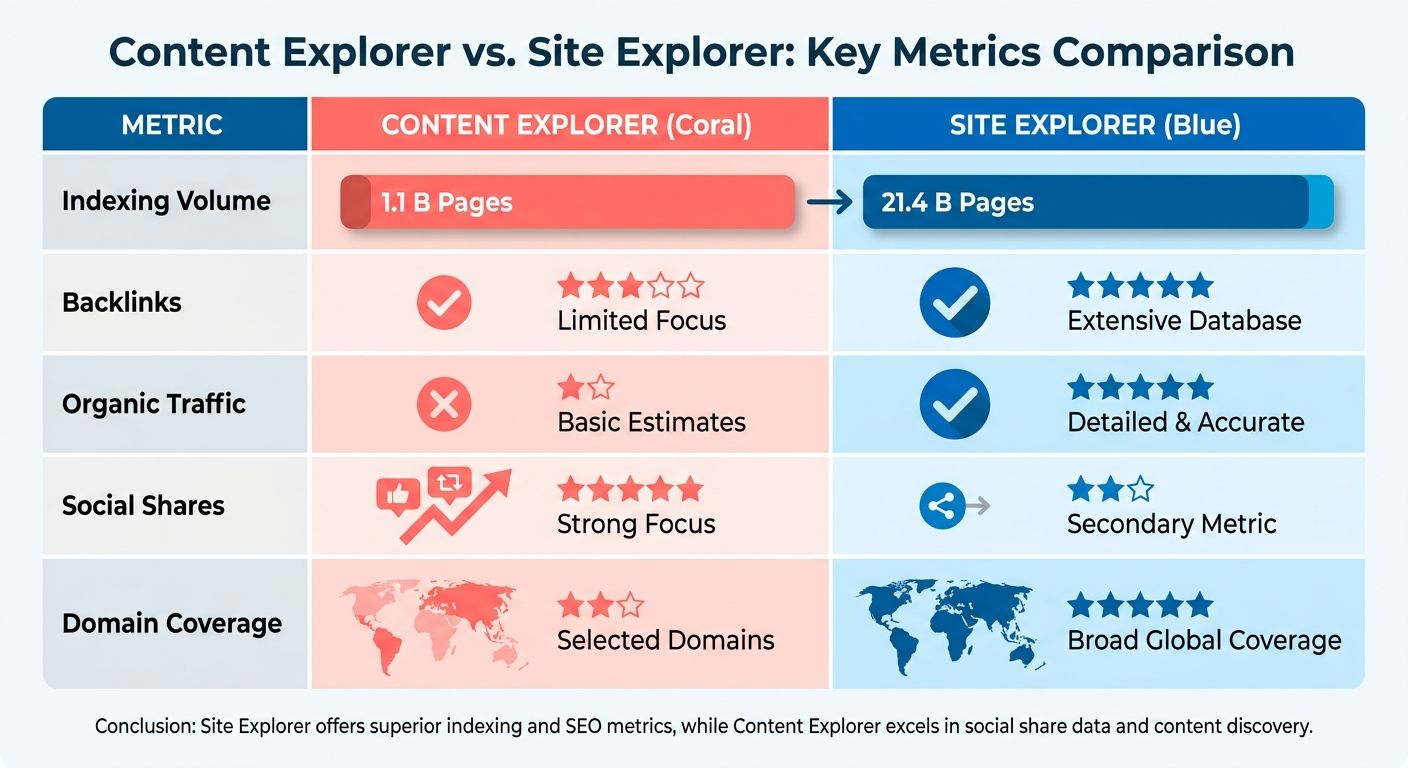
Content Explorer vs Site Explorer: Core Differences
| Feature | Content Explorer | Site Explorer |
|---|---|---|
| Primary Use | Find link prospects and trending content ideas | Analyze competitor domains and backlink profiles |
| Database Size | 1.1 billion web pages | 21.4 billion pages, 35 trillion backlinks |
| Best For | Broken link building, guest post targets, viral topic discovery | Keyword gap analysis, competitor traffic sources, domain health |
| Filtering | Sort by DR, traffic, shares, published date, broken pages | Filter by organic keywords, paid keywords, backlink velocity |
| Output | List of articles and their metrics | Domain overview with traffic trends and top pages |
| Minimum Plan | Standard ($249/month) | Lite ($139/month) |
Content Explorer's broken-page filter is where it differs most from Site Explorer. The index includes dead pages that still hold backlinks. That creates a steady pool of link-building opportunities. A cooking site can surface broken recipe pages with high-quality backlinks. Fitness blogs can do the same for outdated workout guides.
Site Explorer can't do that. It tracks live competitor performance over time, with over 10 years of historical data. Use it to identify which competitors dominate your target keywords. Then use Content Explorer to find link prospects in that same niche.
When to Use Content Explorer
Content Explorer validates topics through actual published performance. Search a keyword or topic, filter by Domain Rating above 50, and sort by organic traffic. The results show what's already ranking, how many backlinks it earned, and whether similar content is worth creating.
We use it most for link prospecting and content trend analysis. The inline charts show whether a topic is growing or declining over the past year. Skip topics with falling interest unless you have a contrarian angle. The published and republished date filters help you target outdated content that needs updating. Fitness marketers often use that approach to request link swaps after creating fresher versions.
When to Use Site Explorer
Site Explorer shows who to outrank before content creation begins. Enter a competitor's domain, check their top pages by traffic, and reverse-engineer their keyword strategy. The organic keywords report shows which terms drive their traffic. The backlink spike tracker alerts you when they land a major link.
Together, both tools create a fuller workflow. One identifies content gaps. The other maps the competitive landscape. But turning that raw data into a draft is still manual. Teams have to export lists, cross-reference metrics, and build briefs from scratch unless they add an automation layer.
Site Explorer also tracks paid traffic strategies and ad spend over time. Content Explorer does not. If competitors are running ads on the same keywords you're targeting organically, you'll only see that in Site Explorer.
Why Consider These Options
Both tools solve real problems, but different ones. Your choice depends on your content stage and how much manual research your team can handle.
We hear one question often: should you invest in Content Explorer with Ahrefs for topic and link discovery, or lean on Site Explorer for competitive teardowns? For most content teams, the answer is both. What changes is how you move that data into production.
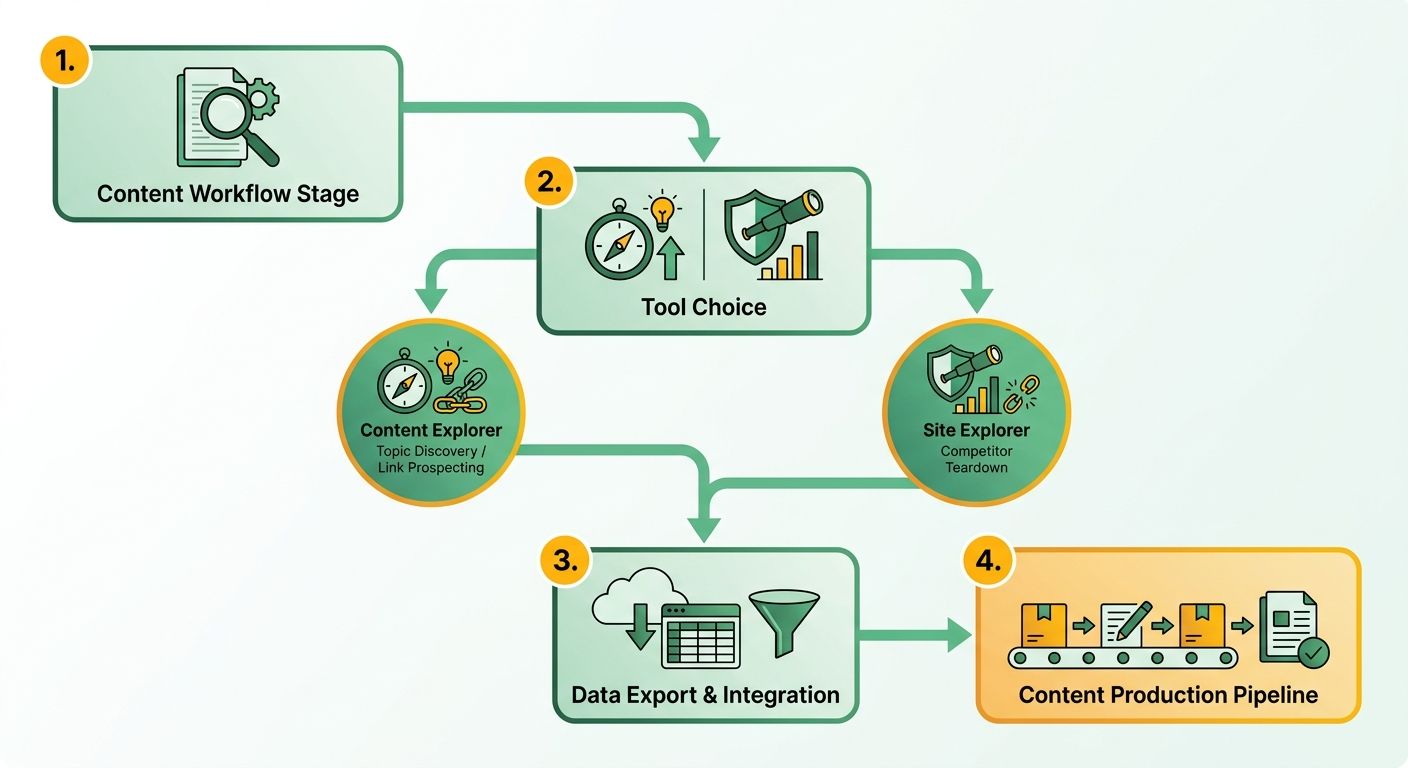
When Does Content Explorer Earn Its Keep?
Content Explorer is the right choice when your bottleneck is finding proven topics and link prospects at scale. It works like a search engine for marketers. You can filter the web's content by performance metrics. That makes it useful for content strategists, link builders, and digital PR teams that need to validate demand before writing.
The tool shines when you're building campaigns that need many topic ideas each month. Teams running editorial calendars at that pace report major research savings compared with manual Google searches and spreadsheet tracking. If you publish around five articles per quarter, the manual approach may be enough.
What Does Site Explorer Do Better?
Site Explorer is better when you need to reverse-engineer a competitor. It pulls top pages, ranking keywords, and the full backlink profile from Ahrefs' broader index. Use it to dissect a rival's organic footprint and understand the backlink profile behind their top-ranking assets.
The Fortune 500 signal matters here. Marketers at 44% of the Fortune 500 use Ahrefs. That shows the tool's ROI at scale. The case for it is strongest when research demands exceed manual capacity. Below that threshold, you may be paying for more than you need.
Where Does AnyPost.ai Fit?
The gap both Ahrefs tools leave open is the move from research to published content. You still have to write, publish, and optimize by hand. That's the bottleneck we built AnyPost.ai to remove.
Our platform automates the production workflow after research. The Taxonomy Researcher surfaces low-difficulty, high-intent keywords for your niche. The SERP Competitor Analyzer studies top-ranking articles and builds a winning structure. The Multi-Hop Research Engine pulls insights from blog articles, Reddit, X, YouTube, and research papers. Then the Humanizer Module writes in clear, natural prose that matches your brand voice. The platform auto-publishes it across your channels.
| Need | Content Explorer | Site Explorer | AnyPost.ai |
|---|---|---|---|
| Topic idea discovery | Excellent | Limited | Excellent (automated) |
| Link prospecting | Excellent | Good | Not included |
| Competitor backlink analysis | Limited | Excellent | SERP analysis only |
| Auto-generate content | No | No | Yes |
| Auto-publish & optimize | No | No | Yes |
The choice is simple. If you only need raw research data, Ahrefs delivers it. If your pain is the manual handoff from research to writing, automation earns its place there.
Feature Comparison
Content Explorer and Site Explorer split the work across three areas: what they index, what they measure, and where they fit in production. Content Explorer with Ahrefs sorts published pages by real performance. Site Explorer reverse-engineers whole domains. The table below shows where each tool fits, and where automated content platforms like ours take over after research.
| Feature | Content Explorer | Site Explorer | AnyPost.ai |
|---|---|---|---|
| Primary job | Find proven topics + link prospects | Analyze competitor domains | Generate and publish SEO-optimized content |
| Index size | 1.1B+ pages (2.0 rebuild) | 21.4B pages, 35T live backlinks | N/A (content generation platform) |
| Core metrics | Organic traffic, referring domains, social shares | Traffic, keywords, backlink profile, 10+ growth trends | SERP competitor analysis, keyword research, content performance tracking |
| Historical depth | Published + republished dates | 10+ years of trend data | N/A |
| Standout feature | Broken-page search for link building | Real-time backlink spike tracking | Auto-generate, auto-publish, auto-optimize content |
| Manual effort | High (research only) | High (analysis only) | Low (automated content creation and publishing) |
What Does Content Explorer Do That Site Explorer Can't?
Content Explorer shows outcomes, not predictions. It ranks individual URLs by what earned traffic and links. That lets you validate a topic before writing. The 2.0 rebuild introduced advanced filtering options. Those filters help isolate publication windows and track content-trend charts over time.
The social signal filter helps separate evergreen content from trending content. Pages earning 500+ shares in the first week often signal viral potential. Steady growth over months suggests durable reference material. A SaaS comparison site used that distinction to separate quick-hit product launches from long-term buyer guides.
Content Explorer also tracks republish dates, not just initial publication. When a high-traffic article gets updated, you see both timestamps. That matters for refresh strategies. A three-year-old post rewritten six months ago shows the topic still converts, and the competition is still maintaining its position.
What Makes Site Explorer Better for Competitive Teardowns?
Site Explorer answers the question of ownership and authority. It tracks competitor growth across multiple dimensions, including organic visibility and emerging AI search performance. That historical view shows whether a rival is climbing or coasting. It gives you a clear picture of their long-term trajectory.
The trade-off is depth versus scope. Content Explorer tells you a topic works. Site Explorer tells you who to outrank and which backlinks earned them the position. You need both answers before content creation makes sense.
Combining these insights answers both what to write and who to beat. But the move from research to draft is still manual in most setups. Automation closes that gap by turning top-ranking-page insights into ready-to-publish articles that match your brand's editorial standards.
When Should You Skip These Tools?
Skip Content Explorer if you're producing high-volume content and topic validation slows you down. A local service business publishing weekly neighborhood guides won't get enough research value to justify the learning curve.
Site Explorer is optional when you're not directly competing for rankings. Internal knowledge bases, documentation sites, and membership libraries benefit more from user research than backlink forensics. Save the seat license for teams running outrank campaigns.
One data note matters here: you'll see Content Explorer's index cited as 18.5 billion pages elsewhere. The 1.1 billion figure is the accurate one for the 2.0 curated index. The larger numbers refer to Ahrefs' broader web crawl, not the content-research subset you actually query.
Performance Comparison
When you run Content Explorer in Ahrefs against a broad query, you're waiting on a database that discovers 10 million new pages every 24 hours. That refresh rate means yesterday's link prospect search can look different today. Site Explorer uses the same crawl infrastructure, but it prioritizes domain-level completeness over content-level freshness. In practice, Content Explorer returns ranked results in 2-4 seconds for most queries. Site Explorer's historical depth adds 1-2 seconds to cold queries on large domains.
The performance gap that matters isn't query speed. It's the research-to-draft handoff. Both tools deliver data quickly enough. The bottleneck is what happens after you export a CSV of 200 high-performing topics or a competitor's top 50 pages. Teams lose hours per brief manually turning those insights into outlines before writers touch a draft.
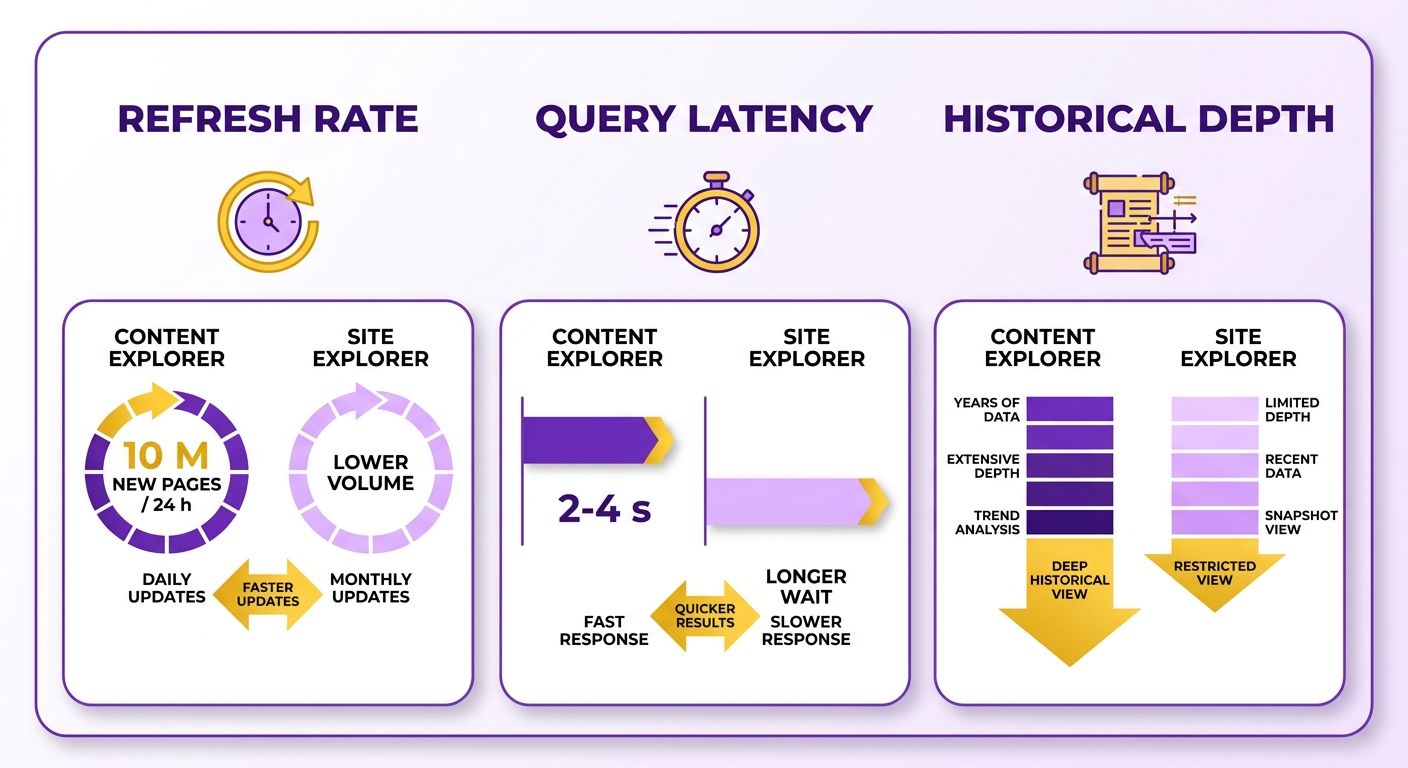
Query Performance and Data Freshness
The rapid discovery rate of Content Explorer gives you near-real-time visibility into trending topics and new link opportunities. If a competitor publishes a breakout guide this week, it surfaces in the index within 24-48 hours. Site Explorer, by contrast, prioritizes backlink recrawl frequency over content discovery speed. Ahrefs recrawls high-authority domains every few days and lower-authority sites every few weeks. For competitive analysis, that lag rarely matters. For link prospecting, it can mean missing outreach windows on fresh content.
Concurrency also changes under load. Content Explorer queries with wide date ranges and no traffic threshold can time out or paginate slowly past the first few thousand results. Experienced users apply a domain rating floor before sorting. Site Explorer stays responsive on single-domain lookups, but it slows when you switch between Backlinks, Referring Domains, and Top Pages on a site with millions of inbound links. Each view recalculates against the full historical index instead of a cached snapshot.
Team Resource Requirements and Learning Curve
Content Explorer access on the Ahrefs Standard plan assumes your team already knows Boolean queries, domain rating distributions, and backlink overlap. New users often spend 2-3 weeks learning which filter combinations produce useful topics instead of noise. Site Explorer's interface is simpler. You plug in a domain and review top pages. Still, extracting strategy from 10 years of backlink data requires the same SEO fluency. One G2 reviewer called the learning curve "steep but worth it once you know what you're looking for."
Resource load scales with query complexity and team size. A single strategist can extract value from both tools. A 10-person content team running daily queries against Explorer hits rate limits on lower-tier plans, forcing upgrades to Advanced ($449/month) or Enterprise tiers. The real cost isn't subscription fees. It's the strategist hours spent turning research data into briefs that writers can execute. That translation step, from metrics to angle and structure, takes much of a content team's planning time.
| Metric | Content Explorer | Site Explorer | AnyPost.ai |
|---|---|---|---|
| Query response time | 2-4 seconds | 3-6 seconds (with historical data) | Automated content generation from your business context |
| Data refresh rate | 10M new pages daily | Domain-dependent (days to weeks) | Real-time content generation and analytics |
| Learning curve | 2-3 weeks to query fluency | 1-2 weeks for basic analysis | Minimal—no specialized SEO expertise required |
| Bottleneck location | Filtering 500K+ result sets | Synthesizing multi-domain insights | Reduced—Taxonomy Researcher surfaces winnable keywords |
| Team scaling cost | Rate limits force tier upgrades | Same | Starter, Growth, or Enterprise tiers by content velocity |
Automation as the Performance Multiplier
Both Ahrefs tools deliver data faster than humans can analyze it. The constraint isn't tool speed. It's the manual work that follows. When you export a Content Explorer CSV of 200 proven topics, someone still has to rank them, draft outlines, and assign them. When you pull a competitor's top 50 pages from Site Explorer, someone still has to reverse-engineer the strategy and turn it into your editorial calendar.
We built AnyPost to close that research-to-draft gap from another angle. Instead of asking you to synthesize exports by hand, our platform maps your content footprint and identifies winnable keyword opportunities. It then analyzes live search results to build optimized outlines and generate ready-to-publish drafts that match your brand voice. That removes the manual synthesis bottleneck and shortens the path from opportunity to published content.
Pros and Cons
Both Ahrefs tools earn their price, but they punish teams that stop at data collection. Content Explorer wins on topic discovery and link prospecting. Site Explorer wins on competitor teardowns. The catch is that the real cost appears after export, when someone has to turn thousands of rows into published pages.
That handoff is where most content teams stall. So let's break down where each tool helps, and where it leaves you with a spreadsheet.
What Are the Strengths and Weaknesses of Content Explorer?
Content Explorer's strength is validation through actual published performance. It sorts live web pages by real engagement and authority. Its biggest weakness is the amount of manual outreach and coordination needed to act on the prospects it uncovers.
The broken-page feature is genuinely useful. You can filter dead pages that still hold live backlinks, then pursue those links with a replacement piece. For example, a travel publication can surface defunct hotel guides that still hold high-authority editorial links. That gives the team a ready-made outreach list.
Here's the catch: the refresh velocity is the trap. The index adds new prospects faster than most outreach teams can process them, so the pool never empties. The tool finds opportunities faster than a human can act on them. That's why the research-to-action gap matters more than the research itself.
One honest caveat: Content Explorer isn't for beginners. It rewards people who already know how to filter aggressively and build outreach lists from scratch.
What Are the Strengths and Weaknesses of Site Explorer?
Site Explorer's strength is structural depth. It maps the full backlink profile and keyword footprint of any domain, tracking historical growth trends and search visibility. Its weakness is that it is fundamentally diagnostic. It tells you who is winning and how they did it, but it doesn't give you a roadmap or a draft.
Site Explorer is the reverse-engineering tool. You see a competitor's top pages, traffic sources, and backlink spikes. What you don't get is a draft. You get a diagnosis and a to-do list you still have to write yourself.
Understanding these database differences is important for planning. When evaluating coverage, make sure you're comparing the active, curated content index with the broader domain crawl. Mixing those metrics can create unrealistic expectations about prospect volume.
Where Does AnyPost.ai Fit in the Trade-Off?
The trade-off both Ahrefs tools share is the manual bridge between insight and output. That's the gap we built our engine to close. AnyPost automates the move from competitive analysis to content creation. It analyzes top-ranking search results to build optimized structures and generate ready-to-publish articles in your brand voice.
Think of the three tools as stages, not rivals. Content Explorer confirms a topic is worth writing. Site Explorer shows who already ranks and why. AnyPost takes both signals and produces the finished, optimized page. That automates the step that usually eats a writer's week. If your bottleneck is proving demand, Ahrefs handles it. If your bottleneck is shipping work, that's where we fit.
Our honest carve-out: skip us if you only need research and already have the team to act on it manually. AnyPost runs its own context extraction and competitor analysis, then removes the spreadsheet-to-draft bottleneck that neither tool was built to solve. It takes you from research to published, ranking content in your brand voice.
Use Cases and Ideal Users
When choosing between Content Explorer and Site Explorer, the decision comes down to where your content bottleneck sits. Content Explorer answers, "What topics have proven traction, and who links to them?" Site Explorer answers, "Who owns this space, and how did they get there?" Most teams need both at different stages, but the real constraint isn't research. It's turning that research into published pages at scale.
Who Should Reach for Content Explorer?
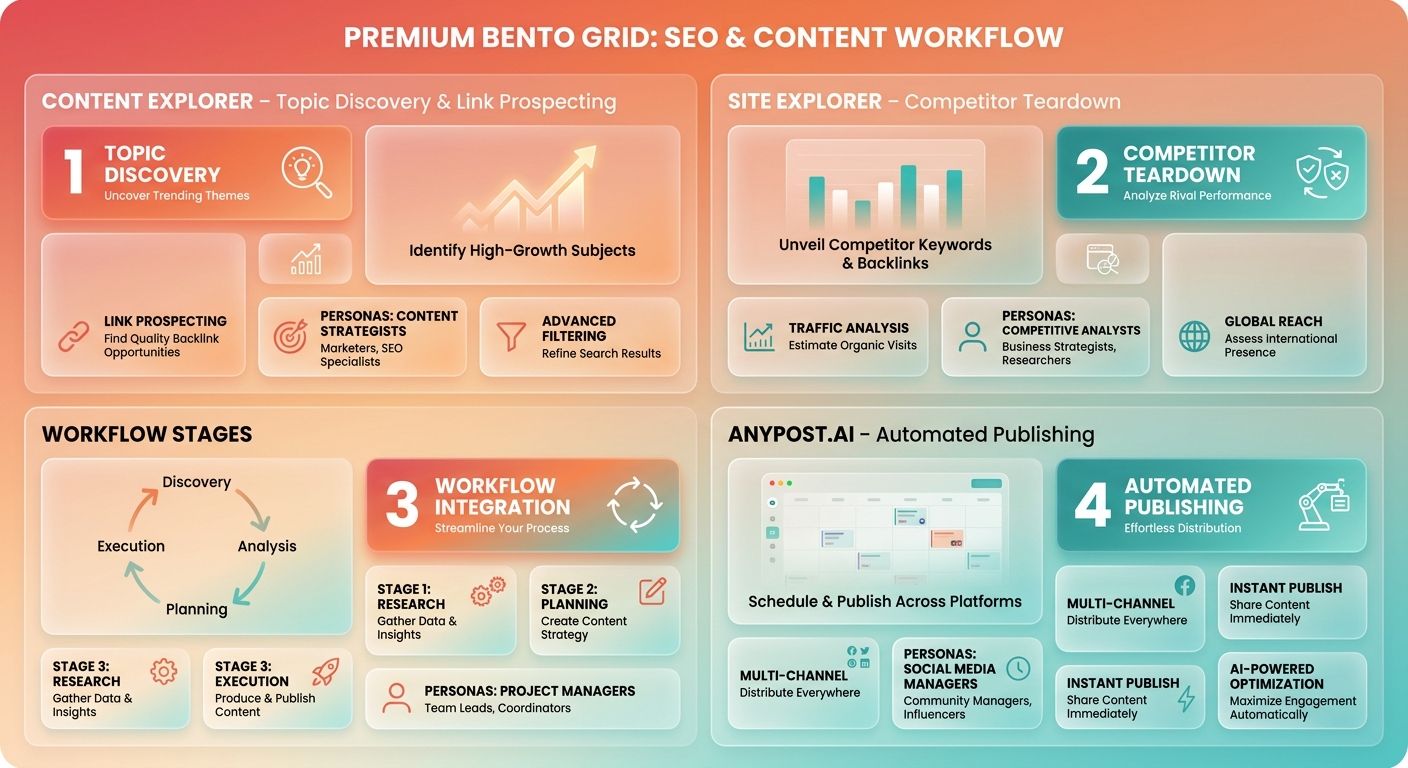
Content strategists and link builders get the most value from Content Explorer when validating topics before anyone writes a word. By filtering live web pages by organic traffic, referring domains, and social shares, you can surface what already performs. That means you're not guessing at angles. You're working with proven demand.
Three core profiles get the most from Content Explorer. First, outreach teams hunting link prospects at volume. Because the broken-link landscape changes constantly, these campaigns offer a steady pipeline of opportunities. Marketing teams use the broken-page filter to identify outdated resources that still hold valuable backlinks, then pitch updated versions for link swaps. But scale requires a highly organized outreach process to keep up with the volume.
Second, editorial teams that need to validate content gaps before assigning briefs. Instead of relying on keyword volume alone, you're filtering for pages with strong organic traffic but lower domain authority. Those are topics where execution matters more than brand weight. Third, PR and digital comms teams tracking brand mentions and journalist contact paths. Content Explorer's mention-tracking mode surfaces unlinked references and byline patterns across newly discovered web pages, helping you claim unlinked brand equity.
The fit test is simple: Content Explorer rewards teams that already have a defined content operation and a steady publishing cadence. If you're producing fewer than four pieces a month, or your keyword research process is still ad hoc, many filtering options will go unused. The tool pays off when you have enough volume to act on what it surfaces.
When Site Explorer Makes More Sense
Competitive analysts and in-house SEO leads lean on Site Explorer when the question is how to close the gap with a competitor. The platform lets you track domain trajectory and reverse-engineer entire sites instead of individual pages. That makes it the better choice for high-level strategic planning.
This shows up most often in B2B SaaS and ecommerce environments where a few competitors dominate category terms. Site Explorer lets you pull top-traffic pages, map backlink acquisition over time, and identify which keyword clusters drive most organic visits. That data supports enterprise competitive strategy and helps teams decide where to focus optimization budgets.
The limitation is clear: Site Explorer tells you what worked for someone else, but it doesn't generate your content calendar or write the pages. You're still exporting CSVs and turning competitor insights into briefs, outlines, and drafts. That's where most teams stall.
Where AnyPost.ai Enters the Workflow
We built our platform for teams who finish research and then face a blank CMS. Instead of leaving you to bridge the gap between data and drafts, our system analyzes top-performing search results to see what works in your niche. It then pulls insights from authoritative sources to generate SEO-optimized content that matches your brand voice, publishing it directly to your platforms.
That matters most when you're scaling past 10 articles a month. Research velocity stops being the constraint. Production velocity does. Our system turns the research-to-draft handoff into an automated step, so your research investment becomes shipped pages instead of idle spreadsheets.
| User Profile | Best Tool | Why |
|---|---|---|
| Link builders at scale | Content Explorer | Broken-link prospects refresh daily; 26M dead pages with backlinks |
| Competitive analysts | Site Explorer | 10+ years of domain history; full backlink and keyword mapping |
| Editorial teams validating topics | Content Explorer | Real organic traffic data on 1.1B pages; filters for low-DR opportunities |
| Teams stuck in research-to-draft handoff | AnyPost.ai | Automates SEO-optimized content generation and publishing at scale |
| PR and outreach leads | Content Explorer | Tracks 10M new pages daily for mentions and journalist contact paths |
The bottom line is straightforward. Content Explorer validates what to write. Site Explorer shows who dominates those topics and how. Neither tool writes the content or closes the loop from insight to publication. That's the gap we address. If your workflow ends with a downloaded CSV and a Trello card titled "write this," you're solving the wrong bottleneck.
Conclusion
When you're choosing between Ahrefs Content Explorer and Site Explorer, the honest answer is that you'll need both at different stages. Content Explorer wins for topic validation and link prospecting before you write. Site Explorer wins for competitor teardowns once you know the space you're entering. The real decision isn't which tool to buy. It's how you turn research into published content without spending weeks on manual drafts.
The bottleneck isn't the research itself. Both tools deliver data almost instantly. The real challenge is execution. Once you identify the opportunities, someone still has to write, optimize, and publish the articles. That's where content teams often stall, regardless of how strong their SEO stack is.
When Content Explorer Earns Its Slot
Reach for Content Explorer when you need to validate topics at scale before anyone writes a word. You're looking at what already performed, not guessing. That makes it the right pick for content strategists who need to justify a topic to leadership, or link builders hunting prospects across hundreds of pages. You can filter by publish date, word count, and referring domains to narrow down proven angles fast.
The learning curve is steep. One review notes that it requires a higher subscription tier and isn't suitable for beginners or teams with limited SEO needs. If you're running a three-person content team publishing twice a month, the manual handoff from research to draft will feel manageable. If you're trying to publish 40 articles a quarter, the handoff becomes the constraint.
That's where automating the research-to-draft step changes the workflow. Our platform analyzes your competitors, identifies content gaps, and generates optimized articles that match your brand voice. You're skipping the manual writing step entirely. The drafts go straight to your CMS, ready for final review and publish.
When Site Explorer Is the Right Tool
Use Site Explorer when you need to reverse-engineer a competitor's entire domain. It surfaces their top pages, keyword rankings, and full backlink profile in one view. That depth matters when you're entering a crowded niche and need to understand who owns the space and how they built authority.
The tradeoff is focus. Site Explorer doesn't sort individual pages by content performance the way Content Explorer does. You're analyzing domains, not validating specific topics. For competitive teardowns and gap analysis, it's the stronger choice. For "what should I write next and who might link to it," Content Explorer is faster.
Our Recommendation for Most Teams
If you're a content strategist or link builder working at scale, Content Explorer earns its place once you're publishing more than 10 articles a month and need to validate topics with real performance data. If you're an SEO team doing competitor analysis, Site Explorer's historical backlink depth and domain-level insights earn its slot in your workflow.
If you're trying to move pages without the manual draft bottleneck, our platform automates content generation and publishing. Once you know what to write, we analyze the competitive market, generate SEO-optimized drafts in your voice, and publish them directly to your CMS. That workflow makes sense when your team spends more time writing than strategizing, and the research pile grows faster than the publish queue.
For teams that can afford both tools and have the headcount to turn research into drafts manually, the Ahrefs suite delivers. For teams where the handoff is the constraint, automating the draft step keeps the pipeline moving.
Frequently Asked Questions
1. Can I use Content Explorer without upgrading to the Standard plan?
No. Content Explorer requires the Standard plan at $249 per month, while Site Explorer is available on the lower Lite plan at $139 per month. If you only need competitor domain analysis and backlink profiles, the Lite plan covers Site Explorer without paying for the more expensive tier.
2. Which tool should a small business with low content output actually pick?
Neither may be worth it for very low volume. For example, a boutique consulting firm publishing a monthly industry update won't extract enough research value to justify the learning curve. If your output is highly limited, manual search analysis and basic tracking likely serve you fine without the subscription cost.
3. Why do some reviews cite different index sizes for Content Explorer?
The discrepancy comes from how Ahrefs segments its databases. The curated index used for content research is a filtered subset optimized for page-level performance metrics. The much larger figures cited in some reviews refer to Ahrefs' entire historical web crawl, which includes non-editorial pages, redirects, and system files that aren't relevant for content ideation.
4. How long does it take a new team member to become productive with these tools?
Productivity depends on your team's existing SEO fluency. Content Explorer requires mastering advanced search operators and filtering logic to separate high-value prospects from noise. Site Explorer has a more intuitive interface for basic domain lookups, but turning its historical backlink and keyword data into an actionable strategy still requires a solid understanding of competitive SEO.
5. If both tools return data quickly, why do content teams still fall behind?
The delay happens during the synthesis phase. While the tools generate data instantly, a human strategist still has to analyze the exports, identify search intent, and structure the outlines. This manual translation of raw metrics into actionable editorial briefs consumes most of the planning timeline.
6. Can Site Explorer show me competitor paid advertising strategies?
Yes. Site Explorer includes dedicated reports for paid search. That lets you see the exact keywords your competitors are bidding on, their ad copy, and their estimated monthly ad spend. This competitive intelligence is completely absent from Content Explorer, which focuses strictly on organic performance.
7. Where does AnyPost.ai fit alongside these two Ahrefs tools?
AnyPost.ai acts as the execution layer that follows your research. While Ahrefs tools identify opportunities and analyze competitors, our platform automates the writing, optimization, and publishing phases. It bridges the gap between raw SEO data and a fully populated blog, allowing you to scale your content output without expanding your writing team.