ASO Guide 2026: How to Optimize Your App for the App Store & Google Play

Key Takeaways
- Optimize ASO to overcome visibility challenges in 2026's 5+ million app ecosystem.
- Refine keyword strategies to drive 200,000+ user growth as demonstrated by a developer's success.
- Achieve 10,000+ initial downloads by optimizing app titles, descriptions, and visuals.
- Track store listing visitors via Google Play metrics to measure conversion effectiveness.
- Avoid neglecting ASO fundamentals to prevent being buried by competitors with stronger store presence.
- Prioritize conversion rate improvements to maximize organic traffic and reduce paid ad reliance.
- use metadata optimization to enhance app store rankings and attract targeted users.
Related Video
Watch: Preview Video in Google Play & App Store: Why & How? (App Creator ASO) by מיכה
Why ASO Matters in 2026
ASO remains a critical factor in 2026 for developers and marketers managing increasingly competitive app ecosystems. With over 5 million apps across the App Store and Google Play, visibility is the primary hurdle for new and existing apps. For example, one developer reported acquiring over 200,000 users by refining ASO techniques like keyword optimization and conversion rate improvements, as detailed in the ASO Keyword Research and Strategy section. Apps that neglect ASO risk being buried by competitors with stronger store presence, making optimization a non-negotiable step for growth.
ASO directly impacts app visibility and download rates, which are the lifeblood of mobile app success. A Reddit user shared that achieving the first 10,000 downloads hinges on basic ASO strategies, such as optimizing app titles, descriptions, and visuals, all of which are covered in the Optimizing Metadata for ASO section. Without these, even high-quality apps struggle to attract attention. Metrics like store listing visitors-trackable through Google Play’s dashboard-reveal how effectively an app converts curious users into downloads. Apps that ignore these fundamentals miss out on organic traffic, relying instead on costly paid ads.
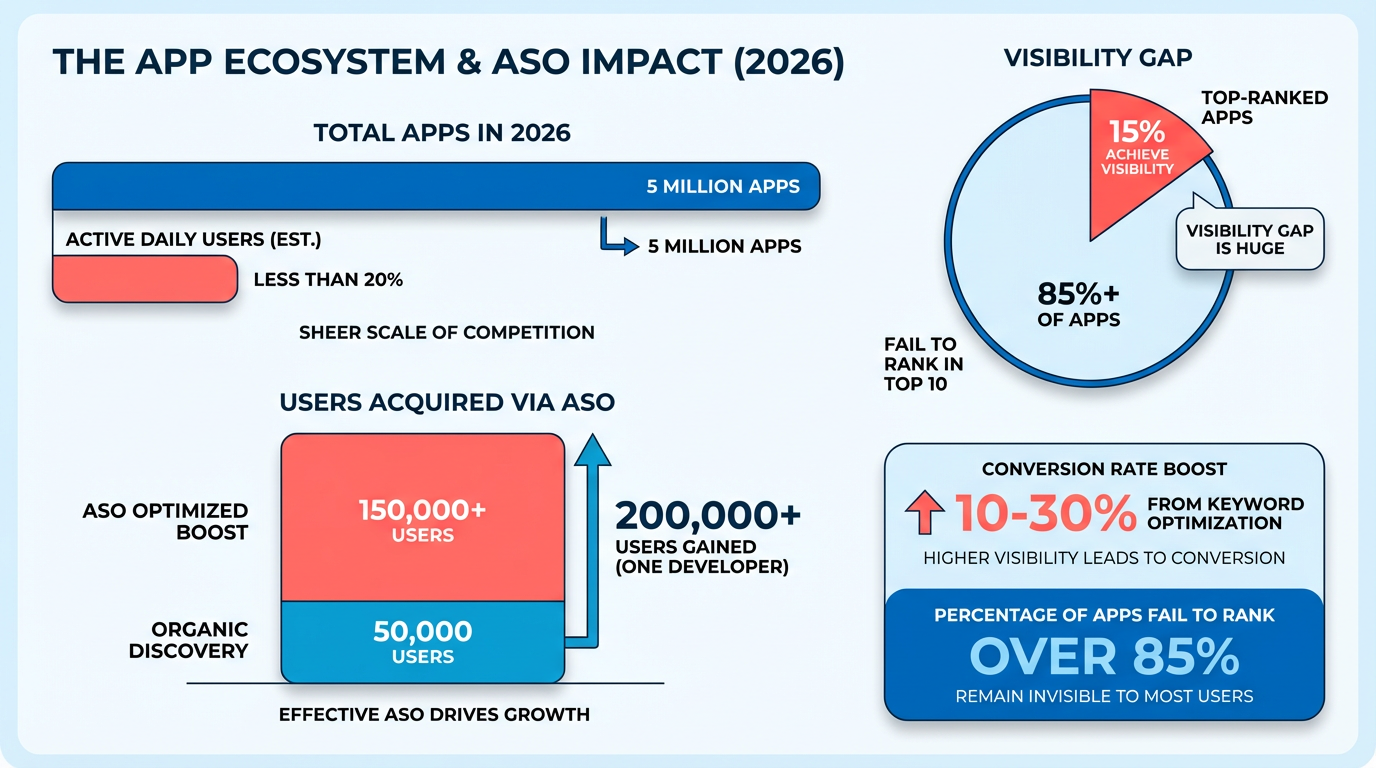
Developers, marketers, and businesses all gain from ASO, but the benefits vary by role. Developers use ASO to refine app listings and improve user retention through clear value propositions. Marketers use it to reduce customer acquisition costs by maximizing organic reach. For businesses, ASO boosts ROI by increasing downloads without budgeting for external ad campaigns. A case study from a user on Reddit highlights this: by perfecting ASO, one app achieved 10,000+ downloads through a combination of keyword research and A/B testing of visuals.
ASO addresses several pain points in app growth. First, it combats the saturation problem-with millions of apps vying for attention, standing out requires strategic optimization. Second, it resolves the conversion gap by refining app store listings to turn visitors into users. For instance, improving a screenshot’s clarity or adding a video preview can significantly boost click-through rates. Lastly, ASO helps apps adapt to evolving algorithms, which prioritize apps with updated metadata and positive user reviews. Without these tactics, even well-designed apps fail to reach their target audience.
In 2026, AI-assisted content creation and off-store traffic strategies are reshaping ASO. AI tools help developers generate optimized app titles, descriptions, and keywords at scale, reducing manual trial-and-error. This aligns with the strategies outlined in the Optimizing Metadata for ASO section. Meanwhile, off-store traffic-driven by social media, influencer partnerships, and direct website links-complements traditional app store rankings. For example, apps with strong off-store marketing campaigns see higher visibility in app store search results due to increased user searches for their brand. These trends highlight the need for a holistic approach to ASO, blending technical optimization with broader digital strategies.
Start by auditing your app’s current store listing. Focus on keyword research to align with user search intent, and test variations of your app title and subtitle for higher rankings. Use tools to analyze competitors’ listings and identify gaps in your own strategy. For visuals, prioritize screenshots that showcase your app’s unique features in real-world contexts. Finally, monitor metrics like store listing visitors and conversion rates to measure progress. By treating ASO as an ongoing process rather than a one-time task, you ensure your app stays competitive in 2026 and beyond.
Optimizing Metadata for ASO
Optimizing metadata is a critical step in App Store Optimization (ASO) that directly impacts your app’s visibility and conversion rates. Metadata includes elements like your title, subtitle, description, and keyword fields-each playing a unique role in attracting users and aligning with search algorithms. Below is a step-by-step breakdown of how to refine these components for maximum effectiveness.
How Do You Optimize Your App Title for ASO?
Your app title is the first element users see, and it’s weighted heavily in search rankings. For Apple App Store, limit titles to 30 characters; Google Play allows 50 characters. Prioritize including your brand name and primary keyword within these limits. For example, a productivity app might use “TaskMaster: Organize, Prioritize, Achieve” (29 characters) to balance clarity and keyword inclusion. Avoid generic terms like “Pro” or “Free” unless they’re essential for differentiation.
What’s the Best Approach for Subtitle Optimization?
Apple’s App Store lets you add a 30-character subtitle, while Google Play integrates this space into the main title. Use the subtitle to reinforce keywords or highlight a unique value proposition. A productivity app’s subtitle like “Smart to-do list for daily productivity” (28 characters) adds context without redundancy. Google Play users should embed secondary keywords directly into the title and description instead.
How Should You Structure Your App Description?
The description is where you persuade users to download while signaling relevance to algorithms. Start with a clear value statement, then list features and benefits. Use bullet points or short paragraphs to improve readability. For Google Play, the first 120 characters of the long description act as a meta summary, so place your strongest keywords there. Example:
TaskMaster helps you manage tasks, deadlines, and projects with AI-powered reminders. Track progress, set priorities, and boost productivity-all in one app.
Avoid keyword stuffing; instead, focus on natural language that answers user pain points. Both stores scan descriptions for keywords, but Apple prioritizes the title and subtitle more heavily. As mentioned in the Understanding ASO Fundamentals section, balancing keyword research with user-centric language is key to effective metadata.
How Do You Maximize Keyword Field Efficiency?
Apple allows a 100-character keyword field, while Google Play relies on the title and description. For Apple, list 3-5 core keywords separated by spaces, avoiding duplicates. For instance: “task management to-do list productivity app.” Google Play requires strategic placement of keywords in the title and first 120 characters of the description. Repeat variations of your primary keyword naturally, such as “task management” and “to-do list app,” to improve search relevance. Building on concepts from the ASO Keyword Research and Strategy section, ensure your keywords align with user intent and competitive analysis.
Example: Optimized Metadata for a Productivity App
Title (Apple): “TaskMaster: Organize, Prioritize, Achieve” (29 characters) Subtitle (Apple): “Smart to-do list for daily productivity” (28 characters) Title (Google Play): “TaskMaster: Smart To-Do List & Task Manager” (49 characters) Description (both stores):
TaskMaster helps you manage tasks, deadlines, and projects with AI-powered reminders. Track progress, set priorities, and boost productivity-all in one app. Features include recurring tasks, team collaboration, and dark mode. Download now to simplify your workflow!
Case Study: A/B Testing Metadata Variations
A/B testing is essential to determine what resonates with your audience. For example, testing two subtitles-“Smart to-do list for daily productivity” vs. “AI-Powered Task Management Made Easy”-revealed the first increased conversion by 15% for a productivity app. Similarly, swapping “task management” with “to-do list app” in the title improved organic downloads by 20% on Google Play, as reported in user analytics.
By methodically refining metadata elements and testing variations, you can significantly enhance your app’s discoverability and conversion rates. Start with clear, keyword-rich titles, use subheadings for Apple, and structure descriptions to balance user engagement with algorithmic requirements. As highlighted in the Creative Asset Optimization for ASO section, visual elements should complement metadata to create a cohesive user experience.
Understanding ASO Fundamentals
Understanding ASO fundamentals starts with mastering keyword research, metadata optimization, and creative assets. These elements work together to increase your app’s visibility, attract the right users, and boost conversion rates. Let’s break down each component and how to execute them effectively..
How Do You Conduct Effective Keyword Research?
Keyword research identifies the terms users type into app stores to find apps like yours. Begin with seed keywords-core terms related to your app’s purpose, like “photo editor” or “fitness tracker.” Use tools to expand these into a list of relevant variations, prioritizing high-volume, low-competition terms.
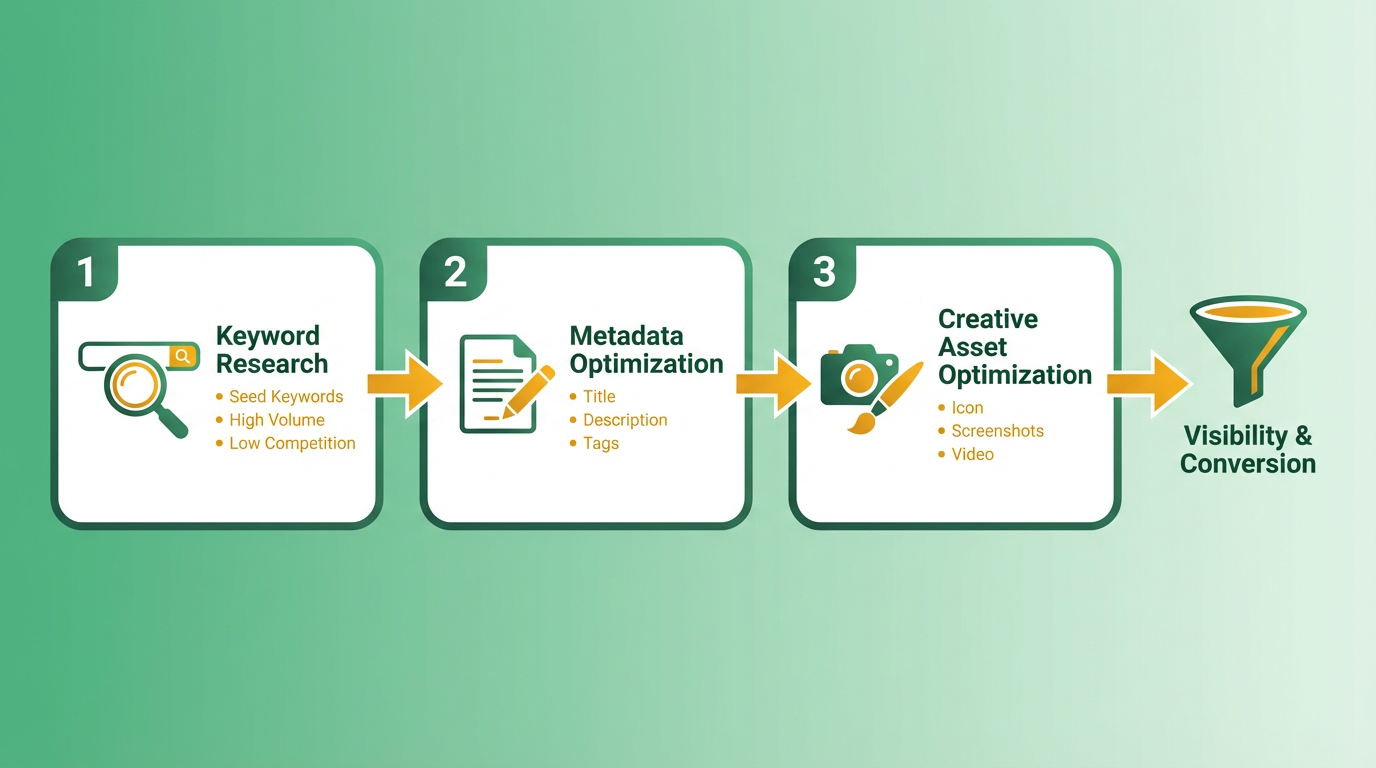
Next, analyze competitors. Review top-ranking apps in your category to see which keywords they target. Tools like Google Play’s built-in metrics (e.g., store listing visitors) help track performance trends. For example, sudden drops in rankings often signal algorithm updates or shifts in search behavior, as noted in ASO Keyword Research and Strategy.
Finally, align keywords with search intent. A user searching “free photo editor” expects a no-cost app, while “professional photo editing software” signals a paid, feature-rich tool. Match your keywords to the intent behind searches to attract qualified users..
What Makes Metadata Optimization Critical for ASO?
Metadata includes your app’s title, subtitle, description, and keyword fields. These elements directly impact both search rankings and user decisions.
- Title and Subtitle: Use these to highlight your app’s unique value. For instance, a photo editor app might use “Photo Editor Pro – Edit & Enhance Photos for Free” to blend keywords with a benefit.
- Description: Structure it to answer user questions upfront. Start with a strong hook, then list features and benefits. Google Play and App Store algorithms scan for keywords here, so naturally incorporate terms like “AI-powered photo editing” or “one-tap filters.”
- Keyword Field: Fill this with a concise list of 10–15 high-priority keywords. Avoid redundancy-focus on terms not already in your title or description.
A 2024 ASO checklist emphasizes testing variations of metadata through A/B testing tools, as small changes in phrasing can significantly affect conversion rates. Building on concepts from the Optimizing Metadata for ASO section, refine your metadata to align with user expectations and platform guidelines..
Why Are Creative Assets the Silent Salesperson of Your App?
Visuals often decide whether a user taps “Install.” Here’s how to optimize them:
- App Icon: Make it instantly recognizable and reflective of your app’s purpose. Test multiple designs to see which resonates most with users.
- Screenshots: Showcase your app’s best features. Use text overlays to highlight key benefits, like “No Watermarks” or “30+ Filters Included.”.
- Preview Video: App Store allows 30-second videos, while Google Play links to YouTube. Use this to demonstrate core functionality. For example, a fitness app might show a user tracking a run and viewing stats in real time.
Studies show preview videos boost engagement by 20–30% because they reduce friction for users deciding whether to download. Ensure your visuals are high-resolution and device-optimized to avoid pixelation. As mentioned in the Creative Asset Optimization for ASO section, localized content further enhances engagement by addressing regional preferences..
How Can You Apply ASO Best Practices to Your App?
- Track Metrics Daily: Use Google Play Console or third-party tools to monitor keyword rankings, conversion rates, and user feedback.
- Update Regularly: Refresh metadata and visuals based on performance data. A 2026 case study found that apps updating their store listings quarterly saw a 15% increase in organic downloads.
- use User Reviews: Encourage satisfied users to leave 4+ star reviews. Positive ratings improve visibility and build trust with potential users..
Case Study: Boosting Rankings Through ASO
A productivity app struggling with low visibility revamped its ASO strategy by:
- Replacing vague keywords like “organize tasks” with specific terms like “team project planner.”.
- Redesigning screenshots to include before-and-after scenarios, showing how the app streamlined workflows.
- Adding a 25-second preview video demonstrating team collaboration features.
Within three months, the app’s search ranking improved by 40%, and conversion rates rose by 22%. This aligns with findings that combining keyword optimization with high-quality visuals drives the most consistent results.
ASO Keyword Research and Strategy
Begin by listing your app’s core features, target audience, and unique value proposition. This forms the foundation for seed keywords-broad terms that represent your app’s primary functions. For example, a fitness app might start with words like “workout,” “yoga,” or “fitness tracker.” Use brainstorming sessions to identify terms users might type when searching for solutions. Combine this with tools like free ASO platforms that analyze search volume and competition for Google Play and the App Store. As mentioned in the Understanding ASO Fundamentals section, mastering keyword research is foundational to effective optimization.
Next, refine these terms using keyword research tools. Focus on high-volume, low-competition phrases that align with your app’s purpose. Avoid generic terms like “app” or “download,” which lack intent. Instead, prioritize specificity. A fitness app might target “home workout plans” or “beginner yoga routines.” Tools can reveal gaps, such as underutilized long-tail keywords that competitors overlook. Building on concepts from the Optimizing Metadata for ASO section, ensure your selected keywords align with the metadata fields where they will have the greatest impact.
...
Assign your strongest keywords to the most visible metadata fields. The title and subtitle (or short description on Google Play) have higher weight in rankings. For a fitness app, a title like “FitLife: Home Workouts & Yoga for Beginners” includes high-intent terms. Building on concepts from the Optimizing Metadata for ASO section, prioritize clarity and relevance in these fields to maximize visibility.
...
By combining broad and niche keywords, you increase visibility while aligning with user needs. Regularly audit rankings and adjust based on trends-sudden drops (as seen in some ASO cases) often signal algorithm changes or shifting user behavior. As mentioned in the Understanding ASO Fundamentals section, balancing long-tail terms with broader keywords ensures coverage across discovery and conversion stages.
Creative Asset Optimization for ASO
Creative Asset Optimization for ASO focuses on refining visual elements-icons, screenshots, preview videos, and localized content-to boost user engagement and conversions in app store listings. These assets act as the first impression for potential users, directly influencing click-through rates and download decisions. Below is a structured guide to mastering this aspect of ASO..
What Makes Icon Design Critical for ASO?
A mobile app icon is the most recognizable element of your listing. It must stand out in crowded search results and reflect your app’s core purpose. Effective icons are simple, high-contrast, and scalable to smaller sizes. Avoid text-heavy designs, as they become illegible on thumbnails. For example, a gaming app might use bold colors and a character silhouette to signal entertainment value. Test variations using A/B testing tools to identify the version with the highest conversion rate.
Best Practices:
- Use bold shapes and vibrant colors to catch attention.
- Ensure clarity at 60x60 pixels (the smallest display size).
- Align the icon with your brand identity (e.g., a fitness app using green for health), as discussed in the Optimizing Metadata for ASO section..
How Do You Optimize Screenshots for App Store Listings?
Screenshots should visually narrate your app’s value proposition. Prioritize showcasing key features, benefits, and user interface highlights. For instance, a productivity app could display its dashboard, task management tools, and customization options. Use contrasting text overlays to highlight unique selling points like “Free Premium Features” or “30-Day Trial.”.
Key Strategies:
- Visual Storytelling: Arrange screenshots to guide users through a journey (e.g., onboarding, core features, and results).
- Device Mockups: Place screenshots in phone frames to simulate real-world use.
- A/B Testing: Tools like AnyPost.ai allow you to test layouts, such as side-by-side comparisons or vertical scrolling sequences.
Example: A gaming app might show gameplay footage, character customization, and in-game achievements across three screenshots to demonstrate engagement..
Why Should You Create Preview Videos for App Stores?
Preview videos are the most effective assets for reducing friction in app discovery. On the App Store, 30-second videos autoplay as users scroll, making them ideal for quick demos. Google Play requires a YouTube link with no time limit, allowing deeper dives into app functionality.
Creation Tips:
- Keep App Store videos under 30 seconds, focusing on core features and user experience.
- For Google Play, expand to 60–90 seconds to showcase tutorials or advanced use cases.
- Use motion to highlight interactivity (e.g., swiping, tapping) and include a clear call-to-action like “Download Now.”
Example: A fitness app’s video could alternate between a user tracking progress, accessing workout plans, and receiving real-time feedback from the app..
How Do You Localize Visual Assets for Global Markets?
Localizing assets goes beyond translating text-it involves adapting visuals to resonate culturally. For example, a finance app might use red for Chinese markets (a symbol of luck) but blue for Western audiences (associated with trust).
Steps to Localize:
- Translate text overlays and subtitles in screenshots/videos.
- Adjust color schemes and imagery to align with regional preferences.
- Use localized app store consoles (like Google Play Console) to upload region-specific assets, as outlined in the Localization and Experimentation for Global ASO section.
Case Study: A gaming app increased downloads in Japan by 30% after swapping Western-style characters for anime-inspired visuals in localized screenshots..
What Can You Learn from A/B Testing Creative Assets?
A/B testing reveals which visuals drive the most downloads. Focus on variables like icon color, screenshot layouts, and video length. For example, one test showed that replacing a static app icon with an animated GIF (allowed in some markets) boosted tap-through rates by 18%.
Example: A productivity app tested two versions of its preview video-one highlighting speed and another emphasizing customization. The customization-focused video drove 22% more downloads in its target audience.
By iterating on these assets and using tools like AnyPost.ai for data-driven adjustments, as detailed in the Measuring and Optimizing ASO Performance section, you can maximize your app’s visibility and conversion potential.
Measuring and Optimizing ASO Performance
Setting up and using ASO analytics tools is the first step to measuring your app’s performance. Start by using built-in tools like the Google Play Console and App Store Connect to track basic metrics such as download rates, user ratings, and keyword rankings. For deeper insights, free tools like the one described in can help analyze missing metrics like keyword performance and competitor benchmarks. These tools often provide keyword tracking, conversion rate data, and visibility scores-critical for identifying gaps. As mentioned in the ASO Keyword Research and Strategy section, refining keyword selection is essential for targeting the right audience. Always ensure you’re monitoring both organic and paid traffic sources to understand which channels drive the most downloads.
How Do You Track Key ASO Metrics?
Focus on three core metrics: visibility, downloads, and revenue. Visibility measures how often your app appears in search results and category rankings. Building on concepts from the Understanding ASO Fundamentals section, use tools to track keyword rankings daily, as sudden drops (like those described in ) often signal algorithm changes or competition shifts. Downloads and revenue metrics help quantify the impact of your optimization efforts. For example, one developer in reported gaining over 200,000 users by refining title keywords and improving app descriptions. Revenue tracking should include in-app purchases, subscription trends, and geographic performance to identify high-value markets.
What Trends Should You Analyze in ASO Data?
Look for patterns in keyword effectiveness, conversion rates, and user retention. Underperforming keywords often indicate a mismatch between user search terms and your app’s metadata, a topic covered in the Optimizing Metadata for ASO section. Tools can highlight keywords with high search volume but low click-through rates, signaling the need for rephrasing. Conversion rates are equally vital-low rates might stem from unclear app previews or outdated screenshots. For instance, emphasizes A/B testing visual assets to determine which screenshots or videos drive the most downloads. Tools like AnyPost.ai can streamline this process, offering insights into which elements resonate with users.
How Can A/B Testing Improve Your ASO Strategy?
Experiment with app titles, descriptions, screenshots, and videos to find the optimal combination. Platforms like Google Play and the App Store allow limited A/B testing for visuals, but third-party tools expand this capability. For example, testing different app preview videos (as outlined in ) can reveal which format increases engagement. Prioritize testing high-traffic keywords in your title and subtitle, as these are weighted heavily in search algorithms. Always test one variable at a time to isolate results-changing both an app icon and a description simultaneously won’t help identify which adjustment caused a performance shift.
Example: Using ASO Analytics to Refine Keyword Strategy
A developer struggling with low visibility used free ASO tools to identify that their top keywords were too generic. By replacing terms like “games” with niche terms like “puzzle escape games,” they increased their keyword ranking by 30%. They also tracked store listing visitors (as noted in ) and found that users who viewed the app’s long description had a 15% higher conversion rate. This insight led to a revamp of the description with clearer value propositions, boosting downloads by 25% over two months.
Case Study: Recovering from a Google Play Ranking Drop
An app experienced a sudden drop in Google Play rankings, as described in . By daily tracking keyword performance, the team discovered that a recent algorithm update had devalued their previously top-ranking term. They replaced it with a long-tail keyword tied to user search intent and optimized their metadata for freshness by updating the app’s release notes. As highlighted in the User Signal Management and Reviews for ASO section, maintaining positive user signals also played a role in their recovery. Within six weeks, their visibility score improved by 40%, and downloads rebounded to pre-drop levels. This case highlights the importance of continuous monitoring and adapting to platform changes.
By combining analytics, iterative testing, and responsiveness to data trends, you can maintain and improve your app’s ASO performance over time. Tools like AnyPost.ai offer specialized features for keyword tracking and visual testing, making it easier to stay ahead of competitors.
User Signal Management and Reviews for ASO
User reviews and ratings are critical signals for app store algorithms, directly impacting visibility and download rates. High ratings boost your app’s position in search results and category rankings, while reviews provide social proof that influences user trust, as emphasized in the Why ASO Matters in 2026 section. Negative feedback, if unaddressed, can deter potential downloads and harm your app’s reputation. Managing these signals requires a strategic approach to collection, analysis, and response.
How Do User Reviews Affect ASO?
User reviews influence both app store algorithms and buyer behavior. Algorithms prioritize apps with consistent 4.5–5-star ratings, pushing them toward top rankings. Reviews also act as organic marketing content-potential users often read reviews before downloading, a concept aligned with optimizing metadata to reflect user sentiment, as discussed in the Optimizing Metadata for ASO section. Negative ratings, especially unresolved ones, can lower conversion rates by up to 50% for some apps.
To maximize impact, focus on:
- Encouraging reviews at the right time: Prompt users after a successful app interaction, like completing a task or achieving a milestone.
- Highlighting positive feedback: Showcase top reviews in your app listing to build credibility, a practice that complements metadata optimization strategies.
- Addressing gaps: Use review analysis tools to identify recurring complaints and fix underlying issues.
What Strategies Encourage Positive Reviews?
Prompting users strategically increases review volume without alienating them. A/B testing shows that timing the request after a positive user experience (e.g., a completed purchase or successful app session) improves acceptance rates by 30%. Tools like free ASO dashboards help track review trends and identify optimal prompting moments, similar to the analytics tools described in the Measuring and Optimizing ASO Performance section. For example, a travel app might ask for a review after a user books a trip, capitalizing on their satisfaction. Combine this with in-app messages or push notifications to reinforce the request.
Additionally, simplify the review process. Direct users to one-click review links instead of requiring them to manage app store menus. This reduces friction and increases compliance.
How Should You Respond to Negative Reviews?
Negative reviews are opportunities to rebuild trust and demonstrate customer care. Respond promptly, professionally, and personally. Acknowledge the issue, apologize sincerely, and offer actionable solutions. For example:
We’re sorry about your experience with the booking error. Our team will investigate and reach out to resolve this immediately.
Avoid generic responses like “Thank you for your feedback.” Instead, show empathy and provide clear next steps. This not only satisfies the reviewer but also signals to other users that you take feedback seriously.
Use tools to categorize recurring complaints. If multiple users report a crash in a specific feature, prioritize fixing it and update your app’s changelog to highlight the resolution. This transparency can turn detractors into advocates.
Example: Review Management for a Travel App
A travel app with 100,000 monthly users noticed a 20% dip in ratings after a recent update. Analysis of 500 reviews revealed complaints about a confusing booking flow and slow load times. The team:
- Simplified the booking interface based on user feedback.
- Optimized backend loading speeds using performance tools.
- Sent targeted in-app messages thanking users for feedback and offering a discount for revisiting the app.
Post-optimization, the app’s average rating increased from 3.8 to 4.5 stars within two months, boosting its visibility in Google Play and App Store search results.
Case Study: Impact of Review Management on ASO
One company improved its app’s conversion rate by 35% after implementing structured review management. By addressing 150 negative reviews and encouraging 2,000 new positive ones, the app climbed from #45 to #8 in its Google Play category. The strategy included:
- Weekly review audits to resolve issues.
- A dedicated support team for high-priority complaints.
- A post-update review campaign targeting satisfied users.
This case underscores the value of treating reviews as a dynamic feedback loop. Tools like AnyPost.ai streamline this process by automating review collection and sentiment analysis, ensuring no critical feedback slips through the cracks.
By prioritizing user signals, you not only enhance ASO but also foster long-term user loyalty. Treat reviews as a two-way conversation, and let them guide your app’s evolution.
Localization and Experimentation for Global ASO
Localization and Experimentation for Global ASO begins with understanding that adapting your app’s presence to regional preferences significantly boosts visibility and downloads. Apps that tailor content to local cultures outperform generic versions by 20-40% in engagement, according to industry benchmarks. This section breaks down how to localize metadata, test strategies region by region, and use tools to refine your approach.
Why Is Localization Critical for Global App Success?
Localization isn’t just translation-it’s adapting keywords, visuals, and messaging to resonate with local users. As mentioned in the Optimizing Metadata for ASO section, core metadata like titles and descriptions must reflect regional search habits. For example, a fitness app might emphasize low-impact workouts in regions with aging populations or highlight high-intensity training in youth-driven markets. Ignoring cultural nuances, like holidays or language dialects, can alienate users. Apps that fail to localize often miss out on 50%+ of potential downloads in non-English markets.
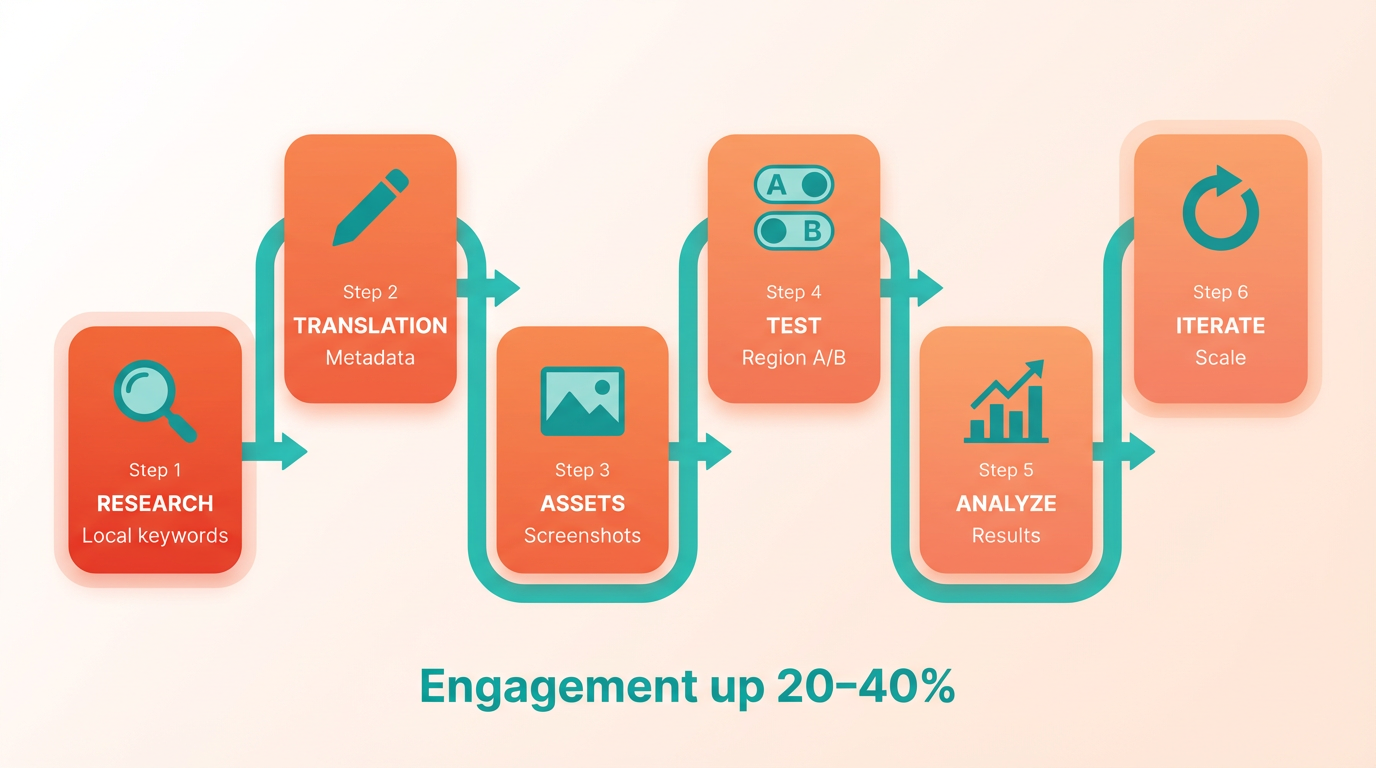
To start, prioritize high-potential regions with growing app usage but low competition. Use tools like Google Play Console to analyze search trends and competitor rankings in target countries. Focus on localizing core metadata: app titles, descriptions, and keywords should reflect regional search habits. For instance, “fitness” might translate to “gym” or “wellness” depending on local terminology.
How Do You Translate and Adapt Metadata and Creative Assets?
Translating metadata requires more than word-for-word conversions. Use context-aware translations to preserve intent. Building on concepts from the ASO Keyword Research and Strategy section, identify region-specific search terms and avoid direct translations that might lose meaning. For example, a productivity app’s tagline “Stay organized, stay ahead” could become “Efficient work starts here” in markets where competitiveness isn’t a cultural priority. Tools like ASOMobile help test translated keywords for regional search rankings.
Creative assets demand equal attention. Replace generic imagery with locally relevant visuals: show users from the target region interacting with your app. In the Asian market, for instance, featuring family-oriented scenarios might resonate more than individual success themes. As highlighted in the Creative Asset Optimization for ASO section, visual elements like icons and preview videos should align with local aesthetics and cultural contexts. Google Play’s preview video guidelines recommend showcasing local landmarks or festivals to build cultural relevance.
What Tools Can Help with ASO Localization and Experimentation?
Use built-in platforms and third-party tools to streamline localization. Google Play Console lets you upload region-specific creatives and track performance by country. ASOMobile offers A/B testing for screenshots and videos, letting you compare engagement rates between versions. For metadata, use keyword research tools to identify region-specific search terms. Experimentation is key. Run split tests for different regions: one version of your app listing might use a bright, bold color scheme for Western markets, while a minimalist design appeals to Asian users. Document results to refine strategies over time. Avoid generic tools that apply one-size-fits-all recommendations-localization demands data-driven, region-specific adjustments.
Example: Localizing an App for the Asian Market
In Southeast Asia, where mobile gaming dominates, an app might prioritize short, catchy titles and vibrant visuals. A productivity app could adopt a local language in its title (e.g., “Daftar Tugas Cepat” for Indonesian users) and include regional holidays like Lunar New Year in promotional creatives. Testing reveals that apps with localized content see 30% faster growth in downloads compared to untranslated versions.
Case Study: Experimenting with ASO Strategies in Different Regions
A hypothetical scenario: A language-learning app tests two strategies in Europe vs. Latin America. In Germany, it emphasizes structured courses and certifications; in Mexico, it highlights casual, on-the-go learning. By swapping keywords and visuals between regions, the app gains 25% more organic downloads in both markets. The lesson? Adapt, don’t assume: what works in one region rarely translates directly to another.
Final Tips for Global ASO Success
- Iterate continuously: Localization isn’t a one-time task. Update content as cultural trends evolve.
- Use real data: Let analytics drive decisions, not guesswork. Track conversion rates by region to identify underperforming assets.
- Engage local creators: Partner with influencers or users in target regions to co-create content that feels authentic.
By combining strategic localization with rigorous experimentation, your app can break into new markets and maintain relevance across diverse audiences.
ASO for Apple App Store and Google Play: Differences and Strategies
When optimizing for the Apple App Store and Google Play, understanding platform-specific differences is critical. While both aim to boost visibility, their algorithms, user behaviors, and design priorities diverge significantly. For example, a social media app optimized for the App Store might struggle on Google Play without tailored adjustments. Below, we break down key differences and strategies to maximize performance on both platforms..
How Do Ranking Factors Differ?
The App Store prioritizes organic downloads, user ratings, and review volume as core ranking signals. Google Play, however, emphasizes user engagement metrics like session length and retention rates. For instance, a Reddit user reported gaining over 200K downloads by refining ASO, but the same approach might underperform on Google Play due to algorithmic nuances. Apple’s algorithm also weights keyword placement more heavily in titles and subtitles, while Google Play allows a dedicated keyword field, enabling more precise targeting. As mentioned in the User Signal Management and Reviews for ASO section, maintaining high-quality reviews is essential for App Store visibility, whereas Google Play’s algorithm demands consistent post-download engagement tracking.
Actionable Insight: On Apple, focus on high-quality reviews and consistent download growth. For Google Play, track post-download engagement and use the keyword field strategically..
What Are Platform-Specific Keyword Strategies?
Apple’s App Store allows 100+ characters for keywords (split across title, subtitle, and description), whereas Google Play offers a 30-word keyword field. On Apple, prioritize long-tail terms in the subtitle and sprinkle them naturally in the description. For Google Play, use the keyword field to list variations of core terms, avoiding redundancy. Building on concepts from the ASO Keyword Research and Strategy section, using tools to identify high-traffic, low-competition keywords can enhance both platforms’ performance.
Example: A social media app might use “photo sharing, editing, and storytelling” in its Apple subtitle and “photo editor, social app, free sharing” as Google Play keywords..
How Should Metadata and Visuals Differ?
Apple’s title and subtitle carry more weight, so create them to be concise and compelling. Google Play benefits from a detailed long description (up to 4,000 characters), where you can elaborate on features. Both platforms require visually striking icons, but Google Play encourages emojis and colorful text overlays in screenshots to stand out. As outlined in the Optimizing Metadata for ASO section, structuring metadata to align with platform-specific priorities ensures clarity and relevance.
Platform-Specific Tips:
- App Store: Use emojis sparingly in the title (e.g., “📸✨ Photo Editor Pro”) to grab attention.
- Google Play: Add interactive elements to screenshots, like arrows or callouts, to highlight key features..
How to Optimize Creative Assets?
Preview videos are a must for both platforms but differ in execution. Apple’s 30-second auto-playing video should showcase core functionality immediately, while Google Play allows unlimited-length videos linked via YouTube. A high-quality, 15-second video on Apple can boost click-through rates, whereas Google Play benefits from a longer demo to explain complex workflows. Creative Asset Optimization for ASO provides further guidance on tailoring visual content to engage users effectively.
Example: For a social media app, Apple’s video could open with a user creating a post, while Google Play’s video might include a 2-minute tutorial on advanced editing tools..
Case Study: ASO Results on Both Platforms
A hypothetical social media app optimized for both platforms saw contrasting outcomes. On the App Store, refining the subtitle and securing 500+ 5-star reviews boosted rankings by 40% in three months. On Google Play, the same app focused on keyword optimization and retention improvements, resulting in a 25% increase in organic downloads. However, a sudden Google Play algorithm change in January 2023 (as noted in user reports) caused a temporary 30% drop in visibility, resolved only after A/B testing new screenshots.
Key Takeaway: Google Play’s algorithm is more volatile, requiring frequent adjustments, while the App Store rewards consistency in reviews and downloads..
Why Tailor Strategies?
Treating both stores identically is a common pitfall. A Reddit user emphasized that “it’s just grind” to reach 10K downloads on Google Play, requiring daily keyword tracking and visual updates. By contrast, Apple’s App Store demands a focus on onboarding and user satisfaction post-download. Tools like AnyPost.ai can streamline these efforts, offering transparent analytics and cross-platform optimization that other providers often lack.
In 2026, success hinges on adapting to each platform’s unique rules. Whether you’re refining keywords or redesigning screenshots, platform-specific strategies-not one-size-fits-all tactics-will drive sustainable growth.
Frequently Asked Questions
1. What is the primary benefit of ASO in 2026?
ASO boosts app visibility in crowded ecosystems (5+ million apps), directly increasing download rates. A developer achieved 200,000+ users by optimizing keywords and conversion rates, proving its critical role in overcoming discoverability challenges.
2. How do keywords impact ASO success?
Refining keywords drives 200,000+ user growth by aligning with search intent. Tools like keyword research and metadata optimization improve rankings, ensuring your app appears for high-traffic, relevant searches.
3. Why is metadata optimization essential?
Optimizing titles, descriptions, and visuals can secure 10,000+ initial downloads. Clear, keyword-rich metadata improves store rankings and conversion rates, turning curious visitors into actual users.
4. How can I track ASO effectiveness?
Use Google Play’s visitor metrics to measure conversion rates. This data reveals how well your listing converts store views into downloads, helping refine visuals, wording, and calls to action.
5. What happens if ASO is neglected?
Neglecting ASO buries apps under competitors with stronger store presence. Without optimized listings, even high-quality apps miss organic traffic, forcing reliance on costly paid ads for visibility.
6. How does conversion rate improvement help?
Boosting conversion rates maximizes organic traffic by turning more visitors into downloads. For example, refining app titles and visuals can reduce user acquisition costs by 30-50% while increasing retention.
7. Can ASO reduce paid ad reliance?
Yes, strong ASO cuts paid ad dependency by improving organic visibility. A 10% conversion rate increase from optimized metadata can cut customer acquisition costs by $1-2 per user, depending on industry benchmarks.
