Automated Rank Tracker: How It Works and What to Measure

Key Takeaways
- Automated rank trackers save 4-6 hours weekly by continuously querying search engines instead of manual incognito browser checks for each keyword.
- Manual tracking delays optimization decisions by weeks, while automated systems catch ranking drops immediately and enable same-day content adjustments.
- Automated trackers achieve 90%+ accuracy for most searches, though results may shift 1-2 positions based on location and device variations.
- The primary advantage of automation is continuous visibility during the 4-12 month window most SEO campaigns require to show measurable results.
- One tracked site moved from position 15 to position 8 over four weeks while a competitor dropped from 5 to 12—movement manual checking would have missed.
Quick Summary
We track rankings in two ways: manually checking Google every few days, or letting software do it automatically. The automated path eliminates the friction of manual reporting and catches ranking drops immediately, whereas manual checking often means waiting until next week's report to find you've already lost ground.
Manual tracking means logging into an incognito browser, searching your target keyword, scrolling through results, and recording where your page appears. Do that for 50 keywords and you've burned an afternoon. Automated systems query search engines continuously, log position changes across desktop and mobile, and alert you when a competitor jumps ahead—all while you focus on actually improving content.
Manual vs Automated: The Real Cost Difference
Manual rank tracking delays optimization decisions by weeks. You check rankings on the 1st, notice a drop on the 15th, investigate on the 22nd, and finally publish fixes by month-end. Meanwhile, your competitor who caught the same drop on day one already adjusted their content and recovered their position.
Automated trackers eliminate that lag. By monitoring search engine results pages constantly, these systems highlight trends that manual checks miss. The key advantage isn't chasing minor daily fluctuations—it's maintaining a steady view of your search footprint. This allows you to spot gradual declines early in your campaign, giving you the chance to make mid-course corrections before monthly reports would surface the problem.
One site tracked a competitive commercial term and their automated system logged a steady climb into the top ten over a month while a legacy competitor slipped out of the top ten. Manual checking would have missed the weekly fluctuations that revealed which content updates actually moved the needle.
What Automated Rank Trackers Actually Measure
Modern tools track more than simple keyword positions. They monitor SERP features like featured snippets, local packs, and image carousels. Ranking #1 below three ads and an AI-generated answer means different traffic than ranking #1 with no obstacles above you.
The best systems provide daily updates across both desktop and mobile, with geo-specific tracking down to city level. That matters because 67% of clicks go to the top 5 organic results, making position tracking within the top 10 critical for traffic forecasting.
You'll also get competitor benchmarking. Track five competitor domains alongside your own keywords to see when they publish new content targeting your terms, or when their positions weaken—creating opportunities you can exploit before others notice.
Time and Difficulty: Setup to Daily Use
Setup time runs 30-60 minutes for most teams. You'll connect the tool to Google Search Console, add your target keywords (start with 20-50 core terms), configure competitor domains to monitor, and set alert thresholds for ranking changes worth investigating.
Daily time commitment drops to near zero once configured. The system runs checks automatically and surfaces alerts only when positions shift beyond your threshold—typically 3+ positions up or down. You'll spend 10-15 minutes weekly reviewing trend reports rather than hours manually checking results.
Difficulty level sits at beginner to intermediate. If you can manage Google Analytics, you can operate a rank tracker. The learning curve involves understanding which metrics actually drive business outcomes, not just watching numbers move. The most important metric for most businesses is organic conversions, not rankings or traffic, so connect rank data to your analytics to see which position improvements actually generate revenue.
Most tools now track citations from AI-generated search answers alongside traditional SERP positions, recognizing that search visibility has expanded beyond the classic ten blue links. For volatile commercial terms, look for platforms offering on-demand or hourly refresh capabilities rather than daily-only updates.
Why Automated Rank Tracking Matters
Rankings decay quietly. Positions rarely collapse overnight. They slip a spot here, drop two there, and by the time a monthly report lands you've already bled traffic you'll spend weeks clawing back.
We built our workflow around that reality. AnyPost pairs SEO-optimized content generation with real-time analytics tracking, so ranking movement isn't just a report you read once a month. When you see a topic losing ground, you can generate and publish fresh, ready-to-rank content in your voice to reinforce it before the drop compounds.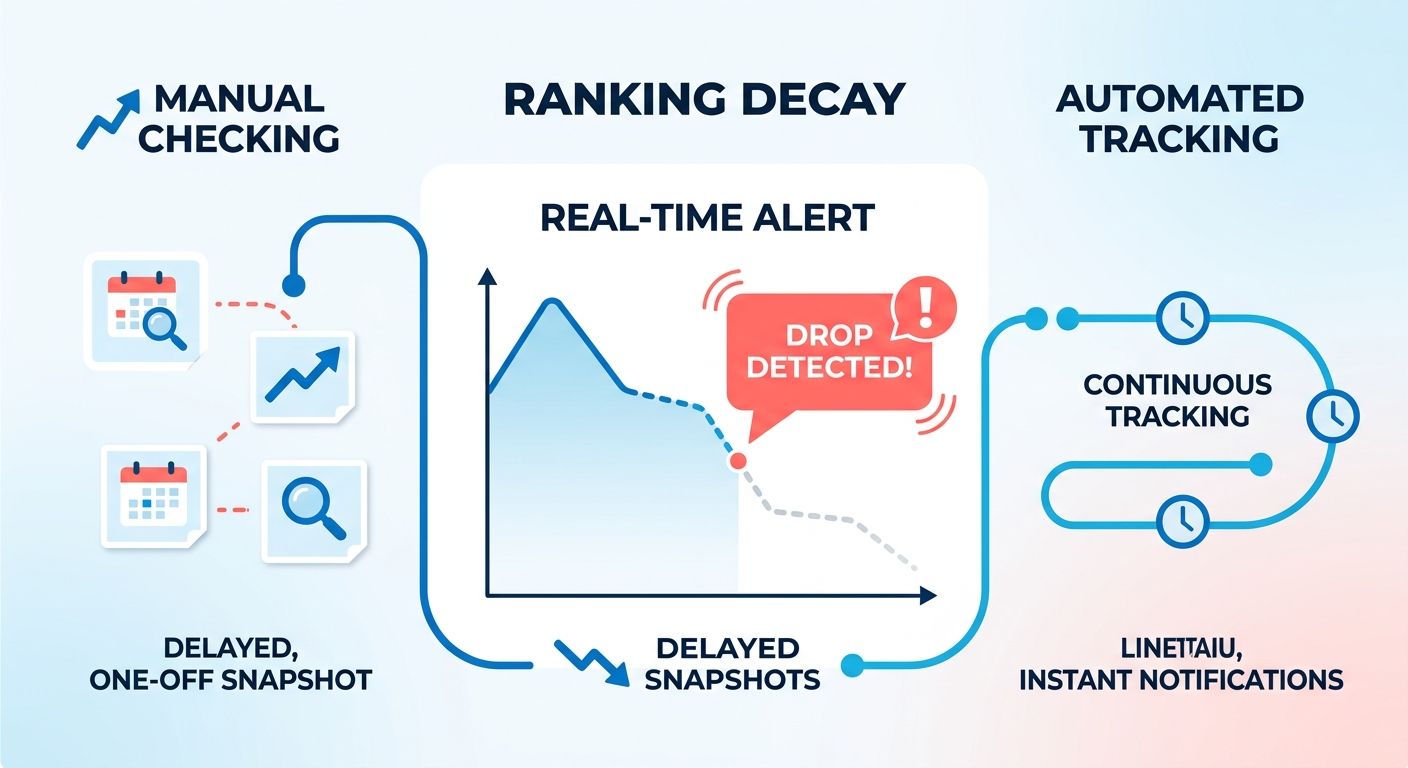
Why detection speed matters
Time-to-detection is the moat. Because search campaigns require a sustained effort over several months to show their true impact, frequent tracking catches gradual declines early while there's still time to correct course. Monthly reporting makes those slow drops invisible until they've already cost you.
One view says organic conversions matter more than rankings. Another says rank data is an analytical tool for spotting optimization opportunities. Both are right at different stages. Rankings tell you where to act; conversions tell you whether the action paid off. AnyPost's analytics help you prioritize work, and your engagement and lead metrics tell you whether it paid off.
What ranking data actually changes
It changes what you publish and when. A logistics provider tracking "freight forwarding services" climbed into the top ten over a month while a competitor slipped out of the top ten. That gap is an opening. When you spot it, AnyPost lets you generate SEO-optimized content in your brand voice and auto-publish it across platforms to reinforce that topic while the competitor is vulnerable.
Automated tracking also exposes patterns manual checks miss. If three related keywords all drop on the same day, that's a signal—maybe a competitor published a strong new resource, or Google rolled out an algorithm tweak. Seeing the pattern lets you respond with coordinated content instead of addressing each keyword in isolation weeks apart.
Who gets the most from this
B2B marketers and content creators managing large keyword sets benefit most. If you're tracking 50 or 500 terms across desktop and mobile, manual checks introduce errors and lag that quietly erode strategy. Automation removes both.
One shift you can't ignore: AI Overviews now appear for roughly 15% of searches. A tracker measuring only traditional positions is functionally blind to a growing slice of the SERP. Accuracy isn't one number anymore. It's geo-precision, refresh frequency, and SERP-feature coverage working together. A tool claiming high accuracy on classic results still misses where attention is moving.
Rank data shouldn't sit in a dashboard waiting for someone to interpret it. It should inform the next piece of content. AnyPost turns that signal into ready-to-rank articles in your voice, published anywhere you need them, so insight becomes output without the manual effort.
Core Features of Automated Rank Tracking
An automated rank tracker does four core jobs: it organizes keywords into projects, pulls fresh position data across devices and locations, filters that data into readable views, and pushes scheduled reports without you lifting a finger. What separates a useful setup from a data dump is how those features feed decisions.
We build our workflow so an automated rank tracker isn't just logging positions. It's telling our content engine which topics deserve attention next. When a keyword slips, that signal flows straight into what we prioritize for publishing.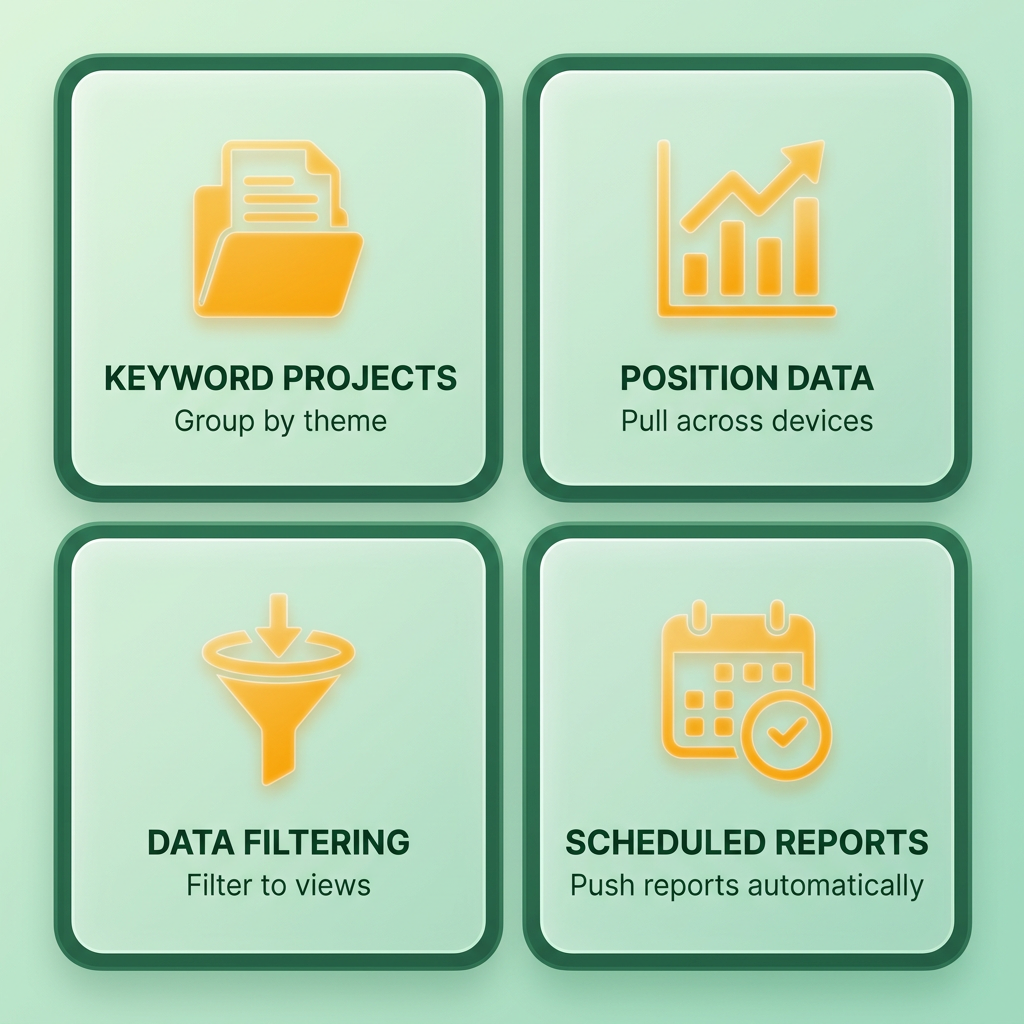
Project organization and keyword setup
Project organization means grouping keywords by theme, campaign, or client, then tagging them for quick filtering. Without it, 200 tracked keywords become an unreadable mess.
You upload keywords via text or CSV, then attach tags. Agencies lean on segmentation and tagging for nuanced analysis, splitting branded terms from commercial ones, or separating blog keywords from product pages. Ahrefs supports this exact setup, letting you isolate data by tag, position, or SERP feature.
Tagging by content intent matters more than tagging by topic. When we group keywords around "ready to convert" versus "top of funnel," the tracker tells us where a ranking drop actually costs revenue, not just traffic.
Which ranking views and filters actually matter
Device and location filters are non-negotiable because search results shift by both. A keyword ranking #3 on desktop might sit at #9 on mobile in a different city. Tracking one number hides the other.
Ahrefs pulls ranking data from around 170 countries. Location granularity matters just as much as country coverage: a local service business needs city or ZIP-level tracking, since a plumber ranking #2 citywide might drop to #14 three neighborhoods over. Set your tracking radius to match how your customers actually search.
Real accuracy is geo-precision times refresh frequency times SERP-feature coverage. A tracker that nails traditional blue links but ignores AI Overviews is measuring a shrinking slice of the page. Modern trackers now monitor citations from AI answers alongside classic positions, and that shift changes what "ranking well" even means, as visibility is increasingly defined by layout prominence rather than numerical rank.
On refresh frequency, daily is the industry standard, and weekly can miss real movement. But weekly holds up fine for stable long-tail terms or budget accounts. Match the cadence to keyword volatility.
Automated reporting that triggers action
Report scheduling sends position updates on a set cadence, but the real value is triggering action. A well-built report doesn't just list positions; it flags the deltas worth acting on. When a mid-page keyword jumps into striking distance of the first page, that movement should surface at the top of your view, not buried in row 47 of a spreadsheet.
When the tracker flags a keyword worth reinforcing, we generate fresh content that matches your brand voice automatically, so the piece reads like your team wrote it. Ranking insight becomes a published draft in your tone, not a task sitting in someone's queue.
Setting Up Your Automated Rank Tracker
We organize rank tracking setups around one question: which keywords can content actually move? That means adding your URL and keyword combinations in a way that feeds actionable decisions, not just data collection.
Selecting and adding keyword combinations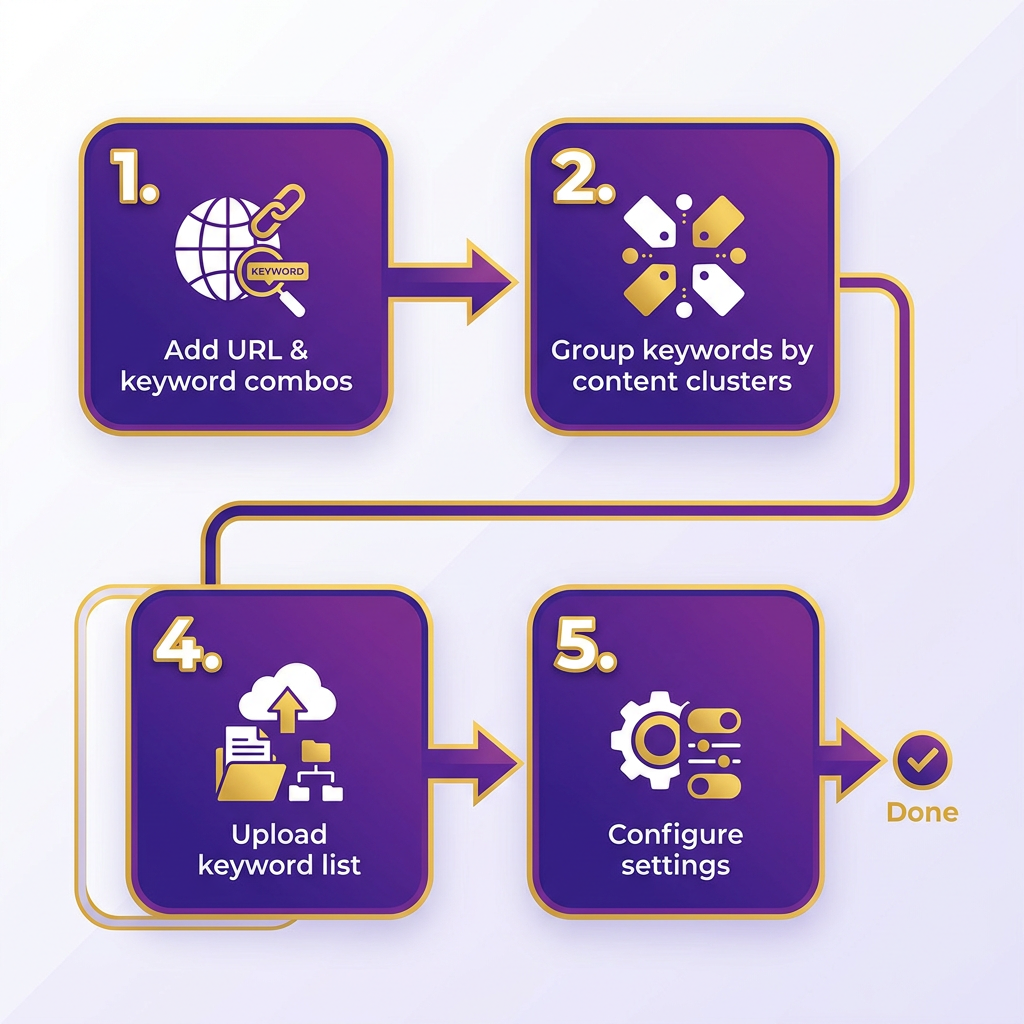
Start by grouping keywords around content clusters rather than dumping your entire keyword research list. Project organization matters here because you'll filter data by theme when deciding what to publish next. Upload keywords via CSV if you're working with dozens of terms, or add them individually if you're testing a tight list.
Tag each keyword with metadata that tells you why it matters. AnyPost's Taxonomy Researcher analyzes your unique business context and surfaces low-difficulty, high-intent keywords tailored to your niche. That way, when a promising term shows movement, you already know which cluster it belongs to and what kind of article to generate next.
Track both desktop and mobile rankings separately. Mobile visibility often diverges from desktop, especially for local or voice-search-driven queries. Setting up separate tracking profiles for these devices ensures you capture the distinct search behaviors of mobile users. If you're monitoring 200+ keywords, expect setup to take 20-30 minutes the first time, then under five minutes for maintenance runs.
Report configurations that get used
Configure reports around decisions, not dashboards. AnyPost's real-time analytics show which pages gained visibility and how published content is performing across platforms.
Frequency matters less than filtering logic. A daily report that shows every micro-fluctuation trains you to ignore it. A weekly report filtered for movement above a threshold you define (many teams use ±3 positions) keeps the signal clean. Configure separate views for branded versus non-branded terms so algorithm updates don't get masked by brand-search noise.
Format your reports to include the ranking URL alongside the keyword. Tools often show keyword position without surfacing which of your pages is ranking, and that distinction determines whether you optimize the existing page or publish new content to compete with yourself. Export options should include CSV for bulk analysis and API access if you're feeding data into a content decisioning layer.
Setting up alerts that drive action
Ranking alerts work when they're tied to business thresholds, not arbitrary position changes. Keywords dropping out of the top-three positions are worth watching closely, since that's where click-through rate cliffs tend to happen. Another useful alert fires when a competitor's page overtakes yours for terms you've tagged as high-conversion.
Customization options vary across tools, but the useful ones let you filter by keyword tags and set different thresholds per project. Volatility alerts catch broad algorithm updates, but action alerts should be specific: "inform content team when keyword X drops below position Y."
Most setups take 15-20 minutes to wire alerts into Slack or email. The integration matters because an alert buried in a dashboard tab doesn't get acted on. When a keyword loses ground, AnyPost's automated content generation makes it fast to spin up a fresh, SEO-optimized draft in your brand voice and auto-publish it where it needs to go. AnyPost's SERP Competitor Analyzer builds a winning article structure by studying the top-ranking pages and identifying opportunities you can exploit to take the top spot.
API integration extends your setup beyond reporting. Connect your tracker to a content management system or workflow tool so ranking data informs what gets written, not just what gets measured. AnyPost turns those priorities into ready-to-rank articles in your voice, auto-published across WordPress, LinkedIn, and X to help reclaim positions before a decline compounds.
Using Automated Rank Tracking Data
Raw position data means nothing until you turn it into decisions. AnyPost turns that signal into action by generating fresh, SEO-optimized content in your voice and auto-publishing it, so ranking insight becomes a work order, not a wall chart.
Most teams stare at isolated keyword movements instead of visibility trends. A modern automated rank tracker should surface the trend line, then hand you the "so what." When a topic cluster needs reinforcing, AnyPost drafts and publishes fresh, on-brand content to shore it up before the slip compounds.
Ranking metrics that deserve tracking
Track the metrics tied to money, not vanity. Organic conversions matter more than rankings or traffic for most businesses, because conversions prove your optimization produced value. Position and traffic still earn their place as diagnostic signals during the discovery phase.
Both camps are right at different stages. Rankings and traffic tell you what to fix. Conversions tell you whether the fix worked. We treat position data as the trigger and conversion data as the verdict.
Watch for keyword cannibalization when multiple pages compete for the same term. Your rank tracker should flag when two URLs alternate positions week to week, which signals you need to consolidate rather than create more content. That single insight can prevent wasted effort on pages fighting each other instead of competitors.
Reading position history and device splits
Position history shows you the trajectory, not just the snapshot. Trend visualization across weeks reveals gradual declines that a single check would hide, and businesses fail gradually far more often than they collapse overnight.
Refresh frequency should align with your operational capacity to respond. If your team only updates content bi-weekly, checking rankings every twenty-four hours creates unnecessary noise. Adjust the tracking cadence to match your actual optimization cycles.
Device splits change the story too. Desktop and mobile rankings diverge, and mobile deserves scrutiny: only 47% of mobile sites pass all three Core Web Vitals thresholds. If your mobile position trails desktop, that's often a page-experience problem worth investigating before it drags the whole cluster down.
Local and AI-answer rankings
Geo-targeted tracking answers a question national rankings can't: are you visible where your customers actually search? A multi-location service business can rank first in one metro and page two in another for the same term. Tracking by location tells you which regional pages need fresh content. AnyPost's Taxonomy Researcher surfaces low-difficulty, high-intent keywords tailored to your niche so those pages target terms you can actually win.
Local pack appearances deserve separate measurement from organic positions. A business showing in the map pack at position 2 captures different user intent than one at organic position 2 below the map. Track both separately, because losing local pack visibility often hits conversion harder than a three-spot drop in standard results.
That combined read (position trends plus device splits plus local presence) is exactly the kind of signal that should feed your next content decision. AnyPost's Persona Engine keeps every one of those articles sounding exactly like you wrote it, so scaling output never costs you your brand voice.
Capturing SERP Features and Competitor Insights
Traditional rank reporting often obscures the actual layout of the search page. If your result is pushed down by multiple ad blocks or interactive widgets, that top spot captures a fraction of the clicks you expect. This is why a modern automated rank tracker has to log more than organic position. It needs to capture SERP features too: featured snippets, local packs, and AI Overviews.
Accuracy isn't a single vendor number. It's geo-precision multiplied by refresh frequency multiplied by SERP-feature coverage. A tracker that reports your position as #3 but doesn't flag that two featured snippets sit above you is delivering incomplete intelligence. Feature coverage is the dimension most teams forget, and it's the one reshaping click behavior fastest.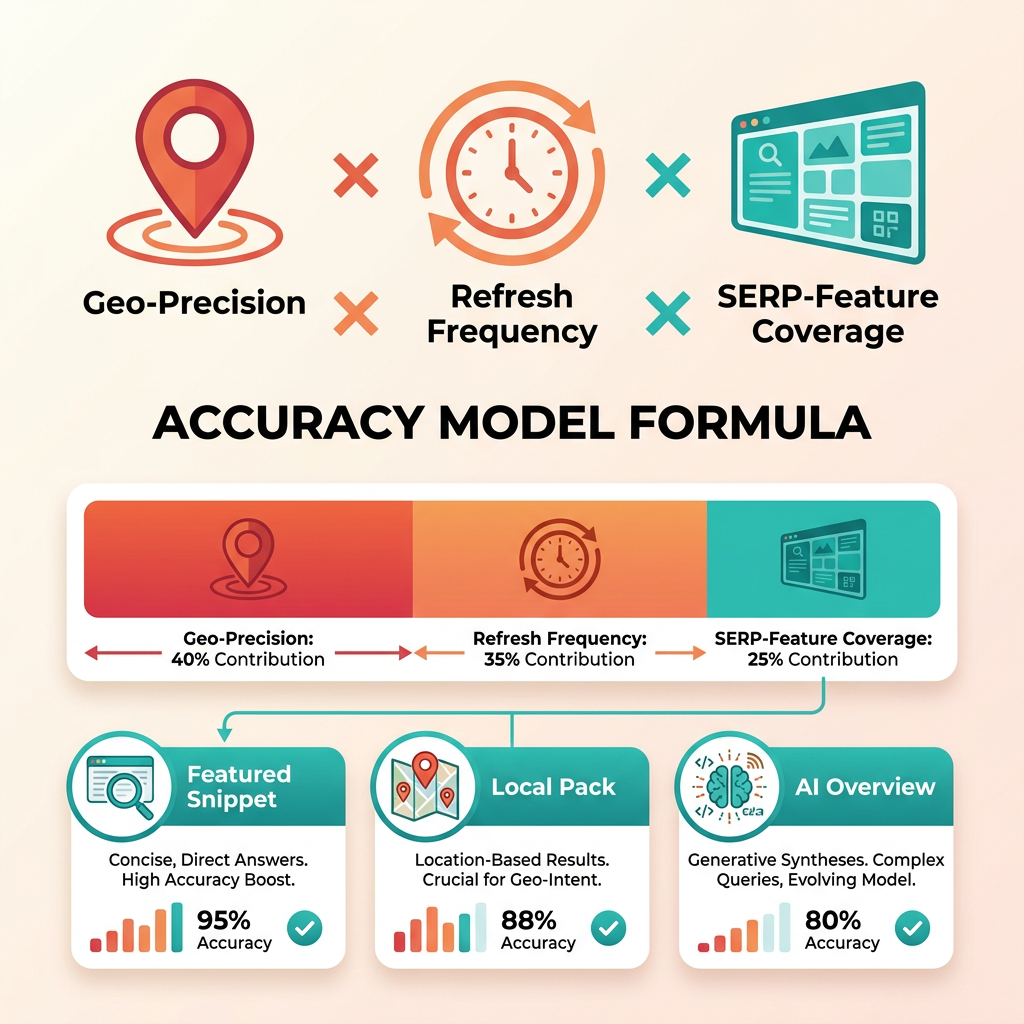
Capturing SERP features like snippets and AI Overviews
SERP feature tracking means logging when your keyword triggers a snippet, local pack, or AI Overview, and whether your page owns that real estate. Start by filtering your keyword set to isolate terms where these features appear. That filtered view tells you where the click opportunity actually lives.
Once you know which keywords surface an AI Overview or snippet, the format of your content matters more than raw position. Snippets reward concise, structured answers. AI Overviews pull from clear, well-organized passages. AnyPost generates SEO-optimized, structured content through the Persona Engine and auto-publishes it to platforms like WordPress, LinkedIn, and X, so you can produce answer-first pieces instead of hoping generic content ranks.
What competitor position tracking reveals
Competitor tracking shows who's gaining on the terms you care about and, just as useful, surfaces rivals you didn't know were competing. AnyPost's SERP Competitor Analyzer studies the top-ranking articles for a term and builds a winning article structure, so you can see where rivals are pulling ahead and where the openings sit.
A regional medical clinic might notice a competitor capturing the local pack for several specialized treatment terms over a quarter. That pattern tells you they're publishing location-specific content faster than you are. The signal isn't "we're losing." It's "here's the content gap to close, and here are the exact keywords to close it on."
Use these use cases to steer priorities: track where competitors own snippets you're missing, spot which clusters they're reinforcing, and flag new entrants before they consolidate. From there, AnyPost's Taxonomy Researcher surfaces the low-difficulty keywords in your niche so you can turn competitor data into content that captures those gaps.
Tracking AI search visibility separately
Yes, and treat it as its own metric. AI search visibility measures whether AI-generated answers cite or mention your content. As these answers absorb more query volume, a strong organic rank means less if the AI layer never surfaces you.
One caveat on tracking frequency: avoid over-monitoring stable informational terms. Instead, focus your tracking budget on high-value commercial terms where visibility shifts directly impact lead generation, letting those movements dictate your content updates.
Building a Workflow to Turn Data into Action
Ranking data becomes useful when it points you toward your next piece of content. When a keyword loses ground, that's a signal to revisit your coverage of the topic. AnyPost's Taxonomy Researcher analyzes your business context to surface related low-competition, high-intent keywords, and the AI generates fresh SEO-optimized content, ready to auto-publish anywhere. The automated rank tracker gives you the data; the content engine turns it into published articles, not a passive dashboard you check monthly.
Alerts that justify action
Set threshold-based alerts around the metrics that predict revenue impact, not just movement noise. A minor slip deep on page three changes nothing, but shifts at the top of the search results directly impact traffic volume. The movements worth watching:
Position drops crossing the top-10 threshold. Falling out of the first page means you've lost visibility where it counts. When this happens, prioritize content refreshes that target the same primary keyword plus two related long-tail variants.
Visibility-share declines across a topic cluster. If five related keywords all slide two positions during the same week, that signals a broader authority problem rather than isolated keyword churn. Respond by publishing a pillar article that ties the cluster together, then interlinking it with the existing pages that slipped.
Competitor displacement. When a specific domain jumps ahead of you on three or more tracked keywords, that competitor likely published new content or earned backlinks targeting your topic space. AnyPost's SERP Competitor Analyzer studies the top-ranking articles to identify gaps in your coverage, then the AI generates content that addresses those gaps before the displacement compounds.
Skip alerts for keywords ranking beyond position 20 unless they're brand terms. The signal-to-noise ratio at those positions wastes time you'd spend investigating movement that doesn't affect traffic.
Building the decision workflow
Connect the data you gather to the system that actually publishes content, not just the one that visualizes it. When a ranking drop shows up, AnyPost lets you turn that insight into a ready-to-rank article and auto-publish it across your platforms from a single dashboard, so the finding becomes published content instead of a note someone reads and forgets.
Watch competitive keywords closely. Weekly-only snapshots miss mid-week competitor moves during the detection window that matters. Keep a tighter eye on high-value commercial terms and a lighter cadence on long-tail informational keywords. The response-time advantage compounds over the extended timeline typical of organic search campaigns.
Tag keywords by business priority, not just search volume. A 200-volume keyword converting at 8% justifies faster response than a 2,000-volume keyword converting at 0.5%. With AnyPost's real-time analytics, you can see how each piece performs and focus regeneration on the terms that drive qualified leads and revenue. Low-converting terms can wait for the next content sprint.
Read position data alongside impression trends. Your automated rank tracker logs your position; Google Search Console logs how many times Google actually showed your result. When position holds steady but impressions drop 30%, that mismatch signals either a SERP-feature displacement (a featured snippet stole your visibility) or search-demand seasonality. Reading both together helps you decide whether the fix is a content refresh or patience.
We treat the most important metric as organic conversions, not rankings themselves. A page holding position 3 that converts at 0.2% needs rewriting more urgently than a page dropping from 8 to 11 that converts at 6%. Keep conversion rate in view alongside position data, or you'll optimize for visibility metrics that don't move revenue.
Frequently Asked Questions
1. Can an automated rank tracker measure rankings from different cities or countries?
Yes, most automated rank trackers support geo-specific tracking down to the city or postal code level. This is crucial because search results vary significantly by location. For example, a boutique gym ranking highly in one district might drop significantly just a few blocks away. Match your tracking radius to how your customers actually search.
2. How often should I refresh my ranking data for the most accurate results?
Align your refresh frequency with your team's capacity to act on the data. If you only update your website weekly, daily ranking updates will create unnecessary noise. Focus daily tracking on highly volatile, high-value terms where immediate action is required, and use weekly tracking for stable informational content.
3. What happens if two of my pages rank for the same keyword?
This indicates that multiple pages on your site are competing for the same search intent. To resolve this, identify which page has stronger historical performance and conversion rates, then consolidate the content of the weaker page into it. Use 301 redirects or canonical tags to guide search engines to the primary URL.
4. Does a #1 ranking guarantee the most traffic for that keyword?
No. The layout of modern search results pages means that even the top organic spot can be pushed far down the page. If a query triggers multiple sponsored listings, local maps, or interactive answer boxes, the click-through rate for the first organic result drops significantly. Track your overall pixel height or visual prominence on the page rather than just numerical rank.
5. How do I know which ranking drops actually cost me revenue?
Integrate your rank tracking tool with your web analytics platform to map keyword positions directly to conversion data. By prioritizing alerts for pages that historically generate leads or sales, you can ignore minor fluctuations on low-value informational pages and focus your resources on protecting high-revenue URLs.
6. Can automated trackers detect when a competitor publishes new content targeting my keywords?
Yes. By monitoring competitor domains alongside your own, you can spot when a rival's visibility suddenly spikes across a specific topic cluster. This shift usually indicates they have launched a new content campaign or updated existing pages, allowing you to audit their strategy and adjust your own content plan accordingly.
