Automated SEO Reporting: What Metrics Matter and How to Set It Up

Key Takeaways
- A useful automated SEO report tracks five things: keyword rankings, organic traffic, technical issues, backlink health, and a voice-fit score.
- Baseline setup with Google Search Console and Analytics takes two to four hours. After that, you're reporting.
- Weekly upkeep is short. Thirty to forty-five minutes covers health checks, voice-fit alerts, and small dashboard tweaks.
- The voice-alignment column is the part most dashboards skip. It flags when AI copy drifts off-brand, so you can fix tone before publishing.
- Rankings refresh daily, so you catch position shifts tied to a new post quickly.
- Backlink metrics track both what you gained and what you lost. That is the honest way to read a link profile.
Quick Summary
The table below shows the article in miniature. It covers what an automated SEO report should track, how it scores whether AI copy sounds like your brand, what data you need, and how much work it takes.
Most dashboards stop at rankings. We added a voice-alignment column because rankings tell you nothing about whether the AI published something that reads like a stranger wrote it.
Use the table to compare core SEO signals, voice-match metrics, data sources, and setup effort. Then decide: does a lightweight setup do the job, or do you need something that auto-adjusts future posts for relevance and ranking?
Which metrics should the report track?
Use the same high-impact KPIs a manual analyst spends hours pulling, plus a voice-fit score. It tells you whether AI content still sounds like you. Five non-negotiables:
- Keyword rankings – watch daily shifts that line up with new content pushes.
- Organic traffic – total visits and top landing pages, so you can see each article's impact.
- Technical SEO issues – catch crawl errors before they bleed traffic.
- Backlink health – authority gained and lost.
- Voice-alignment – tone analysis flags any drift from your style guide, so the system can nudge the next draft back on-brand.
How much time does setup and maintenance take?
Pre-built templates and direct API connections let you skip spreadsheet building entirely. Once the data pipeline is live, it runs on its own and sends scheduled updates to your inbox. Your team stops compiling data and starts reading trends and fixing flagged voice issues.
What technical skill do you need?
The difficulty falls into three tiers.
- Low – tools that pull straight from GSC and GA through built-in connectors. Basic SaaS navigation, nothing more. Fine for small teams.
- Medium – solutions that let you add a custom voice-analysis API or CSV feed. Some data-mapping knowledge, no code.
- High – platforms with full-stack integrations across multiple data sources. You'll want a data engineer or analyst to set it up and troubleshoot.
Match the tier to your team's skills and how complex your voice-matching workflow actually is.
| Tool (placeholder) | Core Metrics (✓) | Voice‑Fit Score | Data Sources | Setup Time | Ongoing Effort | Difficulty |
|---|---|---|---|---|---|---|
| AnyPost Basic | Rankings, Traffic, Tech, Links | ✅ | GSC + GA | 2 hrs | 30 min / wk | Low |
| AnyPost Pro | Same + Voice Score | ✅ | GSC + GA + API | 3 hrs | 45 min / wk | Medium |
| AnyPost Enterprise | Same + Voice Score | ✅ | GSC + GA + Looker Studio | 4 hrs | 60 min / wk | High |
| AnyPost Lite | Rankings, Traffic, Tech, Links | ❌ | GSC + GA | 2 hrs | 30 min / wk | Low |
| AnyPost Custom | Same + Voice Score | ✅ | GSC + GA + CSV | 3 hrs | 45 min / wk | Medium |
How to read the table: Pick the row that matches your current stack. Already feeding GSC and GA into a dashboard? A low-difficulty option gets you running fast. If voice consistency matters, spend the extra setup hour on a medium or high tier that adds the voice-fit module.
Match the tier to your team's capacity, and the report becomes something you actually use, not another thing to maintain.
Why bother automating this at all
An automated SEO report earns its keep when it does more than repeat your rankings back to you. AnyPost's Persona Engine surfaces whether AI-generated copy matches your brand's tone, and paired with real-time analytics, a monthly data dump turns into an ongoing feedback loop that steers the next post toward higher relevance and better SERP performance.
How automation cleans up your data
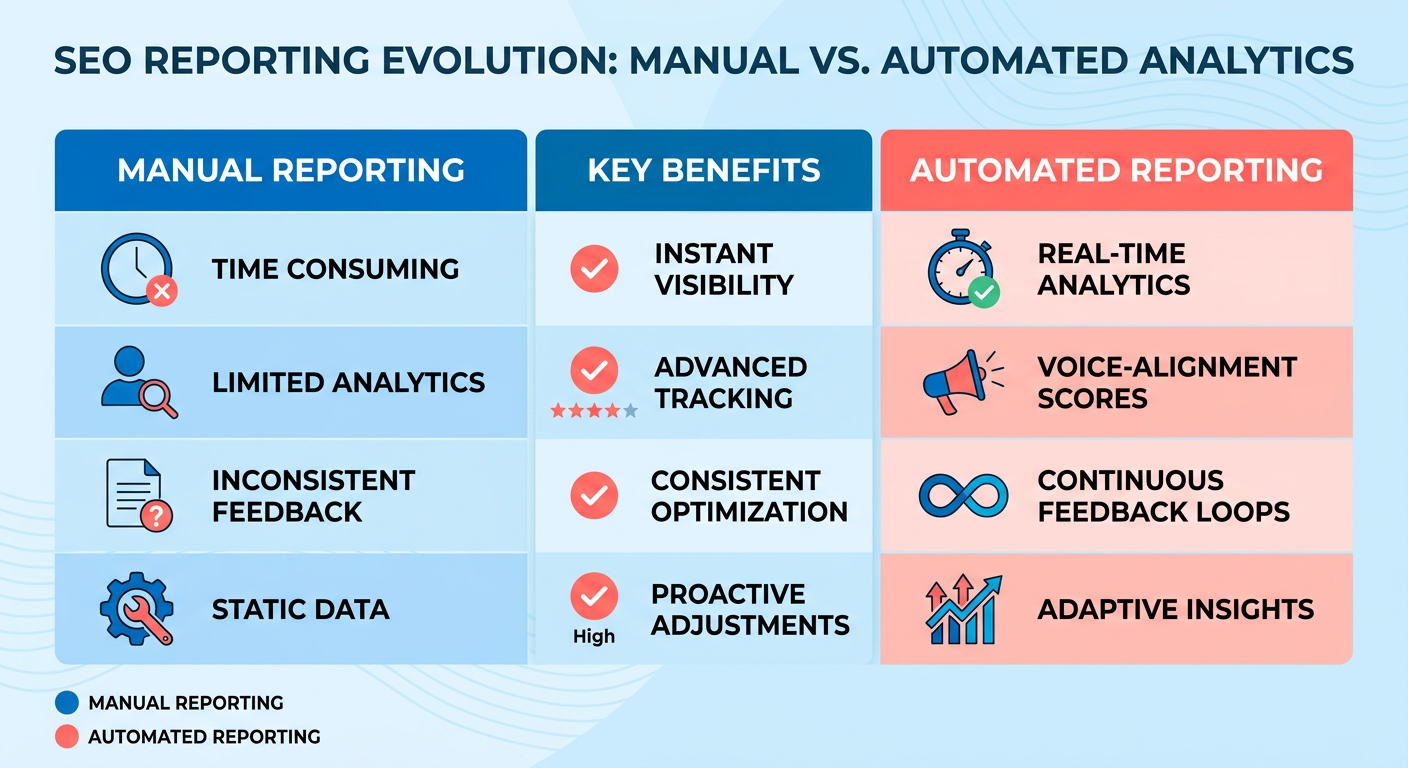
Automation pulls data straight from Google Search Console, Google Analytics, and your CMS. No copy-paste means no copy-paste errors. Syncing those signals automatically keeps your metrics consistent and gives the AI a reliable foundation when it refines content recommendations.
What it does for the bottom line
The obvious win is time. Hours spent compiling spreadsheets and building manual reports come back, and you can point them at strategy, campaign optimization, and the work that actually drives growth.
When automation isn't worth it
If you're publishing under a dozen pieces a month, a full automated setup may not pay off. Linking Search Console, GA4, and the Persona Engine needs a baseline of data to produce reliable insight, and at low volume you won't have it. A lightweight spreadsheet plus the occasional manual audit is cheaper and does the job.
Our take: the value shows up when traditional SEO KPIs and AI-driven brand-voice alignment run through one platform. When both streams meet in a single report, you shift from reacting to reports to shaping content before it goes live, and each new post learns from the last.
For teams ready to scale, the next move is mapping your integrations (Search Console, Analytics, AI-content scorer) and scheduling regular data pulls. Once the pipeline runs, brand-voice insights show up next to keyword rankings, so you can adjust tone, style, and keyword placement before publishing. That's the difference between a monthly chore and a daily growth engine.
The metrics worth putting in the report
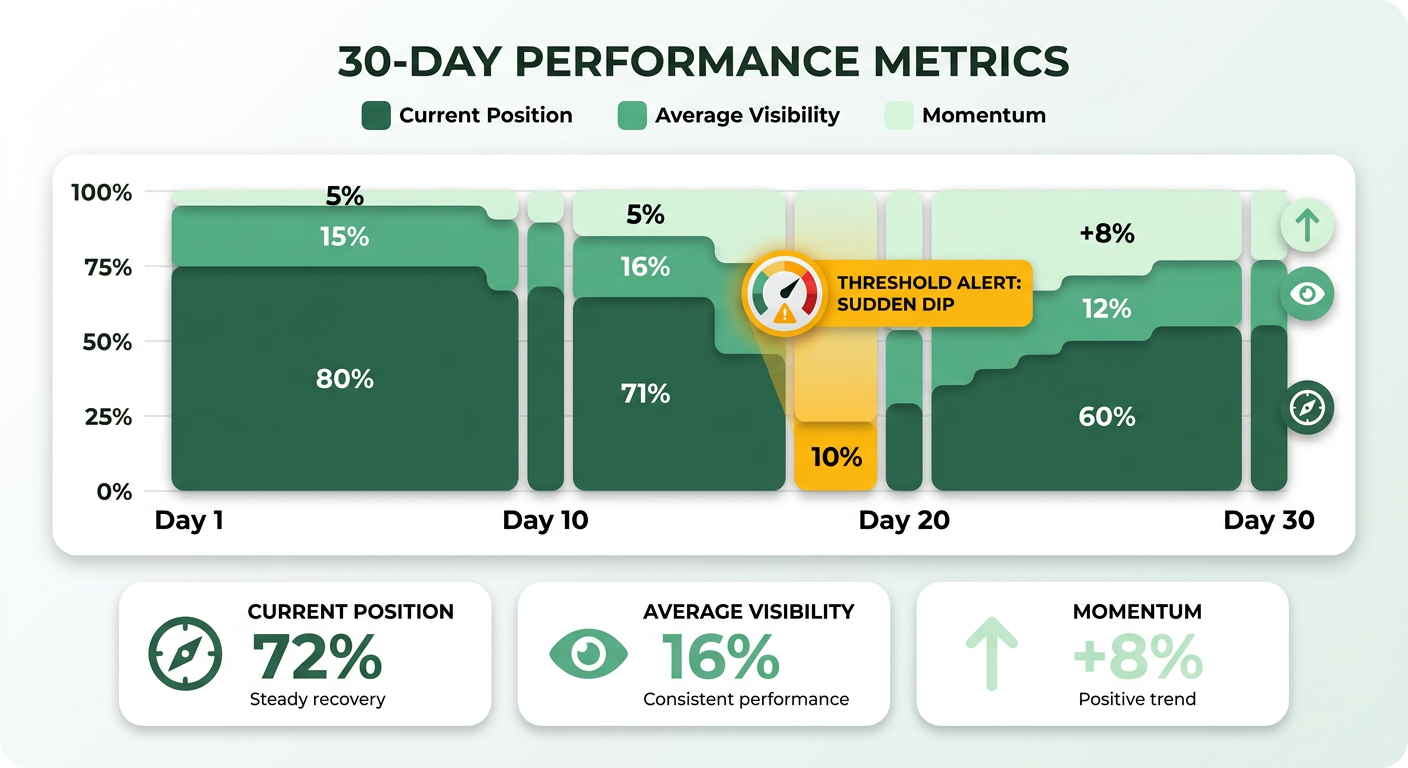
Track current position, average visibility, and momentum over the last 30 days. Together, they show where you stand now and which way you're heading. Our report logs daily rank changes, so a sudden dip fires an alert and prompts a look at the latest AI draft. Daily tracking helps you spot changes tied to your SEO work, and we pair that with the visibility metric to see if a content shift also moved brand-voice alignment.
Set a visibility threshold. Any keyword that slips below it lands in the "Action Required" section. We also run a visibility index that weights impressions from high-traffic queries more heavily, so you can see fast where effort will pay off. When a keyword keeps underperforming, the system recommends a rewrite that lifts the voice-fit score before you republish.
How we judge backlink quality
Count referring domains, then weigh the authority of each source. A handful of high-trust links beats dozens of junk ones. The system pulls domain-rating data from the sources you connect and cross-checks new links against a spam list, following the old quantity-plus-quality rule.
When high-authority backlinks land, a "Link Impact" metric correlates new domains with traffic uplift, so you can chase outreach that actually moves the needle. If a link profile grows fast but stays low-authority, it gets flagged for manual review before it turns into a penalty.
The technical checks and voice signals to surface
Surface Core Web Vitals (LCP, FID, CLS), mobile-friendly status, and crawl-error counts. Then lay the voice-fit score over the top to rate each AI-generated page against the brand persona. Automation is good at uncovering technical SEO issues, and slow pages often truncate AI-generated sentences, which drags the fit score down.
The report groups technical alerts by severity and ties them to the voice-fit trend line. A rise in page-speed errors usually shows up as a dip in the voice-fit metric. When that happens, the system suggests a speed fix and a short copy revision to keep the tone intact. Rendering problems should not be the reason a crawler misreads your content's style.
"Automated reporting saves time and reduces errors, making it easier to review SEO performance." – source
Keep these four metrics front and center, and the report turns raw data into something you can act on. Every AI-created piece can climb rankings and still speak the brand's language.
Setting up data connections and API access
The report pulls raw ranking data, traffic signals, and the tone-matching scores from AnyPost's Persona Engine, all from inside the platform. Connect the analytics you already use, drop the manual exports, and the report runs on a real-time foundation that keeps future posts aligned with your SEO goals and brand voice.
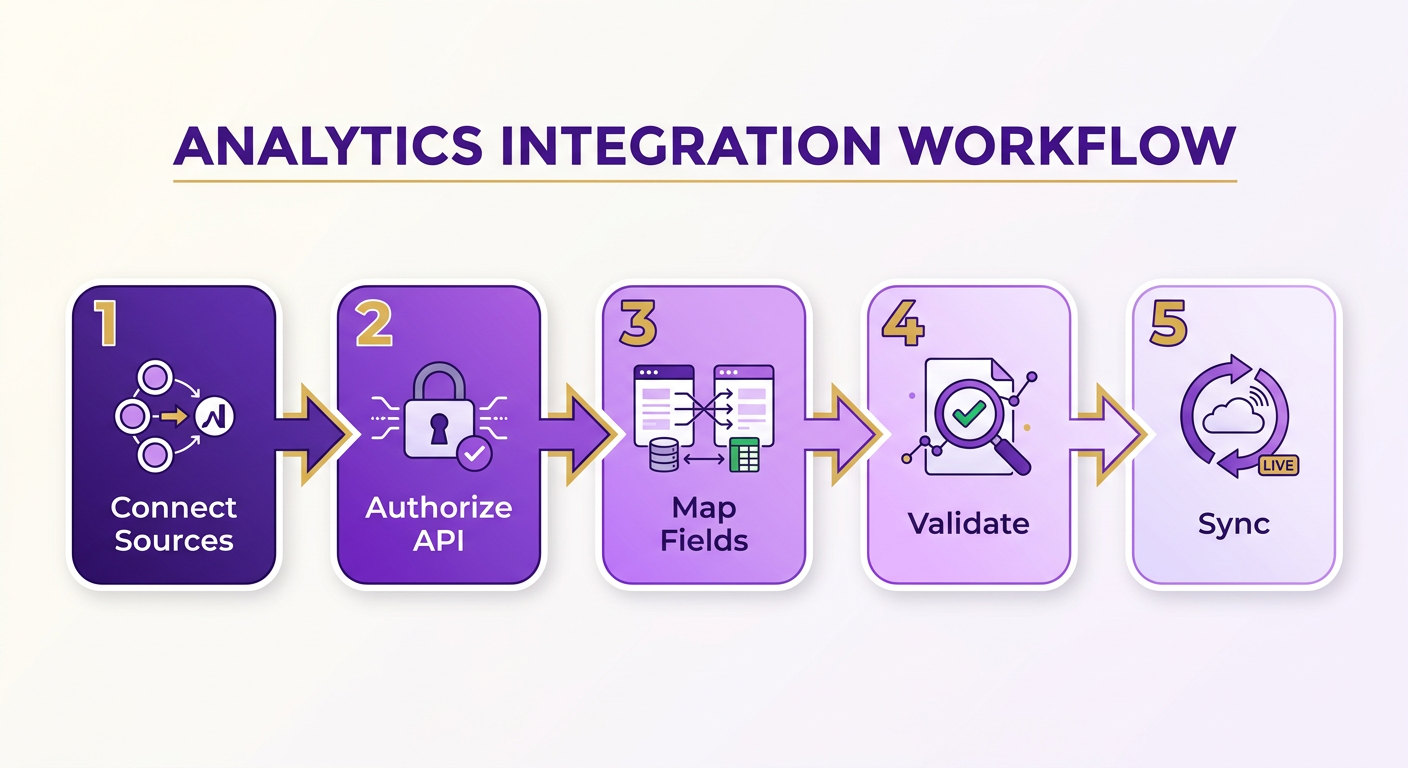
First step: connect your analytics sources to the AnyPost dashboard. Once that's done, the same workflow applies to any source you add later.
Connecting Google Analytics
AnyPost integrates with Google Analytics through the Analytics Data API. Provide read-only credentials in your Google Cloud project, and AnyPost can pull daily sessions, bounce rates, and conversion paths, then show them next to your content performance metrics.
- Enable the Analytics Data API in your Google Cloud console.
- Create read-only credentials (OAuth client ID or service account) and upload the JSON key file in the AnyPost integration settings.
- Grant read-only access to the Analytics property so AnyPost can query without changing anything.
That secure link lets the platform map traffic spikes to specific content updates automatically. With the feed connected, the reporting engine pairs traffic metrics with the tone-matching score to show how closely each AI-written article reflects your voice.
Connecting Google Search Console
Same idea, through the Search Console API. Enable it in the same cloud project, provide read-only credentials, and AnyPost can pull keyword positions, impressions, and click-through rates.
- Enable the Search Console API in the API library.
- Create a new OAuth client and upload the JSON key file in the AnyPost settings.
- Add the service account as a property owner in Search Console with read-only rights.
The Search Console data merges with the tone-matching scores, so you can spot a high-ranking page where the AI copy has drifted off-brand and decide whether it's worth a rewrite.
Adding other data sources (backlinks, third-party metrics)
Beyond GA and GSC, AnyPost can ingest backlink metrics and content analysis from third-party tools. Same pattern every time: get an API token, restrict it to read-only scopes, map the endpoint to the dashboard.
- Backlink providers – send an HTTP GET with the token in the
Authorizationheader; the response should include domain authority and new referring domains. - Content analysis engines – call the provider's scoring endpoint after each publish; store the numeric tone score alongside the SEO KPIs.
To avoid over-fetching, request only the fields the report needs (keyword, position, toneScore).
Keeping API access secure
Treat API keys like passwords. Store them in an encrypted secret manager, rotate them regularly, and never hardcode them into source. Where it's supported, IP-allowlisting restricts calls to AnyPost's reporting servers.
- Store JSON keys in a vault such as Google Secret Manager.
- Set up rotation scripts that warn the team before a key expires.
- Restrict scopes to the minimum (
analytics.readonly). - Log every API request and watch for anomalous spikes.
Do these, and you've got a data pipeline that holds up, powering a report that tracks rankings, measures brand-voice alignment, and feeds the next round of AI-generated content.
Building the dashboard
Charts for trend velocity, tables that rank keyword-voice alignment, scorecards for a quick health read. Stakeholders get the picture without digging through raw data.
- Line charts plot daily rank movement; a steep dip flags a post that may have wandered off-brand.
- Bar tables list each keyword next to a tone-alignment indicator, so you can prioritize the rewrites that lift both relevance and ranking.
- Scorecards show totals like average visibility and overall alignment, so executives get the read in seconds.
Connecting data sources without manual exports
Use native connectors that pull straight from Google Search Console, GA4, and your AI engine, then schedule an automatic refresh to keep the dashboard current.
- Enable the Google Data Studio connector – it supports over 1,000 data sources and refreshes on its own, so no CSV uploads.
- Add the SEO API endpoint (SE Ranking's API, for example) to pull keyword positions and visibility indexes in real time.
- Link the Persona Engine output through a webhook that writes tone-alignment data into a Google Sheet, which Data Studio reads as a table.
Customizing the layout for brand-voice insights
Modular sections let you reorder or hide widgets on the fly, and brand-specific color palettes keep the dashboard consistent with your style guide.
- Drag-and-drop sections – put the tone-alignment table next to the keyword trend chart to see cause and effect at a glance.
- Conditional formatting – highlight metrics below a threshold (say, 70) in red, so content that needs a rewrite jumps out.
- Brand colors and logos – apply your visual identity through the theme settings to tie the data back to the brand.
Keep it simple for teams under ten. A sprawling, heavily customized board turns into a maintenance burden fast. If you're small or just piloting automation, skip the deep customization and stick with the default template until you've validated the core metrics.
Wire in live data, visualize the trends, tailor the view to your brand's voice, and the dashboard stops being a static report. You get a faster, more accurate feedback loop that lets AI-generated copy evolve alongside both rankings and brand consistency. For more on KPI automation, see our guide "Automated KPI Reporting: A Practical Guide."
Where automation goes wrong, and how to stop it
Data quality falls apart when raw metrics conflict, when sampling windows don't match, or when privacy tools strip signals out. Those gaps are common, and they lead to bad calls.
- Reconcile across sources: Trust GSC for average position, GA4 for conversion trends, a backlink scanner for link freshness, then reconcile all three in one table.
- Validation checklist: Before a report runs, confirm impressions, clicks, and sessions all clear a reasonable threshold (say, 1k impressions) to filter out noise.
- Noise alerts: If a keyword's visibility drops more than 15% while the voice-fit score spikes, flag it for manual review. That early warning catches tone mismatches before they publish.
Keeping API connections reliable
Treat each API as a contract you renew on schedule, and build a fallback the moment a call fails.
- Credential rotation: Store OAuth tokens in a secret manager and rotate them regularly. Expired tokens are a top cause of silent failures.
- Rate-limit handling: Wrap each request in a retry loop with exponential backoff, so temporary throttling doesn't cascade into missed daily rank updates.
- Health dashboard: A lightweight status panel pings each endpoint every five minutes and raises a Slack alert if latency tops two seconds. It surfaces problems fast and cuts down on missed-update incidents.
When to pause or recalibrate the voice scoring
Watch the Persona Engine's confidence scores. Pause the voice-fit engine when scores get shaky or when a new style guide comes in.
- Confidence monitoring: The engine emits a probability score for each draft; low scores trigger a manual review before the post enters the scheduling queue.
- Weekly gap analysis: The automated weekly report flags keyword gaps, so you can target high-intent topics that support traffic growth.
- Retraining cadence: We retrain the language model each quarter on the latest high-performing articles, keeping the voice-fit metric in step with evolving brand guidelines.
Build in these safeguards, and the reporting process stops being a fragile spreadsheet and becomes an engine that holds up through API updates and network hiccups, aligning rankings with the voice that makes your brand yours.
Case study: an agency that scaled on automation
Consolidate every KPI into one live view, and the report cuts prep time while building a feedback loop that improves both relevance and rankings.
- Connect data sources – The platform pulls from search performance tools and folds in AnyPost's real-time analytics and Persona Engine for one unified view of SEO metrics.
- Add a tone-consistency column – The Persona Engine scores each draft against the client's brand voice and flags anything outside the desired tone.
- Schedule refreshes – The dashboard updates nightly, so stakeholders get fresh insight each morning with no manual work.
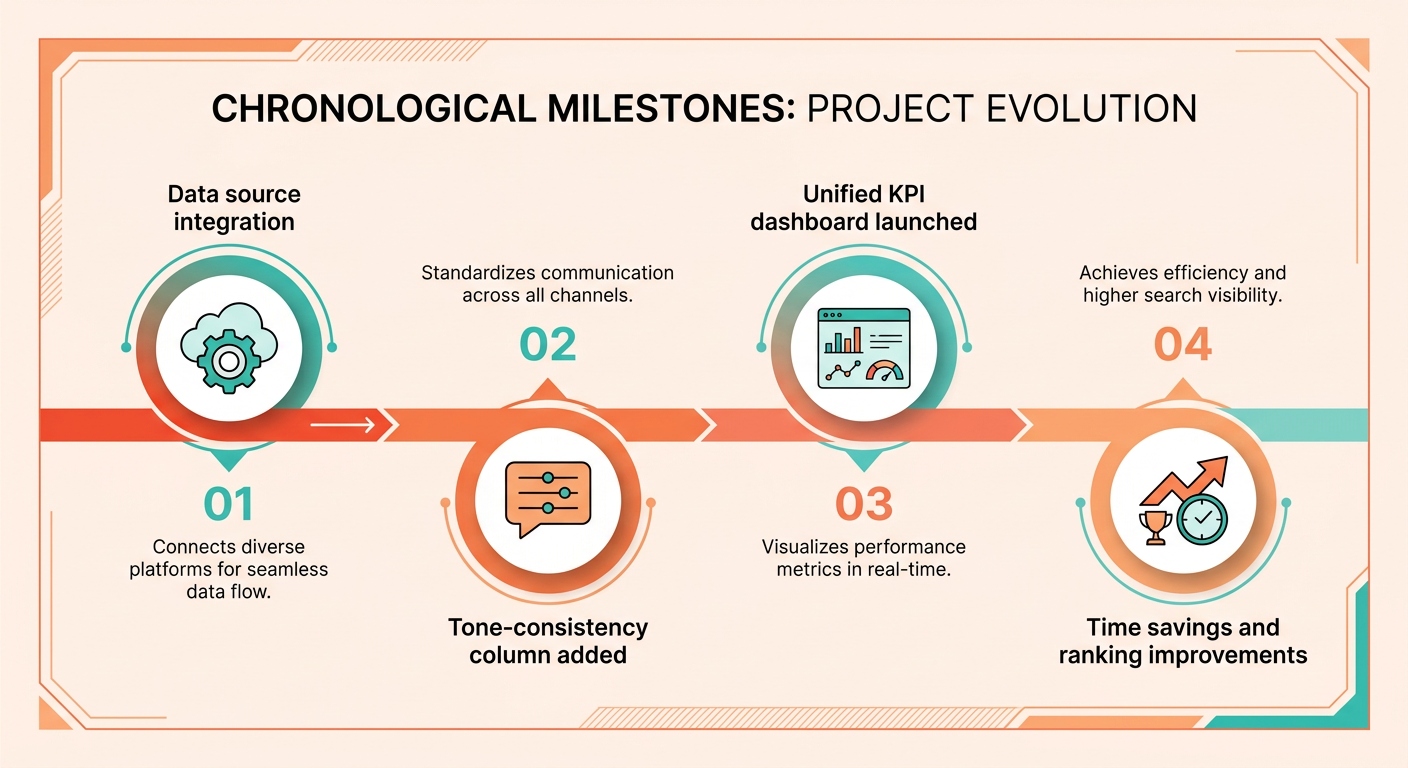
The result is one shareable view with rank trends, traffic data, and tone-consistency signals, all generated automatically.
What the automation delivered
Big efficiency gains and a clear lift in client satisfaction, which fed retention and upsell.
- Prep time dropped from 2.5 hours to under 30 minutes per client, in line with what other agencies see after adopting automated reporting.
- SEO performance got more visible because the tone-consistency indicator caught mismatches before publishing, which helped hold rankings.
- Client retention rose as clean, easy-to-read reports gave prospects confidence in the work.
- Revenue followed – the time saved let the agency take on two extra clients a quarter and upsell existing accounts with premium content-optimization services.
What other agencies should take from this
Automation works when the data pipelines are clean, the tone-consistency definitions are clear, and the team trusts the system enough to act on its alerts.
- Start with a core KPI set – rankings, impressions, CTR, and the tone-consistency indicator. Don't drown the dashboard in low-impact metrics.
- Validate the tone model early – pilot it on a handful of posts, compare the indicator to manual editorial reviews, and adjust the persona parameters before you scale.
- Automate distribution – schedule email delivery or embed the dashboard in client portals so the report becomes part of the cadence, not an extra task.
- Watch for false positives – if the tone flag spikes while rankings dip, dig into the content for lost nuance rather than rewriting on reflex.
Follow these steps and you can pull off the same efficiency boost, turning SEO reporting from a chore into a growth engine. It's how an agency scales its client roster without a matching jump in admin overhead.
Frequently Asked Questions
1. How should I set a voice‑fit score threshold for my content?
Set the voice‑fit threshold where the score reflects acceptable brand tone. Many teams start at 75 out of 100, then raise it to 85 once the model stabilizes. Below the threshold, the system flags the page for editorial review. Scores above it pass automatically to publishing.
2. What steps are recommended when the voice‑fit score drops but keyword rankings stay stable?
If the voice‑fit score falls while rankings remain steady, treat it as a content quality warning rather than an SEO penalty. Review the copy for brand-tone drift, adjust phrasing, and rerun the score. Maintaining tone consistency prevents future ranking erosion when search algorithms later prioritize relevance.
3. How can I push automated SEO alerts to Slack or Microsoft Teams?
Connect AnyPost’s reporting platform to Slack or Microsoft Teams via webhook URLs provided in the integration settings. Configure alerts for rank drops greater than 10 % or voice‑fit scores below the chosen threshold, and the system will push concise messages to the designated channel in real time.
4. What is the best way to monitor several websites from a single dashboard?
Add each domain as a separate data source within the dashboard, then use filter tabs to toggle between them. Unified views can aggregate total traffic, while individual tabs show keyword rankings, technical alerts, and voice‑fit scores per site, keeping reporting consistent across a portfolio.
5. Should I use a CSV feed or an API for importing backlink data?
Use an API when you need near‑real‑time backlink updates and can manage authentication; it reduces manual downloads and supports automated alerts. A CSV feed works for occasional bulk imports or when the provider lacks an API, but requires scheduled imports and may miss timely link-loss notifications.
6. How do I keep data privacy intact when sending copy to a third-party voice-analysis service?
Encrypt all payloads before sending them to the voice-analysis service and store the service’s API keys in a secret manager with limited read-only scopes. Review the provider’s data-retention policy, request deletion of raw text after scoring, and log each request to maintain an audit trail.
