Backlink Automation: How to Automate Link Building Safely

Key Takeaways
- The biggest link gains come from pairing AI prospect discovery with voice-matched content. You compress weeks of manual outreach into a workflow you can run before lunch.
- Tool A runs a full outreach pipeline with AI-personalized emails. $169/month, 1–2 hours to set up, difficulty 3.
- Tool B handles internal link suggestions, has a free tier, sets up in 30–45 minutes, and rates a 2 on difficulty.
- Tool C is a broken-link detector and nothing more. Free, 15-minute install, easiest of the bunch (difficulty 1).
- Tool D mixes prospect search with content prompts. Roughly $120/month, about an hour to configure, difficulty 3.
- Five criteria drive the comparison: automation level, outreach personalization, cost, setup time, and difficulty.
Quick Summary
Backlink automation improves outreach workflow, but only with the right process. The tools that win pair automated target discovery with copy worth linking to. Good articles earn links on their own. Below are the metrics, effort estimates, and safety guardrails you need to size up any tool.
Five metrics to compare backlink tools
Score every tool on five things that actually move ROI. The table below pulls from the major link-building suites, including AI outreach and internal linking assistants, and condenses them into a quick scan.
| Tool (generic) | Automation Level* | Outreach Personalization | Cost (monthly) | Time to Set Up | Difficulty (1‑5) |
|---|---|---|---|---|---|
| Tool A (AI‑backlink builder) | High – full outreach pipeline | AI‑create emails per contact | $169 ≈ | 1‑2 hrs | 3 |
| Tool B (Link Assistant) | Medium – internal link suggestions | Manual review required | Free tier / paid add‑on | 30‑45 min | 2 |
| Tool C (Broken Link Checker) | Low – detection only | None | Free | 15 min | 1 |
| Tool D (Hybrid SEO suite) | Medium – combines prospect search + content prompts | Template‑driven, limited AI | $120 ≈ | 1 hr | 3 |
| Tool E (Custom script) | Variable – depends on configuration | Fully custom | Open‑source | 3‑4 hrs | 4 |
*Automation Level reflects how much of the outreach, linking, or content‑creation workflow runs without you touching it.
How to automate links without getting burned
Safe automation comes down to three things: relevance, quality, and a human check before anything ships. Only target sites whose editorial focus matches your content. AI can surface prospects fast, but you still have to vet them, or you'll end up courting spammy domains. Prioritize link labels that read naturally from the article itself, not forced keyword strings. Run a quick editorial pass before every outreach blast. That's what catches tone mismatches that quietly hurt your brand credibility.
- Let AI draft outreach, but keep a pre-vetted template for the final send.
- Use automated internal linking to tighten site architecture, which earns external links indirectly.
- Scan for dead external links on a schedule and swap in fresh, relevant ones.
How long this actually takes to set up
Setup time tracks the automation level of whatever tool you pick. High-automation suites want you to connect your CMS, import keyword lists, and set contact caps. Medium tools are mostly template customization and email sequencing. Low-level utilities go live almost instantly, but all they do is detect, not reach out.
- Prospecting: 30 minutes to import seed keywords and let the AI build a list.
- Content generation: 10–15 minutes per article when the AI has your brand voice down.
- Outreach scheduling: 5 minutes per batch once templates are approved.
A solo marketer can stand up a full backlink automation cycle in about 3–4 hours the first week, then spend under an hour a week on monitoring and tweaks.
What difficulty rating to expect
Difficulty comes down to integration work. Tools that automate prospect discovery and email personalization need API config plus a review of the AI copy. Internal link suggestions drop into most CMS platforms through standard plugins. Pure detection utilities are browser extensions or web apps you barely have to think about. Custom scripts are the outlier: ongoing code maintenance and regular API updates.
Match the metric profile to your team's actual capacity and you land on a tool that scales safely, without flattening your brand voice or your SEO.
Why bother automating backlinks at all
Backlink outreach is a grind. Automation turns that grind into repeatable work you can run at scale, aimed at high-quality links instead of whatever you can scrape together by hand. Pair automated, voice-matched, SEO-optimized content with a systematic outreach process and you're out of the "hunt and pray" business. That frees a solo marketer to spend time where it counts: building assets worth linking to.
The winning setup usually looks the same. Automation handles data collection; you keep editorial judgment over the content itself. It respects Google's anti-spam signals, and it buys back the hours you'd otherwise burn compiling contact lists and drafting outreach one message at a time.
Where the efficiency actually comes from
Automation cuts the time to produce keyword-rich, SEO-optimized articles. Feed a keyword-rich brief into AnyPost and it generates content that hits your target keywords, matches your brand voice, and bakes in SEO structure from the start.
- Content generation produces ready-to-publish articles from your brief.
- Persona Engine keeps the tone consistent with your brand across platforms.
- Multi-source integration pulls relevant data and references into the draft.
- Real-time analytics track performance so you can sharpen the next brief.
The point is a workflow that keeps your attention on content quality while automation handles repetitive drafting.
Which link-building tasks are safe to automate
Some stages of link building are made for automation:
- Prospecting data collection – scrape SERP and competitor backlink data to build a target list.
- Internal linking suggestions – AI recommends contextual internal links that improve site architecture and SEO value.
- Outreach scheduling – queue reminders and follow-up prompts to keep the process organized, without handing over judgment.
"Automate the operations. Keep the editorial judgment human."
Keep the editorial call in your hands, including the angle, tone, and target keywords, and you stay inside Google's guidelines while still banking the speed.
When to skip full automation
Skip it the moment your goal depends on placement control inside third-party articles or guest posts. Google's anti-spam systems flag patterns that look like mass-inserted links. Anything that auto-injects backlinks into external content is playing with fire. Let automation do the research and outreach, then write the final piece that hosts the link yourself.
In practice: automation carries the heavy lifting: prospecting, data enrichment, and outreach sequencing. A human-written, voice-matched article carries the link. That's how you scale without giving up the quality signals search engines reward.
For a step-by-step on setting up a solo-friendly workflow, see our guide on Backlink Automation for Blogs: A Practical How-To Guide.
Safe Automation Strategies
Safe automation draws a line between the data-heavy steps, such as domain harvesting, metric evaluation, and site architecture mapping, and the creative calls that decide whether a link is any good.
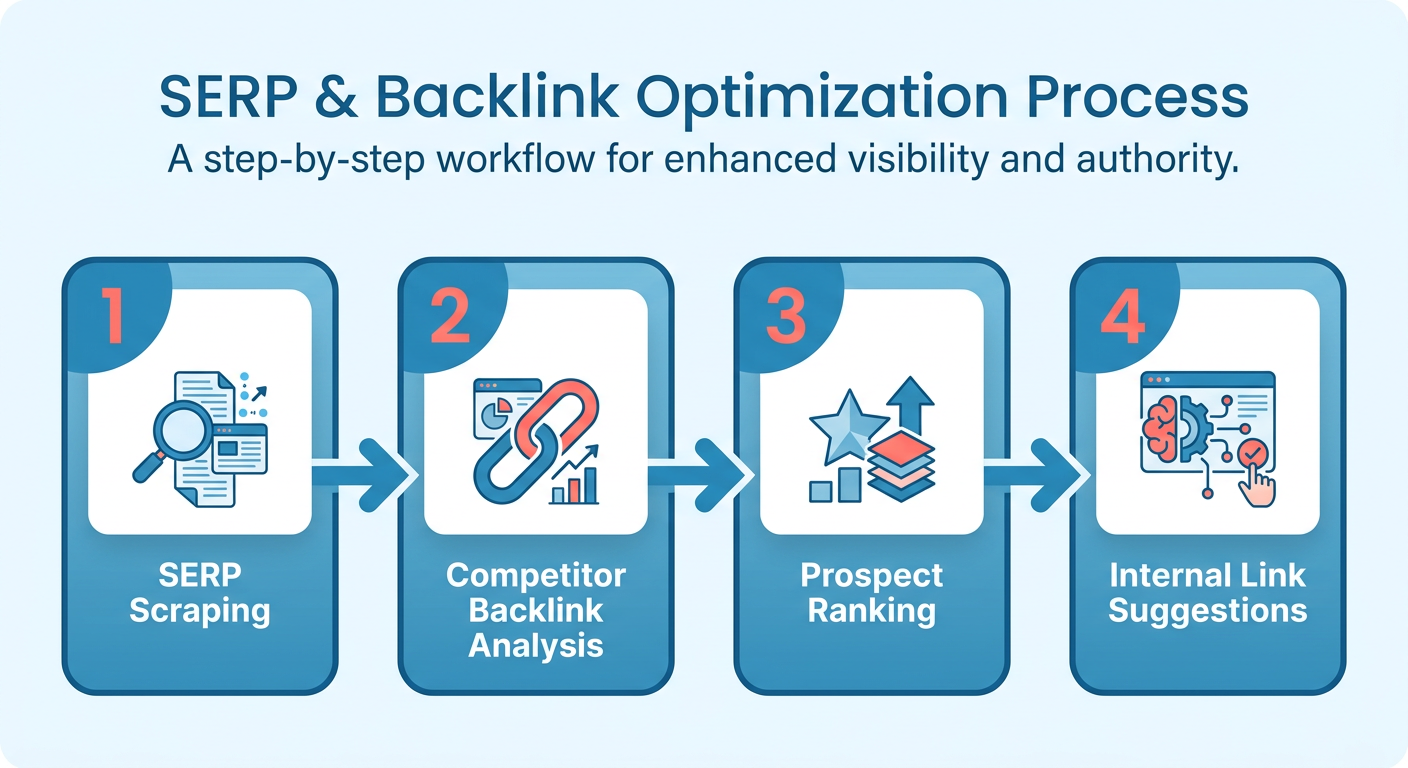
The system scrapes SERPs and competitor backlink profiles, then ranks prospects by relevance and domain authority. That data-gathering stage saves weeks of manual research while leaving the placement decision with you. The built-in optimization features also suggest structural connections inside your own domain, so your site structure stays solid without you giving up editorial control.
Key safety checks:
- Prospect vetting – run every candidate through a spam-score filter before it hits an outreach list.
- Link relevance – tag every outbound link manually for topic and intent.
- Frequency caps – cap new domains at 2–3 per week per content piece to avoid unnatural link spikes.
Which parts of the workflow stay human
Editorial choices, anchor-text nuance, and the final outreach copy. Those stay with you.
Even sharp AI can misread brand tone or miss the context that determines a link's real value. So these steps stay manual:
- Content review – confirm the AI draft actually sounds like your brand and says something new.
- Outreach personalization – write a short, custom intro that references the prospect's recent work. AI can suggest variables; the final sentence is yours.
- Link placement approval – make sure each outbound link earns its spot for the reader, not just the crawler.
How to monitor quality once it's running
The dashboards track backlink performance, anchor-text distribution, and referral traffic trends, so irregularities surface early.
Set up a reporting loop that logs:
- Domain authority trends for each acquired backlink.
- Anchor-text distribution to confirm natural variation.
- Referral spikes that could signal an unnatural link burst.
When a metric drifts past a preset threshold, the system flags the article for a quick human audit. That hybrid approach keeps the pipeline compliant with search engine quality standards while it scales.
Process Automation vs Placement Automation
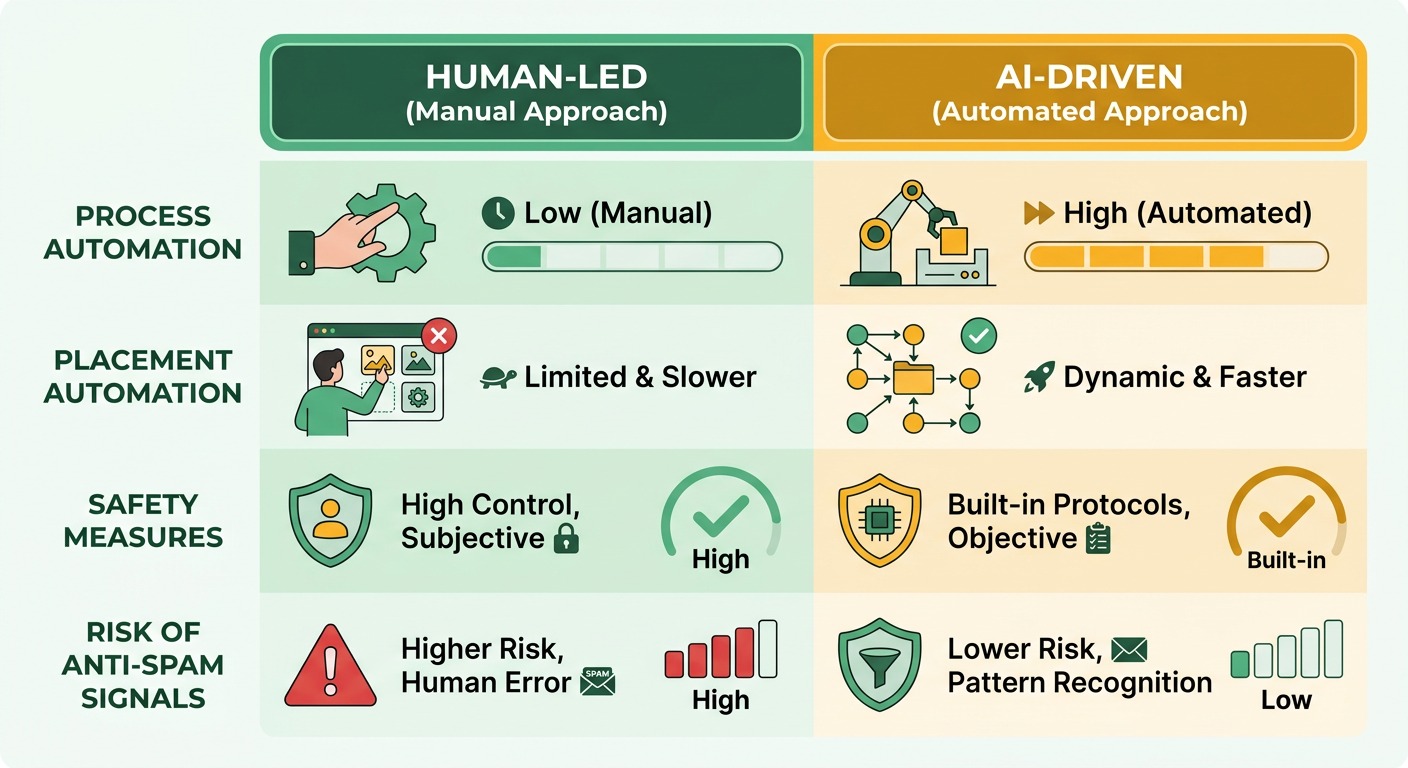
Process automation handles the tasks that gather data: prospecting, internal structural mapping, dead-link detection. It never decides where an outbound link should land. Placement automation does the opposite. It lets the system choose and insert outbound links on its own. The first scales safely. The second can earn you a quality penalty the moment human review drops out. That distinction is the whole game in link building.
Map both onto a solo-marketer workflow and the gap only gets wider. Process steps can run overnight, turning tedious data collection into a background task. Prospecting automation speeds up data gathering by crawling SERPs and competitor profiles, per Natural Links' breakdown of automated link building. Placement steps still need a human voice to avoid the automated-placement penalties search engines spell out.
What process automation gets you
Speed, consistency, and a healthier site structure.
- Prospecting speed: automated SERP and backlink scraping accelerates data gathering, so you can think about content instead of collecting data. Source
- Internal-link optimization: SEO-focused output maps structural connections that fit the article's context, spreading page authority across your site.
- Dead-link reclamation: automated scanning finds broken external URLs so you can pitch your new content as the replacement, per AIOSEO's link-building tools roundup.
Net effect: a solo marketer publishes voice-matched, SEO-optimized articles while the platform quietly reinforces the site's internal network.
Why placement automation is the risky one
Placement automation hands the where to the algorithm, which is exactly how unnatural link patterns get made.
- Penalty exposure: search algorithms flag repetitive, automated outbound links, especially when nobody vetted the relevance. Source
- Loss of relevance: automated outreach can drop links onto low-intent pages, diluting the authority signal and hurting rankings.
- Personalization gap: even AI-powered email personalization can't fully copy a human's nuance, and generic outreach gets lower reply rates.
If you don't have a dedicated reviewer, skip full-scale placement automation until you can audit each prospect by hand.
Blending the two without getting burned
Stitch process automation into the content pipeline, then gate every outbound link behind a manual check.
- Automate prospect discovery: run a nightly scraper that gathers relevant domains and scores them by authority, per Natural Links.
- Generate voice-matched drafts: feed the prospect list into the AI writer, which matches your brand tone and embeds SEO-rich anchors.
- Manual relevance review: before publishing, confirm each suggested outbound link fits the target page's core subject and that the destination domain clears your quality bar.
- Publish and let the content earn links: once it's live, a genuinely useful article pulls backlinks on its own, so you lean less on aggressive placement.
Skip the blended approach entirely if you don't have the bandwidth to review each link. A penalty costs more than the time you'd save. Keep the editorial gate closed and you stay safe while still banking the time savings process automation delivers.
Building an Automated Pipeline
Content ideation is the research phase, where the system reads your niche, competitor content, and keyword gaps to surface topics worth writing. AnyPost.ai's Taxonomy Researcher pulls low-difficulty, high-intent keywords matched to your business context.
- Surfaces topic ideas from search intent and keyword volume.
- Attaches recommended target keywords and semantic variations to each suggestion.
- Checks relevance against your existing content library so you don't rewrite what you already have.
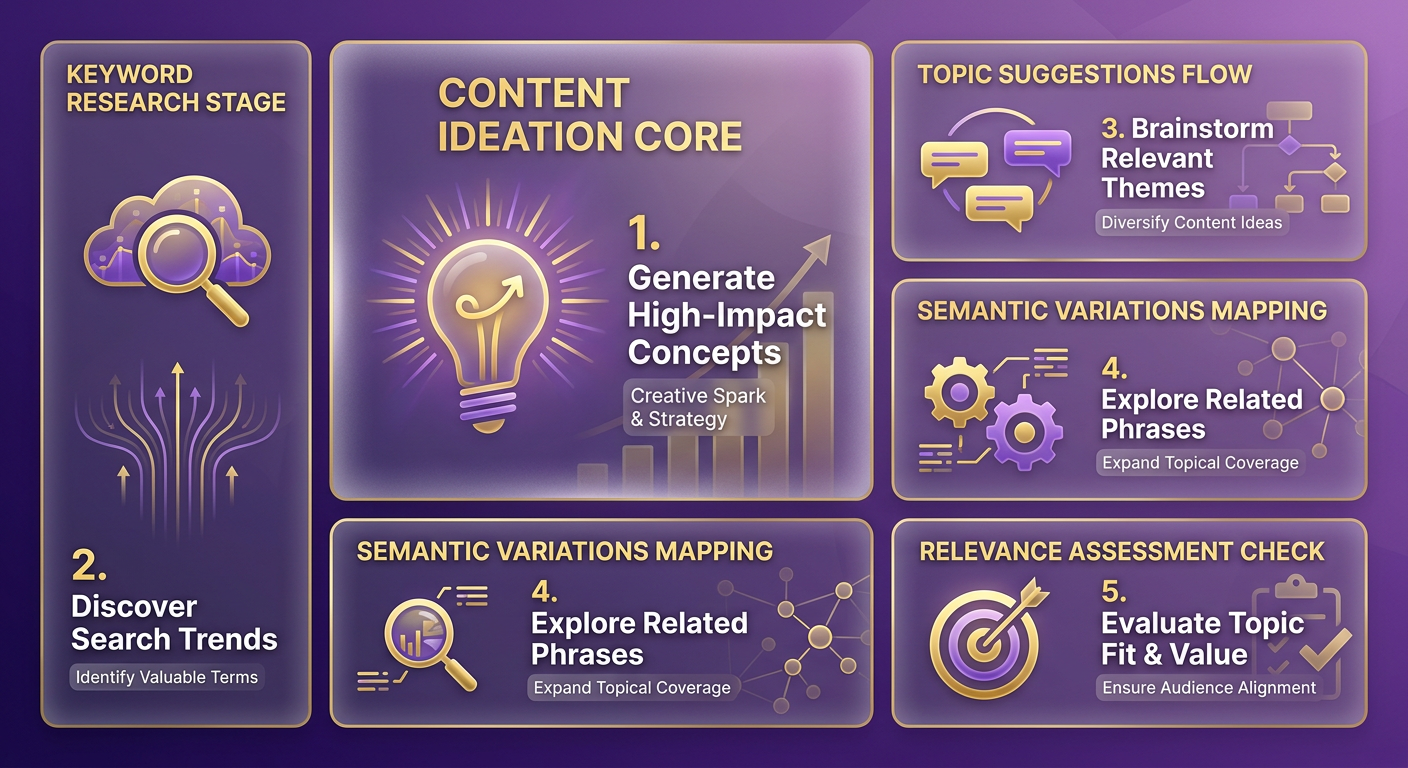
You end up with a living list of article ideas that stays fresh without manual upkeep.
Automating creation and publishing
The tone-matching system drafts articles in the voice you pick, and the built-in SEO optimizations keep each piece structured the way it should be.
- AI drafts a full article with keyword-optimized headings, clean HTML, and relevant internal links.
- The content matches your brand voice through the platform's tone-matching.
- One click publishes to connected platforms: WordPress, LinkedIn, X.
That's how you scale content production without the channels drifting apart in tone.
Which metrics close the loop
Performance tracking tells you whether each published piece actually did anything, and where to point the next one.
- Organic traffic: visits from search.
- Engagement: dwell time, bounce rate, conversion actions on the page.
- Lead generation: form submissions or contact requests tied to the article.
The dashboard lays these out so you can spot your top-performing topics and adjust strategy from there.
When to keep it manual
If your content library is thin or your brand voice isn't nailed down yet, a fully automated pipeline will underdeliver. Start by writing a few pillar pieces by hand, tighten your voice guidelines, then switch on the AI workflow to scale. Wire together AI research, voice-matched creation, automated publishing, and continuous tracking, and you've got a system that feeds itself toward steady organic growth.
Measuring ROI and Ensuring Compliance
Four numbers do the real work: cost per generated article, organic traffic lift, lead conversion rate, and compliance rating. Together they tell you whether the pipeline is paying off while staying on brand.
- Cost per article – total spend (subscription plus any outreach credits) divided by the number of AI-generated pieces that go live.
- Organic traffic lift – week-over-week percentage increase in sessions for pages that got AI-generated content.
- Lead conversion rate – share of visitors who turn into qualified leads after engaging with the new content.
- Compliance rating – a composite of human editorial sign-off, brand-voice alignment, and SEO guideline adherence.
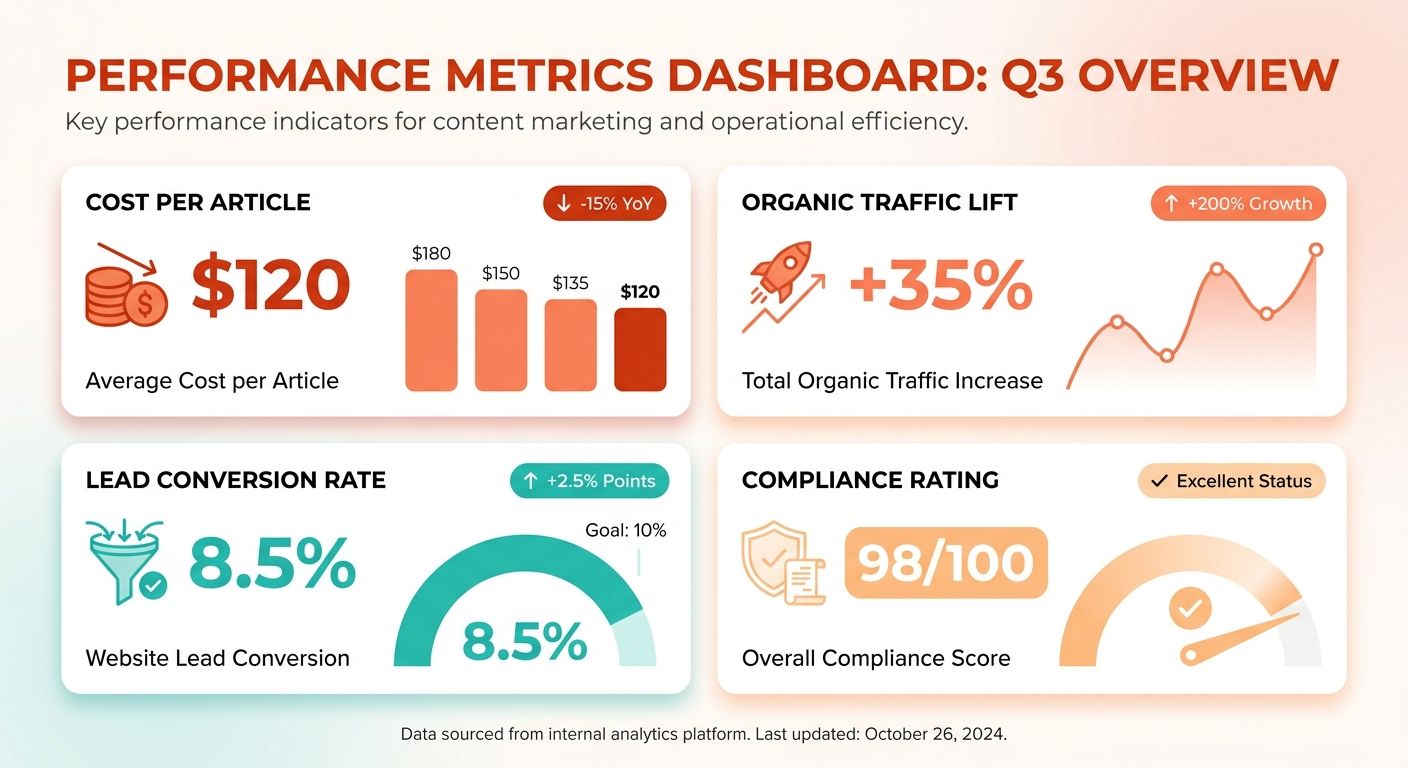
The dashboard pulls these from the same data set that runs the voice-matching and optimization engines, so the ROI view covers the whole loop, from creation to outcome.
Keeping compliance intact as you scale
Three layers keep automation from ever bypassing human judgment where brand consistency and SEO quality matter: content vetting, editorial sign-off, and ongoing monitoring.
- Content vetting – the AI draft is auto-checked against brand-voice parameters and SEO guidelines before a reviewer ever sees it.
- Editorial sign-off – a human confirms the final article matches the intended tone, messaging, and relevance before it publishes.
- Ongoing monitoring – after publishing, the dashboard tracks traffic, engagement, and SEO alerts, so the team can move fast if performance slips.
Keep the decision points manual and let the data-heavy steps run unattended. That's how you sidestep the messes fully automated publishing creates.
When to pull back from full automation
If a compliance rating drops below your safe threshold, or cost-per-article suddenly spikes, pause the pipeline and revert that segment to a manual workflow.
A sudden drop in brand-voice alignment usually means mismatched tone settings, and the content model needs refinement. If traffic lift per article falls below what you expected, your content strategy is probably out of sync with audience intent, which calls for a manual audit. Either way, scale back to assisted automation (AI drafts, human editing) and bring back full automation once the issues are fixed.
Frequently Asked Questions
1. Can I combine a free broken‑link checker with a paid AI prospecting tool without violating safety guidelines?
You can safely pair a free dead-link detector with a paid AI prospecting suite. Use the detector to flag non-functioning external links, then feed the clean list into the AI tool for outreach. Keep a manual verification step before sending, ensuring relevance and preventing spammy domains.
2. What should I do if AI‑generated outreach emails get a low response rate?
If AI-generated outreach yields few replies, audit the personalization variables. Replace generic placeholders with specific references to the prospect’s recent content, adjust the tone using AnyPost’s brand‑voice settings, and run an A/B test on subject lines. Track open rates to pinpoint the weakest element.
3. How can I integrate backlink automation with an existing WordPress editorial workflow?
WordPress sites can adopt backlink automation through a REST API or dedicated plugin that pushes AI-drafted posts into a staging area. After editorial approval, the plugin publishes the article and optionally triggers internal-link suggestions. This keeps the existing editorial calendar intact while adding automated prospecting.
4. Is it safe to run automated broken‑link replacement on high‑traffic pages, and what precautions are needed?
Running automated broken-link replacement on high-traffic pages is possible but requires a backup snapshot and a staging run. First, generate a list of dead URLs, test replacements on a duplicate environment, and monitor 404 logs for regressions before pushing changes live.
5. When is a custom script a better option than off-the-shelf backlink tools?
A custom script becomes attractive when you need niche filtering, such as excluding domains with specific TLDs or integrating proprietary CRM data. It also allows you to schedule prospecting at off-peak hours and to output results in a format tailored to internal dashboards, albeit with higher setup effort.
6. Beyond cost per article, which metrics help ensure compliance with Google’s link-building guidelines?
In addition to production-level financial metrics, monitor anchor-text diversity, the spread of referring domains, and weekly link velocity. Search engines flag sudden spikes or overly optimized anchors, so maintain a natural ratio of branded, exact-match, and generic links. Use a compliance dashboard to alert you when any metric exceeds safe thresholds.
