
Before You Automate SEO Content: Can Your Analytics Kill Losing Articles?

Key Takeaways
- Automation scales mistakes faster than wins, amplifying content search engines already demote.
- One practitioner spent two years building automated workflows before finding duplicate URLs hurt rankings.
- Search engines flag mass updates to weak content as spam signals.
- HubSpot lost 80% of organic traffic after expanding beyond core expertise.
- Pausing automation on underperforming posts after a data audit protects domain authority.
- Google's manual review teams confirmed bulk changes to weak articles can trigger penalties.
- A kill-or-revive matrix prevents automation from polishing failing content.
Why Analytics-First Automation Matters
Before automating SEO content, you need a kill-or-revive matrix in place. Scaling automation without checking strategy first amplifies existing problems. The automation doesn't break, it amplifies what was already broken. When you hand low-performing articles to an automation engine, you're asking it to polish content search engines already demote.
Automation scales mistakes faster than wins. Scaling without a data gate risks spreading structural flaws across your catalog. Without validation, automated systems can repeat technical errors, like broken canonical tags and rendering issues, across hundreds of pages at once. Pausing automation on underperforming posts after a data audit protects domain authority before you scale.
The Hidden Cost of Blind Automation
Search engines treat sudden content shifts as spam signals. When you automate revisions across dozens of articles without analytics validation, you're triggering pattern-detection algorithms that flag bulk changes as possible manipulation. Search quality evaluators look for patterns of mass-produced, low-value updates. When a site makes sweeping programmatic changes without a corresponding lift in real utility, it risks quality-classifier adjustments that depress organic visibility across the domain.
Content dilution happens when a site publishes high-quality but irrelevant articles. That signals to search engines that the domain lacks focus. Search algorithms evaluate topical authority by measuring the concentration of expert content. Spreading production too thin across unrelated subjects weakens this signal, even when individual posts are well optimized. Before you automate, know which articles strengthen authority and which ones dilute it.
Losing articles can still hold backlink equity. A post ranking on page three for a tangential keyword may drive little traffic, but if it has 15 referring domains, deleting or radically changing it can waste link juice built over years. Analytics reveal these mismatches, like a post ranking for "how to file taxes" but attracting traffic for "tax software reviews." That intent gap is invisible without data, and automation can't fix what it can't measure.
Who Benefits Most from Analytics-First Automation
B2B SaaS marketers who rely on evergreen thought-leadership pieces for lead generation see the highest ROI from data-driven gatekeeping. These teams usually maintain 50–200 foundation articles that generate qualified leads over multi-year lifecycles. A single bad automation decision, like revising a high-converting post to chase a trending keyword, can destroy months of conversion work. The analytics step catches these conflicts before they ship.
Recent data shows that 90% of marketers report faster production speeds when using AI tools, and automation can handle 60–70% of knowledge work time. But speed without direction is noise. The new SEO baseline isn't optimization, it's authenticity AI can't replicate. Brands that publish original data still rank and build authority, while interchangeable content disappears. Analytics tell you which articles have defensible differentiation and which ones are commodity content that automation will only make faster to ignore.
A 5-Column Kill-or-Revive Matrix
A lightweight matrix can fit into existing workflows without enterprise analytics platforms. Five columns cover the metrics that matter for automation decisions:
Organic traffic trend – Compare the last 90 days to the prior 90 days. A 20% drop needs 8,000 sessions to be statistically real, so low-traffic articles can't be evaluated on performance alone. Pull from Google Search Console. Target threshold: ≥15% decline with >5,000 sessions. Time to assess: 5 minutes. Difficulty: Easy.
Click-through rate (CTR) – Platform metrics like GSC impressions show higher reproducibility than third-party rank trackers. Use these as kill-switches that pause automation when CTR drops below 2% for non-branded queries. Pull from GSC Performance report, filtered by query. Target threshold: <2% for 30+ days. Time to assess: 5 minutes. Difficulty: Easy.
Bounce rate & engagement – GA4 engagement rate inverts the old bounce-rate metric, so a score below 40% signals content-intent mismatch. Articles with high impressions but low engagement are automation traps, because they'll generate more traffic to the wrong content. Pull from GA4 Pages and screens report. Target threshold: <40% engagement rate. Time to assess: 10 minutes. Difficulty: Moderate.
Keyword ranking volatility – Articles that fluctuate more than 10 positions per week are caught in algorithm flux. Automating them now means optimizing for a moving target. Wait for stabilization or kill the post entirely. Pull from rank-tracking tool or GSC average position over 28 days. Target threshold: ±10 positions in 7 days. Time to assess: 15 minutes. Difficulty: Moderate.
Conversion contribution – Revenue attribution has 58% variance in multi-touch models, so use it for exploration, not kill decisions. But if an article drove zero conversions in 12 months and meets two other kill criteria, it's a candidate for retirement. Pull from GA4 conversion paths or CRM attribution. Target threshold: 0 conversions + 2 other red flags. Time to assess: 30–45 minutes for deep audit. Difficulty: Hard.
Typical time investment: 5 minutes for a quick KPI glance at traffic and CTR, 30–45 minutes for a deep article audit that includes conversion paths and backlink equity checks, and 15 minutes for rule-set validation to confirm your thresholds match your content velocity. Difficulty ratings scale with data availability. If you're already piping GSC and GA4 into a dashboard, the Easy tasks stay easy. If you're manually exporting CSVs and cross-referencing in spreadsheets, expect Moderate tasks to drift toward Hard.
The biggest mistake is treating all metrics as equal. High-reproducibility platform metrics, like GSC impressions and GA4 engagement, should be kill-switches that stop automation. Low-reproducibility metrics, like third-party rankings and revenue attribution, are better for hypothesis generation. Invert the measurement hierarchy: use the data you trust to protect what you've built, and use the data you don't trust to explore what you might build next.
Identify & Flag Losing Articles Using Analytics
Before automating SEO content, you need to know which articles deserve automation and which deserve deletion. Start with a clear framework for evaluating article performance using data from multiple analytics platforms. The goal is to flag losing articles before they enter your automated workflow, not after they've already hurt site authority.
Pull the Right Platform Data First
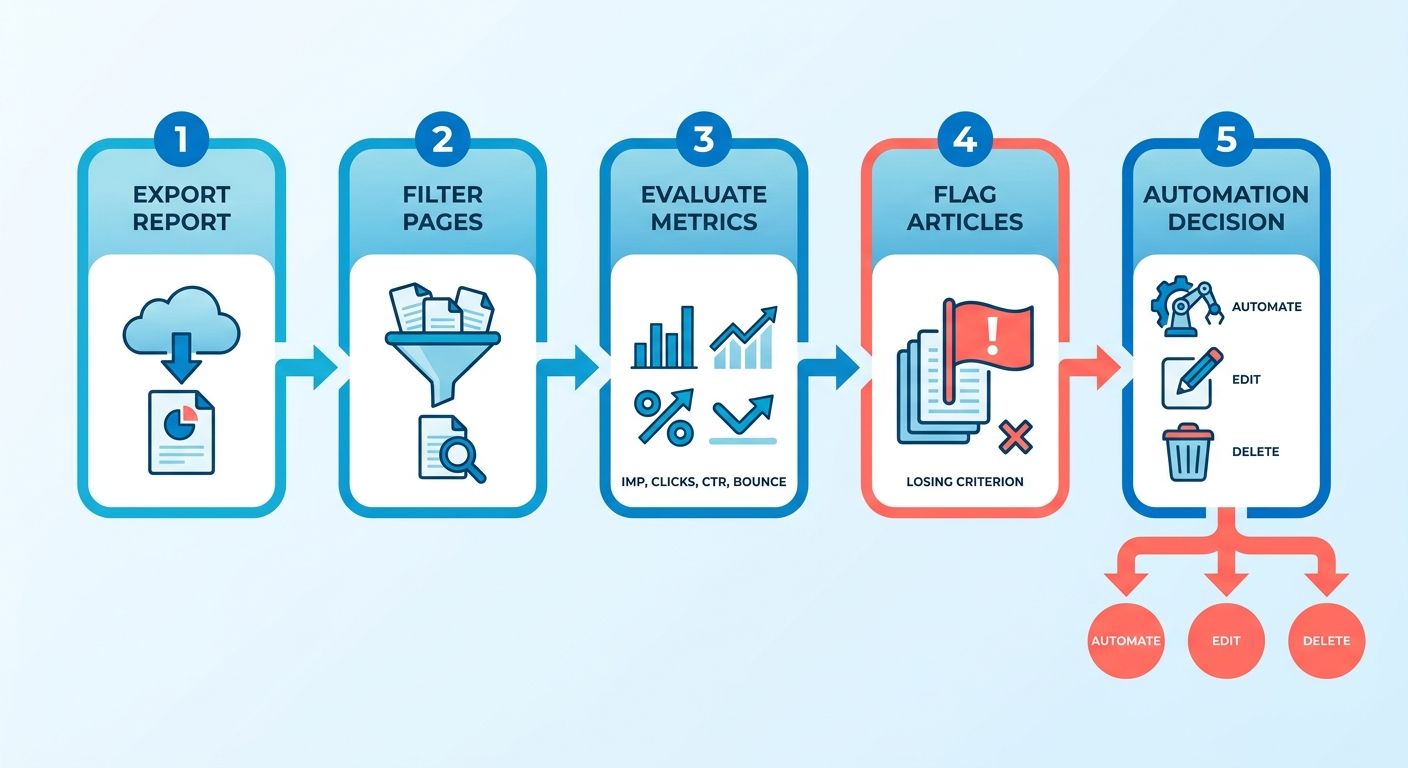
Export the query report from Google Search Console and filter for pages, not just queries. You're looking for articles that lost ground on their primary target keywords, not random long-tail variations. Look for pages with declining trend lines across consecutive months, not just single-week dips.
Next, open GA4 and navigate to the Pages and Screens report under Engagement. Sort by engagement rate and session count, then add a custom comparison for the previous period. A low engagement rate signals users aren't interacting with the content, which means Google's quality filters will eventually catch up. One analysis found that organic traffic drops during site migrations were often tracking breaks, not real declines, so cross-reference multiple data sources before you assume the article is genuinely losing. Because multi-touch attribution models often distribute conversion credit unevenly, relying on one analytics view can lead to false conclusions about an article's true value.
- Filter query reports by landing page to isolate per-article performance rather than sitewide trends, then export for comparison analysis
- Pull GA4 engagement rate and session counts for each article, then create a custom comparison against the prior period to catch momentum shifts
- Cross-reference impression data with session counts to confirm drops are real traffic loss, not tracking configuration breaks or attribution model shifts
The Critical Metrics That Signal Failing Content
Metric #1: Organic traffic decline ≥30% over 90 days. This is your first gate. If an article's sessions dropped by a third or more across a full quarter, it's either a victim of algorithm churn or a sign that the topic no longer matches search intent. Pull the query data for that page. If the primary keyword is stable but traffic tanked, the content itself is the problem.
Metric #2: Keyword ranking drop >5 positions for ≥3 target keywords in an 8-week window. Volatility is normal; directional collapse is not. A 3% conversion rate increase requires 11,000 sessions for statistical significance, so don't trust single-keyword swings. Look for pattern drops across multiple terms tied to the same article. If four related keywords all fell together, the page lost topical authority in Google's eyes.
Metric #3: Click share erosion >40% while ranking position holds steady. This is the SERP relevance alarm. You're still showing up in the same spot, but fewer people click. That means your title, meta description, or snippet lost appeal compared to competitors. The research shows a ~18% click boost from featured snippets, so if your click share is falling while competitors' rises, you're losing format advantages or trust signals.
Metric #4: Exit rate spike >35% from previous baseline. GA4 tracks this as sessions where the page was the last viewed. If users land and leave faster than before, the content no longer matches the search query that brought them. Combining automation with human expertise ensures insights are actionable, so don't automate this article until you've diagnosed whether the intent shifted or the content aged out.
Metric #5: Conversion contribution <1% of monthly leads after a baseline ≥4%. Pull the attribution report in GA4 and isolate organic sessions that converted. If the article used to drive leads and now doesn't, it's either cannibalized by a newer piece or Google demoted it for quality reasons. Attribution models reveal organic's true influence, so check whether the article still assists conversions even if it's not the last click.
- Flag any article with ≥30% traffic decline over 90 days and confirm the drop appears across multiple analytics platforms to rule out tracking issues
- Track ranking drops for ≥3 target keywords in an 8-week window to catch pattern losses rather than normal SERP volatility
- Compare click share trends against ranking stability to isolate relevance loss. If position holds but clicks fall >40%, your snippet or title lost appeal
- Monitor exit rate for spikes >35%, which signal that the content no longer matches the search intent behind the query
- Pull conversion attribution reports and flag articles that dropped from ≥4% of monthly leads to <1%, indicating lost commercial relevance
When the Numbers Lie: Statistical Confidence Thresholds
A 10% engagement rate decrease requires 12,000 sessions to be statistically real, far more than most analysts assume. If your losing article only has 800 sessions per month, the metric swings you're seeing might be noise, not signal. In that case, the kill decision has to rest on strategic fit, not performance data.
When an article drifts from your core subject matter, it acts as a drag on your site's overall search performance. If a declining post sits outside your primary topic cluster, pruning it can actually boost the rankings of your remaining pages by consolidating your topical footprint. Focus your resources on areas where you have established expertise rather than trying to maintain a sprawling, disconnected library. A low-traffic article that dilutes your expertise is more dangerous than a high-traffic article that's declining.
- Check session volume before trusting metric changes. Articles under 12,000 sessions can't produce statistically reliable engagement-rate conclusions
- Audit topical alignment even when traffic is stable. Articles that drift outside your core expertise risk site-wide authority loss regardless of individual performance
Configure Safe Automation Rules in AnyPost.ai

We translate analytics thresholds into clear guidelines that govern which content enters automation and which stays reserved for human review. The main goal is to prevent low-performing articles from entering your automated workflow, and to ensure any AI-assisted refresh follows strict guardrails that preserve quality. When you automate for SEO without these guidelines, you're scaling mistakes faster than wins.
Set Traffic and Stability Gates Before Auto-Publishing
Your first guideline should block any article from automated publishing unless it clears a minimum traffic baseline and demonstrates ranking stability. Set a threshold that filters out articles that haven't proven they can attract and hold attention. Many practitioners look at monthly organic sessions paired with ranking variance over a defined period.
Why these two metrics together? Traffic alone can mislead when the article is losing rankings. Stability alone doesn't tell you whether anyone clicks. Together, they ensure you're only automating content that has already shown it can perform. Without automated safeguards, systems will process whatever content they receive, even if that content is actively declining in search visibility. A pre-automation filter ensures your resources go only toward pages with a stable foundation, preventing the system from wasting API credits on articles that need manual structural work.
Check your backlink profile health as part of this gate. Any article that lost a significant portion of referring domains in a short period should stay manual until you investigate the drop. A sudden backlink loss often signals a penalty risk or expired partnerships, and automating a refresh on top of that can amplify the damage.
Limit AI Rewrite Depth to Preserve Voice and Authority
For evergreen posts that pass the traffic gate, cap AI-generated rewrites to a portion of the original word count. This boundary keeps automation focused on updating stats, refreshing examples, and tightening structure, not rewriting entire sections that carry your brand voice and domain expertise. Machines optimize for metrics; humans optimize for people. When you let automation rewrite too much of an article, you risk flattening the editorial tone into generic SEO prose that algorithms now actively penalize.
We've seen this happen in practice. One agency watched three clients receive Google penalties in a single month after automated tactics violated guidelines the team didn't even know existed. The automation didn't break the strategy, it scaled a bad one. Limiting rewrite depth forces you to preserve the original research, practitioner insights, and specific examples that made the article rank in the first place.
Pair the rewrite cap with editorial oversight. Review any article that shows signs of losing its original conviction and specificity. This catches flat rewrites that pass grammar checks but lose the voice readers trust. If your platform doesn't calculate readability natively, integrate a lightweight readability API that flags passive voice density and generic filler phrases before publishing.
Schedule Post-Automation Audits with Monitoring
Build a post-publishing audit into every automated workflow. This window lets you catch KPI breaches, like engagement rate drops, bounce rate spikes, or ranking slides, before they compound. Establish clear thresholds for what counts as a performance drop, and have a plan to address articles that cross those thresholds quickly.
The audit isn't optional. Automation doesn't just speed up good work, it speeds up mistakes too. The real question isn't whether AI can assist, but whether the assistance helps or hurts. A post-automation audit answers that question with platform data, not guesswork.
- Verify traffic baseline: Confirm the article attracts enough organic sessions per month or shows a stable upward trend over a defined period before enabling automation
- Confirm keyword intent alignment: Check that the primary keyword matches the article's headline and meta description. Misalignment signals the content drifted from its original purpose
- Check backlink profile health: Flag any article that lost a significant percentage of referring domains recently; investigate before automating
- Set AI rewrite depth limit: Cap AI-generated changes to preserve brand voice and original research
- Enable editorial review: Require human review for any article showing signs of tone or readability issues
- Schedule post-automation audit: Monitor engagement rate, bounce rate, and ranking position; address any metric that shows significant decline
- Integrate real-time alert dashboards: Connect Google Search Console and GA4 to a monitoring tool that flags KPI breaches quickly
Separate Low-Risk and High-Risk Workflows
Not every article needs the same oversight. Segment content by current performance and competitive pressure. Articles with stable rankings outside the top positions and limited backlink velocity may be candidates for more frequent auto-updates with minimal review. Articles ranking in top positions, or any page competing for high-value commercial keywords, benefit from keeping strategic decisions in human hands.
This approach lets automation handle repetitive work, like updating dates in listicles, refreshing seasonal references, and recompressing images, while keeping strategic decisions with your team. Algorithms detect patterns, but creativity breaks patterns. When you automate strategic content without thoughtful segmentation, you're asking the system to make judgment calls it isn't equipped for.
Monitor how your automation performs over time. Track what percentage of updates maintain or improve performance, and watch for patterns in articles that require rollback. If your success rate declines, pause the workflow and revisit your gating criteria. You may be letting underperforming content through, or your rewrite parameters may need adjustment.
Ongoing Monitoring, Testing & Optimization
Once you deploy automation rules, your work shifts from setup to vigilance. We watch automated content like a test pilot watches a prototype's first flight, with continuous data feeds, predefined abort thresholds, and a bias toward intervention over hope. When you automate SEO without layered monitoring, you're betting the system will self-correct when algorithms shift or user intent drifts. It won't.
Set Time-Boxed Performance Windows
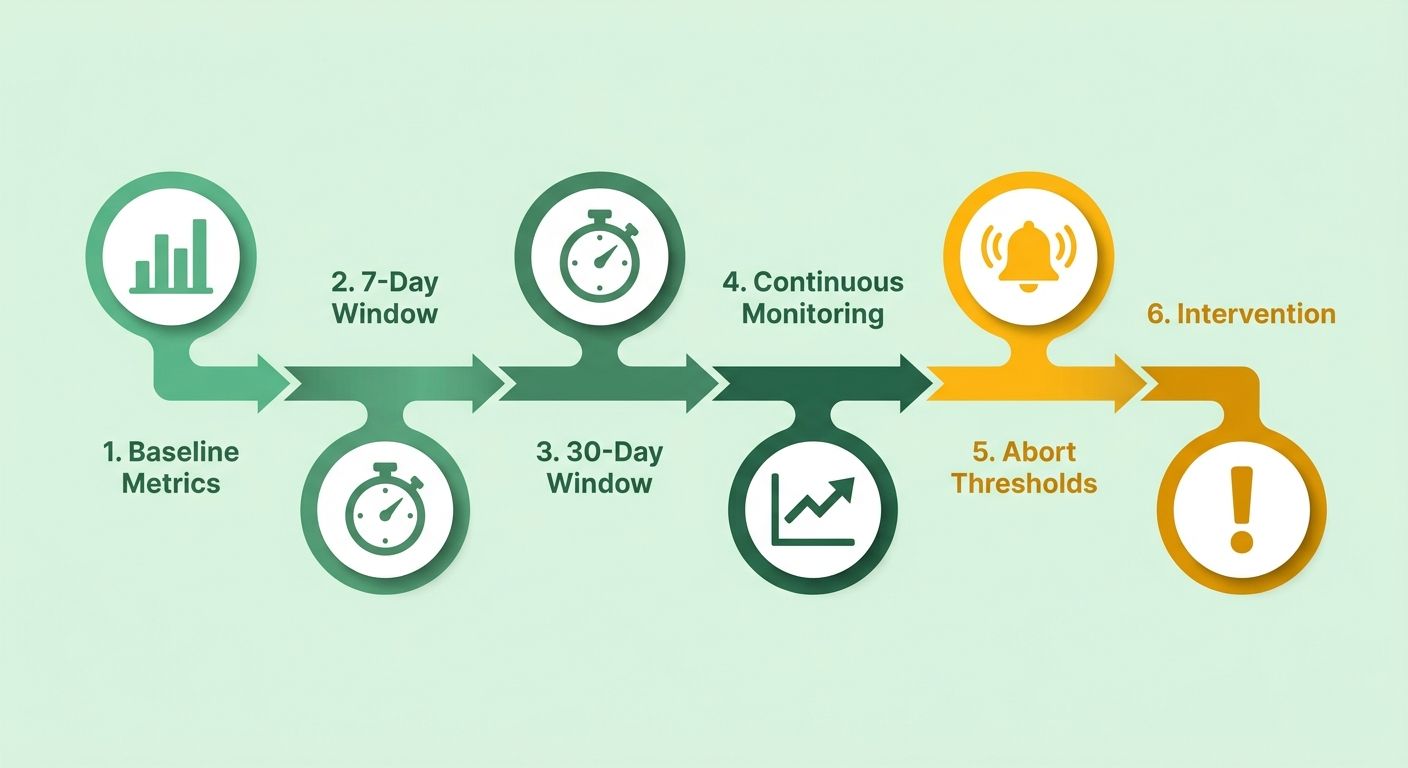
We compare pre-automation baseline metrics against post-automation performance in two watch periods: 7 days and 30 days. The 7-day window catches immediate technical failures, like tracking breaks, indexing blocks, or templated content that triggers spam filters. The 30-day window reveals whether the automated content holds engagement and rankings once the novelty wears off.
Pull engagement rate, average position, and impressions from GA4 and Google Search Console for every automated article. Flag any piece that drops more than 10% in impressions or climbs more than five positions in average rank within 48 hours of publication. Sharp moves in either direction usually signal a measurement error, a redirect loop, or content that's badly off-tone for the target query.
Since conversion paths are rarely linear, judging automation success only by last-click revenue can lead to premature rollbacks of valuable top-of-funnel content. Use high-reproducibility platform metrics, like GSC impressions and GA4 engagement rate, as your kill-switches. Reserve revenue attribution and third-party ranking tools for hypothesis generation, not for triggering rollbacks.
Build Rollback Triggers Into Your Workflow
A traffic dip larger than 10% within 48 hours should fire a Slack notification and pause the automation queue until you confirm the cause. Most SEO platforms let you set custom alerts. Connect them to your team chat so the signal doesn't sit unread in an email digest. We've seen automated rewrites push duplicate meta descriptions live across 50 articles in one evening because the template drew from the wrong field. The 10% threshold caught it before Google's next crawl indexed the duplicates.
Automated rollback is harder to configure safely than manual review, but you can script a revert-to-last-known-good version if your CMS supports version control. When the alert fires, the system pulls the previous article revision back into the live slot and flags the automation run for human audit. This setup prevents a broken automation rule from compounding overnight.
Set up secondary monitoring for edge cases your primary metrics won't catch. One B2B site noticed their automation was rewriting product comparison tables into bulleted lists, which passed engagement thresholds but destroyed the structured data that powered their rich snippets. They lost featured snippet positions on 23 high-value queries before a manual spot-check revealed the pattern. Now they run a weekly crawl specifically hunting for schema markup changes on automated pages.
Run Quarterly Deep Audits to Catch Drift
Every 90 days, rerun the full analysis you used before launching automation. Content that passed your quality gate six months ago may now sit below threshold if Google's algorithm updates shifted toward experience signals or if your site's authority grew and lifted the traffic floor for what counts as "winning."
Document every finding in a shared knowledge base. When you catch a drift pattern, like seasonal query shifts, a keyword cannibalization cluster, or a content type that automation handles poorly, log the rule adjustment and the data that triggered it. Over time this becomes your playbook for refining automation gates without starting from scratch each quarter. After implementing a 30-day review cadence and logging every tweak, one SaaS blog recovered lost traffic within two months by identifying that automated meta descriptions were too generic to compete in high-intent verticals.
Use the quarterly audit to surface systematic blind spots. One publisher found their automation consistently underperformed on articles with FAQ schema because the template pulled answers from the wrong database field, producing generic responses that didn't match the questions. Human editors had been fixing it on high-priority posts, but hundreds of mid-tail articles had shipped with broken FAQs. The audit gave them the data to justify building a dedicated FAQ extraction module instead of patching individual articles.
Test AI-Generated Variants Against Your Baseline
A/B test automated headlines, meta descriptions, and opening paragraphs against the human-written originals. Most low-traffic articles can't hit statistical significance thresholds in a single test cycle, which is why we reserve A/B testing for high-traffic pages where the sample size supports a confident call.
We use ongoing testing to surface which content types benefit from automation and which need a human touch. Tutorial content with step-by-step instructions tends to automate well because the structure is rigid. Opinion pieces and strategic analyses don't. They rely on voice and argumentation that current language models flatten into generic takes. Testing shows you where to invest automation resources and where to route work back to your editorial team.
Run cohort analyses on automated content by publish date to spot degradation over time. One team noticed articles automated in Q1 maintained their rankings through Q2, but Q3 automated content dropped 12 positions on average within 60 days. The difference: Google's August core update prioritized author expertise signals, and their automation wasn't pulling author bios into the new template. The cohort split made the pattern visible where aggregate metrics showed only noise.
Putting It All Together: A Real-World Automation Playbook
We see automation deliver the cleanest results when marketers treat it as a four-week sprint, not a flip-the-switch event. Here's how that playbook unfolds in practice, from discovery to scale.
Pull Your Kill-or-Revive Matrix in Week One
- Audit topical alignment by comparing each article's topic against your core expertise. Content outside your domain weakens authority faster than low traffic does
- Cross-reference bounce rate and session duration in GA4 to catch articles that attract clicks but fail to hold attention. These poison your site's engagement signals
- Map internal linking patterns to identify orphaned pages that receive no contextual links from other articles, leaving them isolated from your topical clusters
Before entering automation, audit your content for topical alignment. Marketing teams often find that articles outside their core expertise, like general marketing tools content on a compliance-focused blog, weaken topical authority even when traffic looks stable. Archive off-topic content before scaling to keep your domain strength intact.
Configure Your Automation Rules in Week Two
- Set a minimum traffic baseline (typically 200+ sessions over 90 days) before any article qualifies for automated refresh
- Require ranking stability by blocking automation for any article that dropped more than 8 positions in the past 30 days. Let those stabilize under manual review first
- Build a human-approval gate for articles targeting high-stakes keywords, like buyer intent, product comparisons, or compliance topics, where mistakes carry brand risk
- Schedule batch automation for qualifying articles, staggering publication across weekdays to monitor indexing response
- Define freshness triggers such as competitor updates or algorithm shifts that should pause automation until you review strategic positioning
AnyPost's automated content generation works best when you use analytics data to define which articles qualify for automation. Set clear thresholds based on traffic, ranking stability, and strategic value so the system scales only content that's already performing or poised to improve.
Monitor First-Week KPIs and Adjust
- Flag rollback triggers for any article where organic traffic drops more than 20% week over week or bounce rate climbs above 65%
- Compare pre-automation baseline metrics against 7-day performance windows to catch technical failures like broken schema markup or templated content patterns
- Audit SERP feature loss by checking whether automated articles lost featured snippets, People Also Ask placements, or image pack visibility after refresh
- Review user feedback signals such as on-page time and scroll depth to ensure automated sections match the engagement quality of your manually written content
Watch for patterns in your first batch of automated articles. If certain content types underperform, like FAQ sections that duplicate existing on-page material, adjust your brief or template so each piece adds unique value. Small rule changes early prevent larger quality issues at scale.
Report 30-Day Results and Calculate ROI
After 30 days, measure your lift in organic traffic across automated articles and compare the time saved in content creation against your subscription cost. Track engagement metrics to confirm quality remains consistent, and identify which stagnant articles gained traction under the new approach. A clear cost-benefit analysis, like writer hours saved versus platform investment, will show whether automation delivers positive ROI in your first cycle.
The scalability tip: export your automation rule templates, like traffic gates, stability thresholds, and approval workflows, and reuse them for adjacent content pipelines. Once you've validated the approach on blog content, the same framework can guide other formats and channels, shortening setup time and accelerating results.
FAQ
How do I know if my content is ready for automation?
Pull a 90-day traffic report from Google Search Console and filter for articles with at least 200 organic sessions and stable rankings, meaning no more than 8-position swings in 30 days. Cross-reference GA4 engagement rate to confirm users are interacting with the content. If an article meets these thresholds and sits within your core topical cluster, it's a candidate for automation. Articles outside those parameters need manual intervention first.
What's the fastest way to spot automation mistakes?
Set up a 7-day performance window that tracks impressions, engagement rate, and average position in GSC and GA4. Flag any article where impressions drop more than 10% or bounce rate climbs above 65% within 48 hours of publishing. Most automation errors, like duplicate meta descriptions, broken schema, and templated content that triggers spam filters, surface within the first week if you're watching the right metrics.
Can I automate high-stakes content like product comparisons or compliance topics?
Generally, no. Articles targeting buyer-intent keywords or regulatory topics carry brand risk that automation can't assess. Build a human-approval gate for these pieces so your editorial team reviews strategic positioning, competitive claims, and legal language before publishing. Reserve automation for lower-stakes content like listicles, seasonal updates, and tutorial refreshes where the structure is rigid and the risk is minimal.
How often should I audit my automation rules?
Run a quarterly deep audit that re-evaluates your traffic gates, stability thresholds, and topical alignment. Google's algorithm updates shift ranking signals, and your site's authority evolves over time. Content that passed your quality gate six months ago may now sit below threshold. Document every rule adjustment in a shared knowledge base so your team can track drift patterns without starting from scratch each quarter.
What do I do if automated content tanks my rankings?
Trigger an immediate rollback to the last known-good version if your CMS supports version control. Pull the GSC query report to identify which keywords lost ground, then audit whether the automation changed title tags, meta descriptions, or structured data. Run a side-by-side comparison of the original and automated versions to pinpoint what broke. If the issue is systemic, like a template error affecting multiple articles, pause the automation queue and fix the root cause before resuming.