Before You Pick a Repurposing Tool: 5 Source Checks That Beat Google's Duplicate Filter

Key Takeaways
- Google's duplicate filter rewards one thing: a clear signal of which version is original. Repurpose without checking the source, and you lose that signal.
- Buffer's syndication to Medium drove 1,215% traffic growth because canonical tags showed search engines exactly where the original lived.
- Canonical tags protect attribution. Timing delays protect first indexing. Neither replaces the other.
- With 211 million pieces of content published every second in 2026, proper attribution is survival, not nicety.
- Most AI repurposing tools turn a blog into decks or threads instantly. Almost none check whether the source is canonical, fresh, or authoritative first.
- Without derivative pages pointing back to a source of truth, Google picks the canonical winner itself. It picks wrong more often than you'd like.
- Duplicate damage comes from a handful of predictable source-level defects. A pre-publish check screens for them in minutes.
Why the source matters more than the copy
Google's duplicate filter rewards one thing above all: a clear signal of which version is original. Repurpose without checking the source, and you lose that signal. Your own content then competes against itself in the index. That's the fastest way to lose ranking on a page you already earned.
Standard automation workflows skip this validation. They're great at fast format conversion. They have no logic to ask whether the source document has the authority or indexing status to win in search. A source-check framework fixes that by validating the original before anything ships.
Why the source, not the copy?
Your source of truth is the single version Google treats as canonical, the one every repurposed piece should visibly descend from. If your derivative pages don't point back to it, search engines have to guess the primary URL themselves.
In a saturated index, clear attribution isn't optional. When Buffer syndicated to Medium, they saw big traffic growth because search engines got a clear roadmap back to the original. Without that signal, syndication can cannibalize your primary rankings instead of supporting them.
To do this, coordinate your publishing schedule with your technical tags. Give Google a brief window to index the original first, so it's recognized as the first-born. The canonical tag then cements its status as the primary authority.
The duplicate traps that keep showing up
The traps are predictable, which is why a pre-publish check catches them. Most duplicate damage comes from a few source-level defects you can screen for in minutes.
- Check the canonical tag points to the true original. Without it, your repurposed version can outrank and cannibalize the page that earned the authority.
- Verify content freshness before reusing. Backlinko saw a 50% traffic jump in 7 days from refreshing a stale flagship guide, so old source material drags every derivative down with it.
- Confirm domain authority of the source. Repurposing from a low-authority page passes weak signals forward and gives Google little reason to rank the copy.
- Match the format to the destination. HTML-to-PDF or feed mismatches create near-identical snippets that trip duplicate warnings.
- Scan for hidden duplicate snippets already live elsewhere. You can't fix overlap you never knew existed.
Who should actually run these checks?
Content-heavy teams that scale through automation. Agencies, SaaS companies, and e-commerce brands repurpose at volume, so a single unflagged source can multiply across dozens of pages before anyone notices the traffic dip.
You can't check for duplicate risk until you know what you already own. Asset inventory comes first, then the repurposing tool. That order is non-negotiable, and it's the step most workflows skip. AnyPost starts by crawling your entire site to build a Business Context Graph of your products, messaging, and audience, so every repurposed piece descends from a source you actually control.
There's a real tension worth naming. Syndicating with canonical tags protects your search visibility, but platforms can suppress in-platform reach for anything that links out. SparkToro put it bluntly:
"Make native content for our platform. Don't you dare link out. Or we'll crush your reach."
You're optimizing search indexing against feed distribution. Our call: for anything you want ranking in Google, protect the canonical source first. Native-only posts serve a different goal. Treat them as separate work.
1. Check the source format before you convert anything
Google's rendering engine reads structure, not intent. If your source file lacks a clean heading hierarchy or a usable text layer, the crawler can't tell your repurposed version apart from the original. So it flags both. That's why format compatibility is the first gate, before you touch any repurposing tool.
Most AI repurposing tools assume your source is already machine-readable. Feed them a clean HTML article and they work fine. Feed them a scanned PDF with no text layer, and they either fail silently or spit out garbled structure that trips a duplicate warning downstream.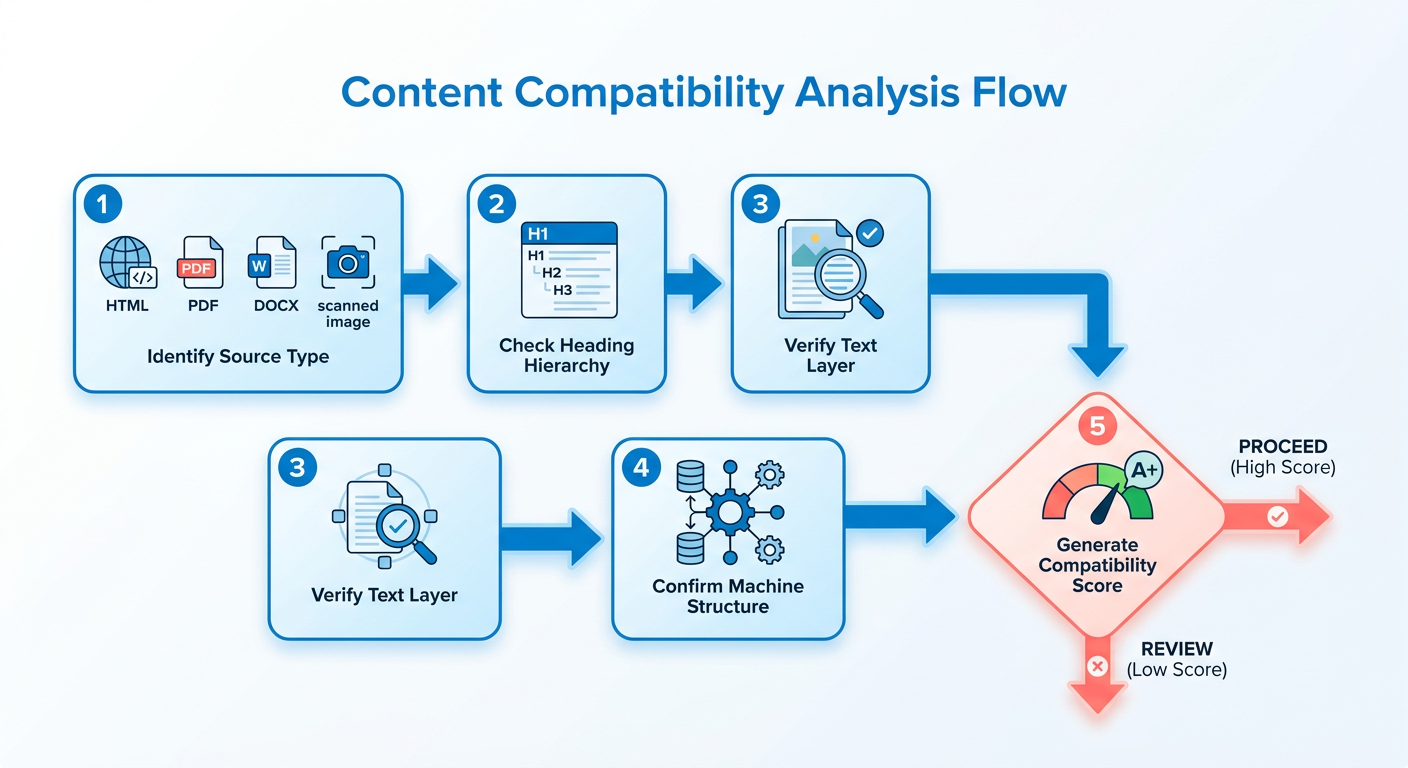
Which source formats are safe to repurpose?
HTML, Markdown, plain text, and JSON-LD structured data all carry the semantic markers Google's crawler needs to attribute content correctly. They preserve heading levels, links, and schema blocks that signal which version is canonical.
Scanned PDFs and image-based slides are the risky ones. They look like documents to you but read as flat pixels to a crawler. When a tool extracts text from them, it guesses at structure, and those guesses are where duplicate flags start.
- Confirm your source has a real text layer, not just images of text, before conversion.
- Check that H1 through H3 heading levels are intact and nested correctly.
- Verify any JSON-LD or schema blocks survived the export from your CMS.
Why heading hierarchy breaks repurposed content
A flattened heading hierarchy strips the structural signal that tells Google which page is the source of truth. Lose the H1-H3 nesting on a repurposed post and the crawler sees an undifferentiated block of text that mirrors your original. It treats the weaker version as a duplicate.
A B2B SaaS team converts a whitepaper PDF into a blog post. The original PDF had no proper heading tags, so the extracted text rendered as a single unbroken wall of paragraphs. Bounce rates climbed, and Search Console threw a duplicate content flag.
That failure is easy to miss in human QA. The post reads fine to a person. Only Google's rendering engine catches the missing structure, which is why we rate format mismatches a medium risk: low visibility, real consequence.
- Preserve alt text on every image so accessibility and semantic signals stay intact.
- Keep structured data blocks unbroken through the conversion step.
- Run a pre-publish crawl to confirm the new format renders with distinct structure.
How to automate format validation at scale
Once you repurpose more than a handful of assets, batch validation is the answer. Run every source file through a format scanner that auto-detects the type and suggests conversion steps before it enters your pipeline. That catches the scanned PDF problem before a tool mangles it.
Our take: pair the scanner with your inventory step, so format checking is part of asset discovery rather than a separate chore. Track progress in Search Console under Coverage, watching the "Submitted URL has crawl issue" error rate as your format-error signal.
AnyPost ingests your validated assets straight into its generation engine, so every derivative piece inherits the correct structural hierarchy and publishes to your CMS.
- Batch-convert source files through a format scanner before feeding the repurposing tool.
- Monitor the crawl-issue error rate in Search Console after each publish.
- Skip full validation only for single one-off posts where manual review is faster.
3. Find the duplicates before you make more
Before you repurpose anything, confirm the content isn't already live somewhere in Google's index. A duplicate you forgot about. An old blog roll. A syndicated copy from months back. Any of these will compete against your fresh version and split your ranking signal.
This is the detection layer of a source-check framework, and standard platforms skip it. They process whatever text you hand them without checking whether a near-identical version is already indexed. The oversight is common: a SEMrush report found 42% of marketers unintentionally republish content that's already indexed.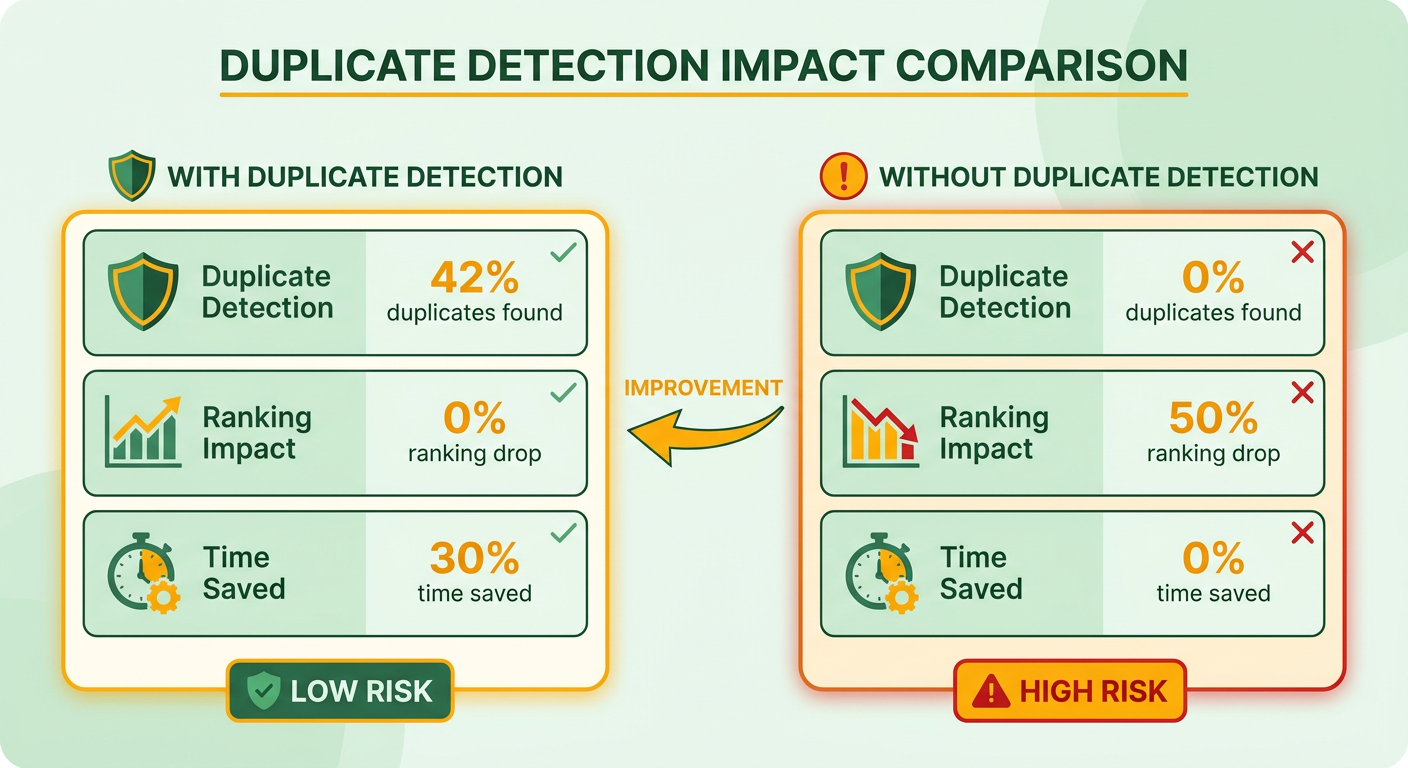
The fix is a pre-publish duplicate audit you run before any repurposing job starts.
How to find existing duplicates in Google's index
Start with a manual index check using Google's own operators. Pull a unique phrase from your source content, wrap it in quotes, and pair it with the site: operator to search your own domain first, then the open web.
- Run
site:yourdomain.com "exact unique phrase"to surface internal duplicates hiding in old archives or blog rolls. - Run the same quoted phrase without
site:to catch external syndication you may have forgotten. - Test two or three distinct sentences per source, not just the intro, since duplicate copies often diverge at the top but match in the body.
Any exact-phrase match is a red flag. It means Google already has a canonical candidate, and your repurposed version will fight it.
This shows up all the time when a startup republishes an article that still sits in an active, older blog roll. Google flags both URLs and splits the page's ranking potential, because neither one sends an unambiguous signal of originality. A quick manual audit heads off the conflict before you publish.
What an automated duplicate scan should cover
Manual checks work for one post. They fall apart at scale. Repurpose dozens of pieces a month and you need a scan that cross-references your content library against live index data automatically.
A Duplicate Finder is an automated audit that compares your content library against Google Search Console data and third-party caches to flag matches before publish.
- Cross-reference every draft against your CMS and internal database to catch reprints of your own work.
- Pull Google Search Console data to confirm which URL Google already treats as indexed.
- Check third-party caches, since syndicated copies often outlive the original placement.
Schedule these scans nightly. New matches appear when a syndication partner republishes or an old page resurfaces, and a nightly alert catches them while you can still act. That's the difference between finding a duplicate in your workflow and finding it after Google's filter has already picked a winner.
Risk rating: High. Duplicate detection failures lead straight to canonical conflicts, which erode hard-earned rankings fast. If you run only one check, make it the exact-phrase site: search. Once your source is verified clean, AnyPost's contextual engine can safely scale your production while holding brand alignment.
4. Set your canonical tags and structured data
A canonical tag is the single line of code that tells Google which version of your content is original. Repurpose one article into six formats, and the canonical tag preserves your ranking signal by pointing every copy back to one source of truth. Get it wrong, and Google may index the wrong page.
This is the core attribution layer of your workflow. Basic generators output raw copy and leave the technical implementation to you, but attribution is what stops your newly created assets from competing with your primary landing pages.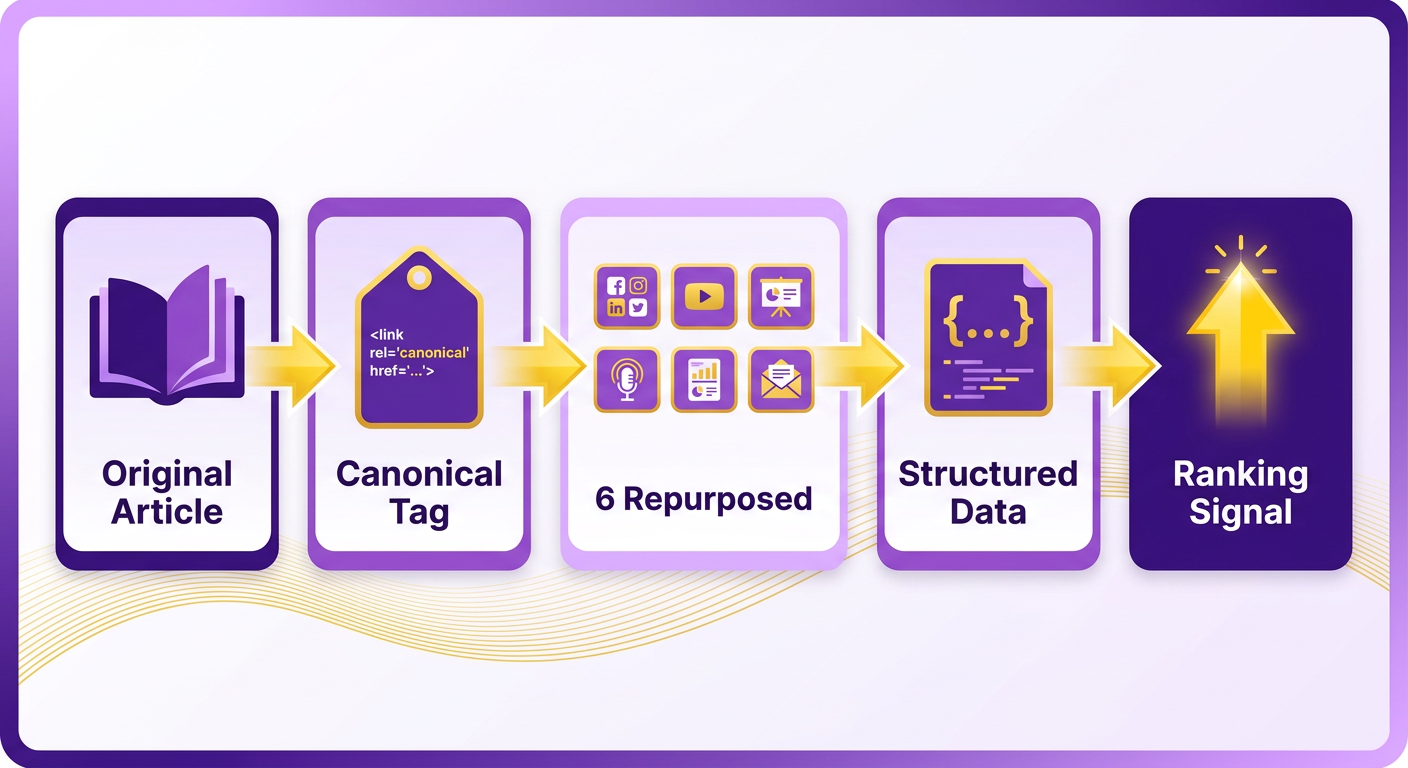
How to write a canonical tag correctly
A canonical tag is an HTML element in the <head> that names the primary URL Google should credit for a piece of content.
The syntax is one line, placed inside the <head> of the repurposed page:
<link rel="canonical" href="https://example.com/original-article" />.
One page gets exactly one canonical URL. List two, and Google ignores both and picks its own winner, which is rarely the page you wanted.
- Place the canonical tag in the
<head>section, never in the body, so the crawler reads it before rendering content. - Point every repurposed format back to the original HTML page, including video scripts and slide decks that live on separate URLs.
- Use one canonical URL per page. Multiple tags cancel each other out and hand the choice to Google.
When to add structured data for attribution
Add Article schema whenever the repurposed asset has its own indexable URL. The schema reinforces your canonical signal with a machine-readable pointer back to the source.
The key property is mainEntityOfPage, which references the canonical URL directly. That gives Google two agreeing signals instead of one, which cuts the odds of a misattributed index entry. Pages with correct canonical tags see a 27% higher click-through rate in SERPs, per Google Search Central.
- Add Article schema with
mainEntityOfPageset to your canonical URL, so the structured data and the canonical tag agree. - Validate the schema before publishing. A malformed property silently drops the whole block from Google's understanding.
- Keep author and publish-date fields consistent across the original and its repurposed versions to avoid conflicting freshness signals.
AnyPost embeds clean HTML structures and canonical references directly into its outputs, and because it integrates natively with your publishing platforms, those SEO signals stay intact as content moves across formats.
The tools that verify your canonical setup
Three checks catch nearly every canonical mistake before it costs you rankings. Run them in order after every repurposing job.
- Run the Google Rich Results Test to confirm your Article schema parses and the
mainEntityOfPageURL resolves. - Pull a Screaming Frog "Canonical" report to spot pages pointing at the wrong source or missing a tag entirely.
- Use the URL Inspection tool in Search Console to see which version Google actually indexed, not just which one you declared.
Risk rating: Medium. A misconfigured canonical won't crash your site, but it can quietly index the wrong page and split the equity you built. Verify, don't assume.
5. Confirm the source is fresh before you copy it
Stale source content is the quiet failure mode of most repurposing workflows. A source Google already reads as outdated passes its age onto every version you spin from it. So freshness is the last gate to clear before a repurposing job runs.
Most automated tools ignore document metadata entirely. They process outdated files without asking whether the information is still accurate or competitive in current results. Better to audit the source's age first and update the original before you generate anything from it.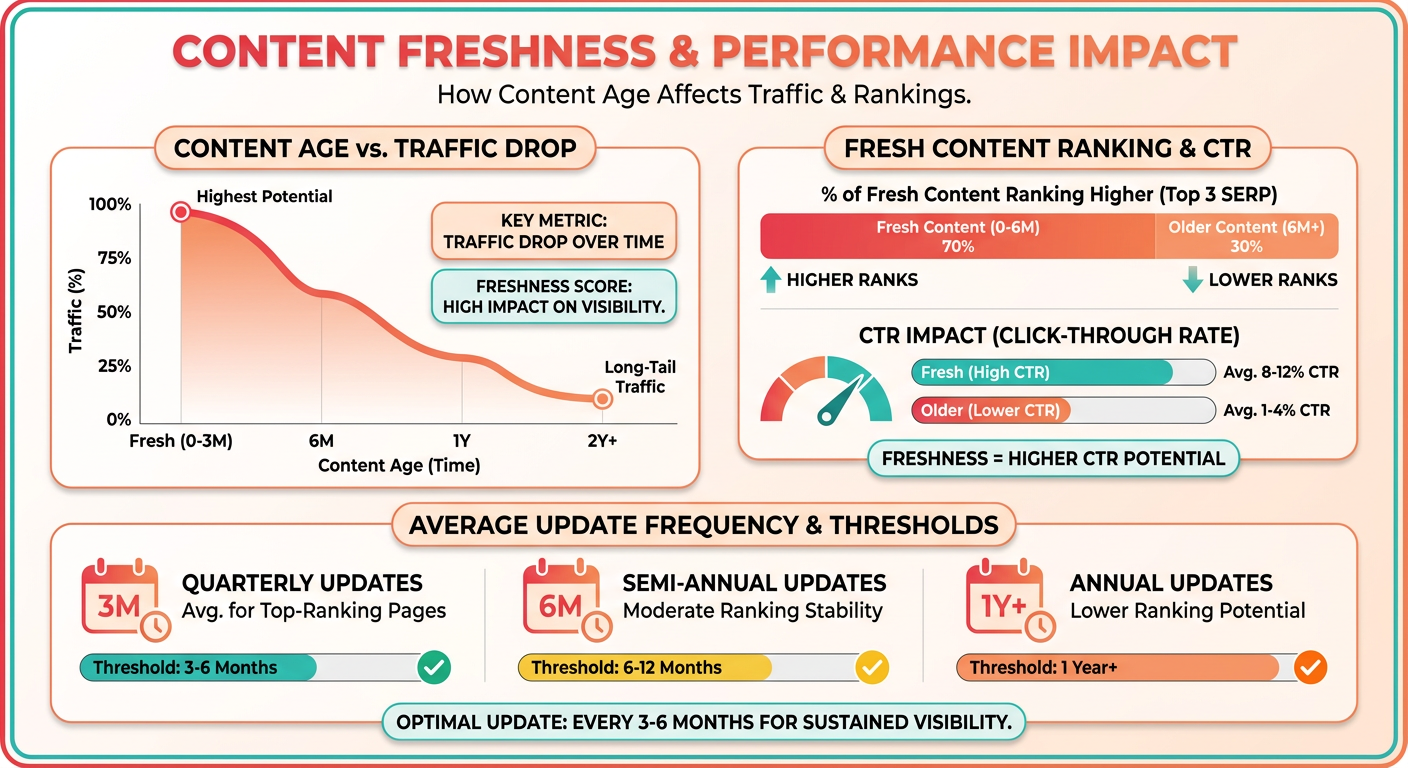
How to read a source's real age
Content freshness is the signal Google reads from timestamp metadata to judge how current a page is relative to its topic. Skip the visible publish date on the page. Crawlers read the code, not the byline.
Two fields carry the truth. The <meta name="last-modified"> tag and the article:modified_time property tell Google when the content actually changed. If those point to a date years back, your repurposed version inherits that staleness.
- Check
<meta name="last-modified">andarticle:modified_timein the source HTML before repurposing, since crawlers trust these over the visible date. - Confirm the modified timestamp updated after your last real edit, not just a template change or a plugin refresh.
What freshness standard fits your content type
Freshness is relative to the topic, not a fixed number. A news piece goes stale within 24 hours. An evergreen tutorial holds for six months or more, as long as you run an annual review to keep the facts current.
Here's where the risk compounds. Freshness alone rarely triggers a duplicate penalty. Pair a stale source with a missing canonical or an existing index copy, and Google has every reason to demote your new page instead of your old one.
We see this when a technical site repurposes an outdated software tutorial without revising the core steps. Google detects the obsolete information and demotes the new asset, and organic traffic drops even though the tool nailed the format conversion.
- Match your source's age against its content type: sub-24-hour for news, six-month-plus with annual reviews for evergreen posts.
- Run a freshness pass on the original before repurposing, not after, so the enriched version becomes your source of truth.
How to signal freshness to crawlers after repurposing
Add a revision log to the repurposed piece that links back to the original's update date. This gives crawlers an explicit freshness trail and reinforces which version is canonical. Small block of markup, outsized attribution payoff.
Watch two metrics to catch problems early. In Search Console, the Coverage report surfaces crawl anomalies tied to content age. Set your own freshness limit for each content type, then flag anything older than that limit as a candidate for enrichment before you repurpose it.
We rate this check low to medium risk. Freshness on its own rarely sinks a page. Combined with the earlier gaps in this framework, it turns a survivable repurposing job into a demoted one.
- Add a revision log linking to the original's update date to give crawlers a clear freshness signal.
- Set a stale-content threshold and review Search Console crawl anomalies so age problems surface before they cost traffic.
Putting it together: the 5-step source-check checklist
Run the five checks in order every time, and a scattered set of habits becomes a repeatable framework. Format first, then authority, duplicate, canonical, and freshness. Skip a gate and the ones after it inherit the risk you missed.
Plenty of workflows focus only on generation. They spin one article into a dozen formats without asking whether the source material is structurally or technically sound. This checklist is your pre-flight safety check.
What the full sequence looks like
A source-check framework is a five-gate validation pass you run on the original before any repurposing job starts, ordered so each gate depends on the one before it.
Start with what you already own. You can't detect duplicate risk without an inventory of your published assets first. That's why discovery precedes detection, not the other way around.
- Format. Confirm the source is machine-readable HTML, Markdown, or plain text so the crawler can attribute it correctly. Garbled structure trips a duplicate warning downstream.
- Authority. Check the source's Domain Rating and Trust Flow before you repurpose. Aim for DR ≥ 30; repurposing a low-DR page can drag your fresh version down with it.
- Duplicate. Run a pre-publish index audit to confirm no near-identical copy already competes for the same terms.
- Canonical. Point every repurposed asset back to one source of truth. A single canonical URL tells crawlers which version to rank when four spin-offs share 80% of the same sentences.
- Freshness. Read the source's real timestamp and enrich it before copying. A stale original passes its age to every spin-off.
Why authority earns its own gate
A weak source poisons everything you build from it. Repurpose a low-DR guest post and you risk Google downgrading the fresh page and dragging your organic traffic down with it. The lesson is blunt: authority isn't a vanity metric here, it's a duplicate-risk input.
Pull the backlink profile with a standard SEO auditor before repurposing. If the source sits on spammy or penalized links, no canonical tag saves it. Our take: treat any source under DR 30 as repurpose-at-your-own-risk, and skip it entirely if the link profile looks manipulated.
How to bake this into your SOP
Build the sequence into your publishing pipeline so no one runs a repurposing job from memory. A custom webhook can gate the job until all five boxes are ticked, which kills the human "I'll check later" failure mode.
Track two numbers after rollout: duplicate-content warnings and organic lift. Teams that adopt this consistently tend to see warnings fall and traffic climb over the first quarter. A platform like AnyPost.ai supports the integration by mapping your existing content library and surfacing high-intent opportunities, so every new asset aligns with your established domain authority.
Where next? Pair the manual pass with automation that publishes SEO-ready content straight to your platform once each gate clears. For now, the manual five-gate pass beats letting any tool publish blind.
Frequently Asked Questions
1. Do I need canonical tags if I already wait a few days before republishing content?
Yes, because they serve entirely different functions. A publishing delay gives search crawlers time to discover and index your original post first. However, once the syndicated or repurposed version is live, only a canonical tag permanently establishes which URL owns the ranking equity. Relying solely on timing leaves your original vulnerable to being outranked later.
2. What happens if I accidentally place two canonical tags on one page?
When a crawler encounters conflicting canonical declarations, it invalidates both signals. Google's algorithm will then programmatically determine which page to index based on its own heuristics, which often results in your syndicated or repurposed page cannibalizing the original's traffic.
3. Can I repurpose a scanned PDF or image-based slide deck safely?
Only if you extract and structure the text first. Because search engines cannot natively parse flat image pixels, any tool attempting to convert these formats must rely on optical character recognition (OCR). This often produces unformatted text blocks that lack proper heading hierarchies, making the output highly susceptible to duplicate content filters.
4. How do I quickly check whether my content already exists in Google's index?
Use targeted search operators. Copy a distinctive sentence from the middle of your draft, place it in quotation marks, and search it alongside site:yourdomain.com to find internal conflicts. Removing the site operator and searching the quoted phrase globally will reveal if external scrapers or syndication partners have already indexed the text.
5. How stale is too stale before repurposing content?
It depends on the volatility of the topic. News and trending topics require updates within hours, whereas evergreen guides can remain viable for up to a year. Always inspect the underlying HTML metadata for the last-modified timestamp, as search engines prioritize this technical signal over the user-facing date.
6. Why does a low-authority source hurt my repurposed content?
Search engines evaluate the credibility of the originating domain when indexing derivative works. If the source page resides on a site with poor link equity or historical penalties, those negative signals carry over to the new assets, making it difficult for them to achieve competitive rankings regardless of how well they are optimized.
7. How does AnyPost fit into a source-check workflow?
AnyPost automates the technical heavy lifting of this framework. By mapping your existing digital assets, the platform ensures that all generated variations maintain structural integrity, embed correct canonical tags, and publish directly to your CMS without manual formatting errors.
