
Best B2B Corporate Lead Generation Strategies: Google Search Console Focus

Section 1: Introduction to Google Search Console for B2B Lead Generation
Google Search Console (GSC) is a free tool provided by Google to help businesses monitor and optimize their website’s performance in search engine results. For B2B lead generation, GSC serves as a critical resource for identifying opportunities to improve visibility, fix technical issues, and refine content strategies that drive targeted traffic to corporate websites [5]. By tracking metrics like click-through rates, search queries, and crawl errors, B2B marketers can align their SEO efforts with the intent of decision-makers actively seeking solutions [1]. This section outlines the foundational steps for setting up GSC, emphasizes its role in diagnosing website health, and connects its features to actionable strategies for generating high-quality B2B leads [4].
Google Search Console Basics for B2B Marketers
GSC provides data on how Google indexes a website, including which pages appear in search results, the keywords driving traffic, and the performance of mobile versus desktop users. For B2B companies, this visibility is essential for identifying content gaps and optimizing pages to target industry-specific search terms [1]. For example, GSC’s Performance Report highlights the search queries leading users to a site, enabling marketers to refine meta titles and descriptions to better match buyer intent [4]. See the [Section 3] section for more details on optimizing content based on these insights. Additionally, the Coverage Report flags crawl errors or indexing issues that could prevent potential leads from accessing key pages like product sheets or case studies [5]. Building on concepts from [Section 4], these technical audits are vital for ensuring seamless user access.
Setting Up and Verifying a Google Search Console Account
To leverage GSC for lead generation, businesses must first create and verify a property in the tool. The setup process involves adding a website URL to GSC and confirming ownership through one of several verification methods, such as uploading an HTML file to the server, adding a meta tag to the homepage, or using domain registration credentials [4]. For B2B sites with multiple subdomains or regional variations, verifying each property separately ensures comprehensive coverage [5]. As mentioned in the [Section 8] section, ongoing monitoring of these configurations is critical for maintaining data accuracy. Once verified, users gain access to real-time data on search performance, allowing them to track the impact of SEO adjustments and content updates [3]. Proper configuration is non-negotiable: as noted in SEO-focused webinars, failing to install GSC correctly can limit a company’s ability to diagnose ranking issues or capitalize on emerging keyword trends [3].
Importance of Search Console in B2B Lead Generation
GSC directly supports B2B lead generation by enabling data-driven decisions about content and technical SEO. For instance, the tool’s URL Inspection feature lets marketers check how Google previews a page in search results, ensuring that CTAs and lead capture forms are presented clearly to prospects [1]. By analyzing the Search Appearance report, B2B teams can optimize rich snippets—such as event dates or pricing—to increase click-through rates from relevant audiences [4]. Furthermore, GSC’s mobile usability report is critical for B2B companies targeting professionals who often research solutions on mobile devices during the purchasing journey [5]. These capabilities align with broader strategies outlined in B2B SEO guides, which stress the need to combine technical optimization with targeted content to convert search traffic into qualified leads [1].
Connecting Search Console Data to Conversion Optimization
Beyond diagnostics, GSC integrates with other tools to enhance B2B lead generation workflows. For example, exporting search query data to keyword research platforms helps prioritize topics for blog posts or whitepapers that address buyer pain points [3]. The tool also surfaces underperforming pages, prompting A/B testing of headlines or CTAs to improve conversions [5]. By regularly reviewing GSC metrics, B2B marketers can identify which landing pages generate the most engagement and allocate resources accordingly—whether that means expanding high-performing content or revising outdated resources [4]. This iterative process of monitoring, testing, and refining is central to maximizing the ROI of organic search in lead generation strategies [1].
Section 2: Understanding Search Console Metrics for Lead Generation
Understanding Impressions
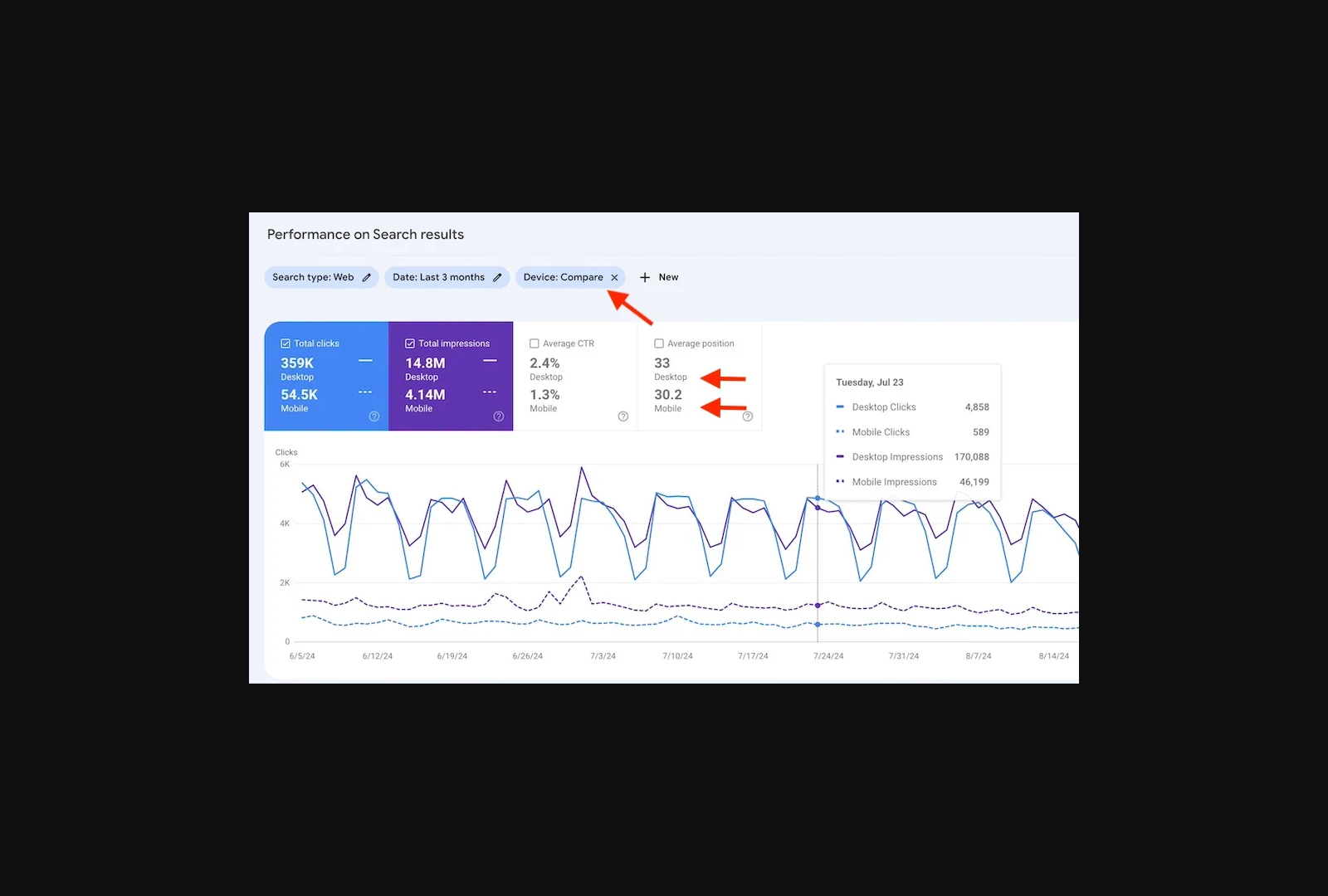
Google Search Console’s impressions metric indicates how often your website appears in search results for specific queries. A high number of impressions for a page suggests visibility but does not guarantee user engagement [6]. For lead generation, focus on pages targeting long-tail keywords with clear buying intent, such as “best injection molding company for automotive parts,” which often signal decision-stage users [6]. Low impressions for high-intent keywords may indicate a need to refine on-page SEO or expand content targeting [4]. See the [Section 3: Optimizing Content with Search Console Insights] section for strategies to enhance content alignment with high-intent keywords. Regularly audit underperforming pages to identify gaps in keyword alignment with your audience’s search behavior [6].
Analyzing Clicks and Click-Through Rates (CTR)
Clicks measure how often users navigate to your site from search results, while CTR (clicks divided by impressions) reveals the effectiveness of your title tags and meta descriptions. A CTR significantly below the industry average (typically 1–5% for most queries) signals poor alignment between your content and user expectations [6]. For example, if a page targeting “B2B manufacturing software solutions” has high impressions but low clicks, revise the meta title and description to highlight unique value propositions, such as “Award-Winning Manufacturing Software for B2B Scalability” [6]. Building on concepts from [Section 3: Optimizing Content with Search Console Insights], cross-reference low CTR pages with competitor content to identify opportunities for differentiation [4].
Using Search Console Metrics for Lead Generation
Leverage Search Console data to prioritize pages generating the most clicks from high-intent keywords. For instance, pages ranking for transactional queries like “request a quote for industrial automation systems” often correlate with lead generation success [6]. Filter Search Console data by query type (e.g., “commercial” or “transactional”) to identify terms directly tied to lead generation goals [4]. As mentioned in [Section 7: Advanced Search Console Strategies for B2B Lead Generation], advanced filtering by query intent can further refine targeting for high-value leads. Filter Search Console data by query type (e.g., “commercial” or “transactional”) to identify terms directly tied to lead generation goals [4]. Additionally, use the “Top Pages” report to assess which landing pages convert clicks into leads, then optimize underperforming pages with clearer CTAs or improved content structure [6].
Section 3: Optimizing Content with Search Console Insights
To optimize content for B2B lead generation using Google Search Console, start by identifying top-performing content through the Performance report. This report highlights pages with the highest clicks, impressions, and click-through rates (CTR), allowing you to prioritize content that already resonates with your audience. Look for pages with high CTR but low conversion rates, as these may indicate opportunities to refine calls-to-action (CTAs) or lead capture forms [1]. Additionally, filter by “long-tail keywords” in the report to uncover content addressing specific buyer intent, such as “best injection molding company for automotive parts,” which often correlates with higher conversion potential [6].
Optimizing Content for Target Keywords
Once you’ve identified high-performing pages, use Search Console’s Keywords tab to analyze the search terms driving traffic. Focus on keywords with high search volume and low competition, as these present opportunities to refine meta titles and descriptions for better relevance [4]. For example, if a page ranks for a generic term like “B2B lead generation strategies,” consider updating it to target a more specific long-tail keyword like “B2B lead generation for manufacturing companies” to attract qualified traffic [6]. Supplement this with the URL Inspection tool to check how Google indexes your pages and fix indexing issues that may dilute keyword authority. See the [Section 4] section for more details on addressing indexing challenges.
To refine keyword targeting further, cross-reference Search Console data with external tools like Moz’s keyword research software, which can help validate keyword intent and competition [3]. For instance, if Search Console shows a page ranking for a low-intent keyword (e.g., “B2B marketing”), prioritize updating the content to align with high-intent terms (e.g., “B2B lead generation services for SaaS companies”) [3]. Building on concepts from [Section 5], integrating Search Console insights with external tools ensures a comprehensive view of keyword performance and audience intent.
Improving Content Visibility with Search Console
Leverage the Coverage report to address crawl errors, indexing issues, or thin content that may hinder visibility. Pages marked as “excluded” or “crawled but not indexed” require immediate attention, as unresolved issues can prevent your content from reaching its intended audience [4]. For pages with high impressions but low clicks, audit meta titles and descriptions for clarity and keyword alignment, ensuring they communicate value directly to searchers [1].
To enhance visibility for local B2B audiences, use the Search Console Geographic report to identify regions where your content ranks well and tailor location-specific keywords accordingly [1]. For example, if a page about industrial manufacturing services ranks highly in a specific region, consider adding location-based keywords like “Midwest injection molding services” to attract hyper-local leads [4]. Additionally, monitor the Search Appearance section to optimize rich snippets, which can increase CTR by highlighting key information like ratings, events, or product features [4].
Finally, use Search Console’s Search Analytics to test and iterate on content changes. After optimizing a page for target keywords or restructuring CTAs, track metrics like CTR, bounce rate, and conversion rate over time to evaluate impact [1]. As mentioned in the [Section 6] section, systematically analyzing these metrics allows marketers to refine strategies and improve lead generation outcomes. By systematically applying these insights, B2B marketers can transform underperforming content into high-converting assets while maintaining technical SEO best practices [6].
Section 4: Leveraging Search Console for Technical SEO Audits
Google Search Console serves as a foundational tool for conducting technical SEO audits, enabling B2B marketers to identify and resolve issues that hinder organic visibility and lead generation. By leveraging its diagnostic features, businesses can uncover crawl errors, sitemap submission problems, and indexing anomalies that prevent pages from appearing in Google search results [4]. For instance, the Coverage report highlights URLs that Google cannot crawl or index, such as pages blocked by robots.txt or those returning server errors. These issues directly impact lead generation by reducing the visibility of content designed to attract B2B buyers [4]. Additionally, the Sitemap report allows users to verify that search engines can access and interpret submitted sitemaps correctly, ensuring critical landing pages are prioritized for crawling [4]. Regularly auditing these elements helps maintain a website’s technical health, which is essential for sustaining high-quality organic traffic [1].
Identifying Technical Issues with Search Console
To begin a technical SEO audit, start by reviewing the Coverage report in Google Search Console. This report categorizes indexing issues into four types: valid, excluded, crawl errors, and invalid. For example, pages excluded due to noindex tags may indicate misconfigured meta directives that prevent valuable content from being discoverable [4]. Crawl errors, such as 404s or 500 server errors, signal broken links or server-side problems that frustrate both users and crawlers [4]. For B2B websites, unresolved crawl errors can block access to lead capture pages, such as case studies or whitepapers, which are critical for converting visitors into leads [1]. The URL Inspection tool further aids in diagnosing individual URLs by revealing crawlability, indexing status, and mobile usability issues [4]. By systematically addressing these problems, marketers ensure their site remains accessible to Google’s crawlers, preserving its ability to rank for target keywords [4].
Fixing Crawl Errors and Sitemap Issues
Resolving crawl errors requires actionable steps based on the type of issue identified. For pages blocked by robots.txt, review the file’s directives to ensure it does not inadvertently restrict access to important sections of the site [4]. If a URL returns a 404 error, redirect it to a relevant page using 301 redirects to retain link equity and guide users to valuable content [4]. Invalid sitemaps, often caused by incorrect formatting or outdated URLs, must be corrected by resubmitting updated versions through Search Console’s Sitemap submission tool [4]. For B2B sites, ensuring sitemaps include lead generation assets—such as product sheets or contact forms—is vital for prioritizing these pages in search results [1]. After fixes are implemented, use the Validate Fix button in Search Console to confirm that Google recognizes the changes and reindexes the content [4]. This process not only improves technical SEO but also enhances the user experience, which indirectly supports lead generation by reducing friction during the buyer’s journey [2].
Using Search Console for Technical SEO Audits
Beyond troubleshooting, Google Search Console provides data-driven insights for proactive technical SEO audits. The Performance report tracks search traffic trends, revealing declines in visibility that may indicate algorithmic penalties or content quality gaps [4]. See the [Section 3] section for more details on leveraging the Performance report to optimize content for lead generation. The Enhancements section highlights opportunities to improve rich results, such as adding structured data for FAQs or product listings, which increase click-through rates for B2B audiences [4]. Building on concepts from [Section 7], advanced strategies for structured data implementation can further amplify these benefits. Additionally, the Security & Manual Actions tab alerts users to penalties imposed by Google for issues like malware or thin content, which must be resolved immediately to avoid reputational damage and lost leads [4]. Integrating these audit practices into a monthly workflow ensures technical SEO remains aligned with business goals, such as increasing form submissions or demo requests [1].
By systematically addressing technical barriers through Google Search Console, B2B organizations can optimize their websites for both search engines and users. This foundational work supports higher rankings, improved user engagement, and ultimately, more qualified leads entering the sales pipeline [4]. For ongoing best practices on maintaining technical SEO health, refer to [Section 8].
Section 5: Integrating Search Console with Other Marketing Tools for Lead Generation
Integrating Google Search Console with CRM systems allows businesses to align search performance data with customer relationship management workflows. By analyzing Search Console metrics such as click-through rates (CTRs) and landing page performance, teams can identify which website pages drive the most engagement and feed this insight into CRM systems to prioritize lead nurturing efforts. For example, if a specific blog post generates high traffic but low conversions, CRM teams can adjust follow-up strategies for visitors to that page. This integration also enables tracking of user behavior patterns, such as frequent searches or repeated visits, which can signal qualified leads in the CRM pipeline [4]. As mentioned in the [Section 2: Understanding Search Console Metrics for Lead Generation] section, monitoring CTR and landing page performance is critical for identifying high-potential areas for optimization.
Using Search Console with Marketing Automation Platforms
Marketing automation platforms benefit from Search Console data by leveraging keyword insights and search trends to trigger personalized campaigns. For instance, if Search Console reveals a surge in searches for “B2B manufacturing solutions,” automation workflows can deploy targeted email sequences or retargeting ads to users who landed on related pages. This aligns with strategies outlined in [Section 3: Optimizing Content with Search Console Insights], where keyword data is used to refine content for specific audience segments. Additionally, Search Console’s URL inspection tool can flag underperforming landing pages, prompting automation teams to A/B test new content variations or redirect traffic to higher-converting assets. By syncing Search Console’s performance metrics with automation platforms like HubSpot or Marketo, marketers can dynamically adjust campaign parameters based on real-time search data [3]. This reduces reliance on static segmentation and ensures messaging resonates with evolving search intent [2].
Enhancing Lead Generation with Integrated Tools
The synergy between Search Console and integrated marketing tools creates a closed-loop system for lead generation. For example, pairing Search Console’s top-performing keywords with CRM and automation platforms allows teams to identify high-value search terms, map them to buyer personas, and automate personalized follow-ups. This process mirrors the strategies in [Section 4: Leveraging Search Console for Technical SEO Audits], where technical SEO metrics are cross-referenced with business objectives to improve lead quality. Furthermore, when Search Console’s mobile usability reports are shared with automation teams, campaigns can prioritize mobile-optimized landing pages for audiences with high mobile traffic, increasing conversion rates [4]. While technical implementation details remain sparse in sources, the strategic value lies in cross-referencing Search Console’s technical SEO metrics—such as crawl errors or page load speed—with CRM and automation workflows to ensure lead generation efforts are both technically sound and behaviorally relevant [3].
Limitations and Strategic Considerations
Sources acknowledge that while integration opportunities exist, explicit technical guidance for connecting Search Console with CRMs or automation platforms is limited. For instance, [3] highlights the importance of Google Search Console alongside tools like Moz but does not detail how to synchronize data between them. Similarly, [2] discusses AI and SEO synergies without specifying integration pathways. Marketers must rely on manual data sharing or third-party tools to bridge these systems until more structured APIs or native integrations are widely documented. Despite these limitations, the strategic value lies in using Search Console as a diagnostic and insights layer, feeding its data into existing marketing stacks to refine targeting, improve content relevance, and accelerate lead progression [2]. This approach aligns with broader B2B lead generation principles, where data-driven adjustments to SEO and automation strategies yield measurable improvements in pipeline quality [4]. For ongoing strategies, see the [Section 8: Best Practices for Using Search Console for Ongoing Lead Generation] section.
Section 6: Measuring and Tracking Lead Generation Success with Search Console
To measure and track lead generation success using Google Search Console, focus on its built-in metrics to evaluate traffic quality, keyword performance, and user engagement. Begin by analyzing the Performance report, which provides data on clicks, impressions, click-through rate (CTR), and average position for each query driving traffic to your site. These metrics help identify high-performing keywords and pages that align with lead-generating intent [4]. For example, long-tail keywords like “best injection molding company for automotive parts” often indicate strong buying intent and can be tracked for their contribution to lead generation [6]. By correlating these keywords with pages containing lead capture forms or CTAs, you can assess their role in the conversion funnel [1].
Tracking Lead Generation Success with Search Console Metrics
Google Search Console’s URL Inspection tool allows you to monitor how specific landing pages perform in search results. Pages with high CTR but low engagement (e.g., high bounce rates) may need optimization for better lead conversion [4]. Additionally, the Coverage report highlights crawl errors or indexing issues that could hinder visibility for pages critical to lead generation [5]. For instance, if a product page with a lead capture form is blocked by robots.txt or returns a 404 error, it may prevent potential leads from reaching conversion points [4]. See the [Leveraging Search Console for Technical SEO Audits] section for more details on addressing indexing issues.
To track success, focus on metrics like search traffic to landing pages and query performance. If a keyword like “B2B manufacturing software solutions” drives significant traffic but has a low CTR, consider refining meta titles and descriptions to better align with user intent [6]. Similarly, pages with high impressions but low clicks may require more compelling snippets to improve visibility [4]. As mentioned in the [Understanding Search Console Metrics for Lead Generation] section, impressions are a key indicator of search visibility and should be analyzed in context with CTR for actionable insights.
Using Data to Optimize Lead Generation Strategies
Leverage Search Console data to refine your SEO and content strategies. For example, analyze the top pages contributing to search traffic and assess whether they include clear CTAs or lead capture forms. If high-traffic pages lack conversion elements, prioritize adding or optimizing them based on user intent [1]. Building on concepts from [Optimizing Content with Search Console Insights], ensure that top-performing content is aligned with lead-generation goals by incorporating targeted CTAs.
For keyword optimization, focus on long-tail terms with commercial intent, such as “enterprise CRM software for logistics,” which often correlate with higher lead quality [6]. If Search Console shows these terms are driving traffic but not converting, consider improving the landing page content or ensuring the page is linked prominently in search results [4]. Finally, use the Enhancements report to address technical barriers, such as missing structured data or low mobile usability scores, which could deter users from completing lead-generation actions [5].
By systematically analyzing Search Console metrics and iterating on underperforming elements, B2B marketers can align their SEO strategies with measurable lead-generation outcomes. Continuous testing and refinement based on real-time data ensure that efforts remain focused on high-impact opportunities [1].
Section 7: Advanced Search Console Strategies for B2B Lead Generation
To implement advanced Google Search Console strategies for B2B lead generation, organizations must leverage the platform’s data in conjunction with AI-driven tools and analytical frameworks. While the Search Console API is not explicitly detailed in available sources, its integration with other systems can be inferred through the broader context of data-driven SEO and AI optimization. For example, source [4] emphasizes using Search Console to monitor how a business appears in Google searches, which provides foundational data for identifying high-intent keywords and underperforming pages. This data can then be fed into machine learning models, as highlighted in source [2], which discusses AI’s role in analyzing search trends and predicting user intent across platforms like ChatGPT and voice search. By combining Search Console’s performance metrics with AI tools, B2B marketers can prioritize pages that align with high-conversion keywords and user behaviors.
Advanced Data Integration with Search Console
Search Console’s ability to surface granular search query data is critical for refining B2B lead generation. Source [4] explains how businesses can use this data to optimize content for specific search terms, ensuring visibility for queries that indicate buyer intent (e.g., "enterprise software solutions for manufacturing"). While the Search Console API itself is not described in depth in the sources, its potential use case involves automating the extraction of this query data to build dynamic reporting systems. For instance, developers could theoretically integrate Search Console’s API with CRM platforms to flag pages driving traffic to high-value leads, though no direct API examples are provided in the sources [4]. Instead, source [2] advocates for manual and semi-automated workflows where Search Console data is cross-referenced with AI tools to identify patterns in organic search traffic. See the [Integrating Search Console with Other Marketing Tools for Lead Generation] section for more details on CRM integration considerations.
Machine Learning for Predictive Lead Scoring
Leveraging machine learning algorithms requires structuring Search Console data to train models that predict lead generation opportunities. Source [2] outlines how AI can analyze historical search performance to forecast which content changes will improve rankings for target keywords. For example, by inputting Search Console metrics like click-through rates (CTRs) and bounce rates into a supervised learning model, marketers can prioritize pages needing optimization. This approach aligns with source [4]’s emphasis on iterative website improvements based on real-time performance feedback. Additionally, source [2] highlights AI’s role in segmenting audiences by search intent, such as distinguishing between informational queries ("B2B marketing trends") and transactional queries ("buy SaaS tools for logistics"). By training models on this intent data, B2B companies can tailor content to stages of the buyer’s journey, increasing conversion rates. Building on concepts from the [Measuring and Tracking Lead Generation Success with Search Console] section, these metrics provide the foundation for predictive modeling.
Multi-Channel Optimization with Search Console Insights
Advanced Search Console strategies for B2B lead generation also involve cross-referencing its data with other SEO and content optimization frameworks. Source [2] recommends integrating Search Console’s search appearance reports with AI-powered tools to enhance visibility in emerging channels like voice search and AI chatbots. For instance, by analyzing Search Console’s “Search Results” tab for featured snippet opportunities, marketers can optimize content to appear in voice search responses, a tactic validated in source [2]’s discussion of AEO (AI-Enhanced SEO). Similarly, source [4] underscores the importance of using Search Console’s URL inspection tool to identify technical barriers—such as slow load times or mobile usability issues—that hinder lead generation. Addressing these issues improves both organic rankings and user experience, directly impacting lead quality. As mentioned in the [Leveraging Search Console for Technical SEO Audits] section, resolving technical SEO issues is a critical step in ensuring search visibility.
Limitations and Practical Implementation
While the sources advocate for advanced strategies, they also highlight limitations in current tools. The Search Console API is not explicitly described in available materials, leaving implementation details to developers familiar with Google’s broader API ecosystem [4]. Additionally, source [2] notes that AI-driven lead generation requires high-quality training data, which may necessitate combining Search Console metrics with CRM and analytics tools. For organizations without in-house machine learning expertise, source [2] suggests partnering with platforms that offer pre-built models for intent analysis. Despite these challenges, the synergy between Search Console’s diagnostic capabilities and AI’s predictive power remains a cornerstone of modern B2B lead generation. By systematically applying these strategies, businesses can move beyond reactive SEO tactics and adopt proactive, data-informed approaches to capturing high-value leads.
Section 8: Best Practices for Using Search Console for Ongoing Lead Generation
Regular Monitoring of Key Metrics
To sustain ongoing B2B lead generation, businesses must consistently monitor Google Search Console metrics to identify opportunities for improvement. Start by tracking key performance indicators (KPIs) such as click-through rate (CTR), impressions, and average position for specific keywords. These metrics help determine which pages are driving traffic and which require optimization [4]. For example, the Performance Report in Search Console highlights pages with high impressions but low CTR, signaling a need to refine meta titles and descriptions to better align with user intent [1]. As mentioned in the [Section 2] section, impressions are a foundational metric for understanding visibility, so addressing low CTR here is critical. Additionally, use the Coverage Report to identify crawl errors or indexing issues that may hinder visibility, as unresolved technical problems can reduce organic reach and lead generation potential [4].
Ongoing Content and Technical SEO Optimization
Leverage Search Console data to iteratively improve content and technical SEO. Begin by analyzing the Queries and Pages reports to uncover underperforming content. If a page ranks for irrelevant or low-intent keywords, update its content to target long-tail keywords that indicate stronger buying intent, such as “best injection molding company for automotive parts” [6]. Building on concepts from [Section 3], this approach aligns with optimizing content based on Search Console insights to better match user intent. Simultaneously, address technical SEO gaps by reviewing mobile usability reports and Core Web Vitals metrics. Slow-loading pages or poor mobile experiences can deter B2B leads, so optimizing site speed and responsive design is critical [4]. For instance, Search Console’s mobile usability report flags issues like text too small to read, enabling quick fixes that enhance user experience and conversion rates [1].
Best Practices for Search Console Use in Lead Generation
To maximize Search Console’s value for lead generation, adopt a proactive approach to data analysis and testing. First, set up custom filters and alerts for significant ranking drops or spikes in crawl errors, ensuring timely interventions to maintain visibility [5]. Second, use the URL Inspection Tool to test how Google previews specific pages, allowing you to refine snippets to include compelling calls-to-action (CTAs) that resonate with B2B audiences [4]. See the [Section 5] section for more details on integrating Search Console with other tools like Google Analytics to track post-click behavior, identifying pages where users abandon the conversion funnel and optimizing those touchpoints [1]. For example, if a high-traffic page has a low conversion rate, A/B test different CTAs or lead capture forms based on Search Console-driven audience insights [2].
Multi-Hop Strategy: Combining Search Console with Broader SEO Efforts
For advanced lead generation, combine Search Console data with broader SEO and content strategies. Use the site: search operator within Search Console to audit competitors’ backlink profiles and identify gaps in your own link-building efforts [6]. Pair this with Search Console’s Performance Report to prioritize pages that already attract organic traffic but lack backlinks, making them ideal candidates for outreach or content upgrades [1]. Furthermore, leverage Search Console’s keyword data to inform content creation, focusing on topics with high search volume and low competition to capture qualified leads [5]. By aligning technical SEO fixes with content enhancements, businesses can create a compounding effect that boosts both visibility and lead quality [4].
Limitations and Practical Constraints
While Search Console is a powerful tool, it has limitations. For example, it does not provide direct insights into user behavior post-click, such as form submissions or email signups, which require integration with analytics tools like Google Analytics [5]. Similarly, while Search Console highlights crawl errors, resolving them often depends on external factors like hosting provider performance or third-party scripts [4]. To mitigate these constraints, pair Search Console with other SEO tools and conversion rate optimization (CRO) platforms to create a holistic lead generation strategy [1]. Regular audits and cross-referencing with sources like Google My Business can further fill gaps in data coverage [2].
By adhering to these best practices, B2B businesses can transform Search Console from a passive diagnostic tool into an active driver of lead generation. The key is to treat it as part of a continuous cycle of monitoring, testing, and refining—ensuring that technical and content optimizations align with the evolving needs of target audiences.
References
[1] B2B SEO for Lead Generation: Strategies for High-Quality Growth - https://thedigitalring.com/insights/seo-strategies-for-effective-lead-generation
[2] How B2B Brands Can Get Leads with AI, SEO, AEO and GEO - https://www.callboxinc.com/webinars/seo-aeo-geo-lead-generation-strategies/
[3] Moz Webinar - SEO Tactics for B2B Lead Generation - | Obility - https://www.obilityb2b.com/blog/moz-webinar-seo-tactics-for-b2b-lead-generation/
[4] Google Search Console: Website Optimization Guide (2025) - https://higherranking.com.au/the-google-search-console-data-you-should-focus-on/
[5] 35 Proven Strategies for B2B Sales Lead Generation in 2025 - https://www.unboundb2b.com/blog/generate-b2b-sales-leads/
[6] Leveraging Organic Search for Manufacturing Lead… | Workshop ... - https://www.workshopdigital.com/blog/lead-generation-manufacturing-search/
Frequently Asked Questions
1. How do I verify my website in Google Search Console (GSC)?
To verify your website in GSC, add your site’s URL and choose a verification method: upload an HTML file to your server, add a meta tag to your homepage, use Google Analytics or Tag Manager, or verify via domain registration. For B2B sites with subdomains or regional versions, verify each property separately. Pro tip: Use domain credentials (via domain provider) for easier verification and centralized control, especially for large enterprises with complex setups.
2. What insights can the Performance Report provide for B2B lead generation?
The Performance Report shows search queries driving traffic, clicked pages, and device usage (mobile/desktop). B2B marketers can use this to identify high-traffic industry-specific keywords (e.g., “enterprise cybersecurity solutions”) and refine meta titles/descriptions to align with buyer intent. For example, if a query like “B2B SaaS pricing models” has high impressions but low clicks, optimize the snippet to highlight ROI or case studies.
3. How can I fix crawl errors flagged in the Coverage Report?
The Coverage Report highlights crawl errors (e.g., 404s, soft 404s, server errors). Start by prioritizing errors on high-value pages like product sheets or case studies. Use tools like Screaming Frog to audit internal links and fix broken URLs. For B2B sites, ensure sitemaps are updated and canonical tags are set to avoid duplicate content. Regularly monitor errors post-content updates to prevent lost traffic.
4. How do I optimize my B2B site for mobile users using GSC?
Use the Mobile Usability report in GSC to identify issues like small text or tap targets. Fix these by adjusting CSS or layout for mobile-first indexing. Monitor Core Web Vitals (LCP, FID, CLS) via the Performance Report and prioritize speed optimizations for pages with high bounce rates. For B2B, ensure mobile users can easily access downloadable resources (e.g., whitepapers) without friction.
5. How can I identify content gaps to improve B2B lead generation?
Analyze the Performance Report to see which pages rank well and which underperform. Use search queries with high impressions but low clicks to uncover content gaps (e.g., a query like “B2B CRM integration tools” might lack a dedicated page). Create pillar content or landing pages targeting these terms, and use GSC’s Search Queries report to track improvements over time.
6. How often should I monitor Google Search Console for B2B lead generation?
Check GSC weekly for crawl errors, indexing status, and performance trends. After major content updates or campaigns, monitor daily for traffic spikes/drops. For B2B, also review the Search Queries report monthly to refine keyword strategies and ensure technical issues (e.g., mobile usability) don’t hinder lead generation.
7. How do I handle multiple subdomains or regional properties in GSC?
Verify each subdomain (e.g., europe.yourbrand.com) and regional version as separate properties in GSC. Use property groups to compare performance across regions. For B2B, ensure hreflang tags are correctly set for multilingual/multiregional sites to avoid indexing conflicts. Regularly audit each subdomain for technical SEO issues to maintain consistent lead generation across all markets.