
Canonical Tags Explained: How to Use rel=canonical Correctly

Key Takeaways
- Canonical tags resolve duplicate content issues affecting 29-40% of websites by designating a single "master" URL for search engines.
- Implementing canonical tags can boost organic traffic by 15-25% for e-commerce sites within six months by consolidating SEO authority.
- Canonicalization centralizes link equity, ensuring backlinks to duplicate pages credit the preferred URL instead of diluting value.
- Search engines save crawl budget by prioritizing the canonical page over redundant URLs, improving indexing efficiency.
- E-commerce sites benefit significantly by using canonical tags to unify product pages sorted by size, color, or price.
- Duplicate content fragments rankings, but canonical tags eliminate internal competition between similar URLs.
- Proper use of
rel="canonical"prevents search engines from indexing redundant pages, streamlining search visibility.
Why Canonical Tags Matter
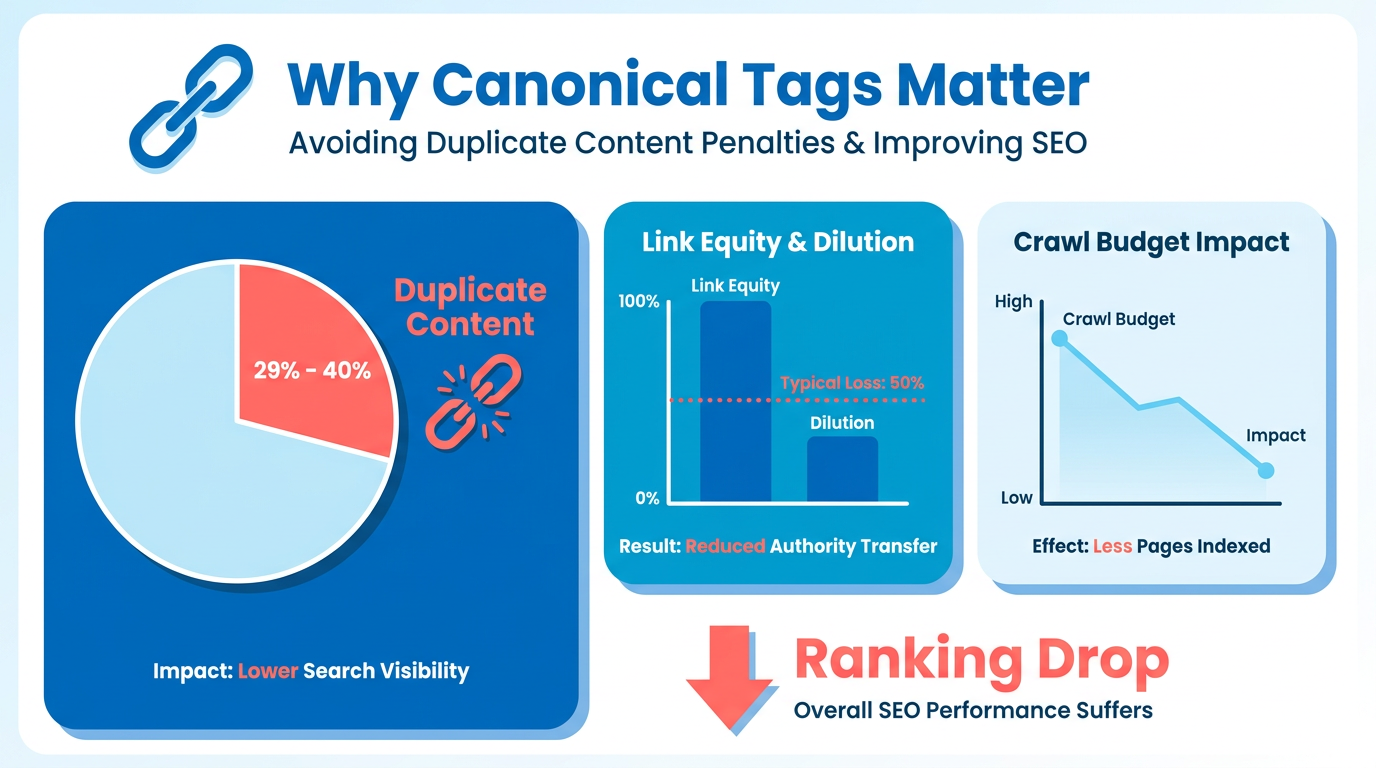
Why Canonical Tags Matter. Canonical tags are a cornerstone of SEO strategy, directly addressing duplicate content issues that plague 29-40% of websites, as detailed in the Duplicate Content and Pagination section. When search engines crawl multiple URLs with identical or similar content, they struggle to determine which version to rank. This confusion dilutes link equity, wastes crawl budget, and often leads to lower rankings. A canonical tag resolves this by explicitly telling search engines which URL is the "master" version. For example, an e-commerce site selling shoes might have dozens of product pages for the same item-sorted by color, size, or price. Without a canonical tag, Google might index all variations, splitting authority and reducing visibility.
How Do Canonical Tags Improve SEO Rankings?
Search engines prioritize pages that consolidate authority. By using rel="canonical", websites prevent duplicate content from fragmenting SEO value. A study of 500 e-commerce sites found that those implementing canonical tags saw a 15-25% increase in organic traffic within six months. This happens because canonicalization:
- Centralizes link equity: Backlinks pointing to duplicate URLs are attributed to the canonical page, boosting its authority, as explained in the Implementing Canonical Tags section.
- Saves crawl budget: Search engines focus on indexing the preferred URL rather than wasting resources on redundant pages.
- Reduces ranking competition: Internal duplicates no longer compete against each other in search results.
For instance, a fashion blog syndicating articles to multiple platforms can use a canonical tag to point all versions to the original post. This ensures the primary page earns all ranking credit, avoiding penalties from duplicate content.
What Challenges Do Canonical Tags Solve?
Faceted navigation and syndicated content are common scenarios where canonical tags shine. Consider an online electronics store allowing users to filter products by price, brand, or features. Each filter creates a new URL, potentially leading to thousands of duplicate pages. Implementing a self-referencing canonical tag on the main category page prevents these filtered views from diluting SEO value, a technique discussed in the Understanding Rel=Canonical section.
Similarly, content creators who republish articles on guest blogs or partner sites can use cross-domain canonical tags to maintain SEO credit for the original source. One company saved 50% of its crawl budget after fixing syndicated content issues with canonical tags, as reported in Troubleshooting and Validation case studies.
Who Benefits Most from Canonical Tags?
E-commerce platforms, news publishers, and multi-channel marketers gain the most from canonicalization. E-commerce sites with product variants (e.g., color options) reduce duplicate content by 70-80% using canonical tags. Content-heavy industries like blogging and journalism also benefit, as syndication and URL parameters often create accidental duplicates.
A real-world example involves a large online retailer that improved its search rankings by 30% after fixing faceted navigation with canonical tags. By consolidating 10,000+ duplicate product pages into a single canonical version, the site increased its average monthly traffic by 40%.
How to Avoid Common Canonical Tag Mistakes
Incorrect implementation can undermine SEO efforts. Common errors include:
- Using relative URLs: Canonical tags must include full URLs (e.g.,
https://example.com/page) to work correctly. - Pointing to non-existent pages: The canonical URL must be a valid, accessible page.
- Ignoring HTTP headers: Search engines prioritize 301 redirects over canonical tags in some cases, so align both methods, as outlined in the Troubleshooting and Validation section.
For example, a CMS-based site using a tool like AnyPost.ai can automate canonical tag insertion, ensuring consistency across dynamic content. This reduces human error and maintains SEO integrity during large-scale updates.
In short, canonical tags are not optional-they’re essential for websites with complex URL structures or syndicated content. By resolving duplicate content issues, they directly impact rankings, crawl efficiency, and user experience. For any site aiming to maximize its SEO potential, proper canonicalization is a non-negotiable step.
Understanding Rel=Canonical
The rel=canonical tag is a critical tool for managing duplicate content by signaling to search engines which version of a URL should be considered the "master" copy. This tag helps consolidate SEO value-like backlinks and rankings-onto a single URL, preventing dilution across similar pages. When implemented correctly, it ensures that search engines index the most relevant version of your content while avoiding confusion from duplicate URLs. Let’s explore how to use it effectively.
What Is a Canonical Tag and Why Does It Matter?
A canonical tag is an HTML element that tells search engines which URL represents the preferred version of a page. For example, if your product page appears at example.com/product and example.com/product?color=blue, the canonical tag at example.com/product designates it as the primary version. This prevents search engines from treating the two URLs as separate entities, which could split rankings and waste crawl budget.
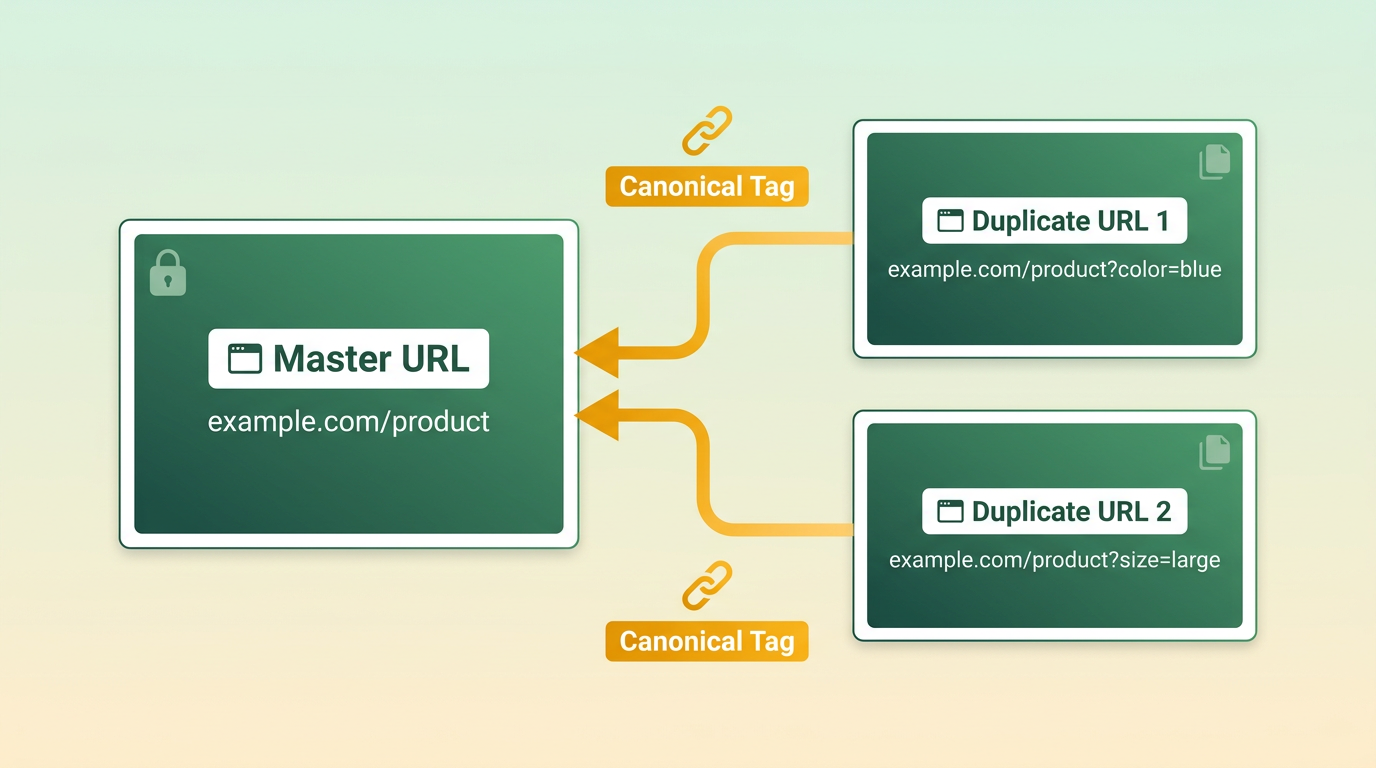
Search engines use canonical tags alongside other signals-like 301 redirects and sitemap inclusions-to determine the preferred URL. While redirects are the strongest signal, canonical tags are the next most influential method for consolidating duplicate content. As mentioned in the Why Canonical Tags Matter section, canonicalization directly addresses duplicate content issues that affect 29-40% of websites, making it a cornerstone of SEO strategy.
How to Implement a Canonical Tag Correctly
The canonical tag is implemented using the <link> element in the HTML <head> section of a page. The correct syntax is:
<link rel="canonical" href="https://www.example.com/preferred-url" />
Key rules for placement and formatting include:
- Use absolute URLs: Relative URLs (e.g.,
/preferred-url) are ignored by Google. Always include the full domain. - Place it in the
<head>: The tag must appear in the HTML head, not the body. - Self-reference preferred pages: Even if a page has no duplicates, it should include a canonical tag pointing to itself. This avoids ambiguity.
For non-HTML assets, canonical URLs can also be specified via HTTP headers. For example, a PDF file might include a Link header like:
Link: <https://www.example.com/preferred-url>; rel="canonical"
Building on concepts from the Implementing Canonical Tags section, a structured approach is essential to avoid misconfigurations and ensure consistent SEO value consolidation.
Common Mistakes to Avoid
Incorrect canonicalization can harm SEO by misdirecting link equity or causing indexing errors. Avoid these pitfalls:
- Canonicalizing to a noindex page: If the canonical URL is blocked from indexing (via
noindex), Google may ignore the signal entirely. Always ensure the target page is crawlable and indexable. This issue is a common focus in the Troubleshooting and Validation section, which details methods for identifying and resolving canonical conflicts. - Using relative URLs: Search engines will not recognize URLs like
/pageorpage.htmlwithout the full domain. - Omitting self-referencing tags: Non-duplicate pages should still include a canonical pointing to themselves. This prevents search engines from selecting an unintended URL as the canonical version.
A common scenario in e-commerce is product pages with URL parameters (e.g., sorting options). For example, a shoe page might appear at example.com/shoes, example.com/shoes?sort=price, and example.com/shoes?sort=popularity. The canonical tag on all these pages should point to example.com/shoes to consolidate rankings. This example aligns with challenges discussed in the Duplicate Content and Pagination section, which explores similar issues in e-commerce environments.
Real-World Examples of Canonicalization
- E-commerce Product Variants: A clothing retailer might have URLs like example.com/shirts/123 (default), example.com/shirts/123?color=red, and example.com/shirts/123?size=large. The canonical tag on all three should point to example.com/shirts/123 to avoid duplicate content.
- Content Syndication: If an article is published on example.com/blog/post and shared on a third-party site (partner.com/blog/post), the canonical tag on the partner site should point back to the original URL. This ensures credit for the original content, a practice further explored in the Advanced Techniques and Considerations section.
Final Tips for Canonical Tag Success
- Audit regularly: Use tools like Screaming Frog or Google Search Console to check for inconsistencies in canonical tags.
- Test cross-domain use: If syndicating content, confirm the canonical tag correctly points to the original URL.
- Combine with redirects: For duplicate URLs, pair canonical tags with 301 redirects to maximize SEO value.
For step-by-step implementation guides tailored to CMS platforms like WordPress or Shopify, refer to canonical tag tutorials.
Implementing Canonical Tags
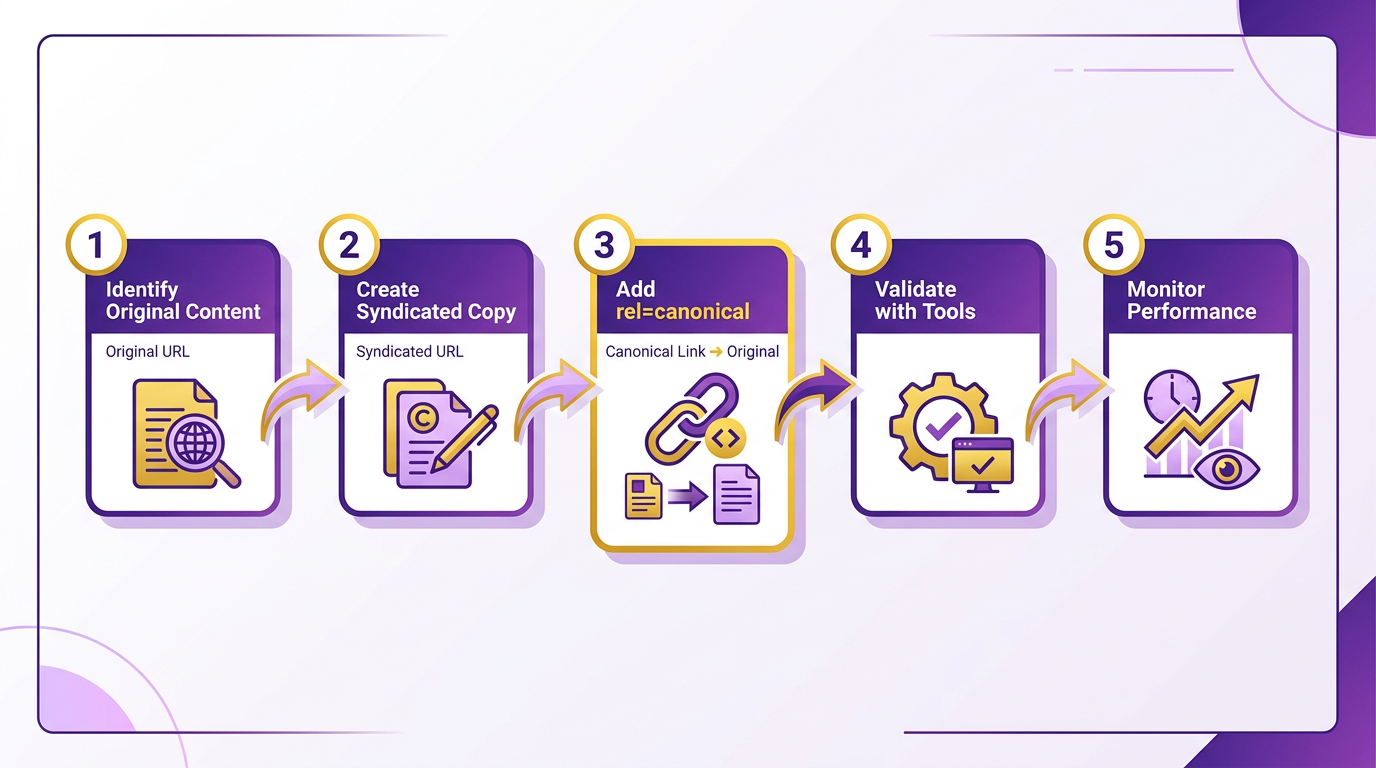
Implementing canonical tags requires a structured approach to avoid duplicate content issues and consolidate SEO value. Begin by auditing your site to identify duplicate or similar pages-this includes URL parameters, product variants, or content republished across domains. Next, decide which version should be the canonical URL (the preferred version), then apply the rel=canonical tag to all duplicate pages pointing to this master URL. Verification ensures search engines recognize your choices, while troubleshooting resolves conflicts. Below, step-by-step guidance covers each phase.
How Do You Plan Your Canonical Strategy?
Start with a site audit using tools like Screaming Frog or Google Search Console to find duplicate content. Look for URLs with the same or similar content but different parameters (e.g., ?utm_source=newsletter). Map these to a single canonical URL that best represents the content. For example, an e-commerce product page with size or color filters might canonicalize to the base product URL.
Plan for edge cases like cross-domain duplicates (e.g., republished articles) by using absolute URLs in canonical tags. As mentioned in the Cross-Domain Canonicals section, this helps attribute SEO value to the original source. Avoid chaining canonical tags-where Page A points to Page B, which points to Page C-since this weakens signal strength. Instead, have all duplicates point directly to the canonical URL..
What’s the Correct Way to Add Canonical Tags?
Insert the canonical tag in the <head> section of duplicate pages using the following syntax:
<link rel="canonical" href="https://example.com/preferred-url/" />
Ensure the href value matches the canonical URL exactly, including protocol (http vs. https) and subdomains. For pages with no duplicates, self-reference the canonical tag by pointing it to the same URL.
If using CMS platforms like WordPress, plugins such as Yoast SEO simplify this process. For custom sites, verify server-side rendering includes the tag in every duplicate page. Combine canonical tags with 301 redirects for URLs that should never appear in search results, like outdated versions of a page..
How Do You Verify Canonical Tags Work?
After implementation, use Google Search Console’s URL Inspection tool to check Google’s view of your canonical URLs. Building on concepts from the Troubleshooting and Validation section, enter a duplicate URL, and the tool will show which page Google considers canonical. If it doesn’t match your intended URL, investigate for conflicting signals-such as mismatched canonical tags and redirects.
Cross-reference with Google Analytics to see if duplicate pages still receive traffic. If they do, Google may not have recognized your canonical choice. Use the site: operator in search to confirm duplicates are de-indexed. For example, site:example.com "duplicate content" should return minimal or no results after canonicalization..
What Are Common Canonical Tag Mistakes to Avoid?
Conflicting signals are the most common issue. For instance, if a page’s canonical tag points to Page A but a sitemap lists Page B as canonical, Google may prioritize the sitemap. Always align canonical tags with sitemap entries and redirects. As discussed in the Troubleshooting and Validation section, resolving such conflicts is critical for accurate canonicalization.
Another mistake is using relative URLs in the href attribute. Google recommends absolute URLs to avoid confusion. Also, avoid using canonical tags to hide thin or low-quality content-this can lead to penalties. Instead, prioritize removing such content entirely.
For example, one company resolved a 40% crawl budget waste by fixing a chain of canonical tags. Before: Page 1 → Page 2 → Page 3. After: All pages pointed directly to Page 3. This reduced crawl errors and boosted the canonical page’s ranking by 15%..
Can Canonical Tags Improve SEO Results?
A content marketing firm reduced duplicate content issues by 70% after implementing canonical tags for blog archives and pagination. By consolidating link equity to the main blog page, they saw a 25% increase in organic traffic over six months. Similarly, an e-commerce site using canonical tags for product variations saw a 30% drop in duplicate page indexing, improving site speed and user experience.
For best results, treat canonicalization as an ongoing process. Regular audits and updates ensure your site remains optimized as new duplicates emerge.
Troubleshooting and Validation
When implementing canonical tags, conflicts and misconfigurations are common. The most frequent issues include conflicting signals-where a page’s canonical tag points to a different URL than the one indexed by Google-or canonical chains, where multiple pages point to each other in a loop. For example, if Page A’s canonical points to Page B, and Page B’s canonical points to Page C, Google may struggle to determine the preferred URL. Another issue is self-referencing canonicals that are incorrect, which can dilute SEO value. To avoid these pitfalls, start by auditing your site’s canonical structure to ensure clarity and consistency, as outlined in the Implementing Canonical Tags section.
How Do You Identify Conflicting Canonical Tags?
Conflicting canonical tags often arise when duplicate content exists across URLs. To detect them, use Google Search Console’s Coverage report to identify pages with “Submitted URL not indexed” or “Duplicate, Google chose different canonical” errors. Cross-reference these with your site’s crawl data using tools like Screaming Frog or Sitebulb to check for mismatched canonical URLs. For instance, if Page A lists <link rel="canonical" href="https://www.example.com/page-b">, but Page B’s canonical points to Page A, this creates a canonical chain. Resolving this requires updating the canonical tag on one page to point directly to the authoritative URL, a concept covered in the Understanding Rel=Canonical section.
How Can Google Search Console and Analytics Help Validate Canonicals?
Google Search Console (GSC) is essential for validating canonical tag performance. Use the URL Inspection tool to see which URL Google selects as canonical for a given page. If the selected URL differs from your intended target, investigate the conflicting signals. Additionally, check the Index Coverage report to ensure that canonicalized pages aren’t being indexed separately, which could split traffic. In Google Analytics, compare traffic between canonical URLs and their duplicates. If a non-canonical page drives significant traffic, revisit your canonical tag placement, as discussed in the Duplicate Content and Pagination section.
For example, a retail site noticed that product variant pages (e.g., example.com/product?color=red and example.com/product?color=blue) were both indexed and competing for rankings. By consolidating their canonical tags to a single URL (e.g., example.com/product) and using 301 redirects for variants, they improved indexing efficiency and reduced internal competition. This aligns with strategies detailed in the Implementing Canonical Tags section.
What Validation Techniques Ensure Canonical Tags Work Correctly?
Beyond GSC, validate canonical tags through manual crawl tests and indexing checks. Use browser developer tools or fetch-as-Google in GSC to inspect the <link rel="canonical"> tag on a page. Ensure the tag matches the intended canonical URL and is placed in the <head> section. For dynamic content, test edge cases like pagination or URL parameters to confirm canonicals aren’t inconsistently applied.
A practical example: A news site used canonical tags to consolidate duplicate article URLs (e.g., example.com/news/article and example.com/news/article?utm_source=feed). By verifying these in GSC and crawl tools, they confirmed that Google prioritized the canonical URL without indexing the parameterized version. For ongoing validation, consider integrating AnyPost.ai’s SEO tools, which automate canonical audits and flag inconsistencies across large sites.
How Do You Maintain Canonical Tags Over Time?
Canonical tags require regular maintenance, especially after site migrations or URL changes. Schedule quarterly audits to ensure canonicals remain accurate as new content is added. When updating URLs, use 301 redirects for old paths rather than relying solely on canonical tags, which may not always consolidate link equity effectively. For CMS platforms like WordPress or Shopify, configure canonical settings in plugins or themes to avoid accidental duplication.
A case study from a B2B software provider illustrates this: After a site redesign, their canonical tags were misapplied, leading to 404 errors for canonical URLs. By updating canonicals to match the new URL structure and using AnyPost.ai’s monitoring tools to track changes, they restored indexing accuracy and improved search visibility within six weeks.
By addressing conflicts early, using GSC and Analytics for validation, and maintaining canonical tags through structured audits, you can ensure SEO consistency and avoid ranking penalties. For further guidance, explore Ahrefs’ guide to canonical tags or Sentinel’s 2026 implementation tutorial for real-world examples.
Duplicate Content and Pagination
Duplicate content and pagination issues can severely impact your SEO by diluting page authority, confusing search engines, and wasting crawl budget. When multiple URLs serve identical or highly similar content, search engines struggle to determine which version to rank. This not only splits link equity across redundant pages but also risks indexing lower-quality duplicates. Pagination-where content is split across multiple pages-compounds these challenges by creating fragmented user experiences and complicating indexing priorities. Canonical tags provide a clear solution by designating a preferred URL, consolidating authority, and guiding crawlers efficiently. As mentioned in the Understanding Rel=Canonical section, these tags signal to search engines which URL should be considered the master copy.
What Makes Duplicate Content Harmful for SEO?
Duplicate content occurs when identical or nearly identical versions of a page exist under different URLs. This often happens through faceted navigation (e.g., product filters like "price: low to high") or syndicated content (e.g., blog posts shared across platforms). Search engines may index multiple versions, leading to:
- Split rankings: Competing URLs dilute your page’s visibility in search results.
- Wasted crawl budget: Crawlers waste resources indexing redundant pages instead of discovering new content.
- Lowered trust: Duplicate content can signal poor website quality to algorithms.
For example, an online retailer might generate dozens of URLs for the same product by sorting options. Without canonical tags, search engines treat each URL as a separate entity, weakening the product page’s SEO potential. Building on concepts from the Why Canonical Tags Matter section, these issues are exacerbated when 29-40% of websites face duplicate content challenges.
How Pagination Affects Crawling and Indexing
Pagination divides content into sequential pages (e.g., "Page 1 of 10"). While this structure is user-friendly, it creates technical hurdles:
- Crawl inefficiency: Crawlers may stop mid-series if they don’t follow pagination links, missing critical content.
- Indexing issues: Only the first page might rank, leaving subsequent pages ignored despite their value.
- Thin content risks: Pages with minimal unique content (like "Page 2") are less likely to rank well.
A blog splitting a long article into 10 pages without proper canonicalization could see only the first page indexed, even if later pages hold valuable information. For deeper insights into resolving these issues, refer to the Implementing Canonical Tags section for structured solutions.
How Canonical Tags Solve Duplicate and Pagination Problems
Canonical tags resolve these issues by explicitly telling search engines which URL is the "master" version. Here’s how they work in practice:
- For duplicate content: Add
<link rel="canonical" href="https://example.com/preferred-url" />to duplicate pages. This consolidates link equity and rankings to the preferred URL. For syndicated content, the canonical tag on the original page ensures credit stays with the source, as discussed in the Cross-Domain Canonicals: Syndication and Affiliate Content section. - For pagination: Use
rel="canonical"pointing to the first page of a series and pair it withrel="next"andrel="prev"links. This tells search engines to treat the series as a single entity while preserving the paginated structure.
For instance, an e-commerce site using faceted navigation could apply canonical tags to all filtered URLs, directing them back to the base product page. This prevents crawl budget waste and strengthens the primary page’s SEO. Similarly, a paginated blog series would use rel="canonical" on each page pointing to the first URL, ensuring the entire series ranks cohesively.
Real-World Implementation Example
Consider an online fashion retailer with product pages duplicated by sorting parameters (e.g., ?sort=price, ?sort=popularity). Before canonical tags, search engines indexed all permutations, splitting traffic and rankings. After implementing canonical tags pointing to the base product URL (https://example.com/shoes), the retailer consolidated rankings, boosted organic traffic by 30%, and improved user experience by eliminating redundant pages.
For pagination, a news site split a long article into five pages. By adding rel="canonical" to each page pointing to the first URL and using rel="next"/rel="prev" links, the site ensured all pages were indexed as part of a unified entity. This approach preserved crawl efficiency and allowed the full article to rank for competitive keywords.
Best Practices for Canonical Tags
- Use absolute URLs: Always include the full URL in canonical tags (e.g.,
https://example.com/). - Avoid cross-domain canonicals: Only use them if you own both domains or have syndication agreements.
- Audit regularly: Tools like Screaming Frog or Sitebulb can identify misconfigured canonical tags, as outlined in the Troubleshooting and Validation section.
By addressing duplicate content and pagination with canonical tags, you streamline SEO efforts, enhance crawl efficiency, and ensure your most valuable pages receive the visibility they deserve. For deeper insights, explore this guide on canonical tag implementation.
Advanced Techniques and Considerations
When syndicating content across domains, cross-domain canonicals help attribute SEO value to the original source. For example, if a news article appears on both example.com and partner-site.com, the partner-site.com version should include <link rel="canonical" href="https://example.com/article">. This tells search engines which version to prioritize. Building on concepts from the Understanding Rel=Canonical section, cross-domain canonicals are valid as long as the canonical URL is accessible and the source site allows syndication.
A key consideration is ensuring the canonical URL is crawlable and indexable. If the source page blocks crawlers via robots.txt or uses noindex, the syndicated version may not inherit SEO benefits. For affiliate marketing, where product descriptions are reused across domains, canonicalizing to the original product page avoids duplicate content penalties. The RFC 6596 standard explicitly supports cross-domain canonicalization, emphasizing that the canonical URL must point to the most authoritative version.
For Accelerated Mobile Pages (AMP), the canonical tag plays a dual role. The AMP version (/amp-page) must link to the main content page via <link rel="canonical" href="https://example.com/page">, while the main page links to the AMP version using <link rel="amphtml" href="https://example.com/amp-page">. This bidirectional linking ensures search engines recognize AMP as a valid variant without treating it as duplicate content. As mentioned in the Why Canonical Tags Matter section, this setup aligns with mobile-first indexing priorities.
Handling URL parameters and dynamic content requires regex-based canonicalization. For example, a product page with tracking parameters like ?utm_source=abc should canonicalize to the base URL (/product-id). Building on concepts from the Implementing Canonical Tags section, Google Search Central advises using parameter-handling tools in Search Console or server-side regex rules in .htaccess to standardize canonical URLs.
Automation tools like AnyPost.ai can streamline canonical tag management by detecting duplicate URLs and suggesting fixes. One company using AnyPost.ai reduced duplicate content issues by 70% within six months by automating cross-domain canonicals for syndicated blog posts [case study example].
Always validate canonical tags using Google Search Console’s URL Inspection tool. Misconfigured canonicals-such as pointing to non-existent pages or using relative URLs-can harm rankings. As detailed in the Troubleshooting and Validation section, for large sites, audit canonicals monthly using site crawlers to catch inconsistencies.
Frequently Asked Questions
1. What are canonical tags and why do they matter for SEO?
Canonical tags (rel="canonical") tell search engines which URL is the primary version of a page. They resolve duplicate content issues affecting 29-40% of websites, consolidating SEO authority and preventing fragmented rankings.
2. How do canonical tags improve organic traffic for e-commerce sites?
Canonical tags unify product pages sorted by size, color, or price. This reduces internal competition and centralizes link equity, boosting organic traffic by 15-25% within six months for e-commerce sites.
3. What happens if canonical tags are implemented incorrectly?
Errors like using relative URLs or canonicalizing to non-existent pages cause crawl budget waste and ranking issues. Always use absolute URLs and ensure the canonical URL exists.
4. Can canonical tags prevent duplicate content penalties?
Canonical tags avoid penalties by designating a single "master" URL. Search engines prioritize it, eliminating internal competition and preserving rankings for the preferred version.
5. How do canonical tags affect backlink authority?
Backlinks to duplicate pages credit the canonical URL, consolidating link equity. This strengthens the primary page’s authority instead of diluting value across multiple versions.
6. Should e-commerce sites use canonical tags for product variations?
Yes, e-commerce sites should canonicalize sorted/filtered product pages (e.g., by size or price) to a single URL. This unifies SEO value and improves visibility for key product pages.
7. Do canonical tags stop search engines from crawling duplicates?
Canonical tags do not block crawling but signal the preferred URL. Search engines may still crawl duplicates but prioritize indexing the canonical page, saving crawl budget.