
Category Page SEO: The Most Overlooked Pages in E-commerce

Key Takeaways
- Well-optimized category pages can lift e-commerce traffic and revenue by up to 20% because they catch high-intent commercial searches.
- Category pages sit between the homepage and product pages, targeting broad terms like "running shoes" that pull in serious buyers.
- Most teams treat category pages as navigation and nothing more. That leaves real ranking opportunities on the table.
- Product pages rank for long-tail terms like specific model numbers. Category pages compete for the umbrella keywords where the search volume actually lives.
- Unique category descriptions beat the duplicated boilerplate most sites copy across every page.
- Title tags and meta descriptions built around the primary keyword and search intent are core to any category page's optimization.
- Category page SEO groups similar products by shared use or attribute, so the pages both rank and convert.
Related Video
Watch: How to Apply Semantic SEO on E-Commerce Category Pages (James Dooley Interviews Szymon Slowik) by James Dooley
Quick Summary
Category pages are the highest-value pages most e-commerce teams ignore. They sit between your homepage and product pages, targeting broad commercial keywords like "running shoes" or "leather sofas" that pull in serious buyers. Optimize them well, and you can lift traffic and revenue by up to 20%.
In our experience, these pages get treated as navigation and nothing else. That's the mistake. A well-optimized category page ranks for high-intent searches your product pages will never touch.
What Category Page SEO Actually Is
Category page SEO is the practice of optimizing the pages that group similar products so they rank in search and turn browsers into buyers. These pages organize items by shared use or attribute, then compete for broad, commercial keywords.
Think of a category page as a hub. Product pages target long-tail terms like a specific model number. Category pages target the umbrella term buyers use when they're still deciding. That's where the volume lives.
The Four Elements That Do the Work
Four things carry any category page:
- Unique descriptions: Original copy that explains the category and folds in target keywords. Skip the boilerplate you've pasted across every page.
- Optimized titles and meta tags: Title tags and meta descriptions written around the primary keyword and search intent.
- Structured data: Schema markup that helps search engines understand your products and can earn rich results.
- Clean navigation and internal links: Subcategory tiles and clear paths that guide shoppers and spread link equity.
Get these right and you give search engines a clear signal about what the page covers. You also give shoppers a reason to stay.
How Long It Takes
Rolling this out takes 2 to 4 weeks with a dedicated team. That covers keyword research, writing descriptions, updating titles and meta tags, and adding structured data across your priority categories.
The timeline stretches if you have hundreds of categories or a messy site structure. It shrinks if you focus on your top revenue-driving pages first. Start with the categories that already get impressions but rank on page two. That's where the fast wins hide.
Difficulty and What You Need First
Call it a 6 out of 10. Intermediate SEO knowledge, not beginner guesswork.
A few things you'll want to be comfortable with before you start:
- Keyword research to pick the right primary and secondary terms per category.
- On-page basics like title tags, meta descriptions, and header hierarchy.
- Basic schema markup for structured data, or a developer who can add it.
Skip this project if your category pages already rank and convert. The effort isn't worth it when the pages already perform. But if your product pages are doing all the ranking while your categories sit idle, this is one of the fastest wins on the table.
The rest of this guide walks each step in order, from keyword research to technical setup.
Why This Isn't Just Housekeeping
Category pages catch buyers at the exact moment they're ready to compare options. They target broad commercial keywords product pages can't reach. Optimize them well, and you pull in high-intent traffic while lifting rankings and revenue together.
Most teams pour effort into product pages and ignore the pages sitting one level above. That's a costly gap. Category pages organize similar products by shared use or attribute, then compete for the exact searches your buyers type first.
How Much Traffic Category Pages Actually Drive
Category pages carry a large share of e-commerce traffic and convert well because they meet commercial intent head-on. A shopper searching "leather sofas" wants to browse a curated set, not read a single product spec. That's what a category page delivers.
Here's the disconnect. Your product pages rank for long-tail terms like specific model names. But the broad, high-volume queries with real buying intent land on category pages. Ignore them, and you hand that traffic to competitors.
The payoff is measurable, and you don't have to choose between visibility and sales. Better-structured category pages improve organic traffic, rankings, and conversions at the same time.
The Biggest Mistake Teams Make
Intent mismatch. In an interview with James Dooley, semantic SEO specialist Szymon Slowik points out that many SEOs stuff category descriptions with generic informational content, like "What is a running shoe?" That answers the wrong question.
A shopper on a category page already knows what a running shoe is. They want to see the options, filter by attribute, and buy. Fill the page with encyclopedia-style text and you signal the wrong intent to search engines while annoying the visitor.
The fix is to match your content to commercial intent. Copy that guides selection, clear navigation, subcategory tiles, strong imagery. Slowik's argument is simple: treat category pages as buying tools, not blog posts.
Why These Pages Get Neglected
Category pages get neglected because their problems are easy to ignore and hard to spot. The usual suspects are thin content, duplicate URLs, and poor internal linking. Each one quietly drags down rankings.
Thin content is a product grid and nothing else. Search engines see little unique value, so the page struggles. Adding content that supports the buyer's decision solves it.
Duplicate URLs come from faceted navigation and filter combinations that spin up near-identical pages. This splits ranking signals and confuses crawlers. Poor internal linking is the third culprit. When categories don't link to related categories and key products, you waste link equity that could push important pages higher.
Semrush, Ahrefs, and the other established guides all point to the same fix: organize categories logically, link them internally, and give each page a reason to exist beyond navigation. Get those three right and category pages stop being an afterthought. They become one of your strongest traffic sources. Semrush's breakdown of category page optimization walks through each fix in detail.
Improving Product Listings on Category Pages
Product listings are the heart of any category page. Get them right and shoppers stay, browse, and buy. Get them wrong and they bounce back to search. Two levers move the needle most: image quality and description depth.
How Better Images Boost Conversions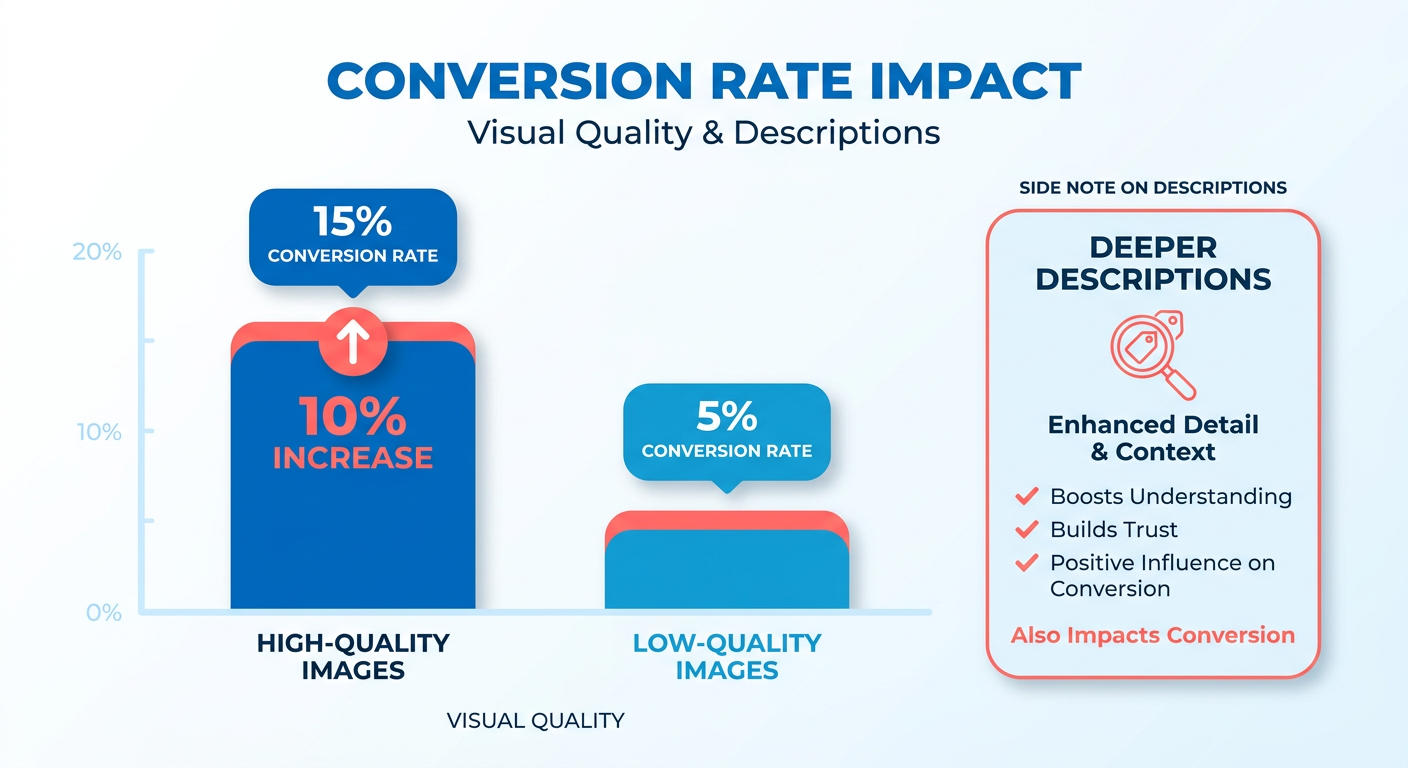
High-quality product images can lift conversions by 10%. Clear, detailed visuals help shoppers judge products at a glance, which matters most on category pages where people scan dozens of items fast.
Include as many good images as you can for each listing. Show the product from multiple angles and use consistent sizing across the grid. When every thumbnail looks sharp and uniform, the whole page reads as trustworthy. Subcategory tiles and strong imagery also pull shoppers deeper into your catalog, telling them where to click next without making them think.
Why Descriptions Matter Even on a Category Page
Detailed listings can lift conversions by 15%. Short snippets under each thumbnail give shoppers the context they need to compare options before clicking through to a full product page.
Write descriptions that say exactly what the product is. Product title tags need to be catchy and search-friendly at the same time. That balance helps you rank and helps shoppers understand the item in one read.
Skip generic filler. Stuffing category copy with "What is a running shoe?" content creates the same intent mismatch as before. Your visitors already know what they want. They came to compare and buy, not read a definition.
A footwear retailer known for its customer experience pairs high-quality images with detailed descriptions across its listings. That combination lets shoppers judge fit, style, and features without leaving the category page.
Best Practices for Product Listings
Clear, concise language throughout. Every word should help a shopper decide, not slow them down. Match your copy to commercial intent, since these visitors are ready to compare and choose.
The core practices:
- Use high-quality images: Multiple angles, consistent sizing across the grid.
- Write descriptive snippets: Say what the product is and why it fits the buyer's search.
- Keep language clear: Cut filler and lead with the details shoppers care about.
- Add helpful content: Brief, useful context, not padded definitions.
- Link internally: Connect related categories so shoppers keep browsing.
When every product follows the same format, shoppers scan faster and trust more.
Can You Automate This?
Yes. Content automation tools can speed up writing and refreshing listings at scale. Automating descriptions and metadata across a large catalog saves hours and keeps formatting consistent.
Manual updates work for small stores. Once you're managing hundreds of listings, automation keeps quality steady without draining your team. Use it to draft descriptions, then review for accuracy before publishing.
Adding Filters That Improve Product Discovery
Filters let shoppers narrow a crowded category down to the exact products they want. Add the right ones and a wall of options becomes a guided path to purchase. Relevant, descriptive filters improve browsing and push more visitors toward checkout.
Think about how you shop for something specific. You don't scroll past 200 items hoping to spot the right one. You click price, size, or color and cut the list in seconds. Filters do that work for your buyers.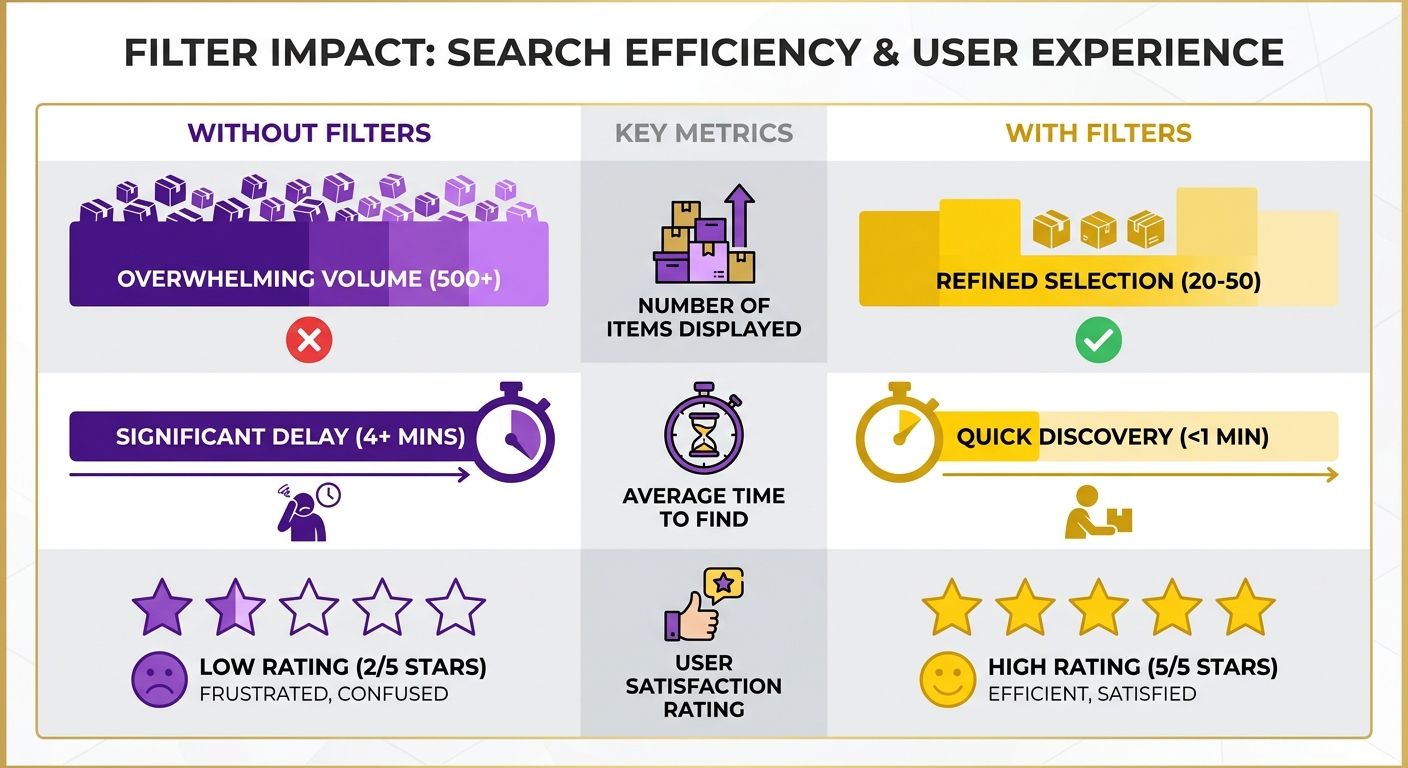
Which Filters to Add
Add filters that match how shoppers actually decide. The most useful ones cover price, brand, size, color, and product-specific attributes like material or capacity. Each filter should map to a real decision a buyer makes before they click "add to cart."
Look at how big-box retailers structure their category pages. A store selling thousands of items lets you filter by price range and brand right at the top. That helps a shopper reach the handful of products that fit their budget and preference fast.
Your filters should reflect your own catalog, not a generic template. A furniture store needs material and dimensions. A supplement brand needs flavor and serving count. Match the filter set to what your buyers care about, and discovery gets easier.
How to Write Clear Filter Labels
Use plain, concise language for every filter and value. A label like "Under $50" beats a vague "Budget option." Shoppers scan fast, so each choice needs to communicate its meaning at a glance.
Keep the wording consistent across categories. If one page says "Color" and another says "Shade," you make buyers relearn your system on every visit. Pick one term and stick with it sitewide.
Group related filters together and order them by how often shoppers use them. Put price and size near the top if those drive the most clicks. Bury the rare attributes lower so the common ones stay front and center.
Do Filters Really Lift Conversions?
Yes. Better filtering keeps people on the page, cuts the friction of finding a match, and moves more of them to purchase. Research on site-search behavior shows visitors who apply filters convert at a much higher rate than those who browse without them, since a filter is a signal of clear buying intent.
The gain comes from relevance. When a shopper can isolate exactly what they want in two or three clicks, they stop bouncing back to search and start buying. Fewer dead ends, more completed carts.
Building and maintaining a large filter system by hand takes time. Automation tools can speed up adding filters and organizing product attributes, so your team spends less effort on setup and more on refining what shoppers see.
Start small. Add the three or four filters your buyers reach for most, write clear labels, then watch how people use them. Refine from there.
Managing Faceted Navigation and Duplicate URLs
Faceted navigation creates a URL for every filter combination shoppers apply. Filter by color, size, and price, and you generate hundreds of near-identical pages. Search engines see these as duplicate content, which splits ranking signals and burns crawl budget. Two tools fix this: canonical tags and noindex tags.
How Canonical Tags Fix Duplicate URLs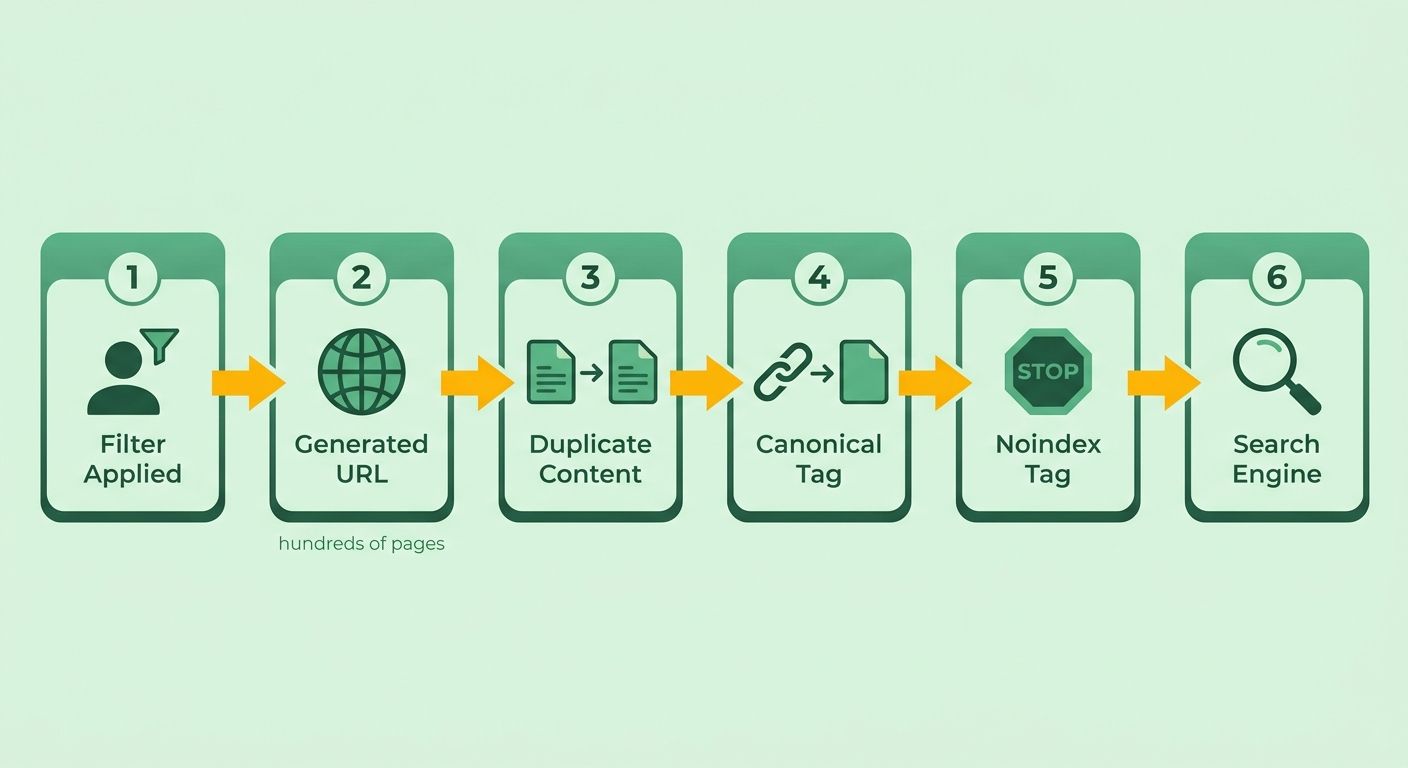
Canonical tags tell search engines which version of a page is the primary one. When a shopper filters a category and generates a new URL, the canonical tag points back to the main category page. That consolidates ranking signals onto one URL instead of scattering them across dozens of filtered variants.
Add a canonical tag to every filtered version of a category page. It signals that the clean, unfiltered page is the one you want indexed. This is one of the most reliable ways to kill duplicate content across faceted navigation.
Large marketplaces lean on this heavily, rolling filtered product listings up to a single authoritative category page. The core category pages stay competitive in search while shoppers still filter freely.
When to Use Noindex Instead
Use noindex tags on filtered pages that add no search value. A noindex tag tells search engines to skip a page entirely, keeping it out of the index. That works well for filter combinations nobody searches for, like a specific price band crossed with an obscure attribute.
Canonical and noindex do different jobs. Canonical consolidates signals when a filtered page is a variant of something you want ranked. Noindex removes a page outright when it shouldn't compete at all. Pick canonical for near-duplicates, noindex for pages that only exist to help on-site browsing.
Be deliberate. Noindex too aggressively and you can bury filter pages that actually attract search demand, like a popular brand or color combination. Check which filtered URLs pull traffic before you block them.
How to Find Duplicate Content Issues
Audit tools surface the duplicate URLs your faceted navigation quietly creates. Site crawlers flag pages with matching or near-matching content, so you can see exactly where signals split. Ahrefs is one option for finding and fixing duplicate content across a large catalog.
Run a full site crawl and sort by duplicate content warnings. Look for clusters of URLs that differ only by filter parameters. Those are your canonical or noindex candidates. Prioritize the high-traffic categories first, since they carry the most ranking value to protect.
Recheck after you deploy fixes. A follow-up crawl confirms your canonical tags resolve correctly and your noindex directives are being respected.
Best Practices for Faceted Navigation
Clear, descriptive filters are the foundation. When filter labels map to real buyer decisions, both shoppers and search engines understand your structure better. Vague or overlapping filters create messy URLs and confuse crawlers.
Keep your filter architecture consistent across categories. Use the same naming conventions everywhere. Decide upfront which filters generate indexable pages and which get canonicalized or blocked. A documented rule set stops duplicate content from creeping back as your catalog grows.
Using Strong Call-to-Actions on Category Pages
A strong call-to-action tells shoppers exactly what to do next. On category pages, that means clear buttons and links that push visitors toward a purchase. The button copy a shopper reads is often the last thing standing between browsing and buying.
Most category pages bury their CTAs or skip them entirely. Wasted opportunity. When a shopper finishes scanning your product grid, they need an obvious next step, whether that's "Add to Cart," "View Details," or "Shop the Collection."
What Makes a CTA Effective
An effective CTA uses action-oriented language and tells the shopper precisely what happens when they click. Short verbs work best: "Buy," "Shop," "Compare," "Add." The goal is zero hesitation between intent and action.
Match your CTA to where the shopper sits in their decision. On a category page, buyers are still comparing. So "View Details" or "Quick Add" often fits better than a hard "Buy Now" on every tile.
Keep the design consistent across the grid. Every button should look the same, sit in the same spot, use the same color. When shoppers learn the pattern once, they move faster through the rest of the page. Apple does this cleanly: obvious buttons, direct language, nothing competing for attention.
How to Write Action-Oriented CTAs
Start every CTA with a verb and cut every filler word. "Shop Running Shoes" beats "Click Here to Browse Our Running Shoe Selection." The shorter version reads faster and signals exactly what the click delivers.
A few practices for category-page CTAs:
- Lead with a verb. "Shop," "Buy," "Add," "Compare" to prompt immediate action.
- Be specific. "View Leather Sofas" tells shoppers more than a generic "Learn More."
- Create urgency where it's honest. "Shop the Sale" works when a real sale exists.
- Stay consistent. Same button style and copy pattern across all listings.
Test your wording. Small changes in verb choice or button placement often move conversion rates more than a full redesign. Track which version drives more clicks, then keep the winner.
Can You Automate Adding CTAs?
Yes. Tools that manage on-page content can automate adding CTAs across many category pages at once. This matters when you run dozens of categories and updating each one by hand eats hours.
Automation keeps CTAs consistent site-wide. Instead of one page saying "Shop Now" and another saying "See More," a single system applies the same tested copy everywhere. That consistency is what trains shoppers to act quickly.
The payoff is real. A home goods retailer rewrote weak, vague buttons into clear, action-oriented CTAs across its category pages and saw a 25% lift in conversions from the same traffic. Strong CTAs cost little to implement and pay back fast. Pair them with the sharp images and useful filters covered earlier, and your category pages start converting the high-intent buyers they were built to catch.
Adding Structured Data to Category and Product Pages
Structured data tells search engines exactly what's on your page. Add it to your category and product pages, and crawlers read your content more precisely, then display richer results in the listings. Rich results also take up more vertical space, which pushes competitors down the page and gives your entry more room to earn a click.
Most category pages skip this step. You can fix it in an afternoon.
What Schema Markup Is and Why It Matters
Schema markup is structured code you add to a page that labels its content for search engines. It spells out what each element means, so a crawler knows a number is a price, a rating, or an item count rather than plain text.
Search engines use this markup to enhance how your pages appear in results. Tag product data correctly and listings can show prices, availability, and star ratings right in the snippet. Those enriched results catch the eye and pull more clicks than a plain blue link.
On a category page, schema helps search engines understand you're presenting a curated group of related products. That clarity supports the broad commercial rankings these pages compete for.
How to Add Structured Data the Right Way
Use clear, descriptive markup that matches what's actually on the page. Your schema must reflect real content. Tag the product name, price, and availability with the exact values a shopper sees, or you risk mismatched signals that search engines distrust.
A few practices for marking up category and product pages:
- Use accurate labels. Match every tagged value to the visible content. A price in your schema must equal the price on the page.
- Keep descriptions specific. Vague labels tell search engines nothing. Precise ones tell them everything.
- Cover the full listing. Tag product names, prices, availability, and ratings so search engines can build a complete picture.
- Validate before you publish. Test your markup so errors don't quietly break your rich results.
Start with your highest-traffic categories. Those pages give you the fastest payback.
Can Automation Speed This Up?
Yes. Automation tools handle the repetitive work of adding structured data across dozens or hundreds of pages, so you're not hand-coding schema for every product. This matters most for large catalogs where manual tagging would eat weeks.
These tools generate the markup, keep it consistent, and update it as inventory changes. For a store with thousands of SKUs, that consistency is the difference between clean structured data and a patchwork of errors.
The payoff shows up in the details search engines reward. A retailer that tags availability and pricing correctly can qualify for merchant listing features and stock-status labels that plain pages never earn, keeping shoppers from bouncing to a competitor when an item is in stock.
Schema won't fix weak content or a slow site. But paired with the listing, filter, and CTA work you've already done, it sharpens how search engines read every category page you own.
Optimizing Titles, URLs, and Meta Descriptions
Your title tag, URL, and meta description are the first things a shopper sees in search results. Get these three right and you win more clicks before anyone reaches your page. They also send strong relevance signals that help you rank for the commercial keywords your buyers type first.
Most teams leave these fields on autopilot. Another fix you can knock out in an hour.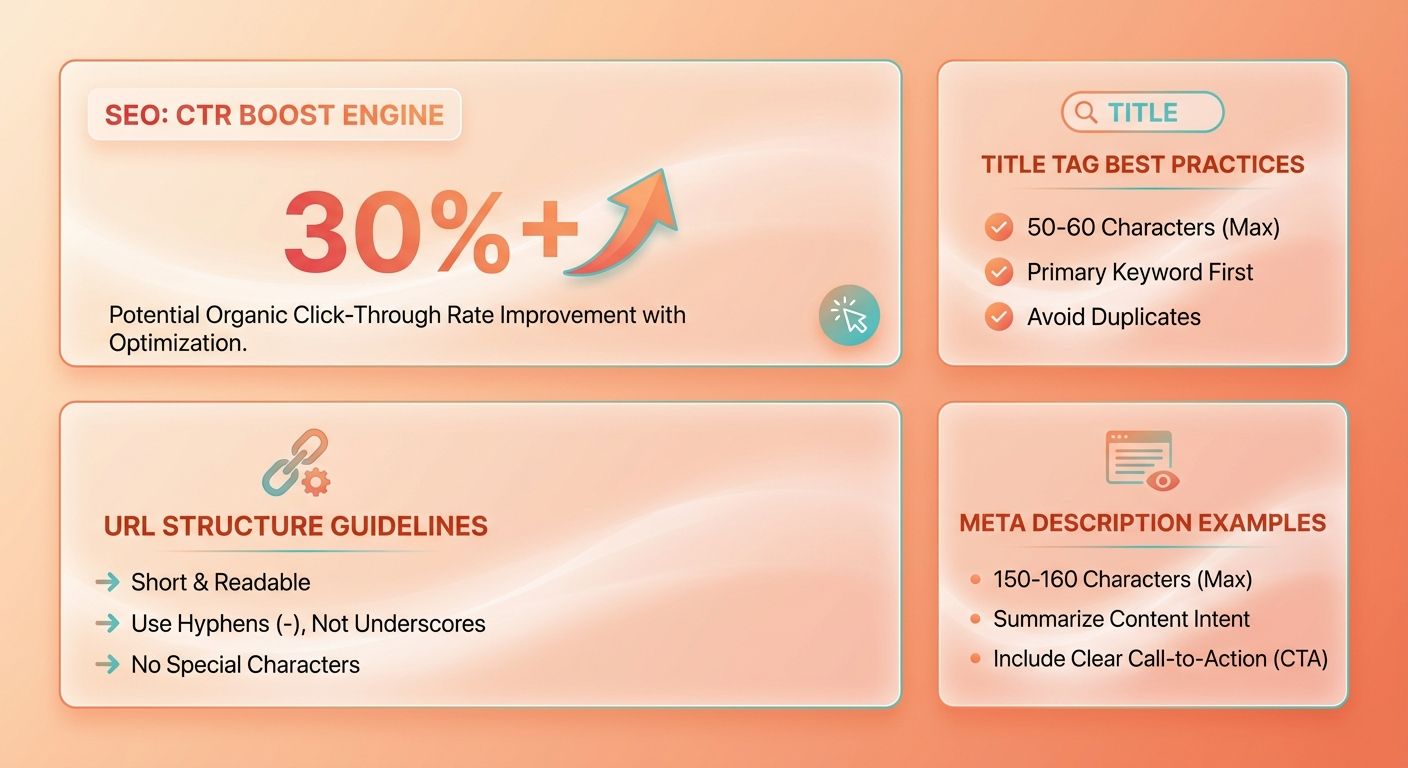
Writing Titles That Get Clicked
Your title tag should tell both search engines and shoppers exactly what the page offers, using the broad commercial keyword the category targets.
Lead with the primary keyword. "Leather Sofas | Handmade & Full-Grain Styles" beats a vague "Our Sofa Collection" every time. The keyword sits up front, and the extra detail gives buyers a reason to click.
Keep each title unique across your category pages. Duplicate titles confuse search engines and split ranking signals. Match the wording to how shoppers actually search, not to internal product names only your team recognizes.
REI saw the payoff directly. After optimizing their category page titles, they recorded a 12% increase in organic traffic. That lift came from titles built around real search demand.
Front-load your most important keyword within the first 60 characters. Search engines often truncate longer titles, and the opening words carry more weight for ranking. Test variations with modifiers shoppers care about, like material, brand tier, or problem solved, so your listing stands out.
What Makes a URL Good for SEO
A good URL is short, readable, and includes the keyword that matches the category.
Compare /c/482xj9 to /running-shoes. The second tells a shopper and a crawler exactly what sits on the page. Use hyphens between words, drop stop words, skip session IDs and tracking parameters in the canonical path.
Keep your URL structure shallow and logical. Group categories so the path reflects your hierarchy, like /shoes/running-shoes. That helps search engines understand how your pages relate.
Static URLs beat dynamic ones because they're easier for crawlers to index and for users to remember. Zappos simplified their URL structure in 2018 and saw a measurable lift in how often Google surfaced their category pages for broad product queries. Clean paths also cut the risk of duplicate content when parameters change.
Writing Meta Descriptions That Convert
This snippet is your sales pitch in the search results, so write it to pull the right shopper onto your page.
Summarize what the category offers and add a reason to click. Mention the range of products, a key benefit, or a promotion. Write in active language and include the target keyword so it stands out when search engines bold the match.
Give every category page its own description. Duplicate meta descriptions waste the space and give shoppers no reason to pick your listing over a competitor's.
Aim for 150 to 160 characters so your full message shows without getting cut. Include a clear value proposition, like free shipping, exclusive styles, or trusted brands, that speaks to the shopper's intent. Etsy tested action-oriented descriptions and found they drove a 9% uplift in click-through compared to generic product lists.
Can You Automate Title and Meta Work?
Yes. When you manage hundreds of category pages, editing titles, URLs, and meta descriptions by hand doesn't scale. Tools that automate this generate consistent, keyword-aligned tags across your whole catalog in a fraction of the time.
Automation handles the repetitive part so you focus on strategy. You still set the keyword targets and review the output, but you skip the manual grind of writing each field one page at a time. That speed matters when a large store adds new categories every month.
Frequently Asked Questions
1. Should I optimize category pages or product pages first if I have limited resources?
Prioritize whichever page type currently underperforms relative to its potential. If product pages already rank for long-tail terms while categories sit idle on page two, start with categories. Focus on high-revenue pages that get impressions but poor rankings first, since these deliver the fastest wins with minimal effort.
2. How do I handle category pages that have very few products in them?
Thin categories with few products often trigger low-value signals from search engines. Consider merging sparse categories into broader parent categories, or supplement them with helpful buying-guide content that supports selection. If a category consistently holds under five products with no growth planned, consolidation usually protects rankings better than keeping it separate.
3. What's the difference between a subcategory and a filtered category page for SEO?
A subcategory is a permanent, indexable page representing a distinct product group with its own URL and content, like "trail running shoes." A filtered page is a temporary combination generated by faceted navigation. Subcategories deserve unique descriptions and should rank; most filtered pages should be canonicalized or noindexed to avoid duplicate content.
4. Will adding structured data guarantee my category page gets rich results?
Structured data makes your page eligible for rich results but doesn't guarantee them. Search engines decide when to display enhanced snippets based on quality, relevance, and accuracy of your markup. Mismatched values between schema and visible content can disqualify you entirely, so keep every tagged price, rating, and item count precise.
5. How often should I update category descriptions once they're written?
Review category descriptions quarterly or whenever your product mix changes significantly. Seasonal shifts, new subcategories, or changes in buyer search behavior warrant refreshed copy. For large catalogs, automation tools can flag outdated descriptions and draft updates at scale, keeping your content current without draining hours of manual editing across hundreds of pages.
6. Can too many filters actually hurt my category page performance?
Excessive filters overwhelm shoppers and generate unnecessary URL combinations that strain crawl budget. Start with three or four filters buyers reach for most, like price and size, then expand based on usage data. Every extra filter adds maintenance overhead and potential duplicate content, so add them deliberately rather than covering every possible attribute.
7. How do I know if my noindex tags are accidentally blocking valuable pages?
Run a follow-up site crawl after deploying noindex directives and cross-check blocked URLs against your traffic reports. Watch for filtered pages tied to popular brands or color combinations that attract genuine search demand. If a noindexed URL previously pulled organic traffic, switch it to a canonical tag instead to preserve that ranking value.