Content Decay: How to Spot and Reverse Declining Pages

Key Takeaways
- Content decay can remove 20-30% of organic traffic within months.
- Fixing a decaying page often pays back faster than new content.
- Decay comes from external change or internal overlap, not lower quality.
- Google shipped 4,725 algorithm changes in 2022, about 13 daily.
- Older pages are dropping out of AI-generated answers despite rankings.
- Gartner projects a 25% drop in search query volume by 2026.
- Reversing decay takes three moves: refresh, realign, and clean up.
Quick Summary
Content decay is the slow decline in a page's organic traffic, rankings, and relevance after strong performance. Every kind of content reaches this point eventually, and it usually hits your best posts first. The good news is that it can reverse. You can recover lost search equity without starting over.
Treat decay as maintenance, not a quality problem. The page did not lose its value. The ground shifted under it. Intent moved, a competitor went deeper, or one of your newer posts began competing for the same keyword.
What causes content decay?
Content decay: a measurable drop in a page's performance driven by external change, internal overlap, or both. The usual triggers are stale information, a weak reading experience, and algorithm churn. Search engines keep refining relevance, so untouched pages slide by default.
There is a newer front, too. As search folds in generative AI, the bar for citation keeps tightening. Keeping a page current is no longer only about defending rankings. It is also about staying visible as query behavior shifts.
How do you reverse it?
Recovery takes three moves working together: a substantive content refresh, keyword and intent realignment, and technical SEO cleanup. Surface edits rarely move anything. Real recovery means rewriting weak sections and adding depth.
A substantive refresh rebuilds the page with keyword-optimized, intent-aligned copy that answers what people search for now, not last year. The goal is a refresh workflow that runs on schedule, backed by analytics that show what works.
We prioritize pages that once drove high-value traffic and still hold link equity, and we check for internal cannibalization before choosing a fix.
At-a-glance: spot it and fix it
| Signal | What it points to | Your move |
|---|---|---|
| Gradual traffic slide over months | Classic decay, no single trigger | Substantive refresh |
| Ranking drop for a key term | Intent shift or stronger competitor | Rework intent, add depth |
| Impressions steady, clicks falling | Title/meta or SERP feature loss | Rewrite title and snippet |
| Two pages splitting one keyword | Internal cannibalization | Consolidate or redirect |
| Dropping out of AI answers | Weak freshness signals | Update facts, restructure |
One honest carve-out: skip the full refresh on pages with negligible traffic and no link equity. Pruning or redirecting those improves site health more than a rewrite.
What decay quietly costs you
Content decay is not only a traffic problem. Left alone, it drains revenue, chips away at reader trust, and hands rankings to whoever keeps pages current. That is why we treat a declining page as a live line item, not a future cleanup task.
The pages that decay are usually the ones that once earned the most. A guide that drove qualified leads last year can slip out of the top results and nobody flags it, because the drop is gradual. No alarm fires. You just notice the pipeline getting thinner.
What ignoring it actually costs
Ignored decay hits traffic first, then revenue, then reputation. Stale pages raise bounce rates and frustrate readers who came for a current answer. Search engines read those signals and keep demoting the page, which speeds up the slide you never caught.
That is why we push refreshes. Real-time analytics surface the pages that are slipping so you can act before the decline compounds. A neglected asset becomes a candidate for a targeted, SEO-optimized rewrite in your own voice, without the manual work that usually pushes these updates to the bottom of the list.
Compare that to the slow bleed. A page can lose traffic month after month before anyone looks, and the longer it sits, the harder it is to recover. Our Taxonomy Researcher and SERP Competitor Analyzer help you catch the winnable refreshes early. Wait too long and decay hardens into something far more expensive to fix.
Freshness is now a two-front war
Freshness pressure comes from two directions: traditional rankings and AI-generated answers. A page that skips updates for over 12 months now risks disappearing from AI Overviews entirely, even while it still ranks in classic organic results. Strong backlinks do not shield older pages the way they once did.
The search surface itself is moving. Constant engine adjustments can reshuffle results under your feet without you touching a line of code.
So refreshing is not just ranking defense anymore. It is how you stay eligible to show up in AI summaries at all. If a page carries no signal that it is current, answer engines increasingly skip it.
Does every kind of content decay?
Yes. Blog posts, product pages, and landing pages all get there. No format is immune, and the causes stack: shifting intent, deeper competitor coverage, link rot, and topical interest that fades.
Most teams blame external competition and never look at their own library. Two of your pages targeting the same keyword can cannibalize each other, splitting rankings you would otherwise own outright. Diagnosis has to check internal overlap, not only what rivals published.
One caveat, stated plainly: cosmetic edits do not satisfy modern search engines. Reversing decay takes a data-driven diagnosis and real rewrites, run as an ongoing habit instead of a one-time rescue.
Understanding Content Decay
Content decay is a slow, persistent slide in a page's rankings, impressions, and clicks with no single triggering event. That is what makes it hard to catch. No crash, no error page, no penalty notice. The numbers just drift down week after week until you look up one day and the page has fallen off page one.
Decay, seasonal dip, or technical error?
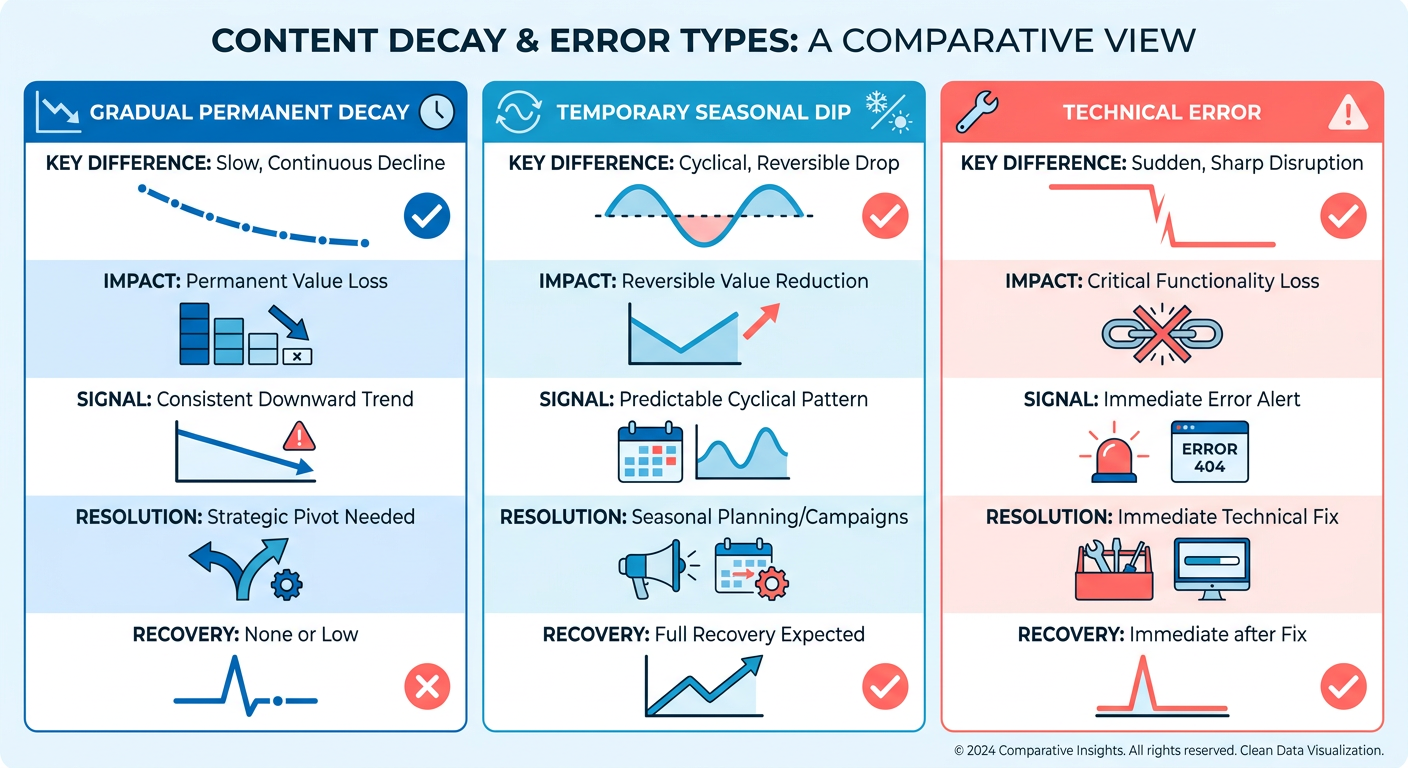
Decay is gradual and permanent unless you act on it. Seasonal drops recover on their own. Technical errors cause sudden cliffs. Sorting your traffic loss into the right bucket is the first diagnostic move, because each one needs a different fix.
Start by checking whether the drop repeats on a calendar. Google Trends will show whether a query rises and falls on a predictable schedule. If a page about tax filing loses traffic every summer and rebounds every spring, that is seasonality, not decay. Leave it alone.
Next, rule out the mechanical stuff. A quick pass through Google Search Console tells you if the page got deindexed, hit a crawl error, or lost coverage. Those produce a sharp overnight fall, not slow erosion. One r/TechSEO thread described 1,800 posts vanishing from the index overnight after months of stable traffic. That is a technical signal, not decay.
Real decay looks different. It is a steady month-over-month decline you mostly see in year-on-year data. It tends to break into three patterns: a ranking drop, an impression collapse, or CTR erosion where you still rank but fewer people click. Each points to a different root cause.
What actually makes a page decay?
Decay is multi-causal, which is why single-fix thinking fails. The usual suspects are stale information, a competitor publishing deeper coverage, and algorithm churn. Continuous updates can quietly erode a page that never changed a word.
Two forces get overlooked. The first is internal cannibalization, where your newer posts start competing with an older one for the same query. The second is the freshness bias now built into AI answers.
That bias is measurable. URLs cited by AI assistants run about 25.7% fresher than standard results. Studies of AI Overviews show roughly 60% of cited sources were published or updated within the past year, which means older pages quietly age out of the pool these systems pull from.
Set a different baseline per page type
"Declining" means something different for a news post than for a pillar guide, so judge every page against what its category should do, not one universal rule.
Evergreen guides should hold or grow traffic for years, so any sustained dip is a red flag worth a refresh. News and trend pieces are built to spike then fade, so a drop there is often natural. Product and commercial pages tie straight to revenue, so we weight even small declines heavily. Set your threshold per template before you audit, or you will waste effort chasing normal fade on pages that were never meant to last.
How to Reverse Content Decay
Start with the highest-leverage move: a real refresh, not a date change. Fixing a decaying page usually returns traffic faster and cheaper than writing something new. But cheap cannot mean cosmetic. Recovery means rewriting weak sections, adding depth, and matching what searchers want now.
What a substantive refresh actually looks like
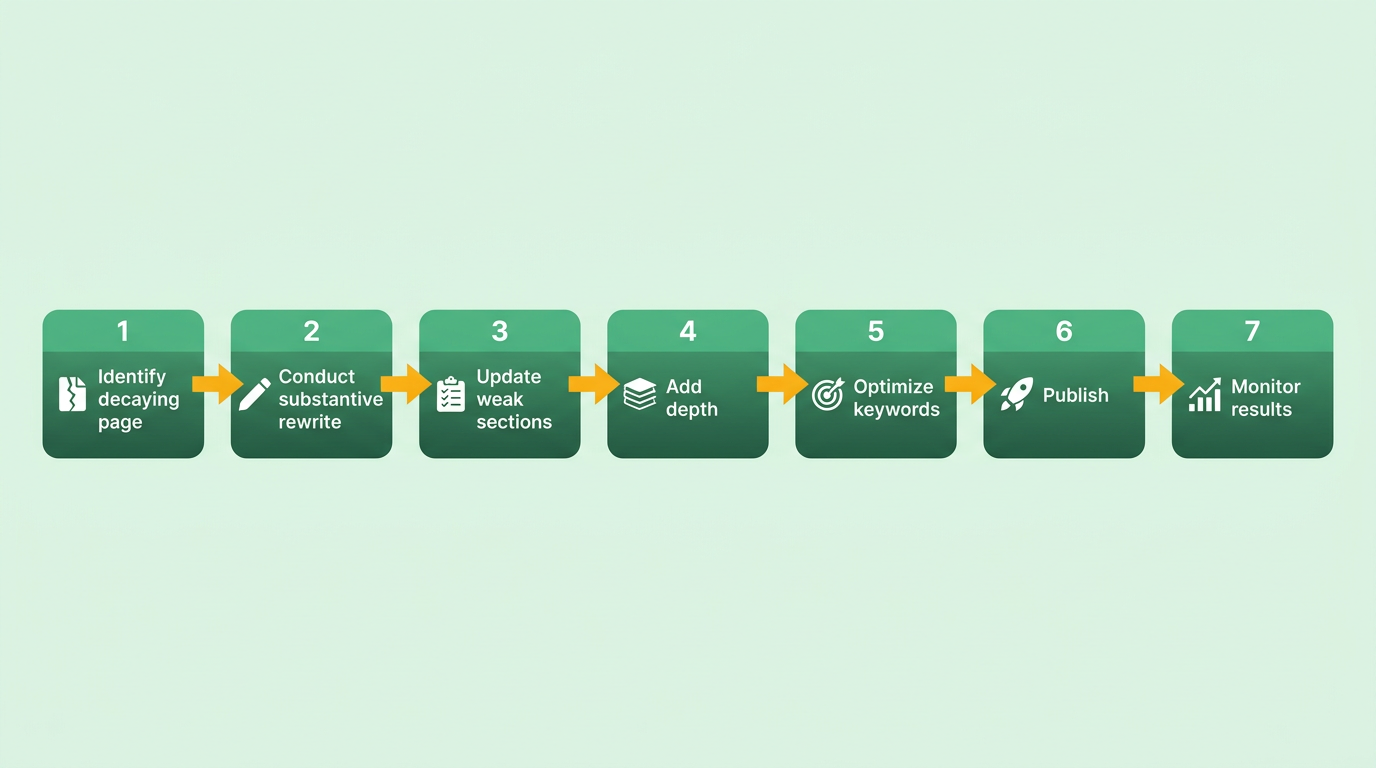
Content refresh: a meaningful rewrite that updates information, deepens coverage, and realigns a page with current search intent, not just a timestamp bump.
There is a tension worth naming. One school says refreshing is the fastest way back because it takes less work than new content. Another warns that surface-level edits do nothing. Both are right about different things. Refreshing is cheaper. It only pays off when the changes are real.
The range of outcomes proves the point. A WordPress speed guide that got a full overhaul saw a 70% jump in organic traffic within three months. A server tutorial losing roughly 10% a month recovered once someone rebuilt it before decay set in. Date-only edits produce neither result.
Treat refresh as a rewrite budget, not a maintenance checkbox. Rework the intro, cut stale claims, and answer the questions competitors now answer better.
Fixing keyword drift and internal cannibalization
Most decay advice fixates on external competitors and skips the problem inside your own site. When two or three of your pages chase the same query, they split link equity and confuse search engines about which one to rank. That is keyword cannibalization, and it is a common, invisible cause of decline.
Audit your own library first. If several posts overlap, consolidate them into one authoritative page and redirect the rest. Merging thin, overlapping articles into a single strong one lifts rankings more reliably than polishing each in isolation.
Pruning helps too. In one case, cutting more than 60% of low-performing articles increased clicks for the pages that stayed. Fewer, stronger pages concentrate authority instead of scattering it.
Why technical SEO and freshness matter now
Freshness signals depend on more than word choice. Skip the updates and your pages get surfaced less often in answer engines. Search behavior is shifting fast toward AI-generated summaries, so pages that look stale to a crawler quietly lose the citations that used to send steady traffic.
That is where the technical layer earns its place. Add visible last-updated dates, apply article and FAQ schema, tighten internal links to your refreshed pages, and clean up meta titles and descriptions to lift click-through.
The reliable pattern is substantive refresh done at scale, not one-off heroics. Teams that build a repeatable update calendar tend to clear a backlog roughly three times faster than teams refreshing pages ad hoc, because the process removes the decision fatigue that stalls maintenance. That is the real lever. A system you run, not a scramble you dread.
Our Persona Engine fits here, keeping refreshed pages on-voice as you update at volume. Schedule quarterly audits, set alerts for ranking slips, and treat maintenance as ongoing work. Decay is natural, and it reverses when you keep showing up.
Deciding What to Do with a Decaying Page
Four moves handle nearly every decaying page: update it, consolidate it, redirect it, or prune it. The choice comes down to two questions. Did the page once drive meaningful traffic, and does it still hold link equity? Answer those and the decision usually makes itself.
Start with the data. Compare year-on-year clicks and impressions to see which pages shed the most over a rolling 12-month window. That history tells you what is worth saving and what is worth cutting.
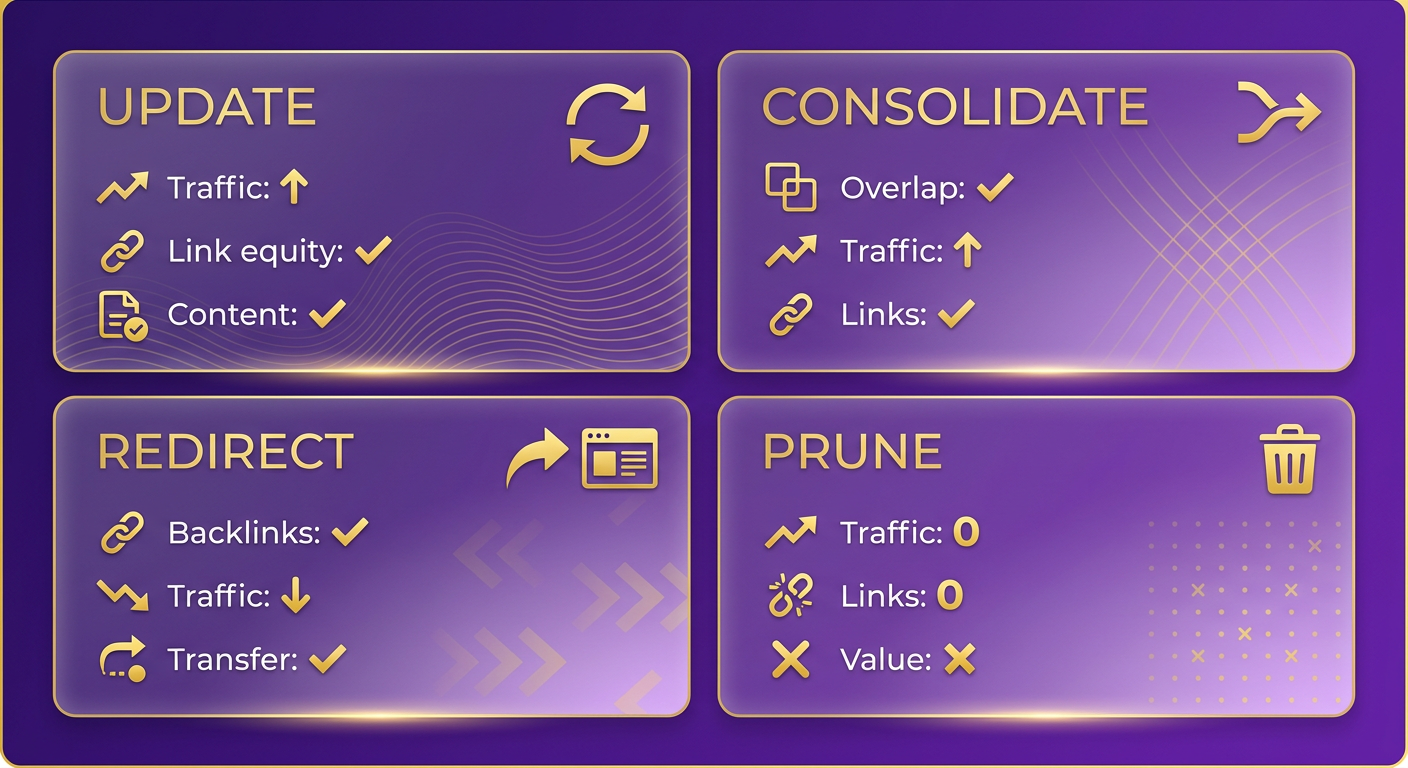
Update, consolidate, redirect, or prune?
The framework: update pages that still earn traffic and match current intent, consolidate overlapping pages fighting for the same query, redirect dead pages that carry backlinks, and prune thin pages with no traffic and no links.
Updating is the default for a page that ranked well and simply drifted. Recovery needs real work, though: new sections, fresh data, sharper answers to the questions people actually search. Without deeper changes, search engines have no reason to re-evaluate the page.
The trick is doing that work without burning your whole quarter on it. The fix is not heroics on any single page, it is a repeatable workflow. Batch your audits, template the refresh steps, and set a fixed cadence so updates happen on schedule instead of only after a page has cratered. A system you run every quarter beats a one-time cleanup you never repeat.
When consolidation beats updating
Consolidate when two or more of your own pages fight over the same keyword. Most decay advice blames outside competitors and skips this, but internal cannibalization quietly splits your authority across pages that should be one.
Merge the overlapping posts into a single stronger URL, then 301 the losers into it. You keep the best of both and stop competing with yourself. It also cleans up the reader experience, since nobody wants three near-identical guides from the same site.
Redirecting on its own matters most when a page is dead but carries backlinks. A 301 preserves that link equity and passes it to a relevant live page, so you do not lose years of earned authority just because one article aged out.
When to just prune
Prune pages with negligible traffic and no meaningful links. Deleting them is not defeat. Removing underperformers concentrates authority across your remaining pages instead of scattering it.
That runs against the instinct to protect everything you have ever published. But bloat dilutes your site's focus, and search engines reward tighter, higher-quality libraries. Keep the pages that once drove real traffic and hold link equity. Let the dead weight go.
This is where content analytics earns its keep. Seeing which pages decayed, which overlap, and which still hold links turns a guessing game into a sorting exercise. AnyPost.ai pairs real-time analytics with automated, SEO-optimized content generation, so once you have spotted the pages worth saving, you can refresh them in your brand voice and publish without the manual grind.
Spotting Decay Before It Shows in Rankings
Content decay shows up in your data long before it shows up on a rankings report. The earliest signal is a slow slide in organic clicks and impressions, and it rarely trips an alarm. Catch the drift early and the fix stays cheap. Miss it and you are rewriting from scratch.
Which metrics flag decay first?
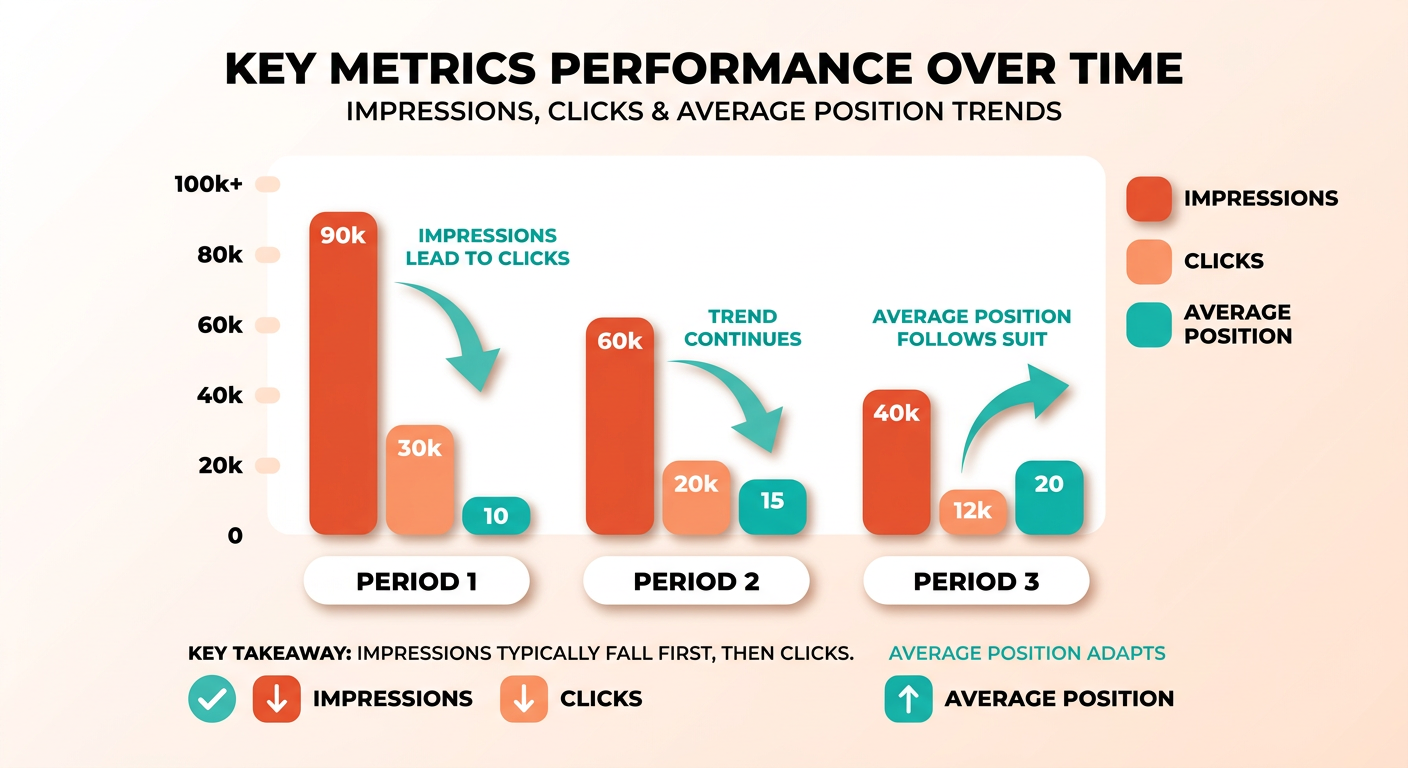
Start with clicks, impressions, and average position in Search Console. Impressions usually fall before clicks. When impressions drop, engines are surfacing your page for fewer queries, a sign intent is shifting or a competitor has moved ahead. When clicks fall but impressions hold, your CTR is eroding, and the fix is usually the title tag and meta description.
We segment declining pages by decay type before touching anything: a ranking drop, an impression collapse, or CTR erosion. Each points to a different cause and a different fix. Treating them as one problem is how teams end up applying the wrong remedy.
Average position tells you severity. A keyword sliding from position 3 to 8 barely dents raw traffic at first, because the click curve stays flat until you drop out of the top spots. By the time traffic visibly falls, you have already lost most of the clicks you will ever get back.
What engagement metrics reveal
On-page behavior fills the gap Search Console cannot. Time on page and bounce rate tell you whether the traffic you keep is the right traffic. Dana DiTomaso points to engagement rate as the sharper diagnostic here. A rising bounce rate on a page that still ranks means readers landed, looked, and left. That mismatch is an early sign that your content no longer answers the query the way it used to.
The freshness signal rankings won't show you
A page can hold its organic ranking and still disappear from AI-generated answers. Skip the updates and content risks dropping out of AI summaries entirely, even when strong backlinks kept it ranking. Watch your "last modified" dates against the topics you compete on. A cluster of pages all untouched for a long stretch is a leading indicator that a decay wave is coming.
Recency now matters across both traditional and AI search. Treat the update timestamp as a monitored metric, not an afterthought, and you catch the risk before either channel slips.
How often should you audit?
Run a light audit monthly and a deep one quarterly, scaled to how much you publish. The quick pass looks for gradual click and impression drops. The deep pass segments pages by decay type and checks engagement against intent.
Once you have spotted a slipping page, the reversal has to be fast to keep the fix cheap. Automated, SEO-optimized content generation lets you refresh pages in your brand voice and auto-publish across channels, which turns maintenance into a repeatable move.
A Checklist for Reversing Decay
Reversing decay is a repeatable workflow, not a heroic one-off. The teams that win treat it as a checklist they run on a schedule: refresh the content substantively, sharpen the keywords, fix the technical signals, then keep the page on-voice. Here is the order we run it in and why.
What goes on the refresh list first
Start with a substantive rewrite, the move with the highest payoff. Real gains come from rewriting weak sections, adding depth, and answering what searchers ask now.
The principle holds up in practice. A guide that gets a full overhaul, with weak sections rebuilt and current intent answered, stands a far better chance of recovering organic traffic than one left to keep sliding. The pages that decay quietly are usually the ones nobody revisits until the drop is severe.
Again, the lever is not effort per page, it is a system. Automating the refresh lets you update at pace without the manual grind. That is the real enabler: a workflow you repeat across dozens of decaying pages.
While you rewrite, tighten the keyword targeting. Pull the queries the page still ranks for in Search Console, then check which ones it used to rank for and lost. Those lost terms tell you where intent shifted. Rework headings and body copy to match the language people actually search now, not the phrasing that worked last year.
Which technical fixes actually move the ranking
After the rewrite, fix the signals search engines read. Internal linking and meta tags move rankings fastest on a page that already has authority.
Point fresh internal links at the refreshed page from your strongest related content. That passes relevance and tells crawlers the page matters. It also addresses a cause most decay advice ignores: internal cannibalization, where your newer posts compete for the same query. Audit for overlap before you add links, so you are consolidating signals instead of splitting them.
Rewrite the title tag and meta description too. When clicks fall but impressions hold, that is CTR erosion, and the title is almost always the culprit. A sharper title tied to current intent recovers clicks without touching your ranking position.
Keeping a refresh on-voice at scale
Substantive refreshes at volume create a quality risk: rewrites that drift off-brand and read like a different author wrote each one. That inconsistency is exactly what erodes reader trust over time.
A centralized voice profile earns its keep here. It holds every refreshed page to the same voice, tone, and reader fit, so a page rewritten this quarter still sounds like your brand and not a patchwork. On-voice content keeps engagement steady, which protects the exact signals decay attacks.
One last item, the one teams skip: put decay checks on a calendar. Run audits monthly for high-volume libraries, quarterly for smaller ones. Decay is a maintenance problem, so treat it like maintenance. Catch the drift early and every fix on this list stays cheap.
Keeping Pages Fresh and Preventing the Next Slide
Prevention is cheaper than recovery. Once you have reversed a decaying page, the job shifts to keeping it from sliding again, and that means treating freshness as routine, not rescue. The teams that stay ahead build maintenance into the calendar instead of waiting for traffic to crater.
How often should you audit?
Content audit: a scheduled review of your live pages to catch declining clicks, impressions, and rankings before they compound.
Run audits quarterly if you publish steadily, monthly if you push high volume. The right cadence depends on how fast your library grows. What matters is that the review is regular. Decay is a slow drift, so a page can shed a chunk of its traffic between two annual check-ins and you would never feel the individual weeks slipping.
Pull year-on-year clicks and impressions in Search Console during each pass. Audits routinely surface recoverable traffic that teams did not know they were losing. The drop hides in aggregate numbers until you segment by page.
What ongoing maintenance looks like
Ongoing maintenance is a repeatable refresh workflow, not one-off heroics. A content calendar is where it lives. You schedule updates the same way you schedule new posts, flagging older winners for review on a rolling basis so nothing goes untouched for too long.
Two structural pieces make it stick:
- A shared calendar that tracks last-updated dates alongside publish dates, so stale pages surface automatically.
- A content team with clear ownership, where writers and editors keep pages on-voice and factually current, and someone owns the decision to update, consolidate, or prune.
This is where real-time analytics earns its keep. Watch performance as it moves instead of reading a monthly report after the damage is done. When a page's clicks start drifting, you want to catch the trend in week two, not quarter three. Early signals keep the fix cheap.
Why freshness matters for AI answers too
Freshness has become a real factor in modern search. The same neglect that lets a page slip in organic rankings now drops it out of AI-generated answers, and that second front is newer and less forgiving.
Pages left un-updated for too long risk disappearing from AI-driven summaries. And the part that surprises people: strong backlinks no longer protect an older page in AI Overviews. A page can still rank organically while quietly disappearing from the AI answer sitting right above those results.
So visible update dates, last-modified metadata, and clean schema for articles, FAQs, and how-to content are not optional polish anymore. They are freshness signals that keep you eligible for AI citations. Build them into your maintenance pass. Update the substance, then make the recency legible to the machines reading your page.
The teams that treat freshness as continuous, not periodic, are the ones whose best pages keep earning long after publish day.
Frequently Asked Questions
1. How can I tell content decay apart from a manual Google penalty?
A penalty appears in Google Search Console's Manual Actions report and causes sudden, sitewide drops tied to policy violations. Decay produces no notice and slides gradually on individual pages. Check the Manual Actions and Security Issues tabs first; if both are clean, you are likely facing decay, not a penalty.
2. Will refreshing a page risk losing the rankings it still holds?
A substantive refresh carries low risk when you preserve the URL, existing headings that still rank, and internal links. Trouble arises only if you strip proven sections or change the URL without a 301 redirect. Keep the winning elements, expand weak areas, and rankings typically hold or improve rather than drop.
3. How long should I wait before judging whether a refresh worked?
Give a refreshed page 8 to 12 weeks before evaluating results, since search engines need time to recrawl, reindex, and reassess relevance. Track impressions first, as they usually move before clicks. If impressions climb within the first month, the refresh is working even before traffic fully recovers.
4. Do brand-new websites need to worry about content decay?
New sites face decay risk once pages mature past their initial ranking period, usually six to twelve months after publishing. Early on, the bigger concern is building authority. Set up Search Console tracking from day one so you establish baselines, then start monitoring for gradual declines as pages age.
5. Can content decay be prevented entirely, or only reversed after it starts?
Decay cannot be fully prevented because external forces like algorithm changes, shifting intent, and new competitors are outside your control. It can be slowed dramatically with a scheduled refresh calendar and freshness monitoring. Treating maintenance as ongoing work keeps decline shallow and recovery cheap instead of letting drops compound.
6. What's the difference between pruning for decay and pruning for a site migration?
Decay pruning removes thin, low-value pages that never earned traffic or links, concentrating authority on stronger content. Migration pruning consolidates or redirects pages to fit a new structure or domain. Decay pruning is driven by year-on-year performance data; migration pruning is driven by architecture, though both rely on 301 redirects.
7. How does automation fit into a repeatable refresh workflow?
By pairing real-time analytics with automated, SEO-optimized content generation, you can scale updates. Instead of rewriting each decaying page from scratch, you spot winnable refreshes early, regenerate intent-aligned content in your brand voice, and auto-publish across channels, turning maintenance into a scheduled system rather than an occasional scramble.
