Content Marketing Strategy for Small Businesses: 10 Steps to Drive Growth

Key Takeaways
- Iterate based on data insights to stay agile, using metrics like engagement rates and conversion rates to refine content strategies.
- Track key metrics such as bounce rates, traffic sources, and conversion rates to identify top-performing content and underperforming assets.
- Test changes like clearer CTAs or optimized headlines if blog posts drive high traffic but low conversions (e.g., improving conversion rates by 20-30%).
- Double down on successful formats, such as social media videos that generate 50% more shares compared to text-only posts.
- Use tools like Google Analytics or AnyPost.ai to automate data analysis and reduce wasted resources on ineffective tactics.
- Focus on recurring trends across platforms—e.g., video-heavy content outperforming static posts—to prioritize high-impact strategies.
- Regularly review performance data (weekly or monthly) to adjust messaging and maintain relevance for evolving audience preferences.
Related Video
Watch: 10 Social Media Strategies That Actually Drive Real Growth (Most Businesses Skip #5) by Angel Marketing
Iterating Based on Data Insights
Iterating based on data insights is essential for small businesses to stay agile and competitive in their content marketing efforts. By regularly reviewing performance metrics, you identify what resonates with your audience and refine your strategy accordingly. This step ensures your content remains relevant, reduces wasted resources on ineffective tactics, and maximizes ROI. Let’s break down how to analyze data, adjust your approach, and use tools to streamline improvements.
How Do You Analyze Data to Improve Your Strategy?
Start by tracking key metrics like engagement rates, bounce rates, conversion rates, and traffic sources. Tools like Google Analytics or AnyPost.ai’s analytics dashboard help pinpoint top-performing content and underperforming assets. For example, if blog posts drive high traffic but low conversions, test tweaks like clearer CTAs or optimized headlines. Focus on patterns: recurring trends across platforms (e.g., social posts with videos getting 50% more shares) signal opportunities to double down on successful formats.
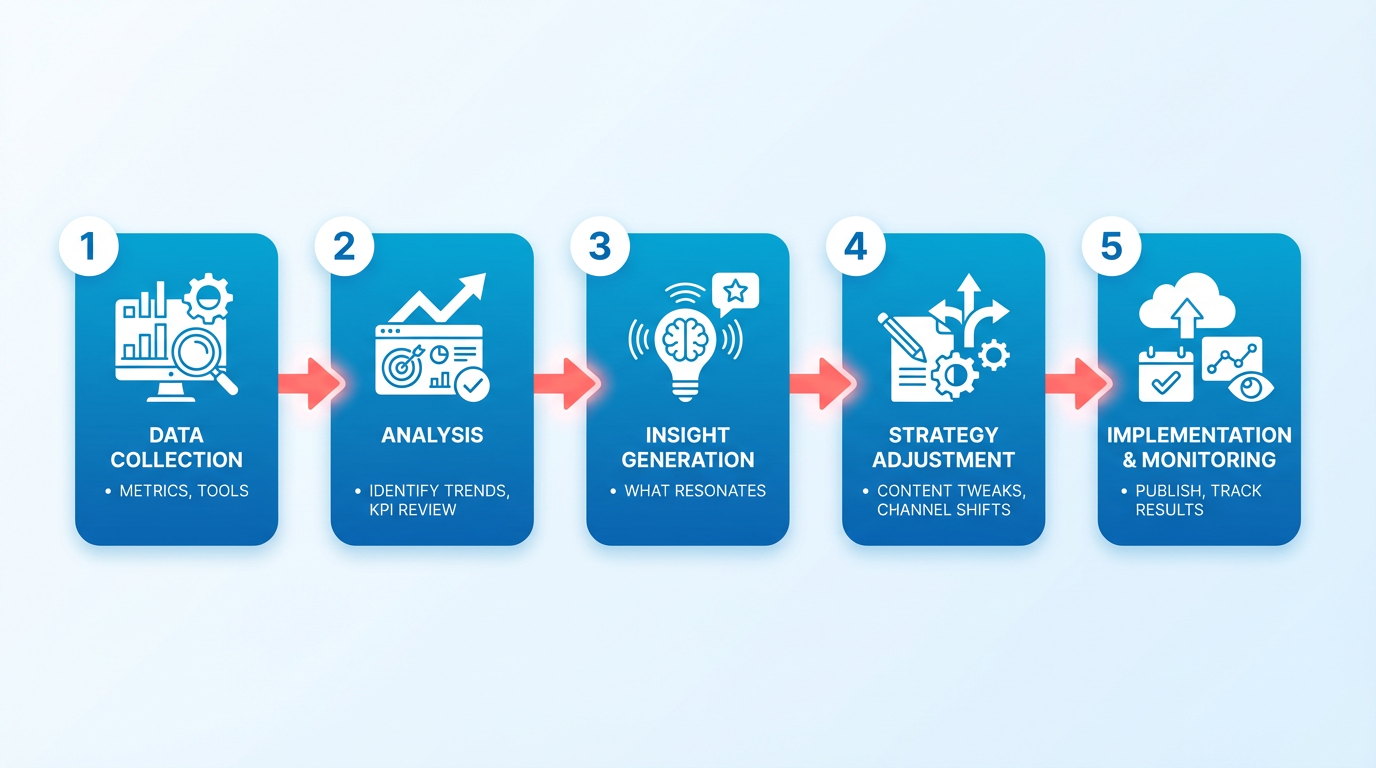
Salesforce highlights that small businesses that refine their strategies based on data are seen as more adaptable, which builds customer trust. Suppose your data shows 70% of your audience engages with video content on Instagram but ignores LinkedIn articles. Prioritize Instagram Reels and repurpose article content into short videos. Regularly revisiting metrics ensures your efforts align with audience preferences, as outlined in the Tracking Performance with Real-Time Analytics section.
What Are Practical Ways to Refine Your Content Strategy?
Adjust content formats and distribution channels based on insights. If analytics reveal that podcasts outperform blog posts, allocate more resources to audio content. Similarly, shift publishing schedules to times when your audience is most active-say, posting Instagram stories at 7 PM instead of 10 AM. Automating Content Generation with AI tools like AnyPost.ai accelerates this process by creating tailored content in your preferred style, saving time while maintaining consistency.
Consider a local bakery that noticed a 30% drop in email open rates. By A/B testing subject lines and segmenting their list based on purchase history, they boosted engagement by 40%. Another example: a retail store analyzed search data to find that “eco-friendly skincare” outperformed “natural beauty products.” Updating their blog’s SEO keywords to match the former phrase increased organic traffic by 25%. These adjustments align with the Creating an SEO-Optimized Content Calendar section, which emphasizes keyword alignment for search visibility.
How Can Tools Like AnyPost.ai Streamline Iteration?
AnyPost.ai’s SaaS service accelerates content refinement by automating research, drafting, and optimization. For instance, if data shows your audience prefers listicles over long-form guides, the tool generates structured, scannable content in seconds. Its AI also suggests keyword improvements based on real-time search trends, ensuring your content stays aligned with what users are actively seeking.
A hypothetical small business using AnyPost.ai might input a topic like “summer marketing tips” and receive drafts optimized for SEO, social media snippets, and email subject lines-all tailored to their brand voice. This reduces the guesswork in iteration, letting you focus on testing and scaling high-performing ideas.
Why Real-World Testing Matters
Data iteration isn’t just about numbers-it’s about learning from experiments. A local fitness studio found that live YouTube workouts drove 60% more sign-ups than pre-recorded videos. By replicating this format across platforms and testing different class lengths (30 vs. 45 minutes), they refined their offering to meet audience demand. Similarly, a B2B software company redesigned their whitepapers into interactive webinars after noticing low download rates, boosting lead generation by 35%.
The takeaway? Use data to hypothesis, test, and adapt. Small businesses that treat their content strategy as a living, evolving plan-rather than a static one-consistently outperform competitors. Pairing this mindset with tools like AnyPost.ai ensures your strategy stays sharp, efficient, and aligned with your growth goals.
Defining Clear Content Objectives
Building on concepts from the Identifying Target Audience and Personas section, content objectives must address specific audience needs to drive engagement. For example, a fitness studio targeting busy professionals would set different goals than one focused on retirees, as audience preferences shape content direction.
When aligning goals with business priorities, the Choosing Content Formats and Channels section emphasizes how formats like video or blogs can vary in effectiveness depending on the objective. A software startup aiming to generate case studies might prioritize long-form guides, while a local bakery could opt for quick recipe tutorials to match its lead-generation goal.
Tools like AnyPost.ai’s content brief generator simplify structuring SMART goals, as explored in the Iterating Based on Data Insights section. By testing formats and tracking metrics, businesses refine their strategies to ensure objectives remain both ambitious and actionable.
Automating Content Generation with AI
Automating content generation with AI helps small businesses save time while maintaining consistent, high-quality output. Tools like AnyPost.ai streamline tasks from drafting blog posts to create social media updates, allowing teams to focus on strategy instead of repetitive work. This step isn’t about replacing creativity-it’s about amplifying efficiency. Let’s break down how to use AI effectively and why it matters.
How Do AI-Powered Tools Like AnyPost.ai Work?
AI tools analyze input (like topics, keywords, or brand guidelines) to generate content drafts tailored to your audience. For example, you can feed AnyPost.ai a product description prompt, and it will output multiple variations in minutes. The key is refining outputs with your brand voice-AI handles the heavy lifting, while you ensure alignment with your unique tone.
Here’s how it typically works:
- Input your requirements: Define the topic, target audience, and desired tone.
- Generate drafts: The AI produces content based on your input.
- Edit and publish: Review the output for accuracy and inject personal touches.
AnyPost.ai’s interface simplifies this process, offering templates for common formats like social media captions or email newsletters. This reduces the time spent brainstorming and writing from hours to minutes. As mentioned in the Choosing Content Formats and Channels section, selecting the right formats ensures your message resonates with your audience, and AI tools can adapt to these preferences efficiently.
What Are the Real Benefits for Small Businesses?
The advantages of automation go beyond speed. Small teams often juggle multiple roles, and AI ensures content stays consistent across platforms without burning out resources. For instance, a local bakery might use AnyPost.ai to generate weekly blog posts about seasonal recipes, freeing staff to focus on customer service or product development.
Key benefits include:
- Increased productivity: Create more content in less time.
- Cost efficiency: Reduce reliance on external writers or agencies.
- Consistency: Maintain a unified brand voice across platforms.
A hypothetical example: One small business owner reported saving 10+ hours monthly by automating 70% of their social media content using AI. This lets them reinvest time into growing their customer base. Building on concepts from the Defining Clear Content Objectives section, aligning AI-generated content with strategic goals ensures every piece contributes meaningfully to business outcomes.
How Do You Start Using AI for Content Creation?
Getting started requires clear planning. First, define what types of content you want to automate-blogs, social posts, or email subject lines? Next, choose a tool like AnyPost.ai that aligns with your needs. Train the AI by inputting brand guidelines, such as preferred keywords or writing style.
Here’s a quick start guide:
- Set goals: Identify 1–2 content types to automate first.
- Upload brand assets: Share your voice, style guide, or past content examples.
- Test and refine: Generate drafts, then tweak the output for quality.
Remember, AI isn’t a magic solution-it’s a tool that improves with feedback. Regularly review outputs and update prompts to reflect new priorities. For example, if your audience reacts well to list-style blog posts, train the AI to prioritize that format. As highlighted in the Iterating Based on Data Insights section, using performance data to refine AI inputs ensures your content evolves alongside audience preferences.
Choosing Content Formats and Channels
Choosing the right content formats and channels is critical to ensuring your marketing efforts resonate with your target audience and achieve your business objectives, as outlined in the Defining Clear Content Objectives section. Without alignment, even high-quality content can fail to convert or engage, such as when a business uses infographics to reach an audience that primarily consumes podcasts. A strategic approach to format and channel selection ensures resources are directed where they create the most impact.
How Do You Choose the Right Content Formats?
The answer lies in understanding your audience’s preferences and your goals. As discussed in the Identifying Target Audience and Personas section, if your audience craves quick, actionable advice, short-form videos or social media posts might work best. For in-depth education, long-form blog posts or whitepapers could be more effective. For instance, a small business offering DIY tutorials might create 60- to 90-second video clips to cater to viewers who prefer visual learning. Meanwhile, a survey-driven content strategy could lead to case studies or how-to guides if research shows customers seek problem-solving resources. The key is to match formats to user intent-not just trends.
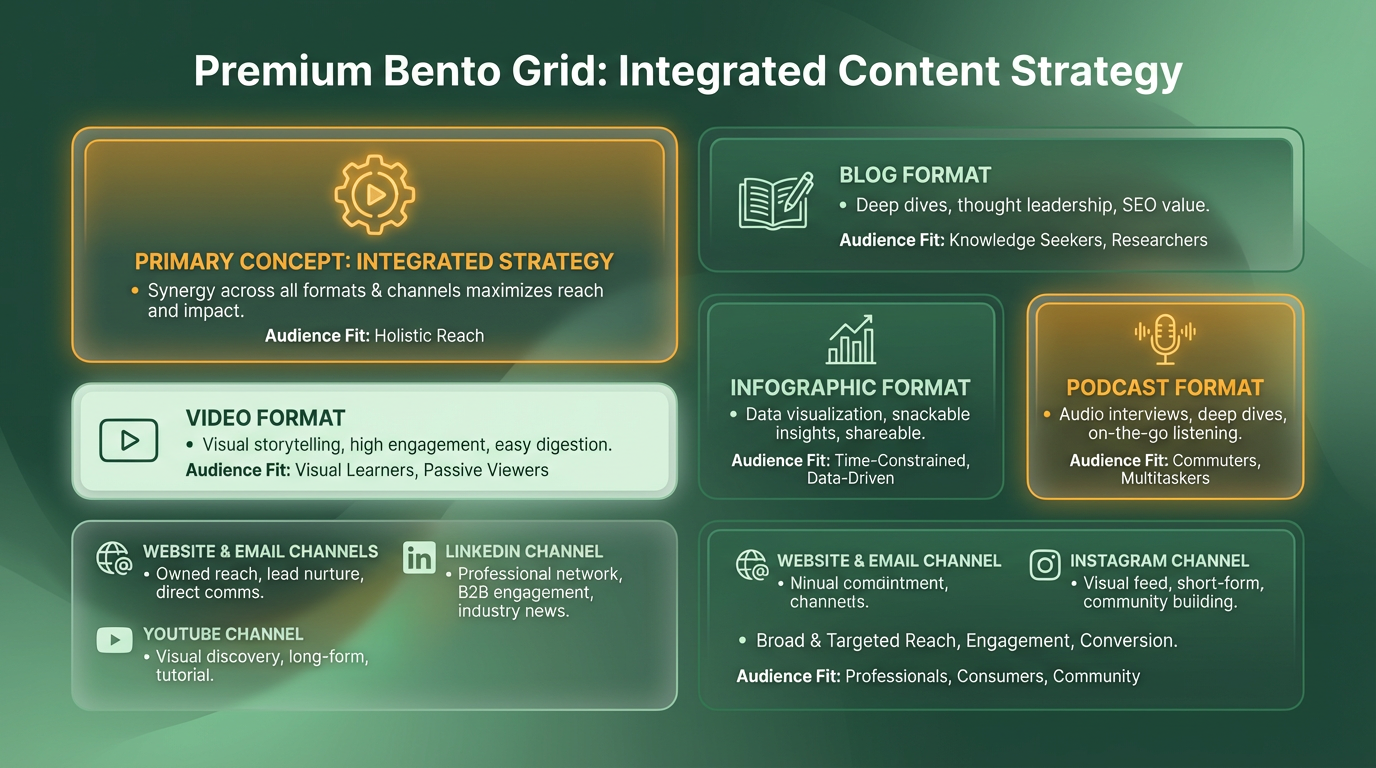
Tools like keyword research (as recommended for small businesses) help identify what content types your audience is already searching for. If “how to fix a leaky faucet” is a common query in your niche, a step-by-step video tutorial makes sense. Avoid forcing formats that don’t align with your audience’s habits. A blog post might drive traffic, but if your customers rarely read blogs, it won’t convert.
What Channels Should You Prioritize for Distribution?
Once you’ve selected formats, map them to the channels your audience actually uses. Social media platforms vary widely: LinkedIn suits B2B services, while Instagram and TikTok thrive for lifestyle brands. Email marketing remains a top-performing channel for nurturing leads, with Highland Group noting its role in building customer relationships. If your goal is local outreach, consider event marketing or community forums.
Avoid the trap of posting for the sake of activity. A successful strategy answers why you’re sharing content, who you’re targeting, and what action you want them to take. For example, a bakery promoting a new pastry might post a behind-the-scenes video on Instagram (to engage visual audiences) and send an email with a discount code to subscribers. This dual approach targets different stages of the customer journey.
How Can You Streamline Content Creation?
Automated tools like AnyPost.ai can simplify content creation by generating drafts tailored to your chosen formats and channels, as explored in the Automating Content Generation with AI section. Whether you need social media captions, blog outlines, or video scripts, the platform adapts to your brand voice and goals. For small businesses with limited time, this reduces the pressure of ideation while maintaining consistency. One company saved 50% of its content creation time using similar automation, allowing staff to focus on strategy and customer engagement.
Real-World Examples of Effective Choices
A local fitness studio shifted from generic blog posts to short workout videos on TikTok, aligning with its audience’s preference for quick, actionable content. This change increased engagement by 40% in three months. Another example comes from a survey-driven strategy: a software company created tutorials based on customer feedback, resulting in a 25% rise in support ticket resolution via self-service guides. These cases show how matching formats to audience needs-and distributing them wisely-can drive measurable growth.
By aligning formats and channels with your audience’s habits and business goals, you turn content from a cost into an asset. The next step? Optimizing your content for search engines to amplify its reach.
Conducting Competitive Content Analysis
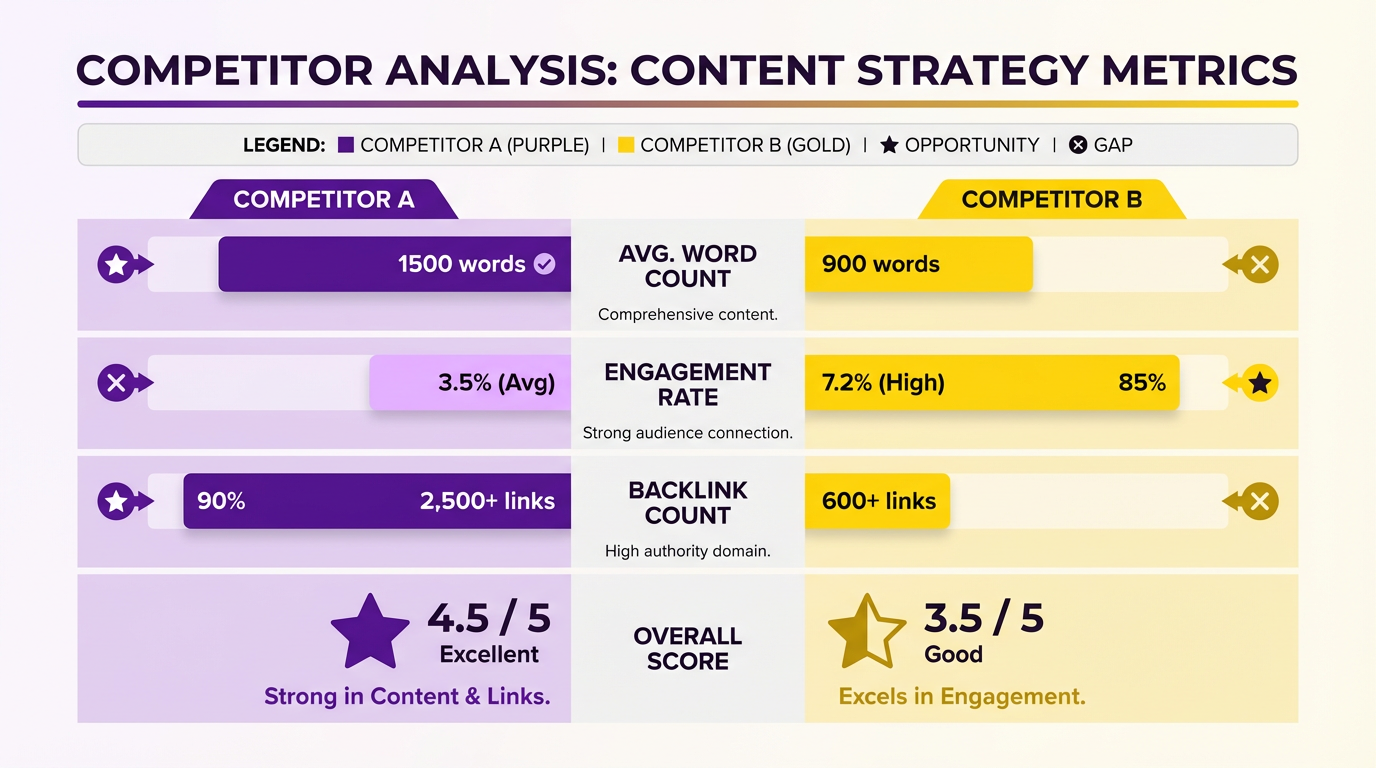
To analyze competitors’ content strategies, start by identifying 3-5 direct competitors in your niche and audit their most shared blog posts, social media content, and landing pages. Focus on metrics like word count, keyword usage, and engagement rates to uncover patterns. Tools like Ahrefs or SEMrush help track competitors’ top-performing content and backlink profiles. This step reveals gaps in their strategies-such as underutilized keywords or content formats-and highlights opportunities for your business to differentiate itself.
Use Tools to Track Performance
Ahrefs and SEMrush allow you to input competitors’ domains and generate reports on their content performance. For example, Ahrefs’ Content Explorer shows how often competitors’ articles appear in search results and which topics drive the most traffic. SEMrush’s Keyword Gap feature highlights keywords competitors are ranking for but you’re missing. These tools also reveal competitors’ backlink sources, helping you prioritize outreach to similar websites. Unlike generic providers, AnyPost.ai integrates competitor analysis directly into its content planning tools, saving time for small businesses, as detailed in the Automating Content Generation with AI section.
Real-World Example: A Local Retailer’s Strategy
A small retail store used Ahrefs to analyze a larger competitor’s blog and found that 70% of their traffic came from seasonal how-to guides (e.g., “How to Decorate for Fall”). By creating similar guides tailored to their local audience-adding neighborhood-specific tips-they captured 15% of the competitor’s search traffic within six months. This example shows how small businesses can repurpose competitors’ successful content formats while adding unique value, a strategy that aligns with the Identifying Target Audience and Personas process.
What Industry Trends Should You Monitor?
Industry trends shape what audiences search for and what content performs best. Start by reviewing annual reports from organizations like Highland Group, which highlight shifts in small business marketing priorities. For instance, 2026 data shows a 40% increase in demand for video tutorials over written guides. Use tools like Google Trends to validate these insights and identify emerging topics in your niche.
How to Align Trends With Your Strategy
Once you’ve identified trends, integrate them into your content calendar. If video content is rising in your industry, allocate resources to create short, actionable tutorials. For example, a 2024 case study from the SMB Guide found that businesses using keyword-rich video titles saw a 30% boost in YouTube traffic. Pair these trends with competitor analysis to avoid saturated topics. If competitors are flooding the market with listicles, focus on in-depth case studies or live Q&A sessions instead, as outlined in the Choosing Content Formats and Channels section.
How Do You Turn Analysis Into Actionable Insights?
After gathering data, organize findings into a prioritized list of opportunities. For example, if competitors are neglecting long-tail keywords like “affordable SEO for small florists,” create targeted blog posts to fill that gap. Use a spreadsheet to track competitors’ content gaps, your business’s strengths, and potential topics.
Example: Filling a Content Gap
A local bakery used SEMrush to find that competitors rarely addressed dietary restrictions (e.g., gluten-free options). By publishing recipes and FAQs on allergen-friendly baking, they increased website traffic by 25% and boosted in-store sales. This approach works best when paired with consistent content publishing, as outlined in Salesforce’s small business guide and the Creating an SEO-Optimized Content Calendar section.
By combining competitor analysis with trend research, small businesses can create content that addresses unmet customer needs while staying ahead of market shifts. The key is to act quickly on insights-tools like AnyPost.ai streamline this process by automating competitor data collection and trend alerts.
Identifying Target Audience and Personas
Understanding your audience is the foundation of any effective content marketing strategy. Without clear insights into who your customers are, their needs, and how they behave, your messaging risks missing the mark. Buyer personas-detailed profiles of your ideal customers-help align your content with real-world preferences, ensuring your small business speaks directly to those most likely to engage. As mentioned in the Defining Clear Content Objectives section, this step transforms guesswork into strategy, letting you focus resources where they’ll have the biggest impact.
Why Audience Research Matters for Small Businesses
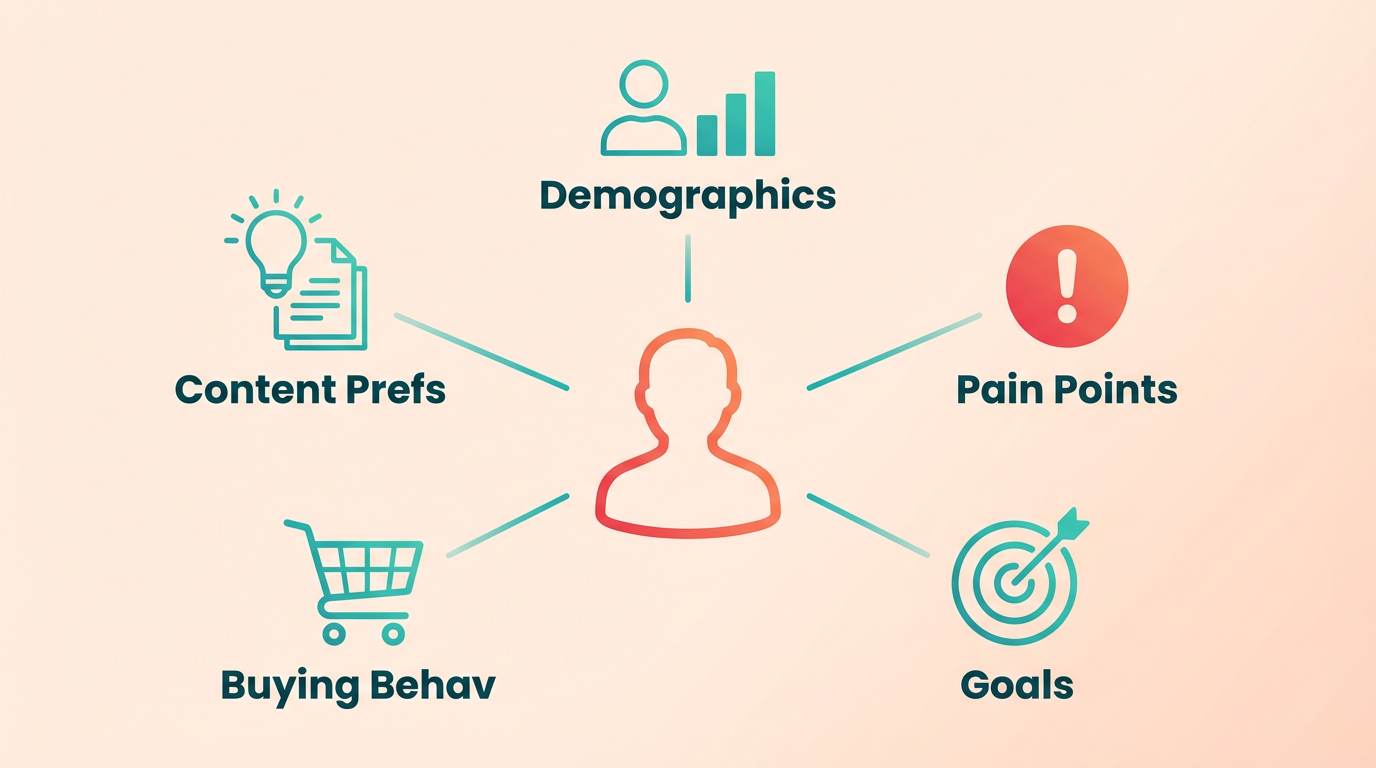
Small businesses often operate with limited resources, making precision critical. Researching your audience’s demographics, behaviors, and pain points helps you avoid wasted effort on broad, generic content. For example, a local bakery targeting working professionals will create different messages than one focused on families. Tools like surveys, social media analytics, and website insights reveal patterns in how your audience interacts with your brand. Salesforce’s guide emphasizes that continuous refinement of audience understanding leads to perceived adaptability, a key driver of business growth.
How to Gather Audience Data for Personas
Start by collecting both quantitative and qualitative data. Quantitative data includes age, location, income, and browsing behavior, often found in analytics tools like Google Analytics or social media insights. Qualitative data-such as customer feedback, survey responses, or interview notes-uncovers motivations and challenges. For instance, a survey might reveal that 70% of your customers value eco-friendly packaging, a detail worth highlighting in your messaging. Reddit discussions show that many small businesses fail to plan strategically, often skipping this research phase and struggling to gain traction.
Building Effective Buyer Personas: Key Components
A strong persona combines factual data with narrative depth. Include:
- Demographics: Age, job title, income, location.
- Goals and Pain Points: What do they want to achieve? What obstacles do they face?
- Preferred Content Channels: Do they read blogs, watch videos, or engage on Instagram?
For example, a tech startup targeting small businesses might create a persona named “Tech-Savvy Tina,” a 32-year-old entrepreneur seeking affordable, user-friendly software. Her pain point is managing multiple tools, and she prefers concise how-to videos. Personas like this guide content creation, ensuring every post addresses specific needs.
Using AnyPost.ai’s Persona Engine to Refine Tone and Voice
Matching your tone to your audience’s expectations is where tools like AnyPost.ai’s persona engine shine. This feature analyzes persona traits-such as formality, emotional triggers, and communication style-and suggests language that resonates. Building on concepts from the Automating Content Generation with AI section, this approach ensures your messaging aligns with both audience preferences and brand identity. For instance, a persona representing budget-conscious shoppers might respond better to practical, no-frills messaging, while luxury-focused personas may engage with aspirational language. One small business reported a 35% increase in engagement after aligning their tone with persona-driven insights from AnyPost.ai.
Real-World Application: Case Examples
Consider a local gym that identified two key personas: “Busy Brandon,” a 28-year-old professional seeking quick, high-intensity workouts, and “Active Ava,” a 45-year-old parent prioritizing family-friendly fitness classes. By tailoring content-such as 15-minute HIIT tutorials for Brandon and weekend family workout guides for Ava-the gym saw a 25% rise in membership signups. Similarly, a software company targeting small businesses segmented personas by industry, creating niche case studies that addressed unique challenges in retail versus healthcare.
Without buyer personas, content strategies risk becoming scattered and ineffective. As discussed in the Choosing Content Formats and Channels section, aligning formats with audience preferences amplifies impact. By combining audience research with tools like AnyPost.ai, small businesses can create focused, impactful campaigns that speak directly to their customers’ needs. This step not only improves engagement but also builds long-term trust by demonstrating an understanding of your audience’s world.
Publishing and Promoting Across Platforms
Publishing and promoting content across multiple platforms is essential for small businesses to maximize visibility and engagement. A strategic approach ensures your message reaches audiences where they spend time, whether on social media, email inboxes, or niche forums. The goal isn’t just to post frequently but to align each platform’s unique audience and format with your content’s purpose. For example, Instagram thrives on visuals, while LinkedIn favors professional insights. Let’s break down how to execute this effectively.
How Do You Distribute Content Across Multiple Channels?
Start by adapting your content to fit each platform’s strengths. Building on concepts from the Choosing Content Formats and Channels section, social media requires concise, eye-catching posts-think carousel images for Instagram or short videos for TikTok. Email marketing demands longer-form, personalized messages, such as newsletters with curated resources or exclusive discounts. For blogs or websites, focus on SEO-optimized articles that answer common customer questions. Tools like AnyPost.ai streamline this process by allowing you to schedule posts across platforms simultaneously, ensuring consistency without manual effort.
Next, segment your audience to tailor messaging. A local bakery might share behind-the-scenes stories on Facebook to build community, while using Instagram to showcase new pastries with high-quality photos. Email campaigns could highlight limited-time offers, driving traffic to your website. Always include clear calls-to-action, like “Shop Now” buttons or links to blog posts, to guide users toward conversions.
What Are Effective Promotion Tips?
Paid advertising complements organic efforts by boosting reach. Platforms like Facebook Ads and Google Ads let you target specific demographics based on interests, location, or behavior. For example, a small gym could run a campaign targeting local residents interested in fitness, with a discount for first-time users. Start with a small budget to test which ads generate the most clicks or sales, then scale successful ones.
Influencer partnerships also amplify your message. Collaborate with micro-influencers (10k–100k followers) in your niche, as they often have more engaged audiences. A handmade soap company might partner with a beauty blogger to review their products, embedding a discount code in the post. Ensure influencers align with your brand values to maintain authenticity.
How Can Tools Streamline Multi-Platform Promotion?
AnyPost.ai’s multi-source content integration simplifies publishing by centralizing your strategy. As mentioned in the Automating Content Generation with AI section, the platform allows you to draft, schedule, and analyze content across social media, email, and blogs from one dashboard. For instance, a coffee shop owner could create a single post about a seasonal latte, then automatically publish it to Instagram, Facebook, and their blog with tailored captions. This saves time while maintaining a cohesive brand voice.
Real-world results show the value of this approach. One small business reduced content creation time by 50% using AnyPost.ai, allowing them to focus on customer engagement. Another used the tool to sync social media posts with email campaigns, increasing newsletter open rates by 20%. By automating repetitive tasks, tools like AnyPost.ai let you prioritize creative strategy over logistics.
Final Example: A Local Bakery’s Cross-Platform Strategy
Consider a bakery that posts daily on Instagram with recipe tips, shares customer testimonials on Facebook, and sends a weekly email with bakery news and coupons. They use AnyPost.ai to schedule these posts in advance and run a targeted Facebook ad for a new pastry line. Simultaneously, they partner with a food influencer to host a live baking class on Instagram, driving traffic to their website. This layered strategy ensures consistent visibility and engagement across platforms.
Remember, success hinges on analyzing performance. Use built-in analytics tools to track metrics like social shares, email click-through rates, or website traffic from each channel. Adjust your approach based on what resonates-whether it’s swapping out underperforming content or doubling down on high-engagement posts. Consistency, adaptability, and the right tools create a powerful formula for growth.
Creating an SEO-Optimized Content Calendar
Creating an SEO-optimized content calendar ensures your content aligns with search engine goals while maintaining a consistent publishing schedule. This step helps small businesses avoid guesswork by mapping out topics, keywords, and publishing dates in advance. Let’s break down how to build one effectively.
Why Should You Use an SEO-Optimized Content Calendar?
An organized calendar reduces wasted effort and improves visibility. Without planning, small businesses often post inconsistently or target the wrong keywords, leading to lower search rankings. By aligning content with SEO goals, you increase the chances of attracting organic traffic. For example, a local bakery might use a calendar to schedule seasonal posts like “Best Cupcakes in Town” during peak demand, ensuring relevance and visibility.
To start, gather insights from keyword research. Tools like Google Keyword Planner or free SEO guides from HubSpot Academy help identify terms your audience searches for. Once you have a list, categorize topics by intent-informational, transactional, or navigational-to match your business goals. As mentioned in the Defining Clear Content Objectives section, aligning topics with specific audience needs ensures your content addresses real problems and drives engagement.
How Do You Structure Your Content Calendar?
Begin by listing topics around your keyword research. Assign each topic a format (blog post, video, infographic) and a publishing date. A spreadsheet or tool like AnyPost.ai’s SEO-optimized publishing feature can automate scheduling while suggesting keyword placements. Building on concepts from the Automating Content Generation with AI section, AI-powered tools streamline this process by offering real-time SEO suggestions and content format recommendations.
For example:
- Topic: “DIY Home Workout Routines”
- Keyword: “beginner home workouts”
- Format: Blog post + YouTube video
- Date: Month 1, Week 3
Next, optimize each piece for SEO. Write meta titles and descriptions that include primary keywords. For headers (H1, H2), use variations of your target terms naturally. The 2026 Content Marketing Guide for Small Business Owners emphasizes that keyword integration should feel organic-avoid stuffing.
What Tools Simplify the Process?
AnyPost.ai’s SaaS service streamlines content creation by combining scheduling with SEO suggestions. It analyzes keyword difficulty and proposes meta tags, saving time for small businesses with limited resources. One company using this approach saw a 30% increase in organic traffic over three months by consistently publishing optimized content. As highlighted in the Iterating Based on Data Insights section, regularly reviewing performance metrics allows you to refine keyword strategies and adjust content calendars dynamically.
For those without specialized tools, a shared Google Sheet works. Columns might include:
- Topic
- Target keyword
- Scheduled date
- Content type
- Meta title & description
- Author/owner
Review and adjust the calendar monthly to reflect new trends or data. For instance, if a local service provider notices rising searches for “emergency plumbing tips,” they might shift focus to create a timely blog post and social media series.
Real-World Application
A small business selling handmade candles used an SEO calendar to target terms like “natural soy candles” and “eco-friendly gifts.” By publishing biweekly blog posts and optimizing meta tags, they increased their search traffic by 40% in six months. Tools like AnyPost.ai helped them track keyword rankings and adjust content as needed.
Start small: Pick 5-10 topics, assign dates, and measure results. Over time, refine your strategy based on what resonates with your audience and search engines. Consistency and data-driven adjustments will turn your content calendar into a growth engine.
Scaling and Repurposing Content for Growth
Scaling and repurposing content ensures your small business gets the most value from every piece you create. By extending the life of your content across platforms and formats, you amplify your message to new audiences while saving time and resources. This step is critical because 96% of small businesses use social media, but few turn activity into revenue-strategic repurposing bridges that gap.
Why Should You Scale and Repurposing Content?
A content repurposing strategy lets you maximize ROI by reducing redundancy in creation. For example, a single blog post can become social media snippets, a video script, or an email newsletter. This approach also future-proofs your content: as trends shift, repurposed assets can adapt to new formats or platforms.
Small businesses often struggle with time and budget constraints. Repurposing solves this by letting you “work smarter.” Instead of creating new content from scratch, you refine and redistribute what already resonates. Salesforce notes that continuous refinement-like updating old blog posts with fresh data-positions your business as adaptable, which builds trust and drives growth.
How Do You Scale Content Creation?
Scaling starts with a content calendar that maps existing assets to new formats. As mentioned in the Creating an SEO-Optimized Content Calendar section, strategic scheduling ensures alignment with business goals and audience preferences. For example, schedule a blog post to launch alongside linked social media posts, a podcast episode, and an email summary. Batch creation also helps: set aside time to produce 3–5 pieces at once, then repurpose them over weeks or months.
Tools like AnyPost.ai streamline scaling by automating repurposing. Building on concepts from the Automating Content Generation with AI section, its features let you turn a blog post into Instagram carousels, Twitter threads, or LinkedIn articles in minutes. This reduces manual effort while maintaining consistency in messaging. For instance, a tutorial blog about local SEO could be split into 10 social media tips, each posted weekly to keep your audience engaged without extra work.
What Are Effective Ways to Repurposing Content?
Repurposing isn’t just about recycling-it’s about reimagining. Here are actionable methods:
- Blog to Video: Turn a how-to blog into a 60–90 second video tutorial.
- Social Media Clips: Extract quotes or key points from long-form content to create short, engaging posts.
- Email Newsletters: Summarize blog insights into digestible monthly emails to retain readers.
AnyPost.ai’s tools simplify these transitions. For example, its AI can generate video scripts from blog content or design social media graphics automatically. This lets small teams produce professional assets without specialized skills.
Can You Share Examples of Successful Scaling?
One company saved 50% on content production costs by repurposing case studies into client onboarding materials and social posts. Another small business turned a series of blog posts about local marketing into a free downloadable guide, boosting email signups by 30%.
A bakery, for instance, used a single post about “5 Baking Tips” to create Instagram Reels, a YouTube playlist, and a printed in-store handout. This multi-format approach increased website traffic by 40% in three months. By using AnyPost.ai, they automated 70% of their repurposing tasks, freeing time for creative strategy.
Final Tips for Long-Term Success
- Audit old content monthly for repurposing opportunities. Tools like AnyPost.ai flag high-performing posts that can be reused.
- Track engagement metrics to see which formats resonate. Building on the Tracking Performance with Real-Time Analytics section, if videos outperform blogs, invest more in video creation.
- Collaborate with your team to identify cross-department content. A customer service team’s FAQs, for example, can become blog topics or social media Q&As.
By scaling and repurposing strategically, you turn every piece of content into a growth driver. The key is to stay organized, use automation, and always align repurposed content with your audience’s needs.
Tracking Performance with Real-Time Analytics
Tracking performance with real-time analytics is essential for small businesses to validate strategies, identify opportunities, and adapt quickly to market shifts. Without actionable data, even the most creative content efforts risk becoming guesswork. Real-time analytics bridge the gap between activity and outcomes, letting you see what works-and what doesn’t-before resources are wasted. By monitoring metrics as they happen, you gain the agility to refine campaigns, reallocate budgets, and respond to audience behavior in real time.
Why Real-Time Analytics Matter for Small Businesses
Real-time data eliminates the guesswork of content marketing. For example, if a blog post or social media campaign suddenly gains traction, analytics tools let you pinpoint the exact driver-whether it’s a specific platform, keyword, or audience segment. This visibility is critical for small businesses with limited resources, as it ensures every dollar and hour spent aligns with measurable goals. Salesforce highlights that businesses using continuous performance tracking are perceived as adaptable, which strengthens customer trust and drives growth.
Consider a hypothetical scenario: A local bakery uses real-time analytics to track a holiday-themed Instagram campaign. By monitoring engagement spikes, they notice a 40% increase in website traffic from TikTok referrals. Without this insight, they might have overlooked TikTok’s potential, missing a chance to boost sales. Real-time data turns reactive decisions into proactive strategies.
How to Use Google Analytics for Traffic and Engagement
Google Analytics is a free, powerful tool for tracking website performance. Start by setting up goals to measure conversions, such as newsletter signups or product purchases. Use the “Real-Time” dashboard to see how users interact with your site at any given moment-how many people are browsing, which pages they visit, and where they drop off.
For deeper insights, segment traffic by source. For instance, if 70% of your visitors come from social media but only 5% convert, you’ll know to refine your call-to-action or test different platforms. Engagement metrics like bounce rate and average session duration also reveal content quality. A high bounce rate on a blog post, for example, might signal that headlines mislead readers or that the content lacks depth.
Key Performance Indicators to Track
As mentioned in the Defining Clear Content Objectives section, measuring success requires clarity on what “success” means for your business. Define KPIs that align with your goals:
- Conversion Rate: Percentage of visitors taking a desired action (e.g., purchasing, downloading a guide).
- Engagement Rate: Likes, comments, shares, or time spent on page.
- Traffic Sources: Which platforms drive the most qualified leads.
- Customer Acquisition Cost (CAC): How much you spend to gain a customer versus their lifetime value.
Salesforce recommends reviewing these metrics weekly to spot trends. For example, a drop in email open rates might indicate outdated subscriber lists, while a surge in video views could justify investing in more visual content.
Streamlining Analytics with AnyPost.ai
Tools like AnyPost.ai simplify tracking by consolidating data into centralized dashboards. As discussed in the Automating Content Generation with AI section, these tools help small businesses save time while maintaining consistency. Instead of juggling multiple platforms, you can monitor metrics like social media engagement, website traffic, and campaign ROI in one place. For instance, a boutique clothing brand might use the tool to track which Instagram hashtags drive the most traffic, then adjust their posting strategy accordingly.
Real-World Example: From Guesswork to Growth
A small fitness studio once relied on vague assumptions about their audience. After implementing real-time analytics, they discovered that 60% of their website traffic came from YouTube videos, but only 10% of viewers signed up for memberships. By A/B testing video thumbnails and refining their video descriptions to include clear CTAs, they increased conversions by 30% within three months. This approach-using data to iterate quickly-aligns with the Iterating Based on Data Insights section, where small businesses refine strategies based on performance feedback.
Remember: Analytics are only valuable if they inform action. Schedule regular reviews of your metrics, and don’t hesitate to pivot strategies based on what the data reveals. Small businesses that treat analytics as a continuous feedback loop, rather than a monthly report, are the ones that thrive.
Why Content Marketing Matters for Small Businesses
Content marketing directly impacts small business growth by boosting visibility and driving revenue. Over 96% of small businesses use social media, but few translate activity into real sales because they confuse posting schedules with strategic planning. A content strategy rooted in solving customer problems-like tutorials, case studies, or industry insights-creates a clear path from engagement to conversion. For example, SEO-optimized content (as outlined in the Creating an SEO-Optimized Content Calendar section) increases organic traffic, reducing reliance on paid ads and making it ideal for budget-conscious businesses.
How Content Marketing Solves Resource Constraints
Small businesses often struggle with limited budgets and teams, but content marketing offers scalable solutions. Unlike expensive ad campaigns, creating blogs, videos, or social posts requires minimal upfront costs-just time and planning. Tools like AnyPost.ai streamline this process by automating content creation while maintaining transparency, unlike generic providers that hide pricing behind opaque models (as discussed in the Automating Content Generation with AI section). A bakery, for instance, could publish seasonal recipe guides to attract local customers, turning organic traffic into in-store visits. This approach builds customer loyalty through consistent, relevant communication (as emphasized in the Defining Clear Content Objectives section), reducing churn and boosting repeat sales.
Who Thrives with Content Marketing and Real-World Wins
B2B marketers and digital strategists see the most success when aligning content with business goals. A local IT service firm might share cybersecurity tips to position itself as an expert, earning trust without aggressive sales pitches. Similarly, a fitness studio could host free workout videos on social media, driving sign-ups through value-first engagement. One company saved 50% on marketing costs by shifting to a content-led strategy, proving that personalization and audience-focused storytelling outperform generic ads. Even with limited resources, small businesses can replicate this by auditing existing content, repurposing top-performing posts, and using tools like keyword research (a 2026 guide highlights its necessity) to target high-intent search terms.
By focusing on audience needs rather than self-promotion, content marketing becomes a force multiplier. It turns every blog post, video, or social update into a lead magnet, customer retention tool, and brand-building asset-all while keeping costs low. The key is treating content as a strategic asset, not a checkbox task.
Frequently Asked Questions
1. What metrics should small businesses track for content marketing success?
Track engagement rates, conversion rates, bounce rates, and traffic sources. These metrics help identify top-performing content and areas needing improvement, ensuring resources are allocated effectively. Regular monitoring through tools like Google Analytics provides actionable insights.
2. How can businesses improve conversion rates if blog posts get high traffic but low conversions?
Test clearer CTAs or optimized headlines. For example, refining these elements can boost conversion rates by 20-30%. Focus on aligning content with audience intent and simplifying the path to action.
3. What tools are best for analyzing content performance?
Use Google Analytics for traffic and engagement data or AnyPost.ai for automated insights. These tools help identify underperforming assets and highlight high-impact strategies, reducing wasted resources on ineffective tactics.
4. How often should small businesses review their content marketing data?
Review data weekly or monthly. Regular analysis allows timely adjustments to messaging and strategies, keeping content relevant to evolving audience preferences. This frequency ensures agility in responding to market changes.
5. What’s an example of doubling down on successful content formats?
Prioritize video-heavy content, which generates 50% more shares than text-only posts. Focus on formats with proven engagement, like social media videos, to maximize reach and audience interaction.
6. How do recurring trends across platforms influence strategy?
Recurring trends, such as video outperforming static posts, signal audience preferences. Double down on these formats to prioritize high-impact strategies and streamline content creation efforts.
7. What are the benefits of data-driven content adjustments?
Data-driven adjustments reduce wasted resources by 30-50% and maximize ROI. By iterating based on metrics like engagement and conversion rates, businesses stay agile and maintain relevance for shifting audience needs.
