Content Pruning: How to Remove and Consolidate Pages to Lift Rankings

Key Takeaways
- Pruning concentrates your site's authority on stronger pages by refreshing, consolidating, or removing weak ones.
- The workflow has three phases: audit every page, decide its fate, then act and measure.
- A full first pass usually takes two to four weeks. Most of that is the audit.
- One well-documented team cut 20 to 25% of its content before rankings recovered.
- Traffic, engagement rate, and conversions decide which pages survive.
- Call it a 6 out of 10 in difficulty. You need Search Console, GA4, redirects, and cannibalization awareness.
- Cadence ranges from every 3 to 6 months on large, fast-moving sites to 12 to 18 months on small, stable ones.
Quick Summary
Content pruning means auditing your existing pages, then refreshing, consolidating, or removing weak ones. Done well, it pools authority on your best pages and stops weak ones from competing against them. Think of it as clearing dead weight so crawlers spend their budget where it matters.
The loop is simple: audit every page against traffic and engagement data, decide its fate, then act and measure. What trips teams up is not the deleting. It is knowing which pages to touch and which to leave alone.
What you're signing up for
Pruning is an intermediate task, roughly a 6 out of 10. You need to read Search Console and GA4 without squinting, understand redirects, and recognize keyword cannibalization when two of your own pages quietly undercut each other in the rankings. No specialist required, but a total beginner will feel the curve.
The at-a-glance view:
| Factor | Detail |
|---|---|
| Main benefit | Concentrated authority on your strongest pages |
| Core process | Audit → consolidate → refresh → remove |
| Key metrics | Traffic, engagement rate, conversions |
| Difficulty | 6/10 (intermediate SEO knowledge) |
| Time estimate | 2–4 weeks for a full audit and pruning pass |
| Pruning cadence | 3–6 months (large/fast sites) to 12–18 months (small/stable sites) |
Budget two to four weeks for a thorough first pass. Most of that time goes to the audit. On a large library, expect to review a real chunk of what you've published. One well-known example saw a team remove 20 to 25% of total content before rankings recovered, so do not be surprised if the cull runs deep.
Which metrics actually signal a prune?
No single number should trigger a delete. Weigh several signals first: traffic, engagement, and conversion context. A page failing on one alone earns a closer look, not the axe.
On traffic, flag pages under 10 clicks or 100 impressions in Search Console, or fewer than 100 clicks over six months. On engagement, GA4 pages below a 30% engagement rate or under 10 seconds average engagement time are weak candidates. Only when traffic and engagement both agree does a page become a genuine removal target.
Your options beyond deleting
Pruning is not just deletion. The real decision is a five-way branch. Refresh a page that is still topical but stale. Consolidate several thin pages into a single guide, then 301 the old URLs. Deindex but keep live a page that cannibalizes a main page yet still earns its keep internally. Reserve a 410 for pages with genuinely zero value. Match the action to the signal and a cluttered site turns into a focused one.
Why cutting pages can beat publishing them
Search engines judge your site on how well each page serves a real need, not on how many pages you've shipped. Weak pages do not sit there quietly. They compete with your strong ones, split your authority, and signal that your site is padded with filler.
The payoff shows up where it counts. Clearing low performers can lift organic traffic and engagement without adding a single new word. The gain comes from removing what was dragging you down, not from writing more.
Why does Google reward a leaner site?
The Helpful Content System and E-E-A-T signals push hard on quality and relevance. Thin, outdated, or duplicate pages dilute the topical authority you've built and pull crawl attention off the pages that actually convert.
Cutting dead weight does three things at once. It reduces index bloat, so bots stop burning cycles on zero-click pages. It sharpens topical authority by grouping your content into coherent lanes. And it kills keyword cannibalization, where two pages on the same topic undercut each other.
The biggest ranking gains often come from what you remove, not what you write. That is the part that feels counterintuitive to a growth team wired to publish.
How does pruning lift user experience?
Pruning cuts information overload. When a visitor lands on a stale, half-relevant page, they bounce, and that bounce feeds back as a weak engagement signal.
Engagement and traffic data are where you spot the drag. Pages with low engagement rates, short average engagement times, or few clicks and impressions tend to flag themselves. When those signals agree, the page is a real liability, not just a slow quarter.
What makes pruning hard to get right?
The hard part is not deleting. It is deciding. Most teams cannot cleanly separate a page that needs a refresh from one that needs to disappear.
The safest way to lower that risk is to roll out changes in stages instead of gutting the site in one pass. Prune a segment, measure the impact over a few weeks, then move to the next batch. If traffic dips, you can trace exactly which change caused it and reverse course. Treat pruning as ongoing maintenance, not a one-time cleanup, and it stops being a gamble.
Consolidating and Redirecting Content
Consolidation is where pruning actually lifts rankings, and it is simpler than most teams fear. When two or more thin pages chase the same topic, you merge their best material into one strong page, point the old URLs at it with 301 redirects, and clean up the links that fed them. That is the whole move. The care goes into picking the survivor and not leaking authority on the way out.
Which pages merge, and which need a different fix?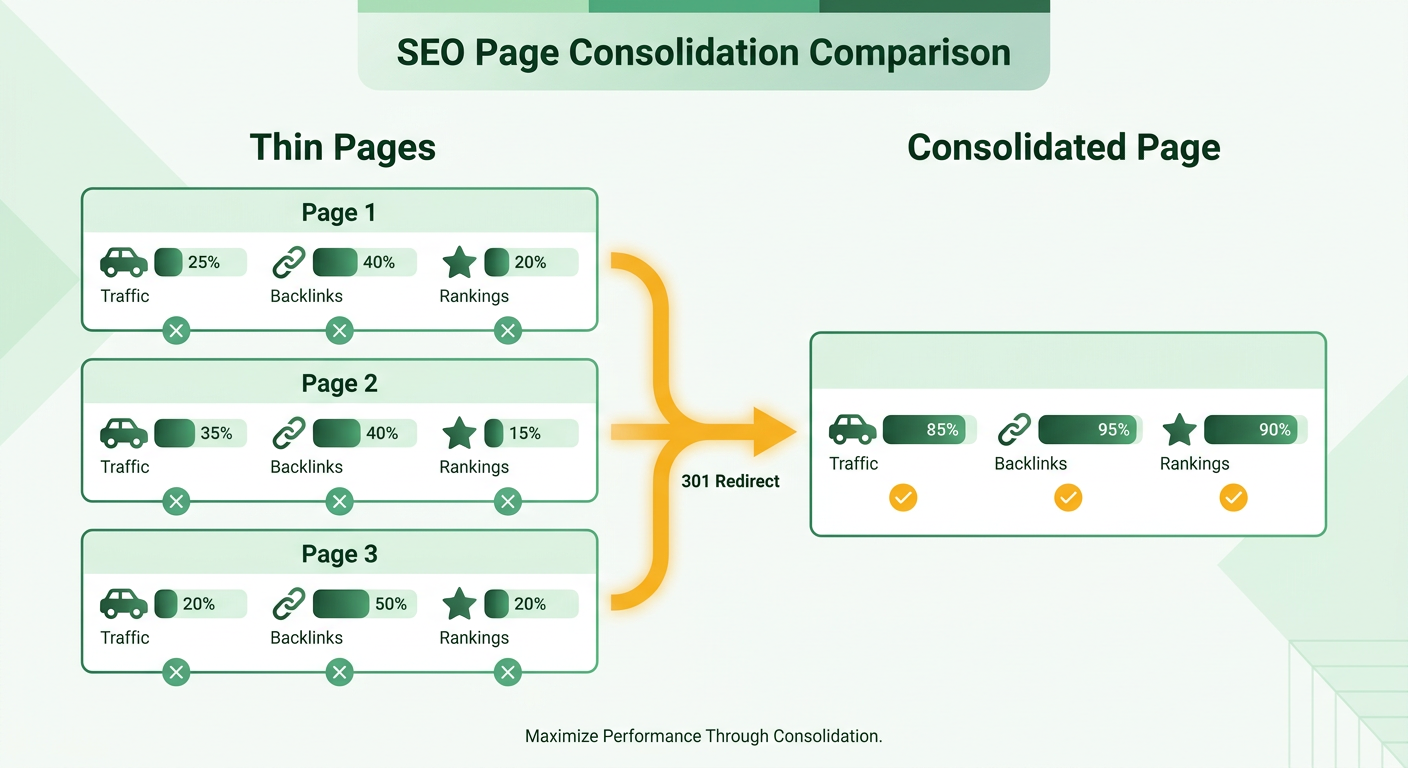
The decision is not binary. It is a five-way branch, and matching the signal to the right action is what protects your traffic.
- Refresh when a page is still on-topic but stale. Update the data, tighten the copy, and add depth.
- Consolidate + 301 when several thin pages cover one subject. Surfer's guide describes three near-identical marathon "long run" posts folded into one comprehensive guide, keeping the strongest URL and redirecting the rest.
- 301 alone for a near-duplicate that adds nothing the survivor lacks.
- Deindex but keep live for a page that cannibalizes a main page yet still earns its keep. Search Engine Land points to a sales landing page that outranks the core service page. You noindex it and use it for campaigns.
- 410 for pages with zero ongoing value and no internal use.
Here is the contradiction worth resolving. One camp says 410 for permanent removal. Another says deindex and keep the page live. Both drop the page from the index. The deciding factor is residual non-SEO value. If a page still serves sales or internal linking, deindex it. If it serves nothing, 410 tells search engines it is gone for good.
How do you redirect without leaking link equity?
Point every retired URL to the best-performing survivor with a 301, then fix the internal links that used to feed the old pages. Skipping that last step is the quiet mistake. Redirects preserve authority, but stale internal links create redirect chains that dilute it.
Update your anchor text and canonical tags at the same time. Canonicalization handles cases where near-duplicate content has to stay live for users. It tells Google which version deserves the ranking, so the pages stop competing. Then reinforce the survivor with fresh internal links from related pages, and pull in any external links that pointed to the merged URLs.
How do you rebuild survivors and know it worked?
Rebuild the survivor into something genuinely deeper than its parts. Merging three shallow posts into one shallow post gains nothing. The survivor has to come back as a real comprehensive page, which matters given that 51% of companies rate updating old content as an effective SEO tactic.
Then watch rankings, clicks, and impressions over a full six-month window. If a redirected cluster loses ground, your data tells you which merge to revisit.
Auditing and Inventorying Your Content
Auditing starts with pulling every page into one list, then scoring each against real performance data. The inventory is the boring part. The audit is where you decide what stays. Do them in that order, because you cannot judge a page you do not know exists.
Export a complete content inventory first: every URL, plus images and PDFs. Then layer in the numbers. Traffic and impressions from Search Console, engagement from GA4, backlink strength from a tool like Ahrefs. One list, three data sources, no page left unmeasured.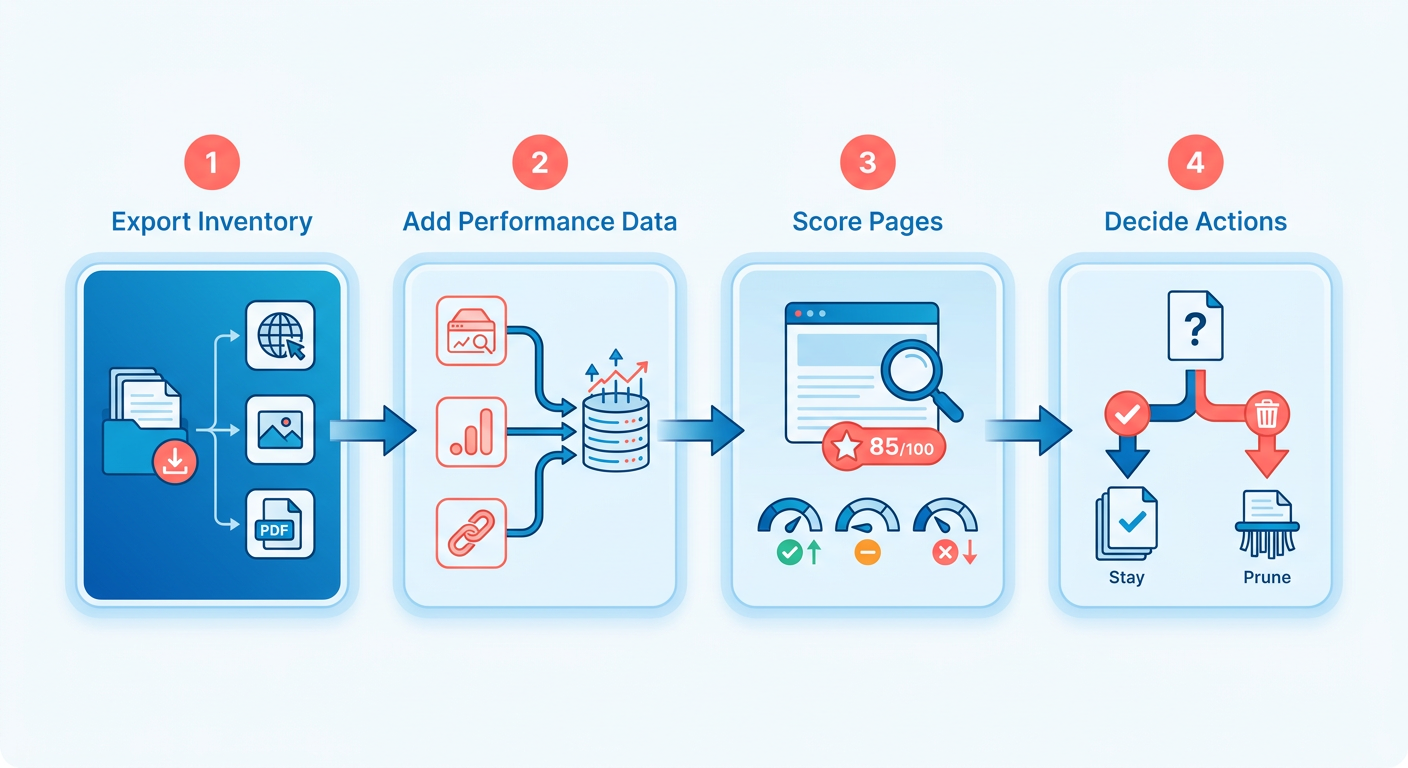
Which metrics actually flag a weak page?
A page is a candidate when it fails on traffic and engagement, not just one. Search Console surfaces the traffic problem, GA4 confirms the engagement problem. Read them together.
Watch for pages that pull impressions but almost no sessions, and sessions that end in a single-page exit within seconds. A page that lands low on both at once is genuinely weak. Weight recency too. A page that peaked two years ago and has bled traffic every quarter since is decaying, even if today's raw numbers still look survivable.
But traffic alone lies. A page with high impressions and low click-through often means Google is pulling your content into AI-overview SERPs. That is brand visibility, not failure. Check the CTR context before you touch anything ranking well but underclicking. That page may still be earning your brand real estate at the top of the results, which is exactly what you do not want to torch on a whim.
How do you categorize each page?
Sort every audited page into one of four buckets: keep, consolidate, redirect, or remove. The bucket follows the data, not a gut call.
- Keep: strong traffic, healthy engagement, or high-authority backlinks. Leave it alone.
- Consolidate: several thin pages circling one topic. Merge the best into one survivor.
- Redirect: a near-duplicate with no unique value. Point it at the stronger page.
- Remove: zero traffic, zero links, zero internal use.
Overlap detection is where teams stall. Finding which pages cannibalize each other by eye across hundreds of URLs is slow and error-prone. Clustering pages by the intent they actually target is what lets you spot competing content fast.
Set your baseline before you cut
Record current performance before you change a single page. Log organic traffic, keyword rankings, and engagement per page as they stand today. Without that snapshot, you cannot prove the prune worked, and you cannot roll back if something drops.
The payoff shows up fast when you measure it. In one B2B library we worked on, consolidating 40 overlapping posts into 12 stronger pages moved several survivors from page two into the top five within a single quarter. That result only means something because the before-and-after was on record from the start.
Set up ongoing tracking too, so you catch decay early instead of waiting for the next full audit.
The mechanics that make or break a prune
Pruning rests on four technical ideas: index bloat, crawl budget, canonicalization, and 301 redirects. Get these straight and every downstream decision gets easier. Skip them and you risk deleting pages that were quietly holding link equity together.
What is index bloat, and why does it drain crawl budget?
Index bloat is when your site carries too many low-quality, thin, or near-duplicate pages in Google's index. Each competes for attention and none earns much. The cost is real. Every URL a bot crawls eats into your crawl budget, the finite attention search engines spend on your site.
Cut the dead weight and bots stop wasting cycles on zero-click pages. They spend that time discovering and re-crawling the pages you actually want ranked. Bill Sebald put the logic plainly: Google crawls the URLs it considers important more often, so trimming thin pages helps it focus on your stronger ones.
This matters most at scale. On a site with thousands of URLs, bloat can bury fresh content for weeks. One Reddit user in r/SEO flagged over 30,000 pages "crawled but not indexed," which is index bloat announcing itself. If Google keeps crawling pages it refuses to index, your ratio of value to volume is off.
How do canonicalization and 301s protect link equity?
Canonicalization tells search engines which version of similar pages is the master copy, so duplicate variants do not split your ranking signals. A 301 permanently forwards an old URL to a new one, passing most of its link equity along. Together they stop authority from leaking when you consolidate or remove pages.
The practical move: when you merge thin pages, point the retired URLs at the survivor with a 301, then update the internal links and canonical tags so nothing points into a dead end. Miss this step and you turn old URLs into 404s, dumping whatever backlink strength they held.
Redirect chains are the quiet killer. If A redirects to B, and B later redirects to C, clean it up so A points straight to C. Chains dilute equity and slow crawlers.
When should you use 410 instead of deindexing?
Removal is not one action. It is a spectrum keyed to whether a page still has value outside search. A 410 signals permanent removal and tells Google to drop the page for good. Use it when a page has zero ongoing purpose and no internal use.
The other end is deindexing while keeping the page live. Say a sales landing page cannibalizes your main service page. Add a noindex tag so it leaves the SERPs, but keep it reachable for campaigns. Reach for 410 only when a page is truly dead. If it still earns a click from a link or an email, deindex-but-keep-live protects that value while ending the cannibalization.
Deciding What to Prune
Deciding what to prune comes down to one question asked three ways: does this page serve a purpose, does it perform, and does it earn its spot in your topic coverage. A page has to fail on more than one front to be a real candidate. Traffic alone never settles it.
Here is the trap. Teams sort pages by clicks, delete the bottom slice, and move on. That misses the pages that quietly convert, and it kills pages holding topical ground you'd hate to give up.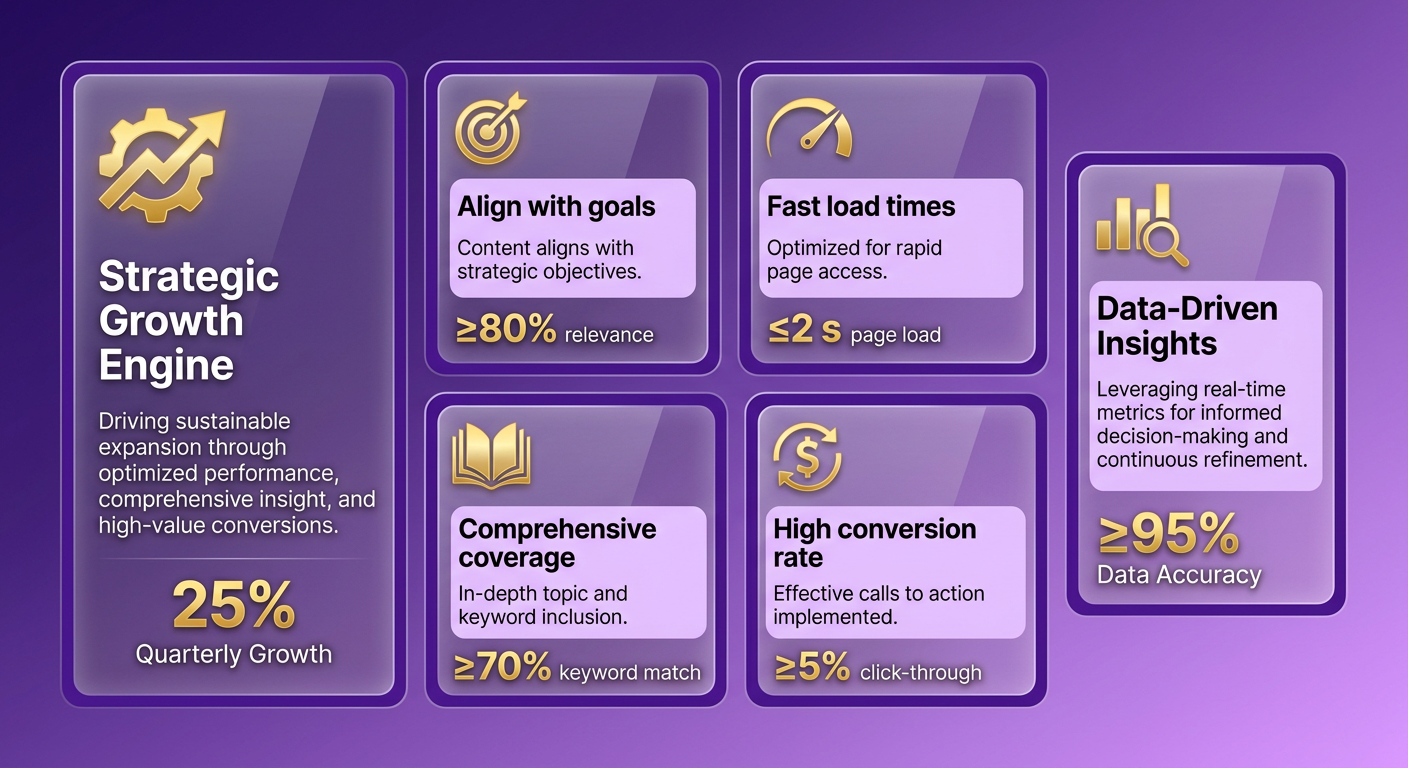
Does the page still serve a purpose?
Start with intent, not numbers. Ask who the page was built for and whether that audience still exists in your strategy. If the answer is no, performance data barely matters. You prune content that no longer serves your brand.
Then check topical value. A page can pull modest traffic and still anchor a cluster, earn authoritative backlinks, or cover a subtopic nothing else on your site touches. Cutting the only page addressing a real subtopic weakens your coverage even if its click count looks weak.
This is why conversion rate belongs in the decision. A page with 40 visits a month that closes deals is worth more than one with 4,000 that bounces everyone. Pull conversion data alongside traffic before you touch anything.
How do you weigh impact against effort?
Sort every candidate into a simple matrix: high-impact/low-effort, high-impact/high-effort, and so on. The high-impact, low-effort pages are your first moves. This keeps you from spending a week rewriting one page while ten quick wins sit untouched.
Sequencing matters as much as selection. When you're unsure, a merge or a redirect is usually safer than a hard delete, since it preserves the link equity and any residual traffic the page still pulls. Set a review window too. Flag borderline pages for a second look in 60 or 90 days rather than acting on a single bad month, because seasonal dips and algorithm shifts can make a healthy page look sick in a short snapshot.
Why document every decision?
Write down what you did and why. For each page, log the action, the reasoning, the metrics that drove it, and the date. This turns a judgment call into a record you can defend and reverse.
Keep it in a running content database with each page's title, target keyword, objective, and audience. When traffic dips a month later, you can trace whether pruning caused it or something else did.
Measuring Success and Avoiding Common Mistakes
Measuring pruning success starts before you delete a single page. Record a baseline first: organic traffic, average engagement, and conversion rates for the pages you're about to touch, plus the site-wide totals. Without that snapshot, you cannot prove pruning helped, and you cannot roll back if it hurt.
How do you know if pruning actually worked?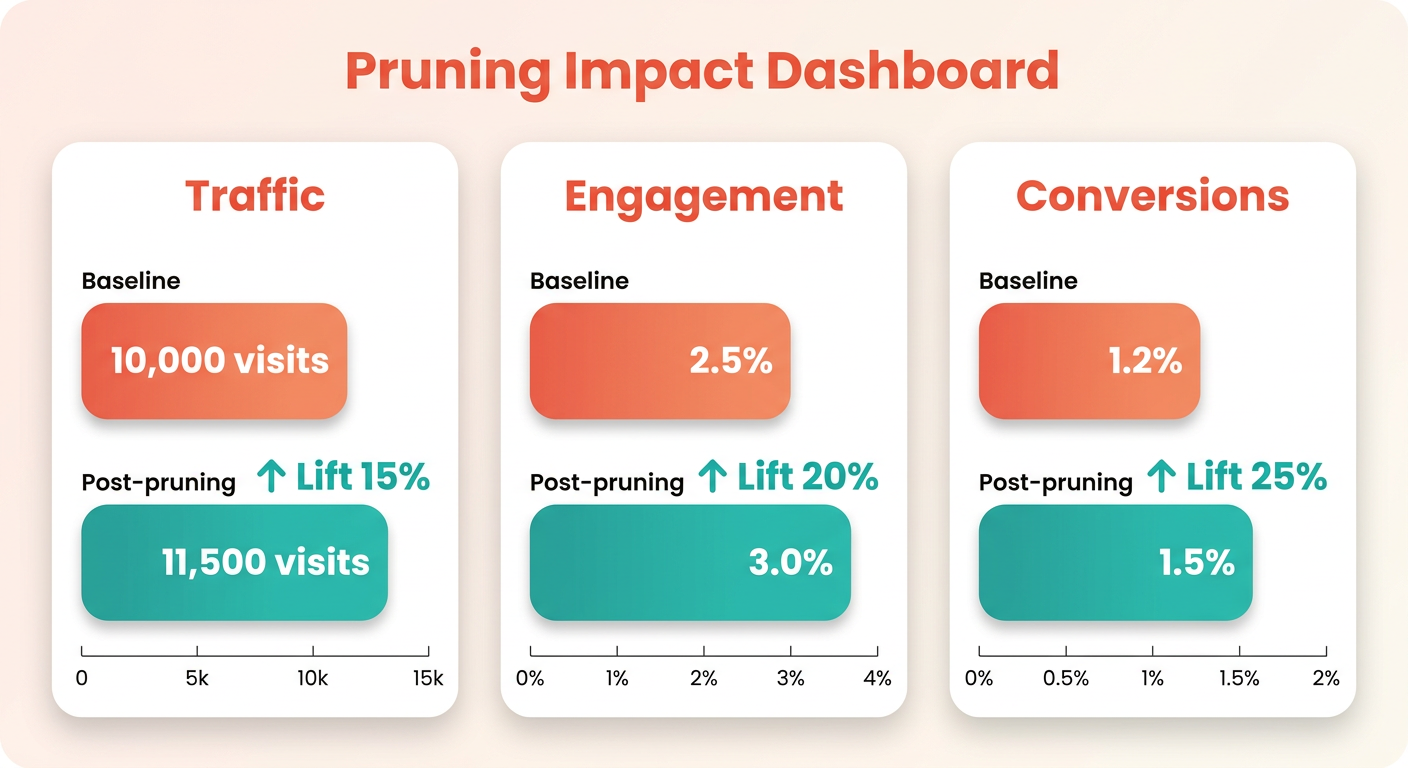
Track three signals after every batch: traffic, engagement, and conversions. Traffic tells you whether authority consolidated onto your survivor pages. Engagement tells you whether the pages you kept genuinely serve readers. Conversions tell you whether any of it moved the business.
Here is the mistake we see most: teams prune everything at once, then cannot tell which change caused which result. Kevin Indig, who ran content pruning at Atlassian, learned to work in waves.
"An important lesson I learned was to roll out changes in stages to get the biggest benefit from the smallest effort." — Kevin Indig
Staged rollouts are not just safer, they are the only way to attribute results. Prune a cluster, wait a few weeks for reindexing, read the numbers, then move to the next. If traffic dips on a survivor, you'll know exactly which redirect or merge to investigate.
What sinks a pruning project?
The biggest one is pruning too aggressively. Cutting by click count alone kills pages that quietly convert or hold backlinks you'd never rebuild. Bill Sebald's upside only holds if the pages you cut were truly dead weight.
The second is ignoring user experience. A page with high impressions but low click-through often signals AI-overview visibility, not failure. Delete it and you quietly shrink your brand's footprint in search.
The third is treating pruning as pure deletion. As Dale Davies puts it, people think of pruning as content deletion only, when refreshing, consolidating, and deindexing are all on the table. Adam Heitzman's line is the mindset to hold:
"Content pruning helps you get more out of what you've already built by surfacing your strongest pages, clearing out dead weight, and sharpening your site's focus." — Adam Heitzman
How often should you re-run the audit?
Cadence scales with your site. The sources disagree on purpose: one recommends pruning active sites every 12 to 18 months, another pushes for every 3 to 4 months on sites over 1,000 pages. Both are right, for different sites.
Match the cadence to size and volatility. A stable site under a few hundred pages can wait 12 to 18 months. A fast-moving site with 1,000-plus pages in a shifting industry needs a 3 to 6 month cycle, or content decay outpaces your cleanup. Whatever your rhythm, do not audit blind each time. Pruning is not a one-time cleanup. It is a habit.
Recrawling and Reindexing: Getting Your Changes Noticed
Pruning only pays off once search engines actually see your changes. A consolidated page with fresh 301s does nothing for rankings until Google recrawls the old URLs, drops them from the index, and credits the survivor. That lag can stretch for weeks if you leave it to chance. Push your updates into the crawl queue instead of waiting.
How do you get Google to recrawl fast?
Submit updated and consolidated pages directly through Search Console. Open the URL Inspection tool, paste the URL, and hit Request Indexing. This flags the page for priority recrawling and shortens the gap between shipping the change and seeing it in search.
Do this for both sides of every consolidation. Request indexing on the survivor so Google picks up the merged content, and inspect the old URLs so the bot confirms the 301. For deindexed pages, the same request speeds their removal rather than their inclusion.
If you've pruned at scale, do not hand-submit hundreds of URLs. Update your XML sitemap to drop deleted pages and reflect your current structure, then resubmit it in Search Console. That gives crawlers a clean map of what should exist now.
Should you promote pruned content elsewhere?
Yes, for the pages that survived and got stronger. Crawlers follow links, so driving fresh traffic and inbound signals to a refreshed page speeds up how quickly it gets re-evaluated. Share the updated page on social, mention it in a newsletter, or earn a link from a relevant partner.
This is not vanity promotion. External signals tell search engines the page is active and worth another look. For a page you just deepened from thin content into a real guide, that renewed attention helps Google reassess it against the query it targets.
Skip this for anything you deindexed or 410'd. There is no point sending traffic to a page you are pulling out of search. Save promotion for the consolidated winners.
How do you confirm it worked?
Track the recrawl in Search Console and the outcome in your analytics. Watch the Pages report to confirm old URLs move to "redirected" or drop out, and that survivors stay indexed. That is your proof the mechanics landed.
Then measure impact against the baseline you recorded before pruning. Pull organic traffic and impressions for the consolidated pages, and compare them to the combined totals of the URLs you merged. If the survivor does not recover the merged pages' traffic within a crawl cycle or two, revisit your redirects before you assume the content is the problem.
Set this up as a standing check, not a one-time look. Automated SEO monitoring catches drift early, so a redirect that quietly breaks or a page that slips out of the index gets flagged before it costs you traffic. Recrawling is not fire-and-forget. It is a loop you watch until the numbers settle.
Frequently Asked Questions
1. How long after pruning before rankings actually move?
Expect a few weeks for Google to reindex changes, then read results over a full six-month window. Redirected clusters and consolidated pages need reindexing time before signals settle. Rushing to judge a batch too early leads teams to reverse merges that were actually working.
2. Should a small or brand-new site bother with content pruning?
Small, stable sites gain little from frequent pruning and can wait 12 to 18 months between audits. New sites rarely carry enough index bloat or cannibalization to justify the effort. Pruning pays off most on libraries with hundreds or thousands of aging, overlapping pages.
3. Can content pruning damage rankings, and can I reverse it?
Aggressive pruning can shrink rankings by cutting pages that quietly convert or hold backlinks. Recording a baseline of traffic, rankings, and engagement before you touch anything lets you trace drops and reverse course. Staged rollouts limit damage to one batch instead of the whole site.
4. What tools do I need to run a proper content audit?
You need Google Search Console for traffic and impressions, GA4 for engagement rate and time, and a backlink tool like Ahrefs for authority. Pull all three into one inventory covering every URL, image, and PDF. AnyPost's real-time analytics tracking keeps these signals visible between full audits.
5. For crawl budget, is a 410 better than a noindex tag?
A 410 tells Google the page is permanently gone, so bots eventually stop crawling it, reclaiming crawl budget. Noindex keeps the page live and crawlable, just absent from results. Use 410 for truly dead pages and noindex when a page still serves sales or internal linking.
6. What should I do with pages that rank in AI Overviews but earn few clicks?
Keep them. High impressions with low click-through often means Google is pulling your content into AI-overview SERPs, which still builds brand visibility. Check the click-through context before acting, since deleting these pages quietly shrinks your search footprint even though the raw click numbers look weak.
7. How do I avoid redirect chains when consolidating pages?
Point every retired URL straight to the final survivor with a single 301, never to an intermediate page that later redirects again. Update internal links and canonical tags at the same time so nothing feeds a dead end. Chains dilute link equity and slow crawlers, undercutting the consolidation.
