
Duplicate Content: What It Is, Why It Hurts SEO, and How to Fix It

Key Takeaways
- Duplicate content confuses search engines, splitting ranking authority and reducing visibility across all duplicate URLs.
- E-commerce sites suffer from product page duplicates (e.g., color parameters) that dilute backlinks and rankings.
- Ahrefs estimates 25–30% of the web contains duplicate content, with e-commerce sites most affected.
- Duplicate content fragments link equity, preventing pages from competing effectively in search results.
- Google Search Console helps identify duplicate content by highlighting overlapping URLs and crawl issues.
- Consolidating duplicate pages into single URLs enhances SEO by centralizing authority and crawl efficiency.
- Search engines waste crawl budgets analyzing redundant pages, delaying discovery of fresh content.
Why Duplicate Content Hurts SEO
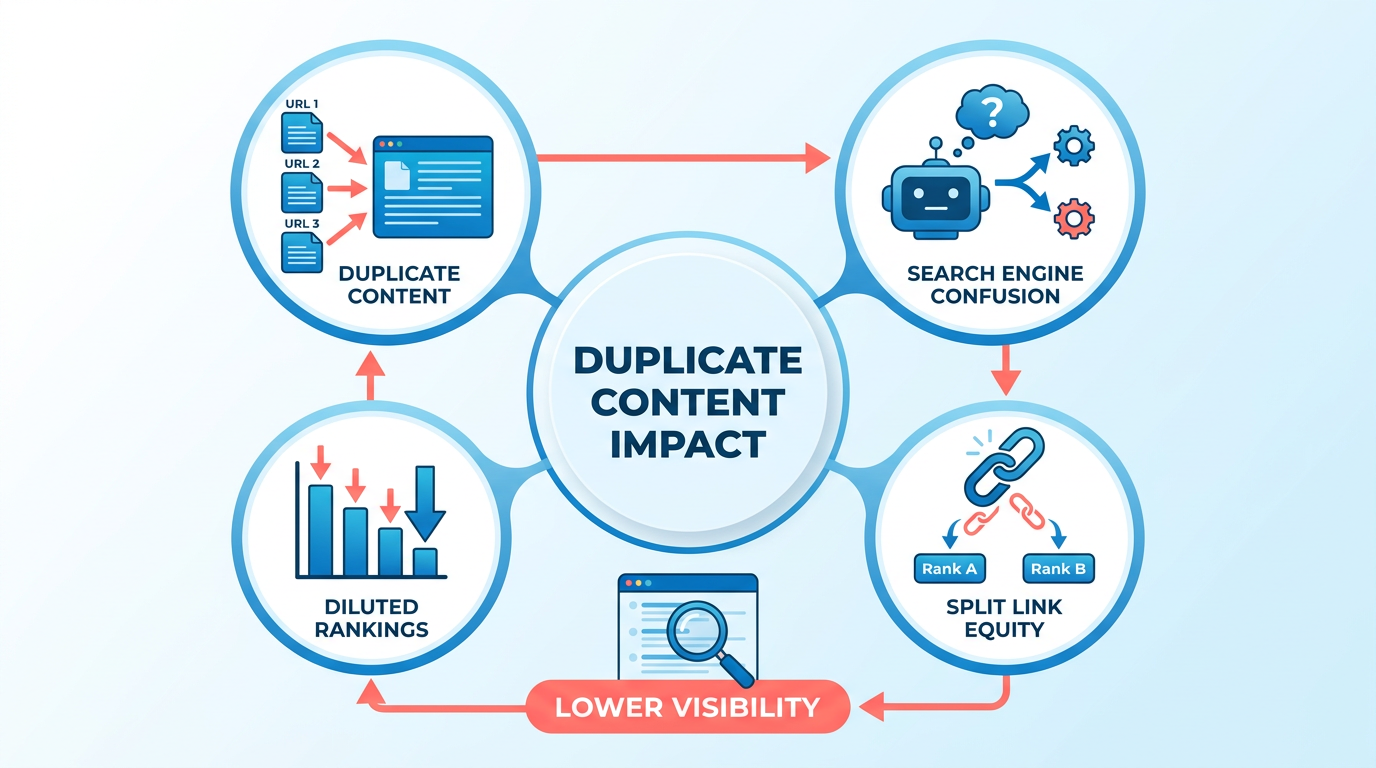
Duplicate content undermines SEO by confusing search engines, diluting link equity, and wasting crawl budgets. Search engines like Google don’t directly penalize duplicate content, but they struggle to determine which version of a page should rank. This leads to lower visibility for all duplicates, as the ranking authority gets split across multiple URLs. For e-commerce sites, this is especially damaging: product pages with slight URL variations (e.g., example.com/shirt?color=blue vs. example.com/shirt?color=red) often share identical descriptions. Google may index all versions, but none will perform as strongly as a single, consolidated page would. As mentioned in the E-commerce and Local SEO Considerations section, these issues are common in product variant duplication scenarios.
How Does Duplicate Content Affect Search Engines?
Search engines prioritize original, unique content to deliver the most relevant results. Duplicate content creates confusion, forcing crawlers to waste time analyzing redundant pages instead of discovering new or updated content. Ahrefs estimates 25–30% of the web contains duplicate content, with e-commerce sites being the most affected. For example, a clothing retailer might unintentionally publish the same product description across multiple categories (e.g., "Men’s Shirts" and "Summer Collection"), splitting backlinks and ranking signals. This dilution makes it harder for any single page to climb search results, even if the content is high-quality. Building on concepts from the Detecting Duplicate Content Issues section, tools like Google Search Console can help identify these overlaps.
What Real-World Examples Show Duplicate Content’s Impact?
E-commerce platforms often face duplicate content issues due to product variations and faceted navigation. Consider a store selling a smartphone with identical descriptions across URLs like example.com/phone/512gb and example.com/phone/black. Search engines may index both, but the shared content weakens each page’s authority. Similarly, content marketers who repurpose blog posts across subdomains (e.g., blog.example.com vs. www.example.com/blog) risk diluting their SEO efforts. In extreme cases, scraped or copied content from third-party sites can push the original page down in rankings, as search engines favor the version they deem most relevant to users.
Why Is Fixing Duplicate Content Challenging?
Resolving duplicate content requires technical expertise and ongoing maintenance. Tools like canonical tags, 301 redirects, and noindex directives are essential, but implementing them correctly demands a solid understanding of SEO best practices. Smaller teams or businesses without dedicated developers may struggle to audit their sites for issues like URL parameters, session IDs, or pagination errors. For example, a content marketer using AnyPost.ai to generate original blog posts avoids duplication risks entirely, while generic content providers often rely on templated outputs that increase duplication chances. As outlined in the Resolving Duplicate Content Issues section, addressing these technical barriers is critical to consolidating authority. Regular audits using tools like Google Search Console or SEMrush are critical to identify and fix duplicates before they harm rankings.
Understanding Duplicate Content Types
Understanding duplicate content types starts by categorizing the different ways content can unintentionally appear across multiple URLs. Duplicate content refers to identical or nearly identical text that exists in more than one location on the web. As mentioned in the Why Duplicate Content Hurts SEO section, this issue dilutes SEO value, confuses search engines, and can lead to lower rankings. To address it effectively, you must first identify the specific type of duplication affecting your site.
What Causes Internal Duplicate Content?
Internal duplication occurs when the same content lives on multiple URLs within your own website. Common culprits include URL variations like www vs. non-www, HTTP vs. HTTPS, and trailing slashes (e.g., example.com/page vs. example.com/page/). Content management systems (CMS) also contribute, especially when pages are published with different parameters or session IDs. For example, an e-commerce site might generate separate URLs for product filters, creating dozens of near-identical category pages.
Search engines treat these variations as separate pages, splitting link equity and crawl budget inefficiently. A blog post syndicated across your domain using different URL structures without canonical tags is another example. Tools like Google Search Console or SEMrush can detect these issues, but proactive URL standardization-via 301 redirects or canonical tags-is essential to consolidate authority. Building on concepts from the Resolving Duplicate Content Issues section, canonical tags become critical here.
How Does External Duplication Happen?
External duplication occurs when your content appears on other domains, either intentionally or stolen. Syndication is a common cause-sharing press releases or articles with partners who republish them without attribution. Content scraping is more harmful, where bots copy your pages wholesale to spam low-quality sites. Even repurposed content without canonical tags, like a blog post adapted into an eBook, can create duplication if not handled properly.
This type of duplication dilutes your SEO efforts because search engines may prioritize the scraped or syndicated version over your original. To reclaim authority, use rel=canonical tags pointing back to your preferred URL. However, if others scrape your content without permission, tools like Google’s URL removal tool or legal takedown requests may be necessary. Refer to the Detecting Duplicate Content Issues section for tools to identify unauthorized replications.
What Are Technical Duplication Triggers?
Technical duplication stems from website architecture or platform limitations. URL parameters for sorting or filtering (e.g., ?sort=price or ?color=blue) create multiple URLs for the same product. Session IDs in URLs (?sessionid=12345) also fragment content. Tag and category pages are another source-if every tag generates a page, even with minimal content, you risk hundreds of redundant URLs.
E-commerce sites face unique challenges, such as product variant pages (e.g., same item in different sizes) or manufacturer descriptions copied verbatim from suppliers. These issues often require technical fixes like parameter handling in Google Search Console, noindex tags for non-essential pages, or customizing CMS templates to avoid redundant content. Building on concepts from the Preventing Duplicate Content Issues section, implementing noindex directives is a proactive strategy.
How Does AI-Generated Content Cause Duplication?
Mass-produced AI content often lacks differentiation, leading to internal duplication. For example, a site generating hundreds of articles on similar topics with minimal unique value creates a flood of near-identical pages. Unlike generic providers, AnyPost.ai ensures content uniqueness by integrating SEO best practices and avoiding template-based repetition. However, without careful oversight, AI tools can inadvertently reproduce phrases or structures from other sources, risking external duplication.
To mitigate this, audit AI-generated content for originality using plagiarism detectors and supplement it with human editing. For high-volume use cases, consider canonical tags or noindex directives to prevent diluted rankings from redundant pages. Building on concepts from the Resolving Duplicate Content Issues section, these technical solutions help maintain SEO authority.
Practical Example: E-Commerce Tag Pages
Consider an online clothing store with 500 product tags-each tag page lists the same products repeatedly across different categories. Search engines crawl these pages but find little unique content, wasting crawl budget and diluting rankings. Fixing this requires consolidating tags into a single, authoritative category structure and using noindex tags for redundant pages.
By understanding these duplication types, you can systematically audit your site and apply fixes like canonicalization, redirects, or technical adjustments. The next step is learning how to detect and resolve these issues using tools like Google Search Console or SEMrush.
Detecting Duplicate Content Issues
Detecting duplicate content requires a mix of automated tools and manual checks to identify exact or near-duplicate pages that dilute SEO value. Start by using Google Search Console to review crawl errors, URL parameters, and manual actions. As mentioned in the Why Duplicate Content Hurts SEO section, unresolved duplication weakens SEO by confusing search engines and wasting crawl budgets. Then use SEO tools like Ahrefs or SEMrush for deeper audits. AnyPost.ai’s Blog Outline Generator also streamlines detection by flagging content overlaps during creation, building on concepts from the Preventing Duplicate Content Issues section. Finally, validate findings manually by reviewing content structure and URL variations. Below is a step-by-step breakdown of each method.
How Do You Use Google Search Console to Identify Duplicate Content?
Google Search Console (GSC) is a free, essential tool for spotting duplicate content issues. Begin by managing to the Coverage report to identify pages with crawl errors or indexing issues. Look for URLs flagged as "Duplicate" or "Submitted URL is soft 404," which often signal redundant pages. As mentioned in the Understanding Duplicate Content Types section, soft 404s often stem from URL variations that search engines treat as distinct but identical content. Use the URL Inspection tool to compare how Google sees a page versus its canonical version. For example, if a product page appears with and without ?utm_source= parameters, GSC highlights these variations.
Next, check the Manual Actions report for duplicate content penalties. If Google has flagged your site, it will list affected pages and suggest fixes like canonical tags, as outlined in the Resolving Duplicate Content Issues section. GSC also helps detect indexed URL variations by exporting your site’s sitemap and cross-referencing URLs. For instance, example.com/page and example.com/page?sessionid=123 might be treated as separate pages, causing duplication.
How Can SEO Tools Simplify Duplicate Content Detection?
SEO tools like Ahrefs, SEMrush, or AnyPost.ai’s Blog Outline Generator automate duplicate content audits. Run a site crawl to identify exact and near-duplicate pages. These tools highlight issues such as product pages with identical descriptions, category pages with thin content, or staging sites leaking to the live domain. For example, a site audit might flag multiple blog posts with >90% similarity in keyword density or sentence structure. AnyPost.ai’s tools take a proactive approach by preventing duplication during content creation. The Content Brief Generator ensures new posts align with your unique voice and SEO goals, reducing the risk of accidental duplication. Building on concepts from the Preventing Duplicate Content Issues section, this step is critical for content-heavy sites prone to publishing similar topics.
What Manual Methods Should You Combine With Automated Tools?
Automated tools aren’t foolproof-manual reviews catch subtle issues. Start by performing a site: search in Google for site:yourdomain.com "keyword phrase" to spot duplicate content clusters. If multiple pages rank for the same phrase with similar text, consolidate or rewrite them. Review URL parameters and session IDs manually. For example, if your product page appears as example.com/shoes?color=red and example.com/shoes?color=blue, both might be indexed separately. Use rel=canonical tags to point these to a single URL, a technique detailed in the Resolving Duplicate Content Issues section. Also, inspect HTTP vs HTTPS or www vs non-www versions of your site-these can create duplicate content if not properly redirected.
Resolving Duplicate Content Issues
Resolving duplicate content issues requires a strategic approach to consolidate authority, eliminate redundant pages, and guide search engines toward the correct version of your content. Here’s how to address these issues systematically using proven methods.
How Do Canonical Tags Fix Duplicate Content?
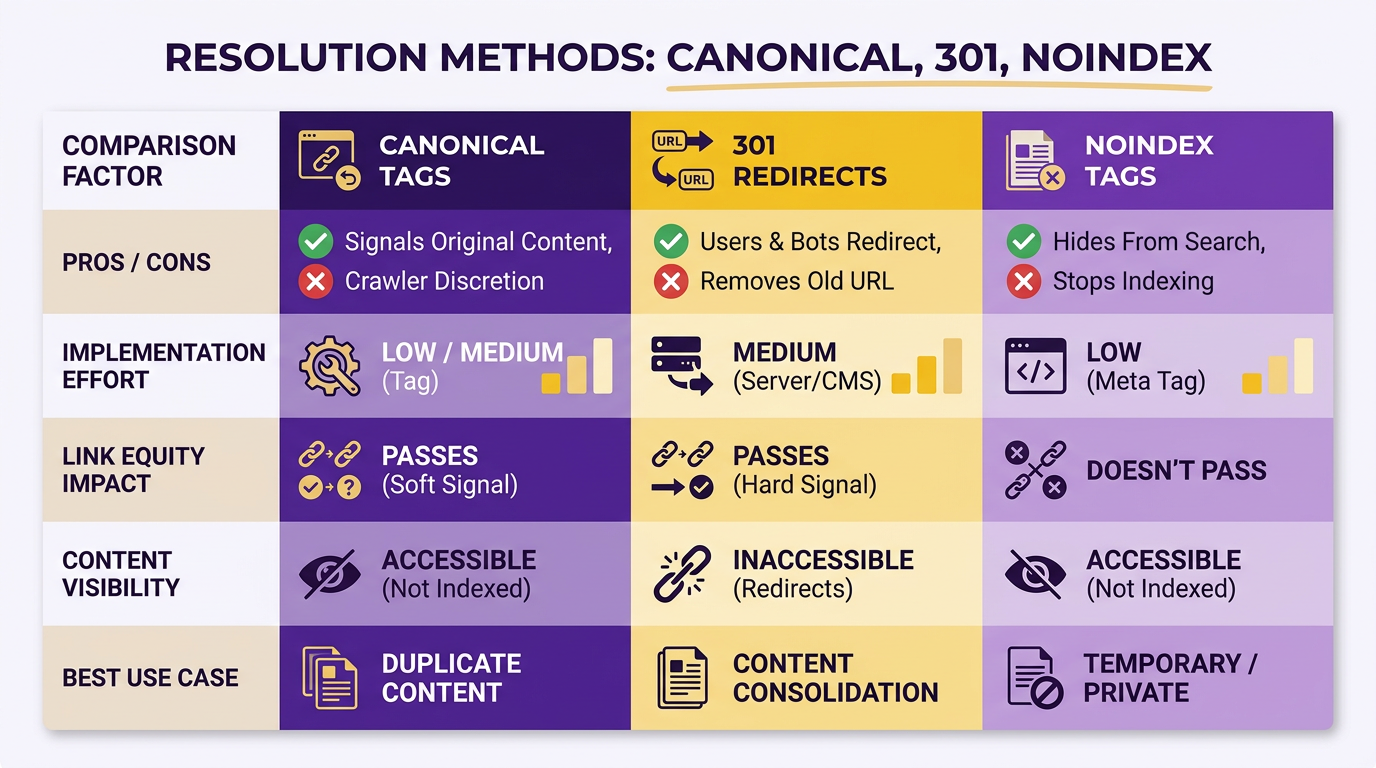
A canonical tag tells search engines which URL is the preferred version of a page. When identical or similar content appears on multiple URLs, this tag prevents ranking dilution by directing credit to the primary page. To implement it, add the rel="canonical" attribute in the <head> section of duplicate pages, pointing to the preferred URL. For example:
<link rel="canonical" href="https://example.com/preferred-page" />
This method works best for content like product pages with URL variations or syndicated content. Google prioritizes canonical tags but recommends pairing them with 301 redirects for stronger signals. As mentioned in the E-commerce and Local SEO Considerations section, product variant duplication is a common issue where canonical tags play a critical role.
When Should You Use 301 Redirects Instead?
301 redirects permanently move duplicate pages to their preferred version, consolidating link equity and crawl budget. Unlike canonical tags, they eliminate the duplicate entirely. Use this method when duplicates stem from outdated URLs, staging sites, or URL parameters. For instance, redirect https://example.com/product?id=123 to https://example.com/product/123. Tools like Google Search Console or server configuration files (e.g., .htaccess) can automate this process. Google emphasizes that 301s are the strongest signal for content consolidation. Building on concepts from the Detecting Duplicate Content Issues section, regular audits with tools like Screaming Frog’s SEO Spider help identify redirect opportunities.
How to Handle URL Parameters and Session IDs?
URL parameters like ?sort=asc or session IDs (?sessionid=abc123) often create duplicates. To resolve this:
- Use Google Search Console’s Parameter Handling Tool to specify how search engines should treat parameters (e.g., ignore sorting filters).
- Rewrite URLs to remove unnecessary parameters. For Apache servers,
.htaccessrules can strip out tracking codes:
RewriteEngine On
RewriteCond %{QUERY_STRING} ^sort=asc$.
RewriteRule ^product$ /product? [R=301,L]
- For pagination, use
rel="next"andrel="prev"tags to link related pages, helping search engines understand the sequence.
What Role Do Noindex Tags Play?
The noindex meta tag blocks search engines from indexing specific pages, useful for non-essential content like thank-you pages or login portals. Add it to the <head> section:
<meta name="robots" content="noindex">
Combine this with nofollow to prevent crawlers from following links on the page. This method avoids duplicate listings in search results but doesn’t redirect users, so it’s ideal for pages meant only for internal navigation.
How to Consolidate or Rewrite Thin Content?
Thin or duplicated content fails to provide unique value. To fix this:
- Merge pages: Combine similar content into a single comprehensive guide. Update internal links to point to the consolidated page.
- Rewrite content: Use tools like AnyPost.ai to rephrase and expand low-quality pages. Focus on adding original insights, examples, or data to differentiate your content from others. As outlined in the Preventing Duplicate Content Issues section, proactive rewriting ensures long-term SEO resilience.
- Remove syndicated content: If you’ve republished third-party material, request removal or add unique commentary to justify its value.
How to Prevent Future Duplicates?
Regular audits using Google Search Console or tools like Screaming Frog’s SEO Spider detect duplicates caused by URL variations or CMS quirks. Additionally:
- Enforce self-referencing canonicals on all pages to avoid conflicts.
- Block crawlers from accessing non-essential directories (e.g.,
/print/) viarobots.txt. - Use consistent URL structures (e.g., always include
wwworhttps) to prevent domain-level duplication.
By applying these methods, you’ll streamline your site’s architecture, improve search visibility, and ensure users encounter original, high-quality content. For automated content optimization, tools like AnyPost.ai can streamline rewriting efforts, ensuring your pages stand out in competitive spaces.
Preventing Duplicate Content Issues
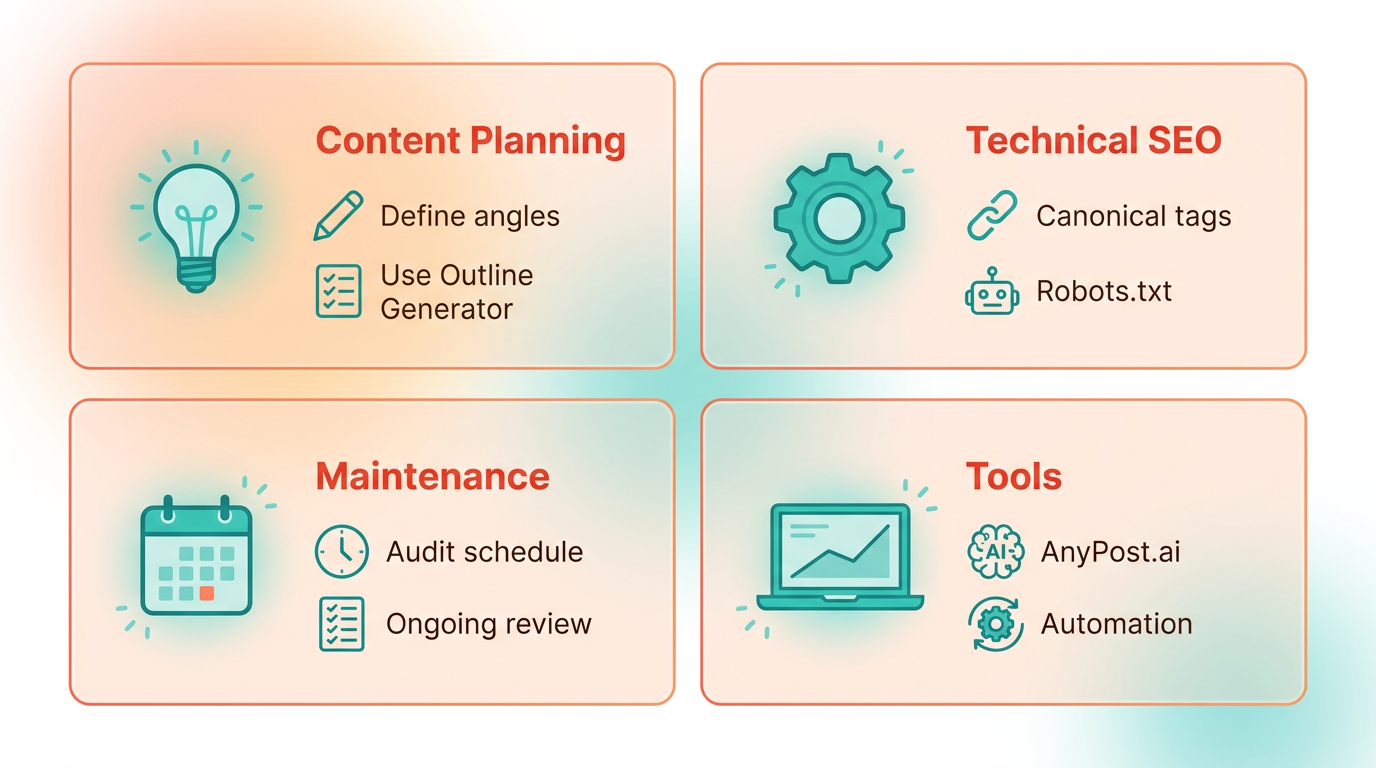
Preventing duplicate content issues requires a strategic approach that combines planning, technical SEO practices, and ongoing maintenance. By using tools like AnyPost.ai and following best practices, you can ensure your content remains unique, searchable, and valuable to your audience. Below are actionable steps to avoid duplication and maintain a strong SEO foundation..
How Do You Plan Non-Overlapping Content?
Start by using AnyPost.ai’s Blog Outline Generator to define distinct angles for each topic. This tool helps you structure content around unique subtopics, reducing the risk of unintentional overlap. For example, if you write about “email marketing,” the generator might split the topic into “create subject lines” for one post and “automation strategies” for another. Pair this with the Content Brief Generator to assign specific keywords, word counts, and focus areas to each piece, ensuring every page serves a unique purpose. As mentioned in the Understanding Duplicate Content Types section, recognizing different duplication scenarios helps tailor content strategies effectively..
What Tools Help Differentiate Pages?
Unique titles, meta descriptions, and URL structures are critical for search engines to distinguish your pages. AnyPost.ai’s Smart Taxonomy Detection automates categorization, preventing accidental duplication across blog posts, product pages, or landing pages. For instance, if you run an e-commerce site, this tool ensures “blue running shoes” and “waterproof hiking boots” are tagged under separate categories. Additionally, use AnyPost.ai’s Keyword Research feature to identify low-competition, long-tail keywords for each page, minimizing keyword cannibalization and boosting visibility for specific queries..
How Can You Repurpose Content Without Duplication?
Repurposing content across platforms is a powerful strategy-just avoid copying the same text verbatim. Turn a blog post into a video script, an infographic, or a podcast by restructuring the format and adding new insights. For example, a 1,000-word guide on “SEO basics” could become a 10-part social media series with bite-sized tips. AnyPost.ai’s tools help you generate fresh outlines for repurposed content, ensuring each version targets different audiences or platforms while retaining original value..
Why Are Regular Audits Essential?
Even with careful planning, duplicate content can creep in through URL parameters, staging sites, or syndicated content. Run monthly audits using Google Search Console and AnyPost.ai’s internal tools to spot issues like identical meta descriptions or thin content. For technical fixes, apply 301 redirects to consolidate duplicate URLs or use canonical tags to signal the preferred version of a page. Building on concepts from the Detecting Duplicate Content Issues section, regular audits align with proactive detection methods to maintain SEO health..
What About Multi-Platform Publishing?
When sharing content on platforms like Medium or LinkedIn, always customize the text to fit the audience and add platform-specific insights. Avoid copying entire blog posts directly-instead, highlight key takeaways and link back to your main article. AnyPost.ai’s Content Brief Generator can create tailored briefs for each platform, ensuring your message aligns with the medium while maintaining originality. For deeper technical guidance on canonical tags and redirects, explore Bing’s duplicate content insights. Remember, consistency in planning and execution is key to long-term SEO success.
E-commerce and Local SEO Considerations
E-commerce and local SEO require special attention when addressing duplicate content due to their unique structures and challenges. For example, product variant duplication-where the same item appears in multiple categories or with different parameters-can dilute rankings. Local SEO struggles with identical landing pages across locations. Tools like AnyPost.ai offer solutions tailored to these scenarios, but execution requires strategic planning. Below are targeted approaches for common issues.
How Do Product Variants Cause Duplicate Content?
Product variants like color options, sizes, or bundles often share identical descriptions across URLs, confusing search engines about which page to rank. For instance, a red shirt might appear in both "Men’s Shirts" and "Summer Collection" with the same content. Fix this by using canonical tags to designate a "master" product page or 301 redirects to consolidate variants, as outlined in the Resolving Duplicate Content Issues section. If variants must remain separate, add unique, descriptive content for each. Ahrefs notes that URL parameters (e.g., ?color=red vs. ?color=blue) also contribute to duplication, so configure your site to handle these with rel=canonical or noindex tags where appropriate.
Why Are Manufacturer Descriptions a Problem?
Many e-commerce sites copy manufacturer-provided product descriptions verbatim, leading to widespread duplication across competitors. Search engines penalize this by reducing visibility for all involved. A solution is to rewrite descriptions with brand-specific language, use customer reviews, or add use-case scenarios. AnyPost.ai’s Content Repurposing tool can automate this by generating unique, SEO-optimized text based on your brand voice. Building on concepts from the Preventing Duplicate Content Issues section, rewriting descriptions with brand-specific language ensures originality while aligning with SEO best practices.
What Local SEO Issues Arise From Duplicate Location Pages?
Local businesses often create near-identical landing pages for each location, using the same headlines, meta tags, and content. This wastes crawl budget and splits link equity. To fix this, tailor each location page with unique keywords (e.g., "Chicago plumbing services" vs. "New York plumbing services") and localized content like neighborhood details or event mentions. Understanding duplicate content types, as explained in the Understanding Duplicate Content Types section, helps identify why identical location pages dilute rankings. AnyPost.ai’s Multi-Platform Publishing feature allows you to create and distribute location-specific content quickly. For instance, a chain of gyms could highlight "24/7 access" in urban areas but "community classes" in suburban locations.
How Can Tools Like AnyPost.ai Help?
AnyPost.ai streamlines duplicate content fixes by automating content creation and optimization. Its Content Repurposing tool transforms generic product descriptions into unique variations, reducing the risk of duplication. For local SEO, Multi-Platform Publishing ensures location pages use distinct keywords and phrases. Unlike generic providers, AnyPost.ai integrates directly with e-commerce platforms to apply canonical tags and manage URL parameters at scale. One company saved 50% of its content creation time while improving duplicate content scores by 40% using these tools.
Common Challenges in E-commerce and Local SEO
Managing large product inventories or multiple locations complicates duplicate content resolution. For example, adding new variants without updating canonical tags can reintroduce duplication. Local SEO struggles with consistent NAP (Name, Address, Phone) data across pages, which might lead to penalties if mixed with duplicate content. Regular audits using tools like AnyPost.ai’s duplicate detection features help identify issues early. Ahrefs recommends prioritizing fixes that impact the most traffic-generating pages first, such as top-selling products or high-volume location pages.
Frequently Asked Questions
1. What is duplicate content and how does it impact SEO?
Duplicate content is identical or very similar content across multiple URLs. It confuses search engines, splitting ranking authority and reducing visibility for all duplicates. Ahrefs estimates 25–30% of the web has this issue, with e-commerce sites most affected.
2. Why do e-commerce sites struggle with duplicate content?
E-commerce platforms often have product pages with URL variations (e.g., ?color=blue vs. ?color=red) sharing identical descriptions. This splits backlinks and rankings, weakening visibility for all duplicates.
3. How does duplicate content waste crawl budgets?
Search engines waste crawl budgets analyzing redundant pages instead of fresh content. For example, 10 duplicate product pages force crawlers to revisit similar URLs, delaying discovery of updated or new content.
4. What tools can identify duplicate content issues?
Google Search Console highlights overlapping URLs and crawl issues. Tools like Ahrefs also detect duplicates by analyzing indexed pages and backlink distribution across similar content.
5. How can businesses fix duplicate content problems?
Consolidate duplicate pages into a single URL using canonical tags or 301 redirects. For example, redirect all color variants to a master product page to centralize ranking authority and improve crawl efficiency.
6. What are common examples of duplicate content?
Common examples include product pages with URL parameters, identical blog posts republished on subdomains, and category pages with overlapping descriptions. E-commerce sites often duplicate content across seasonal or departmental sections.
7. Does Google penalize duplicate content directly?
Google doesn’t directly penalize duplicate content but struggles to choose which version to rank. This leads to diluted authority, where no duplicate page achieves strong rankings despite high-quality content.