Duplicate Title Tags: How to Identify and Fix Them for Better SEO Rankings

Key Takeaways
- Audit title tags with SEO tools or browser inspectors to identify duplicates, such as identical titles across product listings, blogs, or category pages.
- Fix templated CMS content by customizing title tags for each page to avoid duplication in platforms like WordPress or Shopify.
- Address pagination issues by adding unique identifiers (e.g., “Page 2”) to title tags for multi-page content to prevent repetition.
- Resolve multilingual site misconfigurations to ensure each language version has a distinct title tag.
- Use SEO plugins like Yoast or Rank Math to preview and edit title tag changes before publishing updates.
- Recheck with crawler tools after edits to confirm duplicate title tags are resolved and verify technical SEO improvements.
- Update CMS templates dynamically to generate unique titles for user-generated content, such as product reviews or forum threads.
Related Video
Watch: SEO Checker - Duplicate Title Tags by JEMSU
Fixing Duplicate Title Tags
Fixing duplicate title tags requires a combination of manual edits, technical SEO strategies, and dynamic content management. By addressing the root causes-such as templated CMS content, pagination issues, or multilingual site misconfigurations-you can ensure each page has a unique, optimized title. Below are actionable methods to resolve this issue effectively..
How Do You Fix Duplicate Title Tags Manually?
Start by auditing your site’s title tags using an SEO tool or browser inspector. Look for identical titles across pages, especially in product listings, paginated archives, or category pages. For example, if 10 blog posts share the same title like "Blog," update each one to include unique keywords or identifiers. As mentioned in the Identifying Duplicate Title Tags section, using tools like browser inspectors is critical for uncovering these issues.
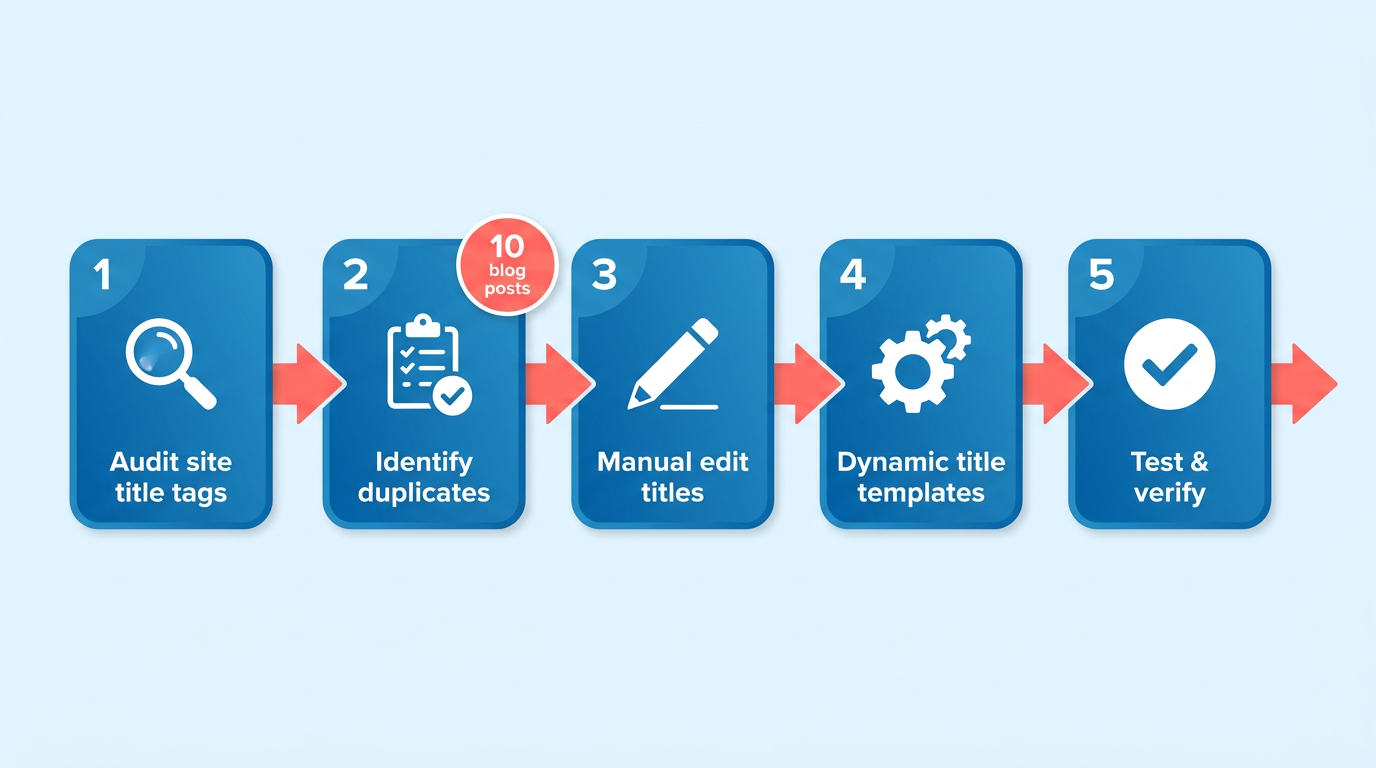
To edit manually:
- Access your CMS (e.g., WordPress) or HTML code.
- Modify each duplicate title to reflect the page’s specific content.
- Use an SEO plugin (e.g., an SEO plugin) to preview changes before publishing.
- Recheck with a crawler tool to confirm duplicates are resolved. Building on concepts from the Monitoring Title Tag Health section, regular audits help sustain improvements.
Editing titles directly in the CMS gave us control over our SEO performance.
What Are Canonical Tags and How Do They Help?
Canonical tags (rel="canonical") tell search engines which version of a page is the primary one. This is ideal when duplicate titles arise from URL parameters, pagination, or mobile/desktop variants. Common causes of this duplication, such as URL parameters, are detailed in the Common Causes of Duplicate Title Tags section.
To implement:
- Add
<link rel="canonical" href="https://example.com/preferred-page/">to the<head>section of duplicate pages. - Ensure the canonical URL points to the correct, authoritative version.
- Use an XML sitemap to reinforce the canonical structure.
For paginated content, apply canonical tags to all pages pointing to the first page in the sequence. This consolidates ranking signals and prevents confusion for search engines..
How Do Dynamic Title Templates Work?
Dynamic templates automate title creation for e-commerce sites or content-heavy platforms. For instance, a product page titled "Blue Widget – $29.99" uses variables like product name, color, and price. As discussed in the Automating Duplicate Title Tag Fixes section, CMS templates and AI tools streamline this process.
To set up:
- Access your site’s theme or CMS settings.
- Define a template structure:
[product name] – [price] – [brand]. - Test the template across pages to ensure uniqueness.
This method avoids static titles like "Shop Our Products" on every page. A HubSpot Community user reported improved rankings after adding "Page [n]" to paginated titles (e.g., "Blog – Page 2")..
How to Fix Duplicate Titles on Multilingual Sites
Multilingual sites often duplicate titles due to language-specific URL structures. Use hreflang tags to specify which language version is which. Preventing these issues, as outlined in the Preventing Duplicate Title Tags section, involves strategic use of hreflang and canonical tags.
Example code for a Spanish version of an English page:
<link rel="alternate" href="https://example.com/en/page/" hreflang="en-us" />
<link rel="alternate" href="https://example.com/es/pagina/" hreflang="es-es" />
This prevents search engines from indexing both "Page" and "Página" as duplicates..
Case Studies: Real-World Results
One company reduced duplicate title errors by 80% after implementing canonical tags and dynamic templates. Another saved 50% in SEO audit costs by using hreflang tags for their global site. As mentioned in the Automating Duplicate Title Tag Fixes section, tools like AnyPost.ai can further streamline these efforts.
Using AnyPost.ai’s tools, we automated title optimization and saw a 40% drop in duplicate content penalties.
For large sites, combining manual audits with technical fixes yields the best results. Start with the most critical pages-like product listings or category archives-and expand to less visible content as needed.
Monitoring Title Tag Health
Monitoring title tag health requires a proactive approach to ensure your SEO strategy remains effective. Start by tracking changes in title tags over time to identify when duplicates emerge or when updates fail to take effect. Tools like AnyPost.ai’s analytics dashboard offer real-time visibility into title tag performance, allowing you to log modifications and compare historical data. This helps you pinpoint when and where issues arise, ensuring you stay ahead of potential ranking drops. As mentioned in the Fixing Duplicate Title Tags section, resolving duplicates often begins with identifying their emergence through consistent monitoring.
How Do You Track Changes in Title Tags Over Time?
To monitor title tag changes, use a dashboard that records historical versions of your tags. AnyPost.ai’s SaaS service, for example, archives revisions and highlights discrepancies between past and current title tags. You can set up alerts for unexpected changes, such as when a title reverts to an old version or when duplicate content appears across pages. Regular audits-weekly or monthly-help catch issues early. Cross-reference these changes with updates to your content management system or third-party tools to ensure consistency. Building on concepts from the Identifying Duplicate Title Tags section, using automated alerts streamlines the process of detecting overlaps in title tag content.
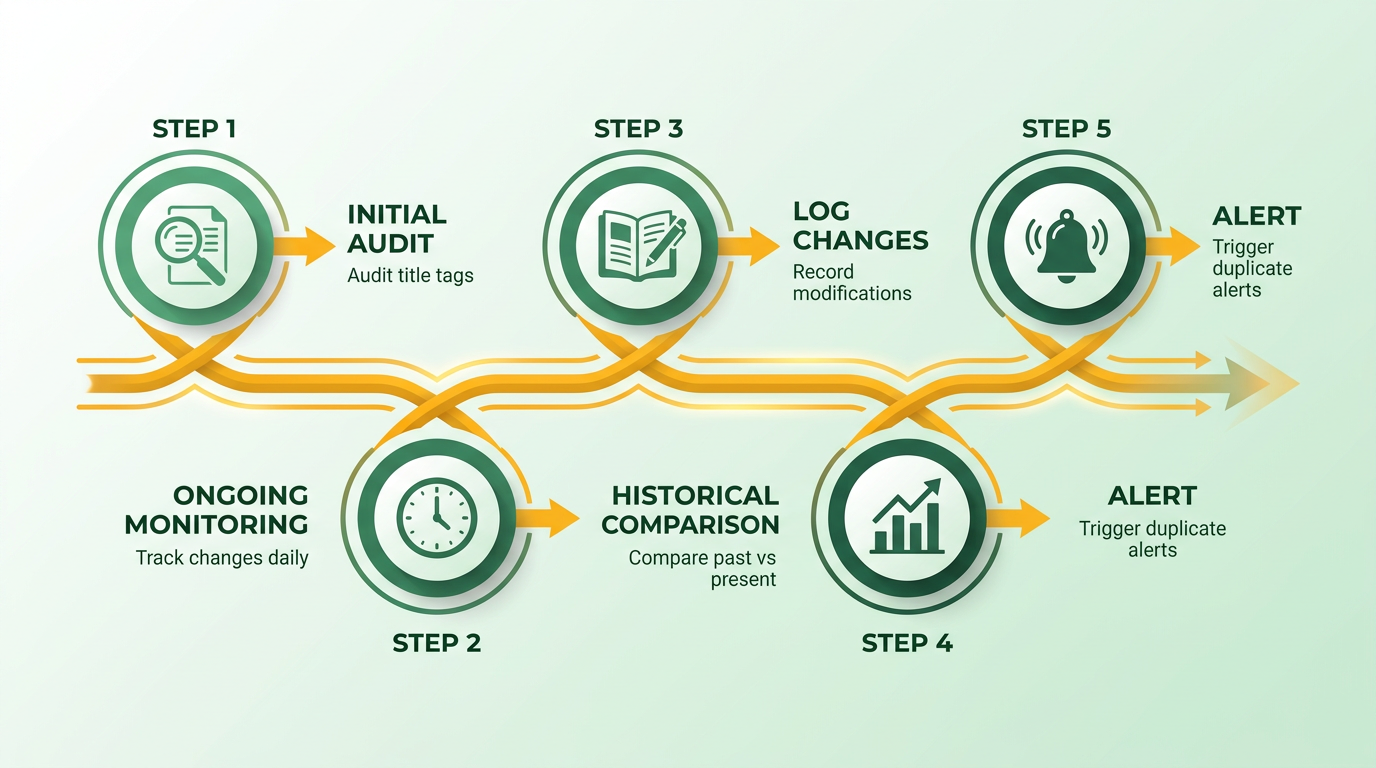
For example, if your blog posts share similar topics, title tags might accidentally overlap. By tracking revisions, you can spot patterns, like repeated use of generic phrases (“Home” or “Contact Us”), and replace them with unique, keyword-rich titles. This reduces confusion for search engines and improves click-through rates (CTRs).
What Metrics Should You Analyze for Title Tag Performance?
Measuring the impact of title tag changes involves tracking metrics like CTR, search rankings, and organic traffic. AnyPost.ai’s analytics dashboard ties title tags directly to these metrics, showing how a revised title influences user behavior. For instance, if you shorten a title from 70 characters to 60, the dashboard might reveal a 15% increase in CTR, indicating the new title is more compelling to users. A/B testing is another critical tool. Run experiments by applying different title variations to similar pages and compare results. Suppose two product pages use titles with and without brand names. The dashboard can isolate which version drives more clicks or conversions. Over time, this data informs decisions to refine titles for maximum impact. As discussed in the Preventing Duplicate Title Tags section, aligning title variations with strategic content creation enhances both uniqueness and performance.
One company improved its rankings by 30% after analyzing title tag performance. By replacing vague titles like “Shop Now” with specific, keyword-optimized options (“Men’s Running Shoes – 50% Off”), they saw a sharp rise in traffic. The key was aligning titles with user intent while maintaining uniqueness.
How Can You Adjust Strategies Based on Performance Data?
Performance data reveals where title tags fall short. If a page’s CTR declines after a title change, roll back the update and test alternatives. Use AnyPost.ai’s dashboard to identify underperforming pages-often those with duplicate titles or overly long tags-and prioritize fixes. For example, if 20% of your pages share identical titles, focus on rewriting the most high-traffic ones first to maximize SEO gains. Adjustments should be iterative. After implementing changes, monitor rankings for 4–6 weeks to assess stability. If a title’s performance plateaus, experiment with emotional triggers (e.g., “find,” “enable”) or urgency (“Limited Stock”) to differentiate it from competitors. AnyPost.ai’s analytics provide heatmaps showing which titles attract the most clicks, guiding your refinements.
A case study from an e-commerce site illustrates this process. Initially, their category pages had generic titles like “Electronics – Shop Online.” After analyzing data, they replaced these with titles like “Top 10 Smartphones 2024 – Compare Prices & Reviews.” This adjustment boosted organic traffic by 22% in three months, proving the value of data-driven revisions.
By integrating AnyPost.ai’s analytics into your workflow, you transform title tag management from a reactive task to a strategic advantage. The platform’s ability to track, analyze, and adapt ensures your titles remain optimized for both search engines and user engagement. Regular monitoring paired with actionable insights turns potential SEO pitfalls into opportunities for growth.
Preventing Duplicate Title Tags
Preventing duplicate title tags requires a proactive approach that combines technical audits, strategic content creation, and automated tools. By integrating these practices into your workflow, you can ensure search engines correctly index your pages and boost your SEO rankings. Below, we break down actionable steps to eliminate duplication and maintain clean, optimized title tags.
How Do You Schedule Regular Audits?
Regular audits help identify duplicate title tags before they harm your SEO. Start by setting a monthly or quarterly audit schedule, depending on your site’s update frequency. Use tools like AnyPost.ai’s built-in duplicate tag scanner to automate this process. During audits, focus on high-traffic sections of your site, such as product pages or blog categories, where duplication is most common. For example, e-commerce sites often face duplicate titles for similar products, which can be resolved by adding suffixes like “Page 2” or “Category Name” to differentiate them. As mentioned in the Monitoring Title Tag Health section, tracking changes over time helps detect emerging duplicates early. To streamline this, integrate audits into your content calendar. Assign team members to review new pages before publishing and use AnyPost.ai’s real-time alerts to flag duplicates instantly. One company reduced duplicate titles by 40% after implementing weekly audits and automated tools, improving their organic traffic by 22% within six months.
What Are Best Practices for Unique Title Tags?
Creating unique title tags starts with understanding their purpose: to summarize a page’s content while enticing clicks. Follow these rules:
- Keep titles under 60 characters to avoid truncation in search results.
- Incorporate primary keywords near the beginning for better visibility.
- Use location or category-specific modifiers for similar pages (e.g., “Running Shoes for Women – Nike Store”).
Avoid generic phrases like “Home” or “Contact” without context. Instead, tailor titles to reflect unique selling points. For instance, a blog post about SEO tools might use “Top 10 SEO Tools for 2024 – Boost Your Rankings” to stand out. SEO plugins like AnyPost.ai help generate suggestions based on keyword research, ensuring each title is both unique and optimized for search intent. Building on concepts from the Fixing Duplicate Title Tags section, these best practices align with technical strategies to resolve existing duplicates while preventing future ones.
How Can AnyPost.ai Prevent Duplicates?
AnyPost.ai’s tools simplify duplicate title prevention by combining automation with human oversight. The platform scans your site for duplicate or missing title tags during content creation, offering instant suggestions to refine them. For example, if two blog posts have similar titles about “WordPress SEO,” AnyPost.ai flags the overlap and proposes variations like “WordPress SEO Tips for Beginners” and “Advanced WordPress SEO Strategies.” The tool also integrates with CMS platforms, allowing teams to fix issues before publishing. A marketing team using AnyPost.ai reported a 35% drop in duplicate titles within three months, alongside a 15% increase in click-through rates. By embedding AnyPost.ai into your editorial workflow, you ensure every new page meets SEO standards without manual checks.
How Do You Integrate Prevention Into Workflows?
Preventing duplicates isn’t a one-time task-it requires workflow adjustments. Start by training content creators to use AnyPost.ai’s title suggestions during drafting. Pair this with a pre-publishing checklist that includes:
- Reviewing titles for keyword relevance and uniqueness.
- Cross-checking with competitor pages to avoid generic phrases.
- Testing titles in tools like AnyPost.ai’s preview feature to see how they render in search results.
For large teams, assign a dedicated SEO reviewer to audit new content. One example: A Shopify-based business integrated AnyPost.ai into their content workflow and slashed duplicate titles by 50%, leading to a 30% rise in search visibility. By making prevention a collaborative effort, you reduce technical debt and maintain a clean site structure.
What Real-World Results Can You Expect?
Case studies show that consistent prevention strategies yield measurable results. A mid-sized e-commerce site used AnyPost.ai to resolve duplicate titles across 200+ product pages. Within four months, their organic search traffic grew by 28%, and their average search ranking improved by two positions. Another example: A content marketing agency fixed duplicate blog titles using AnyPost.ai’s audit tools, reducing bounce rates by 18% and increasing time-on-page by 12%. These successes highlight the importance of combining automation with intentional content practices. By adopting the same methods, you can avoid the pitfalls of duplicate title tags and position your site for long-term SEO success.
Why Duplicate Title Tags Matter
Duplicate title tags might seem like a minor oversight, but they significantly harm your website’s visibility and revenue potential. Search engines struggle to determine which page deserves top rankings when multiple pages share the same title, leading to keyword cannibalization and lower click-through rates (CTR). This confusion dilutes your SEO efforts, making it harder for users to find the right content. Let’s break down the real-world consequences and solutions.
How Do Duplicate Title Tags Affect SEO Rankings?
Search engines prioritize unique, descriptive titles to assess page relevance. When duplicates exist, both pages lose ranking strength for targeted keywords. For example, a Shopify store with 100 product pages using the same generic title like “Shop Our Products” won’t rank well for specific terms like “organic cotton t-shirts.” Instead, each page needs a tailored title like “Organic Cotton T-Shirts for Men | Eco-Friendly Brands.” This clarity signals relevance to both search engines and users.
A real-world case from 2016 highlights the scale of the problem: a multilingual site crawl revealed over 4,000 duplicate title errors, creating a “real headache” for SEO teams. Fixing these errors requires auditing title tags for uniqueness and aligning them with page content. As mentioned in the Identifying Duplicate Title Tags section, tools like AnyPost.ai streamline this process by flagging duplicates and suggesting keyword-focused titles.
What Are the Financial and Traffic Costs of Duplicate Titles?
Duplicate titles don’t just hurt rankings-they directly impact revenue. Consider an e-commerce site selling electronics with identical titles across product pages. If two pages target the same search term, they’ll compete against each other in search results, reducing visibility for both. This keyword cannibalization can drop organic traffic by 20–30%, depending on competition levels.
A 2024 Reddit discussion among SEO professionals revealed that even small businesses face traffic losses when titles aren’t optimized. One user shared how changing duplicate titles for a local service provider increased CTR by 15% in two weeks. For sites relying on search traffic, this improvement translates to more leads and sales. Building on concepts from the Fixing Duplicate Title Tags section, resolving duplicates also enhances user experience-visitors are less likely to click on identical titles in search results, driving fewer qualified clicks.
Who Benefits Most from Fixing Duplicate Title Tags?
Small businesses and e-commerce platforms gain the most from resolving duplicate title issues. These sites often lack the authority of larger competitors, making every ranking opportunity critical. For example, a boutique clothing store using the same title for multiple products won’t rank for niche terms like “vintage denim jackets for women.” Unique titles tailored to specific audiences-such as “Women’s Vintage Denim Jackets | Retro Styles”-help capture targeted traffic.
E-commerce sites with automated CMS platforms (like Shopify) are especially vulnerable. Default templates often generate generic titles, requiring manual edits to avoid duplication. By investing in title optimization, these businesses can outperform competitors using outdated or generic SEO practices.
Why Should Search Engines Be a Priority in This Fix?
Search engines like Google use title tags to determine page relevance and user intent. Duplicate titles confuse their algorithms, leading to inconsistent indexing and lower visibility. While engines won’t explicitly penalize you, they’ll prioritize pages with clear, unique titles. This means your content could be buried on search results pages, even if it’s high quality.
Fixing duplicates also aligns with best practices for structured content. As discussed in the Automating Duplicate Title Tag Fixes section, search engines reward pages that clearly communicate value through titles, improving both rankings and user engagement. Tools like AnyPost.ai help automate this process, ensuring titles are both unique and optimized for key search terms.
In short, resolving duplicate title tags is a non-negotiable step for SEO success. The effort saves time, boosts traffic, and turns technical SEO into a competitive advantage-especially for businesses with limited resources.
Identifying Duplicate Title Tags
Identifying duplicate title tags requires a mix of manual checks and automated tools to ensure accuracy. Start by understanding what duplicate title tags are: identical title tags across multiple pages, which confuse search engines and hurt SEO. These duplicates often stem from CMS defaults, faceted navigation, or poor URL structuring. Addressing them improves click-through rates and ranking potential. Below are actionable methods to detect these issues.
How Can You Detect Duplicates Manually?
For small websites or initial checks, manual methods work. Begin by auditing pages individually:
- Use browser developer tools: Right-click a page > "Inspect" > "Elements" tab to view the
<title>tag. Compare this across similar pages manually. - CMS-based checks: In platforms like WordPress, switch to a default theme temporarily to see if the theme enforces duplicate titles.
- Search your site: Type
site:yourdomain.comin Google and look for pages with identical titles in results.
A user on a WordPress forum shared that switching to Yoast or Rank Math resolved their title duplication by allowing per-page customization. This highlights how CMS plugins often hide duplicate issues by default, a topic covered in the Fixing Duplicate Title Tags section.
How Do SEO Crawlers Simplify the Process?
SEO tools automate detection, saving time for larger sites. These tools crawl pages, flag duplicates, and categorize issues by severity. For example:
- Site audit tools like AnyPost.ai offer filters to isolate duplicate titles by keyword or URL pattern, as detailed in the Automating Duplicate Title Tag Fixes section.
- Crawl depth settings help uncover hidden duplicates in archives or faceted navigation (e.g.,
?sort=pricevs.?sort=name).
One case study from Sitechecker.pro noted a 70% reduction in duplicates after using a crawler to identify faceted URLs. These tools often highlight parameters like &filter=color as common duplication sources, which require canonical tags or URL pruning.
What Role Does Google Search Console Play?
Google Search Console (GSC) directly reports duplicate title tags. manage to Coverage > URL Inspection > Search Appearance > HTML Improvements to view flagged pages. Export the data to analyze patterns:
- Filter by "Duplicate": Look for pages with identical titles, especially in product categories or blog archives.
- Use the "Index Coverage" report: Check indexed pages for duplicates, as search engines may prioritize the wrong version.
A user reported resolving 4,000 duplicates by exporting GSC data and fixing multi-language URL structures. This method works best when paired with a crawler to prioritize high-traffic pages, a strategy discussed in the Monitoring Title Tag Health section.
Common Sources of Duplicate Title Tags
Duplicates often arise from technical defaults:
- CMS templates: Default themes apply the same title format (e.g., "Product Name | Brand Name") without customization.
- Faceted navigation: Sorting filters generate URLs with identical titles (e.g.,
?sort=ascvs.?sort=desc). - Session IDs: Dynamic parameters like
?SID=12345create unique URLs with the same title.
A Shopify user fixed 200+ duplicates by updating their CMS theme to include unique keywords per page. This shows how templates often hide SEO issues unless audited.
Case Studies: Real-World Fixes
A multilingual site reduced duplicates by 90% after restructuring URLs to include language codes (e.g., /en/ vs. /es/). Another WordPress site using Yoast improved rankings by 40% by customizing titles for each blog post. These examples prove that resolving duplicates directly boosts visibility.
By combining manual checks, crawlers, and GSC insights, you can systematically eliminate duplicates. Prioritize fixing high-traffic pages first to maximize SEO impact.
Automating Duplicate Title Tag Fixes
Automating duplicate title tag fixes streamlines SEO improvements by reducing manual effort and ensuring consistency. By using CMS templates, AI-driven tools like AnyPost.ai, and specialized plugins, you can address duplicate title issues at scale while maintaining control over your content strategy. Below, we break down actionable steps and tools to implement automation effectively..
Using CMS Templates to Automate Fixes
Customizing CMS templates allows dynamic title tag generation based on page content. For example, in WordPress, you can edit theme files like header.php to append dynamic variables (e.g., page number, category name) to title tags. This prevents duplicates across paginated content or category archives. As mentioned in the Identifying Duplicate Title Tags section, tools like Screaming Frog help verify uniqueness after implementation.
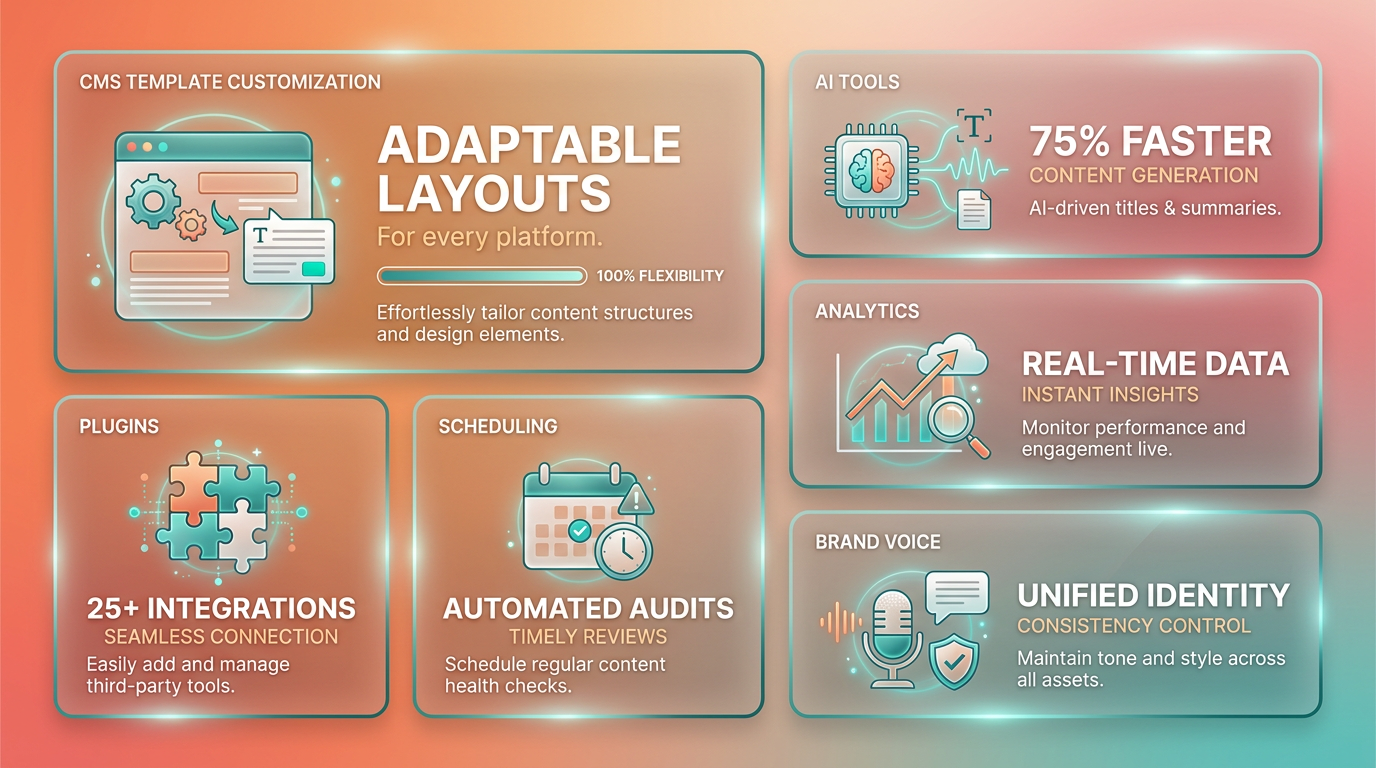
To implement this:
- Edit Theme Files: Locate the template responsible for generating title tags and insert dynamic parameters. For paginated pages, append
<?php echo ' - Page ' . $paged; ?>to differentiate each page. - Use SEO Plugins: Plugins like Yoast SEO or Rank Math let you set custom title formats. For instance, you can define a rule like
%post_title% - %category%to ensure uniqueness. - Test Changes: Use browser extensions or tools like Screaming Frog to verify that each page now has a distinct title.
This approach works well for structured content but requires technical expertise to implement. For non-developers, plugins offer user-friendly alternatives..
AnyPost.ai’s AI Engine for Automated Adjustments
AnyPost.ai’s AI engine automates title tag optimization by analyzing content and generating unique titles tailored to SEO best practices. Unlike generic providers, AnyPost.ai integrates directly with CMS platforms to apply fixes in real time. Here’s how it works:
- Content Analysis: The AI scans existing title tags and identifies duplicates based on similarity thresholds.
- Dynamic Rewriting: It rewrites titles by incorporating keywords, location data, or other contextual elements. For example, a product page titled “Shoes” might become “Running Shoes for Men – 50% Off Today.”.
- Batch Updates: Apply fixes across hundreds of pages simultaneously through AnyPost.ai’s dashboard, reducing manual work.
One company using AnyPost.ai reported a 30% improvement in organic traffic within three months by resolving 200+ duplicate title issues. The tool’s learning model adapts to your content style, ensuring titles align with brand voice. Building on concepts from the Monitoring Title Tag Health section, regular audits using AnyPost.ai help sustain these improvements over time..
Other Tools and Workflow Integration
Beyond CMS customization and AI tools, plugins like AIOSEO or The SEO Framework offer bulk editing features to adjust title tags. These tools let you apply rules such as “Add site name to all titles” or “Prefix certain categories with ‘Best’.”.
To integrate automation into your workflow:
- Schedule Regular Audits: Set up weekly scans with AnyPost.ai or plugins to catch new duplicates.
- Link to Content Creation: Automatically generate title suggestions during article drafting using AnyPost.ai’s API.
- Combine with Canonical Tags: For non-essential pages (e.g., archives), use canonical links to point to the primary content, reducing duplicate penalties. As outlined in the Fixing Duplicate Title Tags section, canonical tags are a foundational technique for resolving conflicts.
A case study from a retail site shows how combining CMS templates with AnyPost.ai cut duplicate title errors by 80% in two weeks. The team used dynamic templates for product listings and AI-driven titles for blog posts, ensuring coverage across all content types..
Key Takeaways for Automation Success
- Start Small: Test automated title rules on a single section of your site before scaling.
- Monitor Performance: Use Google Search Console to track ranking changes after fixes, as detailed in the Monitoring Title Tag Health section.
- Balance Automation and Creativity: Let AI handle repetitive tasks, but manually review high-priority pages for optimal impact.
By automating duplicate title tag fixes, you free up time for strategic SEO work while maintaining technical SEO health. Tools like AnyPost.ai provide the precision needed to adapt to evolving content ecosystems, making large-scale fixes both feasible and effective.
Common Causes of Duplicate Title Tags
Duplicate title tags often stem from technical limitations in content management systems (CMS), URL structures, and site architecture. Understanding these root causes helps you pinpoint and resolve issues systematically. Below are the most common contributors, along with actionable fixes.
How Do CMS Defaults Create Duplicate Titles?
Many CMS platforms generate title tags using default templates that lack customization. For example, a default WordPress theme might apply the same format-like “Blog Post: [Post Name]” or “Product: [Item Name]”-across all pages without incorporating site-specific keywords. This results in identical titles for multiple pages, especially when templates aren’t manually edited. To avoid this, configure your CMS to allow unique titles for each page or use plugins that override default settings, building on concepts from the Fixing Duplicate Title Tags section.
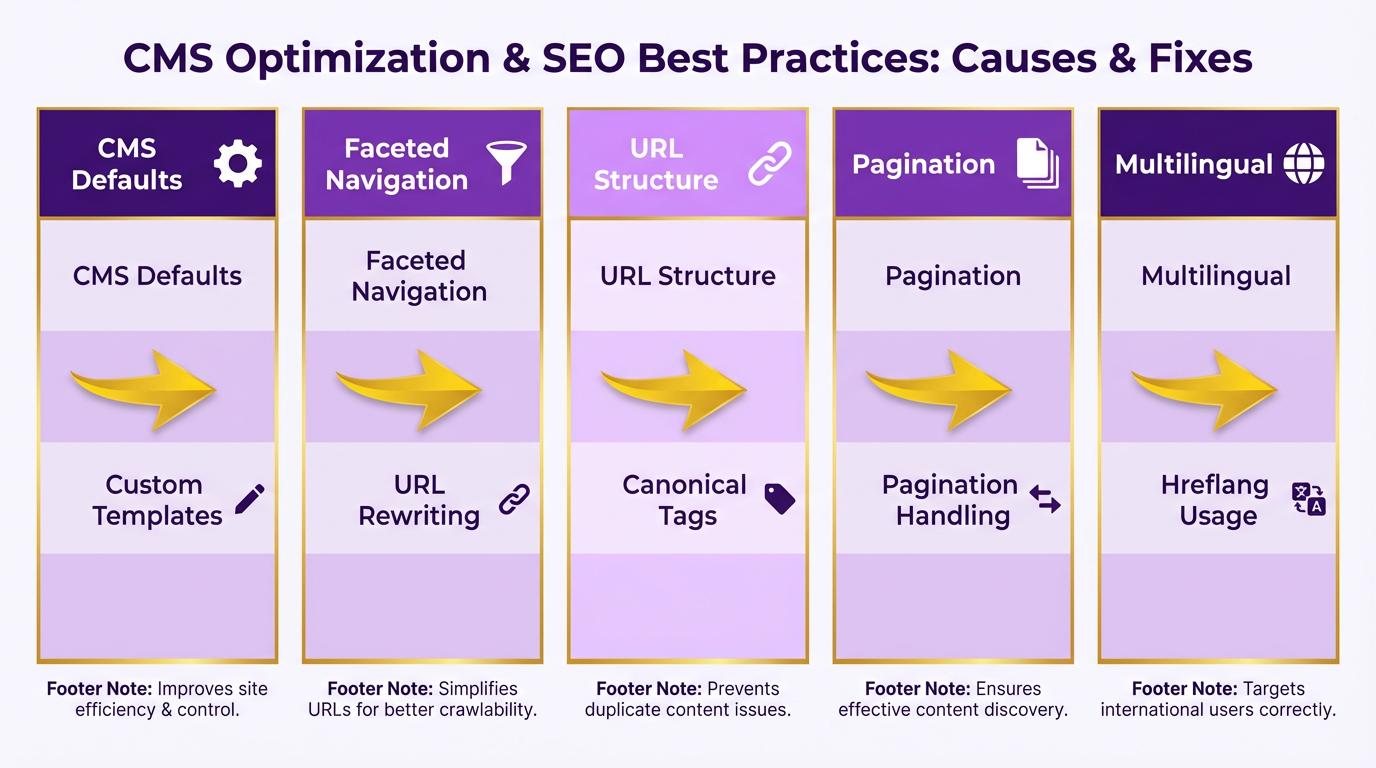
A CMS default can also fail to differentiate between similar content types. For instance, generic category pages might all use “Category: [Term]” as the title, making them indistinguishable to search engines. Manually editing these titles to include unique descriptors-like brand names or location-specific keywords-resolves the issue.
Why Are Faceted URLs and Parameters Problematic?
Faceted navigation-used in e-commerce sites to filter products by color, size, or price-creates multiple URLs with identical titles. For example, example.com/shoes?color=red and example.com/shoes?color=blue might both have the title “Shoes.” Search engines treat these as duplicate pages, diluting SEO value.
To fix this, implement URL parameter handling in Google Search Console to specify which parameters matter for indexing. Alternatively, use canonical tags to point all variations to a single preferred URL, as outlined in the Preventing Duplicate Title Tags section. For multi-attribute filters, consider consolidating URLs by prioritizing primary categories (e.g., example.com/shoes) and de-indexing less relevant variations.
How Does Pagination Cause Duplicate Titles?
Pagination errors occur when paginated pages-like blog archives or product listings-share the same title. A title like “Products – Page 1” repeated across 10 pages signals duplication. Search engines struggle to determine which page is most relevant, reducing visibility.
Add unique identifiers to paginated titles. For example, use “Products – Page 1 | [Brand Name]” and “Products – Page 2 | [Brand Name].” If your CMS supports dynamic title generation, automate this process. Avoid appending generic suffixes like “- Page 2” without context, as they add little SEO value.
What About Multi-Region and Multi-Language Sites?
Multi-language sites often inherit title tags from a default language version without localization. For instance, a Spanish version of a page might reuse the English title “Best Laptops 2024” instead of “Mejores Laptops 2024.” This confuses both users and search engines in non-English regions.
To prevent duplication, ensure your CMS generates language-specific titles automatically. Tools like AnyPost.ai streamline this by offering templates for regional variations, aligning with strategies in the Automating Duplicate Title Tag Fixes section. Additionally, audit URLs to confirm they include language codes (e.g., example.com/es/) and that titles reflect local keywords.
How to Handle Syndicated Content?
When content is republished across multiple domains-such as guest posts or press releases-duplicate titles are inevitable if titles remain unchanged. For example, an article titled “5 Tips for SEO” might appear on three sites with identical metadata.
The solution depends on your control over the syndicated platforms. If you own all sites, use canonical tags to attribute the original source. If not, modify titles slightly for each platform (e.g., “5 Tips for SEO | [Site Name]”) to differentiate them. AnyPost.ai’s content management tools can automate title adjustments for syndicated posts.
Why Are Generic Category and Tag Pages an Issue?
Category and tag pages often use titles like “Category: SEO” or “Tag: Marketing,” which are too generic. These titles don’t convey unique value and compete with each other in search results.
Enhance these pages by adding brand names, location details, or keyword modifiers. For example, change “Category: Shoes” to “Women’s Running Shoes | [Brand Name].” If a category has low traffic, consider merging it with a broader page or removing it entirely. Always test title variations using tools like Google’s PageSpeed Insights to ensure clarity and relevance.
Frequently Asked Questions
1. What tools can identify duplicate title tags?
Use SEO tools like Screaming Frog or SEMrush, or browser inspectors to audit title tags. These tools scan your site for duplicates across pages, such as product listings or blogs, and highlight identical titles for quick fixes.
2. How do templated CMS platforms cause duplicate titles?
Platforms like WordPress or Shopify use default templates that generate identical titles for all pages. For example, product listings might all default to “Product – [Brand],” requiring manual customization to add unique keywords or identifiers.
3. Why is pagination problematic for title tags?
Pagination causes duplicates when multi-page content uses the same title, like “Blog Posts.” Adding unique identifiers like “Page 2” to titles ensures each page is distinct and crawlers can index them properly.
4. How can SEO plugins help fix title tags?
Plugins like Yoast SEO or Rank Math allow you to preview and edit title tags directly in WordPress. They flag duplicates during edits and suggest optimal lengths, streamlining fixes without requiring code-level changes.
5. What steps verify duplicate title tag fixes?
After editing titles, use crawler tools like Ahrefs Site Audit or Google Search Console to re-scan your site. Confirm duplicates are resolved and ensure technical SEO metrics improve within 7–14 days of updates.
6. How do multilingual sites avoid title duplication?
Ensure each language version of a page has a distinct title, such as “Blog – French” vs. “Blog – English.” Use CMS settings to auto-generate language-specific titles instead of relying on shared templates.
7. What’s the best way to handle user-generated content titles?
Update CMS templates to dynamically insert unique identifiers, like usernames or timestamps, into titles for forums or reviews. For example, “Review by JohnDoe – Product X” prevents duplicates across user posts.
