
E-commerce Internal Linking: How to Pass Authority to Money Pages

Key Takeaways
- Internal linking that funnels authority to product and category pages can lift e-commerce revenue by up to 20%.
- Your homepage and best blog posts hold most of your site's authority. Internal links redirect that toward the pages that make money.
- Money pages often sit three or four clicks deep. Internal links close that gap for shoppers and crawlers alike.
- Anchor text pulls double duty: it signals relevance to search engines and nudges shoppers toward buying.
- Expect 2 to 5 days to roll this out on a typical store.
- Difficulty: 6 out of 10. You need working knowledge of site architecture, authority flow, and anchor text.
- Under 50 products? Skip the full overhaul. Your site's already shallow enough.
The short version
Internal linking is one of the highest-leverage SEO moves for e-commerce, and almost nobody uses it well. Point links from your high-authority pages to your product and category pages, and you pass ranking power straight to the pages that pay the bills. Done right, that's worth up to 20% more revenue.
The core idea is simple. Your homepage and top blog posts hold the most authority on your site. Your money pages sit buried three or four clicks deep. Internal links fix that gap.
What this strategy actually does
Internal linking connects two pages on the same site with hyperlinks that pass authority, context, and relevance through anchor text.
For e-commerce, the play is specific. You link from high-authority pages like your homepage or best blog content down to your money pages, the product and category URLs that drive revenue. That tells Google those pages matter, and it helps them rank faster.
Anchor text does double duty. It signals relevance to search engines and nudges shoppers toward the click. So write anchors for both ranking intent and conversion, not keyword stuffing.
How long it takes, and how hard it is
Plan for 2 to 5 days on a typical store. Catalogs with thousands of SKUs run longer.
Difficulty is a 6 out of 10 for marketers with intermediate SEO chops. You need to understand site architecture, authority flow, and anchor text. Never audited a link structure before? Block extra time to learn the basics first.
And skip the full manual overhaul if you run a store with under 50 products. At that scale your architecture is already shallow, and your time is better spent on the product and content pages themselves.
At a glance: internal linking strategies
| Strategy | Best For | Effort | Primary Benefit |
|---|---|---|---|
| Homepage-to-money-page links | Top-priority products | Low | Passes strongest authority fast |
| Blog-to-product links | Content-heavy stores | Medium | Routes topical authority to revenue pages |
| Category hub linking | Large catalogs | High | Organizes crawl paths at scale |
| Anchor text optimization | All sites | Low | Improves relevance and click-through |
The pattern I trust most: build authority in your blog content, then funnel it to products through contextual links. Blog posts attract backlinks and rankings. Those signals should flow to pages that convert.
For large stores, structured category hubs matter more than one-off links. When you're juggling thousands of URLs, planning your crawl paths becomes the whole game. The guide on internal linking for large e-commerce sites covers that architecture in depth.
Start with your five highest-value money pages. Find your strongest authority pages. Link them together with clear, conversion-minded anchor text. That first pass alone often moves rankings within weeks.
Finding your money pages
Money pages are the ones that drive revenue: your product and category pages. They're where a visitor turns into a paying customer, which makes them exactly the pages you want feeding on internal authority.
The problem is simple. These pages rarely earn links or traffic on their own. Blog posts pull in visitors and backlinks. Product pages sit quietly and convert. Your job is to find the ones that matter most, then send authority their way.
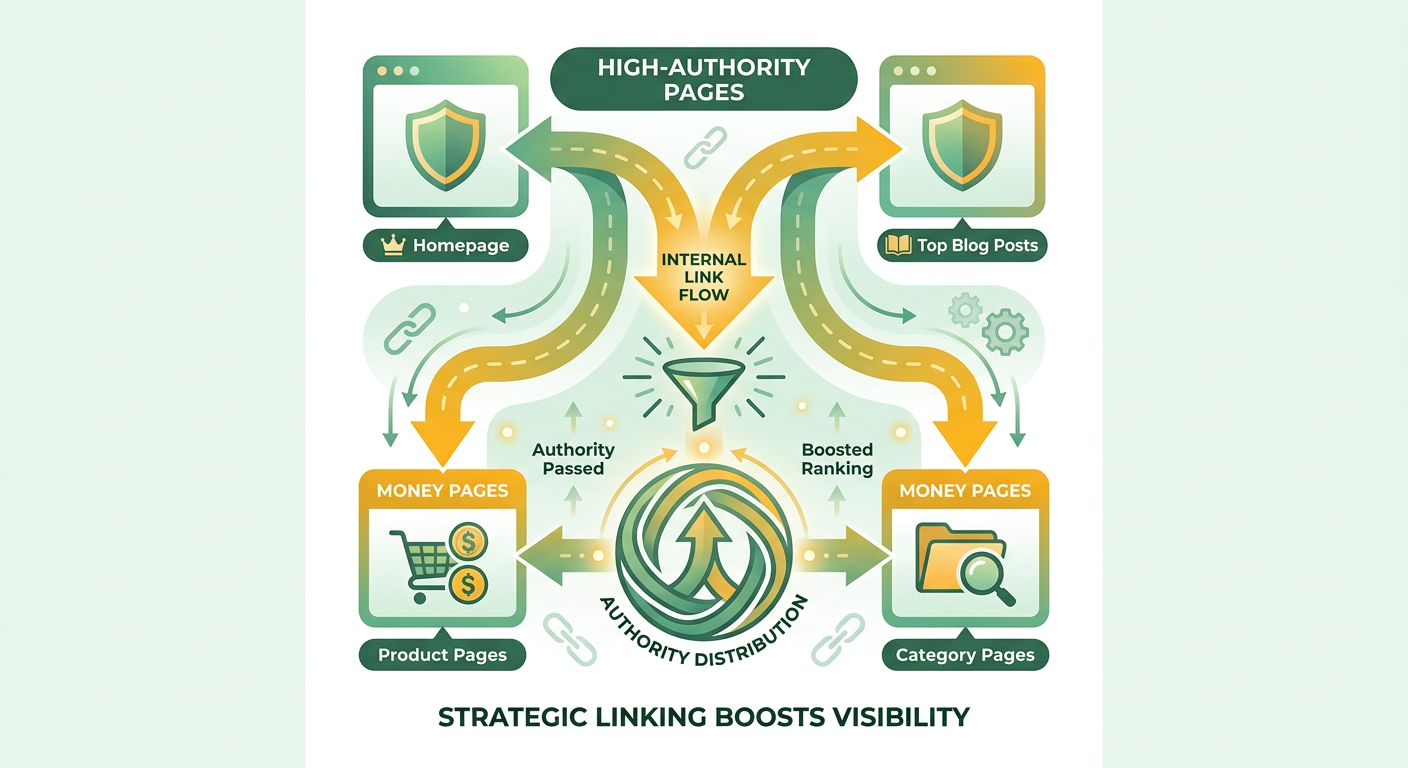
Which pages actually make you money?
Start with your best-selling products and highest-converting categories. A page that converts well but sits three or four clicks from your homepage is a page bleeding potential. Find those first.
Not every page deserves equal treatment. Pages with strong traffic should send authority. Pages with growth potential should receive it. When everything gets linked the same way, your strongest pages waste their pull on stuff that doesn't need it.
Think in two buckets:
- Senders: your homepage, top blog posts, high-traffic category pages
- Receivers: high-margin product pages, seasonal collections, new arrivals with room to climb
How to find money pages in analytics
Use Google Analytics and Google Search Console together. Analytics shows which pages drive conversions and revenue. Search Console shows which pages rank and pull clicks. Cross-reference the two to find pages that convert well but underperform in search.
In Analytics, sort pages by revenue and conversion rate. Product and category pages near the top are your priority receivers.
In Search Console, check the Pages report for URLs stuck on page two. A product ranking in position 11 to 15 is close. A few well-placed internal links can push it onto page one, where the clicks actually happen.
Overlay the two data sets. A page that converts well and ranks just outside the top spots is your best candidate. That's where internal linking pays off fastest.
Can you use best-seller data to prioritize?
Yes. Public best-seller rankings give you a quick read on demand before you dig into your own numbers. The Amazon Best Sellers list is a fine gut check. If a category is flying off shelves marketplace-wide, your version of that page deserves attention.
Match that external demand signal against your internal conversion data. When the two line up, you've found a page worth prioritizing.
Aleyda Solis of Orainti puts the priority plainly: optimize internal linking for your top-selling products. Don't spread effort thin across the whole catalog. Concentrate authority where the sales already are.
The payoff is real. One case study documented by Search Engine Land showed conversions climbing 25% on money pages after internal links were restructured to point at them. That's the difference between a buried product page and one your best content actively promotes.
For larger catalogs, this prioritization step matters even more. You can't manually link every page, so structured internal linking becomes the practical way to scale the same logic across thousands of URLs.
Mapping a topical hub structure
A topical hub structure groups related content under a central category page, with subcategories branching off it. That clustering tells search engines how your pages relate. It also concentrates authority where it counts, feeding your money pages through clear structural paths.
Internal links shape how search engines find pages, read site structure, and distribute authority. A hub structure makes those signals obvious instead of leaving them to chance.
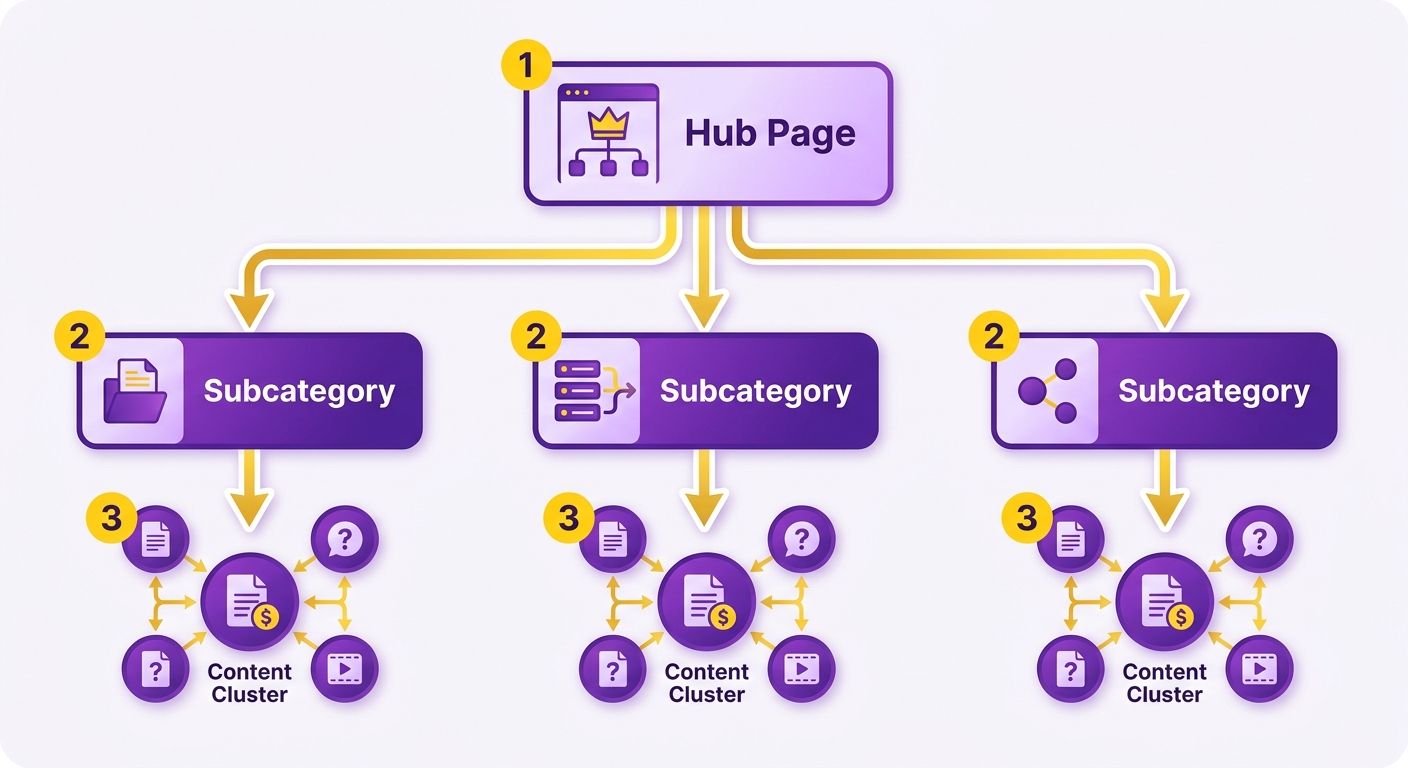
How to build a hub structure with categories
Start with a broad category page as the hub. Then create subcategory pages that link up to it and down to individual products. Each layer passes context and authority to the next, so nothing important sits stranded four clicks deep.
Your top-level category acts as the pillar. Link to it aggressively from supporting content first, then let it distribute authority down to subcategories and products. That keeps your strongest pages tightly connected instead of scattered.
Think of the hierarchy in three tiers:
- Hub (category): the broad topic page, like "Men's Footwear"
- Subcategories: narrower groupings, like "Running Shoes" or "Boots"
- Product pages: individual items linked from their subcategory
Each product links back up to its subcategory. Each subcategory links up to the hub. That two-way flow is what turns a flat site into a structured one.
What this looks like for a fashion store
Take a fashion e-commerce site. Your main hubs might be Clothing and Accessories, each splitting into subcategories that map to how shoppers actually browse.
Under Clothing, you'd build dresses, tops, and outerwear. Under Accessories, belts, bags, and scarves. Every product page links back to its subcategory, and every subcategory links back to its hub.
Two things happen at once. Shoppers move faster because the paths match their intent. Search engines see tight topical clusters, which strengthens ranking signals across the whole group. One company restructured its site around topical hubs and grew keyword rankings by 50%.
For large catalogs, this structure is the difference between chaos and clarity. Managing thousands of SKUs, a planned hub layout keeps authority flowing predictably.
Why anchor text matters so much here
Anchor text is the label on every link in your hub. It tells search engines what the destination page is about, which is why generic labels like "click here" waste the signal. Descriptive anchors reinforce the topical relationship between hub, subcategory, and product.
Barry Schwartz of Search Engine Land put it plainly: "Use descriptive and relevant anchor text for internal linking."
Match your anchor to the target page's topic. A link pointing to your running shoes subcategory should say "running shoes," not "our collection." When you link aggressively to a pillar page first, you can push harder on those anchors without the destination page absorbing the risk if something flags.
Keep anchors varied but relevant. Repeating the exact same phrase on every link looks unnatural. Mix in close variations that still describe the target clearly.
Writing anchor text that sells
Anchor text is the clickable text you use for an internal link. It tells readers and search engines what the linked page is about, passing context and relevance straight through to the destination.
For e-commerce, anchor text does double duty. It shapes how search engines read your money pages, and it convinces a reader to click through to a product. Get it right and you lift both rankings and conversions.
How to write anchor text that converts
Use descriptive text that matches what the reader will find on the other side. Vague anchors like "click here" or "read more" waste the signal. Specific anchors set expectations and pull qualified clicks.
Think about intent. A reader clicking an internal link wants to know where they're going before they arrive. When your anchor names the product or benefit clearly, you reduce hesitation and send warmer traffic to the page that converts.
Match the anchor to the destination's actual topic. If you link to a category of waterproof hiking boots, the anchor should say something close to "waterproof hiking boots," not "our footwear collection." Precision helps the reader and reinforces relevance for search engines.
What a good product-page anchor looks like
Say you're writing a blog post about trail prep, and you want to link to a specific insulated jacket. A weak anchor reads "check out this jacket here." A strong one reads "men's insulated down jacket."
The strong version does three things. It tells the reader exactly what page they'll land on. It gives search engines a clear topical signal. And it filters clicks, so the people arriving are already interested.
That descriptive approach also affects how deep readers go into your catalog. Anchors that name a specific product tend to reduce bounce, since the visitor lands exactly where they expected. Less mismatch between promise and page keeps sessions alive and moves shoppers toward checkout instead of back to search.
Should you use exact-match keywords every time?
No. Repeating the same exact-match keyword on every link to a money page looks manipulative and can trigger scrutiny. Vary your anchors and keep them natural.
Rand Fishkin of Moz put it directly: "Avoid exact-match keyword stuffing on every link to a money page."
A safer pattern: build authority through a pillar page first, then link out to the money page from there. Linking hard to a pillar lets you push on anchors without the money page taking a hit if something gets flagged.
Mix your anchors across variations. Use the product name in one link, a benefit-focused phrase in another, a category term in a third. That keeps the profile natural while still feeding relevance to your revenue pages.
For large catalogs, this variation matters even more. When hundreds of internal links point at the same pages, a diverse, descriptive anchor strategy protects you from over-optimization while keeping every link useful.
Why this isn't optional
Most e-commerce sites are leaving money on the table. Roughly 85% of e-commerce sites have poor internal linking, according to SEMrush, and that gap shows up directly in lost revenue. Your products convert. If nobody can find them and search engines don't rank them, that conversion never happens.
Internal linking fixes a structural problem. It shapes how search engines find pages, read your site structure, and spread authority. Get it right and the payoff is measurable.
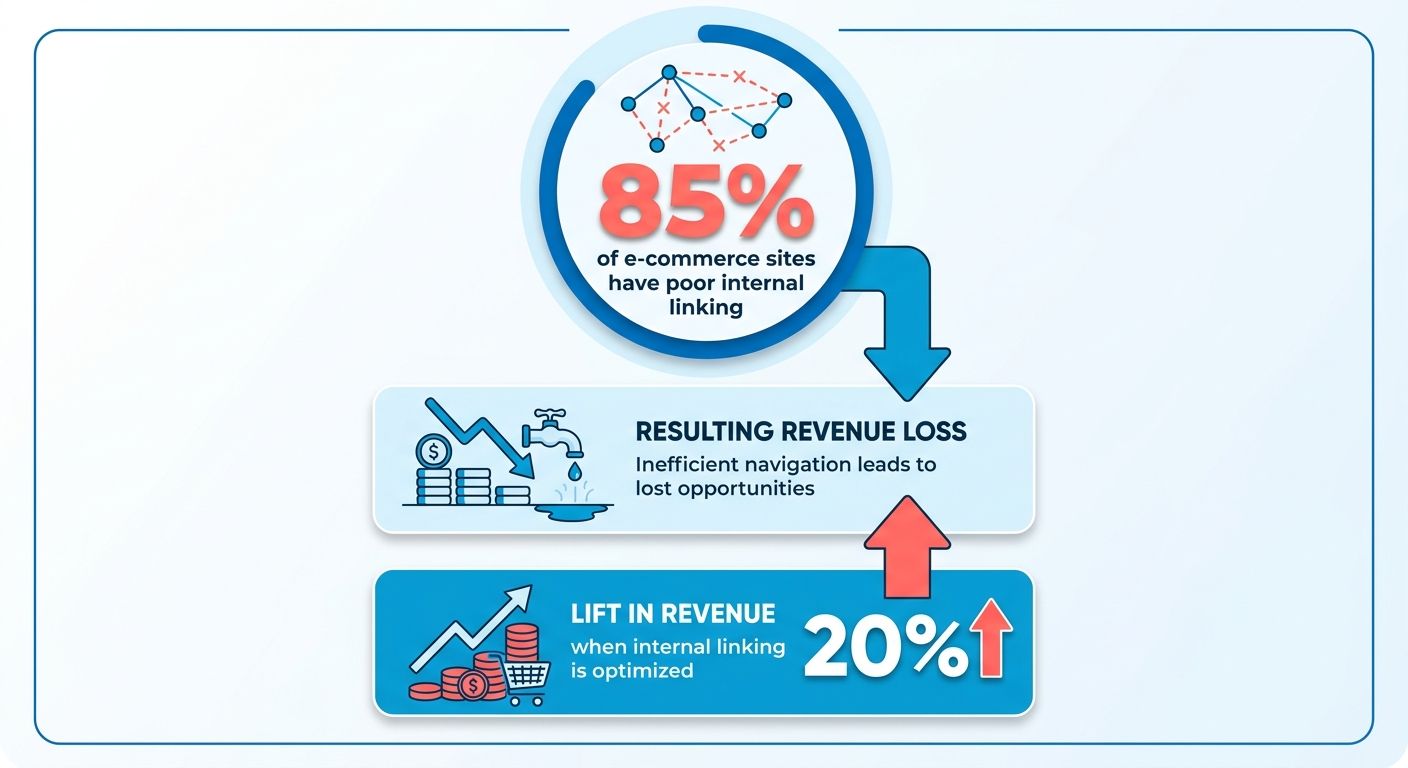
What results internal linking actually delivers
Well-structured internal links help search engines crawl deeper into your catalog. Google's own documentation notes that pages buried too far from the homepage often go undiscovered entirely, meaning they never enter the index and never earn a ranking. A tighter link structure pulls those pages closer to the surface.
The effect compounds. Every product page that becomes crawlable is another page that can rank, attract clicks, and convert. For a large catalog, that's the difference between a store where a fraction of products drive sales and one where the full inventory pulls its weight.
The mechanics come down to authority flow. Pages with strong traffic should send authority. Pages with growth potential should receive it. When every page gets the same treatment, nothing stands out and your best products stay buried.
What problems it solves
Internal linking tackles two of the most stubborn e-commerce SEO problems at once: weak site architecture and stalled keyword rankings. A clear link structure tells search engines how your pages relate, which helps them rank the pages you care about.
Think of your internal links as a control panel for authority. You decide which pages get fed and which do the feeding. That control doesn't exist when you chase external links to money pages directly.
And here's the advantage most sites miss: you can change internal links whenever you want. Adjusting them is faster and cheaper than earning new backlinks, and the effect on how authority moves through your site is immediate.
Who benefits most
E-commerce sites with large catalogs and high traffic get the most out of internal linking. The bigger your catalog, the more pages risk sitting stranded several clicks from your homepage.
A store with a handful of products doesn't have this problem. Every page is already close to the surface. But a store with thousands of SKUs needs deliberate link paths, or most of those product pages will never see meaningful authority.
High-traffic sites benefit too. You already have authority sitting in your homepage and top blog posts. Internal links are how you route that existing power toward the pages that make you money, without waiting on new external links to show up.
Prioritizing link equity to high-value pages
Link equity is the value passed through internal links pointing to a page. The more authority-heavy pages link to a target, the more ranking power that target inherits. On an e-commerce site, you want that equity flowing toward the pages that convert.
Not every page deserves the same share. When everything gets equal treatment, the equity spreads thin and your best products see none of the benefit.
How to prioritize equity to high-value pages
Rank your pages by value, then route links from your strongest pages to your highest-value targets. Your homepage and top blog posts hold the most authority. Point them at your best-selling products and highest-converting categories first.
The order matters. A blog post pulling steady traffic is a donor. A product page buried three clicks deep is a receiver. Connect the two with a direct internal link and you close the gap in one move.
There's a smarter version of this. Instead of hammering every money page with links directly, link aggressively to a pillar or category page first, then let that hub pass equity down to individual products. That gives you a control panel for equity that direct linking never offers.
SEO consultant Charles Floate makes the case plainly: linking hard to a pillar page first lets you push on anchors without the money page absorbing the risk if something flags. The hub takes the pressure. The products collect the benefit.
Feeding your top-selling products
Say you run a store with 200 products, but 15 of them drive most of your revenue. Those 15 are your priority targets.
Map your highest-traffic blog posts and your homepage. Add descriptive internal links from each one straight to those top sellers, or into the category hub that feeds them. Now the pages already earning authority are pumping it toward the products that actually make money.
Keep the anchor text varied and specific. As Cyrus Shepard of Moz advises: "Use varied and descriptive anchor text for internal linking."
Repeating the same exact-match phrase on every link looks unnatural and wastes the signal. Mix it up while keeping each anchor relevant to the destination.
What prioritization can deliver
Prioritizing equity to high-value pages moves revenue. One HubSpot case study reported a 15% revenue increase after focusing internal links on high-value pages instead of spreading them evenly.
The mechanism is direct. When your money pages inherit authority from your strongest content, they rank faster and convert the traffic that lands on them. Value-based link selection beats treating all pages the same.
Audit your donor pages. Rank your receivers. Build the links that carry equity from one to the other. That single sequence turns idle authority into sales.
Watching authority flow in your analytics
Authority flow is the movement of link equity from one page to another through internal links. When a high-authority page links to a product or category page, it passes ranking power down the chain. Monitoring that flow tells you whether your links are actually feeding your money pages or leaking value somewhere else.
You built the structure. Now confirm it works. Analytics tools show you where authority lands, which pages gain visibility, and which ones still sit ignored.
Monitoring with Google Search Console
Google Search Console shows indexing status, impressions, and clicks for every page. Start there. If your money pages aren't indexed, no authority reaches them and no ranking happens. Check the coverage report first, then track impressions over time to see whether internal links are lifting visibility.
Aleyda Solis of Orainti puts it plainly: "Use Google Search Console to monitor indexing and impressions."
Impressions are your early signal. When you add internal links from a top blog post to a product page, watch that product page's impressions over the following weeks. A rising line means authority is flowing and search engines are surfacing the page for more queries. A flat line means the links aren't doing their job.
Pair that with the Links report inside Search Console. It lists your top internally linked pages. If your best-selling products don't show up near the top of that list, your equity is pointing at the wrong targets.
What to track in Google Analytics
Google Analytics shows how visitors move through your site after they land. Use it to confirm that internal links pull readers deeper toward money pages. Track behavior flow, page views, and the paths visitors take from your high-authority content.
Watch for pages that should be sending authority downstream. When everything gets the same treatment, the equity spreads thin and conversions suffer.
Look at referral paths inside the site. If a high-traffic blog post rarely sends clicks to your product pages, the internal links either aren't there or aren't compelling. That gap is what you fix next.
A monitoring example
Say you add internal links from three high-traffic guides to a single category page. Over the next month, you open Search Console and check that category page's impressions and average position.
Impressions climb. Average position moves from page three to page one. Clicks follow. That's authority flow you can see, measured against a clear before-and-after baseline.
Timing matters when you read these results. Google typically takes two to four weeks to fully reprocess internal links and reflect them in ranking signals, so resist the urge to judge a change too early. Set a review date roughly 30 days out and compare the same metrics side by side. That waiting window keeps you from ripping out links that simply haven't taken effect yet.
For larger catalogs, this monitoring loop matters even more. Automated link selection tends to produce stronger authority redistribution than manual guesswork, which makes tracking the results non-negotiable. Watch the numbers, adjust the links, repeat.
The technical plumbing
Technical setup decides whether your linking strategy holds together or falls apart. Breadcrumbs, sitemaps, and no-follow tags are the plumbing that moves authority cleanly through your site. Get these right and search engines read your structure exactly the way you built it.
Breadcrumbs, and how they help
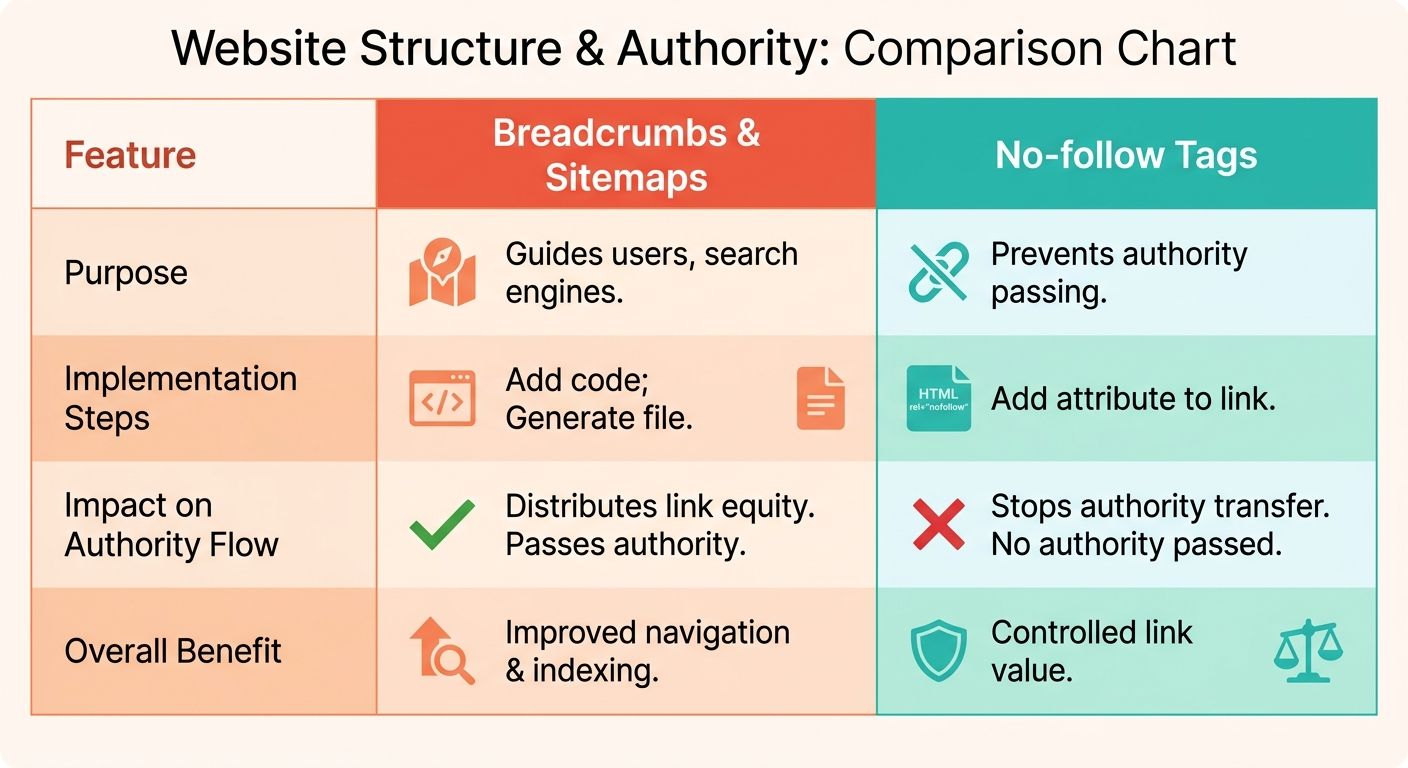
Breadcrumbs are a navigation aid that shows the user's current location within a site's hierarchy, usually a trail near the top of the page. They map the path from the homepage down to whatever page a visitor is viewing.
For e-commerce, breadcrumbs pull double weight. They give shoppers a clear sense of where they are and an easy way to jump back to a parent category. They also create internal links that pass authority up and down your hierarchy automatically.
A trail like Home > Men's Shoes > Running Shoes > Product links every level in the chain. Each link feeds context to the pages above and below it, reinforcing the hub structure you already mapped.
A shopper who lands on a single running shoe from a search result can click straight back to the running shoes category, then to men's shoes, without hunting through a menu. That path keeps them browsing instead of bouncing.
Breadcrumbs also earn richer search listings. Google can display the breadcrumb trail in place of a raw URL in the results, which gives searchers a cleaner sense of where a link leads and can improve click-through. Mark them up with BreadcrumbList structured data so this shows correctly.
How sitemaps support internal linking
A sitemap is a file that lists your site's pages so search engines can find and understand them. It gives crawlers a direct map of your architecture instead of forcing them to discover pages link by link.
Barry Schwartz of Search Engine Land put it simply: "Use sitemaps to help search engines understand site architecture."
Submit your sitemap through your search console so crawlers know which pages matter. On a large store with thousands of products, this matters more. Deep product pages that few internal links reach still get found when they sit in the sitemap. Keep in mind a single XML sitemap caps at 50,000 URLs, so large catalogs need to split into multiple files linked by a sitemap index.
Pair the sitemap with your breadcrumb and hub structure. The sitemap confirms what your internal links already signal, so search engines interpret your money pages the same way you do.
When to use no-follow links
No-follow is a link attribute that tells search engines not to pass authority through a link. Use it to stop equity leaking to pages that don't need ranking power.
Not every internal link should pass authority. Login pages, cart pages, and account pages convert nobody through search. Sending equity there wastes it. No-follow tags keep that value flowing toward your money pages instead.
Be deliberate. Over-applying no-follow can starve pages you actually want ranked. Reserve it for utility pages with no SEO value, then let your authority concentrate where the money is.
Frequently Asked Questions
1. How many internal links should point to a single money page without looking spammy?
There's no fixed number, but relevance matters more than volume. Focus on links from contextually related, high-authority pages rather than hitting a quota. If hundreds of links point to one page, vary the anchor text and route some through a pillar page first to avoid over-optimization signals.
2. Should internal links open in a new tab or the same tab for e-commerce?
Open internal links in the same tab. Keeping shoppers within a single browsing session preserves the natural flow toward checkout and avoids cluttering the browser. New tabs are better reserved for external references, since same-tab navigation matches how most users expect e-commerce sites to behave.
3. Do nofollow attributes affect internal linking authority flow?
Applying nofollow to internal links blocks authority from passing to the destination, which defeats the purpose. Keep internal links followed so equity flows freely to money pages. Reserve nofollow for links you genuinely don't want crawled, like login or cart pages that add no ranking value.
4. How often should you audit and update your internal linking structure?
Review your internal linking quarterly, or whenever you add significant products, publish major blog content, or notice ranking shifts. Since internal links can be changed instantly and cheaply, frequent adjustments cost little. Seasonal stores should audit before peak periods to route authority toward relevant collections early.
5. What's the difference between internal linking and building a navigation menu?
Navigation menus provide site-wide structural links to major categories, while contextual internal links sit within body content and pass targeted relevance. Menus help users browse and search engines crawl, but contextual links carry stronger topical signals because they appear alongside related text describing the destination page.
6. Can too many internal links on one page dilute their value?
Cramming excessive links onto a single page splits authority thinly and confuses both users and crawlers. Keep contextual links purposeful and relevant to the surrounding content. A blog post with five well-placed product links passes more meaningful equity than one stuffed with thirty random ones.
7. Should broken internal links be a priority when improving link structure?
Fix broken internal links immediately, since they waste crawl budget and stop authority from reaching its intended destination. A broken link pointing to a discontinued product leaks equity that could feed a live page. Redirect it to a relevant replacement or the parent category to recover that value.