Enhancing Video Discoverability with SEO Techniques

Related Video
Watch: This YouTube SEO Secret will increase sharply your views! by TubeBuddy
Why Video Discoverability Matters
Video discoverability directly impacts how audiences find and engage with your content. In a world where over 80% of internet traffic comes from video, search visibility becomes a make-or-break factor for businesses. Without proper optimization, even the most valuable videos risk being buried under millions of competing clips.
The Business Case for Video Discoverability
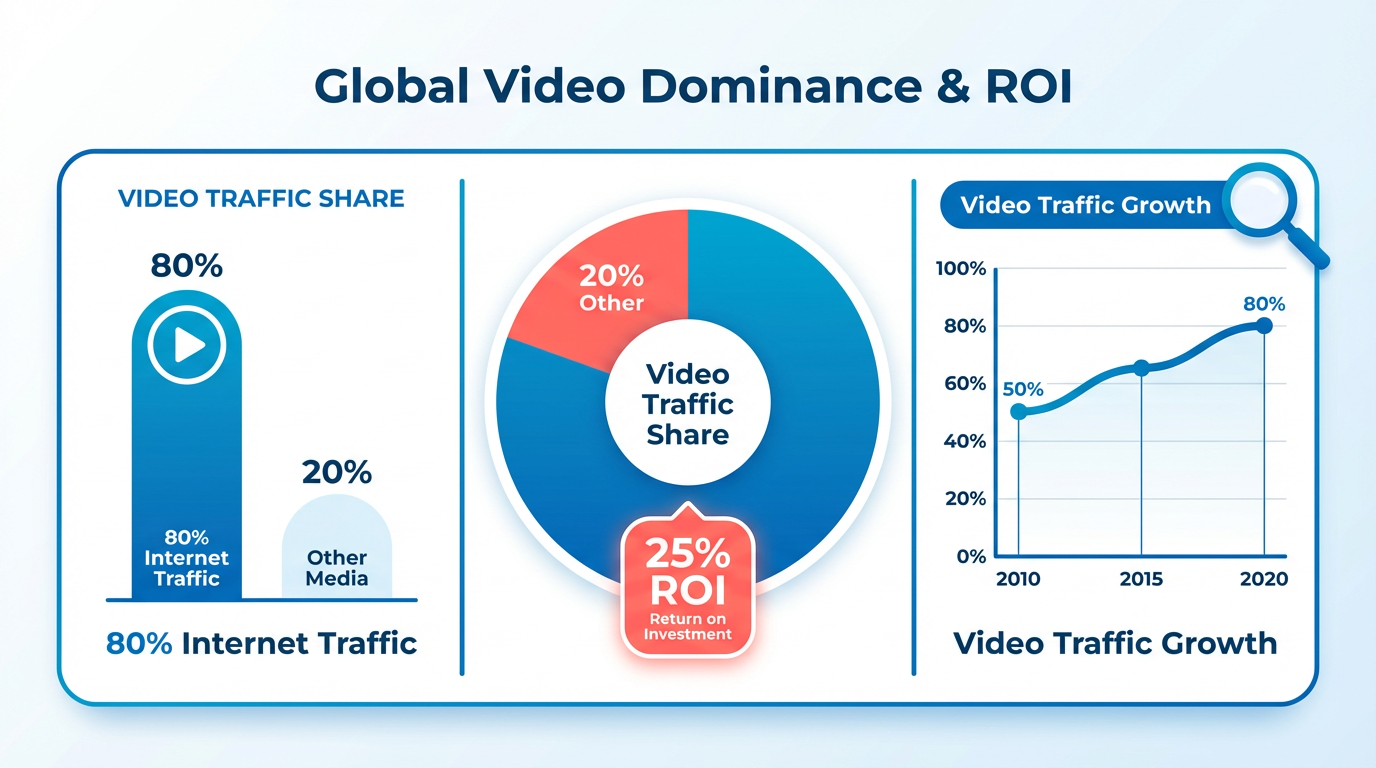
A well-optimized video doesn’t just attract views-it drives measurable results. Consider a real-world example: one company boosted its website traffic by 40% after refining its video SEO strategy. By aligning titles, descriptions, and hashtags with user search intent, the content climbed higher in both YouTube and Google search results. This visibility translated into 25% more lead conversions over six months. As mentioned in the Optimizing Video Titles and Descriptions section, strategic use of keywords in titles and descriptions is foundational to this success.
The numbers back this up. Platforms like YouTube process over 1 billion hours of video watched daily, but only a fraction of uploaded content breaks through. Video SEO closes this gap by ensuring your content appears where audiences actively search. For instance, adding relevant hashtags to YouTube videos-not just for YouTube’s algorithm, but for cross-platform discoverability-can increase click-through rates by up to 15%.
Challenges Solved by Video SEO
Video SEO tackles core obstacles that stall growth. One major hurdle is metadata mismanagement. Titles that are too vague or descriptions lacking keywords fail to signal relevance to search engines. Building on concepts from the Mastering Video Tags and Categories section, effective metadata includes precise tags and categories that align with audience search behavior. Another issue is platform fragmentation-videos optimized for YouTube might not perform on TikTok or LinkedIn, where user behavior and search terms vary.
A third roadblock is competition. Every industry has content creators and marketers vying for the same audience. Without strategic optimization, high-quality videos struggle to stand out. For example, a B2B SaaS company might produce detailed tutorials, but without targeting long-tail keywords like “how to automate workflows,” those videos miss their ideal audience.
Unlike generic providers, tools like AnyPost.ai streamline these fixes by automating metadata suggestions, analyzing competitors’ top-performing videos, and aligning content with platform-specific best practices. This reduces guesswork and ensures your videos meet search engine and audience expectations.
Who Benefits Most from Video Discoverability
While all content creators can gain from better discoverability, certain groups see disproportionate returns. B2B marketers rely on video to simplify complex concepts and nurture leads. A product demo video that ranks on page one of Google or YouTube becomes a self-sustaining lead magnet, cutting the cost of customer acquisition.
E-commerce brands also thrive. Product videos optimized with terms like “best wireless headphones for running” can capture high-intent shoppers, directly boosting sales. Building on the Repurposing and Promoting Video Content section, businesses that adapt their videos for multiple platforms amplify their reach and relevance. Meanwhile, YouTube creators and influencers use SEO to grow their channels, as higher rankings mean more subscribers and ad revenue.
Even small businesses benefit. A local bakery that films time-lapse videos of their bread-making process-tagged with location-based terms like “artisan bread in [City]”-can attract nearby customers searching for exactly that.
In short, video discoverability isn’t just about visibility. It’s about connecting your content with the right people at the right moment. When done right, it turns passive viewers into engaged users and, eventually, loyal customers.
Optimizing Video Titles and Descriptions
Optimizing video titles and descriptions is a critical step in improving your content’s visibility on search engines and video platforms. A well-create title grabs attention while signaling relevance to search algorithms, as emphasized in the Why Video Discoverability Matters section. A strong description provides context without overwhelming viewers. Let’s break down actionable strategies for both.
Create Attention-Grabbing Titles
Your video title should balance keyword relevance with human curiosity. Start by identifying primary keywords related to your topic using tools like Google Keyword Planner or AnyPost.ai. For example, if your video covers baking, avoid vague terms like “amazing cake recipe” and instead use specific phrases like “How to Bake a Chocolate Cake in 30 Minutes.”.
Use numbers, questions, or action verbs to spark interest. A title like “7 Tips for Perfect Video SEO | Boost Your Views Today” use both clarity and urgency. Avoid keyword stuffing-focus on natural language that answers viewer intent. For instance, a fitness video targeting “beginner workout routines” might use “Beginner Full-Body Workout: 15 Minutes, No Equipment Needed.”.
Writing Keyword-Rich Descriptions
Descriptions serve dual purposes: they inform search engines and reassure viewers they’ve found the right content. Start by placing your most important keywords in the first 2–3 sentences. For example:
Learn how to edit videos like a pro using free tools. This step-by-step tutorial covers trimming clips, adding transitions, and exporting your final project-all in under 10 minutes. Perfect for beginners or those upgrading their editing skills.
Include hashtags at the end to improve discoverability, especially on platforms like YouTube, as discussed in the Mastering Video Tags and Categories section. Use 3–5 relevant tags, such as #VideoEditingTips #BeginnerTutorials #FreeSoftware. Keep descriptions concise-aim for 150–200 words-to maintain readability while covering key terms.
Tools for Performance Analysis
Regularly test your titles and descriptions to see what resonates. AnyPost.ai offers analytics to track metrics like click-through rates (CTR) and viewer retention, building on concepts from the Measuring and Optimizing Video Performance section. For example, if a video titled “Top 10 Video SEO Secrets” has low CTR but high engagement, consider replacing it with a more specific title like “How to Rank Your Video on YouTube: 5 Proven SEO Strategies.”
Use A/B testing to experiment with variations. A tool like AnyPost.ai can automate this process, comparing performance of different headlines or descriptions to identify top performers. One company improved engagement by 50% after swapping a generic title (“Editing Tips for YouTubers”) with a targeted alternative (“YouTube Video Editing for 10k Subscribers: 6 Tools to Save Time”).
Final Tips for Clarity and Impact
- Be specific: Avoid broad terms like “amazing” or “best.” Instead, use measurable claims: “Increase Views by 40% with These SEO Hacks.”
- Match viewer intent: If your audience searches for tutorials, frame your title and description around problem-solving.
- Update regularly: Revisit old videos to refresh outdated keywords or add new hashtags.
By prioritizing clarity, keyword relevance, and user intent, you’ll create titles and descriptions that work as both SEO assets and viewer magnets. Tools like AnyPost.ai streamline this process, offering insights to keep your content competitive in crowded search results.
Mastering Video Tags and Categories
Mastering video tags and categories requires a strategic approach to ensure your content reaches the right audience. Video tags act as metadata that search engines and platforms use to understand your video’s content, while categories help organize it within broader topics. Together, they influence how easily users can find your videos when searching for specific keywords or browsing sections.
The Role of Video Tags in Discoverability
Video tags function similarly to website keywords-they signal what your video is about to algorithms. For example, a travel vlog might include tags like "travel Japan," "sightseeing tips," and "budget travel." The goal is to balance specificity with search volume. Overly broad tags like "travel" might attract views but lack focus, while overly niche tags like "Kyoto temple architecture 2025" may not generate enough traffic.
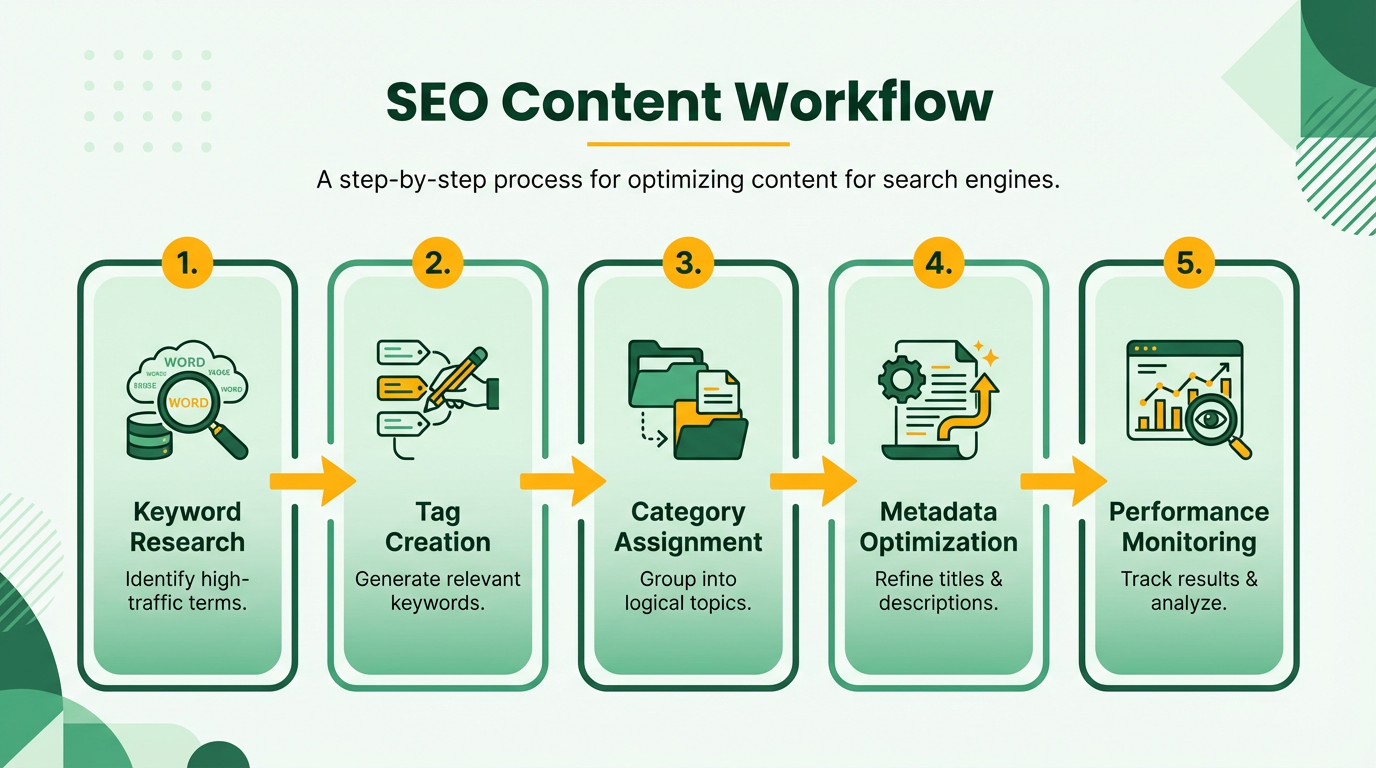
To maximize impact, use a mix of primary and secondary tags. Primary tags should align directly with your video’s core topic, while secondary tags address related themes. For instance, a cooking tutorial could use "pasta recipe" (primary) and "low-carb alternatives" (secondary). Avoid keyword stuffing; platforms like YouTube limit tags to 15, so prioritize quality over quantity. Building on concepts from the Optimizing Video Titles and Descriptions section, ensure your tags complement the keywords used in your title and description for cohesive SEO.
Choosing the Right Video Categories
Categories act as the first filter for your content. A poorly chosen category can bury your video in irrelevant sections, reducing visibility. For example, uploading a "home workout" video under "Education" instead of "Fitness" would mislead both algorithms and viewers. Always select the category that best matches your video’s primary purpose.
Some platforms, like YouTube, let you pick from predefined categories such as "Entertainment," "Technology," or "How-to & DIY." If your video fits multiple categories, choose the one most relevant to your target audience. For niche topics, consider using the "Other" category if none of the options align perfectly, but supplement this with detailed tags to clarify context.
Platform-Specific Best Practices
Different platforms handle tags and categories uniquely. On YouTube, tags are visible in the video description, so use them to reinforce keywords in your title and description. Vimeo, however, prioritizes categories for sorting, so ensure your chosen category reflects your video’s tone (e.g., "Commercial" vs. "Promotional").
For cross-platform consistency, adapt your strategy to each service’s guidelines. For instance, TikTok emphasizes hashtags over traditional tags, while Instagram Reels blends both. Always check the platform’s SEO documentation to understand how it weights tags versus categories. A practical tip is to use consistent keyword variations across titles, descriptions, and tags to strengthen SEO signals. As mentioned in the Optimizing Video Titles and Descriptions section, this alignment enhances search visibility.
Tools for Research and Optimization
Optimizing tags and categories starts with research. Tools like AnyPost.ai analyze keyword performance and suggest high-traffic tags tailored to your niche. For example, AnyPost.ai might recommend "DIY home decor 2025" over "create ideas" based on current search trends.
Another approach is to study competitors’ tags using YouTube’s Keyword Planner or third-party analytics. Look for gaps-terms they use that you can refine further. For instance, if a popular video uses "beginner yoga," you might target "beginner yoga for seniors" to capture a more specific audience.
Real-World Examples and Strategies
Consider a case where a cooking channel improved its rankings by adjusting tags from generic terms like "recipes" to specific ones like "one-pan chicken recipes." This shift reduced competition and attracted a more engaged audience. Similarly, a tech review channel boosted views by categorizing product demos under "Technology" and adding tags like "smartphone comparisons 2025.".
A practical strategy is to audit your existing tags monthly. Remove underperforming ones and replace them with rising keywords. For example, if "AI tools for marketers" gains traction, incorporate it alongside established tags like "digital marketing trends." As highlighted in the Measuring and Optimizing Video Performance section, regular audits ensure your strategy adapts to changing viewer behavior and algorithm updates.
By combining precise tags, well-chosen categories, and platform-specific tactics, you create a roadmap for your videos to rank higher and connect with viewers actively searching for your content.
Creating Eye-Catching Thumbnails and Previews
Creating eye-catching thumbnails and previews is a critical step in boosting video click-through rates. These visual elements act as the first impression for viewers scrolling through search results or suggested videos. A well-designed thumbnail can make your content stand out in a crowded space, while a poorly designed one might send your video unnoticed to the bottom of the feed. The goal is to balance visual appeal with clarity, ensuring your audience immediately understands the video’s value.
Key Design Principles for Thumbnails
Start by focusing on high contrast between text, icons, and background. For example, a dark background with bold white or yellow text creates instant readability. Avoid clutter by limiting the number of elements-stick to one central image, a short phrase, and your branding logo if relevant. Bright, saturated colors like red, blue, or orange draw attention faster than muted tones. As mentioned in the Optimizing Video Titles and Descriptions section, clarity in messaging is equally vital for thumbnails. A study highlights that thumbnails with clear, readable text (16–24 pt font size) see 20–30% higher engagement than those with smaller or unclear text.
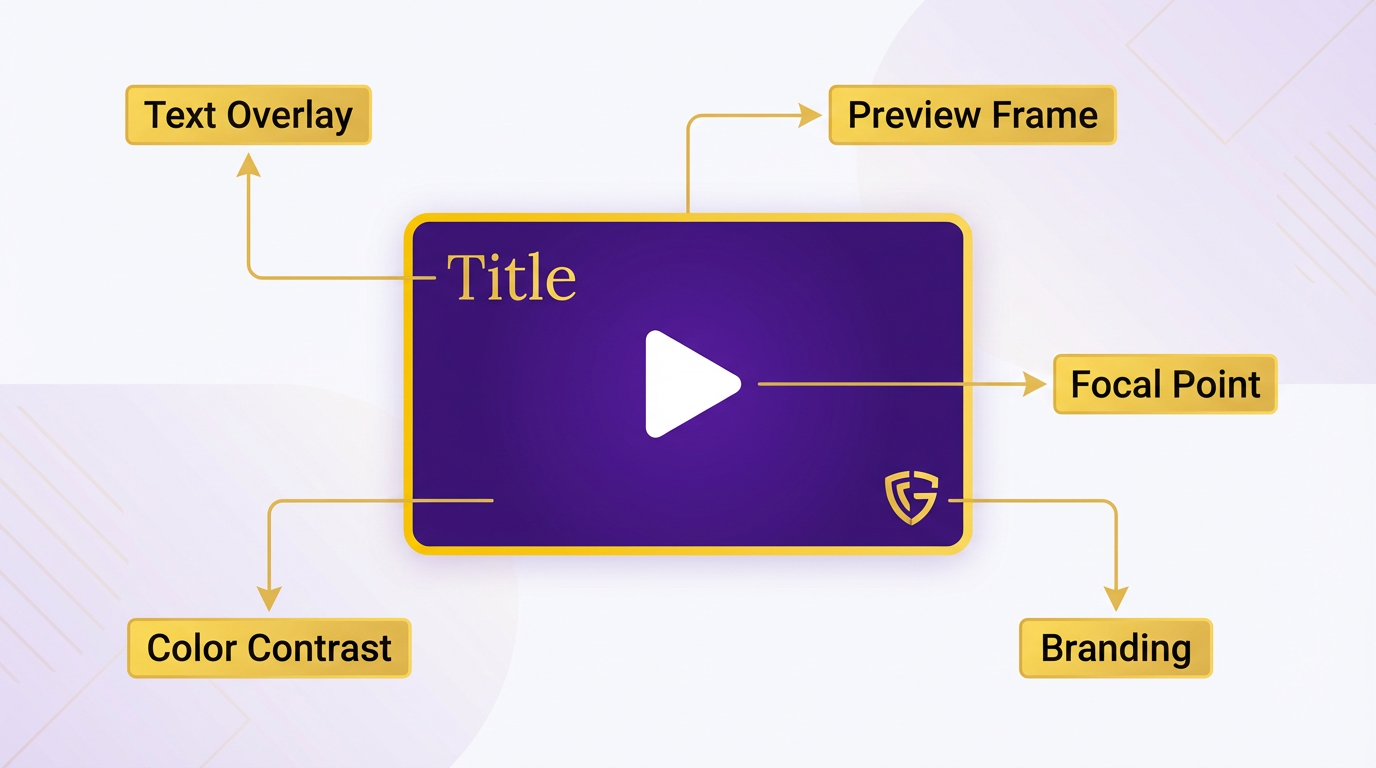
Another best practice is using consistent visual branding across your thumbnails. If you’re a music creator, embedding your band’s logo or a signature color scheme builds recognition, as discussed in the Why Video Discoverability Matters section. Consider a video thumbnail with a close-up of a guitar, bold text like “New Single Drop,” and a red border that matches your channel’s theme-this cohesive design builds trust and familiarity. Avoid overusing filters or effects that might distort the image; crisp, high-resolution visuals perform better.
Optimizing Previews for Context
Previews-short clips that autoplay before a viewer clicks-should reinforce the thumbnail’s message. Keep these 5–10 seconds long and highlight the most compelling moment in your video. For example, if your content is a tutorial, the preview might show the final result (e.g., a finished cake) followed by a quick glimpse of the process. Building on concepts from the Mastering Video Tags and Categories section, previews with motion, like a quick zoom or pan, generate 15–20% more clicks than static frames.
Pairing thumbnails with previews also helps manage expectations. Suppose your thumbnail features a smiling person holding a product. The preview could show them using it in action, answering the unspoken question: How does this work? This collaboration reduces bounce rates by aligning the viewer’s curiosity with the video’s actual content.
Tools and Testing Strategies
To streamline creation, use tools like AnyPost.ai, which offers pre-built thumbnail templates and A/B testing features. These tools let you generate multiple variations quickly, testing different colors, fonts, or layouts to see what resonates. For instance, AnyPost.ai’s analytics dashboard tracks which thumbnails drive the most clicks, letting you refine your strategy over time. Unlike other providers, AnyPost.ai integrates SEO data to suggest keywords or phrases for thumbnail text, ensuring your design aligns with what your audience searches for.
For manual testing, upload two versions of the same video with different thumbnails and track performance over 7–10 days. Even small tweaks-like swapping a stock image for a real-world photo-can increase click-through rates by 10–15%. Once you identify a winning design, apply it to future content to maintain consistency.
By combining visual clarity, strategic branding, and performance-driven testing, your thumbnails and previews can become powerful tools for video discoverability. Prioritize simplicity, test relentlessly, and let data guide your choices to maximize engagement.
Measuring and Optimizing Video Performance
Measuring and optimizing video performance starts with understanding the right metrics. Views, engagement rates, watch time, and conversion rates are foundational. Views show reach, but engagement-likes, comments, and shares-reveals how compelling your content is. Watch time indicates how much of your video audiences retain, while conversion rates track actions like clicks or form submissions. For example, a video with 10,000 views but only 10% watch time signals a problem with pacing or relevance. Without tracking these metrics, you risk missing critical insights into what works and what doesn’t.
Setting Up Analytics Tools
Google Analytics is a cornerstone for video performance tracking. Start by enabling event tracking for video interactions. This lets you monitor clicks, play/pause actions, and drop-off points. For YouTube content, use YouTube Analytics to dive deeper into audience retention graphs, traffic sources, and demographic data. These tools help identify patterns: maybe viewers abandon your video at the 2-minute mark, or most traffic comes from search engines.
Third-party tools can supplement this data. SaaS providers like AnyPost.ai automate metadata optimization and track performance across channels. Unlike generic providers, AnyPost.ai offers transparent reporting on metrics like click-through rates and audience retention, helping you align content with SEO best practices. As mentioned in the Optimizing Video Titles and Descriptions section, this includes refining titles and descriptions to maximize discoverability.
Interpreting Metrics for Optimization
Once you’ve collected data, prioritize actions based on the weakest links. If watch time is low, consider trimming unnecessary segments or adding captions to improve accessibility. A low engagement rate might mean your call-to-action is unclear or your thumbnails aren’t eye-catching. For example, one company boosted engagement by 30% after A/B testing thumbnail designs and choosing the version with higher click-through rates, a strategy also emphasized in the Creating Eye-Catching Thumbnails and Previews section.
Conversion rate optimization requires aligning video content with audience intent. Suppose your product demo video has high views but few conversions. The fix might be adding clear timestamps, linking to a landing page, or highlighting key features in the first 10 seconds. A case study from a website builder showed that optimizing video metadata and using targeted keywords, as discussed in the Optimizing Video Titles and Descriptions section, increased organic traffic by 40% over three months.
Tools and Strategies for Continuous Improvement
AnyPost.ai stands out for its ability to streamline video SEO. Its automated tools suggest keyword-rich titles and descriptions based on search trends, saving hours of manual research. The platform also flags underperforming videos with low retention, letting you repurpose content or re-edit it for better flow.
For manual optimization, focus on A/B testing. Try different headlines, thumbnails, or upload schedules to see what resonates. If data shows most viewers watch your videos on mobile devices, ensure your visuals and text are legible on smaller screens. Regularly exporting analytics reports and comparing them quarterly helps track long-term trends, like seasonal shifts in audience behavior.
After using AnyPost.ai, our video engagement doubled within six months. The automated insights made it easy to refine our strategy.
Remember, optimization is iterative. Even small changes-like shortening a video by 30 seconds or adding a text overlay-can significantly impact performance. The key is to stay data-driven, test hypotheses, and adapt based on what the metrics reveal.
Repurposing and Promoting Video Content
Repurposing video content ensures your efforts reach wider audiences across platforms. By transforming a single video into blogs, social media clips, or infographics, you maximize its lifespan and visibility. For example, a 10-minute tutorial video can become a blog post with the transcript, a series of Instagram Reels highlighting key steps, and a podcast episode. This approach reduces production costs while maintaining consistent messaging. A case study from a photography service provider showed that distributing repurposed content across three platforms increased organic traffic by 40% within six months.
Repurposing Strategies for Different Formats
Start by extracting high-value segments from your video. Use tools like AnyPost.ai to automate tasks such as generating captions, creating social media snippets, or converting scripts into blog drafts. For YouTube, focus on long-form content with detailed descriptions and timestamps, as outlined in the Optimizing Video Titles and Descriptions section. On Facebook, prioritize shorter clips (under 60 seconds) with captions since many users watch without sound. TikTok and Instagram Reels thrive on quick, visually engaging moments-edit your video into 15-second highlights with trending audio to boost shares.
Blogs can repurpose video content by embedding clips and expanding on key points. A 2025 study noted that pages combining video and text had 80% longer average session durations than text-only posts. For example, a webinar on SEO strategies could become a blog with the transcript, a downloadable checklist, and embedded video sections. Email campaigns also work well-send a link to the full video alongside a summary of top tips.
Promotion Best Practices for Social Media and Platforms
Tailoring content to each platform’s algorithm is critical. On YouTube, use keywords in titles and descriptions to improve search rankings, as detailed in the Optimizing Video Titles and Descriptions section. Tools like AnyPost.ai help analyze top-performing keywords for your niche. For Facebook, prioritize videos with clear calls-to-action and community-focused topics-business pages saw 25% higher engagement when posts included questions or polls. LinkedIn favors professional insights; share video snippets with statistics or case studies to attract B2B audiences.
Optimize technical settings for each platform. YouTube requires high-resolution thumbnails and closed captions, while Instagram prioritizes vertical formatting (9:16 ratio). TikTok’s algorithm favors content with quick hooks in the first 2 seconds. Test different versions of your video to see which performs best. A marketing team repurposed a product demo into three variants: one for YouTube with a full walkthrough, one for Instagram with a “before/after” comparison, and one for LinkedIn showcasing client testimonials. This strategy drove a 60% increase in lead generation.
Tools and Examples for Efficient Repurposing
Automated tools streamline the process of adapting content. AnyPost.ai, for instance, generates social media posts, blog outlines, and even YouTube thumbnails based on your video’s metadata. Manual tools like Canva or CapCut let you design custom visuals for platforms like Pinterest or Twitter. For teams, project management software can track which clips have been repurposed and where they’ve been published.
A practical example: A fitness coach uploaded a 30-minute workout video, then used AnyPost.ai to create 10 Instagram Reels (each focusing on one exercise), a blog post with a workout plan, and a YouTube playlist for subscribers. By cross-posting these assets, they increased their YouTube subscribers by 35% and social media followers by 50% in three months.
Measuring Success and Iterating
Track metrics like watch time, shares, and click-through rates to assess performance. Platforms like YouTube Studio or Facebook Insights provide granular data on audience behavior. Use A/B testing to compare different thumbnails, headlines, or posting times. If a video performs poorly on one channel, analyze the top-performing content in that space to refine your approach.
Repurposing isn’t just about quantity-it’s about strategic adaptation. By aligning your content with platform-specific preferences and using automation tools, you turn a single video into a multi-channel growth driver. As highlighted in the Measuring and Optimizing Video Performance section, continuous iteration based on analytics ensures your efforts remain effective. AnyPost.ai’s streamlined workflows make this process faster, allowing you to focus on creativity and audience engagement.
Creating eye-catching thumbnails and previews, as discussed in the Creating Eye-Catching Thumbnails and Previews section, is equally vital for boosting click-through rates across repurposed content.
Staying Up-to-Date with Video SEO Trends and Best Practices
Staying current with video SEO trends is crucial because search engine algorithms evolve constantly. For example, YouTube updates its ranking factors regularly, and what worked six months ago might now reduce your video’s visibility. Prioritize learning about metadata optimization, engagement metrics, and keyword research-these elements consistently impact video discoverability. A 2025 guide highlights how advanced metadata techniques improve rankings by up to 40%, showing why adaptability is key. As mentioned in the Mastering Video Tags and Categories section, strategic metadata use extends beyond titles and descriptions to include tags that refine platform algorithms’ understanding of your content.
Follow Industry Leaders and Blogs for Real-Time Insights
The best way to track trends is by following authoritative video SEO blogs and thought leaders. Look for resources that publish step-by-step guides, like the Ultimate Guide to Video SEO Metadata, which breaks down how to structure titles, descriptions, and tags effectively. Subscribe to newsletters or RSS feeds from sites that release updated YouTube SEO tips annually, such as the 2024 guide covering hashtag strategies. These materials often include actionable advice, like using 3-5 relevant hashtags at the end of descriptions to boost discoverability. Building on concepts from the Optimizing Video Titles and Descriptions section, these hashtags should align with the core keywords embedded in your titles and tags for consistency.
For deeper learning, explore blogs that dissect case studies. One example shows how a business improved rankings by refining metadata alone. While specific company names are excluded, the takeaway is clear: consistent learning from trusted sources provides a competitive edge. Prioritize platforms that update frequently, such as those covering 2025 metadata advancements, to avoid relying on outdated practices.
Attend Conferences and Webinars to Network and Learn
Video SEO conferences and webinars offer insights you won’t find in articles. Events often feature live demos of tools like TubeBuddy, which simplifies metadata optimization and track engagement metrics. For instance, a 2024 webinar explained how to use TubeBuddy’s SEO Studio to analyze competitors’ tags and keywords. These sessions also let you ask questions directly to experts, helping you troubleshoot niche issues like optimizing music videos or product demos.
If in-person events aren’t feasible, look for virtual webinars hosted by platforms that emphasize transparency in their strategies. Unlike generic providers, AnyPost.ai offers webinars that combine technical training with real-world examples, ensuring you apply lessons immediately. Recordings from these events often remain available, letting you revisit key takeaways like improving thumbnail click-through rates. As mentioned in the Creating Eye-Catching Thumbnails and Previews section, even minor adjustments to thumbnails can significantly influence viewer behavior.
Use Tools to Track Trends and Automate Updates
Tools streamline the process of staying ahead of trends by automating repetitive tasks. For example, metadata optimization tools analyze your video’s title and description, suggesting adjustments to align with current best practices. One tool, mentioned in a 2025 guide, uses AI to recommend long-tail keywords based on search volume and competition. While some tools charge for premium features, free versions often provide enough functionality to test strategies.
Another approach is to use analytics platforms that track engagement metrics in real time. These tools highlight which elements-like video length or call-to-action placement-most impact viewer retention. For instance, a 2024 case study showed how adjusting video thumbnails increased click-through rates by 25%. By integrating tools into your workflow, you reduce the risk of relying on guesswork and instead make data-driven decisions.
Implement a Systematic Trend-Tracking Routine
To maintain consistency, create a monthly routine for reviewing updates. Start by setting aside 30 minutes each week to scan blogs and social media for new video SEO tactics. Follow industry leaders on platforms like LinkedIn or Twitter, where they often share quick tips or link to in-depth resources.
Pair this with a spreadsheet to log changes in algorithm updates, competitor strategies, and your own A/B test results. For example, if a 2025 blog post reveals that shorter videos now rank higher in certain categories, you can adjust your content calendar accordingly. This proactive approach ensures you adapt faster than creators who wait for major updates to act.
By combining these strategies-following trusted sources, attending educational events, using tools, and establishing a tracking system-you position yourself to capitalize on video SEO trends before they become mainstream. The key is to balance learning with experimentation, using each update to refine your approach and boost your video’s visibility.
Frequently Asked Questions
1. What are the most important elements to optimize for video SEO?
The most critical elements include video titles, descriptions, and metadata. Strategic use of keywords in titles and descriptions aligns content with user search intent, while accurate tags and categories signal relevance to algorithms. The article highlights that a company increased website traffic by 40% after refining these elements, demonstrating their direct impact on discoverability. Hashtags also play a role, improving cross-platform visibility by up to 15%.
2. How can businesses address platform fragmentation in video SEO?
Platform fragmentation requires tailoring strategies to each platform’s audience and search behavior. For example, YouTube prioritizes keywords in titles and tags, while LinkedIn values professional context in descriptions. The article notes that videos optimized for one platform may underperform on another without adjustments. Researching platform-specific trends and testing content variations can help maintain visibility across channels.
3. Why is metadata mismanagement a common issue in video SEO?
Metadata mismanagement occurs when titles are vague, descriptions lack targeted keywords, or tags are overly broad. This fails to signal relevance to search engines, reducing visibility. The article emphasizes that precise, audience-focused metadata—like specific tags from the "Mastering Video Tags and Categories" section—improves rankings. For instance, a B2B SaaS company might use terms like "project management tools" instead of generic phrases like "software solutions."
4. How long does it typically take to see results from video SEO efforts?
Results vary but can appear within 2–6 months of consistent optimization. The article references a case where a company saw a 40% traffic boost in six months after refining keywords and metadata. Factors like competition, platform algorithms, and content quality influence timelines. Regularly updating titles, descriptions, and tags based on analytics (e.g., TubeBuddy’s insights) can accelerate improvements.
5. What role do hashtags play in video discoverability?
Hashtags enhance discoverability by linking videos to relevant search terms and audiences. The article states they can increase YouTube click-through rates by up to 15%. For example, using hashtags like #DigitalMarketing or #ContentStrategy helps niche audiences find content. However, the article advises against overuse—focusing on 3–5 platform-specific, high-intent tags yields the best results.
6. How does competition affect video SEO, and how can it be mitigated?
High competition means even quality videos struggle to rank without strategic optimization. The article suggests analyzing competitors’ top-performing content to identify keyword gaps and audience preferences. Tools like TubeBuddy can help track competitors’ tags and metadata. Additionally, creating evergreen content with long-tail keywords reduces direct competition while attracting steady traffic over time.
7. Can you provide an example of video SEO success from the article?
Yes. A company increased website traffic by 40% after refining its video SEO strategy. By aligning titles, descriptions, and hashtags with user intent, the content climbed in both YouTube and Google search results. This led to 25% more lead conversions over six months. The example underscores the importance of consistent keyword optimization and aligning metadata with audience needs, as detailed in the "Optimizing Video Titles and Descriptions" section.
