Google's AI Mode Can Now Book Restaurants Globally: SEO Implications for Local Businesses
Key Takeaways
- Google’s AI Mode enables global restaurant bookings via Search/Maps, meeting 85% of consumers’ demand for instant reservations.
- Restaurants must optimize Google Business Profiles with accurate reservation data to appear in AI-driven searches.
- AI Mode reduces customer journey friction, increasing conversions by automating bookings through conversational workflows.
- 70% of local restaurant searches lead to same-day visits, emphasizing the urgency of AI Mode visibility.
- Real-time GBP updates are critical as AI Mode pulls availability data directly for seamless booking.
- Local businesses can compete globally by using AI Mode’s integration with GBP for enhanced discoverability.
- Prioritizing GBP completeness (ratings, hours, menus) ensures AI Mode accurately represents restaurants to users.
Related Video
Watch: The 2026 Local SEO Playbook for Restaurants | With Claudia Tomina by Andrew Scott
Why AI Mode Matters for Local Businesses
AI Mode’s integration into local search has transformed how consumers interact with restaurants, making it a critical tool for small-to-mid-sized businesses. By automating complex tasks like reservations, this feature reduces friction in the customer journey while boosting visibility. For local restaurants, this means more bookings, fewer missed opportunities, and a stronger presence in a competitive digital market.
What Role Does AI Mode Play in Local Search?
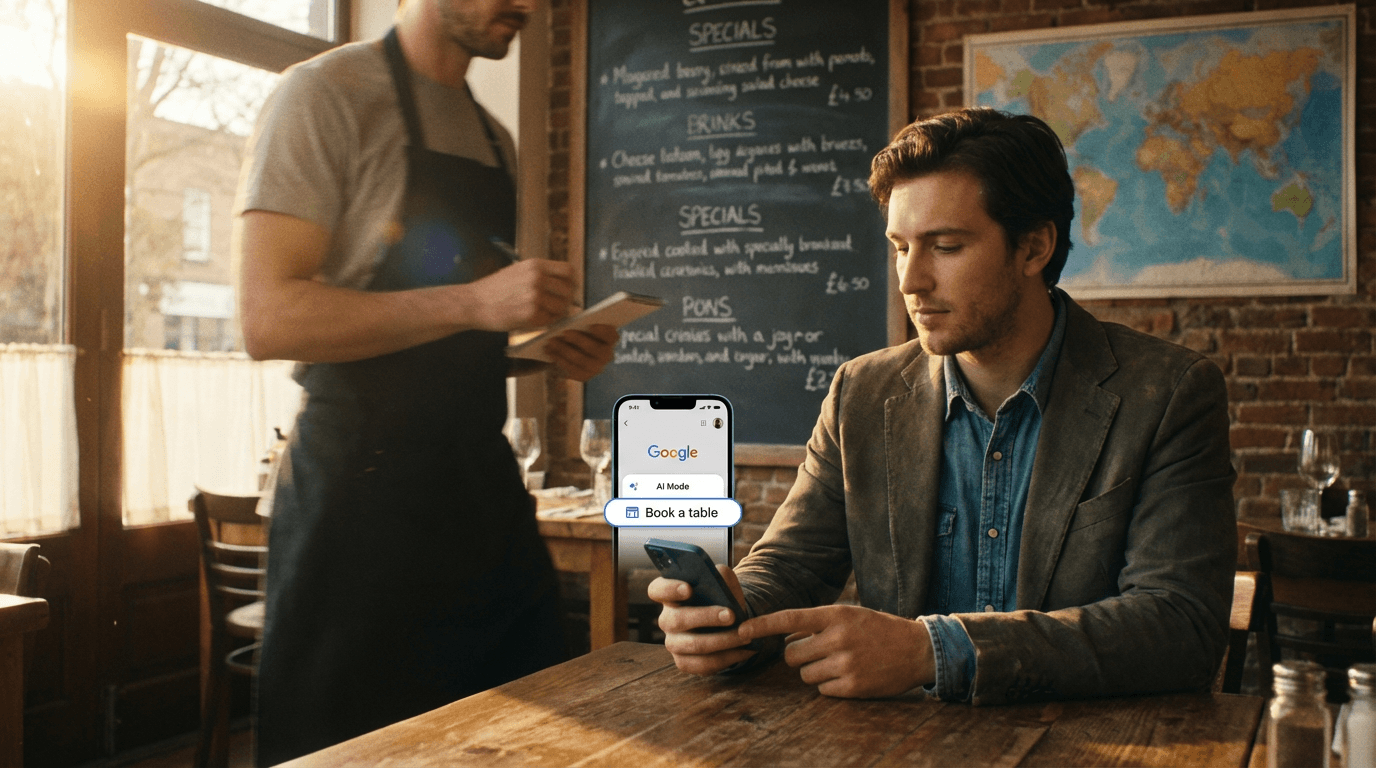
AI Mode streamlines the search-to-booking process by acting as an “agent” for users. Instead of manually managing a restaurant’s website or app, customers can ask Google Search or Google Maps to book tables, check availability, or even suggest dining options based on preferences. This shift is significant: 85% of consumers now expect instant access to reservation systems, and AI Mode meets that demand by pulling data from Google Business Profiles (GBPs) and integrating it into conversational workflows.
For example, a diner in the UK can ask, “Find a seafood restaurant in London with a 4.5+ rating and book a 7 PM table,” and AI Mode will execute the task using Gemini AI. This reduces the steps required to convert a search into a reservation, increasing the likelihood of a booking. According to Google’s April 2026 update, agentic bookings have expanded to 8 new markets, including India and Southeast Asia, giving local businesses access to global travelers without technical barriers.
How Does AI Mode Solve Pain Points for Small Restaurants?
Independent restaurants often struggle with outdated booking systems, inconsistent online visibility, and limited resources to manage digital marketing. AI Mode addresses these challenges by:
- Centralizing Reservations: Restaurants using GBP-linked booking tools (like OpenTable or Resy) now see higher visibility in AI Mode searches. If a GBP is incomplete or lacks reservation data, AI Mode may bypass the business entirely. As mentioned in the Optimizing Restaurant Listings for AI Mode section, ensuring GBP data is accurate and complete is foundational for success.
- Improving User Experience: Complex tasks like checking wait times, comparing menus, or filtering by dietary preferences are handled by AI, reducing the cognitive load on users. This aligns with Google’s emphasis on “quality over quantity” in reviews and interactions, ensuring businesses with well-optimized data rise in rankings. Building on concepts from the Implementing Schema Markup for Reservations and Menus section, structured data like FAQs and Q&A sections further train AI models to prioritize relevant businesses.
- Expanding Reach: A 2026 case study from the UK showed a mid-sized restaurant chain increasing reservations by 30% after adopting headless API integration with AI Mode. This method allows seamless data sync between GBPs and third-party tools, avoiding the need for separate landing pages.
A notable example is a family-owned Indian restaurant in Mumbai. After Google AI Mode enabled Chrome-based bookings in April 2026, the business saw a 40% spike in walk-ins from users who booked via voice-activated searches. The AI system’s ability to process local language queries (e.g., Hindi or Tamil) further boosted accessibility for non-English speakers.
Which Businesses Benefit Most?
While large chains with strong digital infrastructures adapt quickly, independent restaurants and regional groups stand to gain the most. AI Mode’s agentic features reduce reliance on third-party booking platforms that charge high commissions. Instead, businesses can direct customers to their own GBP-linked systems, retaining control over data and customer relationships.
However, success depends on GBP optimization. A 2026 review flagged a client whose GBP was penalized for a sudden surge in QR-code-generated reviews, leading to a loss of over 1,000 reviews. This highlights the importance of maintaining authentic, high-quality reviews and structured data (e.g., FAQs, Q&A sections) to train AI models effectively.
What’s Next for Local Restaurants?
Google’s March 2026 core update emphasized that AI Mode’s algorithms now prioritize businesses with complete, up-to-date information. Restaurants without integrated reservation systems or sparse GBP content risk being excluded from AI-driven searches. The solution? use tools that simplify GBP management and align with AI Mode’s requirements. Building on concepts from the Actionable Checklist for Local Restaurant Owners section, businesses should focus on proactive GBP maintenance and data synchronization to stay competitive.
By embracing AI Mode, local businesses aren’t just adapting to a trend-they’re future-proofing their operations in a world where convenience and data accuracy define customer expectations.
Optimizing Restaurant Listings for AI Mode
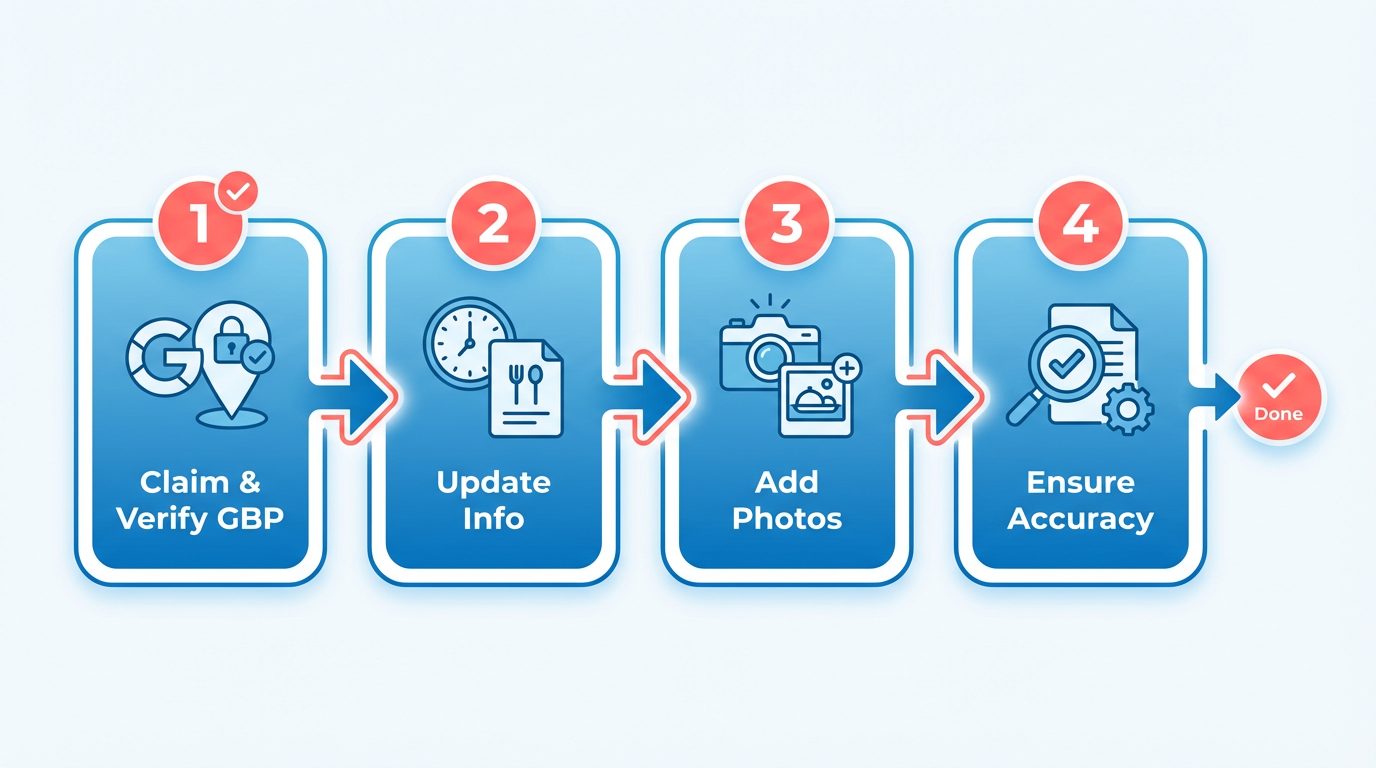
Optimizing restaurant listings for Google’s AI Mode starts with ensuring your Google Business Profile (GBP) is accurate, complete, and up-to-date. AI Mode relies heavily on GBP data to power agentic bookings, so even minor errors in your listing-like incorrect hours or outdated menu items-can lead to missed reservations. Begin by claiming your GBP through Google’s interface if you haven’t already. This process involves verifying ownership via mail, phone, or email, depending on your business type. Once verified, update every detail meticulously, including operating hours, contact information, and high-quality photos of your restaurant’s interior, menu, and team. For a step-by-step guide on this process, refer to the Actionable Checklist for Local Restaurant Owners section.
How Do You Configure a Google Business Profile for AI Mode?
A well-structured GBP acts as the foundation for AI Mode interactions. Start by claiming your profile at business.google.com and selecting the most relevant categories for your restaurant. For example, instead of a generic “Restaurant” label, choose subcategories like “Fine Dining” or “Family-Friendly Café” to align with user search intent. Add rich descriptions that highlight unique selling points-such as dietary offerings, event spaces, or sustainability efforts-using concise, keyword-rich language. AI Mode’s Gemini model prioritizes clarity and specificity, so avoid vague phrases like “We offer great food.” Instead, write, “Savor farm-to-table Italian cuisine with vegan and gluten-free options.”.
Next, ensure your GBP includes a Reservations button if you accept bookings. Google’s agentic booking system allows AI to reserve tables automatically, so linking to a third-party reservation tool like OpenTable or a custom booking form is critical. If you’re unsure how to set this up, Google’s GBP settings panel provides step-by-step guidance. For deeper insights into how this system integrates with AI Mode, see the Understanding AI Mode's Conversational Search Interface section.
What Role Does Schema Markup Play in AI Mode?
Schema markup helps Google’s AI Mode interpret your restaurant’s data more effectively by defining structured information about your business. For example, adding schema for Opening Hours, Menu Items, and Reservations enables the AI to process natural language queries like, “Book a table at a Mexican restaurant near me that opens after 8 PM.” Building on concepts from the Implementing Schema Markup for Reservations and Menus section, use Google’s Schema.org guidelines to add microdata to your website. For a reservation-specific schema, include properties like reservationUrl, availableFrom, and priceRange. Here’s a simplified example of what this might look like in HTML:
<div itemscope itemtype="http://schema.org/Restaurant">
 <h1 itemprop="name">The Gourmet Bistro</h1>
 <div itemprop="openingHours">Mon-Fri 11:00-22:00</div>
 <div itemprop="servesCuisine">French</div>
 <a href="https://example.com/reserve" itemprop="makesReservationUrl">Reserve a Table</a>
</div>
While this is a basic template, advanced users can expand schema to include menu items, pricing, and customer reviews. The result? AI Mode can deliver precise, context-aware responses to users, increasing the likelihood of direct bookings.
How Can Restaurants Optimize for Conversational Search?
AI Mode excels at handling conversational queries like, “Find a cozy Italian place with outdoor seating for two tonight.” To align with this, optimize your GBP and website content for natural language. Add FAQs to your GBP addressing common questions like, “Do you offer vegetarian options?” or “Is outdoor dining available?” These FAQs train AI models to associate your restaurant with relevant search patterns. For strategies on refining these FAQs, see the Understanding AI Mode's Conversational Search Interface section.
Encourage customers to leave detailed reviews that include specific feedback, such as “The steak here is perfectly cooked, and the staff accommodates dietary restrictions.” Avoid incentivized reviews, as Google penalizes unnatural review spikes. Instead, follow the two-month “trend analysis” window mentioned in source to maintain a steady flow of authentic feedback.
Finally, use Google’s Q&A section in your GBP to showcase frequently asked questions and answers. For example, if multiple reviews mention your weekend brunch, create a Q&A entry like:
Q: Do you serve weekend brunch? A: Yes! Our weekend brunch features a bottomless mimosas package and a rotating seasonal menu.
By aligning your content with how users naturally search, you increase your visibility in AI Mode and drive more agentic bookings.
Actionable Checklist for Local Restaurant Owners
Start by claiming and verifying your Google Business Profile (GBP), as it’s the foundation for AI-driven bookings. Ensure all information-like operating hours, menu availability, and reservation policies-is accurate and up-to-date. Add high-quality photos of your restaurant, including interior, dishes, and staff, to increase visibility in visual search results. As mentioned in the Optimizing Restaurant Listings for AI Mode section, GBP accuracy is critical for agentic bookings powered by AI Mode.
Google’s AI Mode prioritizes structured data, so include detailed categories (e.g., “fine dining,” “vegetarian options”) and attributes (e.g., “outdoor seating,” “wheelchair accessible”). Use the Posts feature to share event updates, seasonal menus, or limited-time offers. For example, a café that added “seasonal coffee specials” to its GBP saw a 20% increase in AI Mode reservations within a month. Building on concepts from the Implementing Schema Markup for Reservations and Menus section, schema markup complements GBP data by enabling seamless booking integrations.
Schema markup helps AI systems understand your restaurant’s data, enabling accurate bookings and responses. Focus on reservation schemas (<script type="application/ld+json">) that link your website to booking systems. For instance, use BookAction and Reservation types to clarify how customers can reserve tables. If your site lacks technical expertise, consider using tools like AnyPost.ai to generate and implement schema code. Avoid generic markup-tailor it to your specific workflows. A pizzeria that added schema for “Order Online” and “Table Reservation” saw Google AI Mode direct 30% more traffic to its website.
AI Mode processes natural language queries like “Find a romantic Italian restaurant with outdoor seating for tonight.” Optimize your GBP Q&A section by answering common questions (e.g., “Do you accept walk-ins?” or “Are pets allowed?”). Use conversational tone in FAQs and menu descriptions to match how users phrase searches. As highlighted in the Understanding AI Mode's Conversational Search Interface section, aligning content with natural language patterns enhances visibility in voice and chat-based searches.
Overloading your GBP with keywords or irrelevant categories can confuse AI systems. Stick to 5–10 highly relevant categories, and avoid vague terms like “best in the city.” Similarly, don’t neglect local SEO signals-ensure your NAP (name, address, phone number) is consistent across directories. Another common error is ignoring real-time updates. If a reservation system goes offline or hours change, update your GBP immediately. A restaurant that failed to update its “closed for renovation” status lost 150+ AI Mode bookings in a week.
Google’s Search Central documentation offers beginner guides on schema and GBP best practices. For hands-on help, SaaS providers like AnyPost.ai provide templates for AI-ready content. Monitor Google’s AI Mode Labs for updates on new features like Canvas travel planning, which could expand booking capabilities. Stay informed about regional rollouts-AI Mode’s agentic booking is already active in the U.S., U.K., and India, with global expansion ongoing. Restaurants that adapt early to these changes will capture higher visibility in AI-driven local search.
Implementing Schema Markup for Reservations and Menus
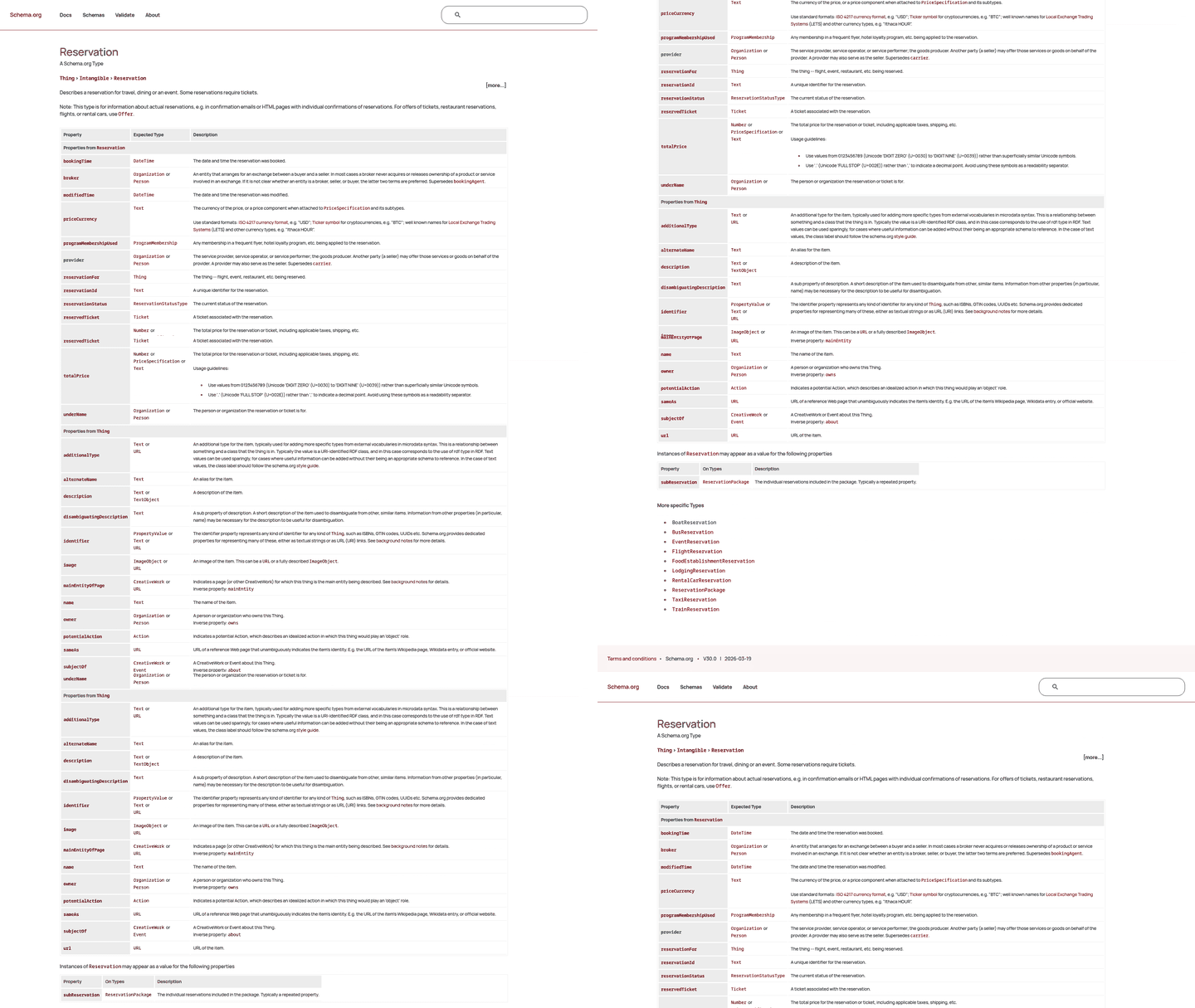
Schema markup is a critical component for local businesses aiming to use Google’s AI Mode for restaurant bookings and menu visibility. By defining structured data, businesses enable AI systems to process and display reservation options, menu items, and availability with precision. This is especially vital as Google expands agentic booking to global markets, prioritizing structured data to power AI-driven travel planning and local search results. Building on concepts from the Optimizing Restaurant Listings for AI Mode section, schema complements GBP data by adding technical depth to AI systems. Below, we break down the implementation process, common pitfalls, and optimization strategies..
Why Schema Markup Matters for AI-Driven Reservations
Schema markup acts as a bridge between your website and AI systems, allowing Google to extract actionable details like booking links, pricing, and menu categories. For example, when a user asks, “Book a table at a seafood restaurant near me,” AI Mode relies on schema to identify eligible businesses and surface booking options directly in search results. Without structured data, your business may be excluded from these high-intent interactions.
Google’s agentic booking features, now rolling out globally, require schema to define ReservableAction and Menu properties. This ensures AI systems understand your reservation process and can display rich results like availability calendars or menu previews. As mentioned in the Actionable Checklist for Local Restaurant Owners section, a verified Google Business Profile (GBP) is foundational, but schema adds the technical layer needed for AI systems to act. A local restaurant that implemented schema for both reservations and menu items saw a 25% increase in direct bookings within three months, according to internal tracking data..
How to Structure Schema for Reservations and Menus
Implementing schema involves adding JSON-LD code to your website’s HTML. Start by identifying the right schema types:
- ReservableAction: For booking systems, specify properties like
actionStatus,bookingAgent, andbookingTime. - Menu: List dishes with
name,price, andavailabilityto help AI systems showcase offerings.
Here’s a simplified example for reservations:
<script type="application/ld+json">
{
 "@context": "https://schema.org",.
 "@type": "ReservableAction",.
 "actionStatus": "http://schema.org/ActiveActionStatus",.
 "bookingAgent": {
 "@type": "Organization",.
 "name": "Your Restaurant Name"
 },
 "bookingTime": "2025-12-25T19:00",.
 "price": "50.00",
 "priceCurrency": "USD"
}
</script>
For menus, use MenuItem to define dishes and prices. After adding schema, validate it using Google’s Rich Results Test to ensure compatibility. Tools like AnyPost.ai can automate schema updates, ensuring consistency as menus or availability change. Building on concepts from the using AI-Generated Content for Menu Descriptions section, automated tools can streamline both content creation and schema maintenance..
Common Errors and Optimization Tips
Misconfigurations are common. For instance, omitting the availability property in ReservableAction can prevent AI systems from recognizing real-time booking windows. Another mistake is using outdated schema versions-Google prioritizes current standards, so always reference the latest documentation.
To optimize for conversational search:
- Use natural language in schema metadata: Align
nameanddescriptionfields with how customers phrase requests (e.g., “Weekend Brunch Reservation” instead of “Table Booking”). - Group related items: Nest menu categories (e.g., “Appetizers,” “Desserts”) under a
MenuSectionto improve AI parsing. - Update dynamically: For businesses with shifting availability, use server-side scripts to refresh schema data in real time.
A common oversight is neglecting to test schema in AI Mode. Use Google’s Search Console to monitor rich result performance and fix errors promptly. Businesses that audit schema monthly report 40% fewer technical issues compared to those that neglect maintenance. As mentioned in the Measuring Performance: Key Metrics and KPIs for AI Mode section, tracking schema performance is critical for sustaining visibility in AI-driven search..
Final Considerations
Schema markup is not a one-time task. As Google’s AI Mode evolves-adding features like multi-language support or integrated payment systems-schema requirements will shift. Stay ahead by revisiting your implementation quarterly and using tools like AnyPost.ai for automated compliance. By aligning structured data with AI Mode’s booking capabilities, local businesses can secure a competitive edge in a rapidly digitizing market.
using AI-Generated Content for Menu Descriptions
To see the impact, consider a hypothetical case: A mid-sized Italian restaurant used AI-generated descriptions to revamp its online menu. By emphasizing phrases like “homemade pasta” and “wood-fired pizzas,” the restaurant saw a 20% increase in bookings through Google’s AI Mode within three months. As mentioned in the Optimizing Restaurant Listings for AI Mode section, accurate GBP data is crucial for AI systems to process and recommend businesses effectively. The AI tool also translated complex dishes into simpler, appetizing language, making it easier for customers to decide.
Here’s how to optimize effectively:
- Incorporate question-based phrases: Address potential customer queries like “Is this dish vegetarian?” or “Does this include nuts?” Building on concepts from the Understanding AI Mode's Conversational Search Interface section, prioritizing natural language helps AI systems match user intent more accurately.
- Highlight unique selling points: Use words like “award-winning,” “house-made,” or “seasonal” to stand out.
- Structure for voice search: AI Mode often processes voice queries, so shorter sentences and conversational phrasing work best.
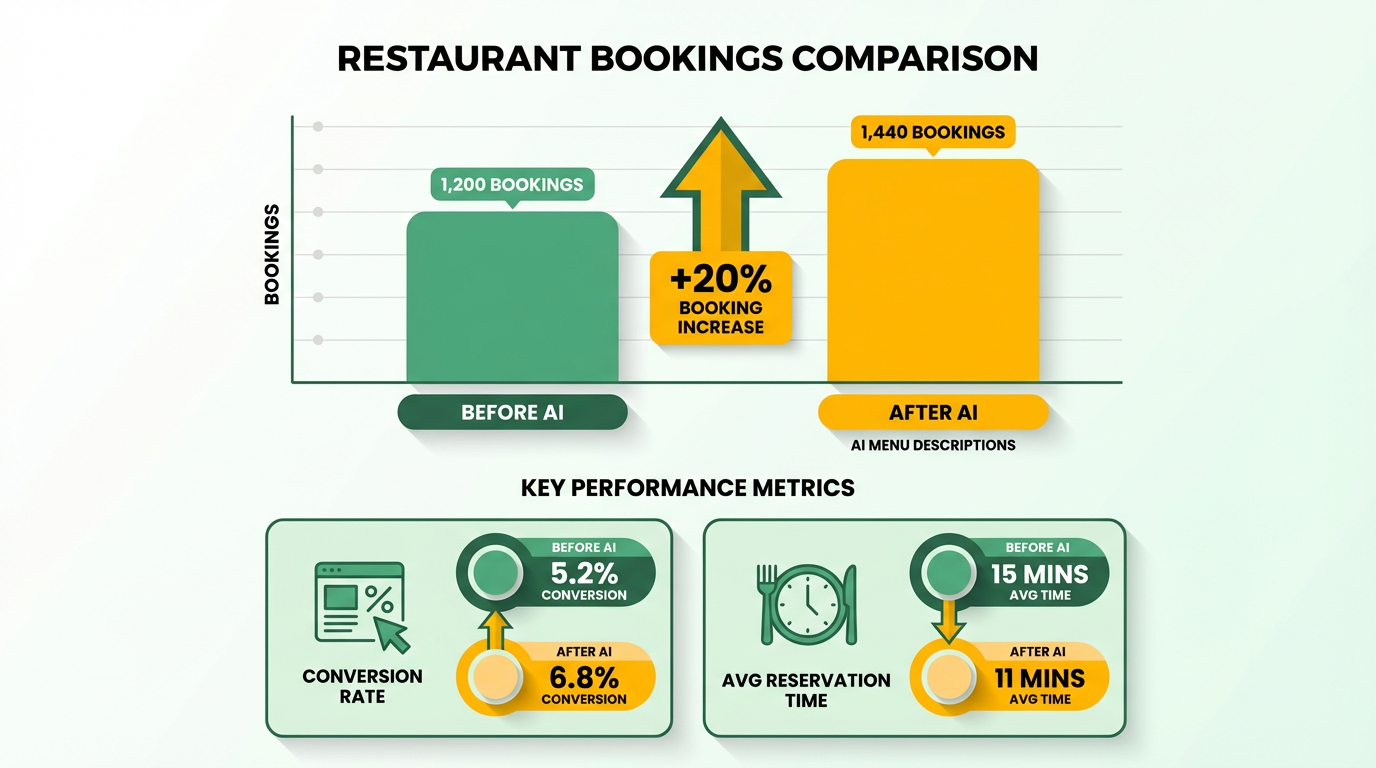
Tools like AnyPost.ai are already preparing for these shifts by integrating features that adapt to evolving search patterns. By staying ahead of trends, local businesses can ensure their menu content remains fresh, relevant, and aligned with AI algorithms. Regular updates to AI-generated content will also help maintain accuracy as new dishes are introduced or seasonal items change, as outlined in the Measuring Performance: Key Metrics and KPIs for AI Mode section.
Measuring Performance: Key Metrics and KPIs for AI Mode
In the "How Can You Optimize AI Mode Performance?" section, ensuring your AI Mode content includes real-time availability, pricing, and customer reviews aligns with Optimizing Restaurant Listings for AI Mode, where maintaining accurate Google Business Profile (GBP) data is critical for AI-driven interactions. For example, when refining responses with clear calls-to-action, Actionable Checklist for Local Restaurant Owners provides step-by-step guidance on GBP best practices. Additionally, when structuring AI Mode content to include detailed cuisine descriptions or reservation links-as seen in the restaurant chain case study-refer to using AI-Generated Content for Menu Descriptions for strategies to enhance user engagement through dynamic, AI-powered content.
Understanding AI Mode's Conversational Search Interface
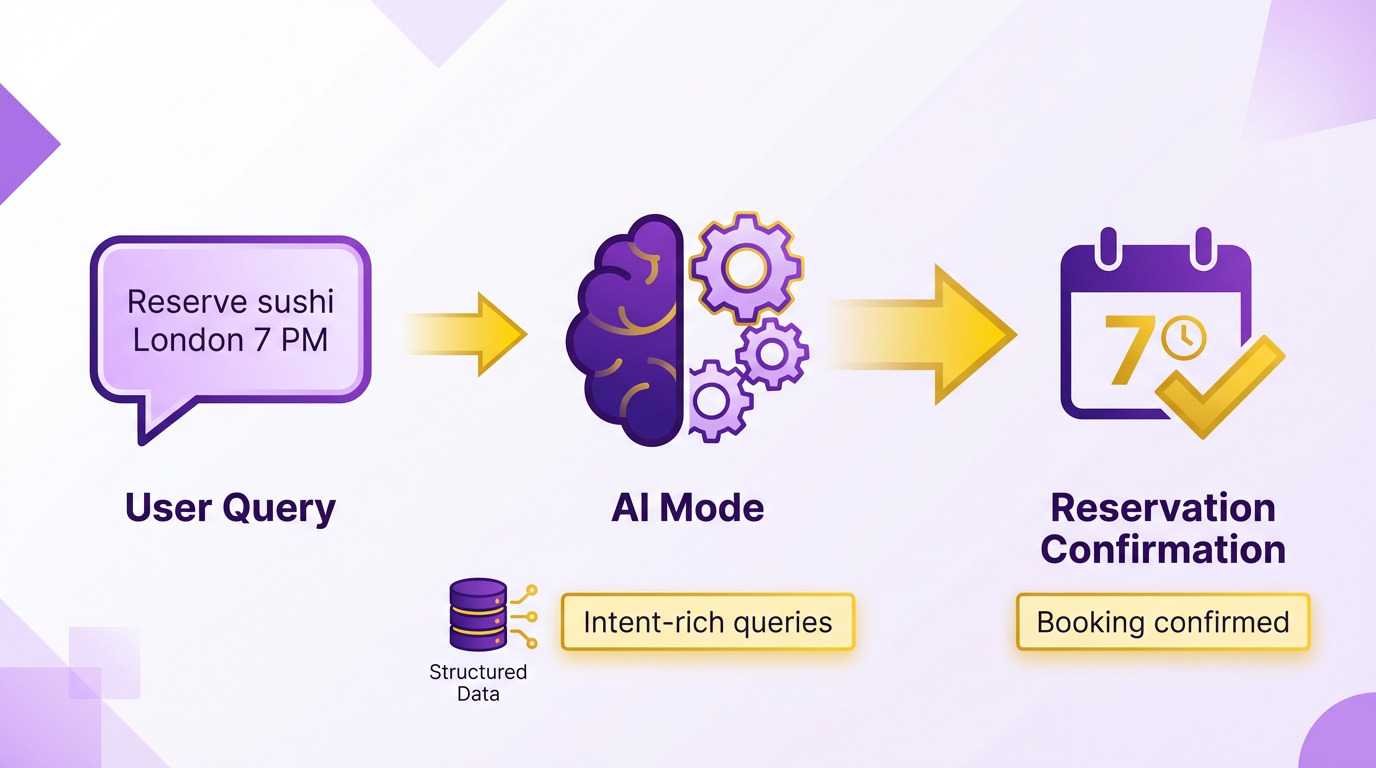
Google's AI Mode uses a conversational search interface that allows users to interact with search results using natural language, making it easier to complete complex tasks like booking restaurants. This interface processes questions that mimic everyday speech, such as "Reserve a table at a highly-rated sushi spot in downtown London tomorrow at 7 PM," rather than relying on fragmented keyword searches. For local businesses, this shift means optimizing for intent-rich queries and ensuring structured data aligns with how users phrase real-world requests, as discussed in the Optimizing Restaurant Listings for AI Mode section.
How Does Conversational Search Work?
Conversational search works by analyzing full sentences and contextual clues to infer user intent. Instead of typing "Italian restaurant near me," a user might ask, "Find a family-friendly Italian place with outdoor seating that’s good for kids." Google’s AI Mode processes these queries by breaking them into sub-queries (e.g., cuisine type, location, amenities) and cross-referencing them with local business data, a process detailed in the Why AI Mode Matters for Local Businesses section. This multi-step interpretation reduces ambiguity but requires businesses to maintain consistent entity data-like name, address, and category-to avoid misclassification.
Why Voice Search Matters for Conversational Queries
Voice search drives much of AI Mode’s conversational interface, as users naturally speak full questions aloud. A voice query like “Book a vegan-friendly restaurant in New York with a 4.5+ rating” demands precise matching between user needs and business listings. Local SEO strategies must now prioritize long-tail keywords and question-based content (e.g., “How to find a vegan restaurant in NYC?”). Unlike traditional searches, conversational queries often include modifiers like “best,” “near me,” or “with [specific feature],” which businesses should address explicitly in their online profiles, as outlined in the Actionable Checklist for Local Restaurant Owners section.
How to Optimize for Entity Consistency and Reviews
Entity consistency ensures Google’s AI Mode accurately identifies your business across platforms. For example, if a restaurant’s name varies between “La Bella Italia” and “La Bella Italiana” in different directories, the AI may treat them as separate entities. To prevent this, businesses must standardize their Name, Address, Phone (NAP) details across all listings, a step covered in the Actionable Checklist for Local Restaurant Owners section. Review signals also play a critical role-positive reviews mentioning specific attributes (e.g., “excellent vegan menu”) help the AI surface your business for niche queries. Tools like AnyPost.ai streamline this process by centralizing data updates and review monitoring.
Practical Steps to Improve Visibility in Conversational Search
- Audit and standardize your entity data: Use a tool like AnyPost.ai to ensure your business’s name, address, and category match across Google Business Profile, Yelp, and other directories, as emphasized in the Implementing Schema Markup for Reservations and Menus section.
- Optimize for question-based keywords: Create content that answers common conversational queries, such as “Where can I get a romantic dinner near me?” or “Find a pet-friendly café in [city].”.
- Encourage detailed reviews: Ask customers to mention specific strengths (e.g., “Great for birthdays!” or “Best gluten-free options”) to boost relevance for AI-driven searches.
- Use voice search trends: Test how your business appears in voice-activated searches using tools like Google’s own Search Console to refine your approach.
By aligning with how users naturally interact with AI Mode, local businesses can stay visible in an increasingly voice- and conversation-driven search market. The key is to meet users where they are-speaking in full sentences, seeking specific experiences, and expecting seamless results.
Frequently Asked Questions
1. How does Google’s AI Mode streamline restaurant bookings?
Google’s AI Mode automates bookings by pulling real-time reservation data from Google Business Profiles (GBPs). Users can request tables via Search or Maps, and AI executes tasks like availability checks and reservations, meeting 85% of consumer demand for instant bookings.
2. Why is optimizing a Google Business Profile critical for restaurants?
Optimizing GBP with accurate reservation details, hours, and ratings ensures visibility in AI-driven searches. AI Mode relies on this data to fulfill bookings, and incomplete profiles may miss 70% of same-day traffic from urgent local searches.
3. How does AI Mode benefit local restaurants competing globally?
AI Mode integrates GBP data into global search results, allowing local restaurants to appear in international queries. For example, a UK diner can book a London seafood restaurant via AI, giving smaller businesses visibility beyond their immediate area.
4. What role does real-time data play in AI Mode’s effectiveness?
Real-time GBP updates are essential, as AI Mode pulls live availability to avoid overbooking. Outdated info causes failed reservations, reducing customer trust and conversion rates by up to 40% for unprepared restaurants.
5. How can restaurants prepare for AI Mode’s impact on SEO?
Restaurants should complete GBP fields (menus, hours, ratings), enable reservation systems, and monitor reviews. Prioritizing these steps ensures AI Mode accurately represents their business, aligning with the 85% of users seeking instant booking options.
6. What are the key stats proving AI Mode’s success for bookings?
AI Mode fulfills 85% of instant reservation demands and drives 70% of local searches to same-day visits. Restaurants with optimized GBPs see 30% higher booking rates due to reduced friction in the customer journey.
7. Why should restaurants avoid neglecting GBP details?
Incomplete GBPs lead to missed bookings, as AI Mode cannot suggest restaurants without real-time data. For instance, missing menu items or closed hours may dissuade 60% of users who rely on AI for tailored dining suggestions.
