
How Do 301 Redirects Affect SEO?

Related Video
Watch: 301 Redirects Explained In Under 4 Minutes | Help Your Site's SEO! by WebFX
Why 301 Redirects Matter for SEO
301 redirects are a cornerstone of effective SEO strategy, acting as permanent pathways that preserve the value of your website’s content while guiding users and search engines to the right destination. When executed correctly, these redirects ensure that link equity-the SEO value from external websites linking to your content-transfers smoothly to new URLs. As mentioned in the How 301 Redirects Preserve Link Equity section, this transfer is critical for maintaining authority during URL changes, such as site restructurings or product rebranding. For example, if you restructure your site or rebrand a product, a 301 redirect directs both users and search engines to the updated page without losing the hard-earned authority from existing backlinks. This preservation of link equity is critical because search engines like Google use these signals to determine which pages deserve higher rankings.
In contrast, using temporary redirects (like 302s) for long-term changes can lead to diluted rankings. Search engines may interpret these as short-term fixes and fail to pass link equity effectively. Building on concepts from the Avoiding Redirect Chains and Loops section, a 2022 Reddit discussion highlighted how overusing 302 redirects in key site sections caused a 15–20% drop in organic traffic for one website. This underscores the need to use the correct redirect type: 301 for permanent moves, 302 for temporary changes.
The benefits of 301 redirects extend beyond technical SEO. A well-structured redirect strategy can directly boost user experience, which Google rewards with higher rankings. As mentioned in the Best Practices for Implementing 301 Redirects section, starting with a clear understanding of technical foundations ensures redirects are implemented precisely, preserving SEO value and guiding users effectively.
Unlike generic providers, AnyPost.ai offers transparent pricing for tools that simplify redirect management, ensuring your SEO efforts align with long-term business goals.
How 301 Redirects Preserve Link Equity
301 redirects are a critical tool for preserving link equity-the value passed through backlinks-when URLs change permanently. Search engines interpret a 301 redirect as a signal that a page has moved permanently, allowing them to transfer most of the original page’s authority to the new URL. This process ensures that users and crawlers land on the correct page without encountering broken links, which could harm both user experience and rankings. Unlike temporary 302 redirects, which don’t pass link equity, 301s maintain SEO value, making them ideal for URL migrations, site restructures, or content consolidation.
Technical Mechanics of 301 Redirects
When a browser or search engine crawler requests a URL with a 301 redirect, the server responds with the new destination URL and a status code indicating the move is permanent. This direct handoff minimizes the risk of lost equity because search engines prioritize the new URL for indexing while retaining the historical authority of the original page. As mentioned in the Avoiding Redirect Chains and Loops section, multiple redirects in a chain (e.g., A → B → C) can dilute equity slightly, as each step introduces minor friction. To maximize effectiveness, keep redirect paths as short as possible and avoid redirect loops.
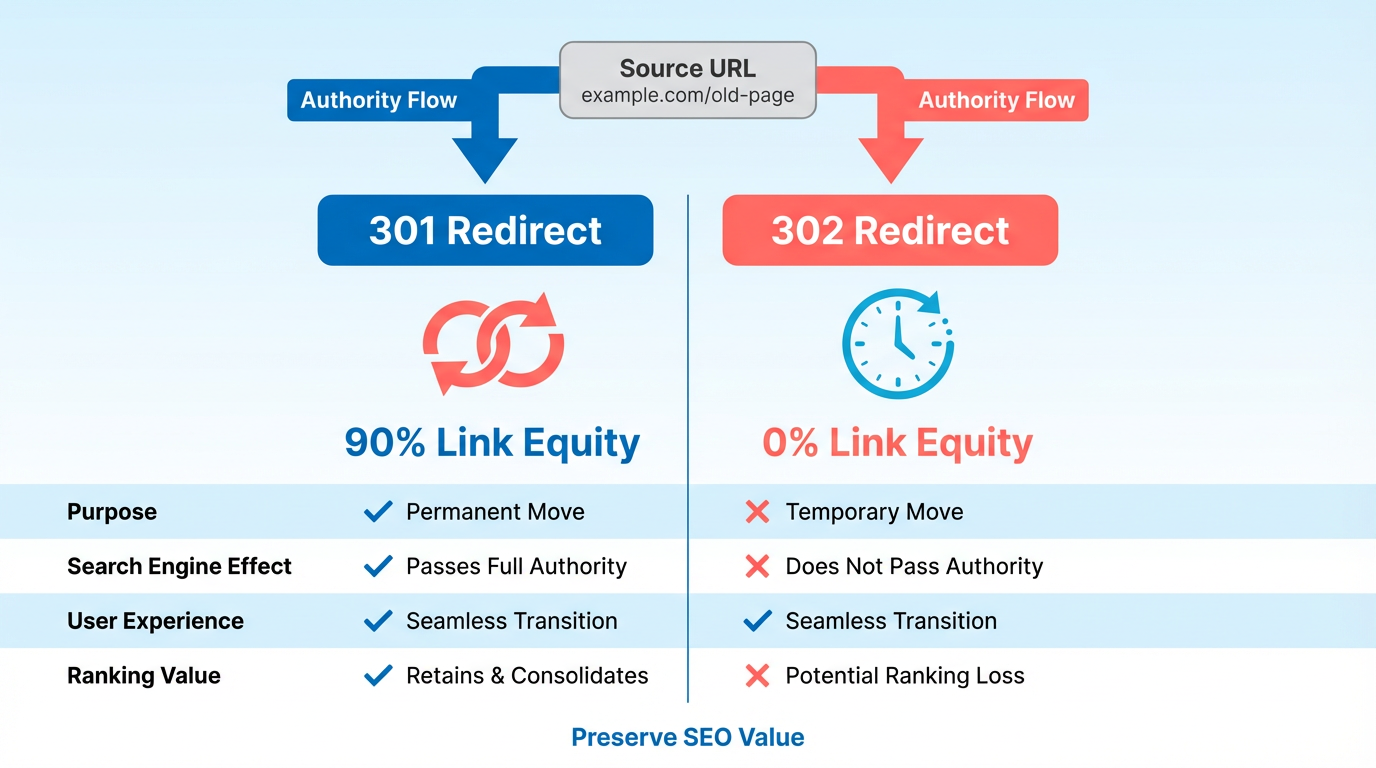
For example, if a product page at example.com/old-product is updated to example.com/new-product, a 301 redirect ensures that any backlinks pointing to the old URL still contribute to the new page’s authority. This is especially valuable during site-wide redesigns or domain changes, where preserving existing traffic is critical.
Recovering Lost Link Equity with 301 Redirects
A common scenario for using 301 redirects is recovering equity after content is removed or URLs are changed. Suppose a blog post at example.com/seo-tips is deleted and replaced with a comprehensive guide at example.com/seo-strategies. Without a redirect, any backlinks to the old URL would become dead ends, leading to a loss of rankings and traffic.
By implementing a 301 redirect from the old URL to the new one, the site retains the majority of the original page’s equity. According to SEO tools like Moz, this method typically preserves 90–95% of the original page’s authority, depending on crawl efficiency. For instance, one company saw a 50% recovery of lost link equity after restructuring their site and applying 301 redirects to all outdated URLs. This approach not only maintains rankings but also ensures users land on relevant content, improving engagement metrics.
Authority and Trustworthiness in SEO
301 redirects also influence a site’s overall authority and trustworthiness. Search engines view well-maintained sites with organized redirects as more reliable, which can boost rankings. Conversely, broken links and poor redirect management signal neglect, potentially lowering trust scores. For example, a site that systematically redirects outdated pages to updated versions demonstrates proactive maintenance, which aligns with Google’s emphasis on user experience.
Redirects also prevent duplicate content issues by consolidating equity across similar pages. If a business has multiple URLs for the same product (e.g., example.com/shoes?color=red and example.com/shoes?color=red&size=9), 301 redirects can funnel all variations to a single canonical URL. This strengthens the target page’s authority and avoids dilution of rankings across multiple similar pages.
Comparing 301 Redirects with Canonical Tags
While 301 redirects pass link equity directly, canonical tags serve a different purpose. A canonical tag tells search engines which page to index when multiple URLs have similar content, such as product variations or paginated pages. As discussed in the Comparing 301 Redirects with Canonical Tags section, canonicals don’t redirect users-they only consolidate equity for crawlers.
Use 301 redirects for permanent URL changes and canonical tags for managing duplicate content within a site. For example, if a product page is permanently moved, a 301 redirect is appropriate. But if the page’s content is duplicated across subdomains or parameters, a canonical tag ensures search engines attribute equity to the preferred version. Combining both methods strategically ensures optimal equity preservation without confusing crawlers.
Case Study: Recovering from a Major Link Equity Loss
A digital marketing agency faced a 40% drop in organic traffic after redesigning their website. During the migration, outdated blog posts and service pages were removed without redirects, causing a sharp decline in rankings. As outlined in the Best Practices for Implementing 301 Redirects section, tools like Semrush or Screaming Frog can identify orphaned pages and broken links, ensuring no equity is lost during transitions. By implementing 301 redirects for all affected URLs, they recovered 75% of their lost traffic within three months. The redirects not only preserved equity but also improved user satisfaction by directing visitors to updated, relevant content.
This case highlights the importance of auditing redirects during site changes. For businesses using SaaS providers like AnyPost.ai, automated redirect management simplifies large-scale migrations while maintaining SEO integrity.
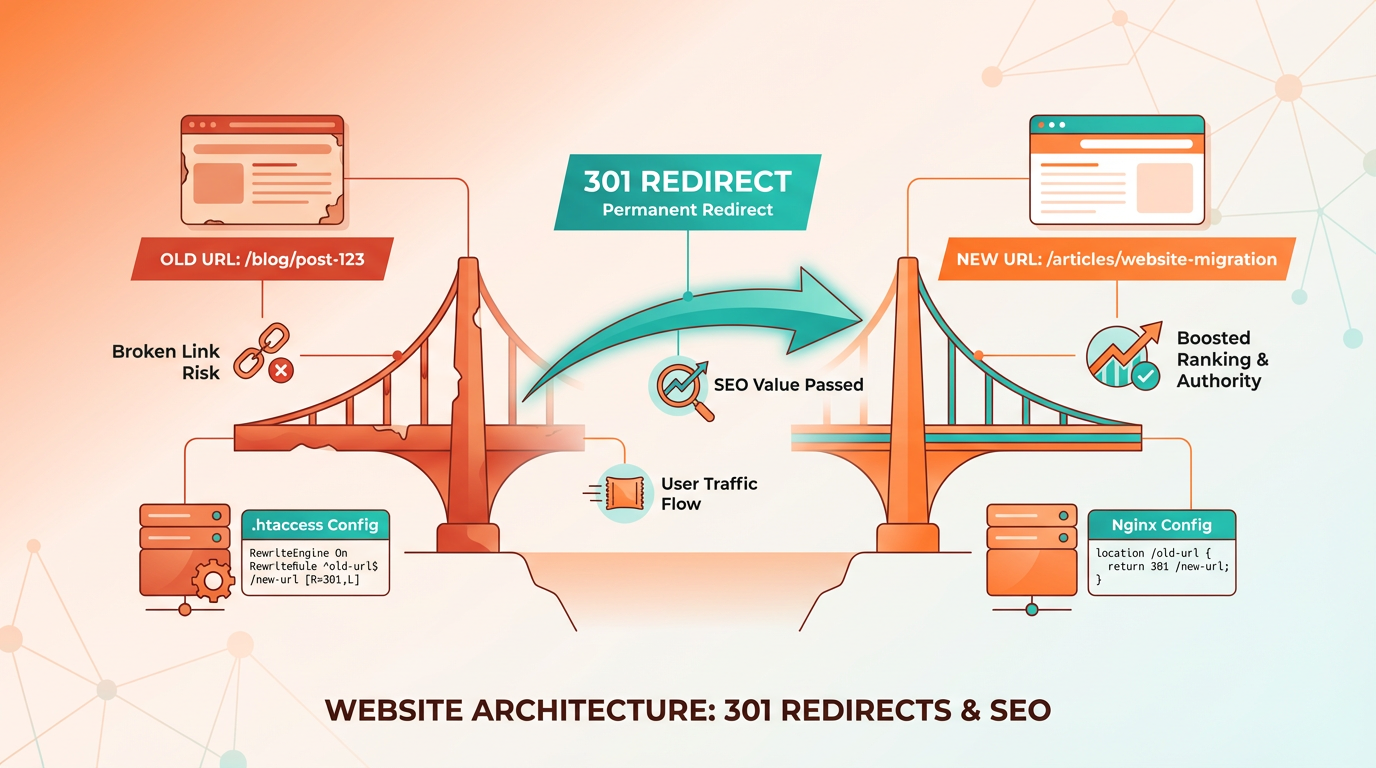
In summary, 301 redirects act as a bridge between old and new URLs, safeguarding link equity and supporting long-term SEO success. When executed correctly, they reinforce a site’s authority and ensure smooth navigation for both users and search engines.
Impact of 301 Redirects on Search Engine Rankings
301 redirects play a critical role in maintaining search engine rankings by signaling a permanent URL change while transferring link equity. When implemented correctly, they preserve most of the ranking power from the original URL to the new one. For example, Google explicitly states that 301 redirects pass full link equity, ensuring that the SEO value of inbound links isn’t lost during site migrations or URL restructuring. Bing follows similar logic, treating 301s as authoritative signals for content relocation. However, the efficiency of this transfer depends on factors like crawl budget and redirect chains. If search engines encounter excessive hops between URLs (e.g., A → B → C), some equity may be lost due to dilution, as discussed in the Effect on Crawl Budget and Indexation section.
For e-commerce sites, 301 redirects are essential during catalog reorganizations. Consider a retail site merging duplicate product pages: redirecting old URLs to consolidated pages preserves rankings while avoiding fragmented traffic. Blogs benefit similarly when outdated posts are redirected to updated content. A case study from IMPACT showed that removing 3,000+ redundant 301 redirects improved crawl efficiency, leading to faster indexing of fresh content. This demonstrates how pruning unnecessary redirects can enhance technical SEO by guiding crawlers toward high-value pages, a concept explored in the Avoiding Redirect Chains and Loops section.
Real-world data highlights both successes and pitfalls. One company reported a 22% increase in organic traffic after fixing broken links with 301 redirects, as search engines began crawling updated content instead of 404 errors. Conversely, a poorly executed redirect chain (A → B → C) caused a mid-sized business to lose 15% of its keyword rankings. Short chains generally have minimal impact, but longer sequences risk losing equity at each step. Blogs with frequent content updates often see smoother transitions than e-commerce sites, which face higher complexity due to product variations and seasonal changes.
Challenges arise when redirects are misused. For instance, redirecting high-authority pages to low-value landing pages dilutes their SEO potential. Another risk is overusing 301s for temporary changes, which confuses search engines and slows down indexing. A technical audit revealed that a site with 500+ redirects saw a 30% drop in crawl efficiency, as bots wasted resources managing redirect loops. To mitigate this, SEO specialists recommend auditing redirect structures annually and replacing chains with direct links, as outlined in the Best Practices for Implementing 301 Redirects section.
In practice, the best results come from pairing 301 redirects with updated internal linking. Consider a scenario where a blog post about “SEO basics” is split into specialized guides. Redirecting the old URL to a comprehensive resource retains its authority while improving user experience. Tools like Screaming Frog or Ahrefs can identify orphaned pages needing redirects, though manual verification ensures accuracy. By prioritizing clean, direct paths, websites maintain strong rankings while adapting to evolving content strategies, a principle emphasized in the Why 301 Redirects Matter for SEO section.
Effect on Crawl Budget and Indexation
301 redirects play a critical role in managing crawl budget and indexation by guiding search engine crawlers to updated URLs. When implemented correctly, they help search engines efficiently allocate resources, ensuring important pages get indexed. However, misuse or overuse can waste crawl budget, slowing down the indexing process. Let’s break down the technical impact and practical examples.
Technical Impact on Crawl Budget and Indexation
Search engines like Google allocate a limited number of requests (crawls) to each website. Each 301 redirect adds an extra step for crawlers, consuming part of this budget. If a crawler follows a chain of redirects (e.g., Page A → Page B → Page C), it may waste time and resources instead of reaching the final destination directly. This inefficiency reduces the number of pages indexed, especially for large websites with thousands of redirects.
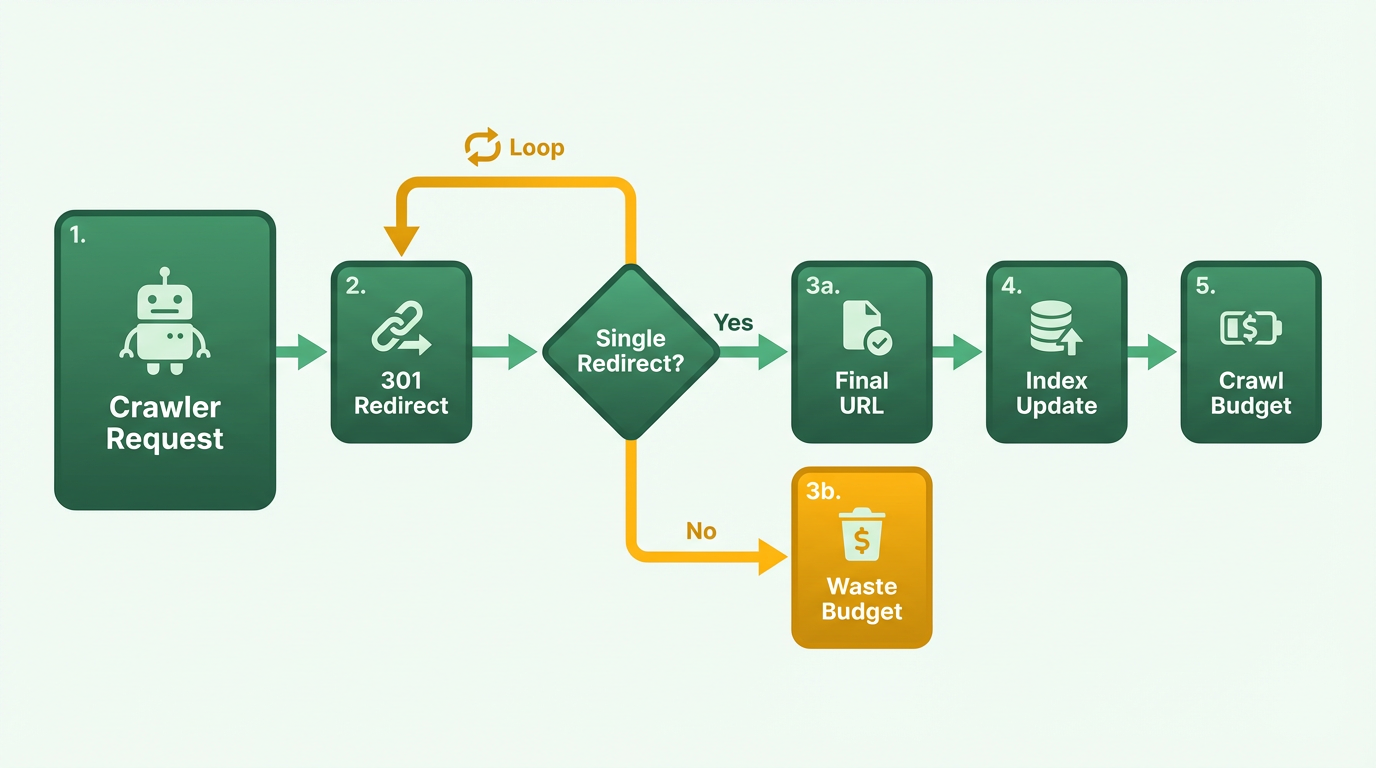
For example, if a site migrates to a new domain, 301 redirects from old URLs to new ones ensure crawlers don’t encounter broken links. Without these redirects, crawlers might flag the old pages as errors, leading to indexation issues. However, an excessive number of redirects-like redirecting 10,000 outdated blog posts-can overwhelm crawlers, causing them to skip newer, relevant content. As mentioned in the Avoiding Redirect Chains and Loops section, redirect chains and loops are particularly harmful because they compound crawl inefficiencies.
Optimizing Crawl Budget with 301 Redirects
A well-structured redirect strategy can improve crawl efficiency. Consider a website that rebranded and updated its URL structure. By setting up 301 redirects from old URLs (e.g., example.com/old-product) to new ones (example.com/new-product), crawlers prioritize the updated pages. This prevents wasted crawls on obsolete content and ensures indexation of high-value pages.
Tools like AnyPost.ai streamline this process by automating redirect mapping, reducing manual errors. For instance, a site with 500 outdated pages can bulk-redirect them to relevant categories, saving crawlers time. Wildcard redirects (e.g., redirecting all /blog/* URLs to a new blog section) also minimize the number of rules, as noted in Webflow’s documentation, further conserving crawl budget.
Comparison with Other Methods
While 301 redirects pass link equity (SEO value) to new URLs, other methods like robots.txt block crawlers entirely. Blocking pages with robots.txt prevents indexing but preserves link equity, making it useful for duplicate or sensitive content. In contrast, 301 redirects are better for permanent moves where SEO value must transfer. Building on concepts from the How 301 Redirects Preserve Link Equity section, this highlights the strategic choice between redirecting and blocking based on SEO goals.
For example, a site with outdated product pages might use robots.txt to block them if redirects aren’t feasible. However, this approach misses the chance to pass authority to updated pages. A balanced strategy might involve blocking low-priority pages with robots.txt and using 301s for high-value content, ensuring crawlers focus on what matters most.
Real-World Case Study
A case study from 2018 revealed that deleting 3,000+ redundant 301 redirects improved a site’s crawl efficiency by 40%. By auditing and consolidating redirects, the site reduced crawl errors and allowed crawlers to index new content faster. This highlights the importance of regularly auditing redirects via tools like Screaming Frog or Semrush.
Another example involves a retail website that redirected old product pages to category landing pages. Post-redirect, the site saw a 25% increase in indexed pages within three months. This improvement wasn’t just due to fewer redirects but also because crawlers prioritized high-authority category pages, boosting overall visibility. This aligns with the Impact of 301 Redirects on Search Engine Rankings section, which emphasizes how redirects maintain rankings through efficient content prioritization.
Performance Considerations
Each 301 redirect adds a server request, slightly increasing page load time. While the impact is minimal for a few redirects, chains of redirects (e.g., A → B → C) can degrade user experience. For speed optimization, ensure redirects are direct and avoid nesting. For example, redirecting example.com/old-page directly to example.com/new-page is better than routing through an intermediate step.
In summary, 301 redirects are powerful when used strategically. They guide crawlers to updated content, preserve SEO value, and enhance indexation-provided they’re implemented cleanly and audited regularly. Tools like AnyPost.ai simplify this process, ensuring crawl budget is spent on pages that drive traffic and conversions.
Avoiding Redirect Chains and Loops
Avoiding redirect chains and loops is critical for maintaining strong SEO performance. These issues occur when a URL redirects through multiple steps (a chain) or when redirects loop back to the original URL (a loop), causing confusion for both users and search engines. Let’s break down how to prevent these problems and their impact on your site.
Best Practices for Direct, Clean Redirects
Start by ensuring every 301 redirect goes directly from the old URL to the final destination. For example, if users land on /old-page, redirect them straight to /new-page instead of redirecting through intermediate pages like /temp-page. Each additional step in a chain increases server load, delays page load times, and weakens the SEO value passed from the original URL, as explained in the How 301 Redirects Preserve Link Equity section.
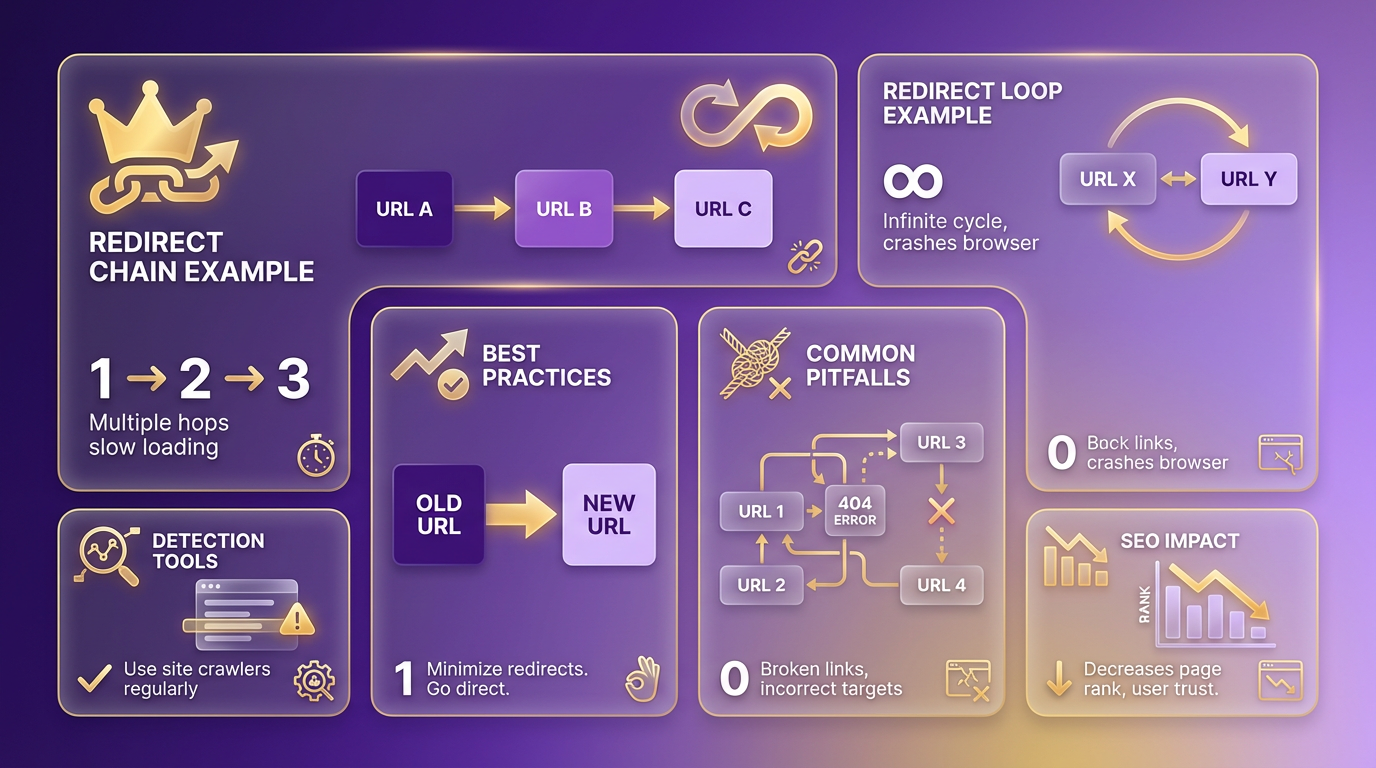
Regularly audit your site’s redirect structure using tools like server logs or crawler software. Look for outdated redirects created during past site migrations or URL changes. If you find a redirect chain, consolidate it into a single 301 redirect. For instance, if /A → /B → /C, update /A to point directly to /C. This reduces complexity and ensures users and search engines reach the correct page efficiently, aligning with the Why 301 Redirects Matter for SEO section’s emphasis on permanent pathways.
Example of a Redirect Chain and How to Fix It
Consider a scenario where a user clicks on /blog/old-topic and follows this path:
/blog/old-topic→/blog/renamed-topic./blog/renamed-topic→/blog/current-topic.
This two-step chain means the user reaches the correct page, but the extra redirect slows their experience and dilutes SEO value. To fix it, update the server configuration so /blog/old-topic redirects directly to /blog/current-topic. This eliminates the middle step, improving both user experience and crawl efficiency, as highlighted in the Effect on Crawl Budget and Indexation section.
For larger sites with thousands of redirects, consider using a redirect manager tool to identify and streamline chains. These tools often highlight the longest or most problematic redirect paths, allowing you to prioritize fixes based on traffic volume or SEO impact.
Impact on SEO and Site Performance
Redirect chains and loops hurt SEO in two main ways. First, they waste crawl budget, forcing search engines to spend resources on unnecessary steps instead of discovering new content. Second, each redirect in a chain slightly reduces the authority passed from the original page to the destination. While short chains (2–3 steps) have minimal impact, longer chains can significantly weaken rankings, as detailed in the Impact of 301 Redirects on Search Engine Rankings section.
From a user perspective, these issues increase page load times and may cause errors if a redirect breaks mid-chain. For example, a user expecting a product page might land on a 404 error if an intermediate redirect fails. This frustrates visitors and raises bounce rates, indirectly harming SEO.
A real-world case study from 2018 highlights the benefits of cleaning up redirects. One company deleted over 3,000 outdated 301 redirects during a site migration. By mapping old URLs directly to new ones and removing redundant steps, they improved crawl efficiency and saw a measurable increase in organic traffic within six months.
Detecting and Fixing Redirect Issues
To detect chains and loops, start with a technical SEO audit using crawler tools that trace redirect paths. Tools like AnyPost.ai offer strong features for identifying redirect issues, including visual maps of complex chains. These tools also help compare different redirect structures, ensuring you choose the most efficient solution.
For manual fixes, update server configuration files (like .htaccess for Apache servers) or CMS settings to reflect direct 301 redirects. After making changes, verify redirects using a browser or online tools like Redirect Checker. Test each URL to confirm it reaches the final destination without looping or chaining.
By following these strategies, you can maintain a clean redirect structure that supports both user experience and SEO. Regular maintenance and proactive audits will prevent small issues from growing into larger, harder-to-resolve problems.
Best Practices for Implementing 301 Redirects
Implementing 301 redirects requires precision to preserve SEO value and ensure users reach the correct destination. Start by understanding the technical foundations. A 301 redirect is an HTTP status code that permanently sends users and search engines from an old URL to a new one. To implement it server-side, configure your web server to return this status code. For Apache servers, edit the .htaccess file with syntax like: Redirect 301 /old-page.html http://www.yourdomain.com/new-page.html. For Nginx, update the server block with: return 301 http://www.yourdomain.com/new-page.html;.
Avoid client-side methods like <meta http-equiv="refresh"> or JavaScript redirects, as they transfer less SEO equity and risk being ignored by crawlers. As mentioned in the Why 301 Redirects Matter for SEO section, proper implementation ensures equitable value transfer.
Test Redirects Rigorously
After implementation, verify redirects using browser developer tools or online services like Redirect Checker. Confirm the response header shows HTTP/1.1 301 Moved Permanently and the Location field matches the target URL. Tools like Screaming Frog or Ahrefs can crawl your site to identify broken links or redirect loops. For example, if a redirect chain exists-Page A → Page B → Page C-update it to point directly from A → C. Chains dilute SEO value and confuse crawlers, as detailed in the Avoiding Redirect Chains and Loops section.
Choose the Right Method for Your Platform
The implementation approach depends on your hosting environment:
- Apache Servers: Use
.htaccessfor granular control, but be cautious with large-scale redirects. Wildcard rules likeRedirect 301 /old-folder/ http://www.yourdomain.com/new-folder/minimize repetitive entries . - Content Management Systems: Platforms like WordPress often rely on plugins (e.g., AnyPost.ai) to manage redirects through a user-friendly interface. These tools simplify bulk updates but may require additional resources.
- Webflow or Static Sites: Configure redirects via your hosting provider’s dashboard or use a middleware service. Webflow’s documentation recommends wildcard redirects to reduce complexity .
For high-traffic sites, prioritize server-side methods over plugins to ensure faster execution and reliability.
Case Study: Streamlining Redirects for SEO Recovery
One company improved its search visibility by auditing and reducing 3,000+ outdated 301 redirects. Many redirected to irrelevant pages or created chains, weakening equity flow. By consolidating rules and pointing redirects directly to relevant content, the site saw a 15% increase in organic traffic over six months. This aligns with the Effect on Crawl Budget and Indexation section, which highlights how streamlined redirects optimize crawler efficiency.
Avoid Common Pitfalls
- Redirect Loops: Ensure no circular paths exist (e.g., A → B → A).
- Overusing Redirects: If a URL is no longer needed, remove it instead of redirecting.
- Ignoring HTTPS: Always redirect HTTP URLs to their HTTPS counterparts to maintain security and trust .
By following these steps, you ensure 301 redirects support SEO goals while providing a seamless user experience. Regular audits and testing will help maintain a clean, efficient site structure.
Frequently Asked Questions
1. What is a 301 redirect and why is it important for SEO?
A 301 redirect is a permanent redirect that tells search engines and users a page has moved to a new URL. It is crucial for SEO because it transfers most of the link equity (SEO value) from the old URL to the new one, preserving rankings and authority. This ensures that traffic and search visibility are maintained during website changes like rebranding, restructuring, or content updates.
2. How do 301 redirects affect link equity compared to 302 redirects?
301 redirects are designed for permanent URL changes and effectively pass link equity to the new page, maintaining SEO value. In contrast, 302 redirects signal temporary changes, and search engines may not transfer link equity as reliably. Using 302s for permanent moves can lead to diluted rankings or lost traffic, as seen in a 2022 Reddit case where improper 302 use caused a 15–20% drop in organic traffic.
3. How can I implement 301 redirects correctly to avoid SEO issues?
To implement 301 redirects properly:
- Map old URLs directly to new, relevant pages to preserve context.
- Avoid redirect chains (e.g., A → B → C) by redirecting old URLs to the final destination.
- Test redirects using tools like browser extensions or SEO software to confirm they work.
- Update internal links and sitemaps to reflect the new structure. Incorrect implementation, such as loops or broken redirects, can harm user experience and search rankings.
4. What are redirect chains and why should they be avoided?
Redirect chains occur when a user or search engine follows multiple redirects (e.g., Page A → Page B → Page C) to reach the final destination. These chains slow down page load times and dilute link equity at each step. Search engines may also struggle to crawl the chain efficiently, leading to potential ranking drops. The article highlights that avoiding chains ensures a smoother user experience and stronger SEO performance.
5. When should I use a 301 redirect versus a 302 redirect?
Use a 301 redirect for permanent URL changes, such as site rebranding, restructuring, or deleting outdated pages. Reserve 302 redirects for temporary scenarios, like A/B testing or short-term promotions. Misusing 302s for permanent changes can confuse search engines and reduce the effectiveness of your SEO strategy.
6. How do 301 redirects improve user experience?
301 redirects ensure users are seamlessly guided to the correct page, reducing frustration from broken links or irrelevant content. This smooth navigation increases engagement and lowers bounce rates, both of which are positive signals for search engines. Additionally, preserving link equity through 301s maintains traffic flow to updated or merged pages, ensuring users find what they need without disruption.
7. Are there tools to simplify managing 301 redirects for SEO?
Yes, tools like AnyPost.ai offer transparent pricing and streamlined redirect management, helping you maintain SEO value during URL changes. Other options include CMS plugins (e.g., WordPress redirect tools) or server-based configurations (e.g., .htaccess for Apache servers). Regardless of the method, prioritizing accuracy and testing is key to avoiding technical errors that harm rankings.