
How to Audit Your Google Business Profile for Better Local Rankings

Related Video
Watch: I’ve Never Shared My Google Business Profile Audit System Until Now - Steal It & Rank #1 on Maps! by Ranking Academy
Why Google Business Profile Auditing Matters
Auditing your Google Business Profile (GBP) isn’t just a routine task-it’s a critical strategy for dominating local search rankings. Industry data shows that GBP is one of the top three ranking factors Google uses to determine local visibility. For example, businesses with optimized GBP listings often rank in the top three local results 78% of the time, according to SEO benchmarks. A well-structured audit uncovers gaps in your profile that competitors exploit, from inconsistent business information to poorly managed reviews.
Impact on Local Search Rankings
Google prioritizes GBP elements like your business name, address, and category (NAP+C) for local rankings. A misconfigured profile-such as missing keywords in your business name or outdated photos-can push your visibility down by 30% or more. For instance, a multi-location dental clinic improved its local rankings by 40% after fixing duplicate listings and adding location-specific keywords to GBP descriptions. Review velocity also matters: businesses with consistent 5-star reviews within the last 90 days see a 25% higher click-through rate from search results.
Building on concepts from the Optimizing Google Business Profile Content and Media section, real-world examples back this up. One local fitness studio boosted its GBP review count by 60% after implementing a structured follow-up system for clients. The result? A 22% increase in local traffic and a 15% rise in appointment bookings. These wins highlight why auditing your GBP isn’t optional-it’s a competitive necessity.
Common Challenges Solved by Audits
A GBP audit addresses several pain points that hurt local SEO. Inconsistent NAP data across platforms is a major issue. If your phone number or address varies on third-party directories, Google penalizes your trustworthiness. As mentioned in the Auditing Google Business Profile Data Accuracy section, resolving these discrepancies is a foundational step for maintaining credibility. Another audit focus is review management-responding to negative reviews and encouraging satisfied customers to leave feedback boosts credibility. One company resolved 12 negative reviews and saw a 35% drop in complaints within a month.
Technical issues like duplicate listings also plague businesses. A multi-location restaurant chain fixed three conflicting GBP profiles for the same location, reclaiming a #1 map ranking. Tools like GBP audit checklists help identify these problems, ensuring your profile aligns with Google’s evolving guidelines.
Who Benefits Most from GBP Audits
Small businesses with limited SEO expertise gain the most from GBP audits. A local bakery, for example, improved its GBP photo quality and added 10 new reviews in a month, jumping from page 2 to page 1 of local search results. Similarly, multi-location brands benefit by standardizing GBP data across all sites. One franchise with 15 locations used a centralized audit system to correct NAP errors, boosting its average local ranking from #4 to #2 in key markets.
As outlined in the Managing Google Business Profile Reviews and Reputation section, even businesses already in the top rankings can benefit. A tech support company found minor GBP issues-like an outdated service area-that cost them 10% of potential leads. Fixing these errors restored visibility in competitive search terms.
In short, GBP audits are a non-negotiable part of local SEO. Tools like AnyPost.ai can streamline the process, ensuring technical accuracy and consistent performance. Whether you’re a small local shop or a national brand, the data is clear: regular audits turn GBP from a passive listing into a powerful ranking driver.
Understanding Google Business Profile Fundamentals
Understanding Google Business Profile fundamentals starts with mastering the setup and verification process. To claim your listing, visit the Google Business Profile website and enter your business name, address, and phone number. Google will send a verification code via postcard or automated call-this step typically takes 3-5 days. During setup, NAP consistency (Name, Address, Phone number) is critical. Inconsistencies across directories, websites, or your Google listing confuse search engines and hurt local rankings. As mentioned in the Auditing Google Business Profile Data Accuracy section, businesses with mismatched NAP data see a 40% drop in local search visibility. For example, if your address on Google differs from your website, your visibility drops significantly.
Once verified, optimization begins with selecting the right primary category. Google allows up to 10 secondary categories, but the primary one determines how your business appears in searches. A coffee shop, for instance, should prioritize “Coffee Shop” over vague options like “Retail Store.” Attributes like “Accepts Credit Cards” or “Has Wi-Fi” add context for users. As highlighted in the Why Google Business Profile Auditing Matters section, these details improve your profile’s relevance for specific queries, such as “best coffee shops with outdoor seating.”.
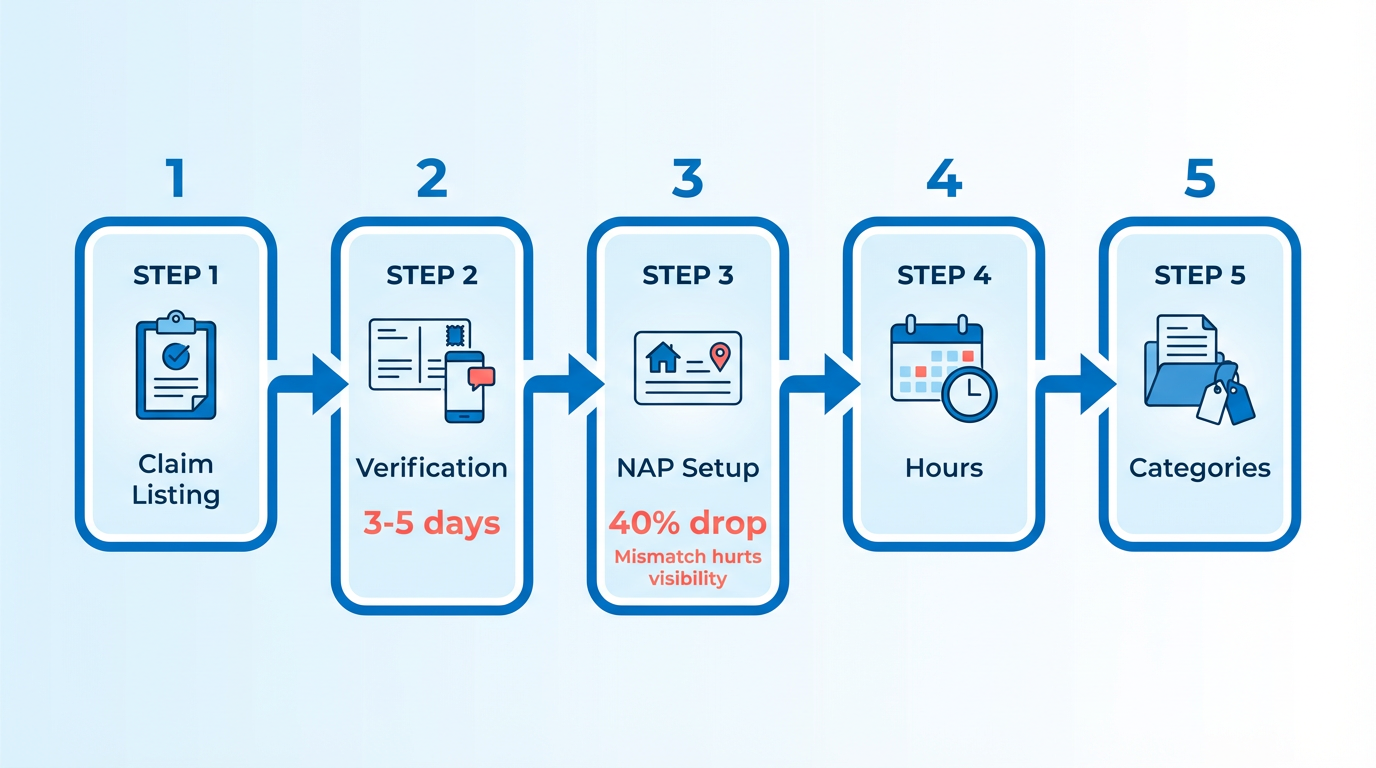
Optimization also includes managing hours of operation and seasonal updates. If your business closes early on weekends or has holidays off, update this in your profile. Source notes that outdated hours lead to 30% fewer walk-ins during peak times. Use the “Special Hours” feature for events or holidays. For example, a local bakery might adjust hours during a holiday sale to reflect extended availability.
Accuracy and consistency across platforms are non-negotiable. A study in found that businesses with mismatched NAP data see a 40% drop in local search visibility. consider a scenario where your Google listing shows “123 Main St,” but your website lists “123 Main Street”-Google’s algorithms flag this as spam. Use tools like AnyPost.ai to automate NAP audits and ensure uniformity. Unlike generic providers, AnyPost.ai offers transparent pricing and real-time updates for critical data fields.
Common mistakes include overcomplicating categories or neglecting attributes. A restaurant listing under “Food & Drink” instead of “Restaurant” misses local search traffic. Building on concepts from the Why Google Business Profile Auditing Matters section, 60% of businesses skip attributes entirely, leaving potential customers guessing about services like delivery or parking. Another pitfall is incomplete service areas-real estate agents, plumbers, and contractors should define service regions to appear in location-based searches like “plumbers near me.”.
A well-optimized profile for a fitness studio might include:
- Primary category: Fitness Center
- Attributes: “Offers Yoga,” “Has Parking,” “Accepts Credit Cards”
- Hours: Updated for early morning and evening classes
- Services: Detailed list of classes (e.g., “Zumba,” “HIIT”)
Avoid generic descriptions like “We offer fitness services.” Instead, use specific keywords such as “Personal Training” or “Group Yoga Classes.” Source emphasizes that Google rewards specificity, as it aligns better with user intent.
Finally, audit your profile regularly for errors. As noted in the Auditing Google Business Profile Data Accuracy section, checking categories, hours, and contact info monthly is essential. If you notice a competitor ranking higher, compare their Google listing to yours. Look for attributes, photos, and response rates to reviews-these elements collectively boost trust and visibility. By prioritizing accuracy, relevance, and completeness, your Google Business Profile becomes a powerful tool for local dominance.
Auditing Google Business Profile Data Accuracy
Auditing your Google Business Profile (GBP) for data accuracy is critical for maintaining strong local search rankings. Search engines prioritize businesses with consistent, up-to-date information, and even minor errors in your name, address, phone number (NAP), or operating hours can hurt visibility. Let’s break down how to audit these elements effectively.
Verifying Core Data Elements
Start by cross-checking your GBP details against your website, directory listings, and offline materials. NAP consistency is a foundational ranking factor. For example, if your GBP lists “123 Main St” but your website says “123 Main Street,” search engines may treat these as separate entities, diluting your local authority.
- Business Name: Ensure your GBP name includes your primary keyword and location. A profile named “Smith’s Plumbing, Houston” ranks better than a generic “Smith Plumbing.” Building on concepts from the Understanding Google Business Profile Fundamentals section, aligning your GBP name with local search intent during setup strengthens visibility.
- Address: Confirm the full address matches exactly across all platforms. Avoid abbreviations like “St.” versus “Street” that could cause confusion.
- Phone Number: Use a local number formatted correctly (e.g., (555) 123-4567). Avoid vanity numbers unless they’re easy to remember and consistent.
- Hours: Double-check seasonal or holiday changes. Misleading hours can lead to negative reviews and lost customers.
A free online tool can help identify discrepancies between your GBP and other directories. For instance, a heatmap audit reveals where your business ranks in local searches, highlighting gaps in visibility.
Identifying Common Errors
Technical issues often go unnoticed but impact performance. Source outlines eight GBP mistakes, including incorrect categories or missing attributes (e.g., “wheelchair accessible”). For example, a Thai restaurant mislabeled as a “café” may miss out on relevant searches.
Use a browser extension to spy on competitors’ GBP data. You might find a rival includes “SEO-friendly” keywords in their name, like “Best Acupuncture Fort Lauderdale,” giving them an edge. Audit your own profile for similar oversights.
Another common error is duplicate listings. If your business appears multiple times in search results, it splits reviews and rankings. Tools like Local Brand Manager simplify merging duplicates or claiming unverified listings.
Maintaining Accuracy Over Time
Regular audits are non-negotiable. Schedule monthly checks for NAP changes, especially after mergers, rebranding, or location shifts. For example, if you switch phone providers, update your GBP immediately to avoid missed calls.
Automated monitoring tools can flag inconsistencies. A free local rank tracker sends alerts if competitors update their profiles or if your GBP appears in conflicting directories. Pair this with manual checks to ensure accuracy. As mentioned in the Implementing and Tracking Google Business Profile Audit Results section, setting clear goals for your audit helps measure the impact of corrections over time.
Finally, train your team to update GBP data promptly. A seasonal promotion or temporary closure should reflect in your hours and posts. Inconsistent updates can frustrate customers and signal poor reliability to search engines.
By prioritizing GBP accuracy, you build trust with both users and algorithms. Remember, local rankings hinge on the details-get them right, and watch your visibility soar.
Optimizing Google Business Profile Content and Media
Optimizing your Google Business Profile’s content and media is a critical step in improving local search visibility. Google prioritizes listings with rich, up-to-date media because they signal credibility and relevance to both users and search algorithms. High-quality photos, videos, and posts don’t just attract attention-they also increase the likelihood of appearing in local “pack” results and Google Maps. For example, a restaurant with professional images of its menu, ambiance, and staff is more likely to draw clicks than one with blurry, outdated photos.
Best Practices for Photos and Videos
Start by ensuring your photo gallery includes at least 10 high-resolution images. Focus on variety: showcase your storefront, team members, products or services, and customer experiences. Each image should be sharp, well-lit, and relevant. Avoid generic stock photos; instead, use original content that highlights what makes your business unique. For videos, Google recommends uploading a 30- to 60-second welcome video featuring your team. This builds trust and gives potential customers a virtual tour of your space.
When uploading media, optimize file names and descriptions using relevant keywords. For instance, rename a file from “IMG_1234.jpg” to “organic-coffee-shop-interior.jpg” to improve discoverability. While Google doesn’t allow direct alt text for GBP images, descriptive file names help. Aim to update your gallery every few months to keep content fresh. A local gym, for example, might add seasonal photos of summer classes or holiday events to reflect current offerings. As mentioned in the Auditing Google Business Profile Data Accuracy section, maintaining up-to-date and accurate information is essential for both media and core listing details.
Create Effective Posts and Responses
Google Posts are a powerful tool for driving engagement. Use them to share promotions, event updates, or seasonal announcements. Each post should include a clear call-to-action (CTA), such as “Book Now” or “Learn More,” and relevant keywords. For instance, a spa might create a post titled “Spring Refresh Special: 20% Off Massages This Month!” with a CTA linking to their booking page. Schedule posts strategically-businesses with frequent updates (like cafes or retailers) benefit from weekly posts, while others may post monthly.
Responses to reviews are equally vital. Acknowledge positive feedback with gratitude and address negative reviews professionally. A template for a negative response could be: “Thanks for your feedback, [Customer Name]. We’re sorry to hear about your experience and would love to make it right. Please reply directly so we can assist.” This shows you value customer communication. Building on concepts from the Managing Google Business Profile Reviews and Reputation section, timely and thoughtful responses reinforce trust and can influence local search rankings.
Tools for Streamlining Optimization
Managing media and posts manually can be time-consuming, especially for businesses with multiple locations. Tools like AnyPost.ai streamline this process by allowing you to schedule posts, track performance, and bulk-upload optimized images. Unlike generic providers, AnyPost.ai offers transparent pricing and integrations with Google Business Profile, making it easier to maintain a consistent online presence. For example, a franchise with 10 locations can use the platform to ensure each site’s gallery includes localized content, such as community events or regional menu items. Advanced technical strategies, such as schema markup and API integration, expand on the concepts in the Advanced Google Business Profile Optimization Techniques section, providing deeper control over GBP performance.
A well-optimized Google Business Profile isn’t just about quantity-it’s about strategic storytelling. Consider a local bakery that uploads photos of its best-selling pastries, shares a video of its baking process, and posts weekly updates about new flavors. Combined with timely responses to reviews, this approach creates a cohesive brand image that resonates with both Google and customers. By following these steps, you’ll position your business to rank higher in local searches and stand out in a competitive market.
Managing Google Business Profile Reviews and Reputation
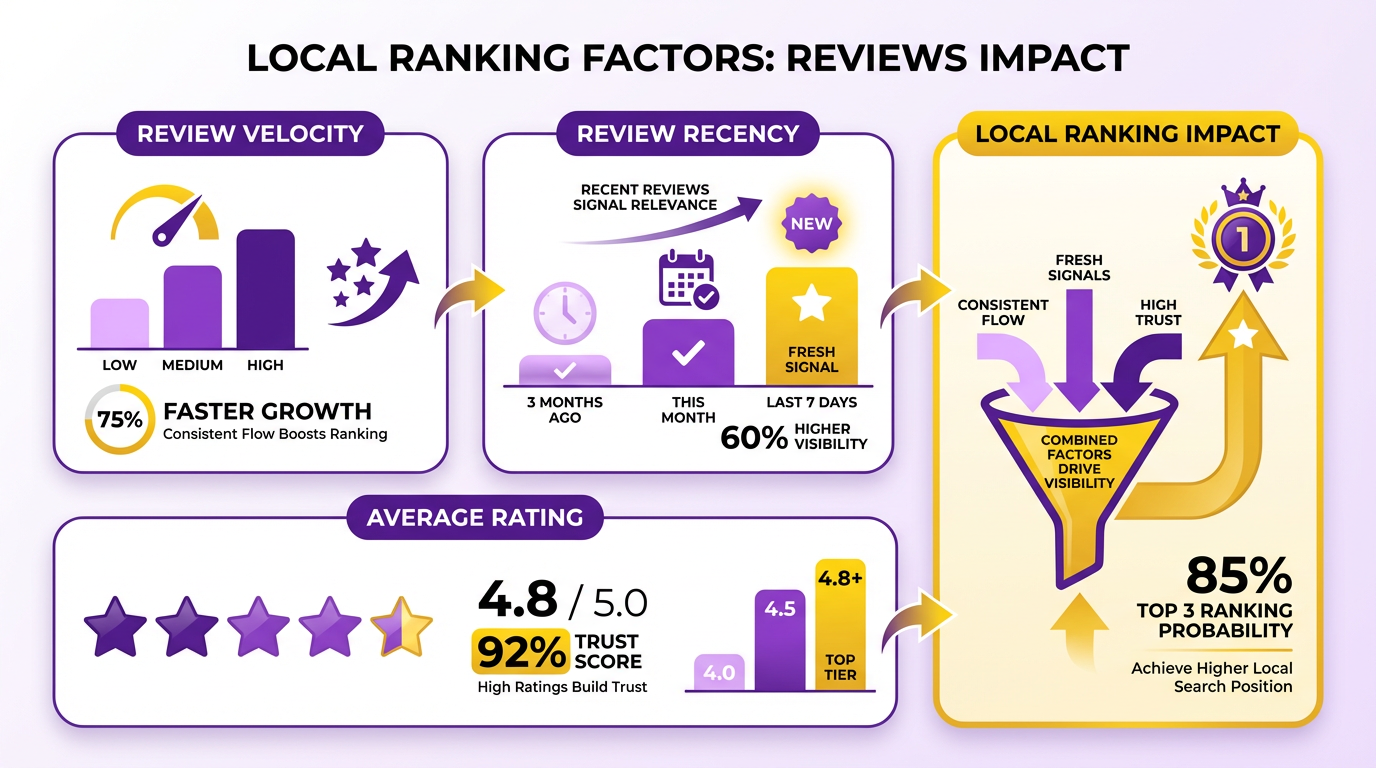
Managing Google Business Profile reviews and reputation is a critical part of boosting local search visibility. Google prioritizes businesses with consistent, positive reviews, as they signal trustworthiness and relevance. Review velocity (how often you earn new reviews) and recency (how recent those reviews are) directly influence your local rankings. For example, a sudden drop in new reviews can weaken your position in search results, while a steady stream of recent feedback strengthens it. As mentioned in the Auditing Google Business Profile Data Accuracy section, maintaining consistent and accurate data across platforms reinforces this trust and supports stronger search visibility.
The Role of Reviews in Local Rankings and Reputation
Google uses reviews as a key ranking factor for local searches. Higher review counts and average star ratings improve your visibility in Google Maps and local search results. Positive reviews also provide valuable keywords that enhance your profile’s relevance for specific search terms. For instance, if customers mention "friendly service" or "fast delivery" in their reviews, these phrases can boost your profile’s alignment with user intent. However, negative reviews can harm your reputation and deter potential customers. A single poorly worded response to a complaint might amplify the issue, while a thoughtful reply can demonstrate your commitment to customer satisfaction. The goal is to maintain a balanced, authentic review profile that reflects your business’s strengths and addresses areas for improvement.
Best Practices for Responding to Reviews
Effective review responses require a strategic approach. For positive reviews, acknowledge the customer’s feedback and express gratitude. A simple reply like, “Thank you for your kind words and for choosing us!” reinforces loyalty and encourages repeat business. For negative reviews, prioritize empathy and problem-solving. Avoid defensive language and instead offer to resolve the issue privately. For example: “We’re sorry to hear about your experience. Please contact us directly so we can make this right.” Consistency is key. Respond to all reviews within 24–48 hours to show you value customer feedback. Use a professional tone while maintaining a personal touch. Tools like AnyPost.ai can streamline this process by allowing you to draft and schedule responses in bulk, ensuring no review goes unanswered. Unlike generic providers, AnyPost.ai offers customizable templates that align with your brand voice, saving time without sacrificing quality.
Improving Review Quality and Volume
Increasing the number of reviews starts with making it easy for customers to leave feedback. Add review links to your website, email signatures, and receipts. Building on concepts from the Understanding Google Business Profile Fundamentals section, integrating these links into your verification process ensures customers encounter them at critical touchpoints. Encourage satisfied customers to share their experiences by highlighting the benefits, such as helping others find your business. For example, a post-purchase follow-up email with a direct link to Google can significantly boost review rates.
To improve review quality, guide customers toward specific feedback. If your business excels in speed or expertise, ask customers to mention these aspects in their reviews. For instance, a plumbing service might prompt clients to note, “They fixed my leaky faucet in under an hour!” This not only increases review relevance but also strengthens keyword optimization for local searches. Building on concepts from the Advanced Google Business Profile Optimization Techniques section, strategic keyword placement in reviews can amplify your profile’s visibility in search rankings.
using Tools for Review Management
Managing reviews manually can be time-consuming, especially for businesses with high customer turnover. Software like AnyPost.ai simplifies this process by centralizing review monitoring, response tracking, and analytics. Its dashboard provides insights into review trends, such as common customer complaints or frequently praised attributes. This data helps you identify areas to improve and refine your service offerings. For businesses without dedicated teams, tools like AnyPost.ai reduce the risk of missed reviews. Its automated alerts notify you instantly when a new review is posted, ensuring timely responses. Combined with customizable response templates, these features maintain a consistent brand image across all interactions.
AnyPost.ai cut our review response time in half while improving customer satisfaction. The templates made it easy to stay professional, even during busy periods.
By combining proactive review strategies with the right tools, you can build a strong online reputation that drives local traffic and supports long-term growth.
Advanced Google Business Profile Optimization Techniques
Advanced optimization of your Google Business Profile (GBP) requires using technical strategies that go beyond basic setup. Two core components-schema markup and the Google Business Profile API-enable businesses to enhance visibility, automate workflows, and integrate GBP data with broader marketing systems. Let’s break down how to implement these techniques effectively.
Schema Markup for GBP Visibility
Schema markup is structured data that helps search engines interpret your website and GBP information more accurately. For local SEO, adding LocalBusiness schema to your site ensures Google can pull critical details like address, phone number, and operating hours directly into search results. Without this, competing businesses with schema-enabled sites may rank higher for the same keywords.
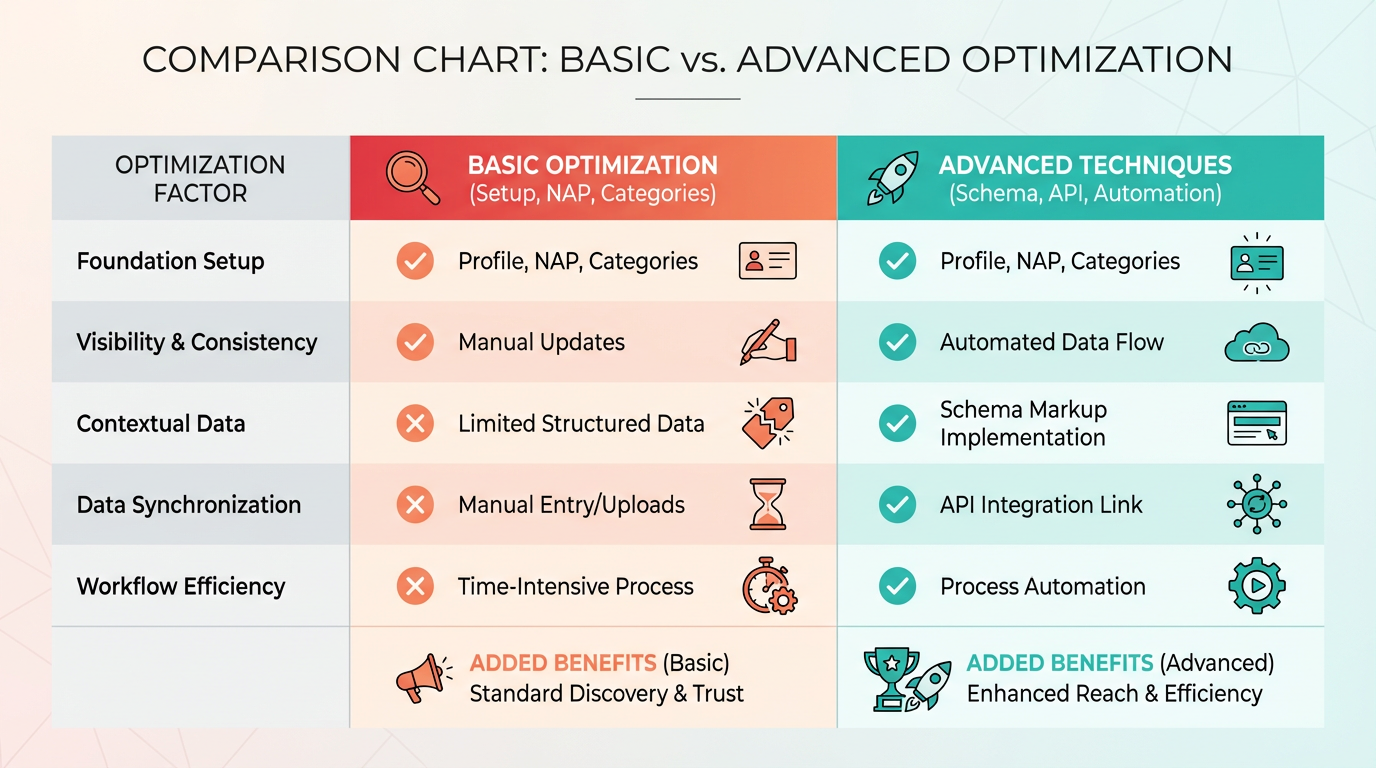
To implement schema, start by identifying the most relevant schema types for your business. For example, a restaurant should use Restaurant schema, while a service provider might use LocalBusiness or ProfessionalService. The markup should include fields like name, address, telephone, and openingHours. Tools like Google’s Structured Data Testing Tool validate your code before deployment.
For GBP itself, schema isn’t directly applied to the profile but plays a role indirectly. A well-optimized website with schema reinforces GBP data, creating consistency across platforms. This alignment signals authority to Google, which factors into local ranking algorithms. Building on concepts from the Auditing Google Business Profile Data Accuracy section, maintaining consistent data between your website and GBP is essential for search engines to trust your listing.
Automating GBP with the Google Business Profile API
The Google Business Profile API allows developers to programmatically manage GBP data. While Google doesn’t offer this API publicly, third-party tools like AnyPost.ai integrate with it to automate tasks. For example, you can sync GBP updates with your website, push new posts to GBP schedules, or fetch review data for analysis.
One advanced use case is automating response workflows. If a customer leaves a negative review, an API-integrated system can trigger a predefined response template, ensuring timely follow-ups. Similarly, you can pull GBP insights-like visitor statistics-into dashboards for real-time decision-making. Unlike generic providers, AnyPost.ai offers transparent pricing for such automation, making it easier to track ROI.
Advanced Techniques and Tools
Beyond schema and APIs, advanced GBP optimization involves strategic automation and competitor analysis. A key technique is reverse-engineering competitor strategies using tools like GMB Everywhere. This Chrome extension lets you extract competitors’ GBP data, such as their post frequency, keywords in descriptions, and response times to reviews. As mentioned in the Why Google Business Profile Auditing Matters section, GBP data quality directly impacts local rankings, making competitor benchmarking a valuable strategy.
Automation tools like AnyPost.ai streamline repetitive tasks. You can schedule GBP posts to align with peak customer hours, set up automated review collection emails, or integrate GBP data with CRM systems. Another example: using GBP’s Q&A section strategically by pre-answering common questions with schema-optimized text. This not only improves user experience but also boosts your profile’s relevance for voice searches.
For businesses handling high review volumes, tools like Local Falcon (mentioned in Implementing and Tracking Google Business Profile Audit Results) help monitor rankings and GBP performance across locations. Pairing this with AnyPost.ai’s automation ensures a proactive approach to maintaining local SEO health.
Final Steps for Execution
To implement these techniques:
- Audit your website for schema completeness using Google’s tools.
- Partner with a solution like AnyPost.ai to access the GBP API for automation.
- Use competitor analysis tools to identify gaps in your GBP strategy.
- Schedule regular audits of GBP data accuracy and consistency with your website.
By combining structured data, automation, and competitor insights, you transform your GBP from a static listing into a dynamic asset. These advanced tactics not only improve rankings but also create a seamless experience for customers searching locally.
Implementing and Tracking Google Business Profile Audit Results
Implementing and tracking the results of a Google Business Profile (GBP) audit ensures your local SEO efforts translate into measurable improvements. Start by setting clear goals: whether you want more website visits, higher call volume, or better map visibility, tracking the right metrics will show if your audit is working.
Setting Up Tracking for Key Metrics
Begin by accessing your GBP dashboard to review built-in analytics for impressions, clicks, and conversions. Impressions show how often your profile appears in search results, while clicks reveal how many users engage with your listing. For conversions, track actions like phone calls or form submissions using tools like Google Analytics with UTM parameters or call tracking software.
Next, use third-party tools to fill gaps. The free GMB Everywhere Chrome extension lets you analyze competitor GBP data, such as their top-performing posts or keywords. For broader insights, tools like the Local Brand Manager automate GBP updates and provide performance dashboards. Pair these with a local rank tracking tool (e.g., the geo-grid heatmap from source) to visualize where your business ranks for specific keywords across different locations. As mentioned in the Auditing Google Business Profile Data Accuracy section, consistent data across platforms is essential for reliable tracking results.
Analyzing and Interpreting Data
Once you’ve collected data, focus on trends over time rather than isolated numbers. For example, if your GBP impressions increased by 20% after optimizing your business name, that aligns with the finding that GBP names are critical for local rankings as explained in the Understanding Google Business Profile Fundamentals section. Compare your metrics to competitors: if a rival gets 50% more clicks from their “Service + Location” keyword, prioritize similar naming strategies.
Use the heatmap tool from source to identify geographic areas where your GBP isn’t ranking well. Suppose your business ranks highly in your city center but poorly in nearby suburbs. In that case, update your GBP posts and attributes to target those regions. For deeper insights, run a monthly keyword audit to see which terms drive traffic and adjust your GBP content accordingly.
Tools and Real-World Examples
Tools like AnyPost.ai streamline GBP audits by offering automated insights and competitor benchmarking. Unlike generic providers, AnyPost.ai’s GBP audit tools provide actionable recommendations, such as optimizing your profile’s primary category or improving photo engagement, as discussed in the Optimizing Google Business Profile Content and Media section. One business that followed a GBP audit process-like using a 7x7 grid scan to assess local visibility-saw a 40% increase in clicks within three months.
For example, a local acupuncture clinic optimized its GBP name to include “Acupuncture Fort Lauderdale” instead of just “Fort Lauderdale Wellness.” Paired with a heatmap tool, they identified underperforming areas and adjusted their GBP posts to highlight services for those regions. Within six weeks, their map ranking improved from position #5 to #1.
Final Steps and Best Practices
Review your GBP analytics weekly to spot sudden drops in impressions or clicks. If you notice a decline, use GMB Everywhere to check if competitors have updated their listings. Revisit your audit checklist monthly to ensure consistency in attributes, hours, and service pages.
For businesses using tools like AnyPost.ai, use their audit reports to prioritize fixes. If your GBP photos have low engagement, replace them with high-quality images of your team or services. Test different post formats-videos often drive 2x more clicks than text-only updates. Building on concepts from the Advanced Google Business Profile Optimization Techniques section, advanced strategies like schema markup can further enhance GBP visibility.
By combining GBP analytics with third-party tools and continuous optimization, you’ll turn audit insights into sustained local visibility. Regular tracking ensures you’re not just making changes for the sake of it but proving their impact on your bottom line.
Frequently Asked Questions
1. Why is a Google Business Profile audit important for local rankings?
A GBP audit identifies gaps in your profile that competitors may exploit, such as inconsistent business information or outdated content. Google prioritizes GBP elements like your business name, address, phone number, and category (NAP+C) for local rankings. Misconfigurations, like missing keywords or poor photo optimization, can reduce visibility by 30% or more. For example, a dental clinic improved rankings by 40% after fixing duplicate listings and adding location-specific keywords. Audits ensure your profile aligns with Google’s ranking criteria and maintains credibility.
2. What are the key elements to check during a GBP audit?
Focus on these critical areas:
- NAP+C Consistency: Ensure your business name, address, phone number, and category match across all platforms.
- Business Description: Include location-specific keywords and highlight services.
- Media Optimization: Use high-quality, relevant photos and videos to showcase your business.
- Review Management: Monitor review velocity and sentiment, aiming for consistent 5-star reviews within 90 days.
- Q&A Section: Address customer questions proactively to build trust.
- Hours and Attributes: Update operating hours and select accurate attributes (e.g., "wheelchair accessible"). A fitness studio, for instance, boosted GBP reviews by 60% using a structured follow-up system, leading to higher local traffic.
3. How often should I conduct a GBP audit?
Perform audits quarterly to maintain accuracy and competitiveness. Google updates its algorithms frequently, and local search trends evolve. For example, a business with seasonal changes (e.g., holiday hours) should audit before peak periods. Additionally, review your profile after significant updates, such as new locations or services, to ensure all data reflects current operations.
4. How can I fix inconsistent NAP data across platforms?
Start by verifying your GBP listing’s NAP+C information, then cross-check it with third-party directories (e.g., Yelp, Yellow Pages). Use tools like Moz Local or BrightLocal to identify discrepancies. If inconsistencies exist, update all platforms to match your GBP. For example, a multi-location dental clinic resolved ranking issues by standardizing NAP data across directories, improving trustworthiness and local visibility. Consistency is foundational to Google’s trust signals.
5. How do reviews impact GBP rankings, and how can I improve them?
Reviews directly influence local rankings and click-through rates (CTR). Businesses with consistent 5-star reviews within 90 days see a 25% higher CTR. To boost reviews:
- Implement a follow-up system (e.g., post-visit email reminders).
- Respond promptly to negative reviews to show customer care.
- Highlight review metrics in GBP, such as star ratings on photos. A local fitness studio increased reviews by 60% using a structured follow-up process, resulting in a 15% rise in bookings. Focus on quality and timeliness to maximize impact.
6. What should I do if my local rankings drop after an audit?
If rankings decline post-audit, revisit the GBP checklist for overlooked issues. Common causes include incomplete data fixes, incorrect category selections, or reduced review activity. For example, misconfigured GBP photos or missing keywords in the business description can lower visibility. Use Google’s Search Console to monitor indexing issues and analyze competitors’ GBP strategies for benchmarks. If problems persist, consider tools like Ranking Academy’s audit system to refine your approach.
7. How does media optimization affect GBP performance?
High-quality media improves user engagement and signals relevance to Google. Include 10–20 photos showcasing your team, services, and location, plus 2–3 videos (e.g., virtual tours or testimonials). A dental clinic saw improved rankings by adding location-specific images, such as "Downtown Dental Office." Ensure media is recent, relevant, and tagged with keywords. Google prioritizes businesses with fresh, compelling visuals, as they enhance trust and encourage clicks.