How to Find and Fix Broken Links Across Your Entire Site

Key Takeaways
- Use web crawlers like Free Broken Link Checker to automate detecting broken links, SSL errors, and 404s.
- Combine automated tools with manual checks using browser extensions for comprehensive detection.
- Verify broken links via Google Search Console to identify technical errors impacting SEO.
- Prioritize fixing 404 errors and redirects that disrupt user experience and site navigation.
- Schedule automated crawls to continuously monitor large websites for new broken links.
- Adjust crawler settings to target specific site sections for deeper analysis of critical pages.
- Fix high-priority links first based on crawl depth and page importance metrics.
Related Video
Watch: 3 Ways to Quickly Find Broken Links on Your Website (So You Can Fix Them) by Scott Redgate
Why Broken Links Matter
Fixing broken links is critical for maintaining a functional, trustworthy website. Broken links disrupt user journeys, harm SEO performance, and erode brand credibility. Addressing them systematically ensures your site remains reliable and competitive. Below, we break down the key reasons why broken links demand immediate attention.
What Impact Do Broken Links Have on SEO?
Search engines prioritize user-friendly, well-maintained websites. When crawlers encounter broken links, they can’t index pages effectively, leading to lower visibility in search results. For example, if a blog post with high authority links to a non-existent page, search engines may devalue the entire page. Fixing these links restores proper crawl flow, helping your content rank higher. As mentioned in the Detecting Broken Links section, automated tools are essential for identifying these issues efficiently.
Consider a scenario where a product page with hundreds of backlinks suddenly returns a 404 error. This not only loses potential traffic but also signals to search engines that your site is unreliable. By resolving such issues, you maintain consistent SEO value and avoid ranking drops.
How Do Broken Links Affect User Experience?
Users expect seamless navigation. A single broken link can frustrate visitors, increasing bounce rates and decreasing conversions. Consider a customer clicking “Contact Us” only to land on a dead page-this poor experience often drives them to competitors.
Real-world examples highlight this risk. A 2022 study by a digital marketing firm found that websites with over 10% broken links saw a 25% higher bounce rate than those with fewer errors. While specific company names aren’t disclosed, the pattern holds: unresolved links directly correlate with lost engagement. These issues are often diagnosed as 404 errors or soft 404s, as explained in the Diagnosing Broken Links section.
Who Benefits Most from Fixing Broken Links?
Website owners, marketers, and SEO specialists all gain from a proactive approach. For owners, fixing links reduces maintenance costs and protects revenue streams. Marketers benefit from improved campaign performance, as broken links in email newsletters or social media posts undermine trust. SEO teams see direct gains in crawl efficiency and indexation rates.
A common challenge solved by fixing links is reducing technical debt. For instance, outdated internal links or expired external resources can create a tangled web of errors. By resolving these issues, teams create a cleaner site architecture, which simplifies future updates and audits.
Why Should You Prioritize This Now?
The cost of ignoring broken links grows over time. Each unresolved error compounds into lost traffic, damaged credibility, and wasted effort. For example, a small e-commerce site might lose thousands in potential sales if key product pages are inaccessible.
To minimize risks, prioritize regular link audits, a strategy emphasized in the Preventing Broken Links section. While manual checks are possible, they’re inefficient and prone to oversight. Automated tools offer a faster, more comprehensive solution. By addressing broken links, you ensure your site remains a reliable resource for users and search engines alike. The long-term benefits-higher rankings, better engagement, and a professional reputation-are well worth the upfront effort.
Detecting Broken Links
Detecting broken links requires a mix of automated tools and manual checks to ensure your website remains functional and user-friendly. Start by using web crawlers to scan your entire site, then verify results with Google Search Console and browser extensions. This approach uncovers technical errors, 404 pages, and other issues that impact SEO and user experience. Below are actionable steps to identify and prioritize broken links effectively.
Use a Web Crawler to Automate Detection
A web crawler is the fastest way to audit your site for broken links. Free tools like the Free Broken Link Checker or Dr. Link Check crawl your website and return a list of dead links, SSL errors, or malformed URLs. For example, input your domain into the Free Broken Link Checker, and it will scan all internal links, highlighting 404 errors or redirects. Advanced users can schedule automated checks to monitor sites continuously. This method is ideal for large websites where manual checks are impractical.
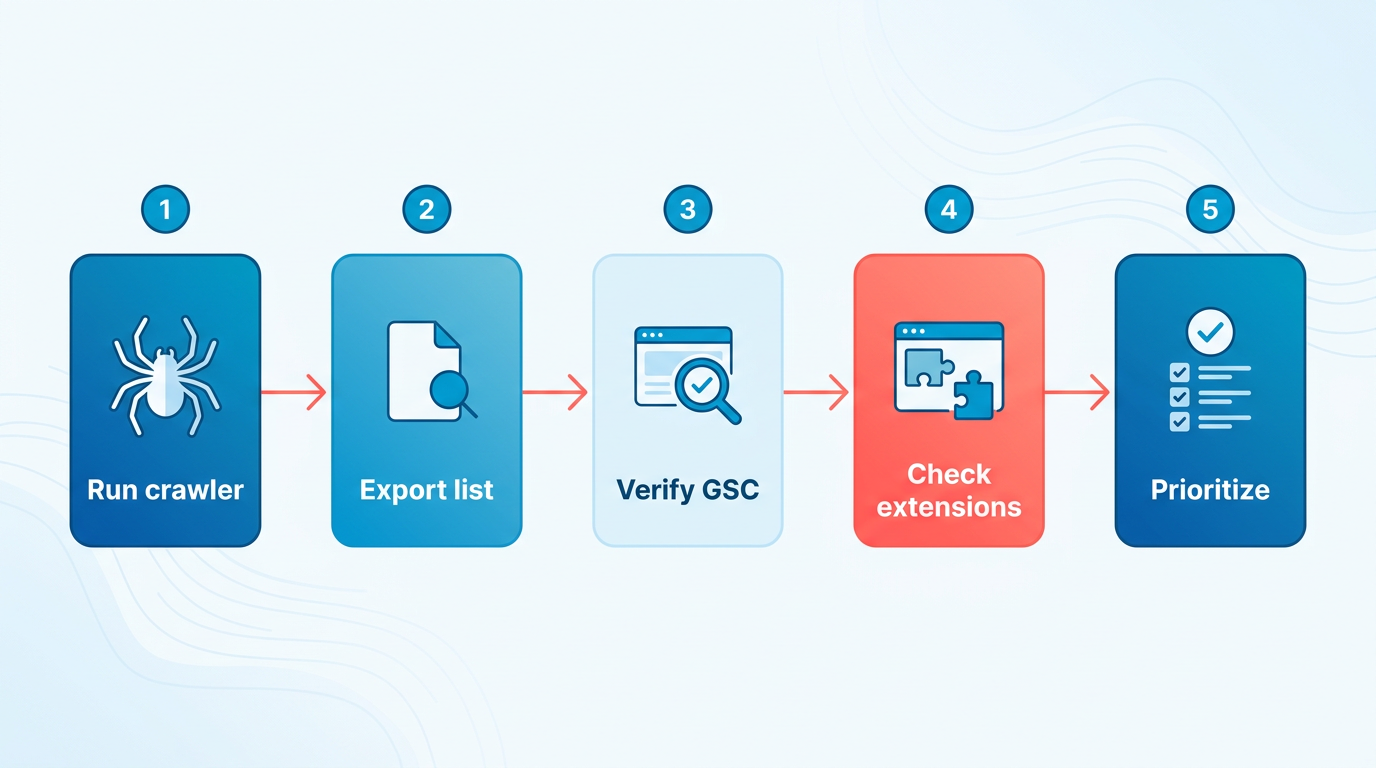
For deeper analysis, configure crawl settings to focus on specific sections of your site. Adjust parameters like crawl depth (how many pages the tool follows from the starting URL) and exclude non-critical areas like contact forms or admin dashboards. A shallow crawl (depth of 1–2) is faster but may miss nested pages, while a deeper crawl (depth of 5+) ensures comprehensive coverage. Prioritize accuracy by allowing the crawler to follow redirects and check external links to external resources.
Use Google Search Console for Technical Insights
Google Search Console (GSC) is a free, built-in tool for identifying crawl errors reported by Google’s bots. Log in to your GSC account, then manage to the “Crawl Errors” section. Here, you’ll see a list of URLs Google couldn’t access, often caused by broken links or server issues. Filter by “Not Found (404)” to focus on missing pages. GSC also provides a sitemap view to identify which pages are causing errors.
Export the list of problematic URLs as a CSV file for offline analysis. Cross-reference these URLs with your site’s content to determine if they’re outdated, moved, or permanently deleted. For example, if a blog post linked in your navigation is missing, GSC will flag it. Use this data to update links or set up 301 redirects. Note that GSC only reports errors Google has encountered, so it may miss internal links that don’t affect search engine crawls. As mentioned in the Diagnosing Broken Links section, understanding error types like 404s is critical for interpreting these results.
Manual Verification with Browser Extensions
Browser extensions offer a quick way to validate links during site navigation. Tools like Fintest Pro (a browser extension mentioned in source ) allow you to hover over links and instantly see their status (200 OK, 404 Not Found, etc.). Install the extension, then manually browse high-traffic areas of your site, such as menus, footer sections, and recent blog posts. These tools are especially useful for testing user-facing links, like buttons or images, which crawlers might overlook.
For large sites, combine automated crawls with targeted manual checks. For instance, if a web crawler flags a batch of broken links in your product pages, use the browser extension to verify fixes. This hybrid approach ensures accuracy without overloading your workflow. Extensions also highlight SSL certificate issues or links to unsecured (HTTP) pages, which can harm your site’s trustworthiness.
Interpreting Crawl Results and Prioritizing Fixes
After running a crawler or GSC audit, sort results by severity. Focus on 404 errors first, as these directly frustrate users. Next, address 301 or 302 redirects that point to incorrect pages. Tools like Dr. Link Check categorize issues with color codes or icons, making it easier to prioritize. For example, a red flag might indicate a critical 404, while a yellow warning could signal a soft 403 Forbidden error.
When fixing links, consider the context. If a page is permanently gone, redirect it to a relevant replacement. If it’s a temporary issue, add a “Coming Soon” notice. Building on concepts from the Prioritizing and Fixing Broken Links section, prioritize repairs based on traffic impact and user experience. Tools like the Free Broken Link Checker also track external links pointing to your site, helping you address issues that could harm your SEO. Regularly rescan your site post-fixes to ensure updates resolve all errors.
By combining automated crawls, Google Search Console reports, and manual verification, you can systematically eliminate broken links. For ongoing maintenance, consider scheduling monthly audits to catch issues early and maintain a seamless user experience. Building on strategies from the Maintaining Link Health section, consistent monitoring ensures long-term site reliability.
Diagnosing Broken Links
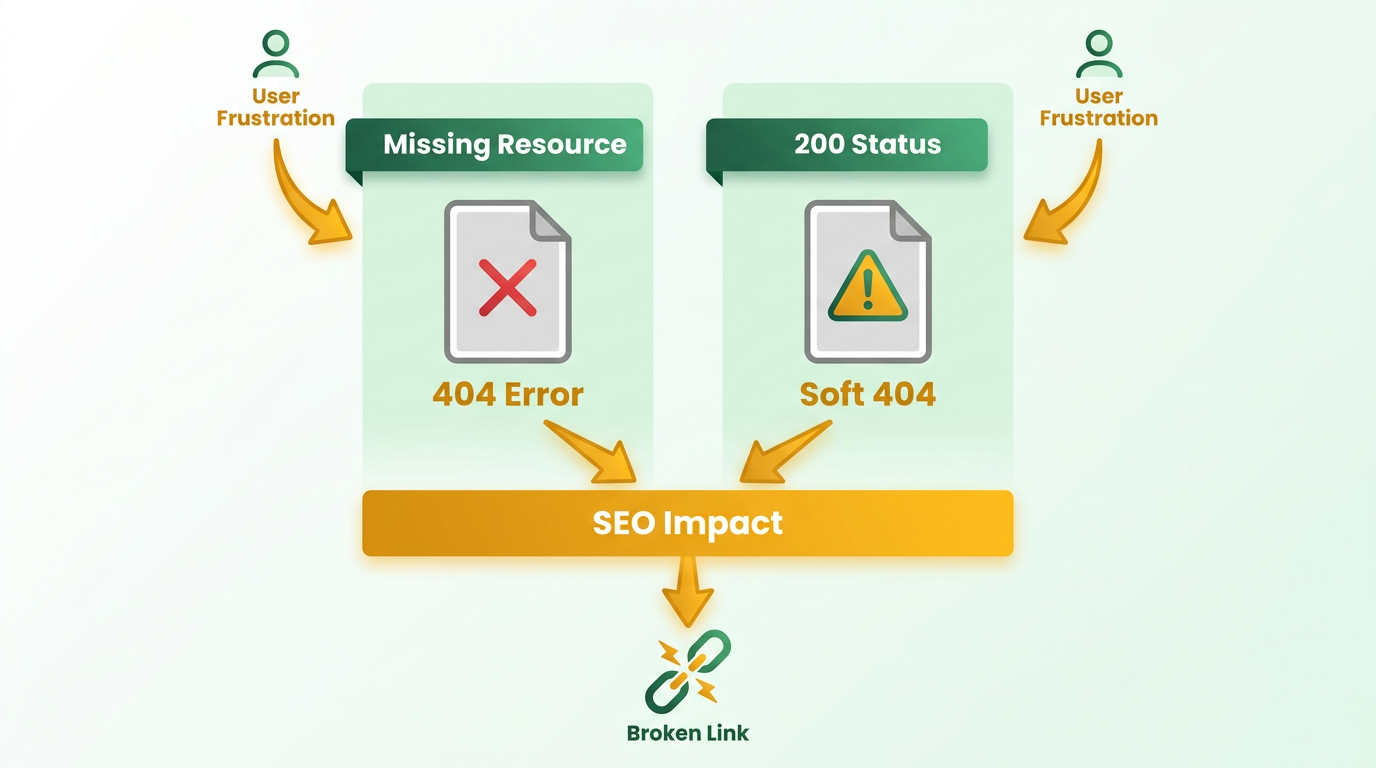
Diagnosing broken links starts with understanding the types of errors affecting your site. A 404 error means a page or resource is missing, while a soft 404 occurs when a page returns a 200 status code (indicating it exists) but provides no useful content, such as a generic error message. Both disrupt user experience and SEO, as explained in the Why Broken Links Matter section. For example, a page might load with a 200 status but display a blank template or irrelevant message, misleading users and search engines.
How Do Redirect Chains Affect SEO?
Redirect chains happen when a URL redirects through multiple intermediate pages before reaching the final destination. Each redirect adds latency, slowing page load times and frustrating users. From an SEO perspective, chains dilute link equity (the value passed through links) and may confuse search engine crawlers, leading to incomplete indexing. For instance, if Page A → Page B → Page C all redirect to Page D, crawlers might stop at Page C due to timeouts, missing critical content. Fixing chains by pointing links directly to the final destination improves crawl efficiency and user navigation, as detailed in the Prioritizing and Fixing Broken Links section.
What Tools Can Diagnose Crawl Errors?
Crawl errors, like server timeouts or malformed URLs, often stem from broken links or misconfigured servers. Google’s webmaster tools help identify these issues by reporting crawl errors in real time. For example, the "Crawl Errors" dashboard highlights pages Google couldn’t access due to server errors (5xx) or client errors (4xx). To fix server-side issues, review hosting logs for patterns (e.g., 500 Internal Server Errors) and ensure URLs follow standard formatting (e.g., using HTTPS for secure connections). For client errors, update or remove outdated links pointing to deleted content.
How Do You Analyze Link Structure for Patterns?
Mapping your site’s link structure reveals hidden issues like orphaned pages (pages with no incoming links) or excessive internal links diluting SEO value. Start by exporting your sitemap and cross-referencing it with crawl results from tools like Dr. Link Check or Google Search Console. Look for patterns such as:
- High bounce rates on pages with broken links, indicating poor user engagement.
- Low crawl frequency on seldom-updated pages, which may signal outdated content.
- Excessive redirects in specific sections, which could point to poor URL management.
For example, if a blog section has 404s on older posts, it might suggest a lack of content updates or poor archiving practices. Address these by redirecting broken links to relevant pages or publishing updated content.
Why Use Automated Tools for Diagnosis?
Manual link checking is inefficient for large sites, but automated tools streamline the process. Online broken link checkers, like the ones described in the Detecting Broken Links section, scan entire domains for 404s, redirect chains, and invalid SSL certificates in minutes. These tools often flag issues with detailed reports, such as listing all URLs returning a 403 Forbidden error. For example, one tool might show that 30% of your internal links point to pages with soft 404 errors, guiding your prioritization.
To complement automated checks, use browser extensions that highlight broken links during site visits. These act as immediate alerts, helping you spot issues before users encounter them. For instance, clicking a link that triggers a 404 will display a warning in the extension, prompting quick fixes. Pairing automated scans with manual spot-checks ensures no critical errors slip through.
By combining these strategies-distinguishing error types, analyzing redirect chains, diagnosing crawl issues, and using tools-you can systematically resolve broken links and maintain a seamless user experience. For further guidance, explore how to fix broken links before they cost you.
Prioritizing and Fixing Broken Links
Prioritizing and fixing broken links requires a strategic approach to minimize SEO damage and maintain user trust. Start by identifying which links to address first based on their impact on traffic, revenue, and search rankings. Focus on restoring links to high-value content before tackling lower-priority pages.
How Do You Prioritize Which Broken Links to Fix First?
To prioritize effectively, evaluate broken links using three criteria: traffic volume, revenue contribution, and SEO importance. Pages with high traffic or conversion rates should receive immediate attention. For example, if a product page with 10,000 monthly visits has a broken link, fixing it should take precedence over a rarely visited blog post.
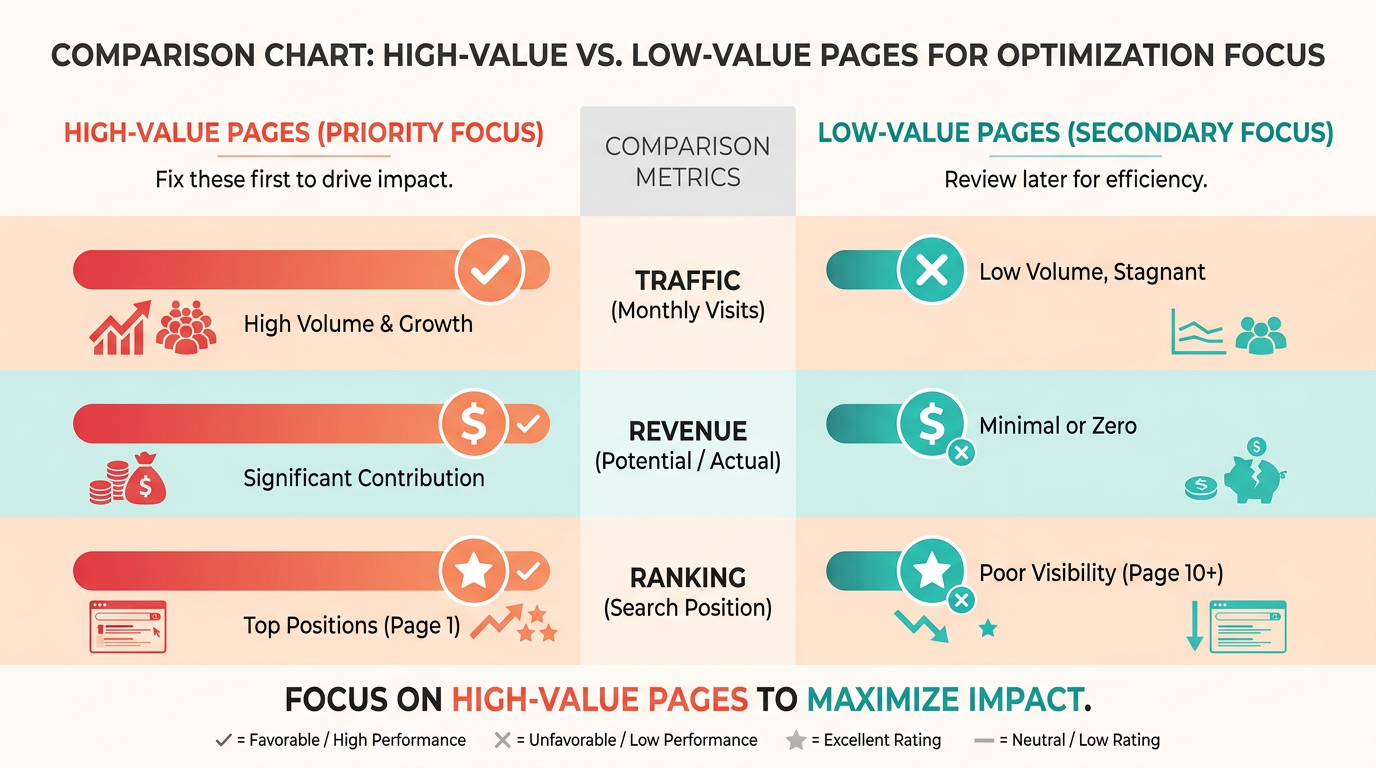
Use tools to analyze metrics like page authority, backlink profiles, and user engagement. A page with strong SEO potential but current technical issues might justify urgent repairs. Avoid generic tools that only list broken links without context. As mentioned in the Diagnosing Broken Links section, understanding error types like 404s ensures you address the most critical issues first.
What’s the Best Way to Fix Broken Internal Links?
For internal links, the solution depends on whether the destination page can be restored. If the content still exists but under a new URL, implement a 301 redirect to guide users and search engines to the correct location. This preserves SEO value and prevents further traffic loss. For outdated or removed pages, update the link to a relevant live page or remove it entirely.
To implement 301 redirects, access your site’s server or CMS settings. Map each broken link to its new URL and verify the redirect works using a browser or testing tool. For instance, if a deleted blog post about “SEO tips” is removed, the tool might recommend redirecting to your updated “2024 SEO Guide” page.
How Should You Handle Backlinks to Formerly Broken Pages?
Broken external links (backlinks) to your site also need attention. Use a backlink checker to identify which websites are linking to your defunct pages. Reach out to site owners to update the link to a relevant live page or ask them to remove it. This preserves your site’s authority and prevents referral traffic from being lost. Building on concepts from the Detecting Broken Links section, this process starts with a comprehensive audit to identify all affected pages.
For pages you’ve already fixed, double-check that all inbound links now point to the correct URL. If a former broken page had strong backlinks, its restoration could boost rankings.
What Should a Functional 404 Page Include?
Even with diligent maintenance, some broken links will reach users. Design a helpful 404 page to reduce bounce rates and guide visitors back to your site. Include features like:
- A search bar to help users find new content
- Links to popular or recent pages
- A site map or navigation menu
- A clear message explaining the error and suggesting next steps
Track 404 errors regularly to identify patterns. If users frequently reach dead ends, it may signal deeper issues like outdated menus or poor internal linking. Maintaining link health, as outlined in the Maintaining Link Health section, ensures these fixes become part of your ongoing strategy.
By combining automation with manual audits, you can maintain a clean, user-friendly site. Prioritize fixes based on impact, repair internal links strategically, and turn broken backlinks into opportunities. A well-maintained site not only retains traffic but also strengthens trust with both users and search engines.
Preventing Broken Links
Preventing broken links requires a proactive approach that combines regular maintenance, automated tools, and strategic monitoring. By implementing these practices, you can maintain a healthy website structure and avoid the frustration of broken user experiences.
Routine Maintenance Tasks to Prevent Broken Links
Routine audits are the foundation of link health. Schedule periodic checks of internal and external links, updating them as needed. Focus on high-traffic pages and recently edited content, as these areas are most prone to outdated references. For example, audit internal links quarterly and external links annually to ensure they remain valid.
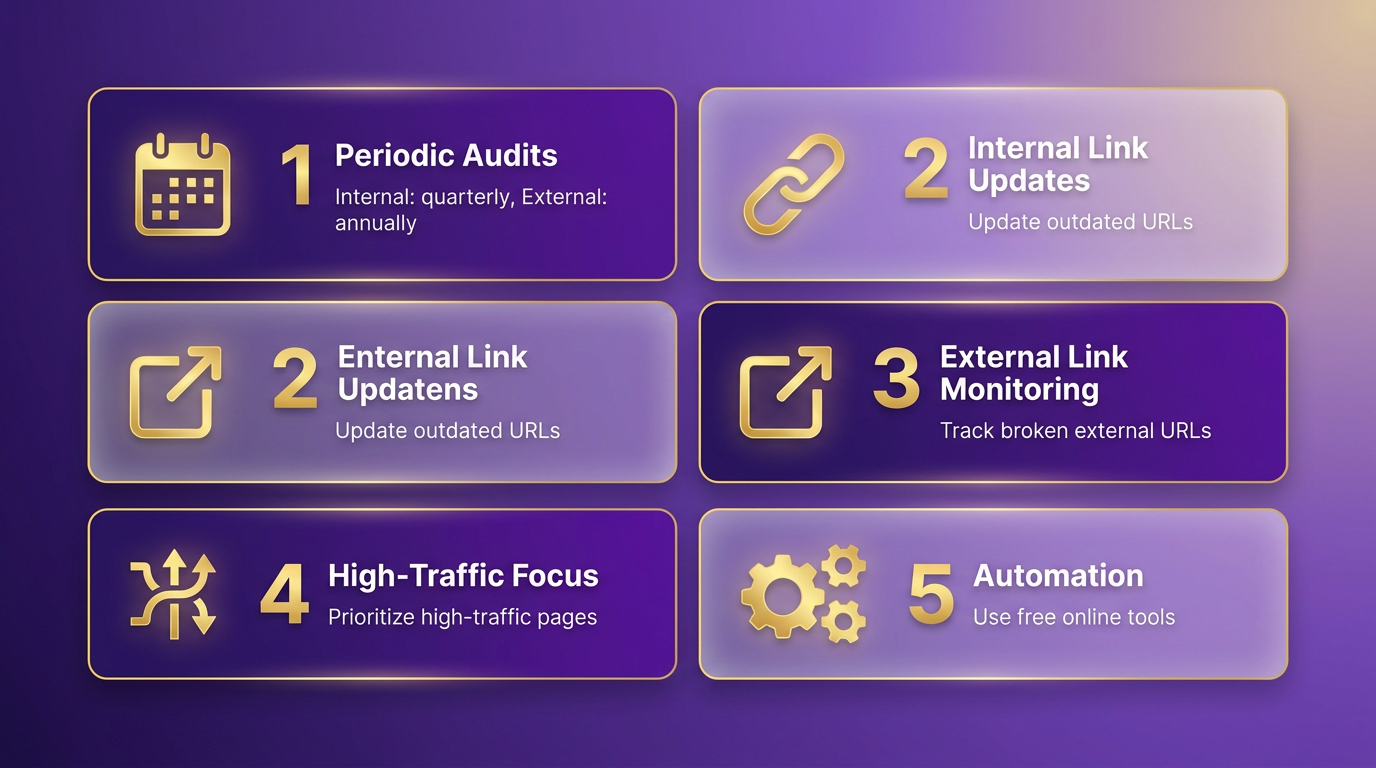
Start by manually reviewing navigation menus, footers, and resource pages for outdated URLs. Use free online tools to scan your entire site for 404 errors, missing redirects, or SSL certificate issues. For smaller websites, this can be done using browser extensions that flag broken links in real time. Larger sites benefit from more advanced tools that automate the process.
A real-world example: One company saved 50% of their manual link-checking time by integrating scheduled audits into their editorial calendar. This simple habit reduced user frustration and improved search engine rankings. As mentioned in the Maintaining Link Health section, consistency is key to preventing new errors from emerging after updates.
Monitoring Tools for Detecting New Broken Links
Even with regular audits, new broken links can appear after updates or migrations. Use monitoring tools to catch these issues automatically. Online services like free broken link checkers can scan your site daily, identifying errors before users encounter them. These tools often highlight specific pages with broken links, saving hours of manual troubleshooting.
For a more targeted approach, browser extensions can analyze hundreds of pages at once. They’re ideal for developers or content teams who need real-time feedback during updates. Pair these tools with a workflow that prioritizes fixing high-impact errors first-such as links on landing pages or blog posts driving significant traffic.
Need help choosing a tool? A Reddit user shared their experience with a browser extension that simplified their link-checking process, reducing errors by 70% in three months. Explore this discussion for insights from others in the blogging community.
Using Automated Tools Like AnyPost.ai for Consistent Link Structures
Automated tools streamline link management by ensuring consistency across your site. AnyPost.ai specializes in maintaining structured content, which indirectly prevents broken links by enforcing clean URL patterns and redirect rules. Its automation capabilities flag potential issues during content creation, such as outdated references or incorrect formatting.
For example, AnyPost.ai can integrate with your CMS to validate links before publishing. This real-time check prevents broken links from going live, a common issue when teams work in silos. Unlike generic providers, AnyPost.ai offers transparent integration options and customizable workflows tailored to your site’s architecture.
A key advantage is its ability to track link performance over time. By analyzing traffic patterns, it identifies underperforming or outdated links that may need updates. This proactive approach reduces the risk of broken links slipping through during large-scale content updates. As highlighted in the Diagnosing Broken Links section, understanding error types like 404s helps prioritize fixes based on their root causes.
Keeping Links Updated During Migrations or Changes
Website migrations or redesigns are high-risk periods for broken links. Use a checklist to update internal links before launching changes. For example:
- Map old URLs to new ones and set up 301 redirects.
- Test every page in a staging environment before going live.
- Update external links pointing to your site if URLs change.
Version control systems like Git can help track changes, ensuring no link is overlooked. For large sites, consider using a sitemap crawler to verify all links function correctly post-migration. A case study from a CMS migration showed that teams using automated redirect tools reduced post-launch errors by 90%.
For deeper guidance, read how one company avoided costly errors during their site overhaul. Building on concepts from the Why Broken Links Matter section, addressing link issues early prevents long-term SEO setbacks.
The Importance of Regular Monitoring
Even with automation, regular monitoring is non-negotiable. Set up a monthly review cycle to catch new errors introduced by minor updates or third-party integrations. Combine automated scans with manual spot checks on high-priority pages.
Broken links don’t just harm navigation. They also dilute your site’s authority in search rankings. Building on practices from the Detecting Broken Links section, combining crawlers with manual verification creates a strong defense against link decay.
By combining these strategies, you create a strong defense against broken links. The goal isn’t perfection but consistent improvement, ensuring your site remains reliable for both users and search engines.
Maintaining Link Health
Maintaining link health requires a proactive strategy that combines regular monitoring, analytics integration, and automated tools. Without consistent attention, broken links can accumulate, harming user experience and SEO performance. The solution lies in automating checks, analyzing data for patterns, and adapting to website updates. By integrating these practices, you can preserve a site’s credibility and search visibility over time. As mentioned in the Detecting Broken Links section, automated tools are essential for scanning large websites efficiently.
How Do You Keep Links Healthy Over Time?
Regular monitoring is the foundation of link health. Manual checks are inefficient, especially for large websites. There are tools that automate scans to detect broken links instantly. For example, browser extensions and online services (like the Free Broken Link Checker) can identify 404 errors across hundreds of pages simultaneously . Schedule weekly or monthly scans to catch new issues early, especially after content updates.
What Role Do Analytics Play in Link Maintenance?
Analytics tools reveal how broken links impact traffic and engagement. For instance, a sudden drop in page views for a specific section might signal a dead link disrupting navigation. Pairing link-checking tools with platforms like Google Analytics helps pinpoint problematic areas. Building on concepts from the Diagnosing Broken Links section, understanding error types like 404s and soft 404s clarifies how different issues affect user behavior.
How Can You Ensure Links Stay Intact During Website Changes?
Website migrations or design overhauls often break internal links. To prevent this, follow these steps:
- Map existing links: Use a sitemap or crawler to document all internal links before changes.
- Set up 301 redirects: If URLs change, redirect old links to new destinations to preserve SEO value.
- Test after updates: Run a full link check post-migration using tools like Dr. Link Check .
As mentioned in the Preventing Broken Links section, proactive strategies like mapping links and setting up redirects are critical during site restructures. For complex migrations, consider a phased rollout to isolate and fix issues early.
Best Practices for Ongoing Link Health
- Automate regularly: Schedule recurring checks, avoiding the need for manual audits.
- Document fixes: Track resolved links to identify recurring issues in specific sections.
- Educate your team: Train content creators to verify links before publishing, using browser extensions like Fintest Pro .
By combining automation, analytics, and disciplined processes, you turn link maintenance into a seamless part of your digital strategy.
Conclusion and Next Steps
Automated tools streamline the process of identifying and repairing broken links, saving you time and improving your site’s performance. By prioritizing link health, you enhance SEO rankings, user trust, and website credibility. Let’s break down how to apply these strategies effectively and why automation is a major advantage.
What Makes Automated Link Management Essential?
Fixing broken links isn’t just a technical task-it’s a critical part of maintaining a professional online presence. Every 404 error frustrates users and signals poor site maintenance to search engines. Automated tools eliminate guesswork by scanning your entire site, flagging dead links, and even suggesting fixes.
If you’re managing a large site or frequently updating content, manual checks become impractical. As mentioned in the Maintaining Link Health section, consistent monitoring and automation are key to preventing link decay over time.
How to Start Your Link Health Journey
- Audit your site: Use a free tool like the Free Broken Link Checker to identify urgent issues. This gives you a baseline for what needs fixing, as outlined in the Diagnosing Broken Links section.
- Automate regularly: Schedule weekly or monthly scans to catch new broken links automatically.
- Fix strategically: Update outdated URLs, redirect deleted pages, or remove irrelevant links. For guidance on deciding which links to prioritize, refer to the Prioritizing and Fixing Broken Links section. For example, if a blog post links to a resource that’s no longer available, replace it with a related article from your own site.
For a deeper dive into troubleshooting, explore the Reddit community’s discussion on Need help with broken links or read this guide on finding broken links before they hurt your SEO.
Why Prioritize Link Health for Long-Term Success?
A single broken link might seem minor, but over time, they erode trust and drive away visitors. Search engines penalize sites with poor user experiences, lowering your visibility in results. Conversely, a well-maintained site signals professionalism and reliability.
Consider this: one company saved 50% of their SEO audit time by switching to automated tools. By embedding link checks into your publishing process, you prevent issues before they impact users.
Start today with a free scan, or upgrade to AnyPost.ai for full automation. Your audience, and search engines, will thank you.
Frequently Asked Questions
1. What tools can automatically detect broken links on a website?
Web crawlers like Free Broken Link Checker or Dr. Link Check scan websites for dead links, SSL errors, and 404s. These tools automate detection, making them ideal for large sites where manual checks are impractical.
2. How should I prioritize fixing broken links?
Prioritize 404 errors and redirects that disrupt user flow. Address links with deeper crawl depths (e.g., depth 5+) or high traffic first, as they impact SEO and user experience more significantly.
3. Can I use Google Search Console to find broken links?
Yes, Google Search Console identifies technical errors like broken links and crawl issues. Check the “Coverage” report to spot 404s and other errors affecting your site’s indexing and rankings.
4. How often should I check for broken links?
Schedule automated crawls weekly for medium sites or monthly for smaller ones. Large sites may need daily checks to stay ahead of new content or redirects causing issues.
5. Should I check external links for validity?
Yes, verify external links using tools like Free Broken Link Checker to ensure they work. Broken external links harm user trust and SEO; update or remove them if invalid.
6. What crawler settings improve detection accuracy?
Set crawl depth to 3–5 for comprehensive coverage and enable redirect tracking. Exclude non-critical areas (e.g., admin dashboards) to focus on user-facing pages most users interact with.
7. How do I fix a 404 error?
Update the broken link to a relevant working page, create a custom 404 page with helpful navigation, or remove the link if no suitable replacement exists. Always test fixes with a crawler afterward.
