
How to Handle Out-of-Stock and Discontinued Products for SEO

Key Takeaways
- One question decides everything: is the product coming back or gone for good? Keep, redirect, or 404 flows from that answer.
- Temporarily out-of-stock products keep their live URLs with a clear "out of stock" label. You hold months of accumulated ranking history.
- Deleting a page the second inventory hits zero throws away rankings, backlinks, and buyer intent you spent months building.
- Permanently discontinued products get a 301 redirect to the closest relevant page, which keeps the earned link equity.
- A waitlist or "notify me" form captures demand while a product waits to come back.
- Redirecting a discontinued page to your homepage wastes link equity. A closely matched replacement keeps users on-site and signals relevance.
The One Decision That Drives Everything
Out-of-stock and discontinued products are an SEO liability if you ignore them and an opportunity if you don't. The whole thing hinges on one question: is the product coming back, or is it gone for good? That answer tells you whether to keep the page live, redirect it, or let it 404.
Most teams overreact. They delete the page the moment inventory hits zero. That's a mistake. You lose the rankings, the backlinks, and the buyer intent you spent months building.
Temporarily out of stock? Keep the page live.
If the product is coming back, leave the URL online and mark it "out of stock." Don't delete it. Don't redirect it.
Orbit Media lays out three real options: leave the page up with an "out of stock" label, leave it up with a waitlist signup, or take it down entirely. For anything returning to inventory, the first two win.
Yoast makes the same point. Removing a temporarily unavailable product page hurts your SEO, because you're throwing away ranking history for a page you'll need again in a few weeks. Add a waitlist or "notify me" form to catch the demand while you wait on stock.
Gone for good? Redirect to the closest match.
When a product is discontinued, point its URL to a replacement product, a parent category, or a closely related item with a 301. This keeps the link equity you earned.
The target matters. Sending a discontinued page to your homepage wastes the equity. Redirect to something the shopper actually wanted. A good match keeps users on-site and signals relevance to search engines.
Discontinued pages often make up a large share of a site's total URLs. On big catalogs, that's not a rounding error. It's a real chunk of your crawl budget and internal link graph.
Which strategy fits your situation?
| Product Status | Best Action | Why |
|---|---|---|
| Temporarily out of stock | Keep page live, mark "out of stock" | Preserves rankings and history for return |
| Out of stock, high demand | Keep page live + add waitlist | Captures intent while inventory recovers |
| Permanently discontinued, has replacement | 301 redirect to replacement | Preserves link equity, keeps buyer on-site |
| Discontinued, no replacement | 301 to parent category | Retains equity, guides shoppers to alternatives |
| Discontinued, no equity or traffic | 404 / 410 | Cleans up crawl budget |
When to skip all of this: if a discontinued page has no backlinks, no traffic, and no close replacement, don't force a redirect. Let it return a 404 or 410 and clean up your crawl budget instead. Redirects only pay off when there's equity or intent worth preserving.
Three things to check on every page: product status, redirect strategy, and link equity. Get those right and dead inventory stops draining your rankings.
Making Temporary Stockouts Work for You
Keeping an out-of-stock page live is only half the job. The other half is making that page useful while it waits for restock. Two tactics do most of the heavy lifting: pre-orders and restock notifications.
Both keep buyer intent alive instead of letting it leak to competitors.
Why pre-orders beat a plain "sold out"
Pre-orders let shoppers buy now and receive later. When a product is temporarily unavailable, a pre-order button captures the sale immediately instead of losing the customer to a competitor. Better user experience, and you pull revenue forward that a stockout would otherwise cost you.
An out-of-stock product still generates demand. Keeping the page visible lets shoppers see the item and get interested. The pre-order button converts that interest before it fades.
On the SEO side, an active pre-order gives the page a real job. You keep the URL, the rankings, and the backlinks. The page stays a live commercial asset instead of a dead end.
How restock notifications cut bounce
A restock notification lets shoppers sign up to hear when an item comes back. Instead of hitting a page, seeing "sold out," and bouncing, the visitor leaves an email and stays connected. Engagement stays up, and you get a direct line to bring them back.
A waitlist works the same way. You capture the interested buyer, then trigger a message the moment inventory returns. Far better than a bare "out of stock" with no path forward.
For deeper tactics on keeping these pages productive, this guide on handling out-of-stock product pages is worth a read.
Writing clear, on-brand notification copy across a whole catalog is tedious. AI tools can draft restock alerts and waitlist messaging at scale, so every out-of-stock page gives the same clear next step.
How to tell Google the real stock status
Use structured data to report a product's real availability. Product schema includes an availability field for in stock, out of stock, or pre-order. Mark it accurately and search engines display the correct status in results, which keeps your listings trustworthy.
Match the value to the situation. A temporarily unavailable item should signal "out of stock" or "pre-order" in your markup, not vanish. When the product returns, update the field.
Your XML sitemap handles the second half. Keep restocked and pre-order pages in the sitemap so search engines recrawl and pick up the change fast. Pulling a temporarily out-of-stock URL from your sitemap only slows down how quickly Google notices it's buyable again.
One caveat: don't over-optimize the on-page copy. Plaster "out of stock" or "item removed" across a detail page and Google may start treating it as thin. Keep the status clear for shoppers, but pair it with a live action, a pre-order or a notification signup, so the page reads as active, not abandoned.
Matching Your Response to the Product's Actual Status
Out-of-stock and discontinued products need different responses because the situations are different. A stockout is temporary. A discontinuation is permanent. Match the response to the actual status, or you'll either throw away rankings or frustrate shoppers who land on a dead product.
Diagnose first. Then pick the tactic.
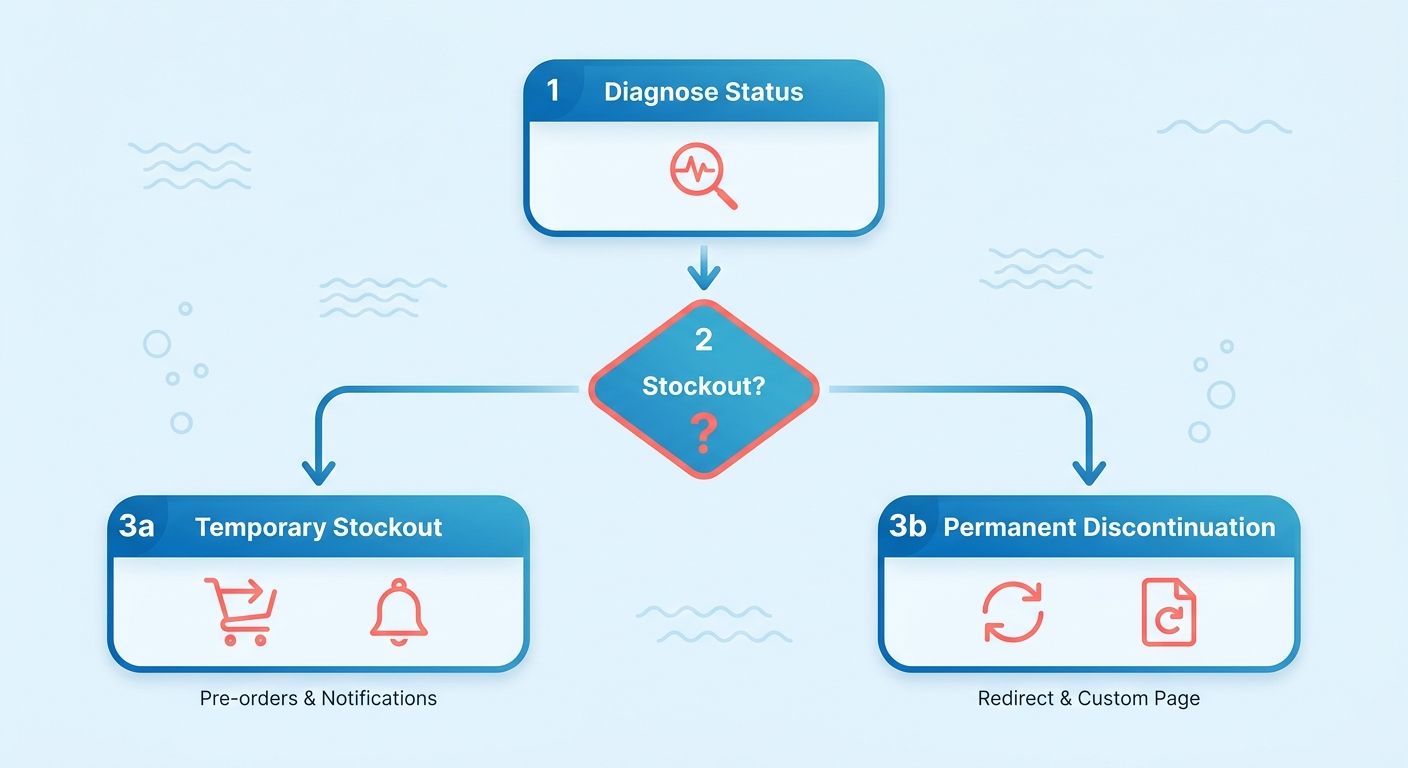
Handling a discontinued product
A discontinued product needs a redirect or a custom page, not an "out of stock" label. Once it's gone for good, sending users to a relevant replacement or parent category preserves the link equity and buyer intent you built. For products that pulled real traffic, a permanent 301 to the closest alternative is the cleanest option.
A detail most teams miss: don't slap "out of stock" or "item removed" on a discontinued page. Those phrases can tell search engines the page is thin or unhelpful, which drags down its value over time.
No close replacement? Redirect to the parent category and explain why. A short message telling the shopper the item is gone and pointing to similar options respects the user instead of dumping them on a bare category grid.
A custom 404 is your fallback when there's no logical redirect target at all. Make it useful. Related products, popular categories, a search box, so the visit doesn't end in a dead stop.
Keeping search engines current on status
Product structured data lets you mark availability directly in the markup, so search engines know whether an item is in stock, out of stock, or discontinued. Accurate listings, and lower odds of ranking a page that can't convert.
Update your XML sitemap on status changes too. When you remove or redirect a discontinued product, the sitemap tells search engines to recrawl and adjust their index faster. Stale URLs in the sitemap slow that down.
For restocked products, run the sequence in reverse. Flip availability back to in-stock in your structured data, confirm the URL is live, and get it back in the sitemap. If you redirected the page during a long stockout, remove that redirect so the original URL can rank on its own.
Why the match matters every time
Get shoppers to a page that either sells the item or offers a real alternative, and you get a conversion instead of a bounce. A mismatched response leaks revenue and erodes trust.
A specialty electronics retailer retires a specific noise-canceling headphone model that still pulls hundreds of monthly visits from an old backlink. Redirect that traffic to the successor model, and you capture buyers who'd otherwise hit a dead end and leave.
Doing this at scale gets tedious fast, especially on large catalogs where products cycle in and out constantly. Content tools can help you produce consistent, status-specific responses, whether that's replacement suggestions, restock messaging, or redirect copy, without writing each one by hand.
Saving SEO Value When a Product Retires
A 301 redirect isn't the only tool for saving link equity when a product is gone for good. Internal linking, canonical tags, and meta robots directives each play a distinct role in keeping that ranking power alive.
The goal is simple: don't let the authority you earned drain into a dead URL.
How internal linking redistributes equity
Internal linking spreads authority from a discontinued page across the pages you still want ranking. That page earned backlinks over its life, and those links passed authority to your site. Internal links from related products, category pages, and content pages capture that value and route it where it counts.
Point links at the closest replacement product and the parent category. That keeps buyer intent moving toward pages that can still convert.
It also gives Google fresh crawl paths. A discontinued page with no outbound internal links becomes a dead end, and the equity it holds has nowhere to flow.
Managing internal links by hand across a large catalog gets painful fast. Tools that map and update internal links automatically keep your equity flowing without a spreadsheet marathon every time a product retires.
When canonical tags are the right call
Use canonical tags to consolidate near-duplicate or variant pages into a single authoritative URL. If a discontinued product has close variants still selling, a canonical tag tells search engines which version to rank. You merge signals instead of splitting them across similar pages.
Say you retired the red version of a shirt but still sell blue and black. Point the red page's canonical at a surviving variant and the ranking signals consolidate onto a page that still takes orders.
Canonicals aren't redirects. Users still land on the page, but search engines treat the canonical target as the master copy. That distinction matters when you want a page reachable while funneling its SEO weight elsewhere.
What meta robots directives actually control
A noindex tag keeps a page out of search results while it stays live for direct visitors. A nofollow controls whether link equity passes through its links.
Reach for this when a discontinued page has no replacement and no meaningful backlinks. You don't want it competing in search or eating crawl budget, but you may still want it reachable.
Be deliberate. Applying noindex to a page that pulls real traffic and backlinks throws away value you should be redirecting instead. Match the directive to the page's actual worth.
Rankings you keep turn into traffic, and that traffic drives revenue you'd otherwise hand to competitors. Every retired product is a chance to reinforce your surviving pages, not a loss to write off.
Redirects: The Reliable Way to Move Ranking Power
A 301 redirect is the single most reliable way to move ranking power from a dead product URL to a live one. It tells search engines the move is permanent and hands the old page's authority to the new destination. Get the target right, and you keep most of what that page earned.
How much equity a 301 actually keeps
A 301 redirect preserves up to 90% of a page's link equity. Point a discontinued product URL at its closest live replacement, and roughly nine-tenths of the authority those backlinks built carries over. That's the difference between recovering a page's value and throwing it away with a 404.
The target matters as much as the redirect. Send the URL to the most relevant replacement, or the parent category if none exists. A redirect to your homepage wastes the buyer intent, because the shopper came looking for something specific, not your front door.
Relevance also helps the user. A shopper hunting a discontinued blender who lands on the current model of the same line stays on your site. A shopper dumped on the homepage bounces.
When to reach for a canonical instead
Canonical tags consolidate near-duplicate or variant pages so search engines index the version you want to rank. Use them when several similar product pages compete for the same terms, not when a product is gone for good. The tag points crawlers to the primary URL and pools ranking signals there.
This is a consolidation tool, not a redirect. Variant pages for color, size, or minor spec differences split ranking power across a dozen near-identical URLs. A canonical pointing each variant at the main product page fixes that.
For a permanently discontinued item with a clear replacement, a 301 is cleaner. Reach for canonicals when the pages still serve a purpose but shouldn't compete with each other in search.
When noindex is the right tool
A noindex tag keeps a page out of search results while it stays live for direct visitors. Useful for a temporarily unavailable product you don't want ranking in its empty state.
Match the directive to the status. For a stockout you expect to restock, keep the page indexable so it holds its position. For a low-value page you're phasing out, noindex pulls it from results without breaking existing links.
Don't reach for these on your best pages. A product that pulls real traffic and holds strong rankings should stay indexed and get a 301 when it retires, not a noindex that quietly bleeds visibility.
Automating redirects at scale
Large catalogs make manual redirects painful. When hundreds of SKUs churn each quarter, mapping every dead URL to the right replacement by hand doesn't hold up. Automation tools can match discontinued pages to relevant destinations and deploy the 301s in bulk, which keeps your redirect logic consistent as inventory shifts.
The payoff is speed and accuracy. You catch stockouts and discontinuations as they happen instead of weeks later, so link equity moves before rankings slip.
Why This Isn't an Inventory Afterthought
Out-of-stock and discontinued products hit your revenue and your rankings at the same time. A stockout drains sales you already earned demand for. A botched discontinuation frustrates shoppers and tanks the trust signals search engines watch. Both are fixable, but only if you treat them as SEO decisions instead of inventory afterthoughts.
What a stockout actually costs you
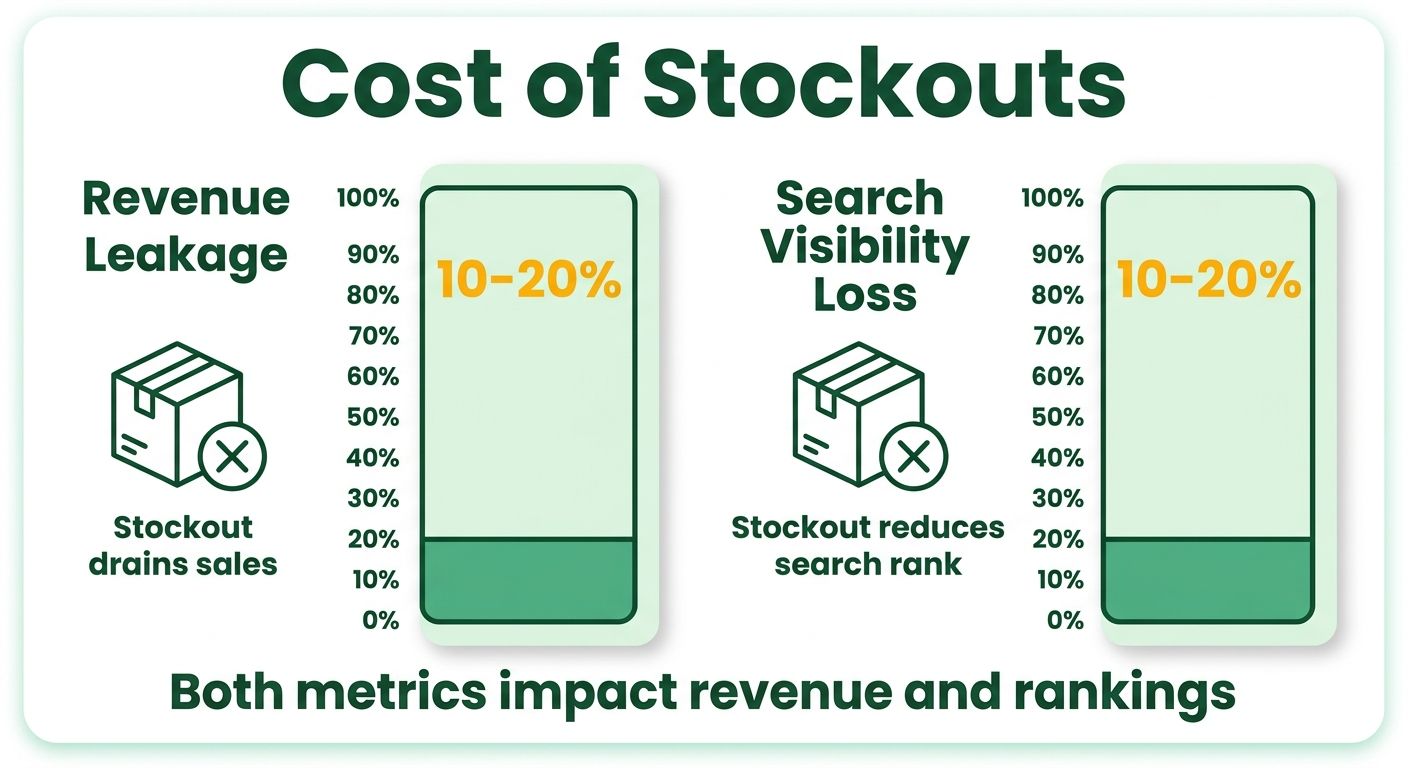
Stockouts don't just pause a sale. They leak revenue and search visibility at once. Industry estimates put the sales loss from out-of-stock products in the 10-20% range, with some retailers losing as much as a fifth of potential revenue during a stockout. That's money walking out the door while your competitors' pages stay indexed and clickable.
The SEO damage runs deeper than the missed transaction. When a page goes stale or throws errors, its ranking power slips.
But an out-of-stock product still carries value. The page keeps generating demand even at zero inventory. Shoppers land on it, see the item, get interested. That interest is exactly what you want to capture instead of waste. Keep the page visible and a dead moment becomes a warm lead, holding your search position and buyer intent while the product restocks.
Why unmanaged discontinued pages hurt UX
Discontinued pages left unmanaged push shoppers away and raise your bounce rate. Someone clicks through, finds a product that no longer exists with no next step, and leaves. Bounce rate climbs, often by 5-10%, and search engines read that behavior as a signal the page failed the visitor.
High bounce rates on product pages compound. They drag on the rankings of nearby pages and waste crawl budget you'd rather spend on live inventory.
This is a UX problem and an SEO problem at once. You need a plan for every product URL that stops selling, or those pages quietly bleed authority. A clear strategy keeps shoppers moving toward something they can actually buy.
How proper handling drives revenue
Managing these pages correctly protects rankings and recovers sales you'd otherwise lose. The pages you built earned backlinks, ranked for buyer-intent keywords, and pulled qualified traffic. Handle stockouts and discontinuations right and that equity keeps working for you instead of draining into error pages.
The payoff shows up in two places. You hold search positions during temporary gaps, and you route buyers from dead products toward live replacements. Both keep revenue flowing that a delete-and-forget approach throws away.
The catch is scale. A store with thousands of SKUs can't manually audit every stockout, redirect every discontinued URL, and rebuild internal links by hand. Streamlining content generation and internal linking lets you apply a consistent strategy across the whole catalog without a team drowning in spreadsheets. Get the process right once, then let it run.
The Three Mistakes That Cost the Most
Most out-of-stock and discontinued mistakes come from acting too fast or not acting at all. Teams either delete pages that still hold value or leave dead pages rotting with no plan. Both bleed rankings and drive shoppers away.
Here are the three errors that cost the most, and how to sidestep each.
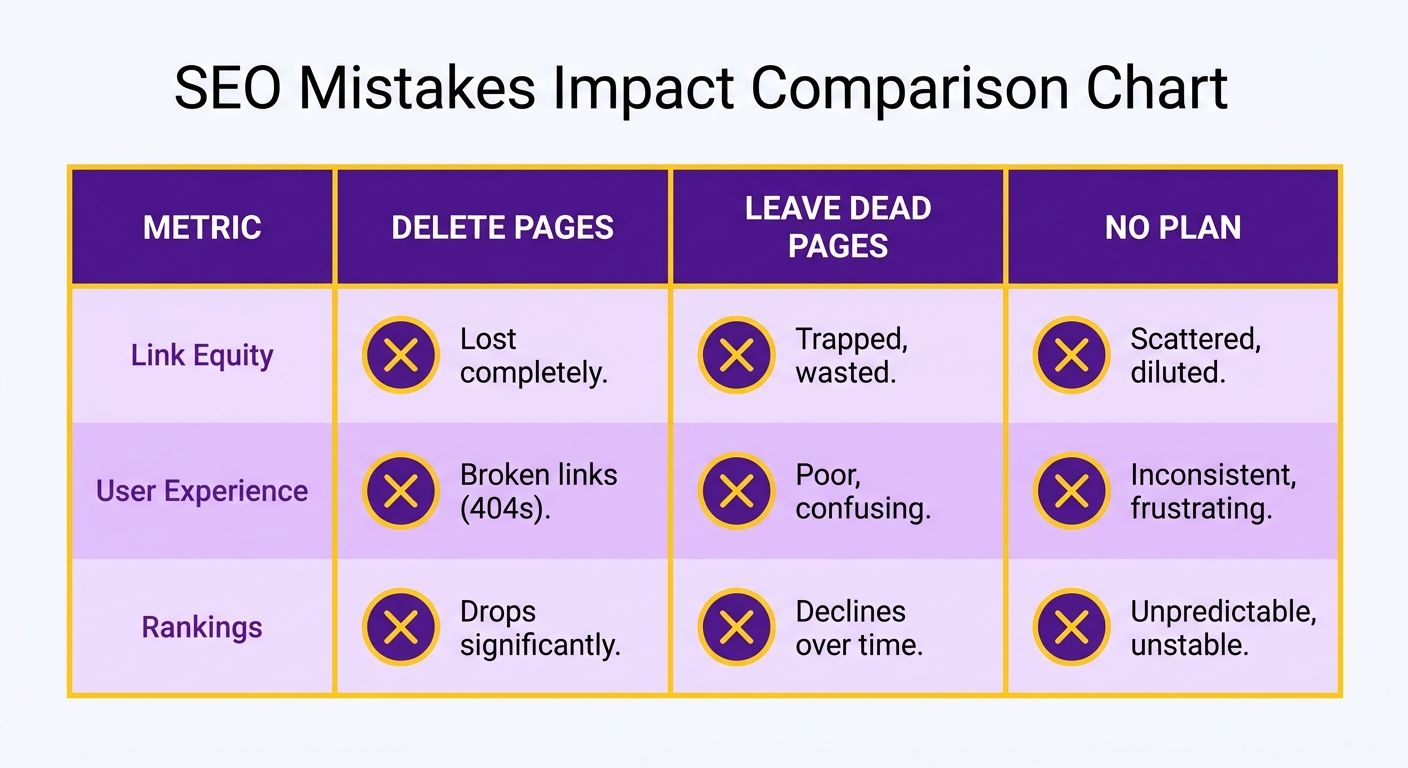
Deleting the page
Deleting a product page throws away the link equity it earned. Hard-delete a URL and every backlink pointing at it hits a dead end. The authority those links passed to your site vanishes, and any rankings the page held drop with it.
This hurts most on popular products that pulled steady traffic. You spent months earning those links and that visibility. Deleting the page erases all of it in one move.
Redirect the URL instead, or keep a page live with a clear plan. A page can leave your search results and sales channels while its storefront version stays reachable. You preserve the value without confusing shoppers.
Leaving the page untouched
Leaving a discontinued page unchanged with no action wrecks the user experience and drives up bounce rates. A shopper lands on a page for a product they can't buy, sees no alternative, and leaves. That signals to search engines that the page fails visitors.
Don't label a permanently gone product with "out of stock," "item removed," or similar on the detail page. Those phrases can push Google to treat the page as unhelpful. A permanent removal needs a redirect or a replacement, not a temporary-sounding label.
If the product's gone for good, send users to the closest alternative or the parent category, with a short message on why they landed there. That turns a dead end into a next step.
Skipping the custom 404
A custom 404 page improves the experience and cuts bounce rates when no relevant replacement exists. Sometimes a product has no natural successor and no logical parent to redirect to. A generic error page loses the visitor instantly. A custom 404 keeps them on your site.
Build it with search, popular categories, and links back into your catalog. Give shoppers a path forward instead of a wall. This works best for one-off items that don't justify a redirect target.
You can generate these custom pages and their supporting copy quickly with AI tools when you're producing them across a catalog.
One more: signal availability with structured data
Adding product markup lets you signal in stock, out of stock, or discontinued directly in the code search engines read. Accurate listings in results.
When inventory changes, update the availability field. Search engines then reflect the correct status, so shoppers aren't misled before they click. Fewer surprises, better click quality.
Structured data also supports the temporary-versus-permanent decision. An out-of-stock item can carry the correct availability value while the page stays live, ready for restock.
Building a System That Holds Up at Scale
Manual page-by-page fixes work when you have a dozen products. They collapse when you have thousands. A scalable system automates the detection, routing, and de-prioritization of dead pages so your team stops fighting the same fire every restock cycle.
Here's how to build one that holds.
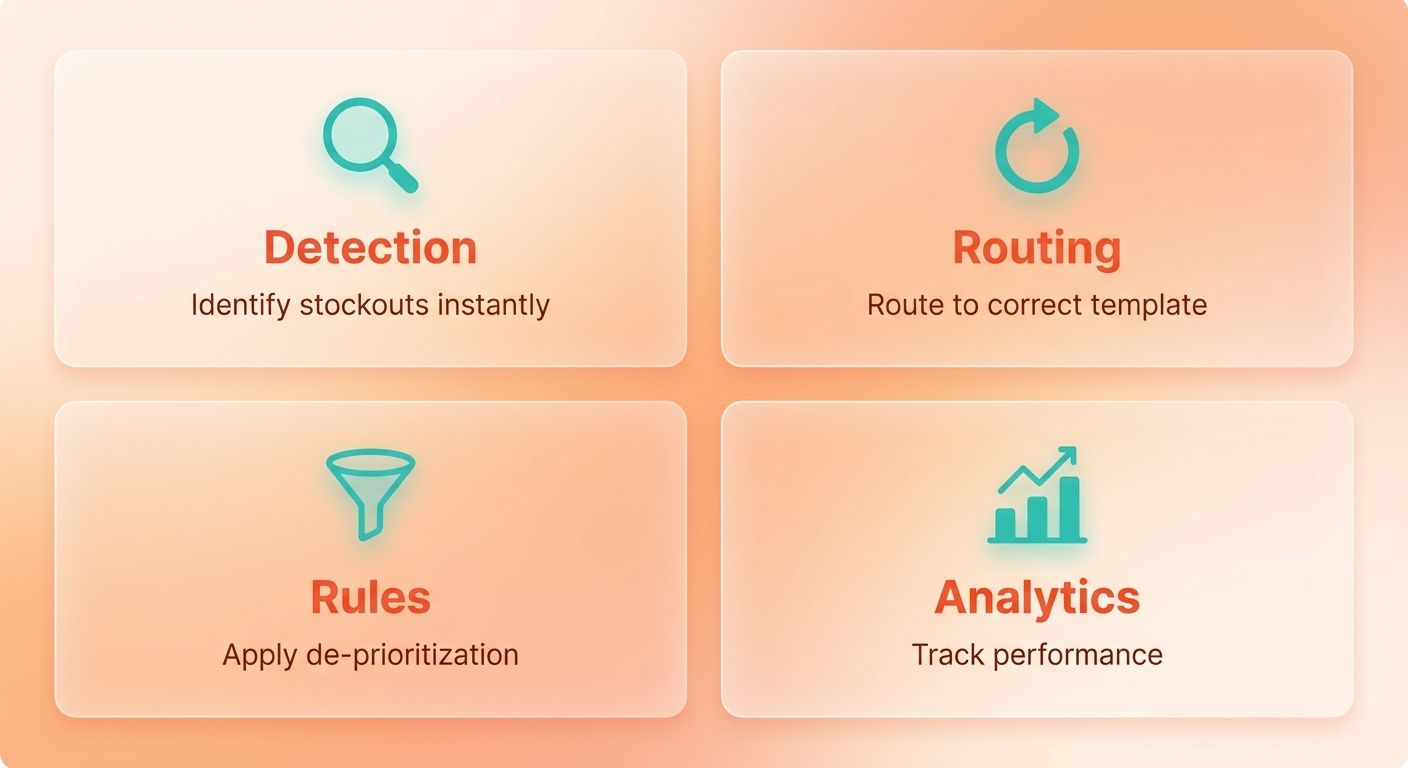
Where automation earns its keep
Automation replaces manual triage with rules that fire the moment inventory status changes. Instead of an editor checking each URL, your system flags a stockout, applies the right template, and adjusts internal search without human input. That speed matters on large catalogs.
Two moves do most of the work. First, let shoppers filter out-of-stock products in your on-site search so dead items don't clog results. Second, de-prioritize out-of-stock products in internal search rankings so available items surface first.
For discontinued items on a large store, get more aggressive. Remove the product from search and all sales channels except the online storefront, then apply a theme template that hides the "Add to Cart" button while keeping the page live. The URL and its accumulated authority survive.
Meta robots directives at scale
Set the rules once, then apply them automatically based on product status. This keeps thin, unavailable pages from dragging down your index quality.
For a temporarily out-of-stock product coming back soon, keep the page indexable. The URL holds its rankings while you wait. For a long-term stockout with no restock date, your options depend on the traffic and links the page holds.
Batch these decisions by product status rather than page by page. A rules-based system reads inventory data and assigns the correct directive. That's the difference between managing 50 pages and managing 50,000.
Internal linking across thousands of pages
Internal linking at scale routes authority from dead product pages to the ones you still want ranking. When a discontinued page had backlinks, automated linking captures that value and pushes it toward replacements and category pages. Done by hand, tedious. Done systematically, it runs in the background.
The trick is pointing links at the right targets consistently. Every discontinued page should link to its closest live alternative and its parent category. Automation tools can generate these connections based on product relationships, so you're not hand-picking targets one by one.
Software that reads your catalog and inserts contextual links keeps equity flowing without an editor touching each page. For teams managing thousands of SKUs, that turns a monthlong project into a background process.
A scalable setup ties all three together. Automation flags status changes, meta robots directives handle crawl and index rules, and internal linking redistributes authority. Build it once, and every future stockout or discontinuation follows the same tested playbook. That consistency is what protects rankings and revenue as your catalog grows.
For deeper implementation tactics, the SALT.agency guide on handling out-of-stock product pages covers additional edge cases worth reviewing.
Frequently Asked Questions
1. How long can a product stay out of stock before I should redirect it instead of keeping the page live?
There's no fixed threshold, but the deciding factor is confirmed restock intent, not time. If inventory returns within weeks or months, keep the page live with a waitlist. Only redirect once a product is genuinely discontinued. Redirecting a returning product forces you to reverse the redirect later, wasting effort.
2. What's the difference between a 404 and a 410 status code for discontinued products?
A 404 signals "not found," implying the page might return, while a 410 signals "gone permanently." Search engines typically deindex 410 pages faster than 404s. Use 410 for products you're certain won't return and that have no equity or traffic worth redirecting to a replacement.
3. Should I use a canonical tag or a 301 redirect for a discontinued product with a close variant still selling?
Use a canonical tag when the discontinued page should stay accessible to direct visitors while pooling ranking signals onto the surviving variant. Choose a 301 redirect when the product is fully gone and you want to move both users and search authority to the replacement automatically.
4. Does keeping out-of-stock pages indexed risk showing empty listings to shoppers in search results?
Accurate product schema prevents this by reporting the correct availability status directly in search results, so shoppers see "out of stock" or "pre-order" before clicking. Pairing structured data with a waitlist or pre-order option keeps the page useful, reducing wasted clicks and preserving user trust.
5. How do I decide the best redirect target when no exact replacement product exists?
Redirect to the closest parent category rather than the homepage, and add a brief message explaining the product is gone with links to similar alternatives. This preserves buyer intent and link equity while guiding shoppers toward items they can actually purchase, avoiding the bounce a bare homepage causes.
6. Can automation handle out-of-stock decisions for a catalog with thousands of frequently changing SKUs?
Automation tools map discontinued pages to relevant replacements, deploy bulk 301 redirects, and update internal links as inventory shifts. This catches stockouts and discontinuations as they happen instead of weeks later, keeping redirect logic consistent and moving link equity before rankings slip on large, fast-churning catalogs.
7. Will applying a noindex tag to an out-of-stock page permanently hurt its rankings?
Noindex removes a page from search results but doesn't permanently destroy rankings if applied briefly. However, avoid noindex on pages with real traffic and backlinks, since prolonged removal bleeds visibility. Reserve noindex for low-value pages you're phasing out, keeping strong pages indexed until they warrant a redirect.