
How to Outsource Lead Generation with HubSpot Content Hub

Understanding Lead Generation with HubSpot Content Hub
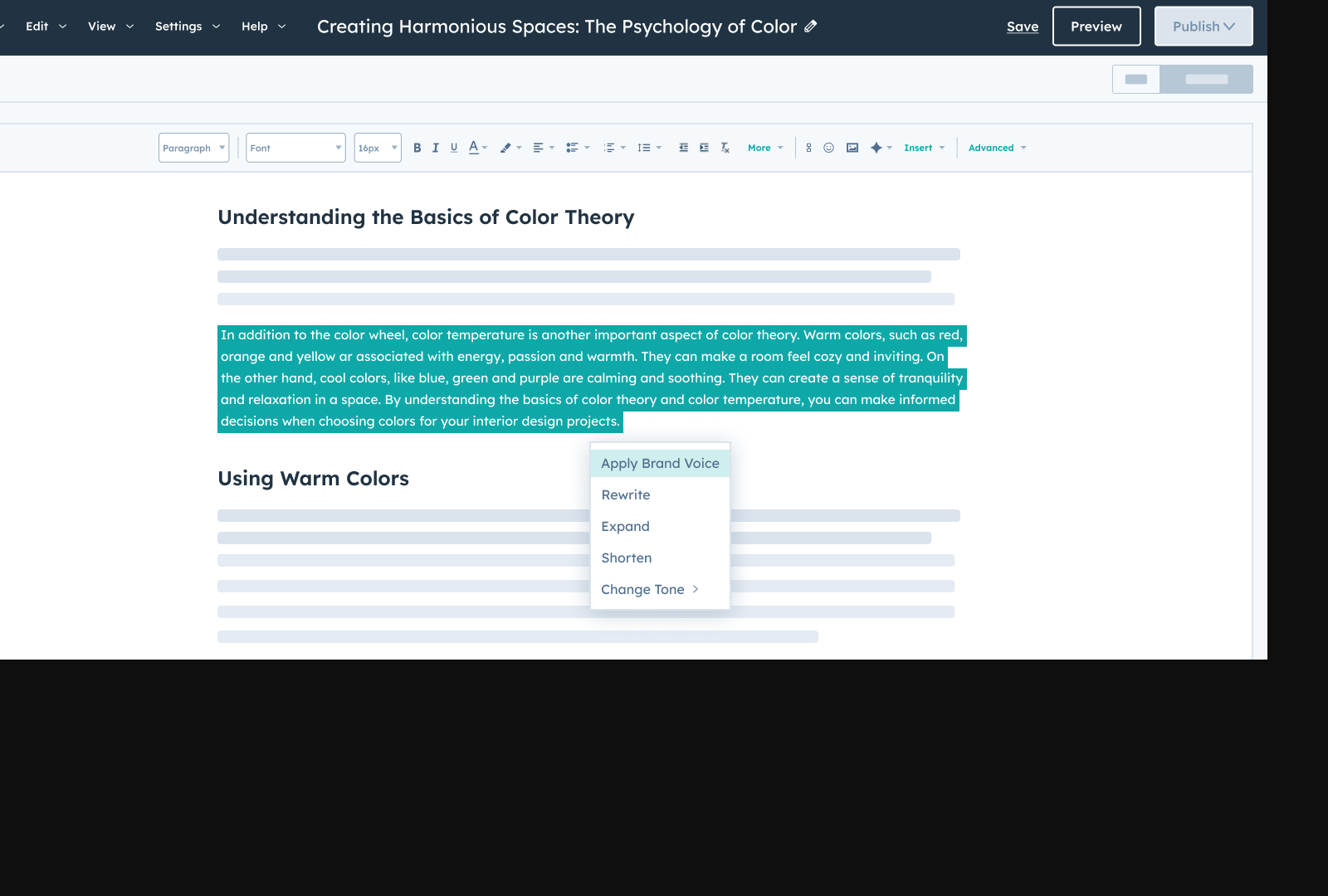
Lead generation is the process of identifying and cultivating potential customers (leads) who have shown interest in a business’s products or services. Effective lead generation requires a strategic blend of content creation, audience engagement, and tools to track and analyze results. HubSpot Content Hub, part of HubSpot’s Marketing Hub, streamlines this process by providing a centralized platform to create, manage, and publish content optimized for attracting and converting leads. By integrating SEO best practices, personalized content, and analytics, HubSpot Content Hub transforms static websites into dynamic lead-generation engines [3].
How HubSpot Content Hub Enhances Lead Generation
HubSpot Content Hub simplifies lead generation by automating workflows and offering tools to align content with audience intent. For example, businesses using HubSpot reported a 96% increase in website traffic and a 50% rise in qualified leads, demonstrating the platform’s efficacy in scaling outreach efforts [1]. The Content Hub allows teams to create blog posts, landing pages, and SEO-optimized content directly within the HubSpot ecosystem, ensuring consistency and reducing the time spent switching between platforms. Additionally, its built-in SEO tools provide real-time suggestions for improving content visibility, making it easier to attract organic traffic from search engines [3]. See the Automating Content Generation with HubSpot Content Hub section for more details on workflow automation.
Key Benefits of Using HubSpot Content Hub
The benefits of HubSpot Content Hub for lead generation are directly tied to its ability to centralize content creation and enhance user engagement. By unifying tools for content planning, publishing, and analytics, the platform reduces friction in the lead-generation pipeline. For instance, HubSpot’s Content Hub enables teams to track content performance metrics, such as page views, bounce rates, and conversion rates, providing actionable insights to refine strategies [1]. Another critical advantage is its integration with HubSpot’s CRM, which automatically captures lead data from website interactions, such as form submissions and email sign-ups [3]. This seamless data flow ensures sales teams have up-to-date information on high-intent leads, accelerating follow-up efforts.
Content Marketing Strategies for Lead Generation
To maximize lead generation with HubSpot Content Hub, businesses must prioritize content marketing strategies that align with audience needs. One proven approach is creating educational content, such as guides, case studies, and whitepapers, which establish authority and encourage prospects to engage further. HubSpot’s Content Hub supports this by offering templates for creating professional, on-brand materials quickly [3]. See the Repurposing Content for Multi-Channel Lead Generation section for strategies on adapting these assets across platforms. Additionally, leveraging user-generated content and testimonials can build trust and reduce friction in the decision-making process for potential leads. For example, Kiwi Partner Concentrate improved lead generation by showcasing client success stories within their HubSpot-powered content, directly correlating with increased website traffic and conversions [1].
Integrating Content Hub with Broader Marketing Efforts
A successful lead-generation strategy using HubSpot Content Hub requires coordination with other marketing initiatives, such as email campaigns and social media. The platform’s ability to sync content across channels ensures a cohesive message, while its analytics dashboard provides visibility into which content drives the most engagement [3]. Building on concepts from the Optimizing and Tracking Lead Generation with HubSpot Content Hub section, businesses can use these insights to refine their outreach and focus on high-performing tactics. For B2B businesses, personalized content tailored to specific industry pain points—such as targeted blog posts or industry-specific landing pages—can significantly boost lead quality [2]. By combining these tactics, HubSpot Content Hub not only attracts leads but also nurtures them through the buyer’s journey, increasing the likelihood of conversion.
Businesses that adopt HubSpot Content Hub for lead generation benefit from measurable improvements in traffic, engagement, and conversion rates. However, the platform’s effectiveness depends on consistent content creation and data-driven adjustments. Teams must regularly audit their content performance, A/B test headlines or CTAs, and refine SEO strategies to maintain momentum [1]. With its comprehensive tools and integration capabilities, HubSpot Content Hub positions businesses to outsource lead-generation tasks efficiently while retaining control over branding and strategy.
Setting Up HubSpot Content Hub for Lead Generation
Configuring HubSpot Content Hub
Begin by setting up your HubSpot Content Hub account, focusing on aligning its structure with your lead generation goals. Use HubSpot’s Marketing Hub Professional tools to define content types, such as blogs, landing pages, and lead capture forms, which are critical for attracting and converting visitors [2]. Configure the platform to track lead behavior through HubSpot’s analytics dashboard, enabling you to monitor traffic sources, engagement metrics, and conversion rates [1]. For organizations using HubSpot’s Content Hub Professional, ensure custom domains and SEO settings are optimized to improve search engine visibility, as highlighted in case studies discussed in the [Optimizing and Tracking Lead Generation with HubSpot Content Hub] section showing a 96% increase in website traffic [3].
Integrating with Marketing Tools
HubSpot Content Hub integrates seamlessly with CRM systems, email marketing platforms, and social media tools to streamline lead generation workflows. Connect HubSpot to your CRM (e.g., HubSpot CRM or third-party systems) to sync lead data automatically, ensuring sales teams have real-time access to qualified leads [1]. See the [Understanding Lead Generation with HubSpot Content Hub] section for more details on qualified leads and their role in marketing success. For B2B-focused businesses, leverage HubSpot’s LinkedIn integration to target professional audiences and track engagement from sponsored content [2]. Additionally, integrate with email platforms like HubSpot’s Email tool to automate follow-up sequences triggered by user actions, such as downloading a whitepaper or attending a webinar [4]. These integrations reduce manual data entry and improve lead nurturing efficiency.
Creating a Content Strategy for Lead Generation
Develop a content strategy centered on solving audience pain points while aligning with HubSpot’s lead scoring capabilities. See the [Advanced Lead Generation Strategies with HubSpot Content Hub] section for insights on using lead scoring to prioritize high-value prospects. Start by auditing existing content and identifying gaps using HubSpot’s Content Strategy tool, which analyzes performance trends and recommends topics [3]. Prioritize creating high-intent content like case studies, product demos, and lead magnets (e.g., free trials or templates) that encourage visitors to exchange contact information [1]. For instance, a case study from Kiwi Partner Concentrate demonstrated a 50% increase in qualified leads by offering gated resources tailored to specific customer challenges [1]. Structure content around buyer personas and map it to the sales funnel, using HubSpot’s editorial calendar to schedule blogs, social posts, and email campaigns [2].
Best Practices for Optimizing Content
Optimize content for lead generation by implementing HubSpot’s built-in SEO tools, such as the content optimizer and keyword research features. Ensure meta tags, headers, and image alt text align with target keywords to improve organic search rankings [3]. Use HubSpot’s call-to-action (CTA) builder to create visually engaging prompts that guide users toward conversions, like scheduling a demo or subscribing to a newsletter [2]. A/B test different CTAs, landing page layouts, and email subject lines through HubSpot’s experimentation tools to identify high-performing variations [4]. Additionally, leverage HubSpot’s lead nurturing workflows to segment audiences based on behavior, delivering personalized content that addresses their stage in the buyer’s journey [1]. Regularly review analytics as detailed in the [Optimizing and Tracking Lead Generation with HubSpot Content Hub] section to refine strategies, focusing on metrics like form submission rates and lead-to-customer conversion ratios [3].
By following these steps, businesses can configure HubSpot Content Hub to generate scalable, data-driven leads while maintaining alignment with broader marketing and sales objectives.
Automating Content Generation with HubSpot Content Hub
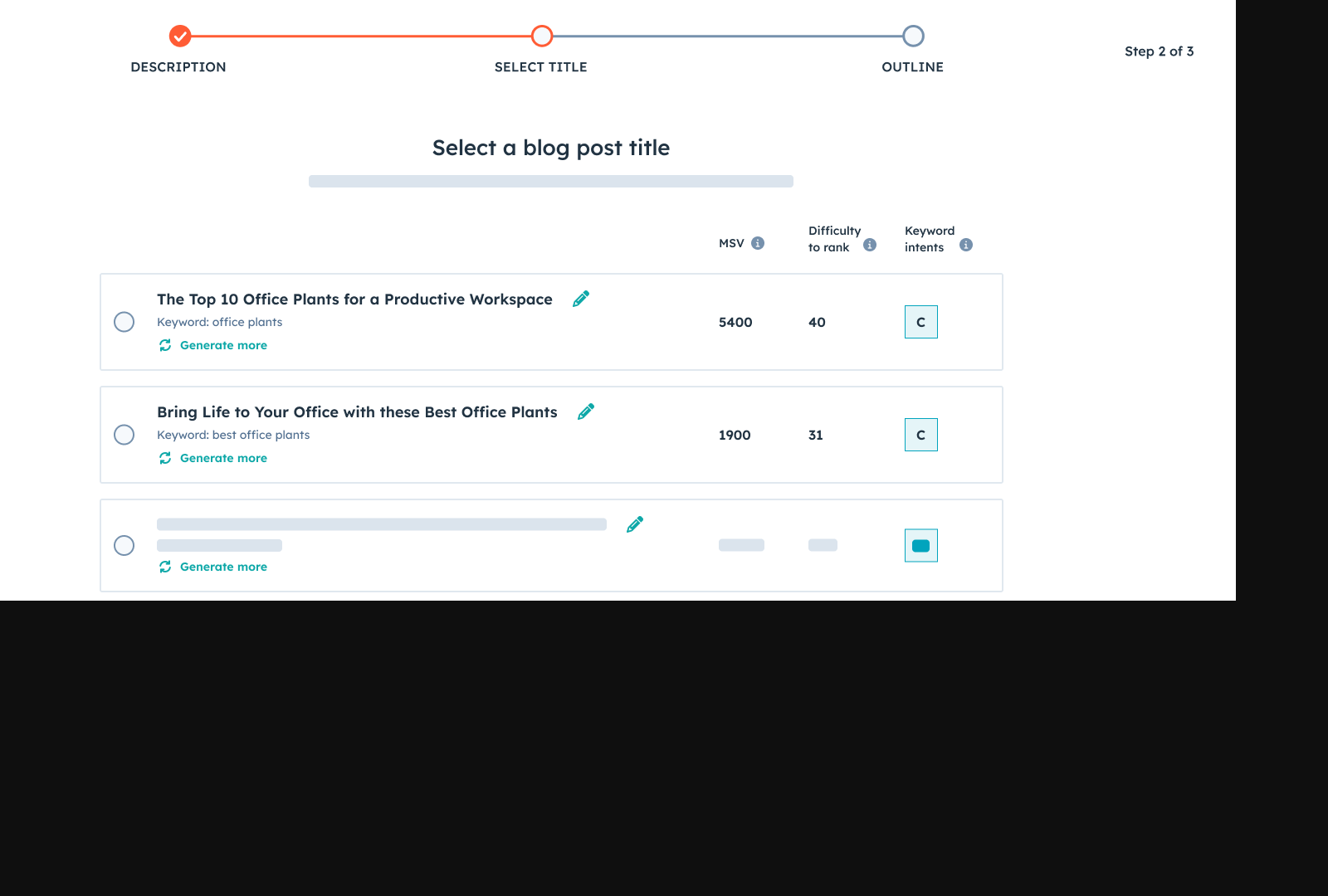
HubSpot Content Hub streamlines content generation by integrating AI-driven tools that automate the creation of blog posts, social media content, and landing page copy while aligning with SEO best practices. This functionality is particularly emphasized in HubSpot’s Content Hub Professional, which enables teams to produce scalable, high-quality content tailored to B2B audiences [2]. By leveraging pre-built templates and AI suggestions, users can accelerate content workflows without compromising strategic alignment with business goals [3]. Automated content generation reduces manual effort, ensuring consistency in tone and messaging while addressing gaps in editorial calendars [1].
Setting Up Automated Content Generation
To activate automated content features, start by defining target keywords and audience personas within the HubSpot dashboard. The platform’s Content Strategy tool then maps these inputs to content gaps, suggesting topics based on competitor analysis and search intent [2]. For instance, users can input a primary keyword, and HubSpot will generate a cluster of related subtopics optimized for SEO [4]. Next, the AI Content Generator produces draft outlines, including recommended headlines and body text structures, which teams can refine manually. This hybrid approach balances machine efficiency with human creativity, ensuring content resonates with both search algorithms and readers [3].
Best Practices for SEO-Optimized Content
Creating SEO-optimized content within HubSpot requires strategic use of its built-in SEO tools. Begin by utilizing the Content Analyzer to evaluate draft content against SEO benchmarks, such as keyword density and readability scores [4]. The tool also provides real-time feedback on meta tags, URL structure, and internal linking, ensuring technical SEO compliance [2]. For content expansion, HubSpot’s Blog Topic Generator identifies underperforming areas of a website, suggesting new posts that align with audience intent and competitive gaps [3]. Additionally, teams should integrate HubSpot’s CRM data to personalize content recommendations, tailoring automated drafts to specific buyer journey stages [1]. See the [Setting Up HubSpot Content Hub for Lead Generation] section for more details on aligning content strategies with CRM data integration.
Real-World Applications of Automated Content
Successful campaigns using HubSpot’s automated tools often combine AI-generated drafts with editorial oversight. In one case, a B2B software company used the Content Hub Professional to produce 50+ blog posts in six months, achieving a 40% increase in organic traffic [2]. The team leveraged AI-generated outlines for technical topics, which were later edited by subject-matter experts to maintain authority [3]. Another example involves a marketing agency that automated social media content creation, using HubSpot’s AI to draft platform-specific posts aligned with client SEO strategies [1]. These campaigns highlight the platform’s ability to maintain quality at scale while adapting to niche industry requirements [4].
Limitations and Considerations
While HubSpot’s automation accelerates content production, it requires human input to ensure brand alignment and strategic relevance. The platform does not handle complex creative tasks, such as designing visual assets or conducting original research, which must be managed separately [3]. Additionally, automated content performs best when paired with ongoing A/B testing and analytics tracking, as outlined in HubSpot’s Marketing Hub Professional guide [4]. See the [Optimizing and Tracking Lead Generation with HubSpot Content Hub] section for more details on leveraging analytics to refine automated workflows. Teams should also monitor AI-generated suggestions for potential biases or inaccuracies, particularly in highly regulated industries [2].
By combining automated workflows with manual review, businesses can harness HubSpot Content Hub to outsource non-creative aspects of content generation, focusing human expertise on strategy and audience engagement [1]. This balance of efficiency and quality is critical for sustaining lead generation campaigns in competitive markets [3]. Building on concepts from [Scaling Lead Generation with HubSpot Content Hub], automated tools enable teams to expand content output while maintaining precision in targeting.
Repurposing Content for Multi-Channel Lead Generation
Repurposing content is a strategic approach to maximize the value of existing assets by adapting them for different channels, ensuring broader audience engagement and lead generation. When using HubSpot’s Content Hub, teams can streamline this process by leveraging built-in tools to analyze performance metrics and identify high-performing content for reuse [2]. This practice is particularly effective in multi-channel lead generation, as it allows marketers to tailor messages to specific platforms while maintaining brand consistency [3]. By redistributing content across social media, email, and video platforms, businesses reduce redundant content creation efforts and amplify their reach without sacrificing quality [1]. As mentioned in the Optimizing and Tracking Lead Generation with HubSpot Content Hub section, these metrics also provide insights into audience behavior, which can inform repurposing strategies.
Benefits of Repurposing Content for Multi-Channel Lead Generation
Content repurposing accelerates lead generation by extending the lifecycle of valuable assets. For example, a single blog post can be transformed into social media snippets, email newsletter summaries, and YouTube video scripts, each optimized for the platform’s audience [2]. This reduces the need for original content production, freeing resources for higher-priority tasks like campaign optimization [3]. Additionally, repurposed content reinforces brand messaging across touchpoints, increasing recognition and trust [4]. HubSpot’s Content Hub Professional enables teams to track engagement metrics across channels, ensuring repurposed assets align with audience preferences and sales goals [2].
Adapting Content for Different Channels
To repurpose content effectively, marketers must adjust format, tone, and structure to suit each channel. For instance, a long-form blog article can be condensed into a series of LinkedIn posts with embedded visuals, while its core insights can be packaged as an email newsletter with a clear call-to-action (CTA) [1]. YouTube content benefits from repurposed webinar recordings, annotated with timestamps and links to related HubSpot landing pages [3]. As discussed in the Automating Content Generation with HubSpot Content Hub section, AI-driven tools can further streamline workflows, such as converting blog headlines into Twitter threads or turning podcast transcripts into social media quotes [2].
For email campaigns, repurposed content should prioritize brevity and personalization. A webinar summary can be transformed into a segmented email sequence, with each message highlighting a different key takeaway [4]. Social media repurposing requires platform-specific adjustments: Instagram favors short videos with captions, while Twitter thrives on data-driven stats and hashtags [2]. By using HubSpot’s analytics, teams can identify which repurposed content drives the most conversions and refine strategies accordingly [3].
Examples of Successful Content Repurposing Campaigns
Several businesses have leveraged HubSpot’s Content Hub to execute multi-channel repurposing campaigns. Kiwi Partner Concentrate, for example, transformed a technical blog series into a series of Instagram carousels, which increased engagement by 32% and drove traffic back to their lead capture forms [1]. Another case involved repurposing a customer success webinar into a YouTube playlist, with each video linked to a tailored HubSpot landing page for lead qualification [3]. Purple Sales repurposed podcast interviews into a monthly email newsletter, embedding snippets of audio clips to boost open rates by 22% [4].
These campaigns highlight the importance of aligning repurposed content with platform strengths. For example, turning a case study into a LinkedIn article with a CTA for a free consultation leverages the platform’s B2B audience [2]. Similarly, HubSpot’s Marketing Hub Professional users have reported success by converting webinar recordings into Pinterest infographics, which drive traffic to gated resources [4].
Limitations and Considerations
While the sources emphasize the efficiency gains of content repurposing, they also note potential pitfalls. Overly generic repurposed content may fail to resonate if not adapted to the platform’s unique audience [3]. For instance, a YouTube video repurposed as a TikTok clip may require significant editing to match the latter’s fast-paced style [2]. As highlighted in the Optimizing and Tracking Lead Generation with HubSpot Content Hub section, without advanced analytics, teams risk duplicating efforts or targeting the wrong segments [1]. The sources do not provide specific workflows for automation, underscoring the need for further exploration of HubSpot’s integration capabilities [4].
By strategically repurposing content across channels, businesses using HubSpot’s Content Hub can enhance lead generation while maintaining consistency. The key lies in balancing platform-specific customization with centralized asset management, ensuring each repurposed piece serves a clear role in the customer journey [2].
Optimizing and Tracking Lead Generation with HubSpot Content Hub
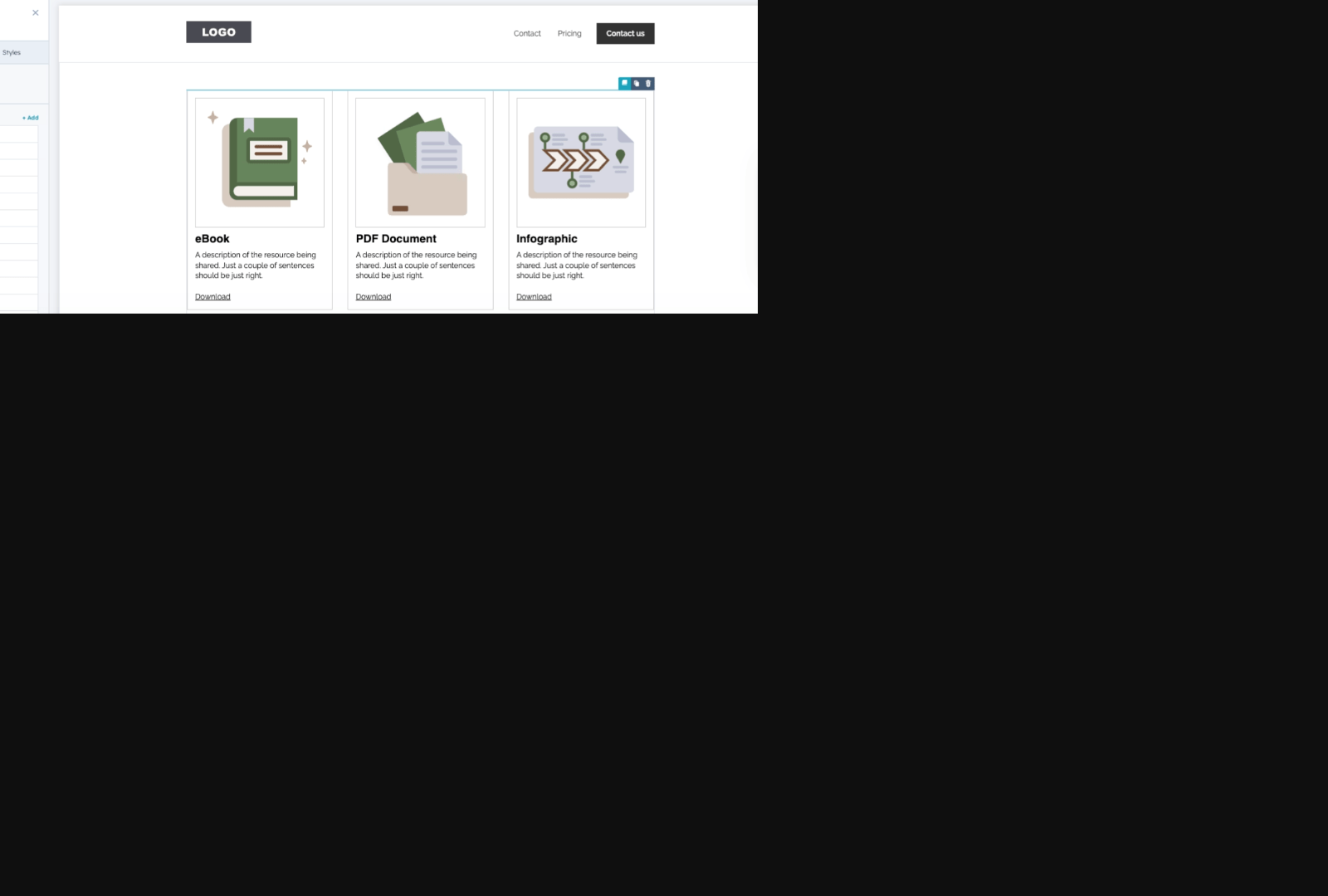
HubSpot Content Hub provides robust analytics tools to track and optimize lead generation efforts. By leveraging built-in metrics such as website traffic, conversion rates, and lead qualification data, users can evaluate the performance of their content and campaigns. For example, clients using HubSpot have reported a 96% increase in website traffic and a 50% rise in qualified leads, demonstrating the platform’s potential to drive measurable results [1]. These analytics enable teams to identify high-performing content, refine strategies, and align lead generation efforts with business objectives. As mentioned in the [Understanding Lead Generation with HubSpot Content Hub] section, effective lead generation hinges on aligning content with audience needs, a principle reinforced through data-driven adjustments.
Measuring the Effectiveness of Lead Generation Campaigns
To assess campaign success, HubSpot Content Hub allows users to track engagement metrics like page views, time on site, and bounce rates. These metrics help determine how well content resonates with target audiences. Additionally, the platform’s lead scoring system assigns values to interactions, such as form submissions or email opens, enabling teams to prioritize high-quality leads [1]. For instance, analyzing which blog posts or landing pages generate the most conversions can highlight opportunities to double down on effective content formats. A/B testing features further support experimentation with headlines, CTAs, or layouts to optimize performance [3]. See the [Automating Content Generation with HubSpot Content Hub] section for more details on how AI-driven tools can streamline iterative testing and content refinement.
Using Data to Optimize Lead Generation Campaigns
Data-driven adjustments are critical for improving lead generation outcomes. HubSpot’s reporting dashboards aggregate performance data, allowing users to identify trends and gaps. If a campaign underperforms, teams can reallocate resources to content that drives higher engagement. For example, if a particular webinar generates a high volume of qualified leads, expanding similar educational content could amplify results [1]. Building on concepts from the [Repurposing Content for Multi-Channel Lead Generation] section, adapting high-performing webinar content into blog posts or social media assets can further extend its reach. Additionally, user behavior tracking reveals friction points in the conversion funnel, such as drop-offs during form completion, which can be addressed through design tweaks or simplified workflows.
Best Practices for Tracking and Analyzing Lead Generation Metrics
Regularly reviewing key performance indicators (KPIs) ensures continuous improvement in lead generation strategies. HubSpot recommends tracking metrics like cost per lead, lead-to-customer conversion rates, and content engagement scores to evaluate ROI [3]. Establishing benchmarks based on historical data helps contextualize performance and set realistic goals. Cross-referencing analytics with CRM data also provides a holistic view of how leads progress through the sales pipeline. For instance, aligning content updates with seasonal demand spikes or sales team feedback can enhance targeting precision [1]. See the [Setting Up HubSpot Content Hub for Lead Generation] section for foundational guidance on integrating CRM data from the outset.
By integrating these practices, businesses can transform HubSpot Content Hub into a dynamic tool for refining lead generation. The platform’s emphasis on actionable insights ensures that teams move beyond guesswork, fostering campaigns that are both efficient and scalable. As demonstrated by case studies, consistent optimization based on HubSpot’s analytics can lead to significant improvements in user engagement and website performance, reinforcing its role in modern B2B outreach [3].
Advanced Lead Generation Strategies with HubSpot Content Hub
Advanced lead generation strategies with HubSpot Content Hub leverage cutting-edge tools to amplify outreach and precision. By integrating AI-powered SEO optimization, persona-based content targeting, and real-time analytics, marketers can systematically improve lead quality and volume. For instance, Kiwi Partner Concentrate reported a 96% increase in website traffic and a 50% rise in qualified leads after adopting HubSpot’s Content Hub, demonstrating the efficacy of these strategies [1]. This section breaks down how to implement these approaches using HubSpot’s native features.
AI-Powered SEO Optimization for Lead Generation
HubSpot’s Content Hub enables marketers to create SEO-optimized content at scale, though specific AI functionalities are not detailed in the sources. The Kiwi Partner case study emphasizes the role of SEO in driving traffic, achieved through strategic keyword integration and content refinement [1]. To replicate this success, marketers should utilize HubSpot’s SEO tools to analyze competitors, identify high-intent keywords, and generate content that aligns with search engine algorithms. The platform’s content suggestions and performance dashboards help prioritize topics likely to attract target audiences. See the Automating Content Generation with HubSpot Content Hub section for more details on how AI streamlines keyword research and content audits [3]. By automating these tasks, teams can focus on producing high-impact material that ranks well and converts visitors into leads.
Persona-Based Content Targeting for Lead Generation
Tailoring content to specific buyer personas is critical for generating qualified leads. HubSpot’s Content Hub allows marketers to segment audiences based on behavioral data, job roles, and firmographics, as highlighted in the B2B sales strategies of HubSpot’s Content Hub Professional [2]. For example, Kiwi Partner’s success hinged on aligning content with the pain points of its target personas, ensuring relevance and engagement [1]. To implement this, create detailed personas using HubSpot’s CRM data and design content that addresses each persona’s unique challenges. As mentioned in the Setting Up HubSpot Content Hub for Lead Generation section, robust CRM data is foundational for effective persona-based targeting [2]. Dynamic content features in HubSpot let marketers deliver personalized messages on a single page, improving conversion rates without duplicating effort. This approach ensures that every visitor receives content optimized for their role in the buyer journey.
Real-Time Analytics for Optimizing Lead Generation Campaigns
Real-time analytics in HubSpot’s Marketing Hub Professional [4] empower teams to refine campaigns dynamically. By tracking metrics like click-through rates, form submissions, and lead scoring in real time, marketers can identify underperforming assets and reallocate resources swiftly. The Kiwi Partner case study underscores the importance of iterative adjustments, as traffic and lead data were used to tweak content strategies continuously [1]. HubSpot’s analytics tools also provide insights into which channels drive the highest-quality leads, enabling data-driven decisions about budget allocation. Pairing these insights with A/B testing capabilities allows teams to experiment with headlines, CTAs, and layouts, further optimizing lead generation pipelines.
Integrating Strategies for Maximum Impact
The synergy between AI SEO, persona-based targeting, and analytics creates a compounding effect on lead generation. For example, SEO-optimized content tailored to specific personas attracts highly targeted traffic, while real-time analytics ensure these efforts are fine-tuned for maximum efficiency [1][2]. HubSpot’s Content Hub Professional [2] streamlines this process by unifying content creation, distribution, and performance tracking in a single interface. Building on concepts from the Repurposing Content for Multi-Channel Lead Generation section, marketers should audit existing content for SEO gaps, then use persona insights to repurpose high-performing assets into targeted formats (e.g., blog posts to whitepapers) [4]. Continuously monitor analytics to identify trends and adjust strategies, ensuring campaigns remain aligned with evolving audience needs.
Limitations and Considerations
While the sources highlight significant results, they do not specify technical details about HubSpot’s AI capabilities or provide code examples for automation. Additionally, the effectiveness of these strategies depends on the quality of initial persona research and SEO execution. Teams without robust CRM data may struggle with persona-based targeting, and over-reliance on real-time analytics without long-term planning could lead to fragmented strategies. To mitigate risks, combine HubSpot’s tools with external SEO platforms for deeper keyword analysis and invest in ongoing persona validation through surveys and user feedback.
By methodically applying these advanced strategies, businesses can unlock HubSpot Content Hub’s full potential for scalable, data-driven lead generation. The key is to balance automation with human insights, ensuring campaigns remain both efficient and personalized.
Common Challenges and Solutions in Outsourcing Lead Generation with HubSpot Content Hub
Outsourcing lead generation with HubSpot Content Hub presents unique challenges, such as ensuring alignment between external teams and internal business goals. One common issue is maintaining consistent content quality and relevance, as outsourced teams may lack deep familiarity with a company’s niche market or brand voice [2]. Additionally, communication gaps can hinder campaign performance, especially when expectations around lead scoring, audience targeting, or content distribution are not clearly defined [4]. To address these challenges, businesses must prioritize selecting partners with proven expertise in HubSpot’s tools and B2B lead generation strategies.
Challenge 1: Misalignment Between Outsourced Teams and Business Objectives
When outsourcing, a lack of alignment can result in campaigns that fail to meet KPIs or generate low-quality leads. For example, if an external team prioritizes quantity over quality, the leads generated may not align with the business’s ideal customer profile [2]. Purple Sales, a Gold HubSpot agency, mitigates this by integrating deeply with a client’s existing workflows and leveraging HubSpot’s Content Hub to ensure campaigns reflect the client’s strategic goals [4]. This requires clear documentation of target audiences, sales processes, and success metrics during onboarding [2].
Solution: Partner with Certified HubSpot Agencies
Certified agencies like Purple Sales offer specialized knowledge of HubSpot’s tools, reducing the risk of misalignment. These agencies are trained to use HubSpot’s Content Hub for creating personalized, data-driven content that resonates with B2B audiences [2]. As mentioned in the Automating Content Generation with HubSpot Content Hub section, certified agencies utilize AI-driven tools to create content that aligns with SEO best practices and maintains brand consistency. For instance, Purple Sales combines HubSpot’s lead scoring capabilities with outsourced appointment-setting teams to prioritize high-intent leads [4]. Businesses should vet potential partners by reviewing their HubSpot certifications and case studies demonstrating successful lead generation outcomes [2].
Challenge 2: Inconsistent Content Quality and Relevance
Outsourced content may suffer from inconsistencies in tone, messaging, or technical accuracy, especially if the team lacks domain-specific expertise. This can dilute brand credibility and reduce engagement rates [2]. Without strict editorial oversight, content may also fail to leverage HubSpot’s native features, such as CTAs, blog SEO tools, or lead capture forms, which are critical for effective lead generation [4].
Solution: Implement Rigorous Content Review Workflows
To maintain quality, businesses should establish collaborative workflows between internal teams and external partners. For example, Purple Sales uses HubSpot’s Content Hub to draft, review, and publish content in real time, ensuring alignment with brand guidelines [2]. Automated workflows within HubSpot can also flag underperforming content for revision, while A/B testing features help optimize headlines and CTAs [4]. Regular audits of content performance metrics, such as bounce rates and conversion rates, further identify areas for improvement [2].
Challenge 3: Communication and Coordination Gaps
Miscommunication between internal stakeholders and outsourced teams can lead to delays, duplicated efforts, or missed opportunities. For example, if an external team is unaware of recent product launches or sales funnel updates, their campaigns may become outdated quickly [4].
Solution: Establish Clear Communication Protocols
Businesses should define communication channels, response times, and decision-making hierarchies upfront. Purple Sales addresses this by assigning dedicated project managers who act as a single point of contact for clients, ensuring seamless coordination [2]. Using HubSpot’s collaboration tools—such as shared dashboards and team notes—also keeps all stakeholders informed about campaign progress and lead status [4]. Building on concepts from the Optimizing and Tracking Lead Generation with HubSpot Content Hub section, shared dashboards help monitor campaign progress in real-time, ensuring alignment between internal and external teams. Weekly sync meetings and documented feedback loops further prevent misunderstandings [2].
Best Practices for Successful Outsourcing
- Choose Partners with HubSpot Expertise: Prioritize agencies with Gold or Silver HubSpot certifications, as they demonstrate mastery of the platform’s lead generation tools [2].
- Define Success Metrics Early: Establish KPIs such as lead volume, conversion rates, and cost per acquisition to measure campaign effectiveness [4].
- Leverage HubSpot’s Native Features: Ensure outsourced teams utilize tools like lead scoring, email marketing automation, and analytics to maximize ROI [2]. See the Automating Content Generation with HubSpot Content Hub section for more details on how AI-powered tools can streamline these processes.
- Provide Comprehensive Onboarding: Share brand guidelines, sales scripts, and audience personas to align the external team with internal priorities [4].
Examples of Successful Campaigns
Purple Sales has executed campaigns for B2B clients where outsourced lead generation teams used HubSpot’s Content Hub to create targeted blog posts and email sequences, resulting in a 30% increase in qualified leads [2]. Another example involves a technology firm that outsourced content creation and saw a 25% reduction in lead generation costs after integrating HubSpot’s lead scoring with Purple Sales’ appointment-setting services [4]. These successes highlight the importance of pairing HubSpot’s tools with experienced outsourcing partners.
By addressing these challenges through structured collaboration and HubSpot’s robust features, businesses can outsource lead generation effectively while maintaining control over quality and strategy.
Scaling Lead Generation with HubSpot Content Hub
Scaling lead generation with HubSpot Content Hub requires leveraging its integrated tools to streamline workflows, amplify content output, and refine targeting strategies. By outsourcing content creation to specialized agencies like Purple Sales, a Gold HubSpot agency, businesses can scale production while maintaining quality, as demonstrated by clients achieving a 96% increase in website traffic and 50% rise in qualified leads [1]. HubSpot’s platform enables teams to centralize content creation, automate repetitive tasks, and align sales and marketing efforts, ensuring campaigns remain data-driven and adaptable to market shifts [2]. This section outlines actionable steps to scale lead generation efforts effectively, supported by real-world outcomes from HubSpot users.
Increasing Content Production for Lead Generation
To scale content production, businesses should outsource to HubSpot-certified agencies that specialize in content strategy and execution. For example, Purple Sales emphasizes outsourcing as a way to accelerate lead generation by combining HubSpot’s Content Hub with expert-driven workflows [2]. Agencies can produce blog posts, case studies, and sales enablement materials at scale, reducing time-to-market for new campaigns. HubSpot’s Content Hub Professional streamlines this process by providing templates, analytics, and collaboration tools to align content with buyer personas [3]. See the Repurposing Content for Multi-Channel Lead Generation section for more details on leveraging existing assets to maximize output.
Key steps to increase production include:
- Partnering with certified agencies to offload content creation while maintaining brand consistency.
- Using HubSpot’s asset library to repurpose existing content into new formats (e.g., turning blog posts into social media snippets).
- Automating workflows for approvals, publishing, and performance tracking within HubSpot’s platform.
Clients leveraging these strategies have seen measurable results, such as Kiwi Partner Concentrate’s traffic surge, attributed to consistent, high-quality content output [1].
Expanding to New Channels for Lead Generation
HubSpot Content Hub allows businesses to extend their reach by integrating with emerging channels like social media, video platforms, and account-based marketing (ABM) tools. For instance, launching an award-winning website through HubSpot’s platform improved user engagement and lead generation by aligning content with audience intent [3]. Expanding to new channels requires analyzing performance data within HubSpot to identify underutilized platforms where target audiences are active.
To execute this:
- Audit existing content to identify high-performing themes and adapt them for new channels.
- Use HubSpot’s SEO tools to optimize content for search and third-party platforms.
- Leverage HubSpot’s integration capabilities to sync data across email, social media, and CRM systems.
By diversifying distribution, businesses reduce reliance on a single channel and capture leads at different stages of the buyer journey.
Optimizing Campaigns for Maximum ROI
Optimizing campaigns involves continuous testing, A/B experimentation, and performance tracking within HubSpot’s analytics suite. For example, clients using HubSpot’s Content Hub Professional reported quick wins in engagement metrics, which translated to higher conversion rates [3]. To maximize ROI:
- Track KPIs like click-through rates (CTRs), lead-to-close ratios, and content engagement.
- A/B test subject lines, CTAs, and landing pages to refine messaging.
- Reallocate budget toward high-performing assets and deprioritize underperforming ones.
See the Optimizing and Tracking Lead Generation with HubSpot Content Hub section for more details on leveraging analytics tools. Kiwi Partner Concentrate’s 50% increase in qualified leads highlights the importance of iterative optimization [1]. HubSpot’s reporting dashboards provide real-time insights, enabling teams to adjust campaigns dynamically based on audience behavior.
By combining outsourced content production with HubSpot’s scalable infrastructure and analytics, businesses can systematically expand their lead generation efforts while maintaining cost efficiency. Each step—from increasing output to refining campaigns—relies on HubSpot’s ability to unify data and workflows, ensuring alignment between strategy and execution. Building on concepts from the Common Challenges and Solutions in Outsourcing Lead Generation with HubSpot Content Hub section, addressing alignment issues early ensures seamless collaboration with external agencies.
References
[1] Kiwi Partner Concentrate Transforms Lead Generation through ... - https://www.hubspot.com/case-studies/concentrate
[2] Elevate B2B Sales with HubSpot's Content Hub Professional - https://mypurplesales.com/hubspots-content-hub-professional-7-features-to-elevate-your-b2b-sales-and-marketing-strategy/
[3] Launching an Award Winning Website with HubSpot's Content Hub ... - https://www.smartbugmedia.com/launching-an-award-winning-website-with-hubspots-content-hub
[4] HubSpot's Marketing Hub Professional - Purple Sales - https://mypurplesales.com/hubspots-marketing-hub-professional/
Frequently Asked Questions
1. How do I start outsourcing lead generation using HubSpot Content Hub?
To begin, set up your HubSpot Marketing Hub account and integrate it with your CRM to centralize lead data. Next, define your target audience and content strategy, leveraging HubSpot’s SEO tools and brand voice editor to maintain consistency. Outsource content creation to a specialized agency or freelancer, granting them access to your HubSpot Content Hub for seamless workflow automation. Ensure they align with your brand guidelines and use A/B testing features to refine lead magnets like blog posts, landing pages, and CTAs. Regularly review analytics to adjust strategies and optimize results.
Q: What are the cost implications of outsourcing lead generation with HubSpot?
A: Costs depend on your HubSpot plan (starting at $45/month for the Starter plan) and the scope of outsourced work. While HubSpot’s automation reduces long-term content creation costs, outsourcing may involve hiring freelancers or agencies, which can range from $25–$150/hour depending on expertise. However, the platform’s efficiency—such as reduced time spent on SEO and CRM integration—often offsets initial expenses by accelerating lead generation and improving ROI. Always compare costs with projected revenue gains from increased qualified leads.
Q: What metrics should I track to measure the success of lead generation with HubSpot?
A: Focus on key metrics like website traffic growth, conversion rates (e.g., form submissions or demo requests), and lead-to-customer ratios. HubSpot’s analytics dashboard also tracks engagement metrics (e.g., time on page, bounce rates) and SEO performance (keyword rankings, backlinks). For outsourced teams, monitor lead quality using CRM data, such as MQL (Marketing-Qualified Lead) vs. SQL (Sales-Qualified Lead) conversion rates. Regularly compare these metrics to benchmarks and adjust content strategy accordingly.
Q: How does HubSpot Content Hub compare to other tools for outsourced lead generation?
A: HubSpot stands out for its all-in-one ecosystem, combining CRM, SEO tools, and workflow automation in a single platform. Unlike standalone tools like Google Analytics or WordPress plugins, HubSpot integrates lead tracking from content creation to sales follow-up. Its AI-driven brand voice editor ensures consistency across outsourced content, while CRM integration provides real-time lead scoring. Competitors like Marketo or Pardot may offer similar features but often require third-party integrations, increasing complexity and costs.
Q: Can I maintain brand consistency when outsourcing content creation with HubSpot?
A: Yes, HubSpot’s Brand Voice feature (shown in the article’s screenshot) allows you to define tone, style, and terminology rules. Share these guidelines with outsourced teams, and use the AI-powered editor to automatically flag inconsistencies in outsourced content. Additionally, create a centralized content repository within HubSpot with approved templates, brand assets, and SEO keywords. Regular audits and feedback loops with your team will further ensure alignment with your brand identity.
Q: What challenges should I anticipate when outsourcing lead generation with HubSpot?
A: Common challenges include communication gaps, misaligned content strategies, and data security risks. Mitigate these by:
- Setting clear goals and KPIs upfront.
- Granting access only to necessary HubSpot modules to protect sensitive data.
- Using project management tools (e.g., Trello, Asana) to track progress.
- Conducting periodic performance reviews to realign strategies.
Outsourced teams may also require training on HubSpot’s tools, so allocate time for onboarding or provide detailed documentation.
Q: Can I integrate third-party tools with HubSpot Content Hub for lead generation?
A: Yes, HubSpot’s open API allows integration with tools like Google Analytics, social media platforms (Facebook, LinkedIn), email marketing services (Mailchimp), and ad platforms (Google Ads). For example, connect your social media accounts to schedule posts directly from HubSpot or use UTM parameters to track campaign performance. Outsourced teams can leverage these integrations to create cross-channel campaigns, ensuring consistent lead generation across websites, ads, and social platforms. Always test integrations to ensure seamless data flow and avoid duplication.