
How to Prevent Content Cannibalization Before You Publish (10-Rule Checklist)

Key Takeaways
- Use Google Search Console’s Performance Report to identify pages ranking for identical keywords within the same topic cluster.
- Analyze Google Analytics bounce rates and session duration to detect overlapping content targeting the same audience.
- Check Google Search Console’s URL Inspection Tool to ensure pages targeting similar topics are indexed correctly and not conflicting.
- Conduct monthly content audits to flag new pages competing with existing ones for the same search intent.
- Consolidate or repurpose cannibalizing content if two pages rank in the top 10 for the same keyword and share >50% overlapping content.
- Export and compare organic traffic metrics quarterly to track shifts in keyword performance across content pillars.
- Automate monitoring with SEO tools like SEMrush to alert when new content duplicates existing SEO efforts.
Related Video
Watch: Stop SEO Cannibalization: Use ChatGPT to De-Duplicate Your Content Plan by Joy Youell
Why Content Cannibalization Matters
Content cannibalization occurs when multiple pieces of content on the same website compete for the same keywords, diluting SEO value and confusing search engines about which page to prioritize. This issue directly harms organic search rankings, traffic distribution, and user experience, making it a critical concern for teams managing large content libraries. For example, a B2B SaaS company with overlapping blog posts about "cloud migration tools" might see its top pages split rankings, resulting in lower visibility for all. As mentioned in the Rule 1-3: Pre-Publish Checklist section, structured planning is essential to avoid such overlaps before publishing.
How Content Cannibalization Hurts SEO Performance
When multiple pages target the same keyword, search engines struggle to determine which content is most relevant. This keyword cannibalization weakens domain authority and splits potential traffic across redundant pages. Studies show that websites with unresolved cannibalization often see a 20–40% drop in organic traffic compared to competitors with streamlined content strategies. For instance, one organization discovered three separate landing pages competing for the term "project management software," none of which ranked in the top three Google results. Fixing this issue consolidated rankings and boosted the target page’s traffic by 65% within six months. Building on concepts from the Rule 4-6: Internal Linking and Anchor Text section, strengthening internal linking can help resolve competing pages by establishing clear hierarchy.
Real-World Consequences of Overlapping Content
Content cannibalization isn’t just a technical problem-it impacts business outcomes. A common scenario involves AI-generated content tools producing similar topics without proper oversight. One SaaS provider using automated blogging created 15 articles on "SEO best practices" within a year, each targeting variations of the same core keyword. This redundancy caused internal competition, with no single page dominating search results. The fix? A content audit to merge or repurpose redundant pages, redirect traffic to a centralized hub, and improve user engagement metrics like bounce rate and time on page. As mentioned in the Monitoring and Maintenance section, ongoing audits are vital to catching these issues early.
Who Benefits Most from Preventing Cannibalization?
B2B marketers managing complex buyer journeys, content creators producing high-volume assets, and digital strategists optimizing for SEO all gain from resolving cannibalization. For B2B teams, overlapping content can fragment lead generation efforts, making it harder to nurture prospects. Content creators avoid wasting time on redundant work, while SEO strategists see clearer metrics for content performance. A digital agency’s case study revealed that fixing cannibalization across 50+ pages increased client site traffic by 30% and reduced content production costs by 25%.
How AnyPost.ai Addresses These Challenges
Automated tools like AnyPost.ai play a key role in preventing cannibalization by integrating keyword audits, topic clustering, and content uniqueness checks into the publishing workflow. Unlike generic providers, AnyPost.ai uses AI to flag overlapping topics during the planning phase, ensuring new content fills gaps rather than repeating existing material. Its SaaS service also suggests internal linking strategies to strengthen page authority and guide users toward the most relevant content. For teams producing 50+ blog posts annually, this automated oversight reduces manual audits by up to 80%, saving time while improving SEO outcomes.
Understanding Content Cannibalization
Content cannibalization occurs when multiple pages on your website compete for the same search terms, diluting your SEO efforts and reducing the visibility of each individual page. This problem stems from poor content planning, overlapping keywords, or duplicate content. For example, if your site has three blog posts all targeting the keyword “how to start a podcast,” search engines struggle to determine which page deserves the top rank. The result? Lower rankings for all and reduced traffic. Below, we break down the causes, consequences, and strategies to address this issue.
What Causes Content Cannibalization?
Content cannibalization typically happens in two ways: duplicate content and keyword overlap. Duplicate content occurs when identical or nearly identical pages exist, often due to poor editorial oversight or automated content generation. For instance, a SaaS company might publish two “onboarding guides” with overlapping sections, confusing search engines about which version to rank.
Keyword overlap, meanwhile, happens when multiple pages target the same primary keyword without differentiation. Consider a fitness brand creating separate articles for “best protein powders” and “top-rated protein supplements” without clarifying their unique angles. Both pages aim for the same audience, splitting traffic and weakening their collective impact. Poor internal linking, as discussed in the Rule 4-6: Internal Linking and Anchor Text section, further exacerbates the issue by failing to guide users-or search engines-to the most relevant page.
How Does Cannibalization Harm Your Rankings and Traffic?
When multiple pages compete for the same keywords, search engines distribute rankings unevenly, leaving no single page strong enough to dominate. This spreads traffic thin, reducing the chances of any one page ranking highly. For example, if two pages rank at positions 4 and 5 for a keyword, neither gains significant visibility, whereas consolidating their content into one optimized page could push it to position 1.
The harm extends beyond rankings. Cannibalization also increases bounce rates if users land on a weaker page instead of the most comprehensive one. Additionally, it wastes resources: time spent creating redundant content could have been used to refine a single, high-quality page. Tools like Google Search Console and Google Analytics help identify these issues by highlighting pages targeting similar keywords or receiving traffic from overlapping search terms.
How Can You Identify and Fix Cannibalization?
Start by auditing your site for keyword overlaps. Use Google Search Console’s “Performance” report to find pages ranking for the same terms. Pair this with Google Analytics to assess which pages drive the most traffic and engagement. If multiple pages rank for the same keyword but underperform collectively, consolidation is likely needed.
For instance, suppose you run an e-commerce site and notice three product pages all targeting “wireless noise-canceling headphones.” Analyzing their content might reveal redundant descriptions or overlapping use cases. Merging these into a single, detailed guide or restructuring their focus (e.g., budget-friendly, premium, and noise-canceling features) can eliminate competition.
Internal linking plays a critical role in prevention. Ensure each page links to the most authoritative version of related content. For example, a blog post on “SEO basics” should direct readers to a comprehensive guide rather than a duplicate article. Tools like AnyPost.ai can streamline this process by analyzing keyword density and suggesting optimizations before publishing, aligning with the Rule 1-3: Pre-Publish Checklist recommendations.
By addressing content cannibalization early, you create a clearer path for search engines to prioritize your best content, ultimately boosting rankings and traffic. The next step is to audit your existing content and implement fixes like merging pages, refining keywords, or improving internal linking-strategies we’ll explore in the Implementing the 10-Rule Checklist section.
Rule 1-3: Pre-Publish Checklist
Content cannibalization occurs when multiple pages on your site compete for the same keywords or topics, diluting your SEO impact. To prevent this, the first three rules of your pre-publish checklist should address owner URL designation, intent locking, and SERP overlap diagnosis. These steps ensure clarity in your content strategy, eliminate keyword conflicts, and align your pages with user intent. Below, we break down each rule with actionable guidance..
Rule 1: Designate a Single Owner URL for Each Topic
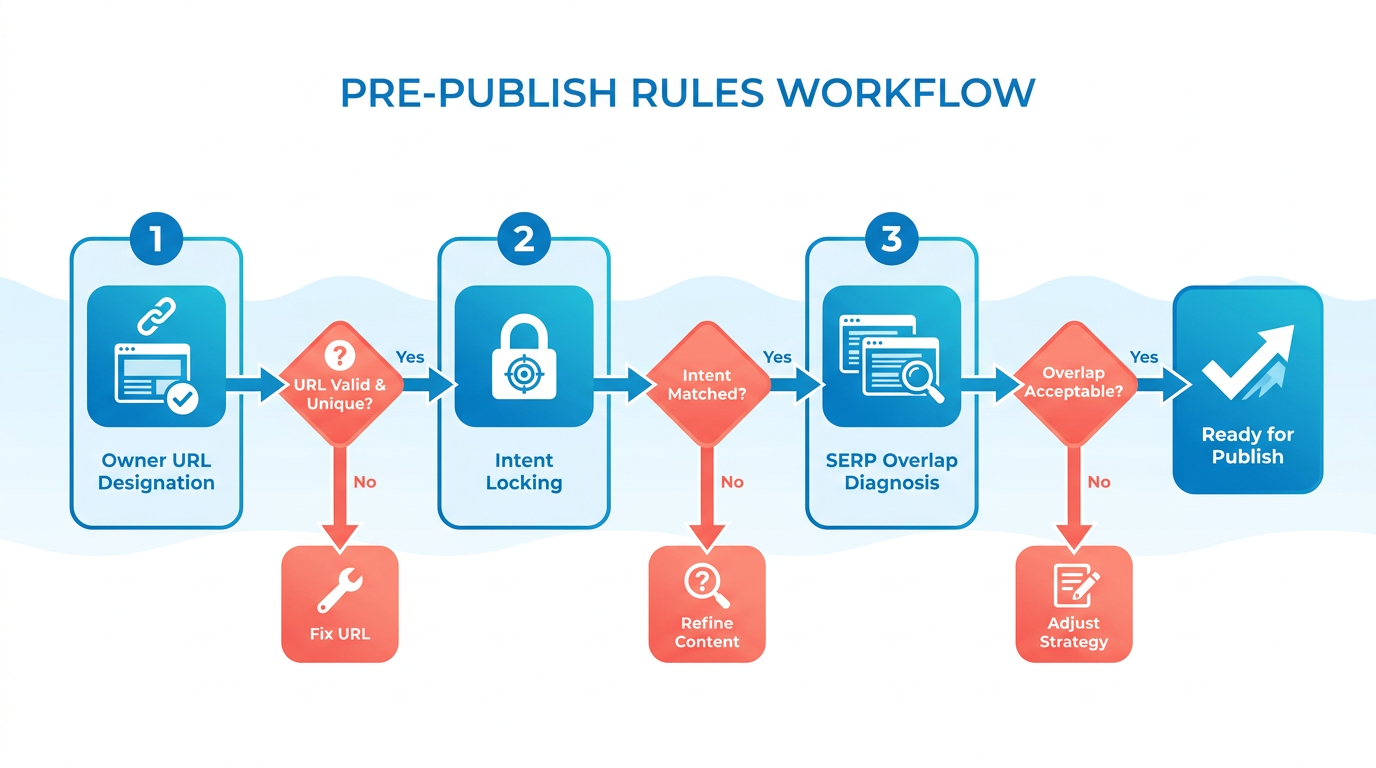
Why it matters: Search engines struggle to determine which page is most relevant when multiple pages target the same keyword. Assigning a single owner URL to a specific topic consolidates authority and avoids confusion.
To apply this rule:
- Create a content inventory: List all pages targeting related keywords. For example, if you have three blog posts about “SEO tools,” identify which one should be the primary resource.
- Choose the strongest page: Evaluate pages by organic traffic, user engagement, and content depth. The highest-performing page becomes the owner URL.
- Redirect or repurpose others: Use 301 redirects for outdated pages or rework redundant content to target subtopics (e.g., “SEO tools for beginners” vs. “advanced SEO tools”). For instance, as outlined in the Rule 7-10: Refreshing and Repurposing Content section, repurposing allows you to expand your library while avoiding overlap.
Example: A SaaS company might have two pages about “project management software.” By designating one as the owner URL and splitting the other into niche guides (e.g., “team collaboration tools” or “agile project management”), they avoid cannibalization while expanding their content library..
Rule 2: Lock User Intent to Prevent Keyword Drift
Why it matters: Keyword drift happens when content veers from its original purpose, causing mismatches between user expectations and page content. Intent locking ensures your content aligns with the specific needs of your audience. As explained in the Why Content Cannibalization Matters section, misaligned intent directly contributes to SEO inefficiency.
Use AnyPost.ai’s Persona Engine to automate this process. The tool analyzes search intent for your target keywords and generates content tailored to a specific audience persona (e.g., a buyer, a researcher, or a problem-solver). For instance, a post targeting “best budget laptops” could focus on buyers prioritizing cost, while a separate post might address “best laptops for students,” emphasizing portability and performance.
Example: A health brand creates two posts about “weight loss diets.” The first targets informational intent (e.g., “how to start a keto diet”), while the second addresses transactional intent (e.g., “buy keto meal plans”). This separation prevents overlap and strengthens SEO relevance..
Rule 3: Diagnose SERP Overlap Before Publishing
Why it matters: The Search Engine Results Page (SERP) reveals which terms are already driving traffic to your site. Overlapping keywords across multiple pages signal cannibalization risks. As emphasized in the Monitoring and Maintenance section, ongoing audits are essential to maintaining alignment with evolving search trends.
To diagnose SERP overlap:
- Audit existing rankings: Use tools like AnyPost.ai’s Cannibalization Checker to identify pages ranking for the same keywords.
- Analyze competitor SERPs: If your new content targets a keyword already used by other pages, adjust its focus or merge the content.
- Refine keyword clusters: Group related terms into subtopics (e.g., “SEO for e-commerce” vs. “SEO for SaaS”).
Example: A tech blog plans to publish a new article on “cloud computing security.” A SERP audit shows two existing posts targeting the same phrase. By splitting the topic into “cloud data encryption” and “cloud access control,” the team avoids overlap and caters to distinct user queries..
Benefits of Using AnyPost.ai for Automated Checks
AnyPost.ai streamlines these rules by automating owner URL designation, intent locking, and SERP overlap analysis. Its Generative Engine Optimization (GEO) tools ensure new content aligns with your strategy while avoiding conflicts. For example, the Keyword Finder identifies low-competition terms to target, while the Rank Tracker monitors performance post-publish. These functions integrate seamlessly with the broader framework detailed in the Implementing the 10-Rule Checklist section. By incorporating these automated checks into your workflow, you’ll reduce cannibalization, improve SEO efficiency, and create a cohesive content strategy.
Rule 4-6: Internal Linking and Anchor Text
Internal linking and anchor text strategy are critical for preventing content cannibalization. When multiple pages target the same keywords without clear hierarchy, search engines struggle to determine which page deserves top rankings. By structuring internal links and anchor text thoughtfully, you create a clear content hierarchy that guides both users and search engines to the most relevant pages. This section outlines actionable steps to implement these strategies effectively.
Why Internal Linking Prevents Cannibalization
Internal links act as signposts that connect your content and signal authority to search engines. When pages with overlapping topics link to a central “pillar” page, you consolidate ranking power and reduce competition between similar content. For example, if you have three blog posts about “SEO tools,” linking them to a comprehensive guide on your site clarifies that the guide is the primary resource. Poor internal linking-like scattering links randomly-can dilute authority and create confusion, leading to cannibalization.
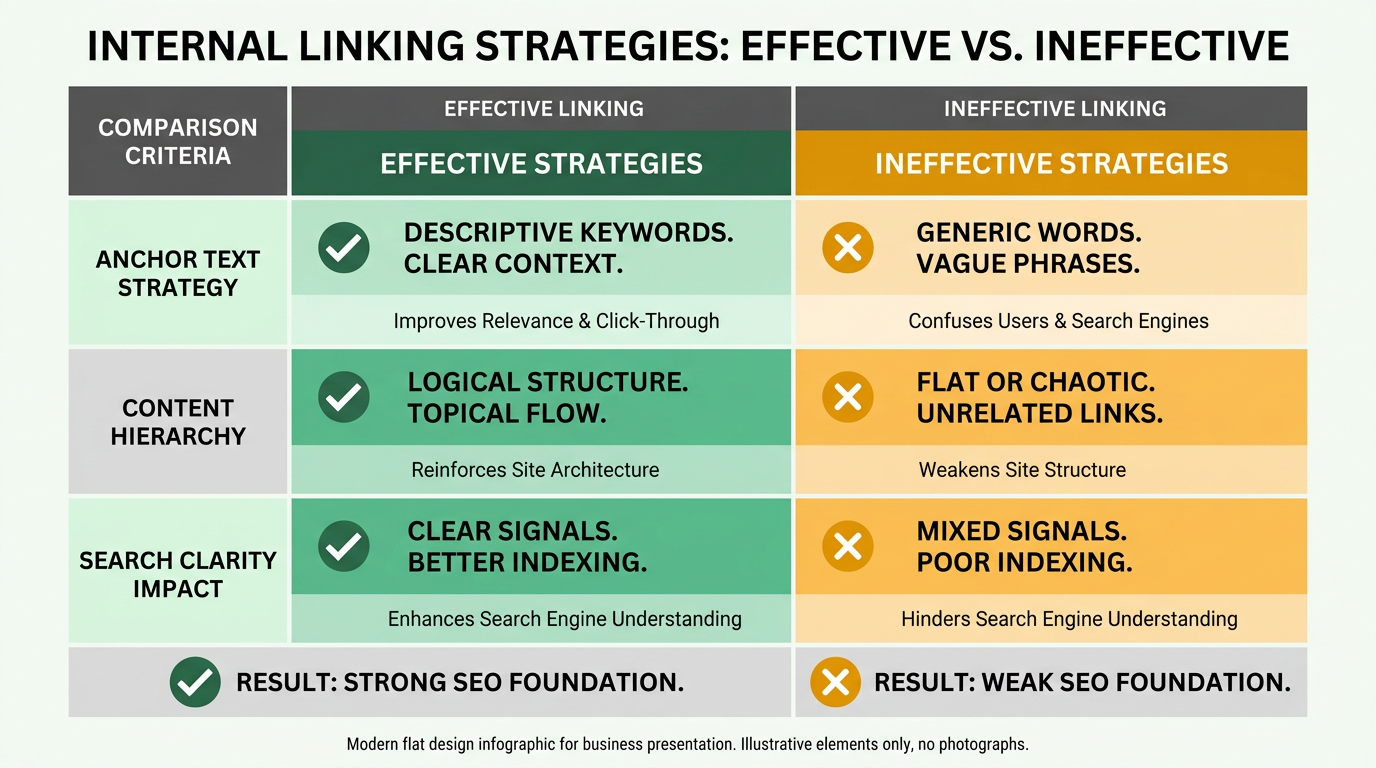
To fix this, audit your existing internal links to identify gaps. Use tools like AnyPost.ai to map your content structure and ensure that high-value pages receive the most links. Avoid linking to outdated or low-quality pages that might compete with newer, optimized content. As mentioned in the Rule 1-3: Pre-Publish Checklist section, a systematic audit should also evaluate content relevance before publishing.
How to Plan Anchor Text for Maximum Impact
Anchor text-the clickable text in a link-directs search engines about a page’s topic. Repetitive or vague anchor text (like “click here” or “read more”) weakens your SEO strategy and increases cannibalization risk. Instead, use descriptive, keyword-rich anchor text that reflects the linked page’s purpose.
For example, if you have a page about “WordPress SEO,” use anchor text like “optimizing WordPress for organic traffic” instead of “WordPress tips.” This approach helps search engines distinguish between pages with similar topics. However, avoid keyword stuffing by varying anchor text naturally. Building on concepts from the Rule 1-3: Pre-Publish Checklist section, anchor text planning should align with keyword research to avoid redundancy.
A common mistake is using identical anchor text for multiple links to similar pages. Suppose you have three blog posts targeting “SEO for e-commerce.” Linking to all three with the exact phrase “SEO for e-commerce” confuses search engines about which page to prioritize. Instead, differentiate anchor text by emphasizing unique angles: “SEO for small e-commerce stores” or “SEO strategies for online retailers.”.
Canonical Tags and Indexation Policies
Canonical tags resolve duplicate content issues by telling search engines which version of a page to prioritize. If two pages have overlapping content (e.g., a product page and a blog post about the same product), the canonical tag ensures only one page is indexed. This prevents search engines from splitting rankings between similar pages.
Indexation policies also play a role. Use noindex tags for pages that shouldn’t appear in search results, like draft content or thin topic clusters. For example, if you publish a new blog post that’s a slight variation of an existing one, temporarily noindex it while updating the original to avoid cannibalization. As outlined in the Monitoring and Maintenance section, ongoing indexation checks are necessary to address new content conflicts.
Combining canonical tags with strategic internal linking strengthens your SEO. AnyPost.ai automates this process by identifying duplicate or overlapping content and suggesting canonical tag placements. This reduces manual effort while ensuring your most valuable pages maintain authority.
Real-World Application and Tools
Consider a scenario where a SaaS company has multiple pages targeting “B2B lead generation.” Without internal linking, these pages compete for the same keywords. By linking all subpages to a central resource (e.g., “B2B Lead Generation Strategies 2025”), the company consolidates authority and avoids cannibalization.
AnyPost.ai streamlines this workflow by:
- Analyzing internal links to identify gaps or over-optimized pages.
- Generating anchor text suggestions based on keyword research.
- Automating canonical tag assignments for duplicate or overlapping content.
A marketing manager using AnyPost.ai reported a 30% reduction in cannibalization issues within six months, alongside a 20% increase in organic traffic to top pages.
By prioritizing internal linking, anchor text diversity, and canonical tags, you create a content ecosystem where pages support each other rather than compete. Tools like AnyPost.ai turn these strategies into actionable workflows, saving time while improving SEO outcomes.
Rule 7-10: Refreshing and Repurposing Content
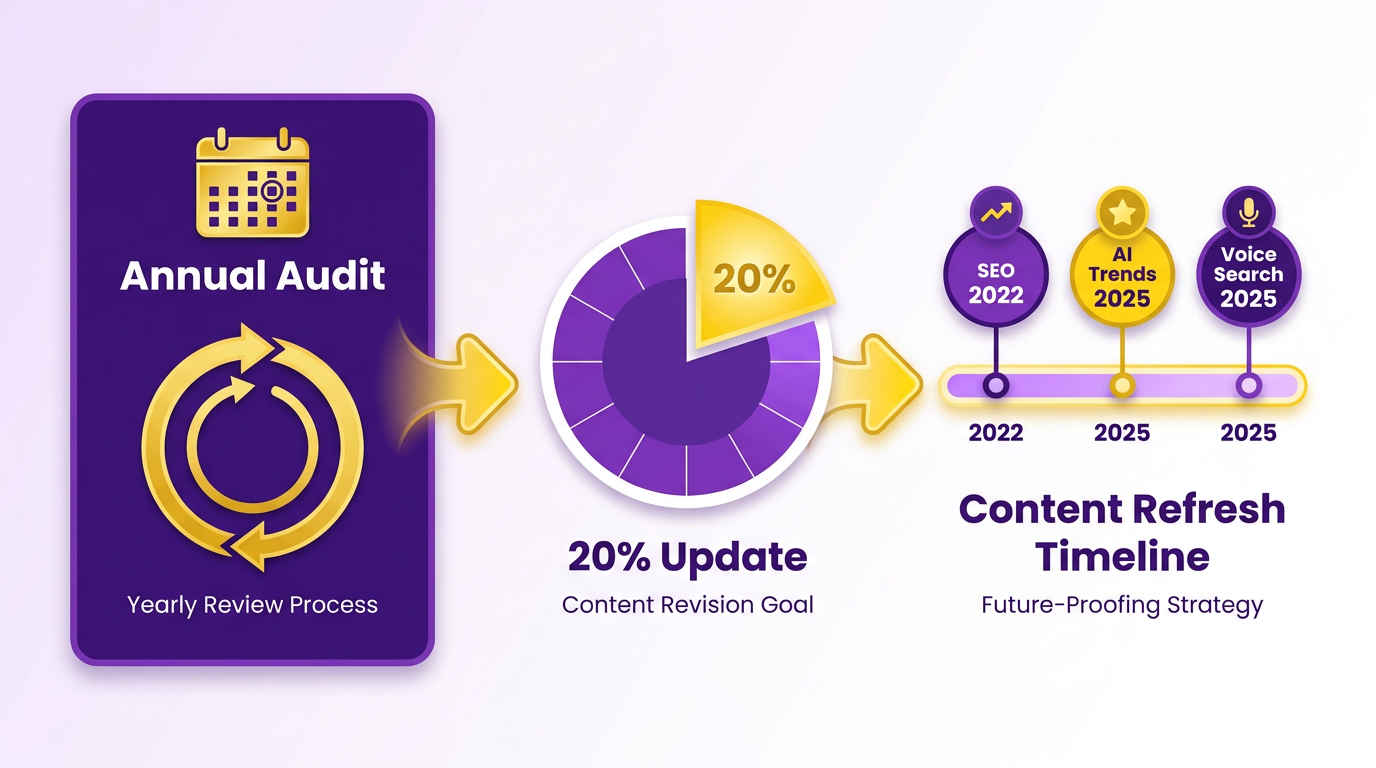
Rule 7 emphasizes the importance of refreshing existing content to maintain relevance and avoid cannibalization. Old blog posts, guides, or product pages often lose effectiveness over time as search algorithms update or user intent shifts. To prevent this, you must audit your content library annually and update at least 20% of underperforming assets. For example, if you published a guide on SEO best practices in 2022, revisit it in 2025 to add recent trends like AI-driven keyword research or voice search optimization. As mentioned in the Monitoring and Maintenance section, regular audits ensure your content stays aligned with evolving search trends.
How Do You Repurpose Content Without Duplication?
Rule 8 focuses on repurposing content strategically to expand reach without competing with yourself. Start by transforming a single piece into multiple formats. A case study could become a blog post, a video script, and a podcast episode-each tailored to different audience preferences. The critical step is to adjust the angle for each version. For instance, a blog might focus on technical steps, while a video highlights real-world results. Building on concepts from the Internal Linking and Anchor Text section, varying keywords and anchor text across formats strengthens SEO hierarchy. Source warns that identical H1 headings across formats directly cause cannibalization, so ensure each repurposed piece has a unique primary keyword and purpose.
What Is a Pre-Defined Kill Switch?
Rule 9 introduces the concept of a pre-defined kill switch to eliminate redundant content proactively. This means creating a policy to archive or delete older pages when new ones are published on overlapping topics. For example, if you launch a 2025 guide on “AI in Marketing,” your kill switch might specify retiring the 2022 version with a 301 redirect to the updated page. As mentioned in the Pre-Publish Checklist section, establishing clear policies before publishing prevents future conflicts. Source recommends tracking metrics like organic traffic and engagement during audits to decide which content to keep. This practice prevents search engines from splitting rankings between similar pages.
Why Use AnyPost.ai for Content Management?
Rule 10 highlights tools like AnyPost.ai to streamline refreshes and repurposing. The platform automates identifying low-performing pages, suggests keyword updates, and even generates new content angles based on user intent. Unlike generic content management systems, AnyPost.ai integrates SEO data directly into its workflows, ensuring repurposed content avoids keyword overlaps. A real-world example: a SaaS company used AnyPost.ai to transform a 1000-word blog into three distinct assets (video, checklist, and webinar script), boosting organic traffic by 40% without cannibalization. By combining regular audits, strategic repurposing, and automated tools, you can maintain a content library that grows stronger over time. The kill switch ensures discipline, while SaaS providers like AnyPost.ai reduce manual effort, making it easier to focus on high-impact work.
Implementing the 10-Rule Checklist
Implementing the 10-rule checklist to prevent content cannibalization starts with a structured approach to auditing, planning, and optimizing your content strategy. Here’s how to apply each rule effectively:
Conduct a Content Audit and Keyword Mapping
Begin by listing all pages targeting specific keywords. Use tools like AnyPost.ai’s keyword analysis feature to identify overlaps. As mentioned in the Understanding Content Cannibalization section, keyword cannibalization occurs when multiple pages dilute rankings for the same terms. For example, if two blog posts rank for “SEO best practices,” they’ll compete for visibility. Map each page to a unique keyword cluster, such as “on-page SEO techniques” and “off-page SEO strategies.” This prevents confusion for search engines and ensures focused content.
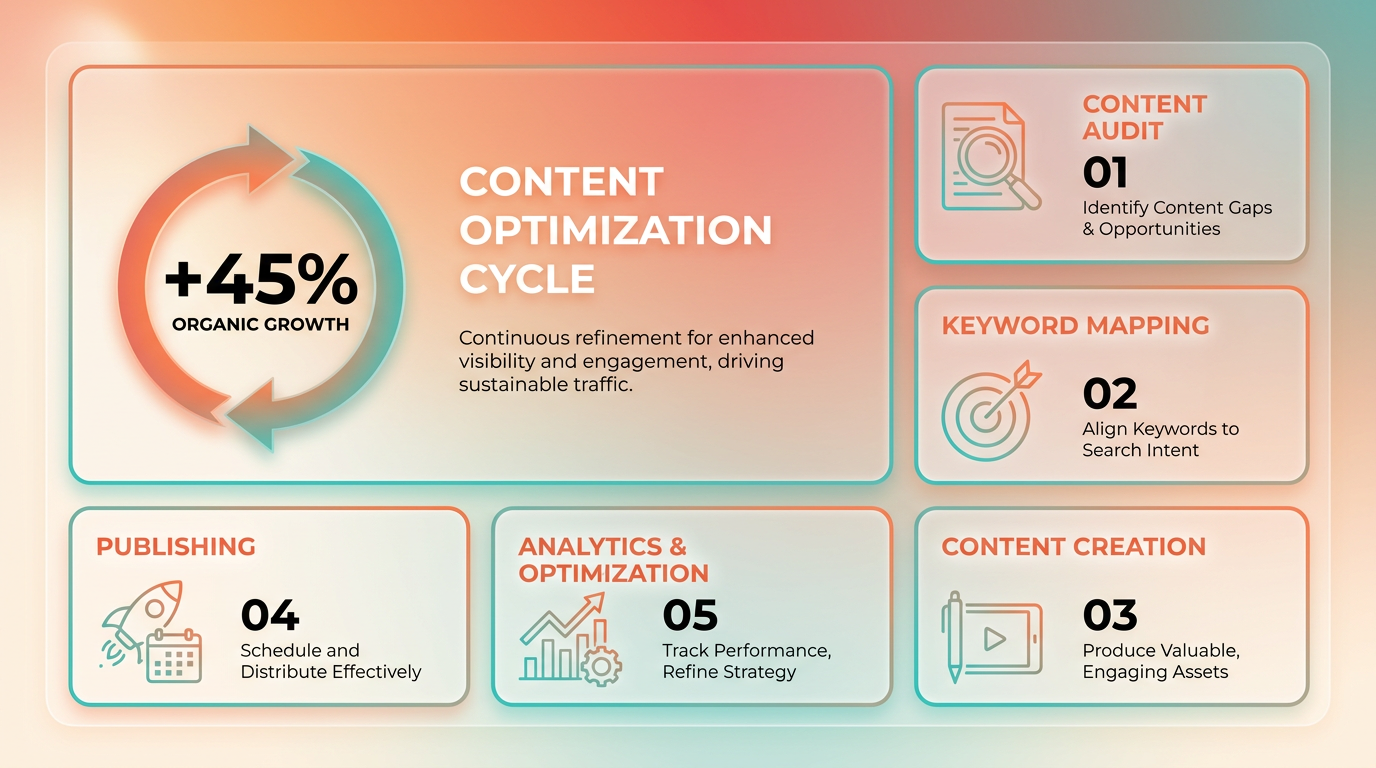
A common challenge is spotting subtle overlaps in topic clusters. AnyPost.ai’s cannibalization checker automates this process, flagging pages with similar intent or keywords. For instance, if you find three pages targeting “B2B marketing,” refine their focus to niche subtopics like “B2B lead generation” or “B2B content marketing.”.
Implement Strategic Internal Linking
Internal links guide users and search engines to your most authoritative pages. Building on concepts from the Rule 4-6: Internal Linking and Anchor Text section, avoid linking multiple pages about the same topic. Instead, consolidate weaker pages into a single pillar page and use internal links to direct traffic there. For example, if you have separate posts on “SEO for e-commerce” and “SEO for online stores,” merge them into one comprehensive guide and link to it from related content.
A practical example: Use AnyPost.ai’s content suggestions to identify linking opportunities. Suppose a new post about “mobile SEO” is published-link it to an existing pillar page on “responsive web design” rather than duplicating content. This strengthens the pillar page’s authority and avoids diluting rankings.
Use Tools for Continuous Monitoring
Keyword cannibalization isn’t a one-time fix. As outlined in the Monitoring and Maintenance section, regular audits are critical to catching new overlaps. For example, if a team member publishes a new post targeting “WordPress SEO,” the tool might flag it if it conflicts with an existing guide on the same topic. Adjust by narrowing the new post’s focus to subtopics like “WordPress speed optimization.”.
Challenges arise when teams work in silos, creating redundant content. AnyPost.ai’s collaboration features help align teams by sharing keyword goals and audit results. One company reduced content cannibalization by 40% after implementing weekly audits with this tool, proving the checklist’s impact.
The Role of AnyPost.ai in Streamlining the Process
AnyPost.ai’s automation transforms the 10-rule checklist into a repeatable workflow. Its keyword clustering feature groups related terms, helping you assign unique targets to each page. For instance, instead of manually identifying overlaps, the tool highlights conflicting keywords and suggests edits. This saves time compared to generic providers, which often lack granular controls for content strategy.
By following the checklist with AnyPost.ai’s support, teams avoid common pitfalls like poor planning or duplicate content. The result? Higher search rankings, better user experience, and efficient use of resources. Start with the audit, refine your strategy, and monitor continuously-this framework turns cannibalization prevention into a proactive, scalable process.
Monitoring and Maintenance
Monitoring and maintenance are critical to preventing content cannibalization because they ensure your content strategy remains aligned with evolving search trends and user behavior. As mentioned in the Understanding Content Cannibalization section, cannibalization occurs when overlapping content dilutes SEO value, making ongoing oversight essential. Without regular oversight, even well-structured content can begin competing with itself as new pages are published or search algorithms shift. This section outlines actionable steps to monitor performance, maintain content clarity, and use automation to sustain SEO effectiveness.
How Can You Monitor Content Performance?
To detect cannibalization early, track metrics like search rankings, organic traffic, and user engagement. Google Search Console provides a Performance Report that highlights pages ranking for the same keywords, while Google Analytics reveals engagement patterns such as bounce rates and average session duration. For example, if two blog posts targeting “SEO basics” both rank in the top 10 but have similar bounce rates, they likely compete for the same audience. Regularly exporting and comparing these metrics helps identify problematic overlaps.
Use the URL Inspection Tool in Search Console to check how Google indexes your pages. If multiple URLs target the same topic, ensure they’re not marked as duplicates using canonical tags. Analytics’ Behavior Flow report can also show if users get confused by similar content, leading to drop-offs. Addressing these issues early prevents ranking dilution and improves user experience.
What Maintenance Practices Prevent Cannibalization?
Maintenance involves updating existing content and optimizing new pages to avoid conflicts. As outlined in the Rule 1-3: Pre-Publish Checklist section, start by auditing keyword usage: create a spreadsheet listing each page’s target keywords and topics, then flag overlaps. For instance, if a new guide on “AI marketing tools” uses the same primary keyword as an older post, revise one to focus on a subtopic like “AI chatbots for customer service.”.
Internal linking plays a key role here. As outlined in the Rule 4-6: Internal Linking and Anchor Text section, use breadcrumb navigation and contextual links to guide users from broader topics to specialized pages. For example, a homepage linking to a category page, which then links to subcategory pages, creates a clear hierarchy. Avoid linking multiple blog posts to the same subtopic without differentiating their angles.
Another maintenance task is updating outdated content. If a 2021 post on “social media trends” still ranks but lacks 2025 insights, expand it with new data instead of publishing a competing article. Building on concepts from the Rule 7-10: Refreshing and Repurposing Content section, tools like Spinutech’s website redesign checklist recommend reviewing content every six months to align with current best practices.
How Does Automation Simplify Monitoring and Maintenance?
Manual tracking becomes unsustainable as content libraries grow. AnyPost.ai streamlines this process by automating keyword audits, traffic analysis, and internal linking suggestions. Its Cannibalization Checker scans your site for overlapping keywords and flags pages that dilute SEO value. Unlike generic tools, AnyPost.ai provides actionable fixes, such as redirecting low-performing pages or suggesting topic clusters to organize related content.
For example, one business reduced cannibalization by 40% using AnyPost.ai’s automated alerts. The platform identified three blog posts targeting “cloud computing benefits” and recommended merging two into a comprehensive guide while redirecting the third to a case study. This saved time compared to manual audits and improved rankings by consolidating authority.
Automation also simplifies ongoing maintenance. AnyPost.ai’s Rank Tracker updates keyword positions daily, while its Content Checker ensures new posts avoid overlapping topics. By integrating these features, teams can focus on creating high-quality content without constant manual oversight.
Practical Example: Fixing a Cannibalization Issue
Consider two blog posts on your site: “How to Start a Podcast” and “Podcast Marketing Strategies.” Both rank for “starting a podcast” but confuse users by covering overlapping steps. Using Search Console, you notice the first page has higher traffic but lower engagement. To resolve this:
- Update the first post to focus on technical setup (equipment, hosting).
- Restructure the second post to emphasize promotion and audience growth.
- Add internal links from the homepage to both, using distinct anchor text. Tools like Yoast’s SEO plugin can help optimize meta titles and descriptions to differentiate the pages further.
By combining manual audits with automated tools, you create a sustainable system to prevent cannibalization. Regular monitoring ensures your content remains focused, while proactive maintenance keeps your SEO strategy strong and user-friendly.
Frequently Asked Questions
1. How do I identify content cannibalization on my website?
Use Google Search Console’s Performance Report to find pages ranking for identical keywords. Overlapping rankings with shared topics or audiences indicate cannibalization.
2. What tools can help monitor content cannibalization?
Google Search Console and Analytics track rankings and engagement. SEMrush automates alerts for duplicate SEO efforts, flagging new content competing with existing pages.
3. How often should I audit my content for cannibalization?
Conduct monthly audits to flag new pages competing for the same keywords. Quarterly traffic comparisons help track shifts in keyword performance across content pillars.
4. What should I do if two pages rank for the same keyword?
Consolidate or repurpose content if pages share >50% overlapping content and rank in the top 10. Redirect weaker pages to the stronger one to centralize SEO value.
5. How does indexing affect content cannibalization?
Use Google Search Console’s URL Inspection Tool to ensure similar-topic pages are indexed correctly. Avoid duplicate content by applying canonical tags when needed.
6. What metrics signal cannibalizing content?
High bounce rates, low session duration for similar pages, and overlapping organic traffic in Analytics indicate cannibalization. Monitor rankings for duplicate keywords.
7. Can automation prevent content cannibalization?
Yes. Tools like SEMrush automate monitoring, alerting you when new content duplicates existing SEO efforts. Combine with monthly manual audits for best results.