How to Use Ahrefs Content Explorer for SEO Research

Key Takeaways
- Content Explorer indexes over 1 billion pages. Ahrefs's full index runs past 20.7 billion. That's a lot of surface area for research.
- Ten million new pages get discovered every 24 hours, and 300 million get refreshed daily, so your content signals don't go stale mid-campaign.
- The low-competition filter surfaces high-traffic pages that rank with barely any backlinks. That weakens the idea that you need a huge link profile.
- It also flags brand mentions that don't have backlinks yet. Handy when outreach bandwidth is tight and you need to prioritize.
- Exported CSVs carry Referring Domains, Organic Traffic, and Domain Rating, which AnyPost maps straight to content templates.
- From there, AnyPost drafts structured articles on top of that keyword data instead of leaving you to stitch spreadsheets by hand.
- Wiring Explorer's traffic and backlink metrics directly into the content pipeline is where the time savings actually show up.
What Content Explorer is good for
Content Explorer gives you one place to spot high-performing pages, backlink prospects, and content gaps, then hand that off to AnyPost's automated drafting. The practical win is simple: pull a keyword list, and you already have traffic, backlink, and social signals. No manual stitching.
The scale is useful. Explorer indexes over 1 billion pages per the Ahrefs blog. The Academy puts the broader index past 6 billion, and the product page cites 20.7 billion pages total. On top of that, 10 million new pages surface every 24 hours and 300 million get refreshed daily. That keeps the signals fresh, and you're less likely to chase a trend that already peaked.
Most of our approach hinges on the low-competition filter. Target low-backlink, high-traffic pages, and you'll find topics that rank without a fat link profile. The tool also surfaces brand mentions without backlinks, which lets you prioritize visibility plays when outreach time is limited.
Turning Explorer data into a draft
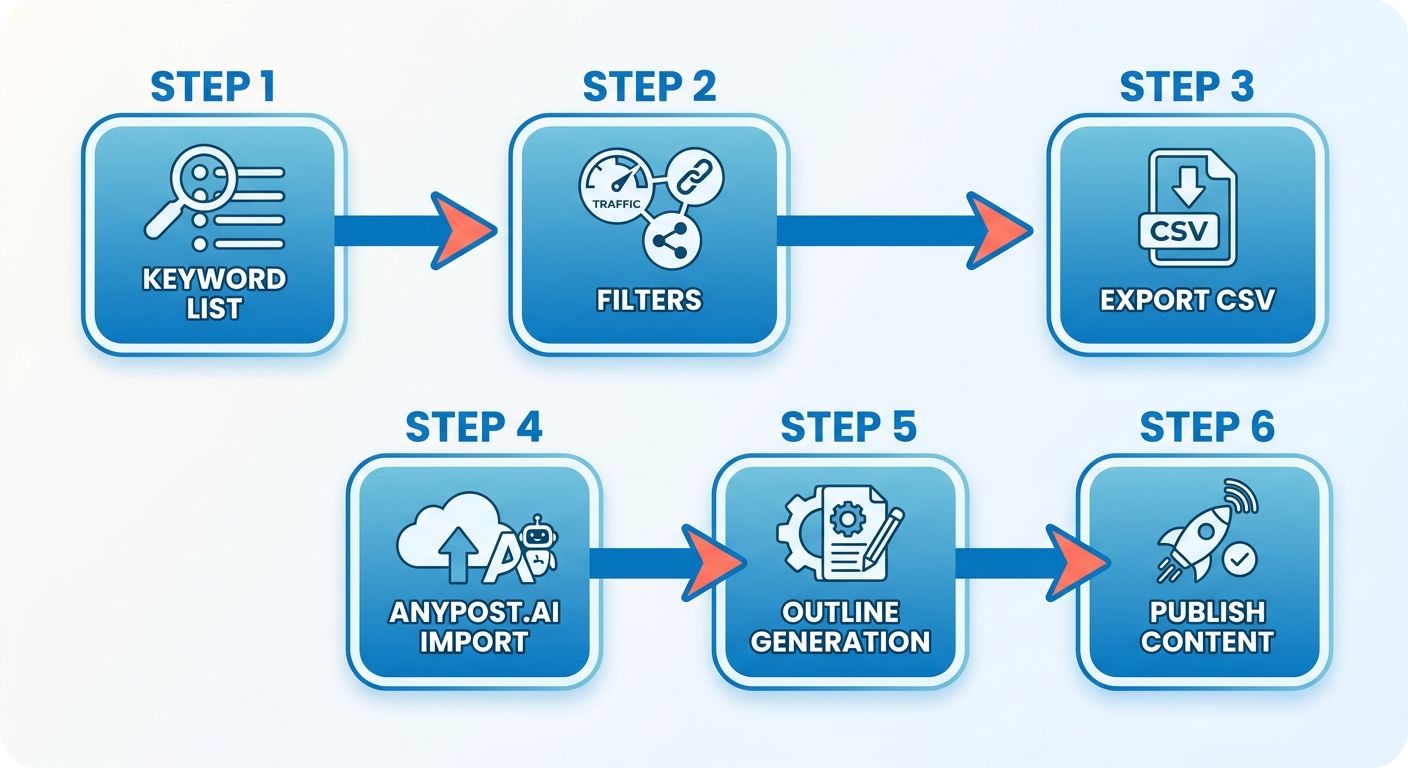
- Export the Explorer list as CSV with Referring Domains, Organic Traffic, and Domain Rating.
- Import the CSV into AnyPost, which maps each row to a content template and adds the keyword, a suggested headline, and a quick read on the competitive field.
- Enrich the draft with AnyPost's AI outlines, which respect the gap you found and run the Persona Engine to match brand voice.
"Ahrefs Content Explorer is a powerful tool for discovering high-performing content and backlink opportunities." – Tim Soulo, CMO, Ahrefs
This loop moves from insight to draft without a research bottleneck.
The metrics Explorer actually surfaces
Every page comes back with traffic estimates, backlink counts, referring domains, domain rating, and social shares. Enough to rank opportunities by difficulty and upside.
- Organic Traffic – estimated monthly visits. Real-world demand.
- Referring Domains – unique sites linking to the page. A rough proxy for how hard it'll be to rank.
- Domain Rating – Ahrefs' authority score, useful for reading the competitive field.
- Social Shares – a quick gauge of resonance beyond search.
Because these refresh continuously, the numbers stay useful across a campaign.
Getting to publish-ready
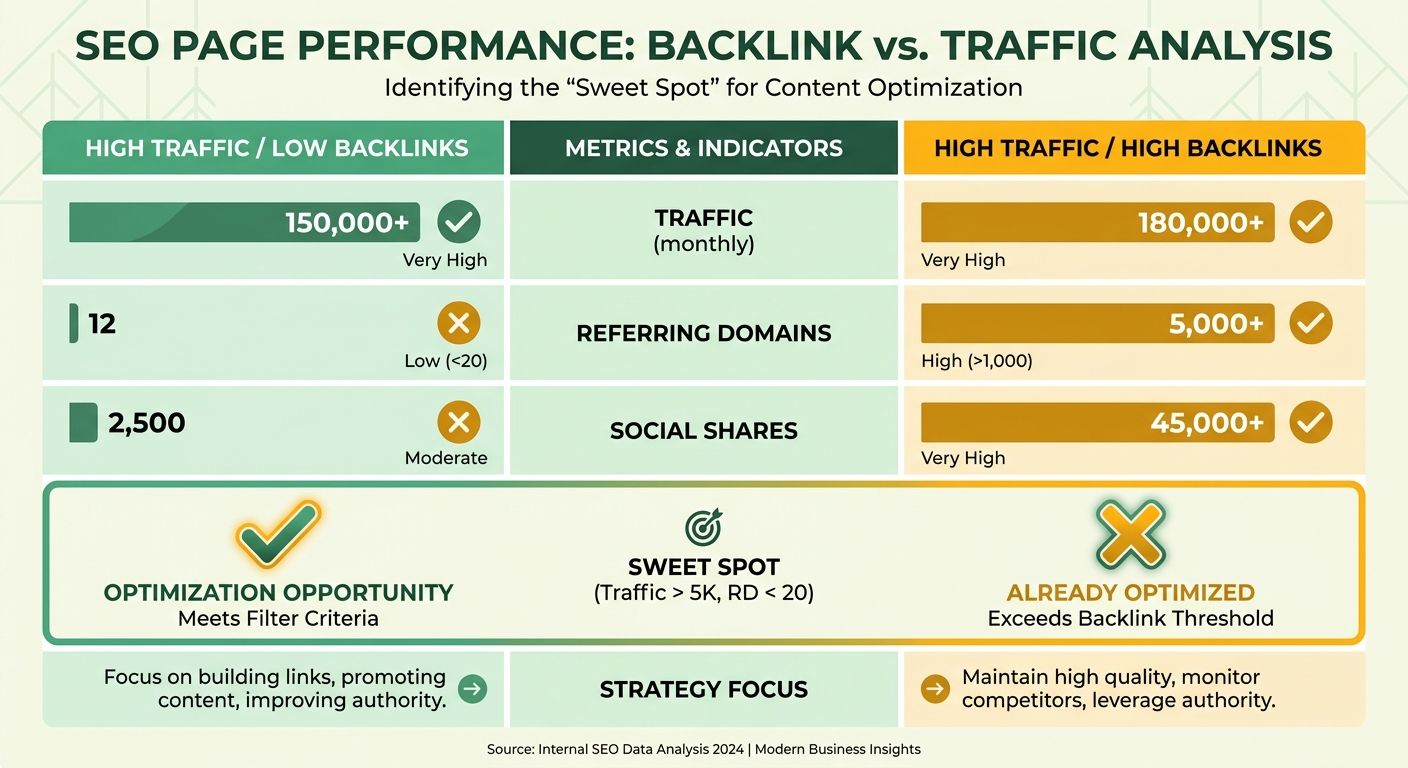
Start by defining the target persona for each brand. Let Explorer surface the top pages for your keywords. Then apply the low-competition filter, say under 20 referring domains and over 5K organic traffic, to isolate the sweet spot. AnyPost's AI then generates outlines, headings, and key points that line up with the gap while holding the brand's voice.
Step 1 – Export and clean
Download the CSV, drop rows that miss your traffic-to-backlink ratio, and tag each entry with its brand.
Step 2 – Map to template
The template injects the keyword, a competitor headline read, and a short note on why the opportunity is worth chasing based on those metrics.
Step 3 – AI enrichment
AnyPost drafts an outline that respects the gap and adds an angle. That angle makes the page worth publishing instead of being the 40th version of the same post.
How this stacks up against other research tools
Most competitors hand you keyword volume or backlink data in isolation, so you're stuck merging separate reports. Explorer bundles content performance, backlink profile, and social signals in one searchable view, and the daily refresh outpaces a lot of alternatives. You skip the manual merge, which is exactly where teams lose time and consistency.
For workflows that move from insight to execution at scale, that matters. When you need low-competition, high-traffic topics turned into publish-ready content across several brands, the depth, freshness, and integration keep the pipeline moving.
Refining Your Search with Filters and Metrics
Think of Content Explorer as the first gate in a research-to-brief pipeline. It surfaces millions of fresh pages, ranks them by traffic, backlinks, and social shares, and hands you a clean data set AnyPost can turn into a brief fast. From the export, AnyPost can generate outlines, headings, and SEO recommendations quickly.
Narrowing results with filters
Start by asking the system to show only content that matches your signals. The filters for content type, language, publication date, and traffic range let you isolate, say, English blog posts from the last three months with 5K to 15K organic visits.
- Content type – blog post, infographic, video, and so on.
- Date range – "last 30 days," "last quarter," or a custom window.
- Language – whatever your brands target.
- Traffic and backlinks – set a minimum organic traffic and a maximum referring domains to catch lower-competition, higher-traffic pages.
Stack those filters, and you get specific subsets. Chase pages with low backlink counts and solid traffic, and you'll expose content gaps you can address without massive domain authority behind you.
What the core metrics tell you
Every row carries three signals worth reading: Organic Traffic, Referring Domains, and Social Shares.
- Organic Traffic reflects demand. A spike means people are actively searching for it.
- Referring Domains is your competition proxy. Fewer domains, lower backlink barrier.
- Social Shares catch viral appeal, and they can hint at brand-mention opportunities even where backlinks are missing.
Quick note on the numbers you'll see quoted. The "over 1 billion pages" figure is the actively searchable subset for Explorer queries. The 20.7 billion on the product page is the total web corpus. In practice, treat the bigger number as the full pool of possible ideas and lean on the 1-billion searchable slice for the metric math.
Turning filtered insights into briefs
A three-step process runs Explorer data straight into AnyPost's brief engine.
- Export and map – download the filtered CSV, then align columns (traffic, domains, shares) to brief fields like target keyword, suggested word count, and authority score.
- Score and prioritize – apply a simple formula (traffic ÷ referring domains) to rank opportunities. The top segment becomes your high-potential briefs.
- Generate – feed the scored list into AnyPost, which generates outlines and suggests meta tags per brand.
This cuts manual research time. Pair Explorer's daily-updated, low-competition lists with automated brief generation, and you get a repeatable method for publish-ready content, minus the spreadsheet drudgery that usually stalls multi-brand operations.
Reading Competitor Content in Explorer
To take apart a competitor's strategy, analyze their top URLs right inside the tool. Sort their published assets by organic traffic and social engagement, and you can see exactly which topics are pulling their audience. That maps their content footprint and shows where coverage is thin.
When to skip low-competition content
Skip any page where your angle can't add real value, even when the metrics look tempting. If a topic is saturated with authoritative sites and the existing content runs deep, copying it rarely wins. Same goes when the keyword intent is transactional but the page is purely informational. Conversion potential drops. Point your research at gaps where the market lacks depth instead. Explorer flags these as "content gaps where popular topics lack substance."
Feeding the data into AnyPost
Once competitor data is imported, AnyPost uses those performance benchmarks to shape the structural requirements of your draft. If a competitor's page won on heavy visual usage, the system flags it and prompts image-heavy sections. The resulting draft is positioned to outperform the page it's competing against, not just match it.
Run external research tools alongside AnyPost's AI drafting, and you shorten the research-to-publish loop, cut manual effort, and scale production without dropping strategic depth.
Building Explorer into Your Content Strategy
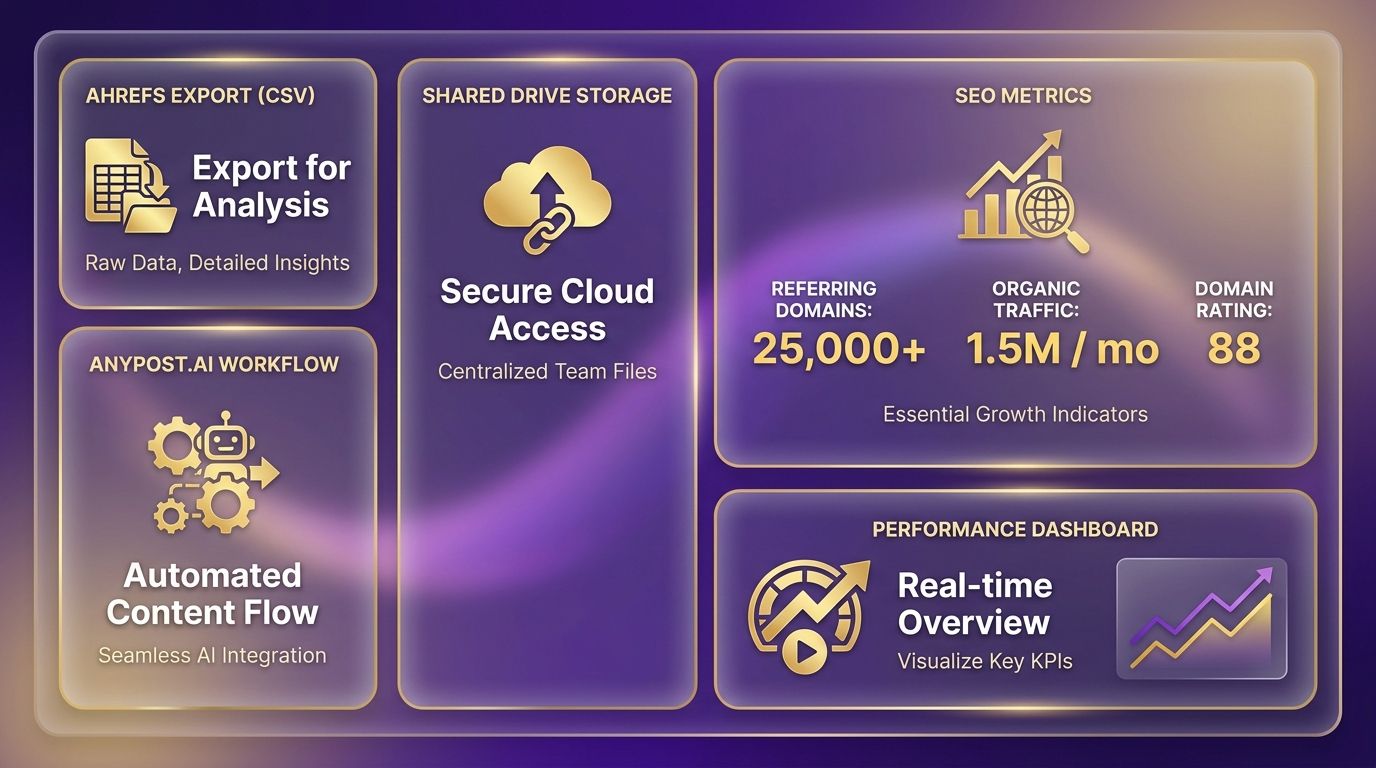
Folding these insights into a broader strategy means setting up a central home for your team's research. Save your filtered searches to a shared drive, and you build a running record of targeted opportunities that strategists and writers can reference. Everyone from SEO analysts to copywriters stays aligned on search intent and performance benchmarks. The export feature covers the mechanics.
The export itself is simple. After applying the low-competition and traffic filters that surface untapped opportunities, click Export → CSV and save the file with a timestamped name. Then run a lightweight script that normalizes column headers (ref_domains → referring_domains) and uploads the file to cloud storage. From there, AnyPost pulls the latest data for each run. The filter options are worth a look.
Using exported data with AnyPost
Import the normalized CSV into AnyPost to start automated drafting. The Persona Engine reads the target audience profile tied to each keyword row and tunes tone, vocabulary, and CTA blocks to your brand guidelines. That gives you customized drafts at scale without babysitting each one.
What to track to know it's working
Watch three signals after a brief goes live: organic traffic growth, new referring domains, and brand-mention volume without backlinks. Ahrefs refreshes these regularly, so schedule a weekly pull that compares pre- and post-publish numbers. When traffic clears the baseline and backlink counts rise, the brief worked. Feed that back into the next research cycle.
When Ahrefs-driven content isn't worth it
Bypass topics where production cost outweighs realistic conversion value. A high-traffic keyword that pulls purely informational users with no path to purchase leaves ROI low. In those cases, redirect budget toward lower-volume keywords that map directly to high-intent product features.
What a full-funnel loop looks like in practice
A multi-brand agency needs weekly posts across several product lines. Run a separate Explorer query per line, export the results, and use AnyPost's Persona Engine to build distinct outlines for each brand. Every outline carries the same traffic and backlink signals, while tone and CTAs get customized per brand at the end. After publishing, pull performance back into Ahrefs, update the master spreadsheet, and let the next round start from the topics that landed. That loop turns raw keyword data into a repeatable pipeline that keeps every brand moving without duplicated effort.
Advanced Features and Tips for Content Explorer
For tighter queries, lean on advanced search operators. Combine syntax like title: or url: with boolean operators to isolate hyper-specific discussions in your niche before the data ever hits your pipeline.
Reading historical trends in the results also surfaces seasonal topics. Look at publication spikes over a few years and you can predict when interest in a subject will peak again, which lets you queue drafts well ahead of time.
Building a custom low-competition query
Automated alerts sharpen the discovery process.
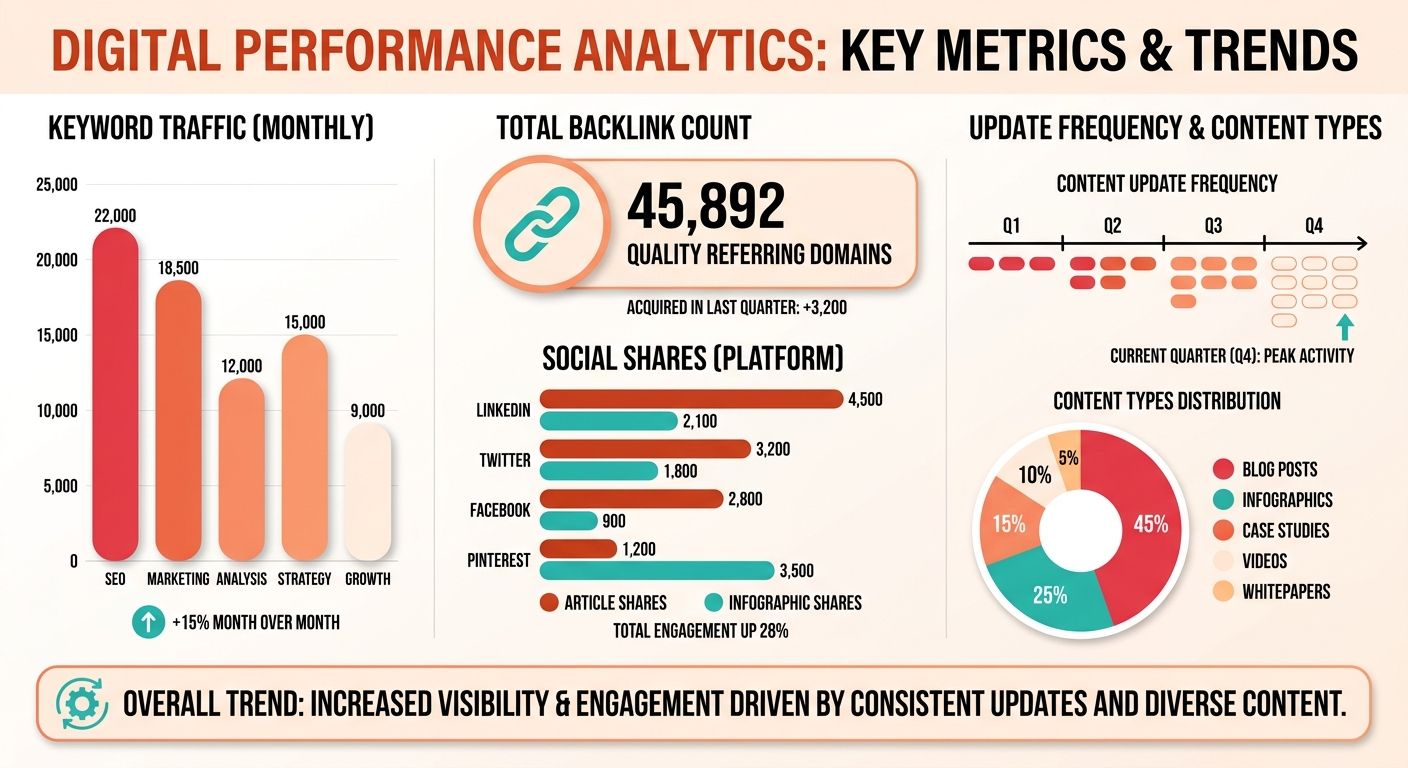
- Set your search parameters to target emerging topics with rising interest.
- Apply domain rating caps to keep massive media publications out of the results.
- Save the configuration and enable email alerts for weekly updates on new matching pages.
- Use those alerts to feed fresh opportunities into the pipeline, so you're among the first to cover a trend.
Pairing Explorer with Keyword Explorer for richer briefs
Running both tools gives you two lenses: content performance from Explorer, keyword intent from Keyword Explorer.
- Export the filtered Explorer list and import the URLs into Keyword Explorer's Batch Analysis.
- Pull keyword difficulty, search volume, and click-through potential for each term.
- Merge those metrics back into the original spreadsheet to build a master sheet ranked by both content traction and keyword profitability.
Your automation then prioritizes briefs that promise the highest traffic upside while staying inside realistic ranking difficulty.
Staying current with Explorer's updates
Keep an eye on Ahrefs' own channels for new filters, metric changes, and other updates.
- Subscribe to the Ahrefs Blog and watch the "New Features" tag for quarterly announcements.
- Follow the Ahrefs Academy webinars that walk through new filters or refresh schedules.
- Run a quarterly review of your custom filter library. Retire deprecated fields and adopt new signals like the "brand mention without backlink" metric.
Align your process with those updates, and every brief reflects the current data set.
One last thing on competitive spaces. It's often smarter to update existing assets than to publish new ones. Re-check your current library against fresh competitor metrics to spot the pages that need optimization to hold their visibility.
Frequently Asked Questions
1. How can I locate brand mentions that have no backlinks using Ahrefs Content Explorer, and why is that useful?
Ahrefs Content Explorer can isolate brand mentions without backlinks by enabling the “Brand mentions without backlinks” toggle in the filter panel, then exporting the results. Those URLs reveal visibility gaps you can fill through outreach or new content, turning unlinked mentions into link‑building opportunities at no extra cost.
2. What if my target keyword shows high traffic but also a high number of referring domains—does the low‑competition filter still help?
When a keyword displays both high traffic and many referring domains, the low‑competition filter remains effective by lowering the domain threshold below the average. For instance, set the maximum referring domains to 10; this surfaces pages that rank with fewer links, giving you a more realistic SEO target.
3. How does Ahrefs Content Explorer compare to SEMrush’s Content Marketing Platform for finding low‑competition topics?
SEMrush’s Content Marketing Platform emphasizes topic research and SEO scoring, while Ahrefs Content Explorer merges traffic, backlink and social data in one view. Ahrefs excels at uncovering low‑backlink, high‑traffic pages, whereas SEMrush offers broader keyword difficulty metrics. Choose Ahrefs for link‑focused gaps, SEMrush for keyword‑centric planning.
4. Can I automate the CSV export from Content Explorer to feed AnyPost without manual downloads?
You can automate the CSV export by using Ahrefs API’s Content Explorer endpoint, which returns the same columns as the UI. A scheduled script pulls the data nightly, saves it to cloud storage, and triggers AnyPost’s import API, eliminating manual downloads and keeping briefs up‑to‑date.
5. How often should I refresh my content brief list after publishing to stay aligned with metric changes?
Refresh your brief list at least once a month after publishing, because Ahrefs updates traffic and backlink metrics daily. A monthly check catches new competitors, shifts in organic visits, and emerging social shares, allowing you to reprioritize or expand topics before they lose relevance.
6. Is it safe to rely only on Ahrefs traffic estimates for budgeting, or should I combine them with other data sources?
Relying solely on Ahrefs traffic estimates can mislead budget forecasts; combine them with Google Search Console data for actual impressions and click-through rates. The dual approach validates projected traffic, highlights discrepancies, and gives a clearer picture of seasonal trends, ensuring more accurate ROI calculations.
