
How to Use an Automated SEO Report to Save Time on Client Updates

Key Takeaways
- Automated SEO reports pull rankings, organic traffic, and technical issues from Google Search Console and Analytics without manual spreadsheet work.
- Their real value is the keyword gaps they surface. Each one becomes a content brief.
- Wire AI drafting into your reporting loop. Each report becomes a trigger.
- AI content and reporting tools extend beyond analysis into action.
- Centralized reporting platforms offer the lowest setup effort.
- Rank trackers deliver the fastest first report, but only track weekly positions.
- Dashboard builders and all-in-one suites take longer to set up.
Quick Summary
An automated SEO report generates client-ready performance updates on a schedule. It pulls rankings, organic traffic, and technical issues from tools like Google Search Console and Google Analytics without anyone opening a spreadsheet. The real payoff isn't the hours saved on data gathering. It's what those reports let you do next.
Here's the shift. An automated SEO report doesn't only measure progress. It surfaces the exact keyword gap your content should fill. When AI drafting is wired into that loop, the report becomes the trigger for the next article. The report flags an underperforming term. AI drafts the piece in your brand voice. The next scheduled report proves the lift. That closes a loop most teams still run by hand.
What Do Automated SEO Reporting Tools Actually Cover?
Most reporting tools handle the same core jobs: syncing data, tracking keywords, and delivering branded reports on a set cadence. Where they differ is setup effort and how far they extend past analysis into action.
| Tool Type | Data Sources | Report Cadence | Setup Difficulty | Time to First Report | Extends to Content? |
|---|---|---|---|---|---|
| Dashboard builder | GA4, Search Console | Daily/weekly/monthly | Medium | 2-4 hours | No |
| Centralized reporting platform | Multi-source sync | Scheduled email | Low | 1-2 hours | No |
| All-in-one SEO suite | Rankings, backlinks, traffic | Daily/weekly/monthly | Medium | 3-5 hours | Partial (AI summaries) |
| Rank tracker | Keyword positions | Weekly | Low | Under 1 hour | No |
| AI content + reporting | SERP data, keyword gaps | Continuous | Medium | 2-3 hours | Yes |
Why Does This Save More Time Than People Think?
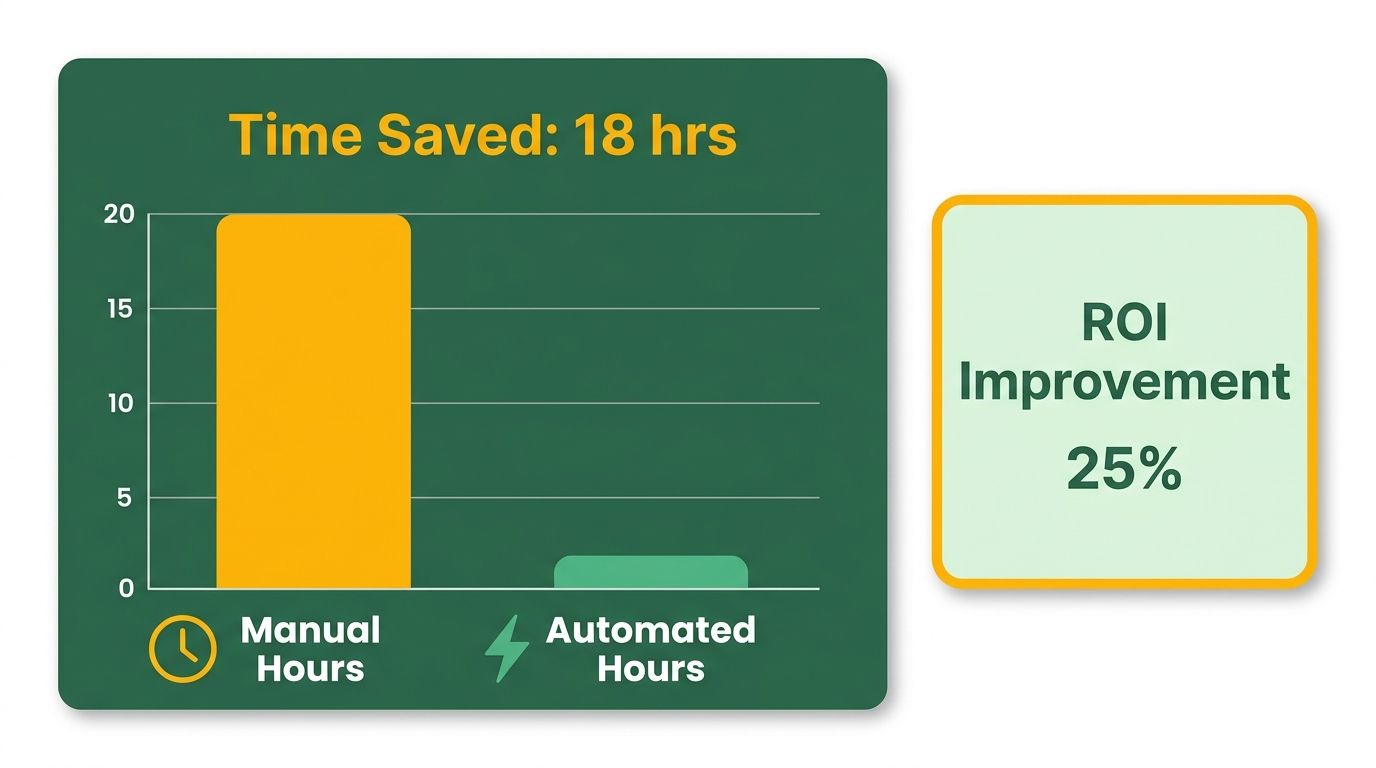
The time savings compound because reporting and content creation stop being separate jobs. Data-collection automation frees roughly 20 hours a month. But that's half the story. When AI summaries and content drafting extend automation into the writing step, the hours you claw back from reporting become the hours you spend publishing the content the report just prescribed.
Automated reports track keyword positions regularly and compare organic traffic before and after new content goes live. That "before and after" measurement is the evidence you need to prove a new article worked. The report and the content engine feed each other. One measures, one produces. The cycle tightens with each scheduled run.
Accuracy improves too. Manual reports invite copy-paste errors and missed data pulls. Scheduled automation removes both.
The Highlights
- Time saved: around 20 hours a month on data collection, plus the writing hours freed when AI drafts gap-filling content.
- Accuracy: scheduled syncing cuts the manual errors that creep into hand-built reports.
- Clarity for clients: clients want clarity and actionable insights, not just data.
- Setup effort: expect 1-5 hours depending on the tool and how many data sources you connect.
Skip full automation if you manage a single small site with stable rankings. The setup overhead won't pay back. For agencies juggling multiple clients, it's the difference between drowning in reports and acting on them.
Why Automated SEO Reports Matter
We've watched teams hand-create client reports long enough to know where the pain lives. An automated SEO report isn't just a prettier spreadsheet. It's the system that eliminates the administrative drag of manual data pulls and redirects your focus toward the work that actually moves rankings. When you wire automation into Google Search Console, Google Analytics, and your tracking stack, the report refreshes itself on schedule. You review it, the client sees it, and nobody touched a CSV.
Here's the part that matters for teams running content operations. The automated report doesn't stop at measurement. It highlights search trends and performance drops, allowing you to adjust your strategy before traffic declines. By identifying these shifts early, you can update your editorial calendar to address slipping terms. This shifts the reporting process from a simple performance check to an active planning tool that guides your team's daily tasks.
Why Manual Reporting Became Unsustainable
Manual reporting made sense when SEO meant tracking five keywords and a handful of landing pages. That model breaks when you're optimizing dozens of terms across multiple clients or product lines. Agencies still export Search Console data to Google Sheets, match it against Analytics traffic, cross-reference backlink tools, and format everything into a deck before they can even start the analysis. By the time the report lands in the client's inbox, the data is already stale and the team has burned a day they could have spent publishing content or fixing technical issues.
The marketing-automation software market is growing at a 13.3% CAGR through 2030 for a reason. Teams realize that automation isn't about making charts look better. It's about creating a system that refreshes itself and clarifies priorities without manual intervention. Only 24% of marketers trust their current attribution models, and that distrust comes from stitching together data sources by hand. When the report pulls from a unified dashboard that auto-syncs every metric, confidence in the numbers goes up and the questions shift from "Is this data right?" to "What do we do about this keyword dropping three positions?"
How Automated Reports Turn Insights Into Action
The real payoff shows up when the report stops being a performance recap and starts being the input for your next move. We use automated reports to compare organic traffic before and after new content goes live. When a landing page moves from position 10 to position 3 for a target keyword, the report documents the lift without anyone logging into a tool. When a technical SEO fix cuts load times by two seconds, the next report proves the ranking improvement tied to that change.
Streamline your SEO strategy by connecting the measurement layer to your broader optimization workflow. When your automated report tracks keyword positions and flags terms that slipped or stalled, you have a priority list for content creation. This allows you to quickly assign updates to your writing team or adjust on-page elements. The report that once marked the end of the month becomes the beginning of the next content sprint, ensuring you're always reacting to live search data.
Setting Up Automated SEO Reports
We start with data sources, not dashboards. An automated SEO report pulls from Google Search Console for query performance, GA4 for organic traffic and conversions, and whatever rank-tracking stack you already use — whether that's a built-in tool or an API feed. The goal is to wire those sources into a single view that refreshes on schedule, so no one touches a CSV before the client sees the numbers.
Connecting Your Data Sources for Live Reporting
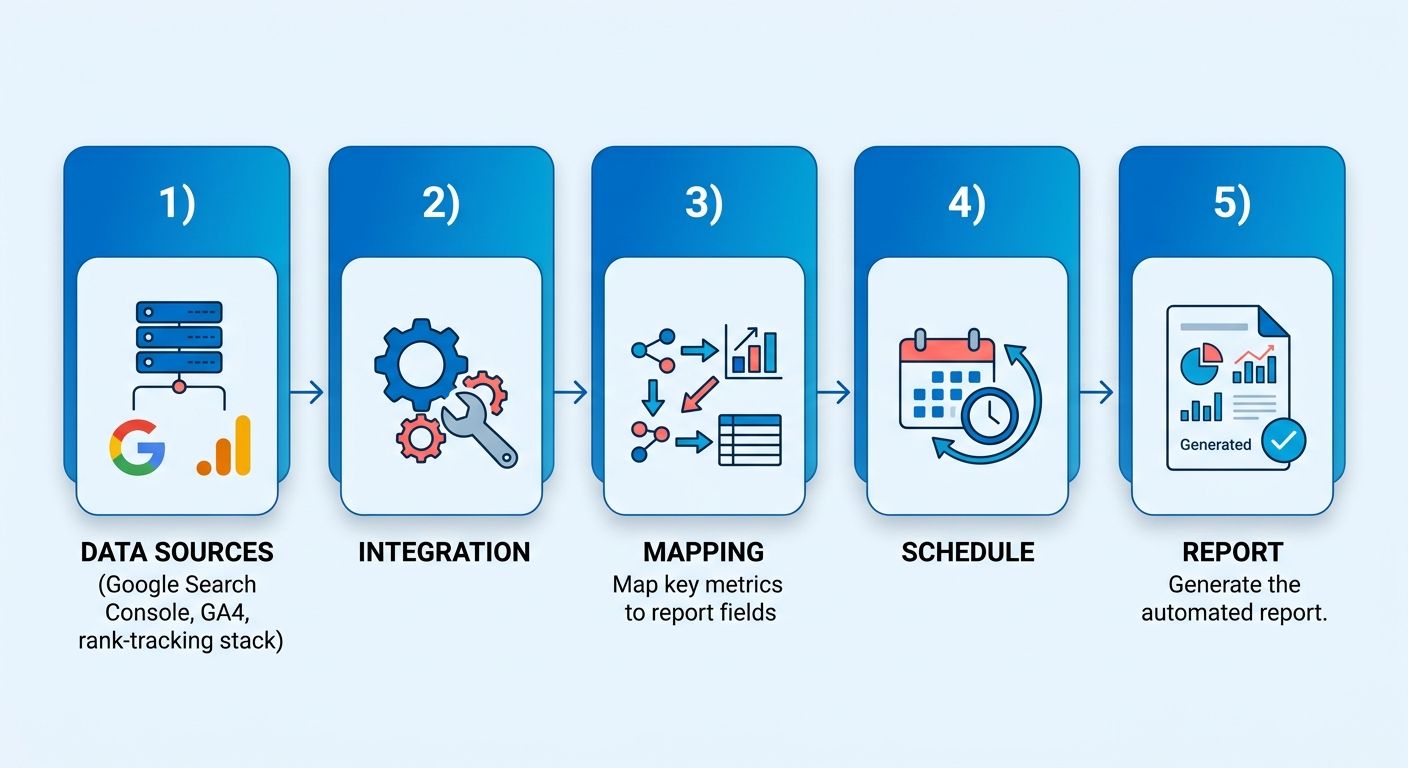
Connect GA4 and Google Search Console first. GA4 tracks sessions, conversions, and revenue tied to organic search. Search Console shows which queries drove impressions and clicks, plus technical crawl issues that could tank your rankings. When you layer those two together, you see not just "traffic went up," but which queries drove the lift and whether those visitors converted. Most reporting platforms let you authenticate both sources through OAuth, so setup takes a few minutes.
Add your rank tracker next. If you're using a tool that tracks positions daily, pipe that data into the same dashboard. This allows you to cross-reference sudden ranking shifts with actual traffic fluctuations. If a keyword drops but traffic remains steady, you might be seeing temporary SERP volatility rather than a systemic issue. Having these metrics side-by-side helps you diagnose the root cause of performance changes quickly.
One platform connects to over 60 data sources, so if you're pulling backlink profiles or technical audit logs from elsewhere, you can centralize everything in one view. The more sources you connect up front, the less you'll need to explain data gaps to clients later.
Building a Self-Updating Dashboard in Looker Studio
Looker Studio (formerly Data Studio) is free and integrates directly with Google's ecosystem. Start with a blank report, connect your GA4 property and Search Console site, then drag in the metrics you need: organic sessions over time, top landing pages by traffic, queries by impressions and CTR, and average position for your tracked terms. Use date-range controls so clients can toggle between last month, last quarter, or year-over-year without asking you to regenerate anything.
Keep the layout clean. One section for traffic trends, one for rankings, one for conversions if the client cares about leads or sales. Teams add too many widgets and bury the insight. The goal is to present a high-level summary that immediately shows whether the current strategy is working, rather than overwhelming the viewer with minor metrics. If organic traffic climbed 25% and three target keywords hit page one, surface those two facts above the fold.
Schedule email delivery through Looker Studio's sharing settings. The report emails itself every Monday morning or the first of the month, and the client opens a PDF or clicks through to the live dashboard. The data refreshes automatically, so what they see is always current. That's the time bucket most teams miss: automating the SEO report saves administrative time, freeing up the hours you'd otherwise spend explaining last month's data when you should be executing your next campaign.
Adding AI Visibility Metrics to the Report
AI search traffic grew 16x from 2024 to 2026, though it still accounts for only 0.32% of total website traffic. That's a leading indicator, not a headline. Add a small section to your report tracking traffic from AI assistants. GA4 labels this as the "AI Assistant" channel, so you can show clients where the puck is heading without overstating its current impact. If a client's site ranks in ChatGPT or Perplexity results for a high-value query, flag it. If not, note that traditional organic search still drives nearly all the traffic and rank there first.
Some tools now generate AI-powered summaries of the report itself, condensing ranking changes and traffic shifts into a few sentences clients can skim before diving into the data. That summary becomes the email body, so the client sees the insight without opening the dashboard. One limitation: don't automate insights so deeply that you lose the human sign-off. AI can draft the summary, but you validate it and adjust the strategic call before it ships.
Using APIs for Advanced Automation
If you need more control than a visual dashboard offers, API-based automation lets you script the entire workflow. Tools that expose REST APIs let you pull rank data, backlink counts, and technical-health scores on a schedule, then push that data into your own reporting stack or trigger other actions. An MCP server can answer ad-hoc client questions by querying your SEO data through an AI assistant like Claude, so when a client asks "why did traffic drop last week?" the assistant pulls the relevant metrics and surfaces the answer without you logging into three platforms.
The real benefit of API-based automation lies in workflow integration. You can configure your reporting stack to send automated alerts to Slack when a high-priority keyword drops below a certain threshold, or automatically generate a task in your project management tool. This ensures that technical issues or ranking drops are routed to the right team member instantly, bypassing the need for manual dashboard checks.
Creating Custom SEO Report Templates
A strong reporting workflow starts with a template you build once, then rebuild on schedule. That's the difference between "update the client deck every month" and "review the auto-generated deck every month." The first approach burns hours on copy-paste work. The second approach gives you a system that flags the gap, points you toward the content to fill it, and measures the result in the next cycle.
What Makes a Template Worth Automating
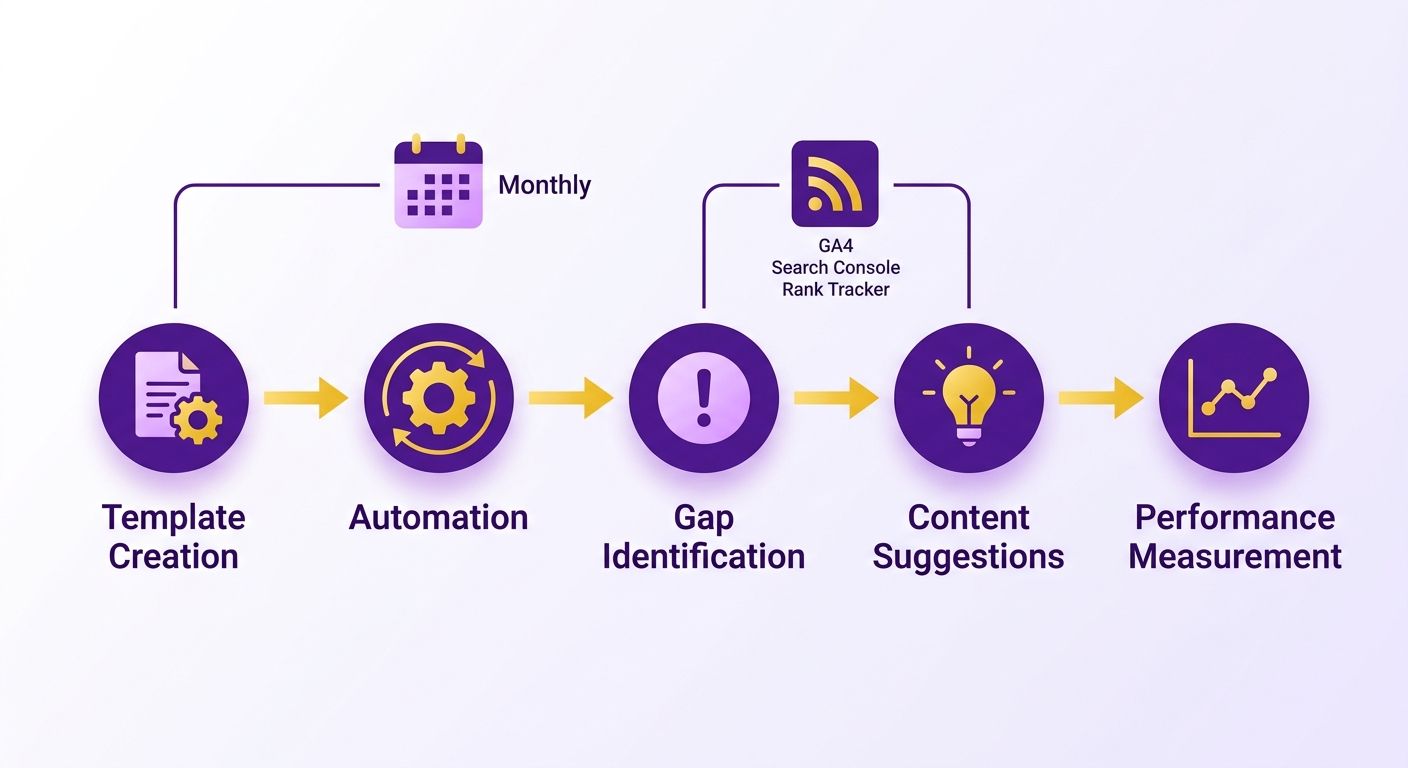
A functional automated SEO report template pulls live data from your connected analytics and search platforms. The template doesn't hold the numbers. It holds the structure: which metrics appear, how they're visualized, and what comparison windows matter. When the report runs, it fills that structure with current data and delivers it to the client without anyone opening a spreadsheet.
It helps to structure templates around three output formats, because different clients want different levels of access. Some want an email summary that hits the high points in three paragraphs. Others want a PDF they can forward to their executive team. A smaller group wants a live dashboard URL they can check whenever they want. All three formats pull from the same underlying data, so you're not maintaining separate reporting stacks for each delivery method.
The email summary shows keyword position changes and total organic traffic compared to last month, highlighting the single most important trend. The PDF version expands that view with charts, technical health flags, and backlink growth. The live dashboard sits open in the client's browser, refreshing daily, so they see the same numbers you do without waiting for the next scheduled send.
Connecting Report Insights to Content Creation
The real use shows up when reporting doesn't stop at measurement. When reports identify content gaps, the next step is translating that data into production. AnyPost helps streamline this transition by generating drafts tailored to your target queries, using its Persona Engine to maintain brand consistency. This allows you to move from identifying a search opportunity to preparing a draft for review, keeping your content pipeline moving without manual delays.
Recent data shows that teams using automation tools for SEO reporting save substantial time on manual data collection. When you also automate the initial analysis, you reclaim the hours you would have spent writing briefs or analyzing search intent. This compounding effect allows your team to focus on refining the strategy rather than getting bogged down in spreadsheet management.
Scheduling and Delivery That Clients Actually Use
Set the report cadence to match how fast your metrics move. Most clients need monthly reports for SEO, because rankings and organic traffic don't shift daily. If you're running aggressive link-building campaigns or publishing multiple pieces per week, bi-weekly reports make sense. Weekly reports work when the client is paying for real-time visibility, but only if the data layer updates fast enough to justify it.
Scheduled delivery keeps the client loop closed. Email reports land in their inbox at the same time every cycle. PDF attachments work for teams that route reports through approval chains. Live dashboard URLs suit clients who want to check progress between formal updates. White-label branding (your logo, their colors) matters more for PDFs than for email summaries, because PDFs get forwarded and dashboards get bookmarked.
One team using automated reporting noted that the real win isn't just delivering reports on time. It's that the reports establish a predictable rhythm of communication. The client knows exactly when to expect updates, which reduces ad-hoc requests and allows you to focus on executing the agreed-upon strategy.
Reviewing and Refining the Automated Reporting Process
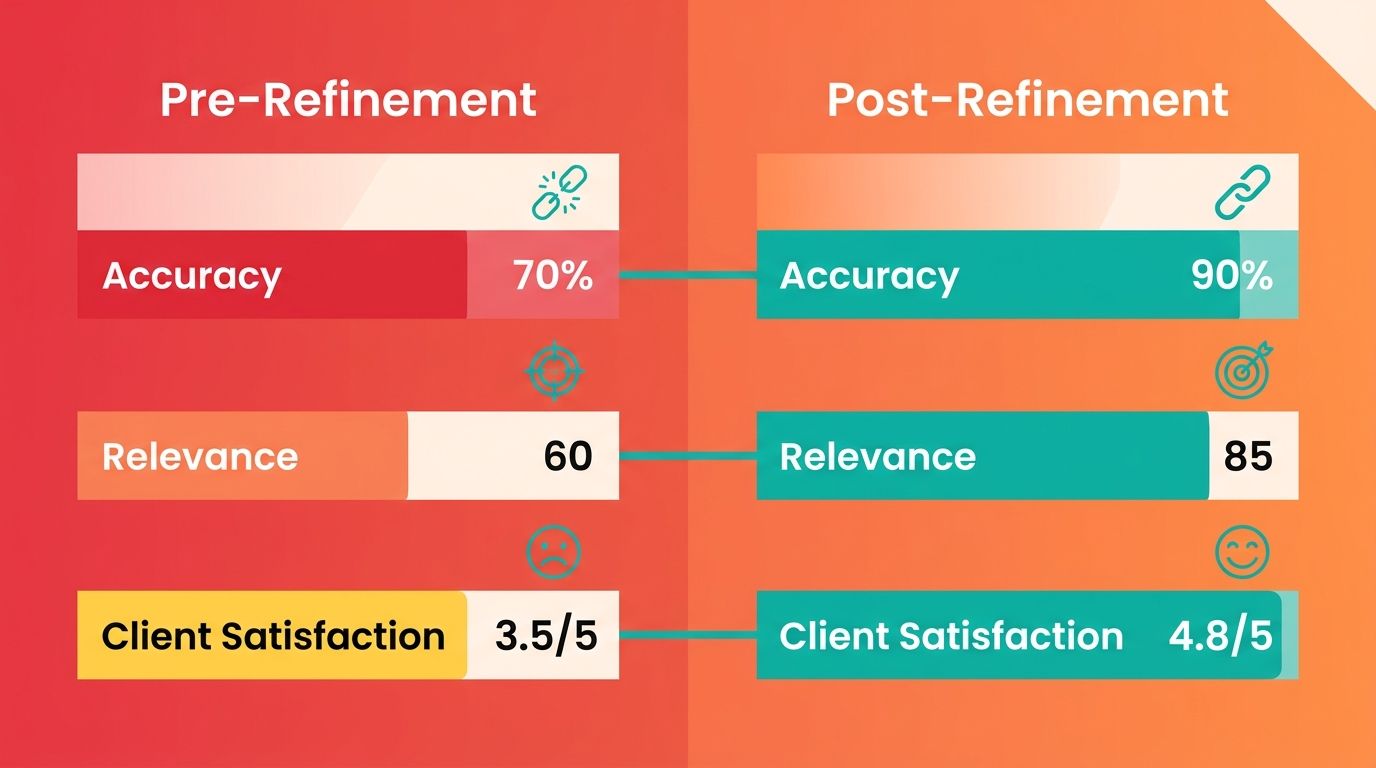
An automated SEO report is only as good as the review cycle around it. We treat every scheduled report as a draft that needs auditing, not a finished artifact. The data pipeline drifts. A tracked keyword loses relevance. A client's priorities shift mid-quarter. If you never revisit the report, you end up delivering clean charts that answer last quarter's questions.
Regular reviews ensure that your templates adapt to changing business goals. If a client shifts focus from lead generation to brand awareness, the metrics you highlight must shift accordingly, keeping the reporting aligned with active business objectives.
How Do You Monitor an Automated SEO Report for Accuracy?
Start by checking that the numbers reconcile. Every review cycle, we confirm the report's traffic and ranking figures match the native platforms directly. Automation reduces human error in data collection, but a broken API connection or a renamed property will silently feed you stale data.
Watch for date-range mismatches too. A report set to "last 28 days" and a dashboard set to "last month" will disagree by a few percentage points, and that gap compounds when you compare periods. We lock the comparison windows across every source before we trust a trend line.
On AI visibility, keep perspective. Track branded and unbranded AI mentions as a leading indicator of where demand is heading, but treat the volume as directional rather than decisive. Don't let a rising signal displace the ranking and organic-traffic metrics that still drive nearly all your results.
Where Should You Automate, and Where Should You Not?
Automate data collection. Keep the strategic call human. The old advice was blunt: automate data collection but not the insights and next steps. That held up when summarization tools were weak.
By 2026, that line has shifted. AI can draft the initial insight layer and the summary now. Let AI produce the first-draft analysis of the data trends, then have a human validate the read and own the strategic recommendation. You're not removing judgment. You're removing the blank page.
This is also where feedback refines the template. When a client keeps asking the same question, that question belongs in the report structure. We fold recurring asks back into the template so the next auto-generated version answers them before they're posed.
Turning Report Insights Into Published Content
Measuring the impact of your optimizations is the final step in the refinement process. When the report documents a ranking improvement following a content update, it validates your optimization strategy. This feedback loop helps you refine your approach, showing you which types of updates yield the best results for your specific audience.
This feedback loop helps you allocate resources more effectively. Instead of spending time guessing which pages need attention, you can rely on the report's historical data to guide your team's efforts, ensuring that your optimization budget is spent where it will have the greatest impact.
To streamline this process, modern publishing platforms can integrate directly with your analytics to suggest updates based on search performance, helping you maintain content freshness with minimal manual oversight.
Frequently Asked Questions
1. Which automated reporting tool should I choose if I just want the fastest first report?
A rank tracker offers the quickest setup, allowing you to generate an initial report almost immediately. The tradeoff is scope: it only covers keyword positions and doesn't integrate broader organic traffic or conversion metrics. For teams needing immediate, basic visibility, it is the most straightforward option.
2. Is an automated SEO report worth it for a single small website?
Skip full automation if you manage one small site with stable rankings. The initial setup time won't pay back when you are tracking only a few keywords. Automation is highly beneficial for agencies managing multiple clients or tracking hundreds of terms, where manual data gathering becomes a major bottleneck.
3. How often should I schedule client reports?
Align the schedule with your client's decision-making cycle. While monthly updates are standard for tracking long-term SEO trends, clients running fast-paced campaigns may require more frequent touchpoints. The key is ensuring each report contains enough new data to warrant a strategic review.
4. Should I let AI write the report insights, or only collect the data?
Use AI to generate the initial draft of your summaries and data interpretations. This saves time on the initial analysis, but a human editor should always review the output to ensure the context is correct and the strategic recommendations align with the client's broader business goals.
5. How do I know the numbers in my automated report are accurate?
Perform periodic spot-checks by comparing your dashboard metrics against the native analytics platforms. Pay close attention to configuration settings, ensuring that timezone settings and filter definitions are identical across all connected sources to prevent minor discrepancies.
6. Should I feature AI search traffic prominently in client reports?
Keep AI search metrics in a secondary section of your report. While interest in AI-driven search is growing, it still represents a tiny fraction of overall web traffic for most industries. Focus the main body of your report on traditional organic search channels that drive the majority of conversions.
7. What actually connects a report to publishing new content?
The connection lies in using performance data to guide your editorial calendar. When a report highlights declining search visibility for a specific topic, it serves as a signal to update that content. Integrating your reporting tools with your content management system allows you to quickly transition from identifying a traffic drop to scheduling an update.