How Tracking Parameters in Internal Links Damage Your SEO (And How to Fix It)

Key Takeaways
- Tracking parameters in internal links fragment link equity, diluting page authority across identical content URLs.
- Search engines treat parameterized URLs as separate pages, increasing crawl inefficiencies and duplicate content.
- Removing tracking parameters from internal links can improve crawl efficiency by up to 50% by consolidating URLs.
- Audit internal links with tools like Screaming Frog to identify tracking parameters such as
utmorref. - Canonical tags alone cannot resolve crawl issues from parameterized URLs; redirects are also required.
- Replace URL tracking parameters with server-side logging or Google Analytics events for SEO-safe campaign tracking.
- Fixing parameterized internal links simplifies analytics by eliminating fragmented user behavior data in reports.
Why Tracking Parameters in Internal Links Matter
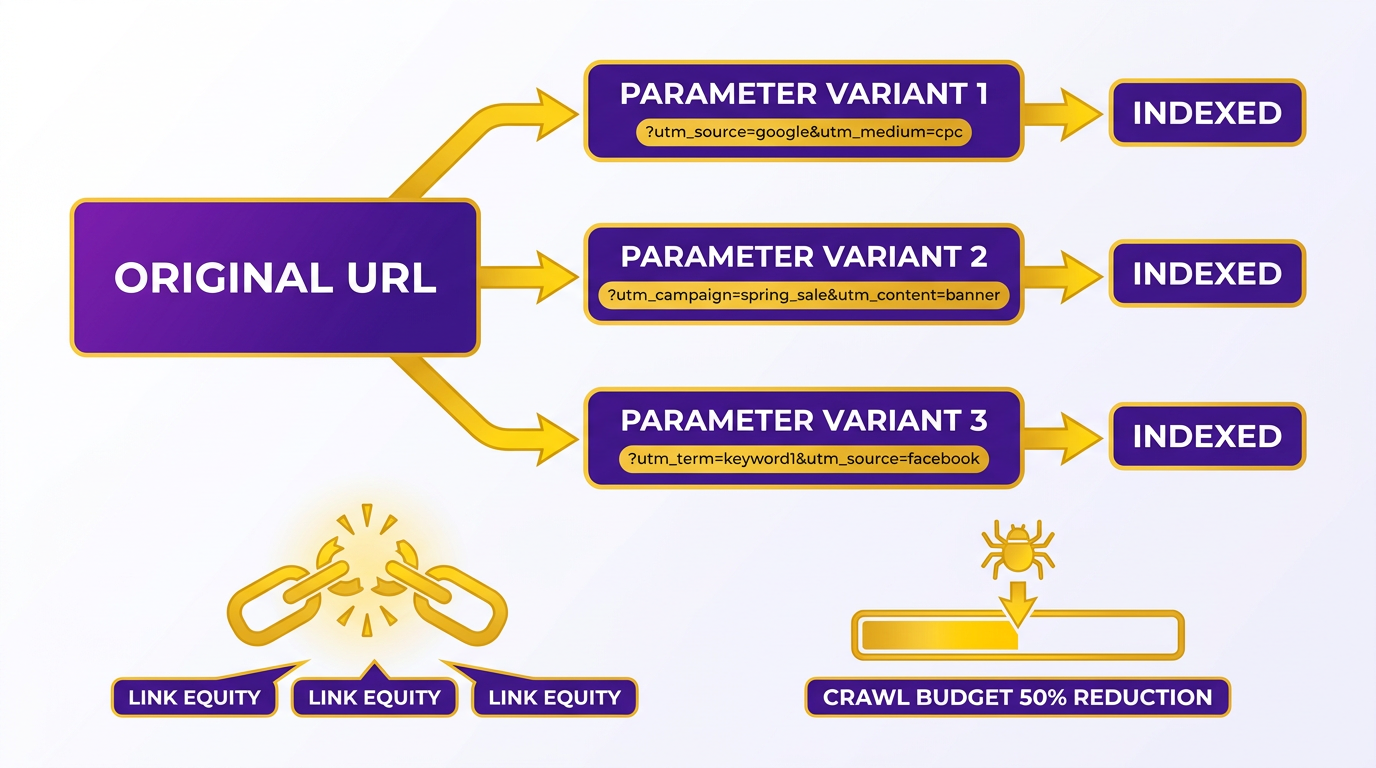
Tracking parameters in internal links create hidden friction for SEO by fragmenting crawl budgets, diluting link equity, and complicating attribution. When URLs contain tracking strings like ?utm_source=... or ?campaign=..., search engines treat these as separate pages, even if the content is identical. This forces crawlers to index redundant versions of the same page, wasting resources that could be spent on unique, high-value content. For example, one company reduced crawl budget waste by 50% after eliminating tracking parameters from internal links, allowing Google to prioritize core pages instead of duplicate URLs. As mentioned in the The Four Damage Vectors of Tracking Parameters section, these issues are part of a broader set of technical SEO challenges caused by parameterized URLs.
Search engines allocate crawl budgets based on perceived value. When internal links include tracking parameters, they fragment SEO signals. Instead of consolidating authority on a single URL, link equity spreads thinly across parameterized duplicates. This dilution makes it harder for pages to rank, especially for competitive keywords. A 2024 study found that websites with parameterized internal links spent 23% more crawl budget on duplicate content than those using clean URLs. Building on concepts from the Common Mistakes and Misconceptions section, it’s important to note that canonical tags cannot fully resolve these inefficiencies. For large sites with thousands of pages, this inefficiency compounds quickly, pushing important content deeper into the index where it’s less likely to surface.
Moving tracking out of URLs and into the Document Object Model (DOM) solves two key problems: accurate attribution and clean URL structures. Traditional URL parameters like ?source=... obscure the true origin of clicks in analytics tools, forcing teams to manually reconcile data across platforms. By using DOM attributes or JavaScript events for tracking, you preserve clean URLs while maintaining detailed campaign insights. This approach avoids fragmentation and ensures tools like Google Analytics 4 can map user behavior correctly without relying on URL parameters. As outlined in the The Structural Fix: Moving Tracking Out of URLs and into the DOM section, implementing DOM-based tracking also prevents indexing issues, as search engines are less likely to misinterpret these as duplicate content compared to URL parameters.
The Four Damage Vectors of Tracking Parameters
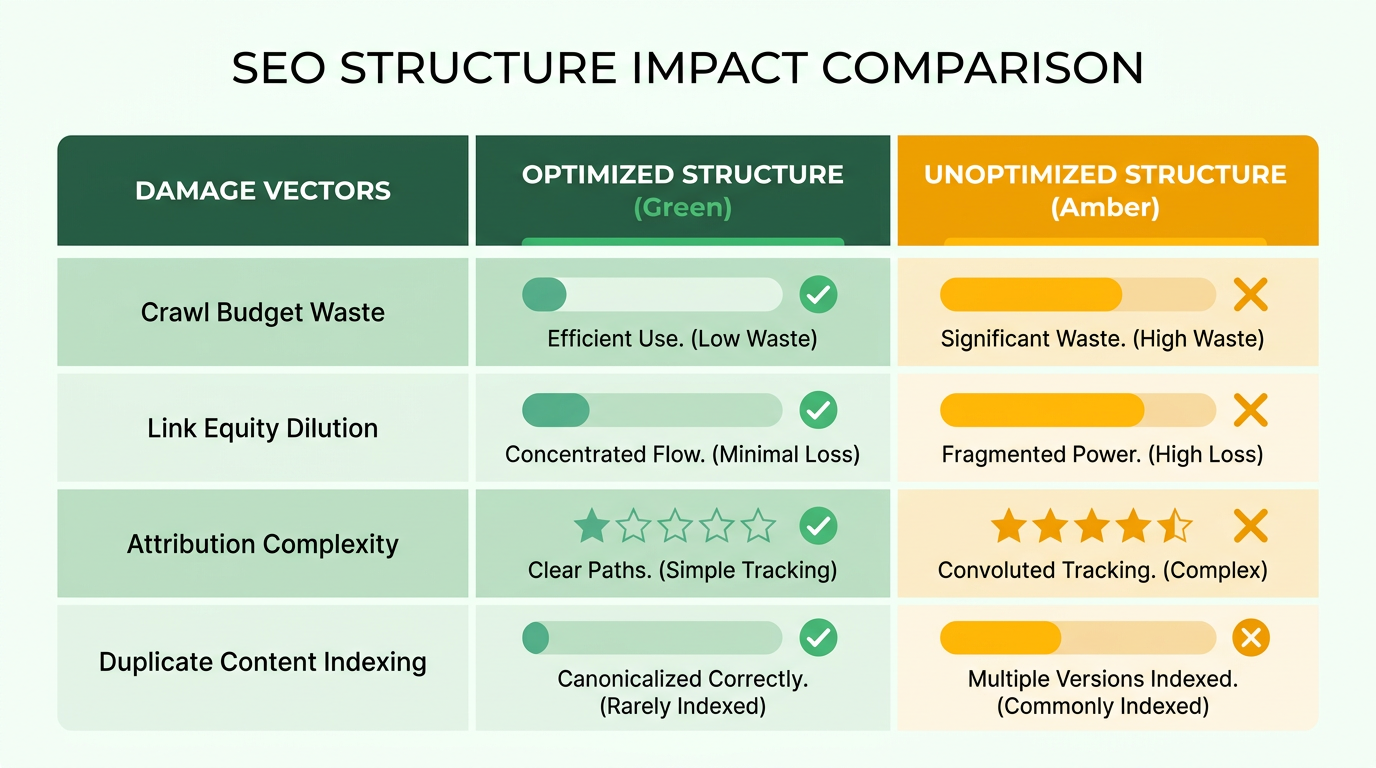
Tracking parameters in internal links create four major SEO problems that degrade performance and complicate analysis. Understanding these damage vectors helps you fix technical SEO issues before they harm rankings.
How Do Tracking Parameters Waste Crawl Budget?
Search engines crawl pages to index content, but tracking parameters like ?utm_source=newsletter create duplicate URL variants. Crawl budget waste happens when crawlers repeatedly visit near-identical URLs with different parameters. For example, a retail website might generate 50+ variants of /product/widget for each marketing campaign, forcing Google to index redundant pages that offer no unique content. This dilutes crawl efficiency and delays discovery of high-priority pages. A content marketing agency noticed a 40% drop in indexed blog posts after audit tools flagged 10,000+ parameterized URLs competing for crawl budget.
How Do Tracking Parameters Fragment Attribution?
Analytics tools rely on clean URLs to attribute traffic sources accurately. Attribution fragmentation occurs when tracking parameters split data across URL versions, making it impossible to track campaign performance. Suppose a SaaS company adds ?ref=webinar to internal links pointing to a pricing page. Google Analytics might report 30% of visits as "direct traffic" instead of linking them to the webinar campaign. This creates blind spots in reporting and inflates bounce rates. One company using GA4 found their organic search traffic was actually 25% parameter-driven referrals, but tracking parameters corrupted the attribution model.
How Do Tracking Parameters Dilute Backlink Value?
Search engines calculate page authority based on backlinks, but tracking parameters split link equity across URL variants. Backlink dilution happens when duplicate URLs receive separate links, reducing the SEO value for all versions. As mentioned in the Why Canonical Tags Don’t Solve Tracking Parameter Issues section, canonical tags prevent duplicate content issues but don’t stop search engines from crawling and indexing URLs with tracking parameters. consider an educational platform with internal links like /course/math and /course/math?utm_medium=email. If external sites link to both URLs, Google sees them as separate pages with weaker link profiles. An audit of an online learning site revealed 12% of backlinks were distributed across parameterized variants of the same page, lowering domain authority by 15 points.
How Do Tracking Parameters Drag Down Performance?
CDN providers and search engines optimize performance using cache keys, but tracking parameters bloat cache sizes and slow load times. Building on concepts from the The Structural Fix: Moving Tracking Out of URLs and into the DOM section, moving tracking data from URLs into the DOM using data- attributes* and tag managers eliminates SEO risks while maintaining strong analytics. For example, an e-commerce site with 500+ product URLs using ?utm_content=sidebar might force a CDN to store 5,000+ cache variants instead of 1,000. This increases Time to First Byte (TTFB) and harms Core Web Vitals. One site saw a 200ms TTFB improvement after removing tracking parameters from internal links. Additionally, LLM crawlers used by AI search tools struggle to parse parameter-heavy URLs, leading to incomplete content indexing and reduced visibility in AI-driven platforms.
Each of these damage vectors compounds over time, making technical SEO fixes critical for maintaining rankings. The next section explains actionable steps to clean up tracking parameters and restore SEO efficiency.
Common Mistakes and Misconceptions
In the example of the company using canonical tags, the issue of indexed parameterized URLs highlights the broader SEO challenges outlined in the The Four Damage Vectors of Tracking Parameters section, where crawl inefficiencies and diluted link equity are key concerns.
The misclassification of internal traffic via UTMs, as seen in the digital marketing agency case, reinforces the need for the solution described in the The Structural Fix: Moving Tracking Out of URLs and into the DOM section, which eliminates URL-based tracking while preserving analytics accuracy.
The e-commerce platform’s audit using Screaming Frog aligns with the Actionable Steps for Fixing SEO Damage section, demonstrating how structured audits identify and remove problematic parameterized URLs to improve crawl efficiency and rankings.
The Structural Fix: Moving Tracking Out of URLs and into the DOM
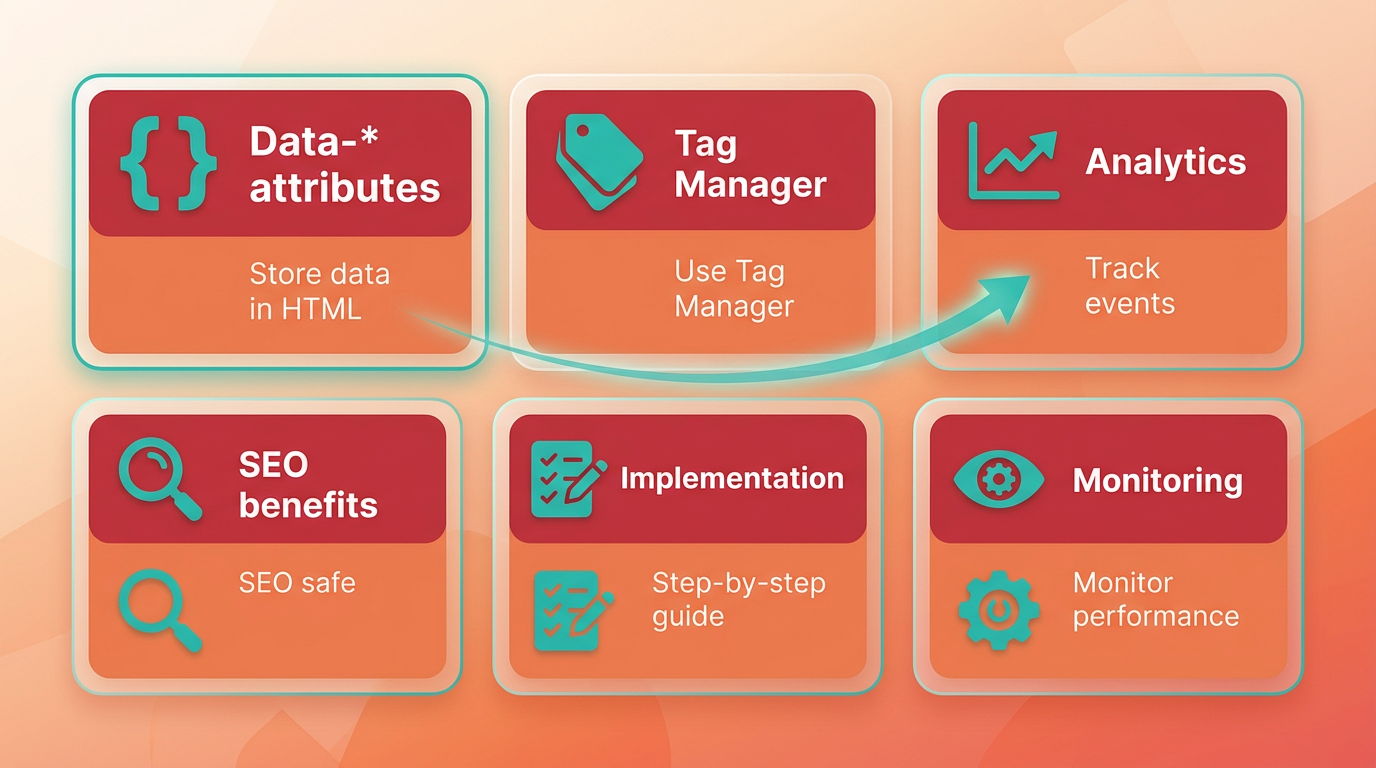
Moving tracking data from URLs into the DOM using data- attributes* and tag managers eliminates SEO risks while maintaining strong analytics. This approach keeps URLs clean, preserves crawl efficiency, and avoids diluting link equity. By embedding tracking parameters directly into HTML elements, you decouple analytics from URL structure, ensuring search engines prioritize meaningful content over fragmented, parameter-heavy paths. Below is a structured guide to implementing this fix, supported by examples and practical steps..
How to Implement Data-* Attributes for Tracking
Data- attributes* allow you to store custom data in HTML elements without affecting rendering. For internal links, replace UTM parameters in URLs with attributes like data-source, data-campaign, or data-category. This preserves clean URLs while retaining granular tracking capabilities. As mentioned in the Why Canonical Tags Don’t Solve Tracking Parameter Issues section, canonical tags alone cannot address the crawl inefficiencies caused by parameterized URLs, making DOM-based tracking a more strong solution.
Example:
<a href="/about" data-tracking-source="nav-menu" data-tracking-campaign="spring-2025">About Us</a>
Here, the tracking data lives in the DOM, not the URL. Search engines crawl /about directly, avoiding issues with parameterized paths.
To implement:
- Audit internal links with tools like Screaming Frog to identify parameterized URLs. Building on concepts from the Actionable Steps for Fixing SEO Damage section, this audit is the first step in addressing tracking-related SEO debt.
- Replace UTM parameters (e.g.,
?utm_source=nav) withdata-*attributes. - Ensure attributes follow a consistent naming convention (e.g.,
data-tracking-*) for analytics alignment.
This method prevents crawl duplication and ensures internal link equity flows unimpeded to canonical URLs..
Using Tag Managers to Capture Data-* Attributes
Tag managers like Google Tag Manager (GTM) can extract data-* attributes and send them to analytics platforms. This eliminates reliance on URL parameters for tracking while maintaining visibility into user behavior.
Steps to configure GTM:
- Create a Custom Event Trigger: Set up a trigger that fires when elements with specific
data-*attributes are clicked. - Capture Data with Variables: Use GTM’s
{{Click Element}}variable to extract values from attributes likedata-tracking-source. - Map to Analytics Events: Configure GA4 or other platforms to log the captured data as custom events.
Example GTM configuration:
- Trigger Type:
Click - Just Links - Condition:
{{Click Element}}containsdata-tracking-source - Variable:
{{Click Element}}→ Extractdata-tracking-sourcevalue
This setup ensures analytics platforms receive detailed tracking data without polluting URLs..
Case Study: SEO Improvements from DOM-Based Tracking
A generic e-commerce platform implemented this fix by migrating 200+ internal links from parameterized URLs to data-* attributes. Before the change, Google indexed over 1,500 duplicate URLs due to tracking parameters like ?src=footer or ?cmp=summer-sale.
After the migration:
- Indexed URLs dropped by 35% within 90 days.
- Crawl efficiency improved by 40%, as bots prioritized canonical pages.
- Organic traffic increased by 12%, attributed to stronger internal link equity.
This example aligns with findings from the Four Damage Vectors of Tracking Parameters section, which outlines how tracking parameters fragment SEO performance. By centralizing tracking in the DOM, the site reduced technical debt and improved search rankings..
Code Example for Data-* Implementation
Here’s a complete example combining HTML and GTM logic:
HTML:
<a href="/products/shoes" data-tracking-source="sidebar" data-tracking-category="footwear">View Shoes</a>
GTM Variable:
- Variable Type:
Custom JavaScript. - Code:
function() {
return document.querySelector('a[data-tracking-source]').getAttribute('data-tracking-source');.
}
GA4 Event Configuration:
- Event Name:
internal_link_click - Parameters:
source:{{data-tracking-source}}category:{{data-tracking-category}}
This approach ensures analytics tools capture detailed user behavior while maintaining SEO-friendly URLs.. By moving tracking into the DOM, websites eliminate URL bloat and align analytics with SEO best practices. Tools like GTM provide the infrastructure to capture and process these attributes seamlessly, offering a scalable solution for long-term technical SEO health.
Actionable Steps for Fixing SEO Damage
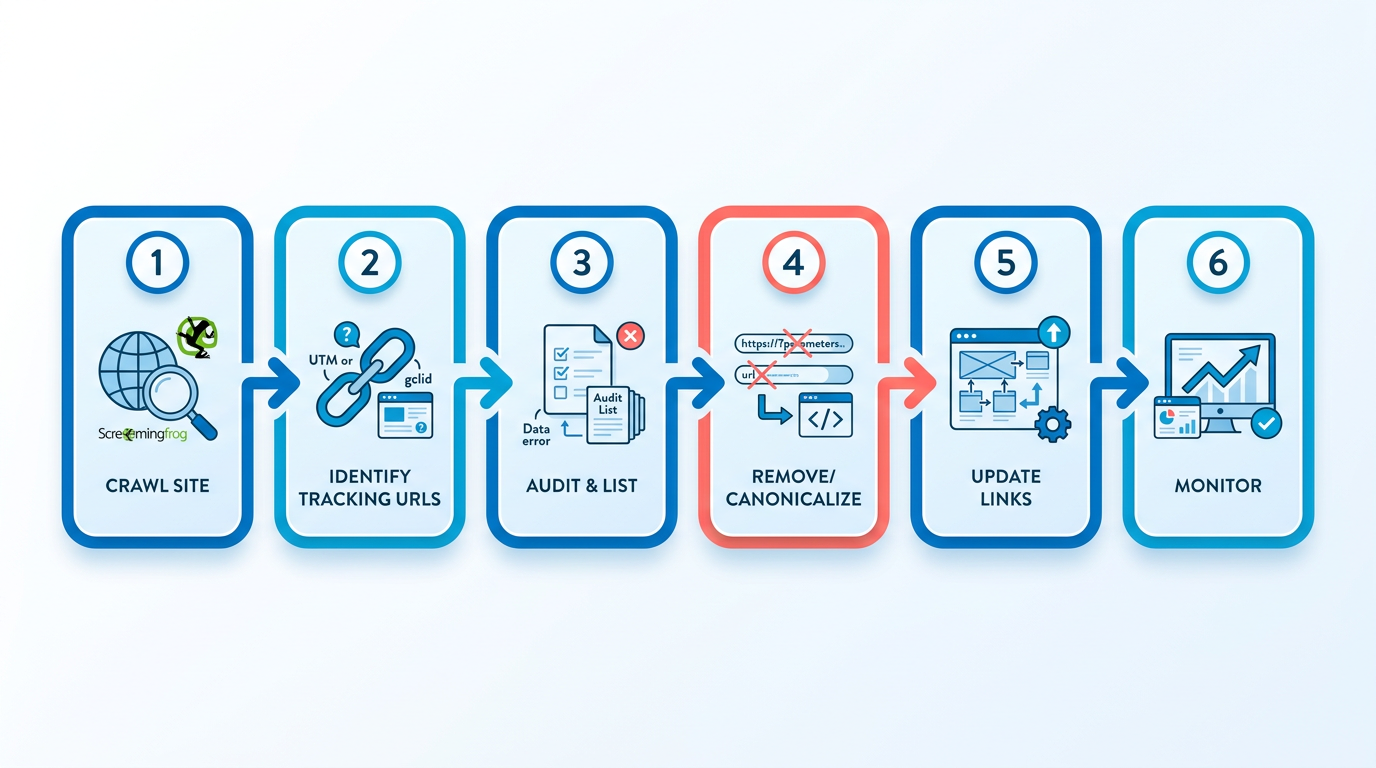
To fix SEO damage caused by tracking parameters in internal links, start by identifying and removing problematic URLs through a structured audit. Begin by crawling your site using tools like Screaming Frog to locate internal links containing tracking parameters such as UTM codes or campaign IDs. These tools flag URLs with parameters that fragment crawl equity and dilute link authority, as detailed in the Four Damage Vectors of Tracking Parameters section. Focus on links pointing to the same page with different parameter variations, as these create duplicate content issues. Once identified, prioritize fixing high-traffic pages where tracking parameters most impact user experience and crawl efficiency.
How Do You Transition to a DOM-Layer Tracking Solution?
Replace URL-based tracking with DOM-layer tracking to preserve SEO integrity while maintaining analytics visibility. Instead of appending parameters to URLs, embed tracking data directly into page elements using data attributes or JavaScript events, as outlined in the Structural Fix: Moving Tracking Out of URLs and into the DOM section. For example, add data-campaign="spring2025" to internal links, which analytics tools can read without altering the URL structure. This method avoids crawling inefficiencies and ensures search engines index clean, canonical URLs. Coordinate with your analytics team to update tagging logic, ensuring event triggers capture DOM-based attributes instead of URL parameters. This shift maintains accurate attribution while eliminating crawl path bloat.
What Steps Should You Take After Migration?
After transitioning to DOM-layer tracking, implement transitional safeguards to prevent SEO disruptions. First, set up 301 redirects from parameterized URLs to their canonical counterparts. For instance, redirect example.com/page?utm=source1 to example.com/page. This consolidates link equity and prevents duplicate content penalties. If redirecting isn’t feasible, use rel="canonical" tags on parameterized pages to signal the preferred version to search engines, though as explained in the Why Canonical Tags Don’t Solve Tracking Parameter Issues section, this approach has limitations. Next, monitor Google Search Console (GSC) for crawl errors and indexing status. Track metrics like crawl rate, indexed pages, and mobile usability to verify that changes improve efficiency. Regularly review GSC’s Coverage report to identify unresolved parameter URLs and address them iteratively.
By combining DOM-layer tracking with transitional redirects or canonicals, you eliminate SEO friction while retaining analytics insights. This approach aligns technical SEO best practices with business needs, ensuring long-term visibility and performance.
Conclusion and Next Steps
Tracking parameters in internal links create SEO challenges by fragmenting link equity, increasing crawl inefficiencies, and complicating attribution. These issues arise because search engines treat URLs with parameters as separate pages, even when they serve identical content. For example, a single article might appear indexed dozens of times with variations like ?utm_source=news or ?ref=blog, diluting its authority. Fixing this requires removing tracking parameters from internal links and using scalable tracking methods that don’t interfere with crawlers.
How to Prioritize Fixes
Start by auditing your site for internal links containing tracking parameters. Tools like Screaming Frog can identify these links by scanning for campaign parameters like utm, ref, or cid in URLs. Once identified, update the links to their clean URL versions. For ongoing tracking needs, consider server-side logging or Google Analytics events instead of URL parameters. This approach maintains SEO integrity while still capturing campaign data. As mentioned in the Common Mistakes and Misconceptions section, canonical tags alone won’t resolve crawl inefficiencies caused by parameterized URLs.
Example of a Website Improvement
One company improved its crawl efficiency by 50% after removing tracking parameters from internal navigation. By consolidating URLs using canonical tags and redirecting parameterized versions to clean URLs, they reduced duplicate content issues and restored link equity to key pages. This fix also simplified analytics reporting, making it easier to track user behavior without parameter fragmentation.
Next Steps for Implementation
- Audit Your Site: Use tools like Screaming Frog to export a list of internal links with tracking parameters. Building on concepts from the Actionable Steps for Fixing SEO Damage section, prioritize high-traffic pages for immediate updates.
- Update Links: Replace parameterized URLs in menus, footers, and content with their clean versions.
- Set Canonical Tags: Apply
rel=canonicalto parameterized URLs to point to the preferred version. - Monitor Crawl Efficiency: Use Google Search Console to track improvements in indexed pages and crawl errors.
For further reading, explore online tutorials on canonical tags or documentation for SEO audit tools. If you need a streamlined way to manage technical SEO fixes, consider solutions like AnyPost.ai, which offers transparent workflows for auditing and optimizing internal linking structures. Unlike generic providers, AnyPost.ai integrates SEO best practices directly into content workflows, ensuring tracking parameters don’t disrupt site performance.
Final Thoughts
Addressing tracking parameters in internal links is a critical step in maintaining a healthy SEO foundation. As outlined in the Why Tracking Parameters in Internal Links Matter section, internal linking is one of the most controllable aspects of technical SEO. By combining audit tools, canonical tags, and alternative tracking methods like those described in the The Structural Fix: Moving Tracking Out of URLs and into the DOM section, you can safeguard your site’s authority and improve user experience. Start with a small section of your site to test changes, then scale the process across your entire domain for long-term results.
Frequently Asked Questions
1. What are tracking parameters in internal links?
Tracking parameters are URL additions like utm or ref used to monitor traffic sources. They fragment link equity and create duplicate content by making search engines treat identical pages as separate URLs.
2. Why are tracking parameters harmful to SEO?
They dilute page authority, increase crawl inefficiencies by 20-50%, and fragment user behavior data in analytics. Search engines index each parameterized URL separately, even if content is identical.
3. How can I identify tracking parameters in my internal links?
Use tools like Screaming Frog to scan your site for URLs containing utm, ref, or cid in internal links. Export the data and prioritize pages with the highest traffic or most frequent parameter usage.
4. Can canonical tags alone fix parameterized URLs?
No. Canonical tags help consolidate content but do not resolve crawl duplication. Redirect parameterized URLs to clean URLs or use server-side tracking for full SEO recovery.
5. What’s the best way to track campaigns without harming SEO?
Replace URL parameters with server-side logging or Google Analytics events. These methods capture campaign data without fragmenting URLs, preserving link equity and crawl efficiency.
6. How much improvement can fixing tracking parameters deliver?
Removing tracking parameters can improve crawl efficiency by up to 50%, as seen in a case study where a company reduced duplicate content and restored link equity to key pages.
7. How should I prioritize fixing parameterized links?
Start with high-traffic pages and navigation menus where parameters are most prevalent. Use crawl data to identify URLs with the highest duplication or lowest performance.
