HTTP Status Codes for SEO: 200, 301, 302, 404, and 410 Explained

Key Takeaways
- Use 301 redirects for permanent URL changes to preserve link equity during site migrations.
- 410 Gone errors are processed faster than 404 Not Found for intentionally deleted pages.
- A 200 OK status confirms a page is accessible and should be indexed by search engines.
- Avoid 302 redirects for SEO as they don’t consolidate link equity to a new URL.
- 503 Service Unavailable prevents de-indexing during server maintenance by pausing crawling.
- Thousands of 404 errors create hidden SEO roadblocks by losing link equity and rankings.
Why HTTP Status Codes Matter
HTTP status codes act as the silent but critical language between servers and search engines, dictating how content is crawled, indexed, and ranked. For SEO, they’re not just technical details-they’re foundational signals that determine whether search engines treat your pages as valid, outdated, or broken. A single misconfigured status code can cost rankings, while the right one preserves link equity and ensures smooth crawling. Let’s break down why these codes matter and how they shape your website’s performance.
How Do Status Codes Impact Crawling and Indexing?
Search engines like Google use HTTP status codes to decide what to do with a page. A 200 OK signal means the page is accessible and should be indexed. If a page returns a 404 Not Found or 410 Gone, it’s removed from the index. The difference between 404 and 410 matters: Google processes 410 errors faster, making it ideal for intentionally deleted pages. Meanwhile, 301 Moved Permanently tells crawlers to transfer all link equity to a new URL, preserving rankings during site migrations. A 302 Found redirect, however, is temporary and doesn’t consolidate link equity, which can dilute SEO value over time.
For example, if a product page is moved permanently, using a 301 ensures search engines update the index and retain the page’s authority. Failing to do so might result in broken links and lost rankings. Similarly, a 503 Service Unavailable error-used during server maintenance-tells Google to pause crawling instead of de-indexing the page, preventing traffic loss during technical issues.
Real-World Consequences of Misconfigured Status Codes
Improper status codes create hidden SEO roadblocks. Consider a site with thousands of 404 errors: each broken page represents a lost opportunity to retain link equity and user engagement. A 2023 study by Ahrefs found that websites with fewer than 10% of URLs returning non-2xx codes ranked 23% higher on average than those with more errors. Redirect chains-like Page A → Page B → Page C-all using 301s-also dilute authority. Fixing these chains by pointing Page A directly to Page C with a single 301 redirect can boost crawl efficiency and rankings.
Soft 404 errors, where a broken page returns a 200 status code but displays no content, are another pitfall. Google indexes these pages as valid, leading to thin content penalties. For instance, a large e-commerce site once lost 12% of its organic traffic after outdated category pages returned 200 codes despite having no products. Correcting these to proper 404s or 301s restored traffic within weeks.
Who Benefits from Mastering Status Codes?
Site owners, SEO professionals, and content marketers all gain from understanding these codes. During a website migration, 301 redirects ensure users and search engines land on updated pages without losing rankings. Content teams can use 410 to remove outdated blog posts faster than 404s, signaling intentional deletions to Google. Technical SEO auditors, meanwhile, use tools like Google Search Console to identify redirect loops or soft 404s, fixing crawl issues that waste Google’s limited crawl budget.
For e-commerce platforms, proper status codes are lifesavers. A product page returning a 500 Internal Server Error might temporarily halt crawling, reducing visibility during critical sales periods. Using a 503 status with a Retry-After header instead keeps search engines informed that the issue is temporary, minimizing ranking drops.
Why This Matters for Long-Term SEO Strategy
HTTP status codes aren’t just about technical compliance-they’re strategic tools. They influence how efficiently search engines explore your site, how much link equity is preserved, and whether users encounter errors. For example, consolidating duplicate content with 301 redirects improves domain strength, while intentional 410s help clean up archives. When combined with other SEO factors like mobile responsiveness and page speed, well-managed status codes create a seamless experience for both users and crawlers.
In short, treating status codes as an afterthought risks traffic loss and ranking instability. But with deliberate use of 200s, 301s, and 410s-and avoiding soft 404s and redirect chains-you turn these codes into a competitive advantage. Tools like Google Search Console and Ahrefs’ Site Audit can uncover issues, but the execution depends on your ability to apply these principles consistently. For teams using AnyPost.ai, integrating status code monitoring into content workflows ensures every published or removed page aligns with SEO best practices.
Understanding HTTP Status Code 200
Understanding HTTP Status Code 200 is essential for SEO because it signals that a web request has been successfully fulfilled. When a server returns a 200 OK status, it confirms that the requested page is accessible, fully loaded, and ready for indexing. This response is the foundation of healthy SEO, as search engines treat 200 responses as valid content to crawl and rank. Without a 200 code, even functional pages might be ignored or misinterpreted by crawlers.
What Makes HTTP Status Code 200 Critical for SEO?
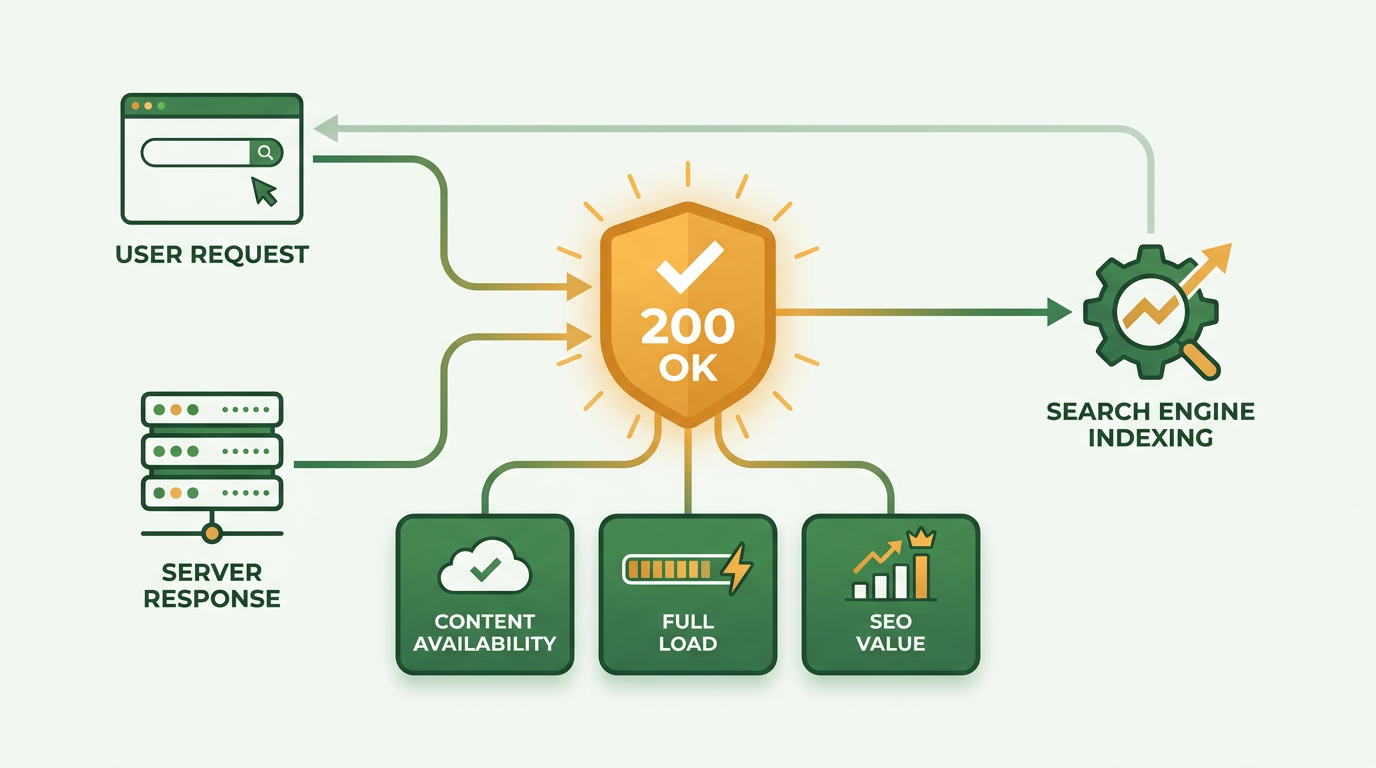
A 200 OK status directly impacts how search engines evaluate your content. Google and other crawlers treat 200 responses as a green light to index pages, ensuring they appear in relevant search results. This status also reassures users that their request was processed without errors, improving overall experience. For example, if your homepage returns a 200, it tells both search engines and visitors that your site is operational and trustworthy.
Key benefits of a 200 status include:
- Indexability: Pages with 200 codes are eligible for indexing, which is non-negotiable for SEO visibility.
- Crawl Efficiency: Search engines allocate crawl budget to pages returning 200, prioritizing fresh and updated content.
- User Trust: A 200 response ensures users access functional pages, reducing bounce rates and improving engagement.
However, misuse of this code can backfire. A soft 404 occurs when a page returns a 200 status but displays no meaningful content, such as a blank page or generic error message. Search engines may still index these pages, diluting your site’s authority. For instance, a misconfigured CMS might serve a 200 code for a deleted blog post, leading to irrelevant or duplicate content in search results. As mentioned in the Understanding HTTP Status Code 404 section, proper use of 404 codes is critical to avoid such issues.
When Should You Use HTTP Status Code 200?
Use a 200 code for any page that is:
- Fully functional: Homepages, product pages, and blog posts should return 200 when accessible.
- Static content: Files like CSS, JavaScript, or images rely on 200 to load correctly.
- User-generated content: Comments or forum posts must return 200 to ensure visibility.
Avoid using 200 for redirects or errors. If a page has moved permanently, use 301; for temporary moves, use 302. Misusing 200 in these scenarios confuses crawlers and wastes crawl budget, as discussed in the Common Mistakes and Best Practices section.
How Do You Check for HTTP Status Code 200?
Tools like Google Search Console provide direct insights into your site’s 200 responses. manage to the Coverage report to see which pages are indexed successfully. For deeper analysis, use crawler tools like Screaming Frog to audit your site’s status codes at scale.
For developers, browser extensions like Postman or cURL commands can test individual endpoints. For example:
curl -I https://example.com.
This command returns the HTTP status code, helping you verify if a page serves a 200.
Best Practices for Optimizing HTTP Status Code 200
To maximize SEO value from 200 responses:
- Minimize server response time: Ensure pages load quickly to avoid timeouts and improve user experience.
- Audit for soft 404s: Regularly scan your site for pages returning 200 but lacking content, as outlined in the Understanding HTTP Status Code 404 section.
- Monitor dynamically generated pages: E-commerce sites with product feeds should verify that all URLs serve valid 200 responses.
For ongoing management, integrate status code monitoring into your SEO workflow. Automated tools can flag unexpected 200 responses on error pages, ensuring your site remains search-engine-friendly. Building on concepts from the Implementing HTTP Status Codes with AnyPost.ai section, SaaS providers like AnyPost.ai offer streamlined solutions for managing redirects and status codes efficiently.
By prioritizing accurate 200 responses, you create a foundation for strong SEO performance, ensuring search engines and users access the content they expect.
Understanding HTTP Status Code 301
HTTP status code 301, or Moved Permanently, signals that a page’s content has been permanently relocated to a new URL. Unlike temporary redirects (302), a 301 instructs search engines and browsers to update records for the new location, preserving the original page’s SEO value. This makes it critical for URL changes during website redesigns, domain migrations, or content reorganization. Below, we break down its role, implementation, and optimization strategies.
What Makes 301 Redirects Valuable for SEO?
A 301 redirect transfers nearly all link equity (ranking authority) to the new URL, ensuring minimal disruption to search visibility. For example, if your old blog post at example.com/old-blog moves to example.com/new-blog, a 301 tells Google to credit the new page with the old one’s backlinks and rankings. This is essential during domain changes or when consolidating duplicate content.
The redirect also improves user experience by preventing broken links. Without a 301, visitors and crawlers would encounter a 404 error, leading to lost traffic and poor engagement. Google processes 301s efficiently, updating its index to prioritize the new URL within weeks, though exact timelines vary.
When to Use (and Avoid) 301 Redirects
Use a 301 redirect when:
- URLs change permanently (e.g.,
http://tohttps://, orwwwto non-wwwversions). - Content is consolidated (e.g., merging similar pages into a single resource).
- Old pages are removed but you want to preserve their SEO value.
Avoid using 301s for temporary changes. For short-term adjustments, a 302 redirect is more appropriate. Misusing 301s for temporary moves can confuse crawlers and dilute rankings if the redirect is later removed without updating the index.
A major pitfall is creating redirect chains or loops. As mentioned in the Common Mistakes and Best Practices section, chains slow down page load times and dilute link equity, while loops trap crawlers in infinite cycles. Both issues require regular audits using tools like Google Search Console or Ahrefs.
How to Set Up 301 Redirects
For WordPress users, plugins like AnyPost.ai streamline the process. manage to the plugin’s settings, enter the old and new URLs, and save. For non-WordPress sites, edit the .htaccess file (if using Apache servers) with code like this:
Redirect 301 /old-page http://example.com/new-page.
Or use mod_rewrite for more control:
RewriteEngine On
RewriteRule ^old-page$ /new-page [R=301,L]
Always test redirects after implementation using browser tools or online redirect checkers. Broken chains or incorrect configurations can harm user experience and SEO performance.
Best Practices to Optimize 301 Redirects
- Minimize redirect hops: Point old URLs directly to their final destination to avoid chains.
- Audit regularly: Use Google Search Console’s Coverage report to identify redirect errors.
- Update internal links: If possible, update links to the new URL instead of relying solely on redirects.
- Use 410 for removed content: If a page is deleted permanently and has no replacement, a 410 (Gone) is faster for Google to process than a 404, as detailed in the Understanding HTTP Status Code 410 section.
For large-scale migrations, document all redirects and validate them systematically. Tools like Screaming Frog can crawl your site to detect issues before launch. By treating 301s as a strategic SEO tool, you ensure a seamless transition for both users and search engines.
How Does AnyPost.ai Automate Redirects? AnyPost.ai streamlines the management of HTTP status codes like 301 and 302 redirects by automating their setup during content updates. When you move content, the platform builds redirects dynamically, ensuring alignment with best practices outlined in the Implementing HTTP Status Codes with AnyPost.ai section. This reduces manual configuration and minimizes the risk of errors during site changes.
Understanding HTTP Status Code 302
HTTP status code 302, known as Found, signals a temporary redirect. This means the requested resource has moved to a different URL temporarily, and users or search engines should continue using the original URL once the issue resolves. Unlike the permanent 301 redirect, a 302 is ideal for short-term changes, such as A/B testing or seasonal promotions. For example, if you temporarily redirect traffic to a landing page for a marketing campaign, a 302 ensures search engines don’t update their index to reflect the new URL permanently, as detailed in the Understanding HTTP Status Code 301 section.
When to Use HTTP 302 Redirects
Use 302 redirects when changes to your site are temporary. Common scenarios include:
- A/B testing new page designs while preserving the original URL’s search ranking.
- Maintenance pages where users are redirected to a temporary message while the original page is updated.
- Geo-targeting or language-specific routing that varies based on user location or preferences.
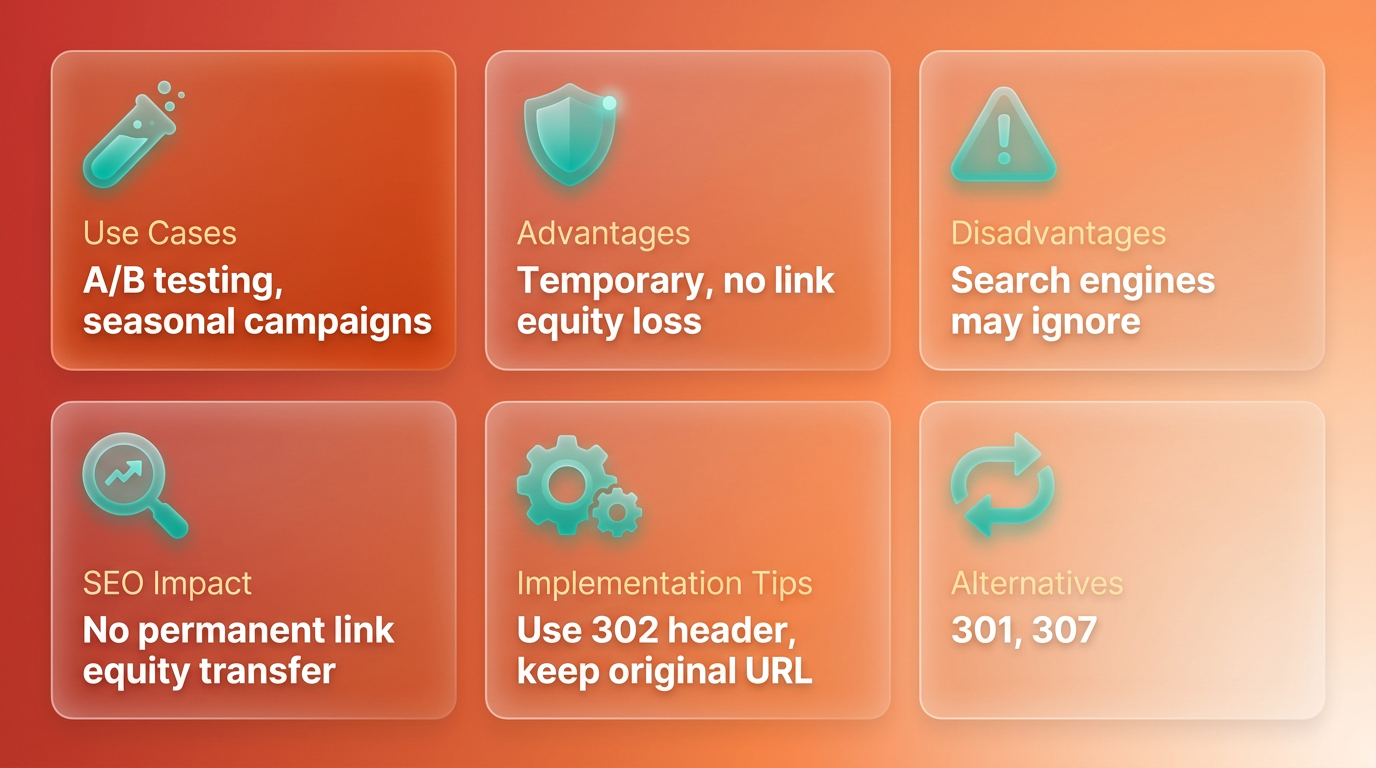
The key benefit is retaining link equity for the original URL. Search engines like Google treat 302 redirects as non-permanent, so they don’t transfer ranking signals to the new URL. This ensures your original content remains the primary authority in search results, a principle highlighted in the Common Mistakes and Best Practices section regarding redirect misuse.
Risks of Misusing 302 Redirects
While 302 redirects are useful, misuse can harm SEO. The most critical pitfall is leaving a 302 active for too long. If the redirect persists, search engines may interpret it as a permanent move (like a 301), leading to diluted rankings for the original URL. For instance, if you run an A/B test for months without reverting the redirect, Google might start indexing the test page instead of the original, as warned in the Common Mistakes and Best Practices section.
Another risk is confusing users. If visitors or crawlers repeatedly encounter a 302 redirect, they may lose trust in the original URL’s stability. This can reduce click-through rates and increase bounce rates. Always ensure redirects are clearly labeled as temporary and removed promptly.
How to Set Up a 302 Redirect
Configuring a 302 redirect depends on your site’s infrastructure. Here’s how to do it with common tools:
Using .htaccess for Apache Servers
- Open your
.htaccessfile. - Add this line:
Redirect 302 /old-page http://example.com/new-page.
Replace /old-page and http://example.com/new-page with your specific URLs.
Using WordPress with a Plugin
- Install a redirect plugin like Redirection.
- manage to Tools > Redirection.
- Enter the source URL (
/old-page) and target URL (http://example.com/new-page). - Set the redirect type to 302 Found.
- Save changes and test the redirect.
Always verify the redirect works correctly using tools like Google’s URL Inspection Tool or online redirect checkers.
Best Practices for 302 Redirects
To maximize SEO benefits and avoid pitfalls:
- Limit redirect duration to weeks, not months.
- Monitor performance with Google Search Console to ensure redirects aren’t causing crawl errors.
- Avoid chaining 302 redirects-multiple temporary redirects can confuse crawlers and dilute rankings.
- Update internal links to point back to the original URL after removing the redirect.
For example, if you run a 302 redirect for a holiday sale, schedule a follow-up to revert changes post-event. Tools like Screaming Frog or Ahrefs can help audit redirects and catch lingering 302s that should be removed. As outlined in the Implementing HTTP Status Codes with AnyPost.ai section, automated tools can streamline this process, ensuring temporary redirects don’t become SEO liabilities.
By using 302 redirects judiciously, you can manage temporary site changes without sacrificing SEO value. Always pair them with clear documentation and monitoring to maintain a seamless user and crawler experience.
Understanding HTTP Status Code 404
HTTP status code 404, or "Not Found," signals that a requested page does not exist on the server. This status code informs both users and search engines that the content they’re seeking is unavailable. Unlike the 410 "Gone" code-which explicitly marks content for permanent removal-404 implies the page might return in the future. As mentioned in the Understanding HTTP Status Code 410 section, 410 is used for content that will never return, while 404 allows for potential restoration. Search engines typically remove pages with 404 errors from their indexes over time, reducing their visibility in search results.
A 404 status helps manage crawl efficiency by signaling search engines to stop indexing non-existent pages. This aligns with concepts from the Why HTTP Status Codes Matter section, where the role of status codes in guiding crawlers and maintaining SEO health is emphasized. It also improves user experience by clearly stating when a page is missing, prompting users to manage back or use a search function.
One major risk is the soft 404, where a page returns a 200 "OK" status despite containing no useful content. This misleads search engines, which continue to index the page as if it’s valid. Building on concepts from the Common Mistakes and Best Practices section, soft 404s are a common pitfall that dilutes SEO value and wastes crawl budget.
Use 404 for pages that have been permanently deleted but where a 410 "Gone" code isn’t required. For example, if a blog post is deleted without replacement, a 404 ensures search engines recognize the page’s absence. In Implementing HTTP Status Codes with AnyPost.ai, the tool streamlines 404 management by automating error monitoring and providing pre-built templates for custom error pages.
By following these steps, you maintain crawl efficiency, enhance user trust, and align with search engine guidelines. Tools like AnyPost.ai further simplify error management, ensuring your site remains optimized for SEO.
Understanding HTTP Status Code 410
HTTP status code 410 Gone signals that a requested resource is permanently unavailable and will not return. Unlike 404 Not Found, which implies the page might reappear, 410 explicitly tells search engines and users to remove the URL from records. This distinction matters for SEO: Google processes 410 errors faster than 404s, reducing crawl waste and helping deindex content more efficiently. Use 410 only when content has been intentionally and permanently deleted, such as outdated blog posts or removed products.
What Makes HTTP 410 Different from 404?
410 Gone and 404 Not Found both signal missing content, but their implications differ. A 404 suggests the page might return in the future, prompting search engines to retry crawling it. A 410, however, indicates permanent removal, instructing crawlers to drop the URL from indexes immediately. For example, if a company removes a product page and plans to keep it offline, a 410 communicates this decision clearly. Soft 404s-where a broken page returns a 200 OK status-should also be avoided, as they mislead crawlers and waste resources. As mentioned in the Understanding HTTP Status Code 404 section, soft 404s often arise from poor error page configuration.
When Should You Use HTTP 410?
Use 410 for content you intentionally deleted and will never restore. Common scenarios include removing outdated articles, discontinuing products, or consolidating URLs during site cleanups. For instance, if a blog post about a temporary promotion is no longer relevant, a 410 ensures it doesn’t reappear in search results. Avoid using 410 for temporary issues-reserve 302 Found or 503 Service Unavailable for such cases. Misapplying 410 can confuse users and crawlers, especially if the page reappears later.
How Do You Implement HTTP 410 Correctly?
Setting up 410 depends on your platform. On WordPress, plugins like Yoast SEO or Redirection let you assign 410 statuses to specific URLs. For custom setups, edit the .htaccess file with ErrorDocument 410 "Gone" or configure server-side rules in Nginx or Apache. Always test changes using tools like Google Search Console or Screaming Frog to confirm the correct status code is returned. If redirecting deleted content to a relevant page, use a 301 Moved Permanently instead-410 should never precede a redirect. As discussed in the Understanding HTTP Status Code 301 section, 301 redirects preserve SEO value by transferring link equity to the new URL.
What Are the Risks of Misusing HTTP 410?
Incorrect use of 410 can harm SEO. For example, applying it to pages you plan to restore forces search engines to remove them prematurely. Similarly, returning a 410 for soft 404 pages (e.g., a custom error page with a 410 status) misleads crawlers. Another pitfall is overusing 410 for large-scale deletions without monitoring. If hundreds of pages are removed, ensure internal links are updated and users are directed to helpful alternatives. Tools like Ahrefs or SEMrush can track 410 responses and identify patterns that need correction.
How Does HTTP 410 Impact Crawl Budget?
Search engines allocate crawl budget based on site health and relevance. Returning 410 for deleted content reduces unnecessary crawling, freeing resources for active pages. However, excessive 410s on large sites might signal poor maintenance. Balance deletions with strategic redirects for valuable pages. For instance, if a product page is removed but its category remains popular, use a 301 redirect to preserve link equity. Monitor crawl stats in Search Console to ensure 410s don’t dominate your traffic. Building on concepts from the Why HTTP Status Codes Matter section, managing status codes effectively ensures efficient crawling and indexing.
By using HTTP 410 appropriately, you streamline indexing, improve crawl efficiency, and maintain a clean site structure. Always pair its use with clear documentation for users-while 410 signals permanence, a helpful error message (e.g., “This content has been removed”) enhances user experience.
Common Mistakes and Best Practices
Common mistakes with HTTP status codes often stem from misusing redirects or failing to address crawl inefficiencies. Incorrectly applying 302 (Found) instead of 301 (Moved Permanently) can dilute link equity, as search engines may treat the redirect as temporary even if the change is permanent. As mentioned in the Understanding HTTP Status Code 301 section, 301 redirects are essential for preserving SEO value during permanent URL changes. Similarly, redirect chains-where a URL redirects through multiple steps-slow crawlers and waste crawl budget. For example, redirecting old-page → temp-page → new-page instead of pointing old-page directly to new-page forces search engines to follow extra hops, increasing the risk of errors or incomplete indexing.
How Do Redirect Chains Affect SEO?
Redirect chains can significantly harm SEO by fragmenting link equity and confusing crawlers. Each additional redirect in a chain reduces the amount of authority passed to the final destination. Google’s crawlers follow up to 10 redirect hops, but even this limit means excessive chains waste resources better spent indexing fresh content. A 1:1 redirect mapping-linking each old URL directly to its new counterpart-eliminates this issue. For instance, if a website migrates to a new domain, using a single 301 redirect from http://olddomain.com/page to http://newdomain.com/page ensures both users and search engines reach the correct destination efficiently.
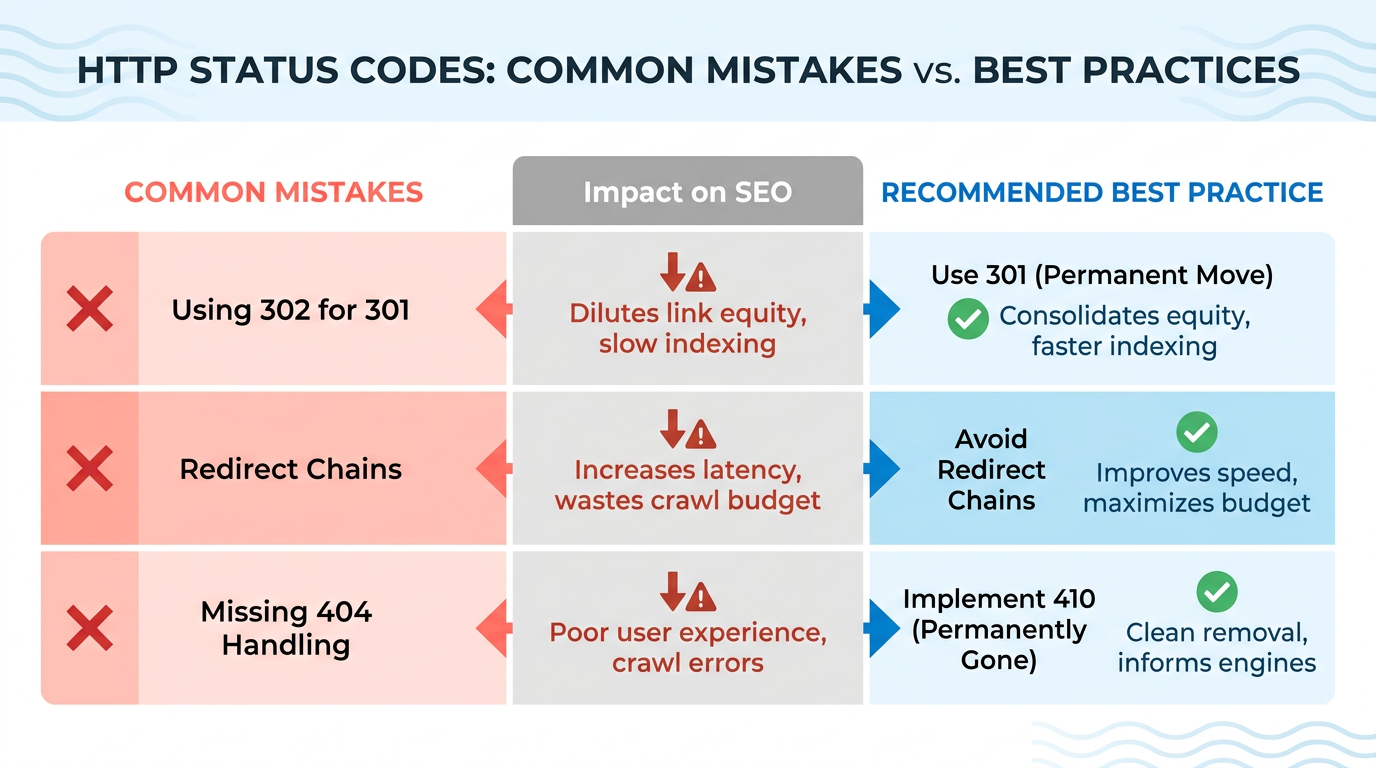
Soft 404 errors, where broken pages return a 200 (OK) status instead of a 404 (Not Found) or 410 (Gone), are another common pitfall. As discussed in the Understanding HTTP Status Code 200 section, a 200 status falsely signals to search engines that content exists when it does not. These pages appear functional but offer no value, misleading both users and crawlers. A page returning a 200 status with a message like “This page doesn’t exist” fails to signal its absence to search engines, keeping it in the index unnecessarily. To avoid this, ensure error pages return the correct status code and guide users back to relevant content.
Best practices for HTTP status codes revolve around clarity and simplicity. Use 301 redirects for permanent changes and 302 redirects only for temporary adjustments. For permanently removed pages, 410 (Gone) is preferred over 404 (Not Found) because Google processes it faster, aiding index cleanup. As outlined in the Understanding HTTP Status Code 410 section, 410 explicitly signals that content will not return, unlike a 404. Maintenance periods should use 503 (Service Unavailable) with a Retry-After header to signal temporary unavailability without triggering de-indexing.
Implementing these practices is streamlined with tools like AnyPost.ai. As detailed in the Implementing HTTP Status Codes with AnyPost.ai section, the platform automates redirect management and error detection, ensuring consistent application of status codes across your site. By treating status codes as contractual signals-clear, precise, and unambiguous-sites maintain trust with both users and search engines.
Frequently Asked Questions
1. What is the difference between 301 and 302 redirects for SEO?
A 301 redirect permanently transfers link equity to a new URL, preserving rankings during migrations. A 302 redirect is temporary and does not consolidate authority, risking diluted SEO value over time. Always use 301 for permanent changes.
2. Why is a 410 status code better than a 404 for deleted pages?
A 410 "Gone" signal is processed faster than a 404 "Not Found" for intentionally removed pages. This speeds up de-indexing and avoids crawl waste, ensuring search engines recognize the page as permanently deleted.
3. What does a 200 status code indicate for SEO?
A 200 "OK" status confirms a page is accessible and should be indexed by search engines. It signals that the server successfully delivered the requested content, making it critical for maintaining rankings and visibility.
4. How do 404 errors impact SEO performance?
Thousands of 404 errors lose link equity and rankings. Ahrefs found sites with fewer than 10% non-2xx errors rank 23% higher on average, as broken links reduce user engagement and crawl efficiency.
5. What role does a 503 status code play during server maintenance?
A 503 "Service Unavailable" temporarily pauses crawling without de-indexing pages, preventing traffic loss during server issues. It tells search engines to retry later, preserving rankings until the site recovers.
6. How do redirect chains hurt SEO?
Redirect chains (e.g., A → B → C) dilute authority and slow crawling. Fixing them by linking A → C directly with a 301 redirect consolidates equity and improves indexing efficiency.
7. What are the consequences of misconfigured status codes?
Misconfigured codes cause hidden SEO roadblocks like lost rankings and broken links. For example, using 302 instead of 301 during migrations splits authority, while errors like 404s waste crawl budget and reduce user trust.
