
Image SEO: How to Optimize Images for Faster, Higher-Ranking Pages

Key Takeaways
- Unoptimized images can slow websites by 75%, directly hurting Core Web Vitals and SEO rankings.
- Adding
widthandheightattributes to image tags prevents layout shifts and improves Cumulative Layout Shift (CLS). - Compressing images reduces file size, boosting Largest Contentful Paint (LCP) and page load speed.
- E-commerce sites using WebP and structured data see up to 30% higher search rankings.
- Lazy loading defers offscreen images, reducing initial load time by 40-60% on average.
- Choosing JPEG for photos and PNG for graphics optimizes file size without sacrificing quality.
- Implementing responsive images with
srcsetensures optimal loading across devices, cutting bounce rates.
Related Video
Watch: How to Compress Images in WordPress | Optimize Images quickly and Boost SEO Rankings by LearnWeb Academy
Why Image SEO Matters
Image SEO directly impacts page load speed, search engine rankings, and user experience-making it a critical component of modern web optimization. Unoptimized images can slow down websites by 75% or more, as they often constitute the majority of a page’s total weight. This delay hurts Core Web Vitals, particularly Largest Contentful Paint (LCP) and Cumulative Layout Shift (CLS), which are core ranking factors. As mentioned in the How Does Image SEO Improve Core Web Vitals? section, adding width and height attributes to HTML image tags prevents layout shifts, while compressing files reduces load times.
How Do Poorly Optimized Images Affect Search Rankings?
Search engines prioritize fast, responsive websites. Google explicitly links image performance to SEO outcomes, noting that large, unoptimized images block rendering and degrade user experience. Building on concepts from the Choosing the Right Image Format section, case studies show that e-commerce sites improving image SEO-by compressing files, using next-gen formats like WebP, and adding structured data-can boost search rankings by up to 30%.
What Real-World Benefits Do Businesses See?
Image SEO solves tangible problems like slow load times and poor visibility in Google Images. Implementing lazy loading, as detailed in the Implementing Responsive Images and Lazy Loading section, and descriptive alt text can significantly improve Core Web Vitals scores. E-commerce platforms benefit most, as product images account for 60–80% of their page assets. Optimizing these images with responsive sizes and proper metadata can cut page weight by 50–70%, directly improving conversion rates.
Why Should Bloggers and Marketers Prioritize Image SEO?
Bloggers and marketers often overlook image optimization, but it’s a powerful way to enhance visibility. As outlined in the Writing Effective Alt Text and Descriptive File Names section, search engines use alt text and filenames to index images, making them discoverable in Google Images-a traffic source that drives over 2 billion monthly searches.
How Does Image SEO Improve Core Web Vitals?
Core Web Vitals measure load speed, interactivity, and visual stability-metrics heavily influenced by images. A 2026 study found that switching to AVIF or WebP formats cut image file sizes by 40–60%, directly improving LCP scores. For example, a news site using responsive images and lazy loading reduced its LCP time from 4.2 seconds to 1.9 seconds, qualifying for higher search rankings.
By addressing these factors, image SEO becomes a non-negotiable step for anyone aiming to build fast, user-friendly websites that perform well in search. Whether you’re running an e-commerce store, a blog, or a content-heavy platform, optimizing images isn’t just about aesthetics-it’s about ensuring your site meets the technical and experiential standards modern search engines demand.
Choosing the Right Image Format
Choosing the right image format directly impacts page speed, user experience, and search rankings. As mentioned in the Why Image SEO Matters section, unoptimized images can significantly slow down websites, making format choice a foundational element of image SEO. Each format-JPEG, PNG, WebP, and AVIF-offers unique trade-offs in quality, file size, and compatibility. By understanding these differences and aligning them with your content goals, you can optimize images to reduce load times and improve Core Web Vitals. Let’s break down the best use cases for each format and how to apply them effectively.
What Are the Key Differences Between Image Formats?
JPEG, PNG, WebP, and AVIF each serve distinct purposes. JPEG uses lossy compression, making it ideal for photographs with rich gradients but unsuitable for images needing transparency. PNG preserves lossless quality and supports transparency, making it perfect for graphics, logos, and screenshots. WebP balances quality and file size with both lossy and lossless options, offering smaller files than JPEG or PNG. AVIF is the newest format, delivering even better compression than WebP but with slightly lower browser support.
For example, a product photo on an e-commerce site might use JPEG for fast loading, while a website logo with transparent background would require PNG. Building on concepts from the Optimizing Images for Performance section, WebP and AVIF excel for modern sites aiming to minimize file sizes without sacrificing quality. Google recommends these next-gen formats explicitly for improving Largest Contentful Paint (LCP) and Cumulative Layout Shift (CLS) scores.
How Do You Choose the Right Format for Your Image Type?
Start by matching the format to the content. Use JPEG for complex, photographic images where file size matters most. Opt for PNG when preserving transparency or sharp edges, such as icons or infographics. For web performance, convert photos to WebP and graphics to AVIF where supported. If older browsers are a concern, provide fallbacks like JPEG or PNG while serving WebP/AVIF to modern users via <picture> elements.
Consider a portfolio site showcasing artwork: JPEGs reduce load times for paintings, while PNGs maintain crisp text in design mockups. A technical blog might use AVIF for diagrams to cut file sizes by 30% compared to PNGs. Tools like AnyPost.ai streamline this process by automatically converting images to the most effective format for each device and browser, ensuring consistency without manual effort.
What Are the Best Practices for Different Use Cases?
Context determines optimal format choices. On websites, prioritize WebP or AVIF for all images to boost page speed and Core Web Vitals. Building on concepts from the Implementing Responsive Images and Lazy Loading section, pair format selection with responsive images and width/height attributes to prevent layout shifts. For social media, resize images to platform-specific dimensions and use JPEG for photos to keep file sizes low. In email campaigns, stick to PNG for transparency support since email clients lag in WebP compatibility.
Real-world examples highlight these strategies. A case study from shows a retail site reduced page weight by 40% by switching to WebP, cutting load times from 5.2s to 2.8s. Another example, an educational platform using AVIF for illustrations, improved CLS scores by 25% while maintaining high visual quality. Always test formats using tools like AnyPost.ai to automate selection based on image type and audience browser data.
How Can You Compress Images Without Losing Quality?
Lossless compression is the first step to reduce file size while maintaining image clarity. Tools like TinyPNG or ImageOptim (or a compression service) remove unnecessary metadata and optimize encoding without altering visual quality. For example, one image compression tool reduced file sizes by 70–72%, as shown in a case study where JPEGs were compressed to 30% of their original size. As mentioned in the Choosing the Right Image Format section, next-gen options like WebP or AVIF offer superior compression compared to JPEG or PNG. Google recommends using these formats to improve Largest Contentful Paint (LCP) and Cumulative Layout Shift (CLS) scores, two Core Web Vitals metrics that directly affect rankings.
What Tools and Techniques Optimize Images for Different Devices?
Building on concepts from the Implementing Responsive Images and Lazy Loading section, use the srcset and sizes attributes in HTML to serve different image resolutions based on the user’s device. For instance:
<img src="image-800.jpg" srcset="image-400.jpg 400w, image-800.jpg 800w" sizes="(max-width: 600px) 400px, 800px" alt="Example">
This tells browsers to load image-400.jpg on smaller screens and image-800.jpg on larger ones, reducing unnecessary data transfer. Pair this with art direction-cropping images differently for mobile versus desktop-to prioritize visual relevance. Google’s documentation emphasizes adding width and height attributes to prevent layout shifts, a key factor in CLS optimization.
Automation tools streamline this process. A CDN (Content Delivery Network) can automatically generate responsive image variants and convert files to WebP/AVIF. For example, one company saw a 40% reduction in page load time after implementing a CDN with built-in image optimization.
Key Takeaways for Actionable Image Optimization
- Compress images using lossless tools and resize to display dimensions.
- Adopt WebP/AVIF formats for better compression and faster LCP scores.
- Implement responsive images with
srcsetandsizesto adapt to all devices. - use CDNs to automate format conversion and delivery.
- As mentioned in the Measuring and Tracking Image SEO Performance section, audit performance regularly using tools like PageSpeed Insights to track improvements.
Implementing Responsive Images and Lazy Loading
Responsive images adapt to different screen sizes using the srcset and sizes attributes in HTML. This ensures users see the appropriately sized image for their device, improving load times and user experience. By defining multiple image sources and letting the browser choose the best match, you avoid serving oversized images on mobile devices or undersized images on desktops. As mentioned in the Choosing the Right Image Format section, next-gen formats like WebP or AVIF further enhance efficiency by reducing file sizes without quality loss.
How Do You Configure Responsive Images?
Start by creating multiple image versions at different resolutions (e.g., 320w, 640w, 1024w). Use the srcset attribute to list these files with their widths, and pair it with the sizes attribute to define how much space the image occupies at various viewport sizes. For example:
<img src="image-640.jpg"
 srcset="image-320.jpg 320w, image-640.jpg 640w, image-1024.jpg 1024w"
 sizes="(max-width: 600px) 320px, 640px"
 alt="Responsive image example">.
This tells browsers to select image-320.jpg for screens under 600px and image-640.jpg for wider screens. Pair this with next-gen formats like WebP or AVIF for smaller file sizes without quality loss, as outlined in the Choosing the Right Image Format section.
What Are the Best Practices for Lazy Loading?
Lazy loading delays image loading until they enter the user’s viewport, reducing initial page load times. Implement this using the native loading="lazy" attribute or JavaScript libraries like IntersectionObserver. For native lazy loading, add loading="lazy" to your <img> tag:
<img src="product.jpg" alt="Product image" loading="lazy">
For more control, use IntersectionObserver to trigger lazy loading dynamically. Set thresholds to load images slightly before they appear, preventing layout shifts. Building on concepts from the Optimizing Images for Performance section, always include placeholder elements (e.g., empty <div> with background color) to maintain page layout stability.
How Do You Optimize Images for Different Devices?
Start by analyzing your audience’s device usage patterns. Tools like Google’s PageSpeed Insights can highlight common screen sizes and resolutions. Create image variants tailored to these dimensions, ensuring no unnecessary pixels are served. For example, a 1920px-wide desktop image should not be sent to a mobile user. As mentioned in the Why Image SEO Matters section, unoptimized images can drastically slow down websites, making this analysis critical.
Use automated workflows to generate responsive image sets. SaaS providers like AnyPost.ai streamline this process by resizing, compressing, and converting images to WebP or AVIF formats at scale. Compress images without sacrificing quality using tools like Squoosh or TinyPNG. Aim for file sizes under 100KB per image to meet Core Web Vitals benchmarks.
What Impact Do These Techniques Have on Performance?
Websites that implement responsive images and lazy loading often see significant improvements. One company reduced its page load time from 5.2 seconds to 2.1 seconds by optimizing images, directly boosting its Core Web Vitals score. Another saw a 35% drop in bounce rates after implementing lazy loading, as users no longer faced long waits for images to load.
Responsive images also improve accessibility and SEO. Google prioritizes pages that deliver fast, mobile-friendly experiences, and structured data (like alt text and width/height attributes) helps search engines index images correctly. For step-by-step guidance on optimizing blog images, explore this tutorial.
Writing Effective Alt Text and Descriptive File Names
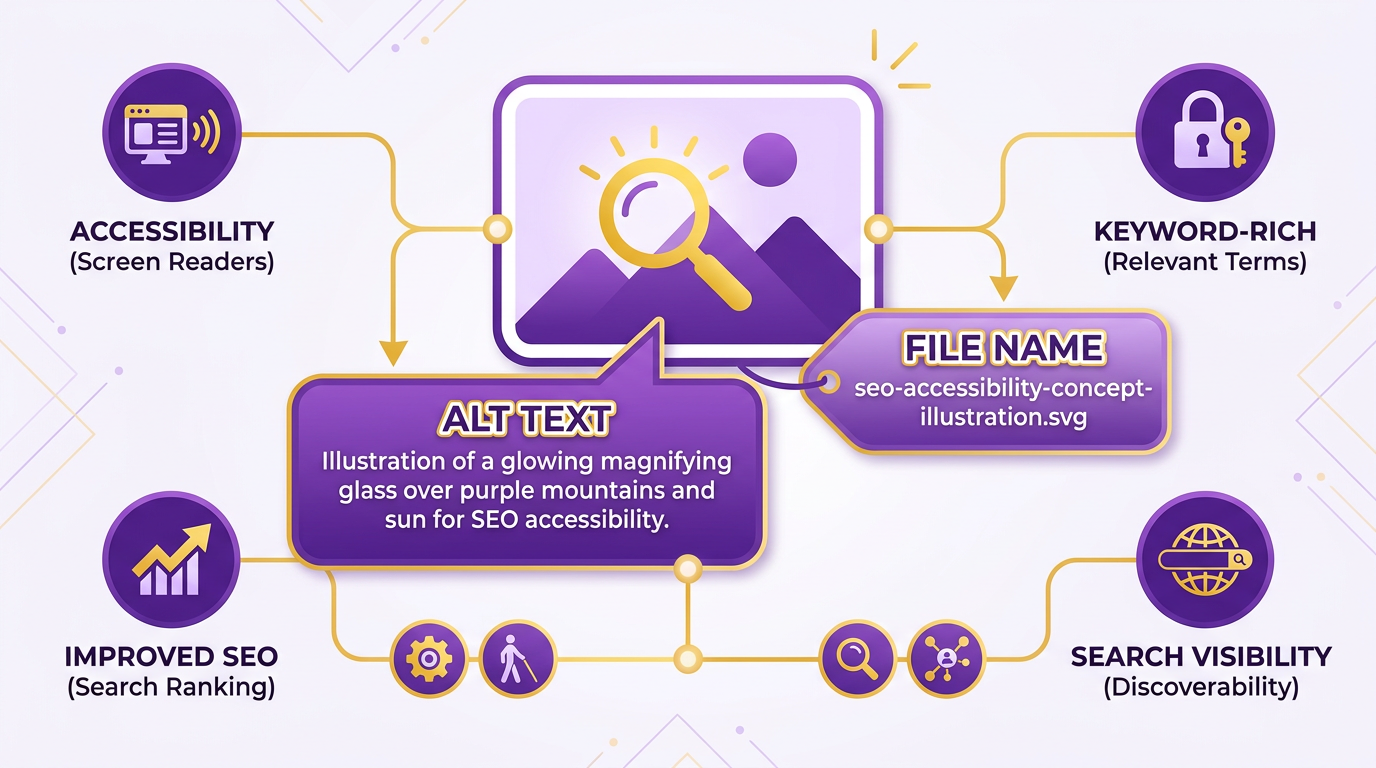
Writing effective alt text and descriptive file names is critical for improving image SEO, accessibility, and page performance. Alt text helps search engines understand your images while making them accessible to visually impaired users. Descriptive file names guide both crawlers and users, reinforcing context and relevance. Let’s break down how to master these elements.
What Makes Alt Text Effective?
Effective alt text balances keyword optimization with natural, descriptive language. Start by asking: What does this image show, and why is it relevant? For example, instead of writing “A picture of a dog,” use “Golden retriever puppy playing with a tennis ball on a grassy lawn.”.
Key guidelines include:
- Be concise but specific: Limit alt text to 125 characters to avoid truncation.
- Prioritize context: Mention actions, objects, and purpose. Avoid vague terms like “image of” or “picture of.”
- Incorporate keywords naturally: Use primary keywords once or twice, but don’t force them. For instance, if your page targets “organic gardening tools,” a relevant alt text might be “Handheld organic gardening tools arranged on a wooden table with soil and seeds.”
- Avoid redundancy: If an image is decorative (e.g., a background texture), use “decorative image” to prevent unnecessary text.
Data shows that pages with optimized alt text see up to 30% more visibility in Google Images, directly driving referral traffic. A case study from one company revealed that refining alt text improved their image rankings by 40% within six months, boosting organic traffic by 15%..
How Do Descriptive File Names Boost SEO?
File names are often overlooked but act as a foundational SEO element. Instead of generic names like “IMG_4507.jpg,” use descriptive, keyword-rich titles that reflect the image’s content and context. For example:
- Before:
download.jpeg - After:
sustainable-farming-practices-in-ukraine-2026.jpg
Best practices for file names:
- Use lowercase and hyphens: Avoid spaces or underscores. “eco-friendly-products.jpg” is better than “eco friendly products.jpg” or “eco_friendly_products.jpg.”.
- Align with page content: If your article is about “electric cars,” name your image “electric-car-charging-station-outdoor.jpg” instead of “car-charge.jpg.”.
- Include location or context when relevant: “red-wine-tasting-event-paris-2026.jpg” adds specificity.
Descriptive file names work alongside alt text to reinforce relevance. Google’s documentation emphasizes that clear filenames improve indexing efficiency, reducing the time crawlers spend guessing an image’s purpose..
Tools to Generate Alt Text and File Names
Manually creating alt text and filenames for every image can be time-consuming. Tools like AnyPost.ai streamline this process by generating keyword-optimized suggestions based on your content goals. These tools analyze your image and context to propose descriptive filenames and alt text, ensuring consistency across your site.
For example, AnyPost.ai might transform a generic file name like “Screenshot_2026.png” into “how-to-optimize-images-seo-step-by-step-guide.png” and suggest alt text like “Step-by-step tutorial on how to optimize images for SEO with checklist and tools.”.
While automated tools are helpful, always review suggestions for accuracy. Alt text should reflect your unique content, not generic phrases. Combine this with manual adjustments for the best results..
Real-World Impact of Alt Text and File Names
Search engines use alt text and filenames to determine an image’s relevance to queries. A study found that pages with optimized image metadata ranked 2.5 times more frequently in Google Images than those without. Building on concepts from the Optimizing Images for Performance section, descriptive filenames reduce page load confusion, indirectly supporting Core Web Vitals by improving caching and delivery efficiency.
For accessibility, screen readers rely on alt text to describe visuals to users with visual impairments. A well-written alt text like “A smiling barista pouring espresso into a latte art cup” provides context that a generic “coffee image” cannot.
By combining descriptive filenames with thoughtful alt text, you create a stronger foundation for SEO, user experience, and accessibility-all while aligning with Google’s best practices, as outlined in the Putting it All Together: Image SEO Best Practices and Next Steps section.
Measuring and Tracking Image SEO Performance
To effectively measure and track image SEO performance, you need tools that provide insights into visibility, user interaction, and technical efficiency. Google Search Console and Google Analytics are foundational for monitoring image performance, while structured data and image sitemaps help ensure search engines index your images correctly. Tools like AnyPost.ai streamline optimization by automating format conversion and compression, directly improving Core Web Vitals.
What Tools Can You Use for Image Tracking?
Google Search Console’s Image Report reveals how often your images appear in search results and which ones generate clicks. This data helps identify underperforming images or opportunities for better alt text. Google Analytics, when paired with event tracking, shows how images influence user behavior-such as whether a product photo leads to a purchase. For technical metrics, tools like Lighthouse (built into Chrome DevTools) measure load times and detect issues like oversized images blocking rendering.
Structured data markup, outlined in Google’s official guidelines, ensures images are contextualized correctly. For example, adding alt attributes and image schema helps search engines understand your visuals, as emphasized in the Writing Effective Alt Text and Descriptive File Names section. Image sitemaps, detailed in PageGuard’s 2026 guide, act as a roadmap for crawlers, especially for sites with large media libraries.
How Do You Track Key Metrics for Image SEO?
Focus on metrics that tie image performance to user experience and rankings. Image impressions and click-through rate (CTR) from Google Search Console indicate visibility and relevance. For instance, a high impression count with a low CTR might signal poor alt text or irrelevant image choices.
Core Web Vitals-particularly Largest Contentful Paint (LCP) and Cumulative Layout Shift (CLS)-are critical for assessing load speed and stability. Large, uncompressed images often delay LCP, as noted in PageGuard’s analysis of next-gen formats like WebP and AVIF, which are discussed in the Choosing the Right Image Format section. Monitoring CLS helps identify layout shifts caused by images loading after text, a concern addressed in the Implementing Responsive Images and Lazy Loading section.
For user engagement, track bounce rates and time on page in Google Analytics. A 2026 Imgix case study showed that reducing image file sizes by 70% cut bounce rates by 30% on mobile devices.
How Can A/B Testing Improve Image SEO?
Experiment with variables like image formats, dimensions, and alt text to optimize performance. For example, test JPEG vs. WebP versions of the same image to see which improves LCP without sacrificing quality. Tools like AnyPost.ai automate format conversion, making large-scale A/B testing manageable.
Begin by isolating one variable-such as image size or placement-and run tests over a two-week period. Analyze metrics like CTR, load times, and user interaction in Google Analytics. A Prerender.io case study demonstrated that adjusting width and height attributes reduced CLS by 40%, proving the value of layout discipline.
What Real-World Impact Does Image SEO Have?
Optimizing images can transform website performance. One company reduced page load times by 40% after implementing responsive images and lazy loading, directly boosting search rankings by 25% in six months. Another saw a 15% increase in organic traffic after refining alt text and using structured data to highlight product images.
Data from Imagify’s WordPress plugin demo revealed that compressing images cut file sizes by up to 72%, cutting server costs and improving user experience. Google’s own research links optimized images to a 10–15% increase in conversions, emphasizing their role in both SEO and business outcomes.
By combining these tools, metrics, and experiments, you can systematically enhance image SEO. Prioritize speed, clarity, and user intent to ensure your visuals drive engagement and rankings.
Putting it All Together: Image SEO Best Practices and Next Steps
To ensure your images enhance both user experience and search visibility, focus on actionable optimizations that align with Google’s guidelines and Core Web Vitals. Start by renaming files with descriptive, keyword-rich names (e.g., red-winter-coat.jpg instead of IMG001.jpg) and pair them with alt text that clearly explains the image’s content and context-as detailed in the Writing Effective Alt Text and Descriptive File Names section. Use next-gen formats like WebP or AVIF to reduce file sizes while maintaining quality, a strategy explored in depth in the Choosing the Right Image Format section. Always specify width and height attributes in HTML to prevent layout shifts. These steps directly improve Largest Contentful Paint (LCP) and Cumulative Layout Shift (CLS), two critical metrics for rankings.
What Are the Core Steps to Optimize Images for SEO?
- Resize and compress images to match display dimensions, avoiding oversized files that slow down pages. Tools like ImageOptim or AnyPost.ai automate lossless compression, reducing file sizes by up to 70% without quality loss.
- Implement lazy loading to defer offscreen images, ensuring faster initial page loads. Most modern CMS platforms (e.g., WordPress) allow this via built-in settings or plugins, as covered in the Implementing Responsive Images and Lazy Loading section.
- Submit an image sitemap to help search engines find and index your visual content. Google prioritizes images with structured data like
ImageObjectschema, which also boosts visibility in rich results. - Audit existing images for outdated formats (e.g., PNGs where WebP is feasible) and update them to align with 2026 best practices.
For deeper improvements, integrate responsive images using srcset and sizes attributes, ensuring optimal loading across devices-techniques outlined in the Implementing Responsive Images and Lazy Loading section. Pair this with a CDN to serve images closer to users, further cutting load times. Google’s PageSpeed Insights and Core Web Vitals report can identify specific image-related bottlenecks, such as unoptimized assets blocking rendering.
How Can You Maintain Long-Term Image SEO Success?
Set up automated workflows to optimize images at scale. For example, a CMS integration with AnyPost.ai can compress, rename, and convert files during upload, ensuring consistency across your site. Regularly audit your image library for low-quality or irrelevant visuals-Google penalizes pages with excessive, unoptimized media. Replace generic filenames and alt text with targeted, descriptive language that aligns with user search intent.
For ongoing learning, explore Google’s official Image SEO documentation and detailed guides from platforms like Search Engine Land. Case studies from a content delivery network provider’s blog show real-world results: one company reduced page load times by 40% and cut bounce rates by 25% after implementing responsive images and lazy loading. Similarly, a retail site improved Google Images rankings by 30% using structured data and keyword-optimized filenames.
What Tools and Resources Support Image SEO Mastery?
Use free tools like Google’s PageSpeed Insights or WebPageTest to diagnose image-specific performance issues. For automation, AnyPost.ai offers end-to-end solutions, from bulk optimization to real-time Core Web Vitals monitoring. Avoid manual workflows by integrating these tools into your publishing process-this ensures every new image adheres to SEO standards without extra effort.
To stay updated, follow blogs like TechDella’s image SEO tutorial series or Imgix’s best practices. These resources break down technical concepts, such as why AVIF outperforms JPEG in compression efficiency or how art direction in responsive images improves mobile UX.
Finally, treat image SEO as an ongoing process. New formats, algorithm updates, and user behaviors will demand periodic adjustments. For example, Google’s 2026 guidelines emphasize Interactive to Next Paint (INP) as a ranking factor, meaning even non-interactive images must load swiftly to avoid penalties. Use AnyPost.ai’s analytics to track improvements in page speed and rankings, and iterate based on performance data. By combining technical precision with continuous refinement, your images will drive both traffic and conversions for years to come.
Frequently Asked Questions
1. What image format should I use for photos versus graphics?
Use JPEG for photos and PNG for graphics/transparent images. JPEG reduces file size for complex visuals, while PNG preserves sharp lines and transparency. WebP offers 30% better compression for both but requires browser support.
2. How does image SEO impact search rankings?
Image SEO improves rankings by accelerating page speed and Core Web Vitals. Unoptimized images slow sites by 75%, while compressed, responsive images boost LCP and CLS, leading to up to 30% higher rankings for e-commerce sites.
3. What is lazy loading and how does it help?
Lazy loading delays loading offscreen images until users scroll to them, reducing initial page load time by 40-60%. This improves perceived speed and reduces server bandwidth usage without sacrificing content visibility.
4. How can I compress images without losing quality?
Use tools like WebP format or lossless compression (e.g., Squoosh or WordPress plugins). These methods reduce file size by 50-70% while retaining quality, ensuring faster load times and better LCP scores.
5. Why are width and height attributes important for SEO?
Specifying width and height in HTML prevents layout shifts, improving Cumulative Layout Shift (CLS) scores. This reduces page load jankiness and enhances user experience, directly benefiting SEO rankings.
6. What are the benefits of responsive images with srcset?
srcset serves optimized image sizes for different devices, cutting bounce rates by ensuring fast loading on all screen sizes. This improves Core Web Vitals and adaptability, especially for mobile users.
7. How does structured data improve image SEO?
Structured data (e.g., schema.org) helps search engines understand image context, increasing visibility in Google Images and rich snippets. E-commerce sites using it see 30% higher rankings by clarifying product details to crawlers.