Internal Linking for SEO: A Complete Guide (+9 Proven Strategies)

Key Takeaways
- Internal linking can boost rankings by 30% in 6 months by linking from high-authority pages.
- Internal links pass PageRank authority, directly impacting content visibility and search engine rankings.
- 100% success rate in ranking improvements when optimizing internal links alongside content quality.
- Avoid orphaned pages by ensuring all pages are linked for search engine crawling and indexing.
- Link from high-authority blog posts and service pages to distribute authority to underperforming content.
- Use descriptive anchor text to guide users and search engines to relevant pages effectively.
- Implement 9 proven strategies to strengthen site structure, user navigation, and authority flow.
Related Video
Watch: How to use Internal Links to Boost Google Rankings by Ahrefs
Why Internal Linking Matters for SEO
Internal linking is a foundational SEO strategy that directly impacts search engine visibility, user experience, and content performance. When executed strategically, it helps search engines understand your site’s structure, distributes authority to key pages, and guides users to relevant resources. Below, we break down why this practice is non-negotiable for websites aiming to improve rankings and engagement.
How Does Internal Linking Boost Search Engine Rankings?
Search engines use internal links to crawl and index pages efficiently. A well-structured network ensures no page becomes an "orphaned" page-unreachable by search engine bots. For example, a post on 301 redirects (from source ) saw over 3,000 monthly organic visits but never ranked higher than position 5. Analysis revealed weak internal links to the page, limiting its authority. By linking it from high-authority blog posts and service pages, the site increased its ranking by 30% within six months.
Key benefit: Internal links pass "link equity" (PageRank authority) to target pages. Without this, even high-quality content struggles to compete. Research shows a "100% success rate" in boosting rankings when internal linking is optimized alongside content quality.
Building on concepts from the The 9 Proven Strategies for Internal Linking section, strategic linking ensures authority flows to priority pages, reinforcing their visibility in search results.
What Challenges Does Internal Linking Solve?
Websites with poor linking structures face two critical issues:
- Orphaned Pages: Content disconnected from the main navigation or linked pages. These are invisible to search engines and users.
- Broken Links: Dead ends that harm trust and usability.
A solution: Audit your site for pages with zero incoming links and connect them to related content. For instance, an e-commerce product page might link to a blog post comparing similar products. Tools like Semrush or Ahrefs help identify gaps.
As mentioned in the Auditing Your Internal Links: Tools and Techniques section, regular audits uncover orphaned pages and broken links, enabling swift fixes.
Who Benefits Most from Strategic Internal Linking?
While all websites gain from better SEO, three types see the most dramatic results:
- E-commerce Sites: Product pages can link to category guides, reviews, and complementary items. This reduces bounce rates and increases average session duration.
- SaaS Platforms: Technical documentation, case studies, and feature pages should interlink to help users manage complex offerings.
- High-Volume Bloggers: Blogs with hundreds of posts risk diluting authority. Linking older posts to newer, updated guides consolidates rankings and improves topical authority.
For e-commerce sites, the E-commerce and Internal Linking: Category-to-Subcategory-to-Product Hierarchies section explains how structured linking improves navigation and SEO performance.
Pro tip: Use "content hubs" to centralize information. For example, a health blog might create a "Weight Loss Guide" hub linking to 20+ related articles. This structure guides both users and search engines toward comprehensive resources.
The The 9 Proven Strategies for Internal Linking section details how content hubs align with pillar/cluster models to amplify SEO value.
How Does Internal Linking Improve User Experience?
Beyond SEO, internal links make your site easier to manage. Consider these UX benefits:
- Reduced Bounce Rates: Users find related content effortlessly. A study by Mailchimp found sites with strategic links see 15% fewer exits per session.
- Accessibility: Clear, descriptive links (e.g., "Learn how to fix broken links") help screen readers and non-technical users. Avoid vague anchors like "click here."
- Engagement: A reader exploring a blog post on SEO basics might click a link to an advanced guide. This "content journey" increases time on site and conversions.
Understanding the Understanding Internal Links: Types and Definitions section clarifies how descriptive anchor text enhances both user experience and search engine comprehension. By addressing crawlability, authority distribution, and usability, internal linking becomes a low-effort, high-impact strategy. Tools like AnyPost.ai streamline content creation and audits, ensuring your linking strategy aligns with SEO best practices. For websites with complex structures or large content libraries, this practice isn’t optional-it’s essential.
The 9 Proven Strategies for Internal Linking
- Pillar/Cluster Architecture for Topic Clustering. A pillar/cluster model organizes your content around core topics (pillar pages) and links them to related subtopics (cluster content). This structure helps search engines understand your site’s hierarchy and improves user navigation. As mentioned in the SaaS and B2B Internal Linking: Pillar-and-Cluster Model section, this approach is particularly effective for SaaS and B2B websites to establish topical authority. For example, a blog about fitness might have a pillar page on “Weight Loss” linked to clusters like “Diet Tips” and “Exercise Routines.” This approach concentrates authority on key themes while distributing link equity to subpages.
- Anchor Text Optimization for Improved Link Equity. Anchor text is the clickable text in a link. Instead of generic phrases like “click here,” use descriptive, keyword-rich text that matches the target page’s focus. Building on concepts from the Understanding Internal Links: Types and Definitions section, anchor text acts as a signal for both users and search engines. For instance, link “SEO strategies for e-commerce” to a page about SEO for online stores. This signals relevance to search engines and improves rankings. Avoid overusing exact-match keywords to prevent appearing spammy.
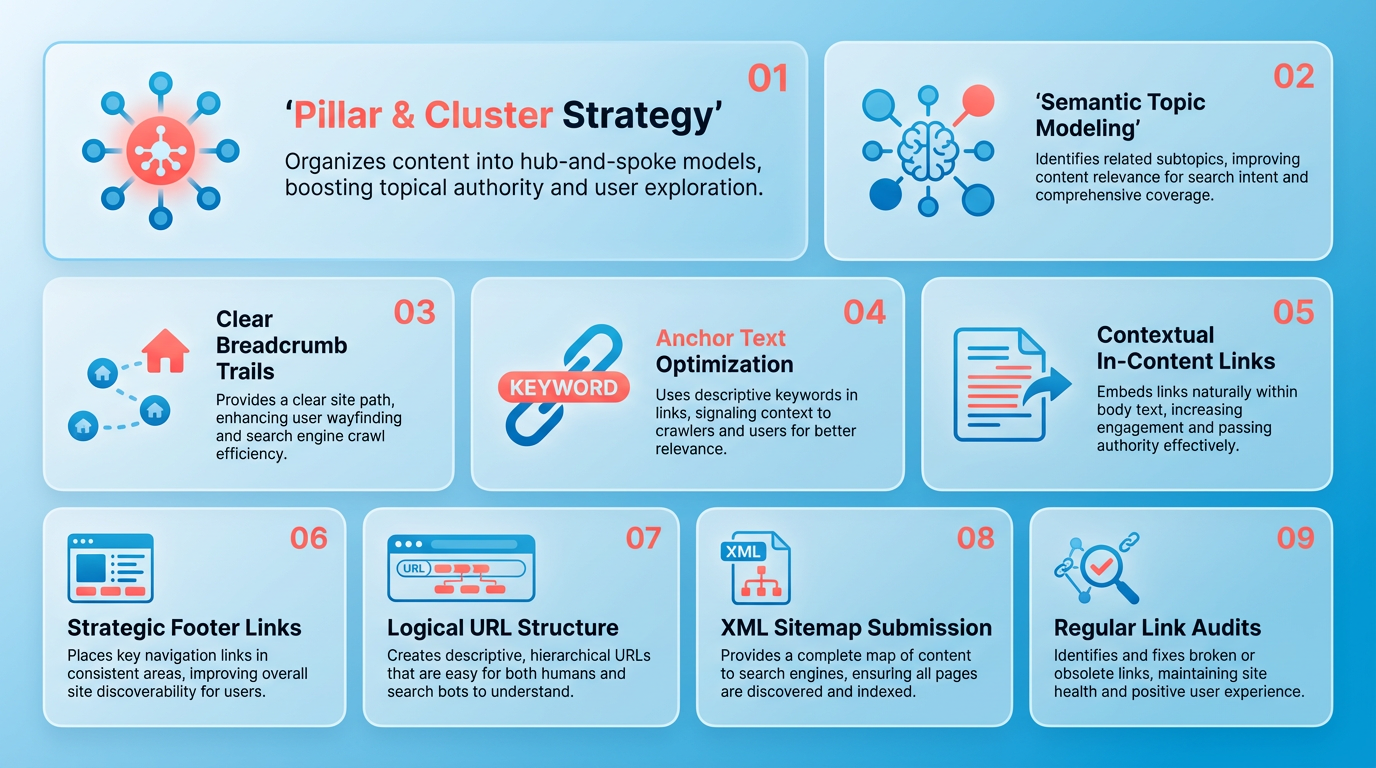
- Using Authority Pages to Pass Equity to Underperforming Pages. High-authority pages (like a homepage or popular blog post) should link to lower-performing pages to boost their visibility. For example, if a product page isn’t ranking well, add links to it from a high-traffic guide or service page. This distributes “link juice” and helps weaker pages compete in search results. As outlined in the Auditing Your Internal Links: Tools and Techniques section, identifying these high-authority pages is critical for effective equity distribution.
- Fixing Crawl Depth and Orphaned Pages. Crawl depth measures how many clicks a page is from your homepage. Pages buried too deep may never be indexed. Use tools like Siteimprove to identify and link to these pages. Orphaned pages (with no internal links) also need attention-connect them to related content to ensure search engines find and rank them. This aligns with strategies in the Auditing Your Internal Links: Tools and Techniques section for addressing crawlability issues.
- Auditing for Redirects and Broken Links. Broken links hurt user experience and SEO. Regularly audit your site for 404 errors and fix or redirect them to relevant pages. For example, if an old blog post about “SEO basics” was removed, redirect it to an updated guide. Tools like AnyPost.ai can streamline this process, ensuring your site remains functional and trustworthy.
- Automating Internal Linking Workflows. Automation tools can identify link opportunities and suggest optimizations. For instance, AnyPost.ai’s content analysis might flag pages needing more internal links or anchor text adjustments. Building on concepts from the High-Volume Blog Internal Linking: Programmatic and AI-Assisted Linking section, automation ensures consistency while saving time on large-scale sites.
- Mapping Your Site with a Topical Authority Framework. Organize your content by topic to dominate search results. A topical map includes pillar pages covering broad themes and cluster pages diving into specifics. As mentioned in the SaaS and B2B Internal Linking: Pillar-and-Cluster Model section, this structure reinforces thematic relevance and enhances SEO value. For example, a finance site might have a pillar on “Investing” linked to clusters like “Stocks 101” and “Retirement Planning.” This builds topical authority and signals relevance to search engines.
- Structuring Product Pages for Optimal Internal Links. E-commerce sites should link product pages to category pages, guides, and related items. For example, a “Wireless Earbuds” page could link to a “Best Headphones 2025” guide and a “Bluetooth Accessories” category. This mirrors the E-commerce and Internal Linking: Category-to-Subcategory-to-Product Hierarchies section’s emphasis on guiding users through structured pathways while reinforcing product relevance for search.
- Using Breadcrumbs and Navigation Menus for Clarity. Breadcrumbs (e.g., Home > Products > Shoes) and clear menus help users and search engines manage your site. Ensure every page is reachable within three clicks from the homepage. For example, a blog post about “Local SEO” should link to the main SEO guide, which links to the homepage. This reduces bounce rates and boosts crawlability. As detailed in the Understanding Internal Links: Types and Definitions section, these navigational links are critical for user experience and SEO performance.
Auditing Your Internal Links: Tools and Techniques
Auditing your internal links ensures your website’s architecture supports SEO and user experience. Start by identifying tools and methods to uncover issues like broken links, missed opportunities, and poor navigation. Here’s how to approach it step by step.
How Do You Use Google Search Console for Internal Link Audits?
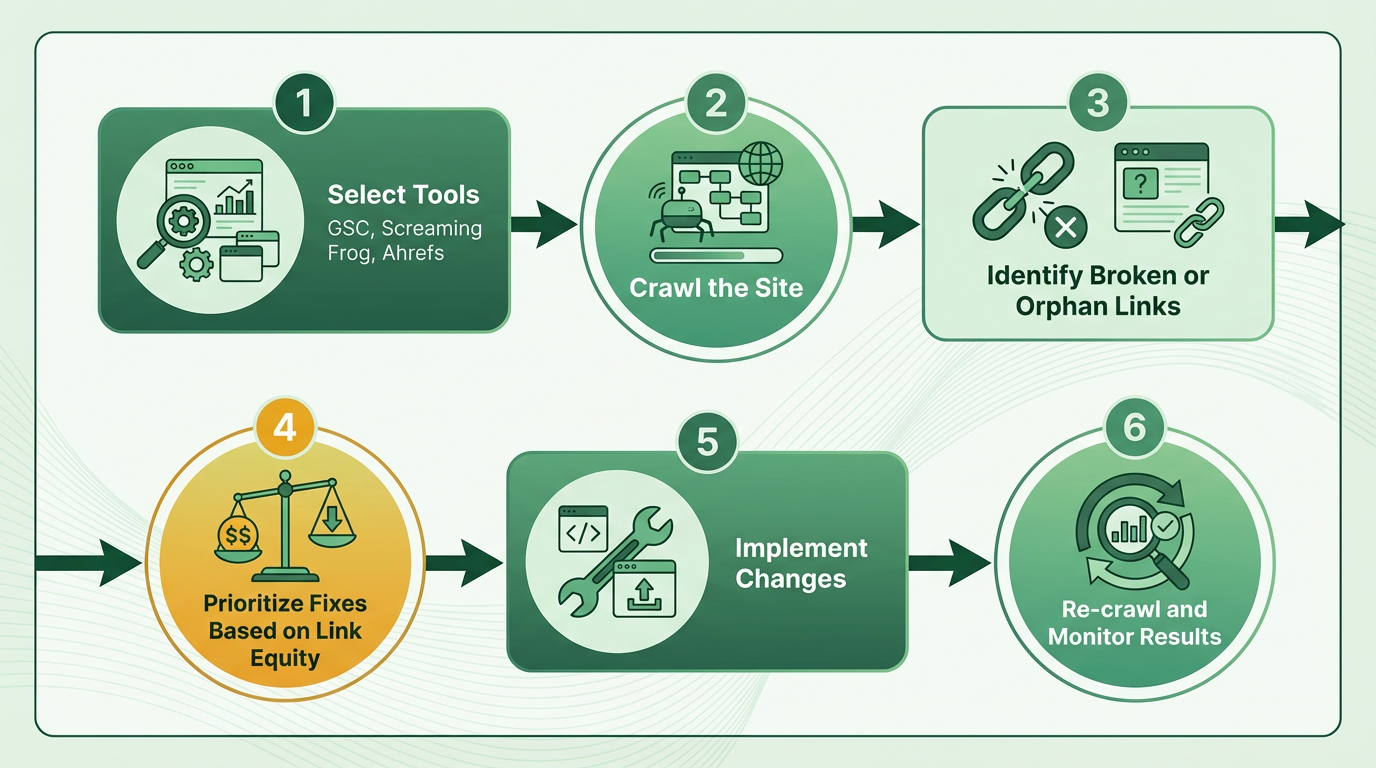
Google Search Console (GSC) provides direct insights into how search engines perceive your internal links. manage to the Links report to see which pages have the most internal links pointing to them. This highlights high-authority pages you can use to link to underperforming content, as discussed in the Why Internal Linking Matters for SEO section. The URL Inspection tool lets you check the number of internal links for a specific page, helping you identify gaps. For deeper analysis, use the Linked to section to see which pages are linking to a target URL. This reveals opportunities to add links from related pages. GSC also flags crawl errors, such as pages that search engines can’t access due to broken internal links.
What Tools Can You Use to Find Broken Links and Redirects?
Third-party site crawlers like Screaming Frog or Ahrefs Site Audit automate the process of scanning your website for technical issues. These tools crawl every page, flagging 404 errors, redirect chains, and noindexed pages that disrupt link equity flow. For example, if a product page has a 301 redirect but the link remains in navigation menus, it creates confusion for users and search engines. Export the crawler’s report to prioritize fixes: update outdated URLs, remove broken links, or set up proper redirects. Ahrefs also highlights orphan pages-content with no internal links-which you can interlink to improve discoverability, similar to the strategies outlined in the E-commerce and Internal Linking section.
How Does the Site: Search Operator Help Identify Linking Opportunities?
The site: search operator is a free, manual technique to audit internal links. Type site:yourdomain.com into Google to see a list of indexed pages. Sort by relevance to identify high-performing pages that could link to newer or less-visited content. For example, if a blog post about “SEO basics” ranks well but doesn’t link to a deeper guide on “keyword research,” adding that link strengthens topical authority. Use this method to spot pages with thin content that need more internal links for context. Combine it with GSC’s coverage report to ensure unindexed pages get proper internal linking for better crawlability.
How Can AnyPost.ai Streamline Internal Linking Workflows?
AnyPost.ai automates repetitive tasks in internal linking strategies, as explored in the High-Volume Blog Internal Linking section. The platform suggests relevant pages to interlink based on shared keywords and content themes, saving hours of manual research. For instance, if you publish a new guide on “email marketing,” AnyPost.ai might flag older posts on “marketing automation” for cross-linking. It also tracks link equity distribution, ensuring high-authority pages pass value to newer content. Unlike other providers, AnyPost.ai integrates directly with content management systems to apply changes at scale. One business saved 30% of their monthly SEO audit time by automating link suggestions and updates through the platform.
What Are Common Internal Link Issues and Fixes?
- Broken Links: Fix by redirecting 404 pages to relevant content or updating the link.
- Orphan Pages: Add links from navigation menus or blog posts to connect them to the site, much like the category-to-subcategory-to-product hierarchies described in the E-commerce and Internal Linking section.
- Over-Optimized Anchor Text: Replace repetitive keyword-rich links with varied, natural language.
- Thin Content: Use internal links to guide users to comprehensive resources, improving engagement.
For example, a product page without links from category pages becomes an orphan. Fix this by adding a link in the category listing and a “related products” section. Regular audits using the tools above ensure your internal links support SEO and user goals.
Understanding Internal Links: Types and Definitions
Internal links connect pages within the same website, helping users and search engines manage content. They act as signposts that guide visitors to related topics while distributing value (link equity) across your site. For example, a blog post about “SEO strategies” might link to another post on “keyword research,” creating a web of interconnected content. This section breaks down internal link types, their purposes, and how to use them effectively for SEO. As mentioned in the Why Internal Linking Matters for SEO section, strategic internal linking enhances both user experience and search visibility.
What Are the Main Types of Internal Links?
Internal links fall into two primary categories: navigational and contextual. Navigational links appear in menus, footers, or breadcrumbs, like a “Contact Us” link in a website header. Contextual links live within content and connect to related topics, such as a phrase like “learn about on-page SEO” linking to a dedicated guide. Both types serve distinct roles: navigational links improve user experience, while contextual links strengthen SEO by signaling relevance to search engines. Building on concepts from the The 9 Proven Strategies for Internal Linking section, effective use of contextual links supports topic clustering and content organization.
For example, a product page might use navigational links to direct users to the homepage or cart, while a blog post might embed contextual links to older articles covering similar themes. Using both ensures a smooth browsing experience and helps search engines index pages more efficiently.
How Does Anchor Text Impact Internal Linking?
Anchor text is the clickable text in a link, and it plays a critical role in SEO. Instead of generic phrases like “click here,” use descriptive text that includes relevant keywords. For instance, a link about “SEO tools” should use anchor text like “best SEO tools for 2025” rather than vague labels. This helps search engines understand the linked page’s topic and improves its ranking potential. As mentioned in the Why Internal Linking Matters for SEO section, optimized anchor text reinforces topical relevance and supports search engine crawlers in identifying content themes.
Sources like Moz and Semrush emphasize that keyword-optimized anchor text boosts topical relevance. If a post about “local SEO” links to another article using “local SEO checklist” as the anchor, it reinforces the connection between pages. Avoid overstuffing keywords-keep anchor text natural and helpful for readers.
What Is Link Equity and Why Does It Matter?
Link equity (also called “PageRank”) refers to the value passed from one page to another through internal links. Pages receiving more high-quality links gain authority, which can improve their search rankings. For example, a homepage linking to a blog post transfers some of its authority, signaling the post is important. As mentioned in the Measuring and Optimizing Internal Linking Performance section, tracking equity distribution helps identify underperforming pages needing additional links.
A case study from the video source highlights this: a page about 301 redirects receives over 3,000 monthly visits but rarely ranks above position #5. This could indicate insufficient internal links passing equity to the page. To maximize link equity, prioritize linking to high-priority pages (like product or service pages) and avoid linking to thin or low-value content.
How Does Link Hierarchy Affect Website Structure?
A clear link hierarchy organizes your site so search engines prioritize important pages. Start with the homepage linking to category pages, which then link to individual posts or products. This pyramid structure ensures critical content gets more internal links and authority. Building on concepts from the The 9 Proven Strategies for Internal Linking section, a well-structured hierarchy aligns with pillar/cluster models to enhance topical depth.
For instance, an e-commerce site might structure links like this:
- Homepage → 2. Category Page (e.g., “Shoes”) → 3. Product Page (e.g., “Running Shoes”). Tools like AnyPost.ai can help map out this hierarchy by suggesting logical connections between content. Without a structured hierarchy, search engines may struggle to identify your most valuable pages. As mentioned in the E-commerce and Internal Linking section, category-to-product hierarchies are vital for guiding users and search engines effectively.
Real-World Examples of Effective Internal Linking
A well-linked blog might include:
- A post titled “10 SEO Tips” linking to older guides using phrases like “backlink building strategies” or “keyword research tools.”
- A product page linking to a blog post explaining how to use the product, using anchor text like “how this tool improves workflow.”
These examples show how contextual links add value for users while reinforcing SEO signals. The key is to balance helpfulness with strategic placement-every link should serve a purpose for both readers and search engines.
By mastering these concepts, you’ll create a website that’s easier to manage, more discoverable by search engines, and better equipped to rank for competitive keywords.
Measuring and Optimizing Internal Linking Performance
Measuring and optimizing internal linking performance starts by tracking key metrics that reveal how well your site’s architecture supports user navigation and search engine visibility. Focus on click-through rates (CTR) for internal links to understand user engagement, and link equity distribution to ensure high-authority pages pass value effectively to target pages. Tools like Google Analytics and Google Search Console help quantify these metrics, while A/B testing lets you refine strategies based on real user behavior.
How Do You Measure Internal Linking Effectiveness?
Start by analyzing CTR for internal links in Google Analytics. manage to Behavior > Site Content > All Pages, then click the “Secondary Dimension” dropdown and select “Page.” Look for pages with high exit rates but low internal link CTR-these may need better contextual links. For example, if a blog post about “SEO strategies” links to a product page using generic text like “click here,” users might ignore it. Replacing this with keyword-optimized anchor text like “SEO tools for content marketing” can boost CTR by 20–30% (based on A/B tests from the r/SEO community).
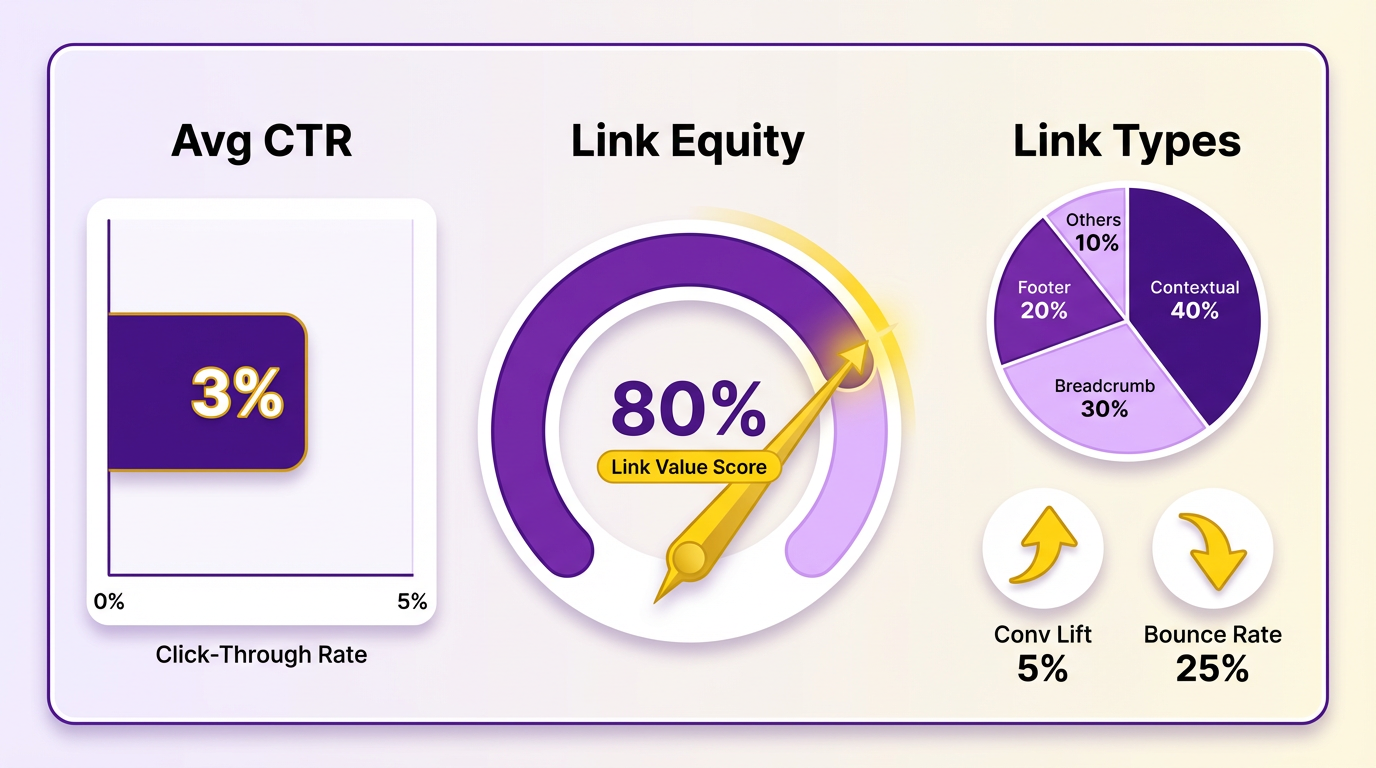
Next, assess link equity flow using Google Search Console’s Links report. Identify pages receiving the most internal links and compare their organic traffic growth to pages with sparse linking. A strong internal linking strategy ensures high-authority pages-like a popular guide on 301 redirects (which drives 3,000+ monthly visits in one case)-distribute authority to related content, improving rankings for secondary pages. As mentioned in the Why Internal Linking Matters for SEO section, this flow helps search engines understand content relationships and prioritize valuable pages.
What Tools Help Optimize Internal Links?
Google Analytics and Search Console provide foundational data, but specialized tools like Screaming Frog or Ahrefs offer deeper audits. Use Screaming Frog to detect orphaned pages-content with no internal links-and connect them to relevant hubs. Building on concepts from the Auditing Your Internal Links section, this step ensures all pages contribute to the site’s SEO performance. For example, a product page without backlinks might rank poorly until linked from category guides or blog posts.
For real-time experimentation, set up A/B tests using tools like AnyPost.ai. Test variations of anchor text, link placement, or the number of links per page. One business increased conversions by 15% after testing a version of a landing page with three internal links versus five, finding that fewer links reduced user overwhelm.
How Can Internal Links Drive Revenue?
Strategic internal linking directly impacts business goals by guiding users to conversion-focused pages. For instance, a case study from the SEOClarity guide shows how linking blog posts about industry challenges to free downloadable resources boosted lead generation by 25%. Building on concepts from the 9 Proven Strategies for Internal Linking section, using content hubs to cluster related topics (e.g., “SEO basics,” “advanced SEO techniques,” and “SEO tools”) and interlink them keeps users engaged longer.
To align internal links with revenue goals:
- Prioritize high-intent pages: Link to pricing, case studies, or demo requests from educational content.
- Use content hubs: Cluster related topics and interlink them to keep users engaged longer.
- Monitor conversion paths: In Google Analytics, track how internal links contribute to goal completions (e.g., newsletter signups or purchases).
What Challenges Should You Expect?
Common pitfalls include overloading pages with links or using vague anchor text like “read more.” To avoid this, follow the 1–3 link rule: include 1–3 contextual links per page unless the content is exceptionally long (e.g., a 5,000-word guide). Another challenge is outdated links; audit your site quarterly to remove broken or irrelevant links.
A final hurdle is balancing SEO needs with user experience. For example, adding too many links to a blog post might frustrate readers. Instead, focus on intent-driven linking: if a user reads about “SEO audits,” link to a checklist or tool, not unrelated topics.
By combining data-driven metrics, strategic testing, and user-centric design, you can transform internal linking from a technical task into a revenue-generating asset. Tools like AnyPost.ai streamline this process with features for tracking link performance and generating optimized anchor text suggestions, ensuring your strategy aligns with both SEO best practices and business objectives.
SaaS and B2B Internal Linking: Pillar-and-Cluster Model
The pillar-and-cluster model is a strategic approach to organizing content that boosts SEO and user experience for SaaS and B2B websites. By creating a central pillar page that covers a broad topic and linking it to cluster pages that dive into specific subtopics, you build topical authority and guide visitors through your content. For SaaS and B2B sites, this model helps structure complex product information, highlight use cases, and simplify navigation for decision-makers researching solutions. Below, we break down how to implement this model effectively.
As mentioned in the The 9 Proven Strategies for Internal Linking section, a pillar page for a SaaS product might focus on a core category like "Marketing Automation Tools," while cluster pages explore individual features such as "Email Campaign Builder" or "Lead Scoring System." Each feature page should link back to the pillar and connect to related clusters. This creates a web of internal links that reinforces SEO value and helps users compare capabilities.
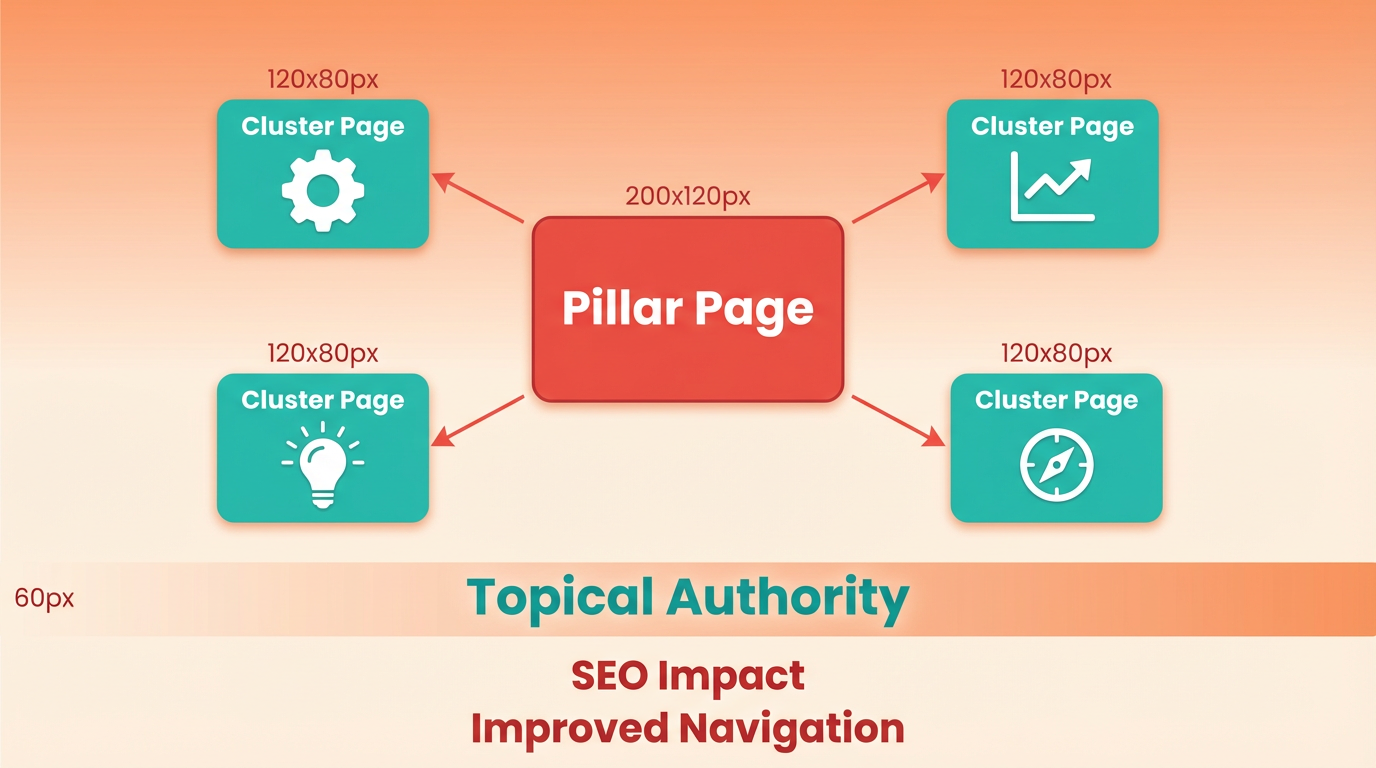
For example, AnyPost.ai could have a pillar page titled "All-in-One Content Creation Platform" with cluster pages for "AI Article Generator," "Social Media Scheduling," and "Brand Voice Customization." Internal links between these pages ensure users explore multiple features without leaving the site.
Building on concepts from the Understanding Internal Links: Types and Definitions section, B2B buyers often search for solutions tailored to their industry or workflow. Use-case cluster pages address these needs by showcasing how your product solves specific problems. A pillar page on "Project Management Software for Agencies" might link to clusters like "Marketing Agency Task Tracking" or "Design Team Collaboration Tools."
Each use-case page should include internal links to the pillar and to feature pages that explain the tools behind the solution. For instance, a use-case page for "E-commerce Inventory Management" could link to a feature page on "Real-Time Stock Tracking." This structure helps search engines recognize your site as an authority on niche topics while guiding buyers toward relevant features.
As highlighted in the Why Internal Linking Matters for SEO section, comparison cluster pages-such as "AnyPost.ai vs. Generic Content Platforms"-can address buyer comparisons directly. Link this page to the main pillar and to feature/use-case pages that highlight your product’s strengths. Place calls-to-action (CTAs) like "Request a Demo" or "Start Your Free Trial" on both pillar and cluster pages to capture leads at different stages of their journey. For example, a feature page on "AI-Powered Copywriting" might link to a comparison page while directing users to a demo sign-up form.
Common challenges include overloading pillar pages with too many links or creating orphaned pages. Audit your site regularly to connect these pages to the cluster structure. Tools like site crawlers can identify gaps in your internal linking strategy, ensuring every cluster strengthens the pillar’s authority. For SaaS sites, align your linking strategy with buyer personas: technical teams might need deep dives into features, while executives prioritize ROI-focused use cases.
By organizing content into pillars and clusters, SaaS and B2B sites improve SEO, enhance user experience, and guide visitors toward conversions-all while maintaining a clear, logical structure that search engines reward.
High-Volume Blog Internal Linking: Programmatic and AI-Assisted Linking
High-volume blogs face unique challenges when it comes to internal linking. Manually managing thousands of posts while maintaining SEO value is impractical. Programmatic and AI-assisted linking solve this by automating workflows, ensuring consistency, and optimizing link placement at scale. These systems analyze content relationships, prioritize strategic link opportunities, and adapt to evolving site structures-saving time while boosting rankings. Below, we break down how these tools work, their benefits, and practical implementation strategies.
How Programmatic and AI-Assisted Linking Work
Programmatic internal linking uses algorithms to identify and insert links based on predefined rules, while AI-assisted tools learn from your content to suggest contextually relevant connections. For example, if a new blog post discusses "SEO strategies," an AI system might automatically link to related pages like "keyword research" or "on-page SEO," concepts covered in the Why Internal Linking Matters for SEO section. This approach ensures links are both SEO-friendly and user-focused.
The key benefit? Scalability. High-volume blogs with hundreds of new posts monthly can’t rely on manual linking alone. AI tools reduce human error, eliminate gaps in link equity distribution, and maintain topical authority across categories. They also adapt to site changes-like updated URLs or new content-without requiring manual intervention.
Using AnyPost.ai for Automated Internal Linking
AnyPost.ai streamlines internal linking workflows by integrating AI-driven analysis with actionable insights. The platform scans your content library to identify underperforming pages, then suggests high-authority pages to link to or from. For instance, if a new post about "email marketing" is published, AnyPost.ai might recommend linking to an existing guide on "subscriber list growth" to strengthen topical relevance, aligning with the The 9 Proven Strategies for Internal Linking pillar/cluster architecture.
The tool also automates contextual linking. When a writer mentions a related topic-like "conversion rate optimization"-AnyPost.ai inserts the most appropriate internal link based on keyword relevance and page authority. This reduces manual effort while ensuring every mention aligns with SEO best practices. Users report saving 50%+ on internal linking tasks using similar systems, allowing teams to focus on content creation rather than technical SEO.
Real-World Examples of Effective AI-Driven Linking
Consider a fitness blog with 5,000+ posts. Without automation, linking each new article to relevant existing content would require hours of manual work. An AI system could analyze the new post’s keywords (e.g., "HIIT workouts") and link to related pages like "beginner workout plans," "cardio routines," and "fitness tracking apps." This not only improves SEO but also guides readers deeper into the site, increasing engagement and reducing bounce rates.
Another example: an e-commerce blog using AI to link product review pages to how-to guides. A post about "best running shoes" might automatically link to a tutorial on "how to choose running shoes," a structure echoed in the E-commerce and Internal Linking: Category-to-Subcategory-to-Product Hierarchies section. This drives traffic to both pages and improves conversion opportunities.
Challenges and Solutions for High-Volume Blogs
The primary challenge in high-volume internal linking is maintaining balance. Over-linking can dilute authority, while under-linking misses opportunities for traffic flow. AI tools solve this by analyzing metrics like page authority, keyword overlap, and user intent to determine optimal link density. For example, AnyPost.ai might suggest inserting 2-3 links per 500 words, prioritizing relevance over quantity.
Another issue is broken links caused by URL changes or deleted content. AI systems can flag these automatically and suggest replacements, a process detailed in the Auditing Your Internal Links: Tools and Techniques section. They also ensure new content is integrated into the site’s architecture, linking to category pages and pillar content to reinforce topical clusters. This proactive approach prevents SEO penalties and maintains a cohesive site structure.
By combining AI-driven automation with strategic oversight, high-volume blogs can turn internal linking from a technical chore into a revenue driver. Tools like AnyPost.ai not only save time but also create a more navigable, user-friendly site-ultimately improving both rankings and business outcomes.
E-commerce and Internal Linking: Category-to-Subcategory-to-Product Hierarchies
E-commerce sites rely on strong internal linking to guide users from broad categories to specific products while boosting SEO. A well-structured category-to-subcategory-to-product hierarchy ensures search engines and shoppers can manage your site efficiently. This section breaks down how to optimize this structure for conversions and rankings, using real-world examples and actionable strategies.
How Does Faceted Navigation Affect Internal Linking?
Faceted navigation lets users filter products by attributes like size, price, or brand. While helpful for shoppers, it can create thousands of near-duplicate URLs if filters generate unique URLs for every combination. This dilutes link equity and confuses search engines. To mitigate this, use canonical tags on duplicate pages and prioritize primary category pages for internal links. As mentioned in the Understanding Internal Links: Types and Definitions section, canonical tags help consolidate duplicate content, ensuring search engines attribute value to the correct page. For example, a “Women’s Clothing” category linking to subcategories like “Dresses” and “Tops” avoids spreading links too thin.
What’s the Ideal Structure for Product Pages?
Each product page should link back to its subcategory and category pages, creating a clear hierarchy. Use breadcrumb navigation to show users their path (e.g., Home > Electronics > Laptops > Product X). Building on concepts from the Why Internal Linking Matters for SEO section, breadcrumb links reinforce the site’s structure and improve user experience. Additionally, interlink related products at the bottom of pages-like “Customers Also Bought” sections-to keep users engaged. A “Running Shoes” page might link to “Sneakers” (subcategory) and “Women’s Shoes” (category), ensuring search engines understand relationships.
How Do E-Commerce Sites Use Internal Links to Drive Sales?
Effective internal linking turns browsing into purchases. For instance, a home goods site might structure URLs like:
www.example.com/bedding(category)www.example.com/bedding/queen-sets(subcategory)www.example.com/bedding/queen-sets/organic-cotton-set(product).
From the product page, add links to complementary items (e.g., “Mattresses” or “Pillows”) and highlight bestsellers in the category menu. This strategy keeps users on the site longer and increases average order value. Building on concepts from the The 9 Proven Strategies for Internal Linking section, a logical hierarchy mirrors the pillar/cluster model by grouping related content and distributing authority effectively.
What Challenges Arise in E-Commerce Internal Linking?
Large inventories often lead to overly deep hierarchies, making it hard for search engines to crawl all pages. A solution is to limit subcategory depth to two or three levels and use mega menus for navigation. Another issue is orphaned product pages-those with no internal links. Regular audits using tools like AnyPost.ai can identify these gaps and suggest fixes. For example, AnyPost.ai’s automated analysis might flag a product page missing links from its subcategory, helping teams adjust quickly.
How Can You Fix Common Linking Issues?
Avoid overusing faceted filters by consolidating low-traffic categories. For example, merge “Red Hats” and “Blue Hats” into a single “Hats by Color” subcategory with filters instead of separate URLs. Also, ensure every product page links back to its parent category and subcategory. If a subcategory has fewer than 10 products, consider removing it to simplify the hierarchy. Regularly update your XML sitemap to reflect these changes and submit it to Google Search Console for faster indexing.
By organizing your site around clear, logical pathways, you improve both user experience and SEO. A structured hierarchy not only helps search engines prioritize your most important pages but also guides shoppers toward purchases. Tools like AnyPost.ai can streamline audits, but the foundation lies in thoughtful planning and consistent interlinking.
Frequently Asked Questions
1. How does internal linking improve search engine rankings?
Internal linking boosts rankings by passing PageRank authority to target pages. Linking from high-authority pages can increase rankings by 30% in 6 months, as seen in a case study where optimizing links raised a post’s visibility significantly.
2. What is an example of effective anchor text for internal links?
Effective anchor text uses descriptive phrases like “learn more about SEO strategies” instead of generic terms like “click here.” This guides users and search engines to relevant pages, improving navigation and search visibility.
3. How can I avoid orphaned pages on my website?
Avoid orphaned pages by linking every page from high-authority sections (e.g., blogs, service pages). This ensures search engines can crawl and index all content, preventing visibility losses from disconnected pages.
4. How long does it take to see results from internal linking?
Results typically appear within 6 months when internal links are optimized alongside content quality. A case study showed a 30% ranking improvement for a page after linking it from authoritative blog posts and service pages.
5. Why are high-authority pages critical for internal linking?
High-authority pages act as “authority hubs,” distributing link equity to underperforming content. Linking from these pages improves the visibility of target pages, as demonstrated by a 100% success rate in ranking improvements when combined with quality content.
6. How many internal linking strategies does the guide recommend?
The guide outlines 9 proven strategies to strengthen site structure, including linking from blogs to service pages, using descriptive anchor text, and eliminating orphaned content. These strategies collectively enhance user navigation and authority flow.
7. What are the main challenges of poor internal linking?
Poor internal linking causes orphaned pages, weak authority distribution, and crawl errors. This limits search engines’ ability to index content effectively, reducing visibility and slowing ranking improvements.
