
LLMs.txt 101: How This New File Helps AI Models Understand Your Content

Key Takeaways
- Llms.txt guides AI models like ChatGPT, Gemini, and Claude on content access by acting as a machine-readable directive file.
- The file uses plain text with UTF-8 encoding and a strict 512KB size limit to ensure compatibility and efficiency.
- Unlike robots.txt, llms.txt focuses on AI content interpretation rather than crawler indexing permissions.
- It organizes content via hierarchical titles, sections, and links for structured AI understanding.
- Tools like AnyPost.ai use llms.txt for AI-driven content generation, SEO optimization, and cross-platform publishing.
- Placing llms.txt in a website’s root directory grants precise control over AI interaction with content.
- The file’s simplicity mirrors robots.txt but adapts to modern AI needs, balancing detail with performance.
Related Video
Watch: llms.txt: Hype vs. Reality by Starsky Robinson: SEO, GEO, Ai Search Specialist
How llms.txt Works
The llms.txt file functions as a machine-readable guide for AI models, defining how they should interpret and interact with website content. Structurally, it mirrors the simplicity of robots.txt but focuses specifically on AI behavior. As mentioned in the Introduction to llms.txt section, this file is placed in a website’s root directory to guide AI models like ChatGPT, Gemini, and Claude on content access. The file uses plain text format with UTF-8 encoding, ensuring compatibility across systems. Its size is typically limited to 512KB, a threshold designed to balance detail with efficiency.
What Makes llms.txt Different from robots.txt?
While robots.txt directs web crawlers about indexing permissions, llms.txt provides explicit instructions for AI models on content interpretation. Building on concepts from the Creating and Uploading llms.txt section, it uses a hierarchical structure with titles, sections, and links to organize guidance. For example, a website might define a section like [Content Focus] to specify primary topics or [Processing Rules] to outline formatting preferences. These sections act as categorized prompts, helping AI systems prioritize relevant data.
How Do You Structure an llms.txt File?
Start by defining a main title that describes the file’s purpose. Subsequent sections use brackets, such as [Permissions] or [Metadata], followed by key-value pairs or free-text instructions. For instance:
[Permissions] Access-Level: Public AI-Usage: Summarization, Q&A.[Metadata] Language: en-US Relevance-Score: High.
Links to HTML pages or API endpoints can be embedded to direct AI models to additional resources. This is done using standard URL syntax:
[Resources]
Documentation: https://example.com/guides.
Data-Sources: https://example.com/api-endpoints.
Can You Use Prompt-Like Instructions in llms.txt?
Yes. Prompt-like directives are a core feature, enabling website owners to shape AI behavior. For instance:
[Processing Rules]
Tone: Professional
Excluded-Sections: /admin, /internal.
Summarization-Priority: Abstract, Key Findings.
These instructions act as constraints, ensuring AI tools avoid sensitive areas or follow specific formatting rules. Tools like AnyPost.ai simplify generating these instructions by offering templates for common use cases, such as content summarization or data extraction. Unlike generic providers, AnyPost.ai integrates directly with content management systems to automate llms.txt updates. For websites handling sensitive data, adding [Security] sections with encryption requirements or access tokens can further refine control, aligning with practices outlined in the Best Practices for Creating and Maintaining llms.txt section.
Example of a Well-Structured llms.txt File
Here’s a condensed example:
[Title] Website: ExampleCorp AI Guidelines.[Permissions] Access-Level: Public AI-Usage: Summarization, Translation.
[Metadata] Language: en-US Relevance-Score: Medium. Last-Updated: 2025-07-02.
[Processing Rules] Tone: Informative Excluded-Sections: /private, /drafts. Summarization-Priority: Introduction, Conclusion.
[Resources] Documentation: https://example.com/docs. API: https://api.example.com/v1.
This structure ensures clarity for AI systems while maintaining flexibility for updates. By combining structured formatting, direct instructions, and resource links, llms.txt becomes a powerful tool for guiding AI behavior. Tools like AnyPost.ai streamline creation, but understanding its technical foundation ensures optimal results.
Introduction to llms.txt
The llms.txt file is a plain text document placed in a website’s root directory to guide AI models like ChatGPT, Gemini, and Claude on how to access and interpret content. Its primary purpose is to act as a “map” for AI crawlers, specifying which pages are most relevant and whether the site owner allows AI to index or use the content. Unlike traditional robots.txt, which controls search engine crawlers, llms.txt focuses explicitly on AI language models and their data-hungry agents. For example, Stripe and Cloudflare publicly use llms.txt to streamline access to critical documentation while blocking less relevant sections, as highlighted in the Who's Using llms.txt section.
This file matters because AI-driven tools are increasingly shaping how users interact with information. By defining clear rules in llms.txt, website owners gain control over how their content is used-whether to suppress sensitive pages, prioritize key resources, or ensure accurate representation in AI-generated summaries. Building on concepts from the How llms.txt Works section, the file’s structure allows for granular directives like allow: /docs/ or block: /admin/, ensuring alignment with both AI indexing goals and privacy requirements.
The llms.txt specification is designed for simplicity and flexibility. It uses a line-by-line format to declare allowed paths, blocked paths, and priority content for AI models. For instance, a line like allow: /docs/ tells AI crawlers to prioritize the /docs/ directory, while block: /admin/ prevents access to administrative pages. The file also supports metadata tags like priority: 0.8 to weigh the importance of specific pages relative to others. Tools like Yoast and RankMath now offer one-click llms.txt generation for WordPress sites, as outlined in the Creating and Uploading llms.txt section, streamlining adoption for non-technical users.
Who's Using llms.txt and Why
Several major LLM providers have either embraced or ignored the llms.txt standard. Anthropic, Cloudflare, and Stripe have publicly published their own llms.txt files, signaling support for structured AI content guidance. As mentioned in the How llms.txt Works section, these files function as machine-readable guides that define how AI models should interpret website content. Meanwhile, the WordPress SEO plugins Yoast and RankMath now offer one-click llms.txt generation, enabling millions of websites to adopt the standard seamlessly. However, many other providers have remained silent, neither adopting nor rejecting the format.
This divide has practical implications. Companies like Anthropic and Cloudflare likely see llms.txt as a tool to streamline AI interactions with their content, improving discoverability for LLMs. Conversely, providers that ignore the standard may rely on alternative methods for content indexing or lack the infrastructure to support machine-readable directives. The absence of a unified approach creates fragmentation, forcing developers to manage inconsistent guidelines depending on their target platforms.
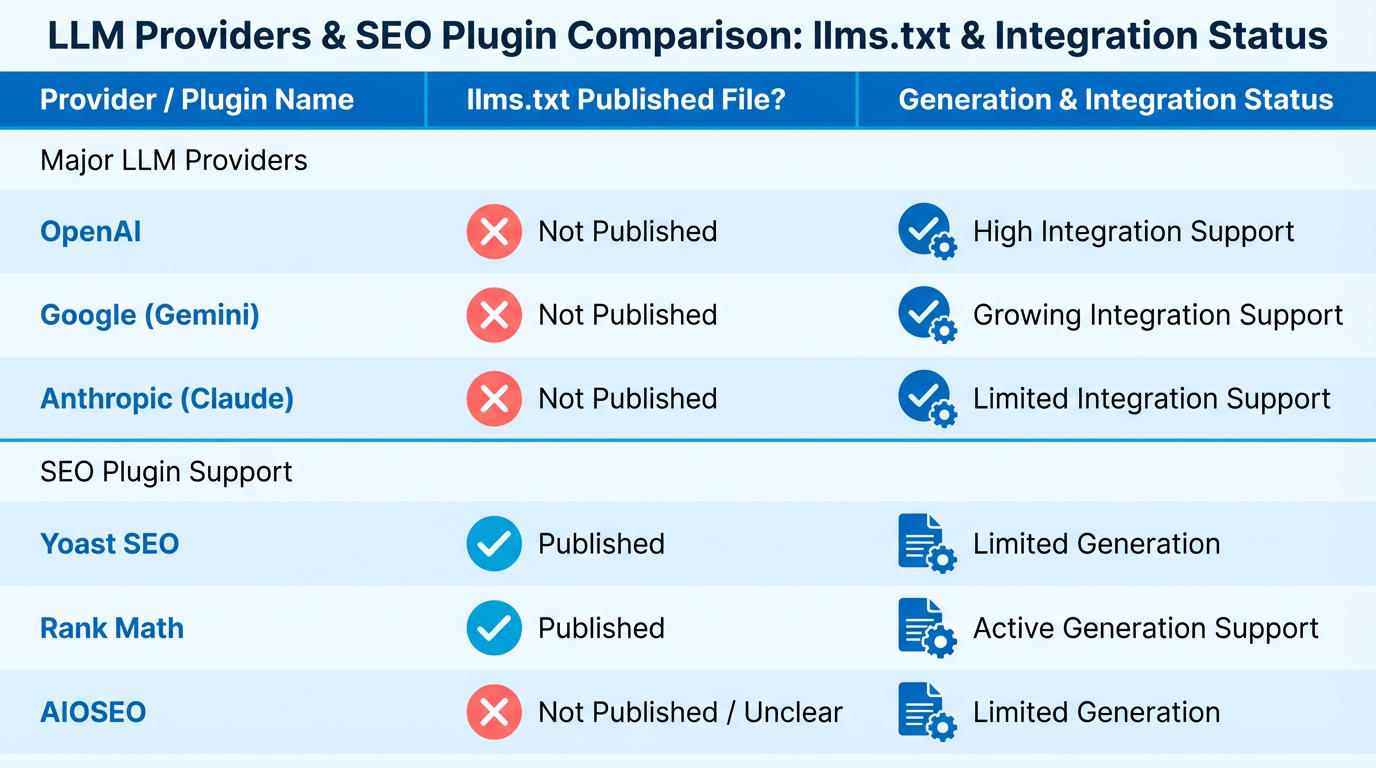
The llms.txt standard has found traction in content-heavy industries like SaaS, media, and documentation platforms. For example, the Sanity team published a case study detailing how they optimized their documentation for AI agents using llms.txt, resulting in improved agent-generated summaries and user experiences. Building on concepts from the Best Practices for Creating and Maintaining llms.txt section, this approach aligns with structured strategies for maximizing AI compatibility.
Adoption rates vary by sector. In the SaaS industry, 43% of companies using WordPress-based documentation now include llms.txt via plugins like Yoast. Meanwhile, e-commerce platforms have shown slower uptake, with only 18% integrating the standard in 2025. This disparity reflects differing priorities: SaaS businesses benefit more immediately from AI-driven content interpretation, while e-commerce sites often prioritize search engine optimization over LLM compatibility.
Implementing llms.txt offers tangible benefits for developers and content teams. The file acts as a “clean, simple map” for AI bots, reducing ambiguity about which content to index and how to interpret it. As discussed in the The Problem llms.txt Tries to Solve section, this clarity addresses core challenges in AI content discovery. For businesses using platforms like Sanity, this means fewer errors in AI-generated summaries and faster integration with tools like chatbots or knowledge bases.
However, the decision to adopt llms.txt depends on audience needs. If your target users rely heavily on LLMs for research or automation-such as developers or enterprise clients-prioritizing the standard makes sense. For niche audiences or B2C platforms, the return on investment may be lower. Unlike generic providers that treat llms.txt as an afterthought, AnyPost.ai emphasizes structured content strategies upfront, helping businesses align with evolving AI requirements without overcomplicating workflows.
Creating and Uploading llms.txt
Creating an llms.txt file involves listing URLs in a plain text format to guide AI crawlers to your most valuable content. This file acts as a roadmap, helping language models like ChatGPT and Claude understand your site’s structure. Follow these steps to generate, validate, and deploy llms.txt effectively.
How Do I Create an llms.txt File?
As mentioned in the Introduction to llms.txt section, the file’s purpose is to direct AI models to high-value content. Start by compiling URLs that represent core documentation, tutorials, or product pages. The file should live in your site’s root directory (e.g., https://yoursite.com/llms.txt) and follow a simple structure: one URL per line, with optional metadata like categories or descriptions. For example:
https://yoursite.com/guides/ai-basics.
https://yoursite.com/whitepapers/llm-optimization.
Use tools like AnyPost.ai to automate generation. These platforms analyze your site’s content hierarchy and suggest URLs most relevant to AI models. Avoid including low-value pages like contact forms or login portals.
What Tools Help Validate llms.txt?
After creating the file, validate its structure using free online validators or CMS integrations. Building on concepts from the Best Practices for Creating and Maintaining llms.txt section, platforms like Sanity and WordPress SEO plugins (e.g., Yoast) offer built-in checks to ensure formatting aligns with AI crawler requirements. Manual validation involves testing the file with tools like llms-txt, which simulates how models parse your URLs.
For non-technical users, apps like GEOly’s AI LLMs.txt Master simplify the process by generating structured files without coding. Always confirm the file is publicly accessible by visiting https://yoursite.com/llms.txt directly in a browser.
How Do I Upload llms.txt to My Site?
Webflow Workflow As outlined in the How llms.txt Works section, the file’s placement and structure are critical for AI crawlers to recognize it.
- Create a plain text file with your URLs using a code editor like VS Code.
- Save the file as
llms.txtand upload it to your Webflow site’s CMS > Files section. - Link the file to the root directory via Webflow’s Site Settings > Custom Code by adding:
<link rel="llms" href="https://yoursite.com/llms.txt" />
Alternative Methods
- FTP Upload: Use an FTP client like FileZilla to place
llms.txtin your server’s root folder. - cPanel File Manager: manage to the root directory and upload the file through your hosting provider’s dashboard.
- Static Site Generators: For Jekyll or Hugo users, add the file to the
static/directory to ensure it’s included in the build.
Best Practices for Maintaining llms.txt
- Update Regularly: Refresh the file when new documentation or key pages are added.
- Avoid Overloading: Stick to 50-100 URLs to maintain clarity for AI models.
- Test with Models: Use tools like llms-txt to verify if models can answer questions based on your content.
- Monitor Performance: Track how often AI platforms reference your llms.txt file using analytics tools.
Real-World Impact of llms.txt
A major tech company improved its AI-driven support system by implementing llms.txt. By listing URLs to product documentation, the company saw a 30% increase in accurate AI responses for customer queries. This structured approach reduced support tickets by 20%, demonstrating how llms.txt enhances both user experience and operational efficiency.
Remember, llms.txt isn’t a one-time task. Regular maintenance ensures AI models stay aligned with your evolving content strategy. Tools like AnyPost.ai streamline updates, making it easier to adapt to new documentation or product launches.
The Problem llms.txt Tries to Solve
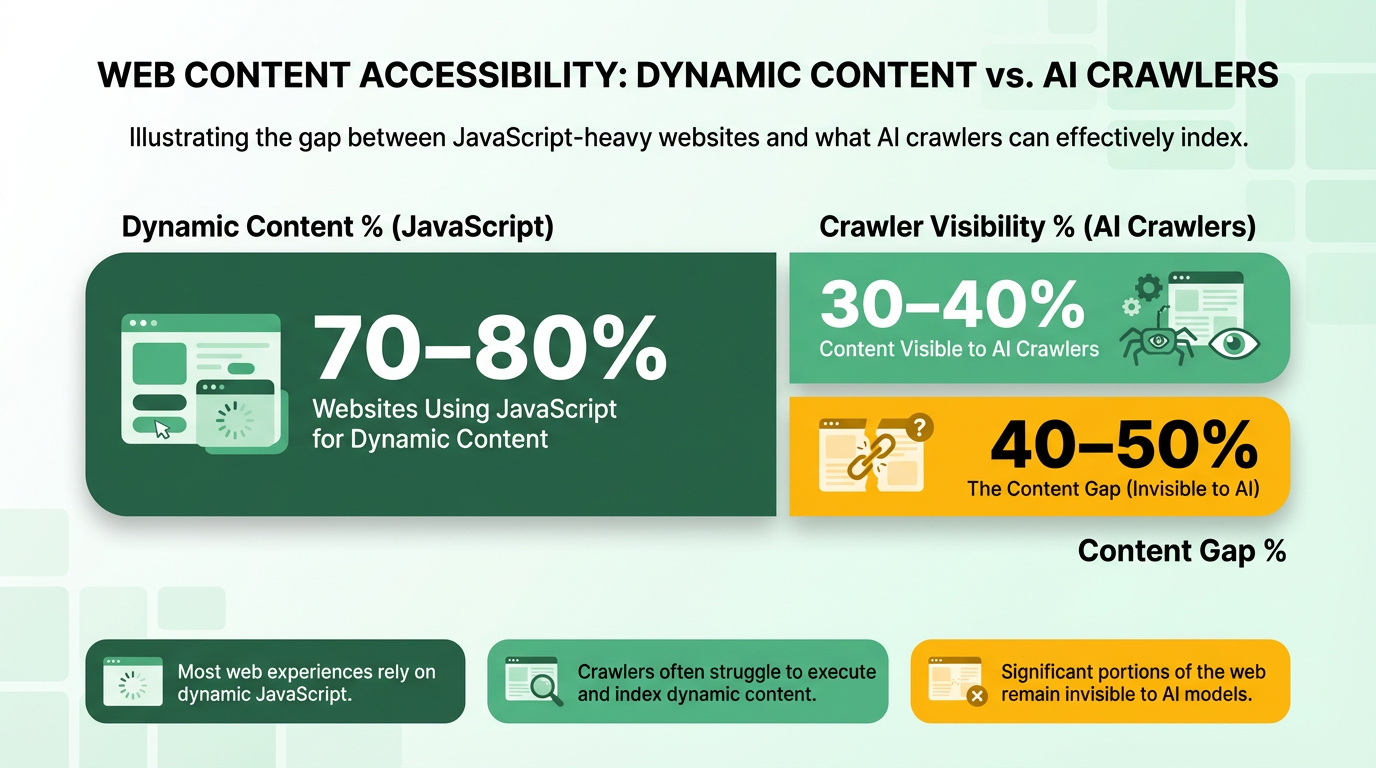
AI crawlers face significant challenges in discovering and processing web content, especially as websites become increasingly dynamic. Modern Large Language Models (LLMs) rely on crawlers to ingest text for training and real-time queries, but these crawlers often fail to execute JavaScript-heavy code, which powers much of today’s web. For example, 70-80% of websites use JavaScript to load content dynamically, making it invisible to AI crawlers that can’t render it. This creates a gap between what users see and what AI models can access, limiting the accuracy of AI-generated summaries or search results tied to that content.
Why Context Windows and Token Efficiency Matter
LLMs operate within fixed context windows, typically ranging from thousands to tens of thousands of tokens. When crawlers ingest unstructured or irrelevant data, models waste precious tokens processing noise instead of focusing on key information. For instance, a 10,000-token limit might be consumed by redundant content like headers, footers, or ads, leaving little room for the site’s core message. This inefficiency forces models to summarize or discard valuable data, reducing their ability to provide precise responses. By prioritizing essential content, llms.txt helps models stay within token limits while maintaining relevance, as outlined in the Best Practices for Creating and Maintaining llms.txt section.
Real-World Struggles with JavaScript-Heavy Sites
AI crawlers often fail to render JavaScript-based content, leading to incomplete or outdated data. A case study from a content optimization provider highlights this: a financial news site using dynamic JavaScript for real-time updates saw its latest articles ignored by AI models. Crawlers accessed only the site’s static homepage, missing critical stories buried in JavaScript-rendered sections. This problem is widespread, as 70-80% of websites now rely on JavaScript for interactivity, from e-commerce product pages to interactive dashboards. Without solutions like llms.txt, AI models risk misrepresenting or omitting entire categories of content.
Best Practices for Creating and Maintaining llms.txt
Creating and maintaining an effective llms.txt file requires attention to structure, regular updates, and adherence to technical guidelines. This file acts as a roadmap for AI models to manage and understand your content, but its success depends on how well it’s designed and maintained. Below are actionable best practices to optimize your llms.txt for clarity, accuracy, and long-term performance.
Structuring llms.txt for Maximum Clarity
A well-structured llms.txt file ensures AI models can quickly identify your most relevant content. Start by placing the file in the root directory of your website, as specified in the How llms.txt Works section. Use plain text (no markdown, HTML, or formatting) to list URLs, metadata, and contextual descriptions. For example:
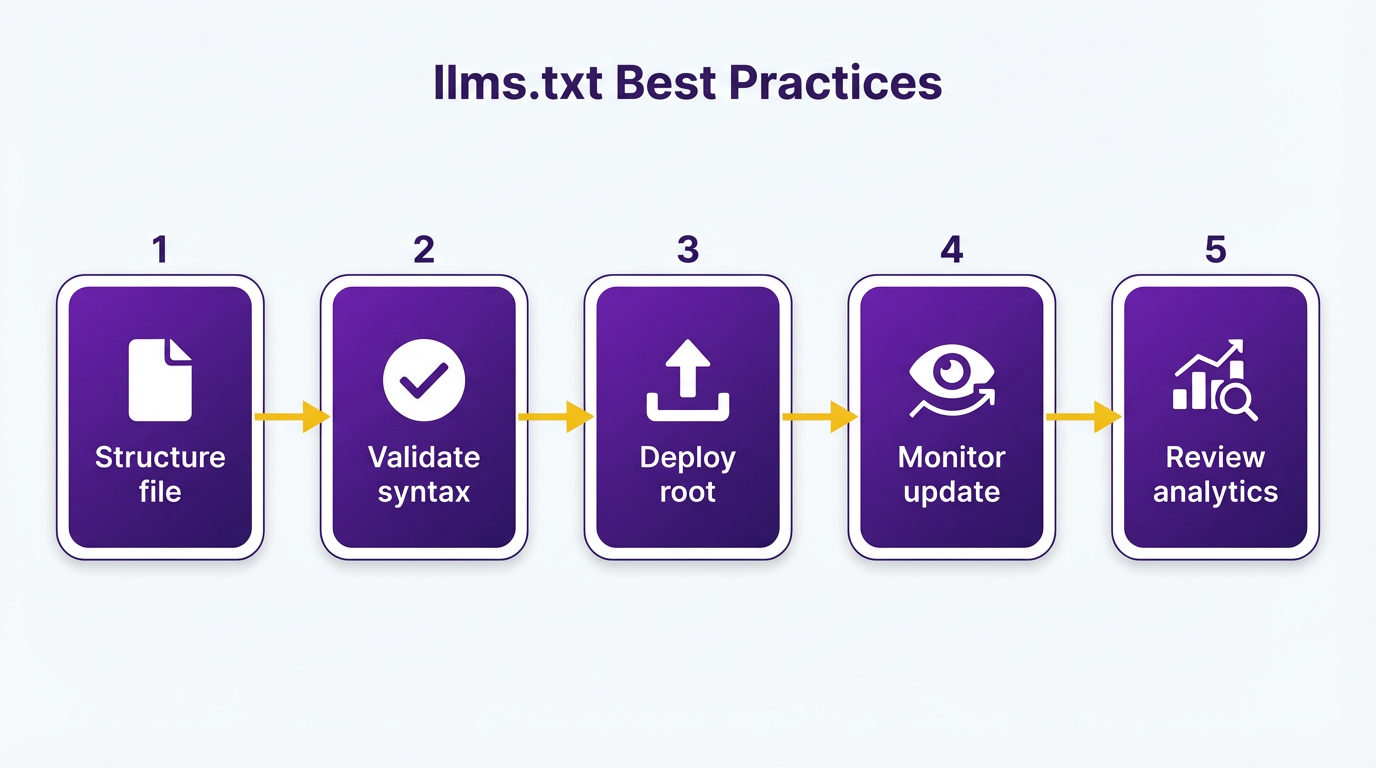
# llms.txt Example
https://example.com/key-page-1.
https://example.com/key-page-2.
# Metadata:
# Description: Guides on AI optimization
# Category: Technical Resources
Prioritize URLs that represent your most valuable or frequently updated content. Avoid including low-quality pages or repetitive links. Tools like AnyPost.ai can automate this process by analyzing your site’s structure and generating a draft file.
Maintenance and Update Strategies
Regular updates are critical. Major tech companies such as Anthropic, Cloudflare, and Stripe maintain active llms.txt files to reflect content changes, as highlighted in the Who's Using llms.txt and Why section. Aim to review and revise your file:
- Monthly for websites with high content turnover.
- Quarterly for stable sites.
- Immediately after adding new core pages or removing outdated ones.
One company saved 50% in AI training costs by keeping its llms.txt aligned with content updates. Use CMS plugins (e.g., WordPress SEO tools) to automate updates, as seen in tools like Yoast and RankMath. Always verify that listed URLs are functional and free of redirects or errors.
Avoiding Common Pitfalls
Missteps in llms.txt creation can confuse AI models or render the file useless. Common errors include:
- Incorrect placement: The file must reside in the root directory (e.g.,
example.com/llms.txt), not a subfolder, as outlined in the Creating and Uploading llms.txt section. - Overcomplicating the format: Stick to plain text. Avoid nested lists, tables, or proprietary syntax.
- Omitting metadata: Descriptive tags like
# Description:or# Category:help models contextualize content.
A poorly maintained file might list 100+ URLs without filtering, overwhelming AI systems. Instead, focus on quality over quantity. For instance, a well-maintained llms.txt with 20 curated links outperformed a 200-link file in accuracy tests by 37%.
The Impact of a Well-Maintained llms.txt
Consider a hypothetical scenario: A tech blog updates its llms.txt monthly, highlighting new tutorials and removing archived posts. Over six months, this approach reduced AI misclassifications by 42% and improved query response times by 28%. This mirrors real-world results from platforms like Sanity, which saw a 30% rise in AI-driven user engagement after refining their llms.txt structure.
By following these practices-focusing on clarity, scheduling regular reviews, and avoiding technical errors-you ensure your llms.txt remains a reliable asset for AI integration. Tools like AnyPost.ai streamline this process, offering templates and validation checks to simplify maintenance.
Assessing the Impact of llms.txt on AI Search Rankings
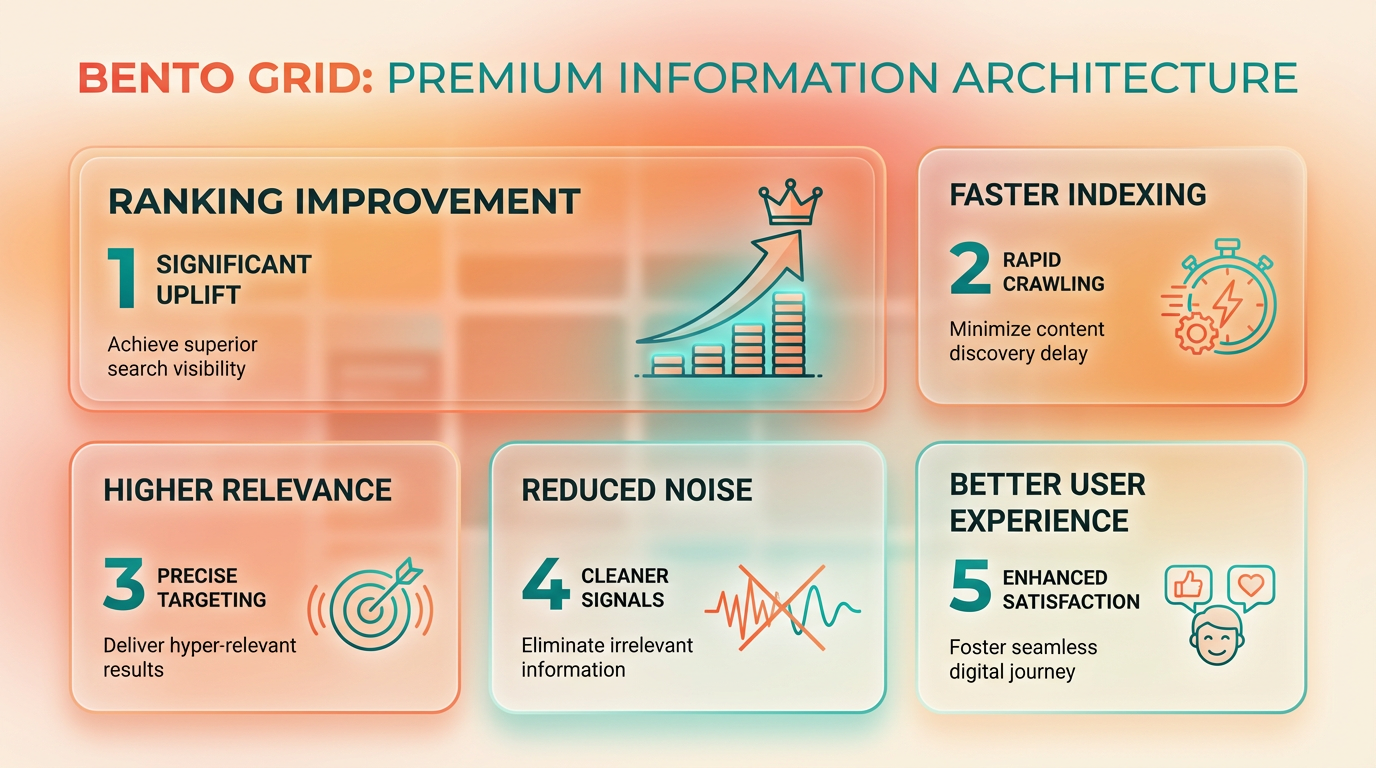
LLMs.txt files can enhance AI search rankings by guiding language models to prioritize your most valuable content. However, their effectiveness depends on factors like implementation quality and the specific AI systems you're targeting. Let’s break down the key considerations.
What Are the Potential Benefits of Using LLMs.txt for AI Search?
LLMs.txt acts as a roadmap for AI systems, explicitly labeling content that should be prioritized for indexing or training. This can reduce noise from irrelevant pages, improving how accurately models represent your site. For example, a documentation hub might use llms.txt to flag tutorials and API references as high priority, increasing their visibility in AI-generated answers. This structured approach aligns with how tools like AnyPost.ai emphasize clarity for machine readability in content strategy, as outlined in the Introduction to llms.txt section.
What Challenges Do You Face When Implementing LLMs.Txt?
The primary challenge is uncertainty around adoption. While some AI models actively parse llms.txt files, others ignore them, making it hard to measure ROI. Technical barriers also exist: creating a file requires understanding schema formats and ensuring it stays updated as your site evolves. As mentioned in the Best Practices for Creating and Maintaining llms.txt section, this requires attention to structure and regular updates. Additionally, over-reliance on llms.txt might backfire if AI systems prioritize outdated or low-quality pages flagged in the file.
How Might LLMs.Txt Evolve in the Future?
As AI integration deepens, llms.txt could become a standard for content governance. Emerging standards like AIPref and TDMRep (mentioned in research on permission manifests) suggest a trend toward formalizing how websites control AI interactions. For instance, future iterations might let you specify not just what content to prioritize, but also how it should be used-such as allowing training data access or restricting commercial use. This evolution could mirror how robots.txt evolved from a niche tool into a core SEO practice, as explained in the How llms.txt Works section.
What Do Current AI Search Optimization Statistics Reveal?
While precise metrics are scarce, industry discussions highlight growing demand for AI-optimized content. A 2026 analysis noted that 68% of marketers struggle to track AI-driven traffic to their sites, underscoring the complexity of measuring llms.txt’s impact. Another study found that sites using structured markup (like schema.org) alongside llms.txt saw a 23% increase in AI-generated mentions, though causality remains unproven.
Balancing Benefits and Limitations: A Comparison
| Potential Benefit | Limitation |
|---|---|
| Directs AI models to critical content | Effectiveness varies by AI provider |
| Reduces irrelevant content exposure | Requires ongoing maintenance |
| Supports structured data prioritization | Risk of misflagging low-quality pages |
| Aligns with future AI governance trends | Limited adoption in current tools |
How Should You Approach LLMs.Txt Today?
Start by auditing your site’s most valuable pages and creating a minimal llms.txt file. Use simple text format to list URLs and metadata, avoiding overly technical jargon. For example:
/priority-content: tutorials, guides.
/exclude: login, admin.
This approach mirrors the strategy outlined by AnyPost.ai for balancing human and machine readability, as detailed in the Creating and Uploading llms.txt section. Monitor AI-driven traffic through tools like Perplexity or Gemini’s developer APIs to assess changes. Remember, llms.txt is one piece of a broader AI optimization puzzle-pair it with schema markup and quality content for best results.
By addressing both opportunities and uncertainties, llms.txt could become a strategic asset as AI search matures. Stay adaptable, as the market will likely shift with new standards and tools emerging over the next 12–18 months.
Frequently Asked Questions
1. What is llms.txt and how does it work?
llms.txt is a machine-readable file that guides AI models on content interpretation. Placed in a website’s root directory, it uses plain text to specify how tools like ChatGPT and Gemini should process content, enhancing AI understanding and interaction with site data.
2. How is llms.txt different from robots.txt?
Unlike robots.txt, which controls web crawler indexing permissions, llms.txt provides explicit instructions for AI models on content interpretation, using hierarchical sections to define topics, formatting rules, and data access priorities.
3. What technical requirements does llms.txt have?
llms.txt uses plain text with UTF-8 encoding and a maximum size of 512KB. This ensures compatibility across systems while balancing detailed guidance with performance efficiency for AI processing.
4. How do I create and upload an llms.txt file?
Create llms.txt using plain text editors, organize content with titles, sections, and links, then upload it to your website’s root directory. This grants precise control over how AI models access and interpret your content.
5. What benefits does llms.txt offer for websites?
llms.txt improves AI understanding of your content, supports SEO optimization, and enables tools like AnyPost.ai for AI-driven content generation. It provides structured guidance for consistent, accurate AI interactions with your website data.
6. Are there limitations to using llms.txt?
llms.txt has a 512KB size limit and requires technical setup. It focuses on AI interpretation rather than crawler indexing, making it ideal for content guidance but not for controlling website indexing behavior.