Map Each Old Post to the Channel That Converts Best

Key Takeaways
- Repurposing reshapes a post you already published for a different channel, so it earns fresh traffic and conversions without writing from scratch.
- The twist here: score each legacy post for per-channel conversion likelihood first, then publish where the numbers say it'll land.
- The full workflow runs five phases and takes roughly 30 days to a first live batch.
- A well-scored evergreen post moved to its best channel often sees a meaningful traffic boost over staying buried.
- The repurpose phase, rewriting in channel-native voice, can drive a significant traffic lift and a solid conversion gain.
- The automate phase is the hardest step but pays the most, with the highest potential traffic and conversion lifts.
- The audit phase is the easiest. Analytics and a spreadsheet, three to five hours of work.
Quick Summary
Repurposing means taking a post you already published and reshaping it for a different channel, so it earns fresh traffic and conversions without starting over. Our approach flips the usual playbook. Instead of picking channels by habit, we score each legacy post for conversion likelihood per channel first, then publish a voice-matched version where the numbers say it'll convert.
Here's the whole workflow before you commit real time to it. Audit what you have, score it for conversion potential, map each post to its best-fit channel, repurpose in your voice, then automate and watch the KPIs.
What the full workflow looks like
Five phases, roughly 30 days to first live batch. Each phase asks for a different skill, so budget your effort where it counts.
| Phase | Core Action | Avg. Time (hrs) | Tools Needed | Traffic Lift | Conversion Lift | Difficulty |
|---|---|---|---|---|---|---|
| Audit | Pull all legacy posts, tag by topic and format | 3–5 | Analytics, spreadsheet | . | . | Easy |
| Score | Rate each post's conversion odds per channel | 2–4 | AI scoring, GSC | +5–10% | +5% | Medium |
| Map | Match each post to its highest-converting channel | 2–3 | Scoring output | +15–25% | +10% | Medium |
| Repurpose | Rewrite in channel-native voice | 4–8 | AI writer, editor | +30–60% | +15–25% | Medium |
| Automate | Schedule, publish, track, iterate | 2–4 | Publishing tool, analytics | +50–100% | +20–30% | Hard |
These gains compound as you move through the stages. Match your existing assets to the platforms that fit them, and you pull real value out of content that's currently earning close to nothing.
The 5-step framework in one read
- Audit. Inventory every old post. Note format, topic, and current performance. Easy work, mostly organizing.
- Score. Rate conversion likelihood for each post on each channel. This is where most teams skip straight to guessing. Don't.
- Map. Assign each post to the single channel where its score is highest. One post, one best home.
- Repurpose. Rebuild it in that channel's native voice. A LinkedIn carousel doesn't read like a YouTube script.
- Automate & Optimize. Publish on schedule, watch the metrics, re-score against real conversion data.
What KPIs should you hit?
Aim for a bounce rate under 40% on repurposed landing content and a conversion rate lift of 15–30% within the first two cycles. If nothing's moving by week four, look at your scoring logic, not your writing.
30-day sprint benchmarks:
- Days 1–7: Finish the audit and first scoring pass.
- Days 8–14: Lock channel mapping for your top 10 posts.
- Days 15–25: Repurpose and voice-match the first batch.
- Days 26–30: Automate publishing and set up tracking.
Why this beats a generic repurposing sprint: you're not spraying the same post across five channels and hoping. You're placing each piece where the conversion math already favors it. That's the line between busy work and traffic that actually pays.
Why channel choice decides whether old posts convert
Most of your organic traffic already lives in posts you published months ago. In many content libraries, the majority of organic traffic comes from posts older than twelve months. That backlog is your biggest untapped conversion asset, and it's why we treat channel mapping as the first real decision in how to repurpose content, not an afterthought.
Here's the shift we push. Most teams pick a channel by habit, then squeeze the old post into it. We flip that. Match each legacy post to the channel where its format and buyer actually align first, then publish where it fits. That one reorder separates a repurposing plan that earns leads from one that just fills a queue.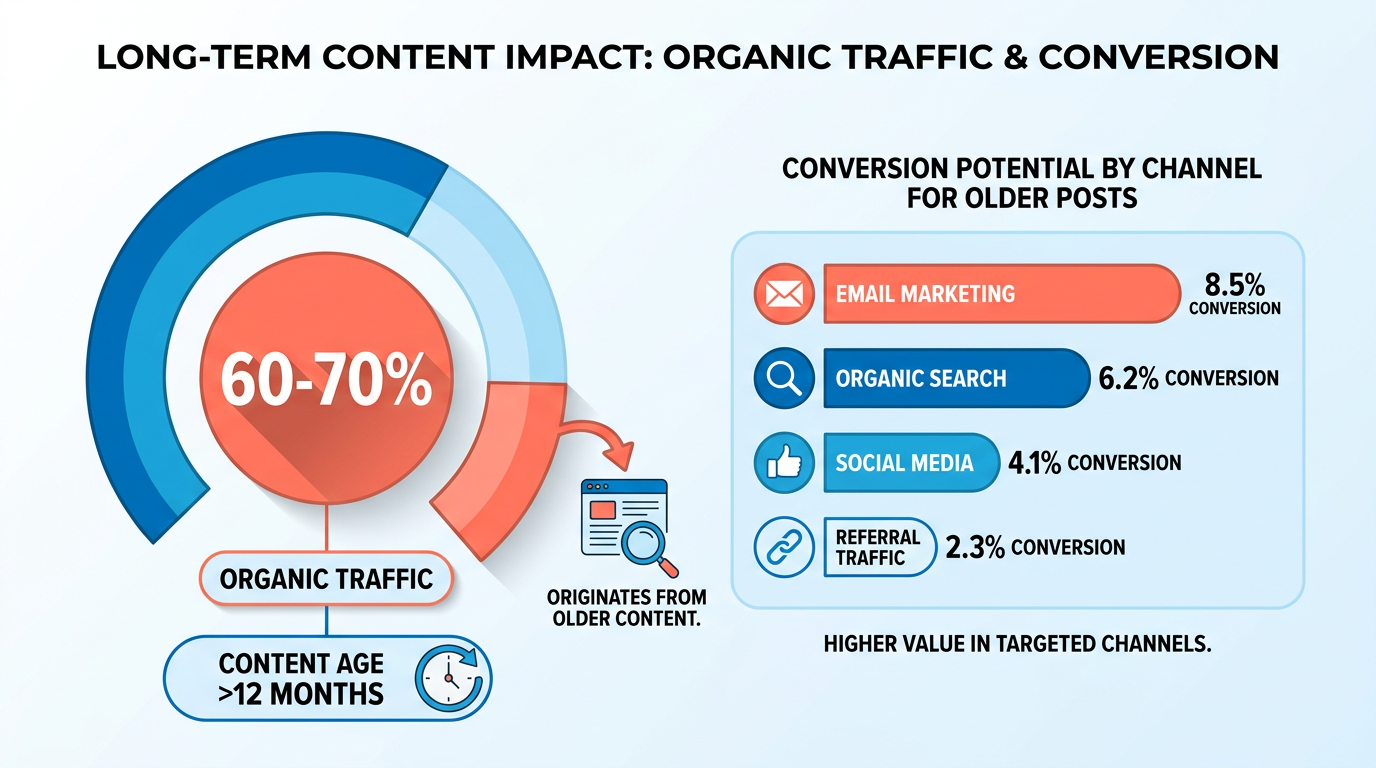
Why channel choice moves the conversion number
The same post converts differently depending on where it lands. A dense how-to might stall as an X thread but pull real demo signups as a LinkedIn carousel. Voice and format have to match the channel's buyer, or the post just looks recycled.
That's the gap we close by matching each post to the right channel before publishing. An evergreen comparison post might sit dead on your blog. Reformatted for an email newsletter, it moves people who already know your name closer to a decision. Same words, different revenue.
This matters more now that bottom-funnel content carries new weight. "Best of" articles, comparisons, and product pages are showing up more often inside large language models, which makes ranking for bottom-funnel, product-focused searches on both Google and LLMs a bigger deal. Your old comparison posts are exactly the assets those searches reward. Map them to the right channel and you put them back in front of buyers.
Is repurposing actually cheaper than new content?
Generally, yes, and the math tends to be lopsided. Repurposing often runs at a fraction of the cost of new content while still delivering a solid portion of the traffic lift. You reuse the research, angle, and brand voice. You only rebuild the format.
That efficiency hits a real pain point. Finding good writers is a persistent struggle for many content teams. Repurposing sidesteps that bottleneck. One strong asset becomes several high-impact pieces without doubling your budget or your headcount.
There's an SEO payoff on top. Republished posts add fresh signals and give you natural internal linking, which strengthens domain authority over time. You feed two systems at once: the channel that converts and the search engine that keeps sending traffic.
Who gets the biggest return?
B2B SaaS, agencies, and local businesses with a sizable content backlog tend to gain the most. The bigger the archive, the more conversion potential is sitting idle. If you've got a large archive and thin distribution, this is the highest-use move on your list.
Take a post already in your archive and turn it into social carousels and newsletter content, then auto-publish it across LinkedIn, X, Instagram, TikTok, and YouTube. Nothing new gets written. The posts already exist. They're just aimed at the wrong rooms.
Skip this if your archive is small. With only a handful of posts, you don't have enough raw material to map, and your time is better spent creating. This approach earns its keep on volume. AnyPost turns your existing content into social carousels and multi-platform posts, so one asset reaches every channel that converts.
Audit your existing content library
Before you score a single post, you need a complete inventory of what you've published. Our first move is always the same: pull every live URL into one master list, then attach the metadata that tells you whether a post is worth repurposing at all. This is the unglamorous groundwork that makes the rest of the process actually work.
Skip the guesswork. A spreadsheet with the right columns turns a vague "we have a lot of old blog posts" into a ranked, filterable asset list you can act on this week.
What belongs in your audit spreadsheet?
Build a master sheet with one row per published asset and these columns: URL, Publish Date, Content Type, Primary Keyword, Search Intent, Traffic (last 30 and 90 days), Conversions, and Engagement metrics. Each column feeds a later scoring decision, so none of them are filler.
Pull the traffic and ranking data automatically instead of copying it by hand. Google Search Console, Ahrefs, or SEMrush all export click, impression, and position data you can paste straight into the sheet. Saves hours and keeps the numbers current.
The Conversions column matters most for our angle. A post with modest traffic but strong conversion history is a better repurposing candidate than a high-traffic post that never drives signups. You're mapping to the best-converting channel later, so capture conversion signal now.
How do you tag posts for later analysis?
Tagging turns a flat list into a segmentable one. Add two more columns: a persona tag and a platform-signal flag. These decide which channel and which voice each post gets when you repurpose it.
Tag every post with a business-relevant persona. Use labels like Founder, Marketer, or Local Business Owner so you can match content to the audience that actually buys. A post written for founders belongs on a different channel than one written for local shop owners.
Once your best-performing assets are tagged, AnyPost.ai preps them for multi-channel distribution automatically, matching the formatting each selected platform expects.
Which posts should you cut before scoring?
Filter out the dead weight before you spend effort scoring anything. Three categories get flagged: duplicate topics competing against each other, thin content that never ranked, and outdated information that would hurt your brand if republished.
Then split what remains by shelf life. Mark each surviving post as evergreen or time-sensitive. Evergreen assets earn priority because a repurposed version keeps converting for months. Time-sensitive posts only pay off inside a narrow window.
The filtering is where the volume drops fast. In a typical audit, a large starting spreadsheet gets cut down to a much smaller set of high-potential posts once duplicates, thin pages, and stale content come out. That smaller set is what you feed into conversion scoring, and it keeps your team focused on the assets that can move leads.
Score posts by traffic, intent, and conversion
A repurposing score answers one question: which of your old posts will actually convert if you move it to a new channel? We build that score from three pillars, and we keep the math simple enough to run across a hundred URLs in an afternoon. This is the step that turns a messy audit into a ranked queue, and where most teams stop guessing and start ranking.
The three pillars are Volume, Relevance, and Performance. Volume is your traffic. Relevance is how well the post's search intent matches a buyer ready to act. Performance is the conversion rate the post already earns. Score each on a 0–100 scale, then blend them.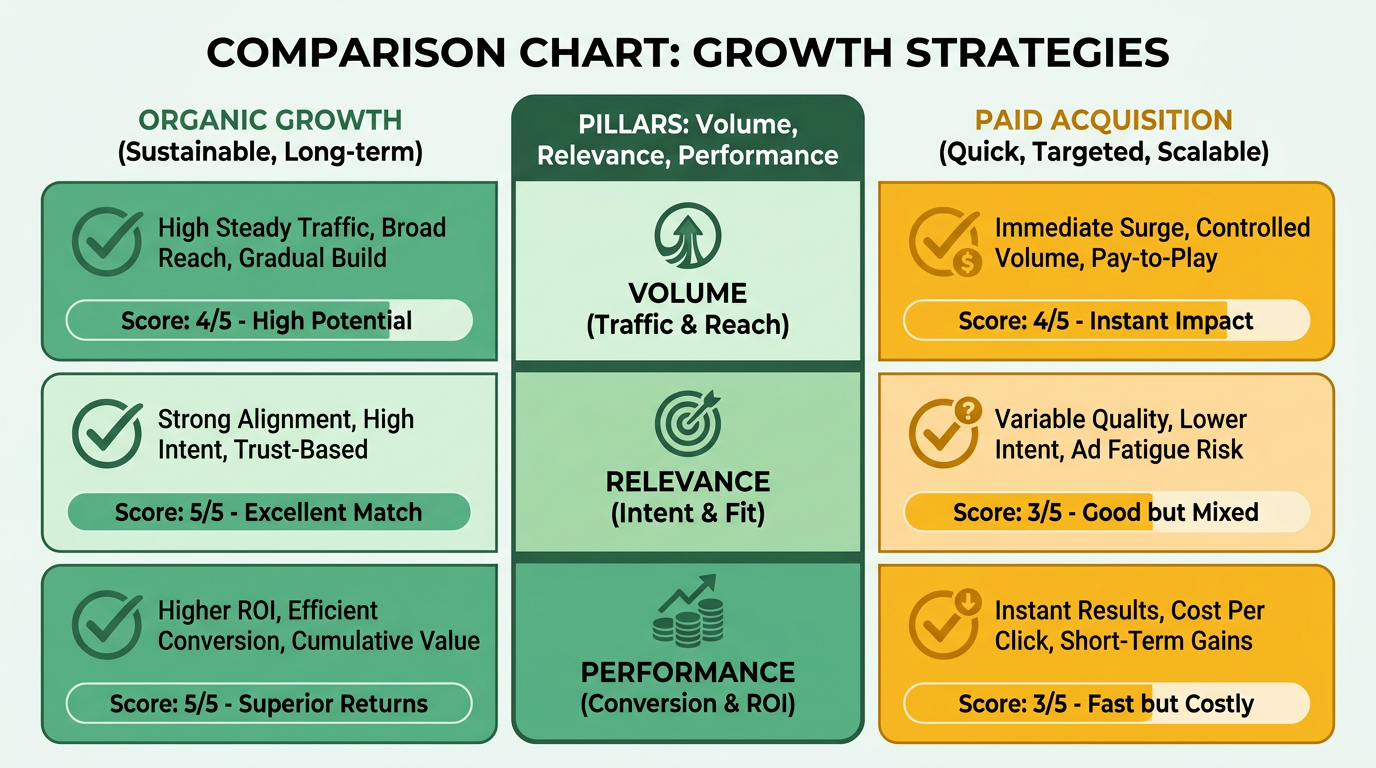
What formula do we use?
A sensible default weights traffic slightly heavier than the other two, because a post with no audience can't convert anyone. Here it is:
Score = (Traffic × 0.4) + (IntentMatch × 0.3) + (Conversion × 0.3)
Each input is normalized to a 0–100 value first, so you're comparing like with like. Traffic becomes a percentile against your library's top performer. IntentMatch and Conversion get their own 0–100 scales, described below.
Shift the weights to match your goal. Chasing leads this quarter? Push Conversion to 0.4 and drop Traffic to 0.3. Building top-of-funnel reach? Do the reverse. The formula is a starting point, not a rulebook.
How do you assign IntentMatch scores?
IntentMatch rates how close a post's keyword sits to a buying decision. We map the three standard intent categories to point bands: transactional intent scores 90–100, navigational lands at 50–70, and informational falls at 20–40. The closer the reader is to a purchase, the higher the number.
This is the qualitative pillar, and it's the one channel mapping lives or dies on. A transactional post rarely belongs on an awareness-heavy channel. Match the intent to the channel's buyer stage, and your conversion math stops fighting you.
Normalizing posts of different ages
An old post has had years to bank traffic. A recent one hasn't. Comparing raw totals punishes your newer winners, so normalize to traffic per day since publish. A post live for 600 days with 60,000 visits earns 100/day. A 90-day post with 9,000 visits earns the same. Now they compete fairly.
How do you turn scores into action?
Sort every post into three tiers, then work them in order. This keeps your team on the posts that pay back fastest.
- High (80–100): Repurpose immediately. Your fastest conversions.
- Medium (50–79): Queue for the next batch or test a channel swap.
- Low (0–49): Skip repurposing for now. The numbers aren't there yet.
An example: a post pulling 12,000 monthly visits, transactional intent, and a 2.5% conversion rate normalizes to a score of 84. That lands in the High tier and gets flagged for immediate repurposing, no debate.
Pulling conversion numbers by hand is the slow part. AnyPost tracks performance in real time straight from Google Search Console, showing you what changed rather than just what was done, so you can see which posts are earning impressions and clicks as fresh data lands. That's what lets you rescore your whole library as new numbers come in, instead of once and never again.
Map content themes to channel fit
Every channel converts a different theme best, so mapping theme to channel is where repurposing stops being busywork and starts driving leads. Once you know which posts carry the most conversion potential, the next move is matching each one to the platform its format and buyer already favor. That pairing is the difference between a post that lands and one that disappears.
AnyPost reads your business context to surface the opportunities worth pursuing, so you can focus effort where it counts before you touch a mapping matrix. This section is about turning those priorities into channel decisions.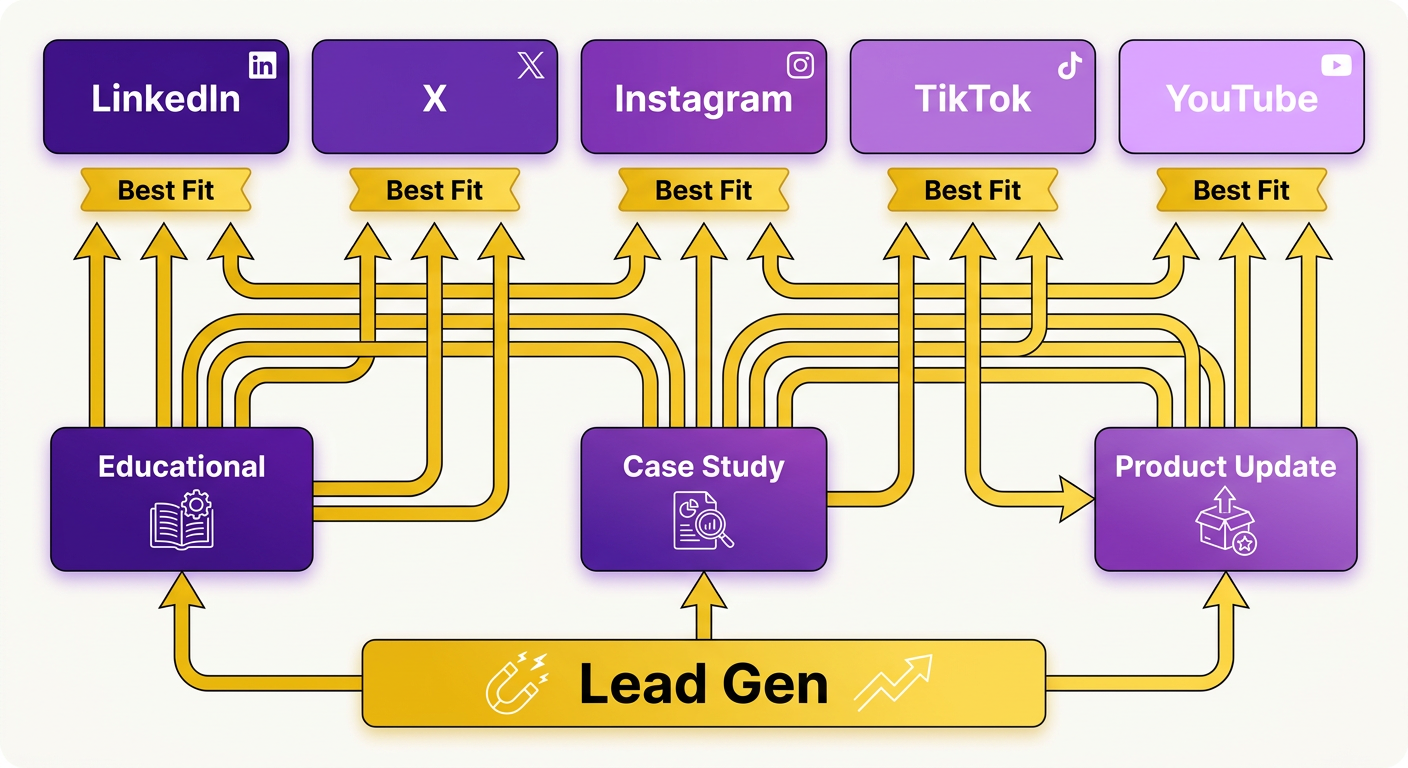
Which channels convert which themes?
Match the theme to where its readers already act. Each platform pulls a different buyer and rewards a different format, so a how-to guide and a testimonial belong in very different places.
Here's the profile we work from:
- LinkedIn: B2B decision-makers. Case studies and trend roundups convert here because the audience is scanning for proof and peer signals.
- X: Real-time news and thought leadership. Short takes and hot commentary fit its pace and character limits.
- Instagram: Visual storytelling. Process breakdowns and before-afters work when you respect its image specs.
- YouTube: Long-form tutorials. A how-to SEO guide becomes a step-by-step video series that keeps viewers to the payoff.
- Email newsletters: Nurtured leads. A customer testimonial reframed as a short case study converts because these readers already trust you.
A detailed technical guide might get ignored on a fast-paced social feed but find a highly engaged audience in an executive's inbox. We move high-performing assets into formats like step-by-step video walkthroughs, visual slide decks, or narrative email sequences all the time.
How do you build the mapping matrix?
Build a grid with themes down the side and channels across the top, then fill each cell with past conversion data. The number in each cell tells you where that theme has already earned leads, so you map on evidence instead of habit.
Cross-reference each high-priority post against its best-fit channel to produce a Priority Score. A post that carries strong conversion potential and lands in a channel where its theme already performs jumps to the top of your queue.
Break ties with the ICE framework:
- Impact: the traffic and lead lift you expect from the move.
- Confidence: how solid the historical data behind the mapping is.
- Ease: how much work it takes to reshape the format.
Watch platform constraints while you map. X caps your character count, Instagram enforces image specs, and video length shapes what fits on short-form feeds. High-intent assets need careful routing. Point bottom-funnel comparison guides toward channels where buyers are actively evaluating solutions, and you catch high-value interest at the moment of decision.
How do you run the 30-day sprint?
Ship 10 to 15 posts per week, balanced across channels, and keep the mapping in a living dashboard. The dashboard updates as new conversion data arrives, so a channel that starts outperforming gets more of your queue next week.
Our Persona Engine handles the voice-matching automatically, reshaping tone and format to fit each platform so you're not rewriting from scratch. Scaling content production by hand strains a small team fast, so the automation is what keeps a multi-channel publishing schedule realistic. Let AnyPost handle the formatting and scheduling across your active networks, and distributing a single core asset becomes a hands-off process.
Build channel-specific templates and automation
A channel-specific template turns a scored post into a ready-to-publish asset in minutes. Once your queue is ranked by conversion likelihood, the template encodes that intent into the right format for the destination. This is where the mechanics stop being manual and start running on rails.
Every template shares five parts: headline, hook, bullet points, visual cue, and CTA. What changes is how each part flexes per platform. A LinkedIn hook opens a professional gap. An X hook picks a fight with a lazy assumption. Same source post, different shape.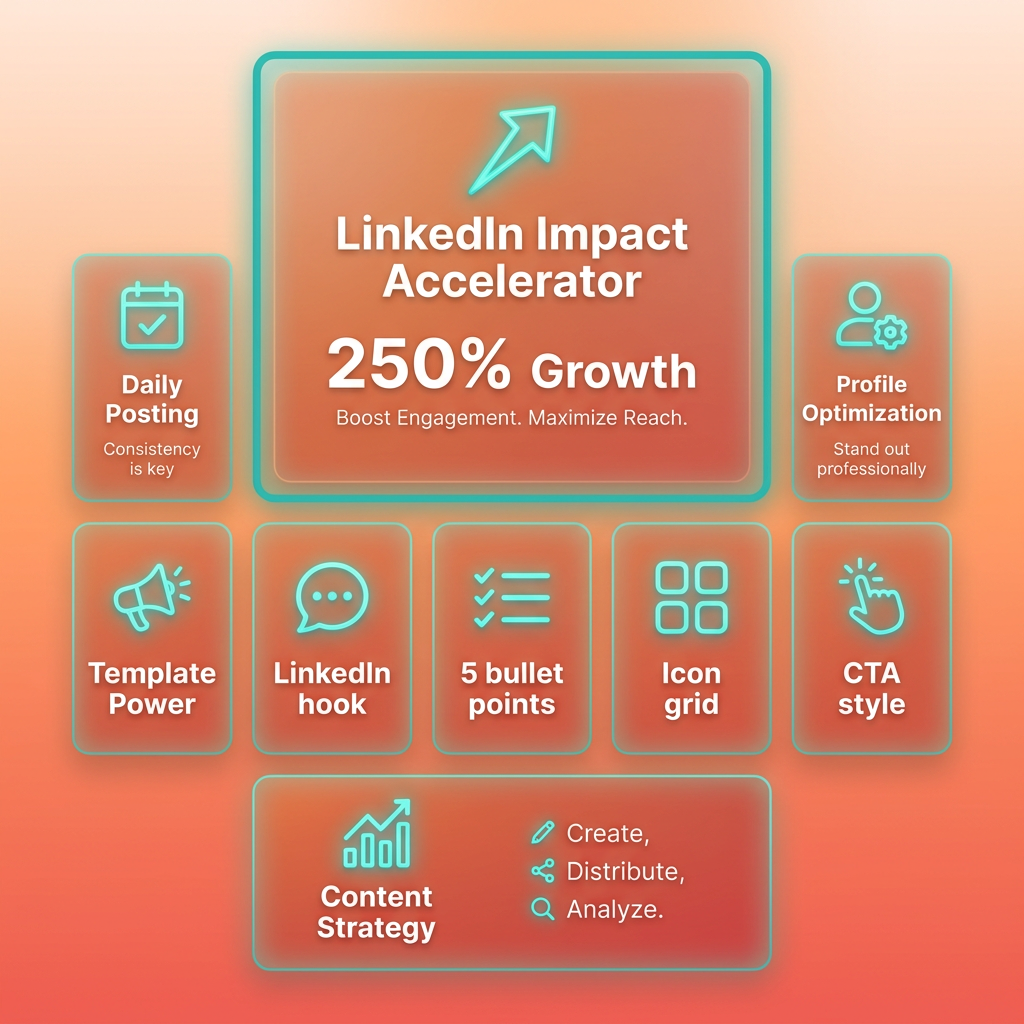
What goes into a channel template?
A template is a fixed skeleton with platform-specific fills. You lock the five components, then define the tone, length, and CTA style each channel rewards. That consistency is what lets our AI generate 20 versions without 20 rounds of editing.
Here's a LinkedIn carousel template we run often, built as five slides:
- Slide 1: The hook. One bold claim pulled from the post's strongest data point.
- Slides 2–4: Three data points or steps, one per slide, each with a short caption and a visual cue.
- Slide 5: The CTA, linked to a lead-gen form.
For an X thread, the same post breaks into a punchy opener, four to six numbered insights, and a closing reply-bait question. A YouTube script gets a cold-open hook, a three-beat body, and a spoken CTA. The structure stays consistent, but the voice and pacing adapt to each platform's culture.
How do you keep brand voice consistent across formats?
Use a Persona Engine to lock your voice once, then apply it to every format automatically. Feed it your tone rules and sample copy, and it rewrites each template fill to sound like you, whether the output is a carousel caption or a newsletter intro.
Voice drift is the fastest way to make repurposed content feel like a bot wrote it. The same discipline applies to visuals: a reusable, consistent style across icons and illustrations saves time and keeps your content coherent across every channel. Voice deserves that same rigor.
A locked persona also removes the review lag that kills batch output. When each fill already sounds like you, editors spend seconds confirming rather than minutes rewriting, so a queue of 30 drafts clears in one sitting instead of three.
What does the automation workflow look like?
The workflow runs in five steps: import scored post, select channel template, AI generate, human review, then schedule publish. You never draft from a blank page. The scored post feeds the template, and the AI fills it in your persona.
Because AnyPost automates content generation at scale, you can push a batch of posts through the pipeline instead of drafting each one by hand. Assign each a template and a target channel, then set your cadence in the scheduler so nothing dumps at the same hour. Set up right, a single source post expands into a variety of native formats built for each audience.
Before anything publishes, run every draft through a quality check:
- Brand compliance: voice and claims match your persona rules.
- SEO keyword presence: primary term sits in the headline and first line.
- Platform guidelines: character limits, slide counts, and link rules hold.
Pre-define one metric per template so you know what "working" means. For YouTube scripts, we track average view-through rate. For LinkedIn carousels, it's the click-through to the lead-gen form. Set the number before you publish, not after.
Monitor, optimize, and scale the process
Repurposing content is never a one-time project. It's a loop: publish, measure, feed the numbers back into your scoring model, repeat at scale. Once posts are ranked by conversion likelihood, the real edge comes from watching what actually converts and letting those results re-rank your queue every month.
The goal is a system that improves itself. Your first mapping is a hypothesis. Live conversion data is the answer, and it should overwrite your assumptions fast.
What should your dashboards track?
Track three things per repurposed asset: traffic by channel, conversion funnel movement, and content fatigue. These are the signals that tell you whether a mapping decision paid off or needs a rethink.
Build a dashboard with traffic by channel at the top, so you can see which platform your repurposed post actually earns leads on. Below that, track funnel metrics: click-through, sign-up, and qualified lead rate per asset.
The third signal is content fatigue. When a post's engagement decays after weeks of strong performance, that's your cue to refresh the voice or rotate the format. Fatigue indicators keep you from burning goodwill on a channel that's tapped out.
Test variations inside a single channel too. Try two CTAs on the same Instagram carousel, or two hooks on the same LinkedIn post. AnyPost.ai generates and distributes these variations automatically across your connected profiles, so real-time performance data decides which creative angle wins.
How do you refresh the scoring model each month?
Run a monthly cycle: re-score every asset against fresh performance data, update your channel-fit matrix, and fold in new platform behavior. This keeps your mapping honest as buyer habits shift.
Start by re-scoring all content with the last 30 days of results. A post that underperformed on X might now be your best LinkedIn convert. Let the data move it.
Then update the matrix with emerging platform insights. New trends on TikTok, a shift in how a channel rewards format, a rising audience segment. Bake those into the next mapping round instead of waiting for a quarterly overhaul.
Weight recent results more heavily than old ones. Scores built on rolling windows stop a viral spike from six months ago outranking a post that converts steadily today, so your queue reflects current buyer behavior instead of stale wins. Recency weighting keeps the model reactive without wiping out proven performers.
How do you scale to thousands of posts?
Set up a continuous pipeline. New blog posts get scored and routed to their best-fit channel on publish day, automatically, so your backlog and your fresh content run on the same rails.
That's what turns a manual mapping habit into a system that handles thousands of assets. Iteration compounds. The platform is built to run this cycle continuously, turning the re-evaluation and distribution of your legacy assets into an automated engine for sustained growth. That's the payoff of treating mapping as an ongoing test, not a one-off.
Future-proofing is built in. When a new channel like Threads or Substack starts to matter to your buyers, add it as a row in the matrix. You score against it and route to it without rebuilding anything. The process absorbs new channels instead of breaking on them.
Frequently Asked Questions
1. How many old posts do I need before this mapping strategy is worth the effort?
This strategy is designed for organizations with a substantial backlog of content. If your archive is relatively small, your resources are better spent developing foundational assets first, as a larger library provides the necessary data and variety to make systematic mapping highly effective.
2. What if a high-traffic post has a low conversion rate?
You should prioritize assets that have demonstrated an ability to inspire action, even if their overall audience size is small. For high-traffic posts that fail to convert, consider routing them to awareness-focused platforms rather than direct-response channels, or re-evaluate their call-to-action alignment.
3. Can one old post be published to multiple channels instead of just one?
While our scoring model identifies the single most profitable primary channel for an asset to prevent unfocused distribution, you can certainly adapt the content for other networks. Modern publishing tools can help you translate a single piece of writing into multiple platform-native formats efficiently, expanding your reach without duplicating your manual workload.
4. How do I compare a five-year-old post fairly against one published last month?
To ensure a fair comparison, calculate the average daily traffic for each post since its publication date rather than looking at lifetime totals. This mathematical adjustment levels the playing field, allowing recent high-performing articles to compete fairly with older, established pieces that have accumulated traffic over several years.
5. What if I don't see conversion improvements by week four?
If performance remains flat after a month, re-examine your channel-matching assumptions rather than immediately rewriting the copy. The mismatch is usually structural—such as sending informational content to a channel populated by buyers looking for direct solutions—rather than a creative failure.
6. Which phase should I expect to be hardest, and is it worth it?
Setting up the automation and scheduling pipeline typically presents the steepest technical challenge. However, this phase also unlocks the most significant efficiency gains and performance improvements, as it transforms a manual, sporadic effort into a consistent, data-driven publishing engine.
7. Does repurposing help SEO, or only social distribution?
It benefits both. Updating and linking back to your core assets signals fresh activity to search engines, which can improve your search rankings. Simultaneously, distributing these tailored pieces across social channels captures active buyers who may not be searching on traditional search engines, giving your brand broader coverage across the entire customer journey.
Ready to stop letting old posts gather dust? Start mapping your archive to the channels that will actually convert.
