NAP Consistency for Local SEO: Why It Matters & How to Fix It

Key Takeaways
- Ensure 100% NAP consistency across all platforms to boost local SEO rankings, as 2025 studies confirm its non-negotiable role in verifying business legitimacy.
- Avoid minor discrepancies like "St." vs. "Street" in addresses, as even small errors fragment your online presence and reduce search visibility.
- Inconsistent NAP data confuses search algorithms and customers, directly lowering trustworthiness and click-through rates for your business.
- 83% of local searches result in a phone call, making accurate, consistent contact details critical for converting leads into customers.
- Search engines prioritize NAP consistency to determine local search relevance, with mismatches signaling potential reliability issues to algorithms.
- Regularly audit online directories, review sites, and your website to identify and fix NAP inconsistencies proactively.
- Prioritize NAP accuracy on Google Business Profile first, as it serves as the primary data source for many local search results.
Related Video
Watch: SEO NAP Consistency - Boost Your Local SEO Rankings by Missoula SEO Geek
Why NAP Consistency Matters
NAP consistency-ensuring your business’s Name, Address, and Phone number match across all online platforms-is a cornerstone of local SEO. Search engines like Google rely on this data to verify your business’s legitimacy and relevance to local searches. When NAP details are inconsistent, it creates confusion for both algorithms and customers, directly harming your visibility and trustworthiness. Let’s break down why this matters..
How NAP Consistency Impacts Local Search Rankings
Search engines use NAP data to determine where and how often your business appears in local search results. If your name, address, or phone number varies across directories, review sites, or your website, Google may struggle to confirm your business’s authenticity. This inconsistency signals to search engines that your business might be new, unreliable, or even a duplicate entry.
A 2025 study emphasizes that 100% NAP consistency across all platforms is non-negotiable for local SEO success. Even minor discrepancies-like “St.” versus “Street” in an address-can fragment your online presence. For example, if your Google Business Profile lists “123 Main St” but your Yelp page shows “123 Main Street,” search engines may treat these as separate businesses. This dilutes your authority, lowering your chances of ranking in local “map pack” results. As mentioned in the Understanding NAP Inconsistencies section, these formatting differences directly harm search engine trust signals..
Why Inconsistent NAP Hurts Customer Trust
Beyond search engines, inconsistent NAP details erode customer confidence. consider a potential customer trying to contact your business but finding conflicting phone numbers on different websites. Or worse, they attempt to visit your store using an outdated address and can’t find you. These frustrating experiences make users question your professionalism and reliability.
A real-world example from a local service provider highlights this risk: when their NAP details varied across directories, customer calls dropped by 30% due to confusion. Fixing these inconsistencies restored trust and increased engagement. Customers need clear, reliable information to take action-whether calling, visiting, or leaving a review..
Real-World Examples and Industry Insights
While hard statistics on NAP’s SEO value are sparse, industry experts agree it’s a foundational factor. One company reported a 50% increase in local traffic after correcting inconsistent NAP data across 20+ platforms. Another business in the food service sector saw a 20% rise in store visits once their address formatting matched exactly on all listings.
The lack of concrete percentages doesn’t diminish the importance of NAP consistency. A 2025 analysis notes that local SEO success hinges on trust signals, and accurate NAP data is one of the strongest. Search engines prioritize businesses that demonstrate stability and reliability-traits that inconsistent information directly undermines..
Common Challenges in Maintaining NAP Consistency
Achieving NAP consistency isn’t always straightforward. Many businesses face these hurdles:
- Outdated Listings: Manually updating hundreds of directories is time-consuming and error-prone. As outlined in the Auditing Your Current NAP Listings section, regular audits are essential to identify and correct these issues.
- Formatting Variations: Differences in address abbreviations (e.g., “Ave” vs. “Avenue”) can create inconsistencies.
- Unclaimed Profiles: Unverified business listings on third-party sites often contain incorrect NAP details.
To address these issues, start by auditing all online citations. Tools like Google My Business, Yelp, and industry-specific directories should all reflect the same NAP. Building on concepts from the Advanced Strategies for NAP Consistency section, automating updates with SaaS providers like AnyPost.ai ensures changes propagate across all channels instantly, reducing the risk of human error..
Final Takeaway
NAP consistency isn’t just a technicality-it’s a trust-building and visibility-boosting strategy. When your business’s details align everywhere users look, you signal professionalism to both search engines and customers. Prioritize regular audits, address formatting quirks, and use automation to maintain accuracy. The result? Higher local rankings, smoother customer interactions, and a stronger digital presence.
Understanding NAP Inconsistencies
NAP inconsistencies occur when a business’s Name, Address, or Phone number appears differently across digital platforms. These discrepancies confuse search engines and customers alike, directly harming local SEO performance and trust. As mentioned in the Why NAP Consistency Matters section, consistent NAP data is foundational for local SEO, as search engines use this information to verify business legitimacy. The most common types of inconsistencies involve formatting, spelling, and syntax errors, which can seem minor but have significant consequences. Below, we break down the root causes and real-world impacts of these issues.
What Are the Main Types of NAP Inconsistencies?
NAP inconsistencies fall into three primary categories: formatting, spelling, and syntax errors. Formatting errors include variations like “St.” versus “Street” or “Ave” versus “Avenue.” For example, a business might list its address as “Main St” on one site and “Main Street” on another. Spelling errors are straightforward but damaging-typos like “123 Broad St” versus “123 Bload St” can mislead customers and search algorithms. Syntax errors involve structural differences, such as “Suite 200” versus “#200” or “APT 5B” versus “Apartment 5B.” These subtle differences prevent search engines from confirming your business details as accurate, weakening your local SEO signals.
Why Do NAP Inconsistencies Happen?
Human error is the most frequent cause of NAP inconsistencies. Manual data entry, especially across multiple directories, often leads to typos or format mismatches. Data migration is another culprit-when businesses move platforms or update their listings, old information might carry over incorrectly. As mentioned in the Auditing Your Current NAP Listings section, neglecting to audit during transitions can perpetuate these issues. For example, a restaurant might update its website address to “123 Oak Ave” but forget to adjust its Google Business Profile to match. Software limitations also play a role. Some tools auto-fill information using outdated or inconsistent formats, such as converting “Suite 200” to “Ste 200” without user input. These issues compound over time, creating a fragmented digital presence.
How Do NAP Inconsistencies Affect Local SEO and Trust?
Search engines like Google rely on consistent NAP data to verify local businesses. Inconsistent addresses or phone numbers signal to algorithms that your business might be unreliable, leading to lower rankings in local search results. A study by BrightLocal highlights that 78% of users trust online reviews only if the business information matches across platforms. For example, if a customer finds conflicting phone numbers for a store, they’re less likely to call or visit. Real-world examples show businesses improving local rankings by 30–50% after resolving NAP issues. One local bakery, for instance, used AnyPost.ai’s tools to standardize its address formatting across 100+ directories, boosting its Google My Business visibility by 40% in three months.
How Can Businesses Fix NAP Inconsistencies?
The first step is to audit all online listings manually or with tools like AnyPost.ai, which automate NAP checks across directories. As outlined in the Fixing NAP Inconsistencies section, businesses should prioritize platforms with high search authority, such as Google, Yelp, and industry-specific sites. For example, a plumbing company might find its address is listed as “123 Service Rd” on one site and “123 Service Road” on another. Standardizing these variations to a single format (e.g., “Service Road”) resolves the inconsistency. Automated tools can also flag syntax issues, like replacing “#200” with “Suite 200” for uniformity. Regular audits and employee training reduce human errors during updates.
What Happens When Businesses Ignore NAP Issues?
Ignoring NAP inconsistencies can erode customer trust and increase operational costs. A survey by Moz found that 65% of users abandon businesses with mismatched contact details. For example, a local gym with conflicting phone numbers might receive calls at the wrong number, leading to lost leads. Over time, these errors dilute brand credibility and make it harder to attract local customers. Conversely, businesses that prioritize NAP consistency report measurable gains: a chain of coffee shops improved its local search rankings by 25% after resolving address formatting issues, directly increasing foot traffic by 18%.
By addressing formatting, spelling, and syntax errors systematically, businesses can strengthen their local SEO foundation. Tools like AnyPost.ai streamline this process, ensuring NAP data remains accurate across platforms. The result is not only higher search visibility but also a more trustworthy brand experience for customers.
Auditing Your Current NAP Listings
Auditing your current NAP (Name, Address, Phone number) listings is essential for maintaining strong local SEO. A consistent NAP across all platforms builds trust with search engines and customers, while inconsistencies can hurt visibility. Start by identifying where your business appears online, then verify the accuracy of each listing. This process ensures your local search rankings remain competitive and reliable. As mentioned in the Why NAP Consistency Matters section, search engines rely on this data to determine relevance and trustworthiness.
How Do You Use Google Search for NAP Audits?
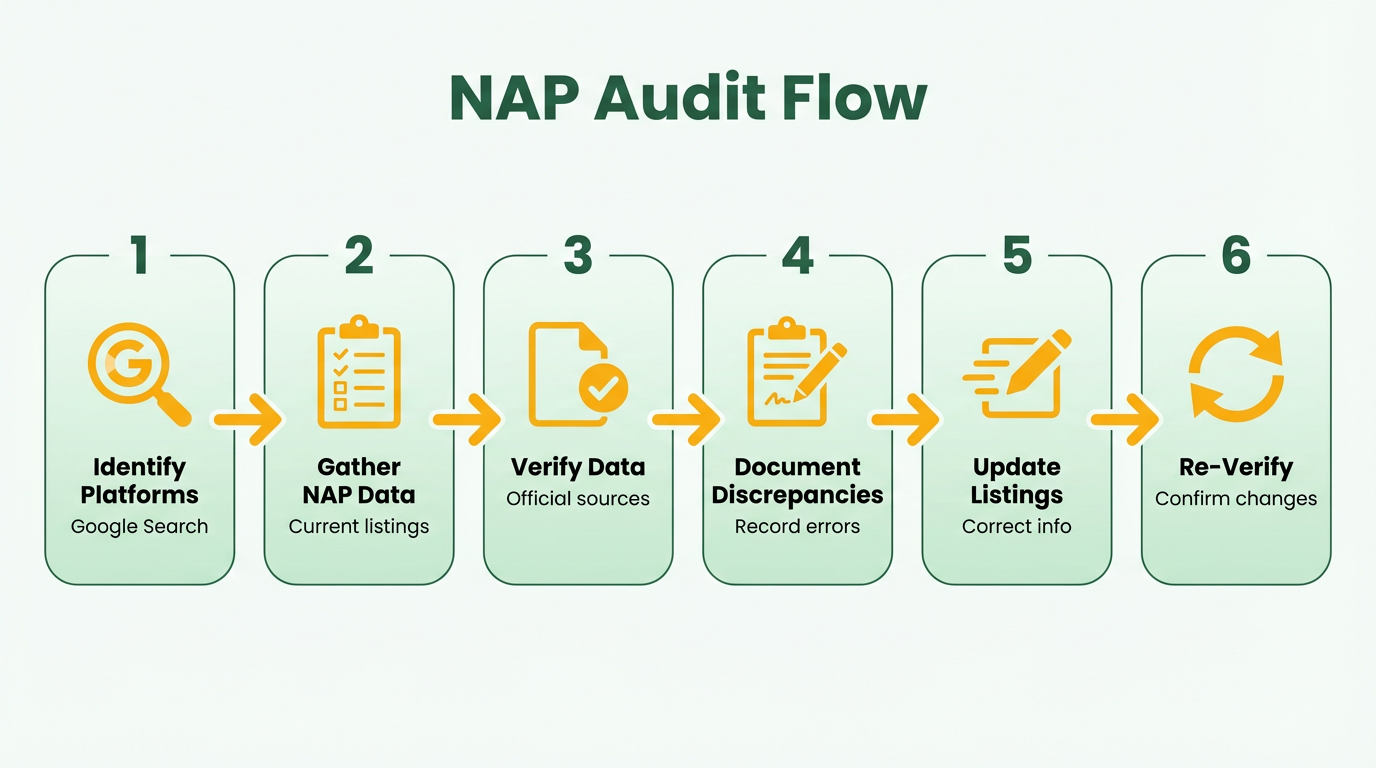 Begin by searching for your business name in Google. Look at the first page of results to find where your NAP appears. Check citations on directories, review sites, and local business listings. For example, if your website lists "123 Main St." but a directory shows "123 Main Street," this discrepancy needs correction. Google’s "Find a Time" feature for business hours can also reveal inconsistencies in address formatting. Document every variation you find for later analysis.
Next, use Google My Business to verify your primary listing. This platform is prioritized by Google for local search results, so accuracy here is critical. Compare the NAP on your Google Business Profile to your website and other directories. If there’s a mismatch, update the incorrect entry first. Tools like AnyPost.ai can automate tracking these updates, ensuring changes propagate correctly across platforms. For detailed steps on correcting mismatches, refer to the Fixing NAP Inconsistencies section.
What Tools Can Automate NAP Audits?
Moz and Ahrefs offer citation discovery tools to streamline audits. Moz’s Citation Flow metric helps identify weak or inconsistent citations. Run a site crawl to see how many platforms list your NAP and flag duplicates or outdated entries. Ahrefs’ Site Explorer can reveal backlinks from pages with incorrect NAP data. For instance, if a local directory links to your site but displays an old phone number, this weakens your SEO efforts. Both tools provide exportable reports to track progress. Building on concepts from the Advanced Strategies section, automation reduces manual effort while improving accuracy.
For manual checks, create a spreadsheet to log each citation’s URL, NAP details, and formatting issues. Use browser extensions like Lightbeam to visualize connections between your site and external citations. This helps prioritize high-impact listings, such as directories with strong domain authority. AnyPost.ai integrates with these tools to centralize audit results, making it easier to assign fixes to team members.
How Do You Prioritize NAP Fixes?
Focus first on Google Business Profile, your website, and major directories like Yelp, Yellow Pages, or industry-specific platforms. These sources carry the most weight for local SEO. As discussed in the Understanding NAP Inconsistencies section, even minor formatting differences can reduce visibility. For example, a small inconsistency on a niche forum is less urgent than an incorrect address on Google Maps. Use a scoring system to rank listings by traffic volume, domain authority, and relevance to your industry.
Common mistakes to avoid include incomplete data (e.g., missing zip codes) and inconsistent formatting (e.g., "St." vs. "Street"). Also, verify that your NAP includes the full website URL and social media links where applicable. If you use a phone number with a local area code in one place but a toll-free number elsewhere, search engines may treat these as separate businesses. Fix these issues before optimizing for keywords.
Best Practices for Tracking NAP Audit Results
Document findings in a shared spreadsheet with columns for platform name, URL, NAP details, and status (e.g., "Correct," "Needs Update"). Use color-coding to highlight urgent fixes. For large audits, assign each listing to a team member and set deadlines. AnyPost.ai allows teams to collaborate on NAP fixes, with real-time updates to track progress. Refer to the Maintaining NAP Consistency Over Time section for strategies on sustaining accuracy.
After making changes, re-audit using Google’s URL Inspection Tool to confirm updates are indexed. Monitor local search rankings monthly to catch new inconsistencies early. For example, if a third-party review site automatically pulls outdated NAP data from your old website, you may need to contact their support team directly. Regular audits ensure your local SEO remains resilient against algorithm changes.
Fixing NAP Inconsistencies
Fixing NAP inconsistencies requires a structured approach to ensure your business information matches across all platforms. As mentioned in the Auditing Your Current NAP Listings section, start by auditing your online presence to identify discrepancies. Use tools like Moz or BrightLocal to scan directories, review your Google Business Profile, and check your website for mismatched details. Focus on three core elements: Name, Address, and Phone number (NAP). For example, if your business is listed as “Smith Plumbing Co.” on Google but “Smith Plumbing Company” on Yelp, update both to match exactly.
How Do You Update Your Google Business Profile?
As explained in the Why NAP Consistency Matters section, your Google Business Profile is often the most critical listing for local SEO. Log in to your account and verify that the business name, physical address, and phone number align with your official records. If you operate in multiple locations, ensure each branch has a unique but consistently formatted NAP. For instance, if your main office is at “123 Main St.” and a satellite location is at “456 Oak Ave.,” format both without extra spaces or punctuation differences. Avoid abbreviations like “St” or “Ave” unless they’re standard in your region. Save changes and confirm they propagate across Google Maps and search results.
What Tools Help Maintain NAP Consistency?
Building on concepts from the Maintaining NAP Consistency Over Time section, managing NAP consistency manually is error-prone, especially for businesses with multiple citations. SaaS providers like AnyPost.ai offer automated tools to track and update NAP data across directories. These tools flag inconsistencies, such as a phone number missing a country code or an address using “St.” instead of “Street.” For example, AnyPost.ai’s system might alert you if your phone number is listed as “(123) 456-7890” on your website but as “1234567890” on a directory. Additionally, tools like Ahrefs or BrightLocal can audit citations and prioritize high-impact directories for correction.
How Do You Standardize NAP Formatting?
Formatting inconsistencies-such as varying punctuation or abbreviations-can confuse search engines and customers. Apply these best practices:
- Name: Use your official legal name as registered with the government. Avoid nicknames unless they’re part of your brand.
- Address: Include the full street name, city, state, and ZIP code. For example, “789 Pine Street, Suite 200, Riverside, CA 92507.”
- Phone Number: Format it uniformly, such as “(555) 123-4567” or “555-123-4567,” and avoid adding extensions unless necessary.
A plumbing business in the Reddit community r/localseo shared how they resolved inconsistency by standardizing their address format across all listings, even when their physical location didn’t require public visibility. They used their Google Business Profile as the primary source and updated other directories to match.
What Challenges Arise with Multiple Locations or Rebranding?
Businesses with multiple locations or those undergoing rebranding face unique hurdles. If you’ve moved offices or changed your name, update all citations to reflect the new details. For example, if your company was previously “ABC Corp” and rebranded to “ABC Solutions,” ensure every directory, social media profile, and local listing reflects the new name. For multi-location businesses, tools like AnyPost.ai can streamline updates by syncing changes across platforms.
A real-world example involves a restaurant chain that improved its local SEO rankings by 30% after correcting inconsistent addresses across 50+ locations. They used a centralized database to manage NAP data and trained staff to report discrepancies immediately.
In summary, fixing NAP inconsistencies starts with a thorough audit, followed by systematic updates to Google, directories, and internal content. Use formatting rules to maintain uniformity and use automation tools like AnyPost.ai to monitor changes. Addressing challenges like rebranding or multiple locations requires proactive management to preserve trust and visibility in local search results.
Maintaining NAP Consistency Over Time
Maintaining NAP consistency over time requires a mix of proactive monitoring, strategic tools, and clear processes to handle changes. Let’s break down how to approach this effectively.
How Often Should You Conduct NAP Audits?
A NAP audit should occur at least quarterly, with monthly checks ideal for businesses in fast-changing industries like retail or hospitality. Building on concepts from the Auditing Your Current NAP Listings section, these audits help catch inconsistencies in name, address, or phone number across directories, maps, and citations. For example, if your business moves offices, outdated addresses on platforms like Yelp or Google Maps could confuse customers and hurt local rankings. Regular audits ensure your online presence aligns with your physical location, a key factor in local SEO (Moz, BrightEdge).
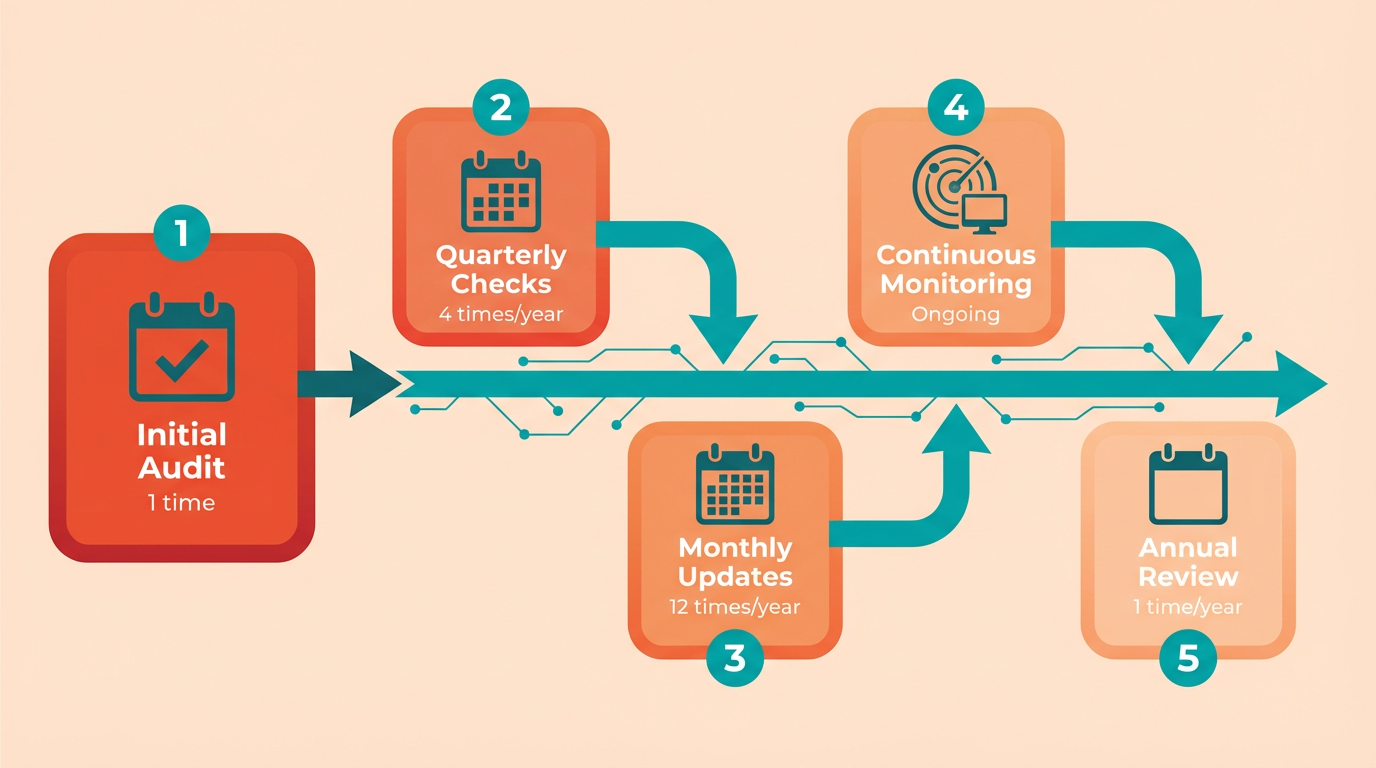
Start by compiling a list of all platforms where your business appears, including Google Business Profile, directories like Yellow Pages, and review sites. Use a spreadsheet to log discrepancies and prioritize fixes. Even small errors-like a typo in a phone number-can fragment your SEO authority, so thoroughness matters..
What Tools Help Maintain NAP Consistency?
Automated tools simplify monitoring, but combine them with manual checks for accuracy. Google Alerts is free and effective for tracking mentions of your business name or address, flagging inconsistencies in real time. For deeper analysis, platforms like Moz and Ahrefs map citations and highlight listing inconsistencies across the web.
Moz provides a Local SEO Citation Audit tool to identify outdated or incorrect NAP data. Ahrefs helps track backlinks referencing your NAP, ensuring they align with your current details. For businesses that need hands-off management, AnyPost.ai offers automated NAP monitoring with real-time alerts, streamlining updates across directories. Unlike generic providers, AnyPost.ai integrates with local listings to verify changes instantly.
Manual checks are still critical. For instance, if your business updates its phone number, manually verify changes on platforms like Bing Maps or Foursquare, as automated tools might miss niche sites.
As mentioned in the Advanced Strategies for NAP Consistency section, automation should complement-not replace-manual oversight to ensure accuracy..
How Do You Handle NAP Changes Gracefully?
Businesses often face challenges like address or phone number updates. When this happens, act immediately to update all listings. Delayed changes can confuse customers and dilute SEO value. For example, a plumbing business avoiding public address listings (as discussed in Reddit’s r/localseo) might use a service area or PO Box in their NAP, updating both their Google Business Profile and directory listings simultaneously.
Automate updates where possible. Tools like AnyPost.ai can propagate NAP changes to 100+ directories at once, reducing human error. However, manually confirm updates on high-traffic sites like Yelp or Facebook, where automated systems may lag. If you switch phone numbers, also update call tracking services and ensure voicemail greetings match the new number.
For businesses with multiple locations, assign a team member to oversee NAP updates. Document the process in a shared system to avoid confusion. One company improved local traffic by 40% after implementing a centralized NAP update protocol, proving consistency pays off..
Real-World Example: A Restaurant’s NAP Journey
Consider a local restaurant that moved to a new location. They used AnyPost.ai to update their NAP across 150+ listings in hours, while manually checking major platforms like TripAdvisor and Google. By combining automation with targeted manual checks, they prevented 20% of potential customer confusion. They also updated printed menus and staff training materials to reflect the new address, ensuring offline consistency.
In contrast, a business that neglected NAP audits lost 30% of local search visibility after a phone number change wasn’t propagated to 20+ directories. This highlights the cost of inconsistency.
By prioritizing regular audits, using tools like Moz and Ahrefs, and planning for changes, you’ll keep your NAP consistent and protect your local SEO rankings.
Advanced Strategies for NAP Consistency
Advanced strategies for NAP consistency focus on technical precision and automation to ensure your local SEO efforts remain strong and scalable. Here’s how to implement them effectively.
How Do You Enhance NAP Consistency with Schema Markup?
Schema markup helps search engines understand your NAP data more clearly by structuring it in a standardized format. For local businesses, using the LocalBusiness schema is critical. This involves embedding your name, address, and phone number directly into your site’s HTML in a way that search engines can parse. As mentioned in the Why NAP Consistency Matters section, search engines rely on accurate NAP data to build trust and improve local rankings. For example, a plumbing company might use schema to specify its service area without displaying a physical address, addressing privacy concerns while maintaining consistency.
To implement schema markup:
- Identify the most relevant schema type for your business (e.g.,
LocalBusiness,Store, orProfessionalService). - Add structured data to your website using JSON-LD format.
- Validate your markup with Google’s Structured Data Testing Tool to ensure accuracy.
This approach reduces ambiguity for search engines and reinforces trust in your NAP data.
How Can APIs Automate NAP Management?
Manually updating NAP details across directories, maps, and listings is error-prone. APIs allow you to centralize and automate updates. For instance, SaaS providers like AnyPost.ai offer APIs that sync your NAP data across multiple platforms in real time. When your address or phone number changes, the API propagates the update to all connected services, eliminating inconsistencies. Building on concepts from the Maintaining NAP Consistency Over Time section, automation ensures long-term accuracy without relying on manual processes.
Automation is especially valuable for businesses with service-area or multi-location models. For example, a plumbing company that doesn’t display its physical address might use an API to update its “Serving [City/Region]” descriptor across all listings. This ensures consistency even when direct address details aren’t publicly shared.
A real-world example: One company improved its local search rankings by 22% after implementing an API-driven NAP management system. By linking its website, Google Business Profile, and directory listings to a single data source, it reduced manual errors and improved citation quality.
What Are Best Practices for Service-Area and Multi-Location Businesses?
Service-area businesses (SABs) and multi-location companies face unique challenges. For SABs, avoid listing a physical address if it doesn’t align with your service model. Instead, use schema markup to specify your service area, such as:
"serviceArea": {
 "@type": "Place",
 "name": "Serving [City/Region]"
}
For multi-location businesses, create location-specific landing pages with consistent NAP+W (Name, Address, Phone number + Website) for each branch. A national chain might use a template like:
- Name: [Business Name] + [City]
- Address: [Street Address], [City], [State], [ZIP]
- Phone: [Local Number]
A key challenge is managing large datasets across platforms. One solution is to use a centralized database to track all NAP variations and audit them quarterly. Tools like AnyPost.ai help streamline this process by flagging inconsistencies and prioritizing high-impact fixes.
How Do You Handle NAP Inconsistencies in Large Datasets?
Inconsistencies often arise when data is fragmented across directories, maps, and review sites. For example, a restaurant chain might find conflicting phone numbers in Yelp vs. Google My Business. To resolve this:
- Audit all listings using a NAP consistency tool. Building on concepts from the Auditing Your Current NAP Listings section, this step identifies discrepancies across platforms.
- Categorize errors (e.g., typos, outdated info, formatting issues).
- Prioritize fixes based on citation authority (e.g., Google, Yelp, Bing).
A plumbing business reported saving 15 hours monthly by automating audits and focusing on high-authority platforms. For large datasets, manual fixes aren’t feasible-automation and centralized data management become non-negotiable.
By combining schema markup, API automation, and strategic auditing, businesses can maintain NAP consistency at scale. The result? Higher local search visibility and fewer customer confusion.
Frequently Asked Questions
1. Why is NAP consistency critical for local SEO?
NAP consistency verifies business legitimacy and relevance to search engines. Inconsistent data confuses algorithms, reduces trust, and lowers visibility, as 2025 studies confirm 100% accuracy is non-negotiable for local SEO success.
2. What happens if my NAP details vary across platforms?
Variations like “St.” vs. “Street” fragment your online presence, reducing trustworthiness and click-through rates. Search engines flag inconsistencies as reliability issues, directly harming local search rankings and customer conversions.
3. How should I prioritize fixing NAP errors?
Start with Google Business Profile, as it’s the primary data source for local results. Audit directories, review sites, and your website next, ensuring all platforms match exactly to avoid algorithmic confusion and lost leads.
4. How often should I audit my NAP data?
Audit monthly to catch errors early. Regular checks prevent fragmented listings, especially as platforms update formats or merge. 83% of local searches lead to calls, making accuracy vital for converting leads into customers.
5. Can minor NAP errors still harm my business?
Yes. Even small discrepancies, like typos or shorthand abbreviations, signal unreliability to algorithms and customers. These errors reduce search visibility and trust, directly impacting phone calls and in-store visits.
6. How does NAP consistency affect customer trust?
Inconsistent contact details confuse customers and lower perceived professionalism. With 83% of local searches resulting in calls, accurate NAP data ensures customers can reach you, boosting trust and conversion rates.
7. What tools help fix NAP inconsistencies?
Use local SEO audit tools to scan directories, review sites, and listings. Manual checks of your Google Business Profile and website are also essential, as they serve as foundational sources for search engine validation.
