Nonprofit SEO: How to Grow Visibility and Donations on a Small Budget

Key Takeaways
- Only 37% of nonprofits run any SEO strategy. Basic optimization is a competitive advantage.
- The three core pillars: on-page optimization, keyword research, and link building.
- Most SEO work costs time rather than money. On-page fixes are completely free.
- Google Ad Grants can provide eligible nonprofits with up to $10,000/month in free search ads.
- Nonprofit SEO attracts new donors, volunteers, and email signups without an agency retainer.
- Free keyword research tools help you find the exact terms your supporters search for.
- Search engines reward sites that answer real questions clearly and load fast.
Quick Summary
Nonprofit SEO helps your organization show up when supporters search Google. It works even when your budget is tight. Small teams pull in new donors, volunteers, and email signups by fixing their site's basics and writing for the questions people actually type. You don't need a big agency retainer to compete.
The core idea is simple. Search engines reward sites that answer real questions clearly, load fast, and earn links from trusted places. Most of that work costs time, not money.
What Does Nonprofit SEO Actually Cover?
Nonprofit SEO is optimizing your website so it ranks higher in search results for terms your supporters use. It rests on three pillars: on-page optimization, keyword research, and link building. Together they make your mission easier to find.
The catch most guides skip: the vast majority of charitable organizations completely overlook search engine optimization. The bar to stand out is remarkably low. If your peers aren't optimizing, a few smart moves put you ahead fast.
Who Should Skip This?
SEO is a long game. If you need donations this week for an emergency appeal, paid ads or a direct email push will move faster. Skip a heavy SEO investment when your timeline is days, not months.
But if you want a steady stream of new supporters who find you on their own, SEO pays back for years. The content you publish today keeps ranking and attracting visitors long after you hit publish.
What Will You Walk Away With?
By the end, you'll know how to research keywords your audience uses, optimize your existing pages, and build links without a budget. We also cover how Google Ad Grants and free analytics tools support the work.
There's one more lever that saves the most time: automating content creation and repurposing. Writing every article by hand drains small teams. Smart automation lets you publish consistently without burning out your two-person comms staff.
The payoff is real. Higher rankings mean more visibility. More visibility means more traffic. More traffic means more donations and volunteers.
Why Nonprofit SEO Matters
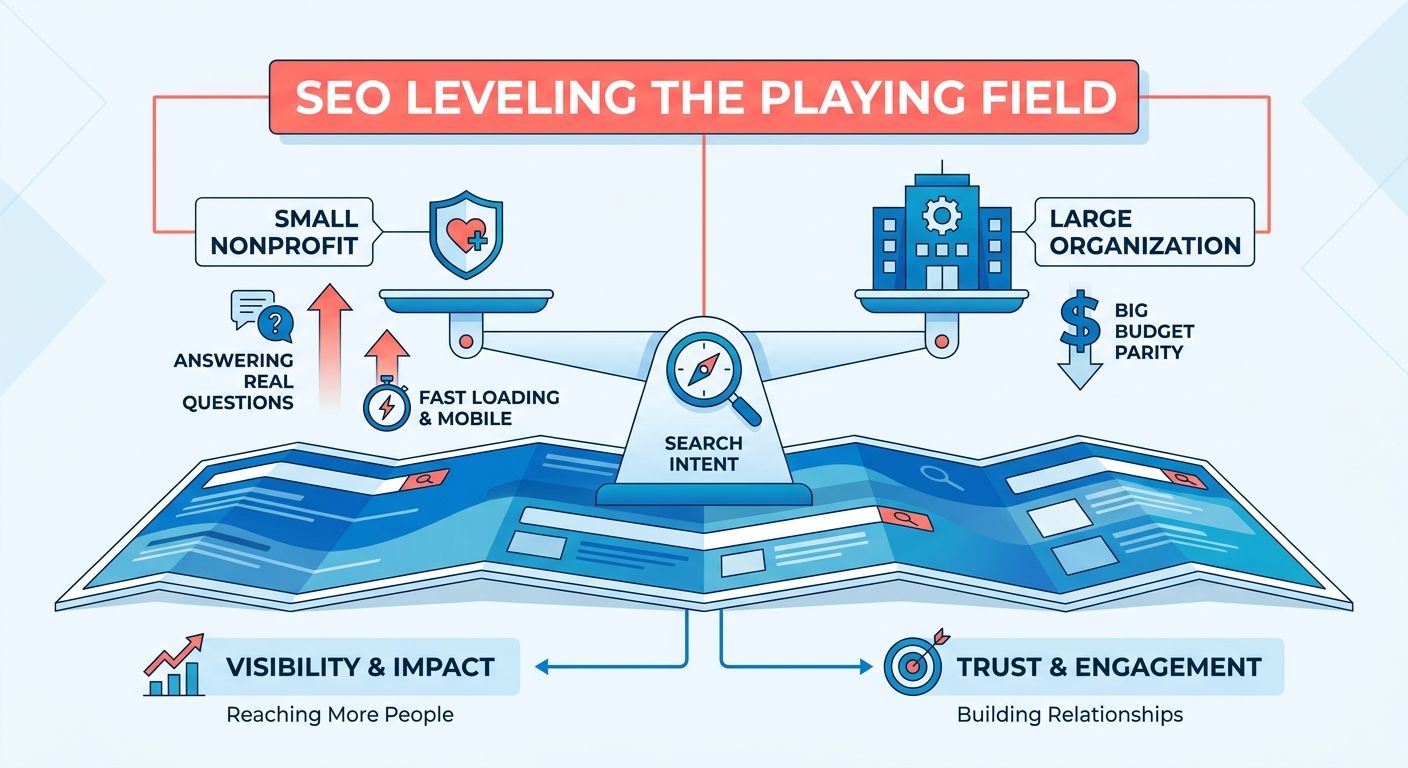
Most nonprofits compete for attention with almost no budget. SEO levels that playing field. It puts your cause in front of people already searching for the work you do, without the ad spend that drains a small organization's reserves.
That matters because supporters rarely find you by accident. They type a question into Google. If your site answers it well, you show up. If it doesn't, a louder organization gets the donor, the volunteer, or the email signup instead.
Why Do Nonprofits Need SEO More Than Most?
Nonprofits face a squeeze that for-profit companies don't: limited budget, thin staff, and a mission that demands every dollar go toward the cause. Paid advertising eats that budget fast. Organic search keeps working long after you publish.
Here's the gap worth knowing. The average nonprofit website pulls in a small share of its traffic from search, yet organic visitors are some of the most motivated people who reach your site. They arrive with intent, looking for exactly the kind of help or cause you represent. Closing that gap turns a quiet channel into a steady source of new supporters.
The cost structure is the real draw. You invest time, not retainer fees. Writing helpful pages, fixing your site's structure, and earning links from trusted partners all cost effort rather than cash.
How Does SEO Actually Drive Donations?
The connection to fundraising is direct. When your site ranks near the top, more potential supporters see it. This organic visibility builds a steady pipeline of qualified traffic directly to your donation pages.
The path is straightforward. Someone searches for a problem your organization solves. They land on a page that explains your work clearly. That same page makes it easy to give, sign up, or volunteer.
This pulls in the right people, too. SEO attracts your target audience, not random traffic. The visitors who find you through a relevant search already care about your issue. They convert at a higher rate than people who stumble in from a generic ad.
What Does Real-World Impact Look Like?
The results show up in the numbers. One water-focused charity reshaped its website content and backlink profile through an SEO campaign and improved its conversion rate by 64%. That's a measurable jump in supporters taking action, driven by search work rather than a bigger ad budget.
Researchers have studied this enough to formalize it. Academic work proposes a full search-engine marketing process built specifically for nonprofits, one designed to optimize organic results and adapt easily across different organizations. The approach isn't guesswork. It's documented and repeatable.
If you want a practical starting point, the Nonprofit SEO 101 guide walks through making your organization easy to find online. Pair that with consistent content work, and you build visibility that compounds month after month.
Your supporters are already searching. SEO makes sure they find you instead of someone else.
Link Building Strategies on a Small Budget
Backlinks tell search engines that other trusted sites vouch for yours. You can earn them without spending a dime. The two highest-value tactics for a small team are guest blogging and getting listed on resource pages. Both trade your time and expertise for links that lift your rankings.
Link building rewards patience over budget. A single quality backlink can keep sending referral traffic and ranking value for years, long after the hour you spent earning it. Treat each link as a lasting asset, not a one-time win. A slow trickle of outreach adds up to a strong profile within a few months.
How Does Guest Blogging Build Links Cheaply?
Guest blogging means writing an article for another organization's site in exchange for a link back to yours. It costs nothing but your writing time, and it puts your cause in front of a new audience that already cares about related topics.
Start with sites your supporters already read. Pitch a partner organization, a community foundation, or an issue-focused blog a topic you know well. Tie it to your mission so the link feels earned, not forced.
Keep your pitches specific. Offer a clear headline and a short outline instead of a vague "I'd love to contribute." Editors say yes faster when you hand them something close to ready.
Why Use Resource Pages and Partnerships?
Resource pages are curated lists of helpful links that many nonprofits, libraries, and universities maintain. Getting added to one earns you a quality backlink from a relevant, trusted site. You can also link out to other reputable nonprofits and ask them to do the same.
Partnerships make this easier. If you already collaborate with another organization on programs or events, ask to be featured on their site. A line on their partners page or a mention in their newsletter often comes with a link.
Look for pages that list "helpful organizations" or "where to get support" in your cause area. Email the page owner, explain how your work fits their list, and make the addition simple for them. You can find more outreach templates and foundational strategies in Candid's nonprofit SEO guide.
Do You Need a Lot of Backlinks?
No. A handful of links from respected, relevant sites beats hundreds from random low-quality pages. Search engines weigh trust and relevance far more than raw volume, and spammy links can hurt you.
Consider how editorial links earn their weight. A link sitting inside a relevant article carries more authority than one buried in a footer or sidebar. A single mention in a topic-focused blog post can outperform a dozen directory listings. Aim for context, not just placement.
Quality over quantity should guide every outreach email you send. Ask whether a link comes from a site your supporters would actually trust. If the answer is no, skip it.
To find opportunities, watch where similar organizations get covered. Note the blogs, directories, and partner pages linking to causes like yours, then pitch those same outlets. You can also set up free search alerts for your topic to catch sites already writing about your issue, then reach out while the subject is fresh.
Optimizing Content for Trust and Credibility
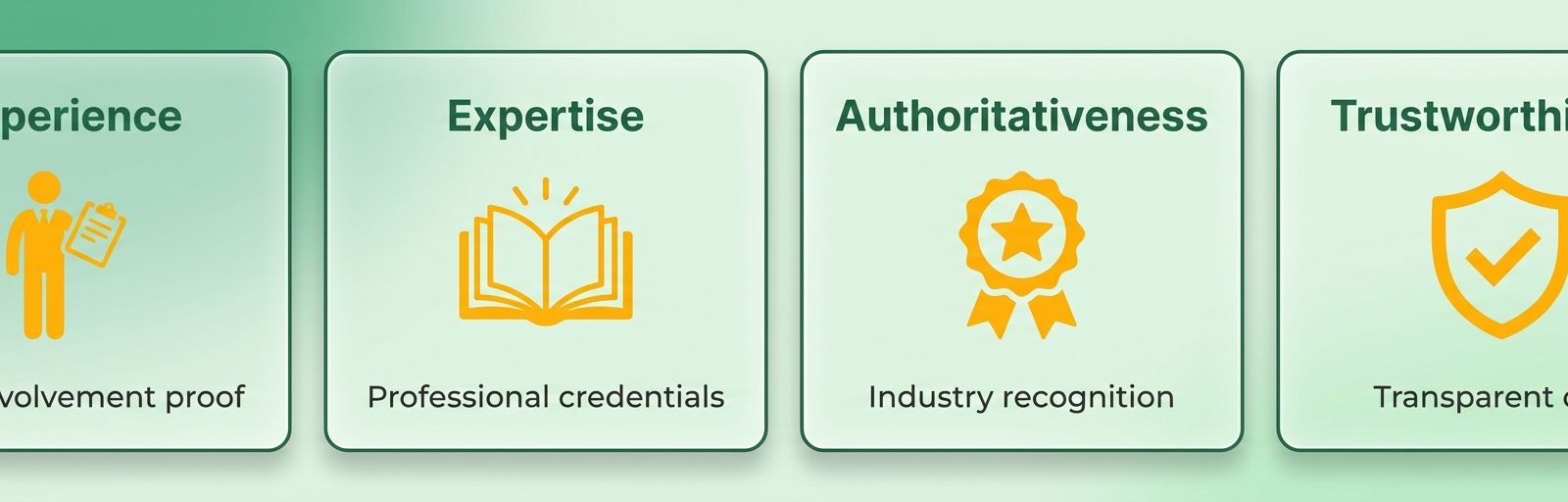
Search engines reward content that proves real expertise and earns reader trust. Google calls this E-E-A-T: experience, expertise, authoritativeness, and trustworthiness. For nonprofits, strong E-E-A-T means your pages signal that real people with real knowledge stand behind your mission.
This matters more than most teams realize. Establishing authority online directly influences how comfortable visitors feel when entering their credit card details on your site. Credibility is what turns a visitor into a supporter.
What Are the E-E-A-T Factors Nonprofits Should Focus On?
E-E-A-T breaks into four signals search engines use to judge your content. Each one tells Google your pages deserve to rank, and each one reassures the human reading them.
Experience: Show firsthand involvement. Your work in the field gives you stories no competitor can copy.
Expertise: Demonstrate subject knowledge. Cite your program data, name your staff, explain your methods.
Authoritativeness: Earn recognition from trusted sites. Backlinks and mentions from respected organizations build this over time.
Trustworthiness: Be transparent. Clear contact details, financials, and impact reporting tell readers you're legitimate.
For a nonprofit, these aren't abstract. A clinic publishing what it learned treating patients shows experience. A staff bio listing a director's credentials shows expertise. Both lift the page in search and in the reader's mind.
Why Does High-Quality Content Build Credibility?
Quality content earns trust because it answers real questions clearly and shows you know your field. Thin, generic pages do the opposite. They signal a site that copied its way to publication.
Storytelling is your strongest tool here. Sharing real stories about the people and communities you serve strengthens your marketing and makes your cause feel concrete. A donor who reads about an actual outcome believes in your work more than one who reads a mission statement.
You don't need new content for every page. Repurpose what you already have. Turn an annual report into a blog post, a webinar into a transcript, a case write-up into an FAQ. This stretches a small team's output without sacrificing depth.
A food bank that publishes a detailed page on how it sources and distributes meals, with named volunteers and yearly totals, reads as credible because it shows experience and transparency at once. A vague "we feed the hungry" page can't compete.
How Do You Check Your Content's E-E-A-T?
Audit your pages against the four signals and fix the gaps. Start by reading each key page as a skeptical first-time visitor. Does it name real people? Does it cite real numbers? Does it link to anything trustworthy?
Analytics tools show you which pages hold attention and which lose readers fast. High bounce rates and short time-on-page often flag thin content that needs depth or clarity.
Trust signals deserve a manual check too. Add author names to articles. Publish a clear about page. List your contact information and registration details. To align these trust signals with search engine expectations, consult the Nonprofit SEO 101 guide for a step-by-step compliance checklist.
Using Google Ad Grants to Complement SEO
The grant program offers registered nonprofits free search advertising, placing your mission at the top of Google results for keywords you choose. Paired with your organic SEO work, it doubles your shot at showing up when supporters search.
Think of it this way. SEO earns you rankings over months. Paid search buys you visibility today while those rankings build. Run both and you cover the searches you haven't yet earned organically.
How Do Ad Grants Complement Your SEO?
Paid ads and SEO work the same search terms from two angles. Your keyword research already tells you what supporters type. Feed those exact terms into your grant campaigns and you own both the paid and organic slots for high-value searches.
This matters most for competitive keywords where ranking organically takes time. A new nonprofit might wait months to crack page one for "youth mentoring programs." A grant campaign puts you there now.
The opportunity is wide open. Nonprofits that pair paid and organic search see roughly double the qualified traffic of those relying on one channel alone, yet few coordinate the two deliberately.
Use your paid campaigns as a testing ground, too. The keywords that convert clicks into donations or signups are the same ones worth targeting in your content. Let the ads tell you which terms deserve a dedicated landing page.
Why Optimize Grant Campaigns for ROI?
The grant has strings attached. Google requires accounts to maintain a 5% click-through rate or risk suspension. Loose, broad campaigns get paused fast.
Tight targeting keeps you compliant and useful. Build campaigns around specific donor or volunteer intents instead of vague brand terms. A search for "how to volunteer locally" signals real intent. A search for your org name alone wastes the budget on people who already found you.
Send every ad to a relevant landing page, not your homepage. If someone clicks an ad about disaster relief, drop them on a disaster relief page with a clear next step. Matching the ad to the page lifts both your conversion rate and your quality scores.
Track which campaigns drive donations, email signups, and volunteer forms. The grant gives you raw reach. Your job is turning that reach into supporters.
What Tools Help You Manage Campaigns?
Google's own Ads platform handles the core work: campaign setup, keyword targeting, and performance tracking. Your free analytics setup ties ad clicks to the actions that matter, so you see which keywords bring donors versus tire-kickers.
Pull your keyword research, content plan, and grant campaigns into one shared view. When all three point at the same supporter questions, your paid and organic efforts reinforce each other instead of competing.
Start small. Pick five or six high-intent keywords, write tight ad copy, and build matching landing pages to test the waters.
Improving User Experience to Increase Donations
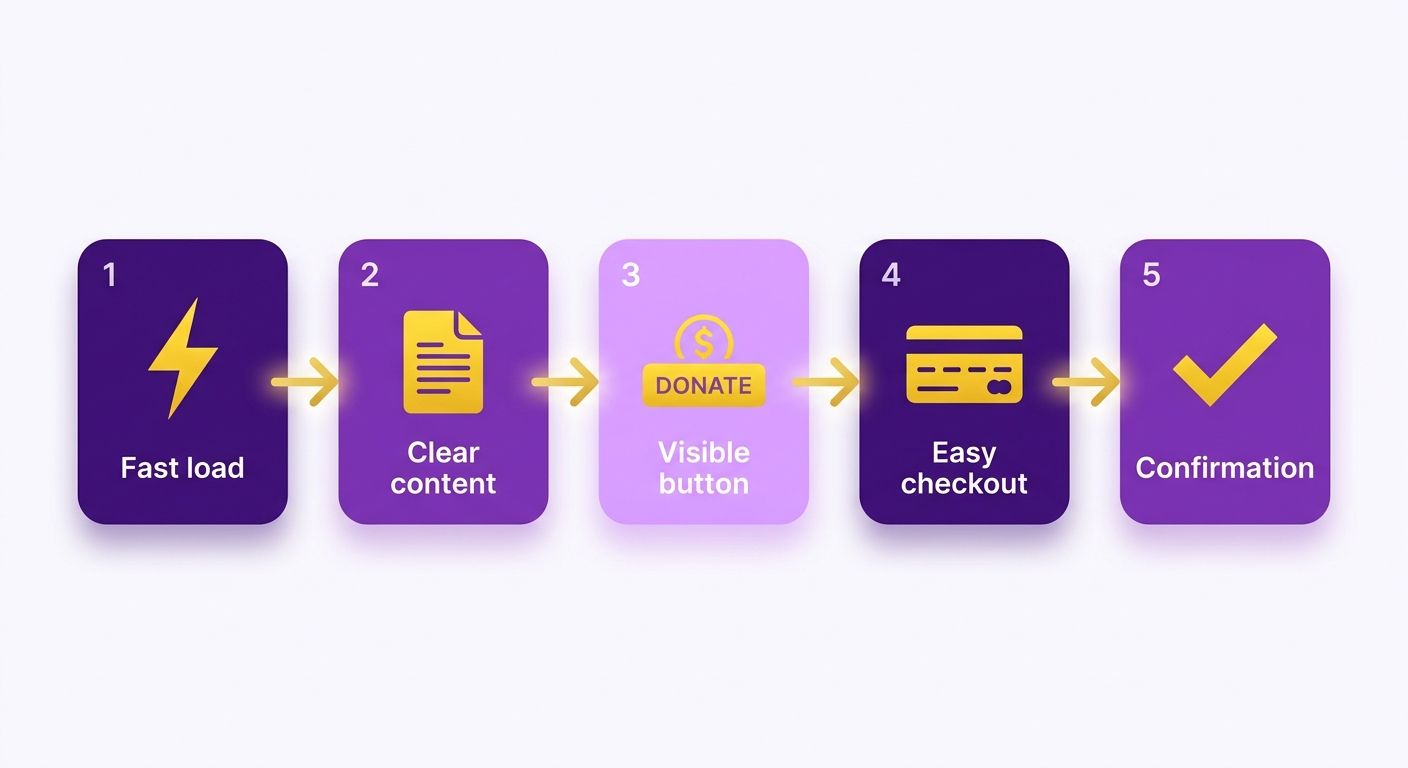
A great-looking site means nothing if visitors can't figure out how to give. User experience decides whether the traffic your SEO earns turns into actual donations. When your pages load fast, read clearly, and guide people toward a donate button, more of those visitors follow through.
This is the last mile of nonprofit SEO. You did the work to get found. Now your site has to make giving effortless.
Why Does Website Design and User Flow Matter for Donations?
Website design and user flow control how easily a supporter moves from landing on your page to completing a gift. A confusing layout or a buried donate button costs you donors who already wanted to help. Clear navigation and a simple path to giving keep them moving forward.
User flow is the route a visitor takes through your site. Map it from a supporter's first click to the thank-you page. Every extra step, every distraction, every form field you don't need is a chance for someone to leave.
The American Red Cross redesigned its donation flow to reduce steps and clarify messaging. It saw a measurable increase in completed gifts. Better content paired with a clear path to action turns visitors into donors.
Keep your donate button visible on every page. Cut form fields to the essentials. Write headlines that tell people exactly what their gift accomplishes.
How Important Are Mobile-Friendliness and Page Speed?
Mobile-friendliness and page speed are non-negotiable for nonprofit sites. A large share of your supporters arrive on phones, and a slow or clunky mobile experience sends them away before they ever see your appeal. Fast, responsive pages keep them engaged.
Page speed matters for two reasons. Search engines factor it into rankings, so a slow site hurts the visibility you worked to build. And visitors abandon pages that stall. Compress your images, trim unused code, and test your load times regularly.
Make sure your donation form works smoothly on a small screen. Buttons should be easy to tap. Text should be readable without zooming. If giving on a phone feels like a chore, you lose mobile donors.
What Tools Help You Analyze User Experience?
Free and low-cost analytics tools show where visitors click, where they drop off, and which pages stall before the donate button. That data points you straight to the friction.
Watch your conversion path closely. If lots of people reach your donation page but few finish, the form is the problem. If they leave the homepage fast, your messaging or load speed needs work.
A seamless donation flow ensures that the hard-won traffic from search engines actually translates into funding. Pairing search visibility with an intuitive layout maximizes your digital fundraising potential. If you need to audit your current site layout, review the design best practices outlined in Candid's resource on making it easy for supporters to find you online.
Run small tests. Change one thing, measure the result, keep what works. Steady improvement beats a single big redesign.
Budget-Friendly Keyword Research for Donor Intent
Keyword research tells you the exact words supporters type when they look for a cause like yours. Get those words right and your pages show up for searches that actually lead to donations. The good news for a small team: the best tools for this work cost nothing or come with a free tier.
You don't need a paid subscription to start. You need a method and a couple of free accounts.
What Free Tools Can Nonprofits Use for Keyword Research?
Google Keyword Planner is a free tool built for keyword research, and it's the first place to start. It shows you how many people search a term each month and how competitive that term is. Sign up with a Google account, type in a phrase tied to your mission, and get a list of related searches with real volume data.
A second option gives you keyword research tools with a free version alongside its paid plans. The free tier lets you check a handful of terms a day, see related keywords, and get a feel for search difficulty before you commit a dollar.
Use both together. One confirms search volume; the other surfaces variations you hadn't thought of. That cross-check keeps you from guessing.
Why Do Long-Tail Keywords Matter for Nonprofits?
Long-tail keywords are longer, specific phrases with lower search volume but clearer intent. Instead of chasing a broad term like "charity," you target something like "weekend food bank volunteer near me." Fewer people search it, but the ones who do are closer to acting.
This matters because long-tail terms are easier to rank for. Broad keywords pit you against large, established organizations with deep budgets. Specific phrases face far less competition, so a small site can claim the top spot.
They also match donor intent better. Someone searching a precise phrase usually knows what they want. When your page answers that exact question, you catch a supporter at the moment they're ready to give, sign up, or show up.
How Do You Find Competitor Keywords on a Budget?
Competitor keyword analysis shows you which terms similar organizations already rank for, so you can target the same supporters. Free and freemium tools let you enter another nonprofit's web address and see the searches sending traffic their way.
Start with organizations doing work like yours. Plug their site into a keyword tool and scan the terms they rank for. Look for phrases tied to giving, volunteering, or your specific programs. Those are gaps you can fill.
Pair this with the search data you already pulled. If a term shows decent volume and a peer ranks for it without much authority, that's your opening.
Keyword research is the foundation of effective nonprofit SEO. It tells you what your supporters care about in their own words, then points your content at the searches most likely to bring donations. Once you have your list, you can learn how to map these terms to your site structure by reading the Nonprofit SEO 101 guide.
Start small. Pick five long-tail phrases this week, write one strong page for each, and watch which ones bring supporters in.
Cost-Effective On-Page SEO Tactics for Nonprofits
On-page SEO is the work you do directly on your pages to help them rank. It covers the words you target, the tags search engines read, and how fast your site loads. Most of it costs nothing but your time, which makes it the best place for a small team to start.
You already chose your keywords. Now you put them where search engines and supporters will see them.
How Do You Optimize Title Tags, Meta Descriptions, and Headers?
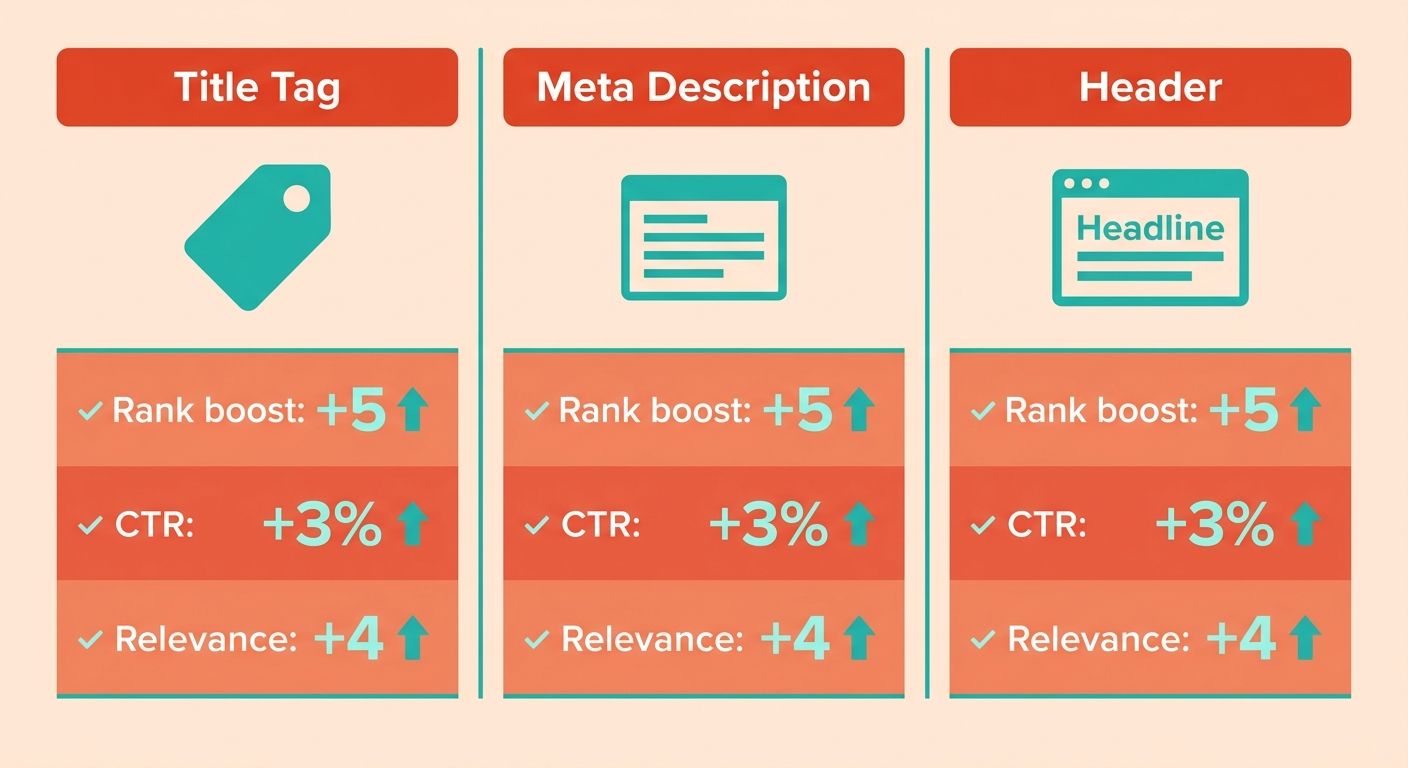
Place your donor-intent keyword in three spots on every page: the title tag, the meta description, and your header tags. These are the elements search engines read first to understand what your page is about. Getting them right tells Google when to show your page and tells supporters why to click.
Title tag: The clickable headline in search results. Lead with your main keyword and keep it under roughly 60 characters so it doesn't get cut off.
Meta description: The short summary under the title. Write it like an invitation. Name what you do and who you help, and work your keyword in naturally.
Header tags: The H1, H2, and H3 labels that structure your page. Use one H1 for the main topic, then break the rest into clear sections. This helps readers scan and helps search engines map your content.
Write all of these for people first. A page stuffed with keywords reads badly and drives visitors away before they reach your donate button.
Why Do Mobile-Friendliness and Page Speed Matter?
A slow or clunky mobile site loses supporters before your content ever loads. Many people who search for a cause do it from a phone. If your pages don't fit their screen or take too long to appear, they leave and find another organization.
Page speed affects both rankings and giving. Search engines favor fast sites, and visitors abandon slow ones. Compress your images, cut unused plugins, and test your site on an actual phone to see what donors see.
Mobile-friendliness means your text reads cleanly, buttons are easy to tap, and nothing forces a visitor to pinch and zoom. This is the same last-mile thinking that turns traffic into donations. The faster and cleaner the path, the more gifts you collect.
What Does Good On-Page Work Earn a Nonprofit?
Executing these on-page adjustments directly impacts your bottom line by removing barriers to entry. A local animal shelter optimized its adoption pages around "rescue dogs for adoption" and improved its mobile load times. Application page visits rose by over 40% within two months, without spending a dime on ads.
Start with your highest-traffic pages. Fix the title, the description, and the headers on each, then check load speed. For a comprehensive checklist of on-page elements to audit, refer to the Nonprofit SEO 101 guide.
Tracking SEO Performance with Free Analytics Tools
You can't improve what you don't measure. Free analytics tools show you exactly how your SEO work pays off, so you know which pages bring donors and which ones need help. The good news for a small team: the tools that matter most cost nothing.
You already published the pages and earned the rankings. Now you watch the numbers to see what's working.
What Free Tools Track Nonprofit SEO Performance?
Google Analytics is a free tool that tracks your website traffic and how visitors behave once they land. It tells you where people come from, which pages they read, and whether they finish a donation. Pair it with Google Search Console, also free, and you see the exact search terms bringing people to your site.
Set up Google Analytics first. Add the tracking code to your site, then watch the reports build over the next few weeks. You get a clear picture of how many people find you through search versus social media, email, or direct visits.
Search Console fills the gap Analytics leaves. It shows which queries your pages rank for, your average position, and how often searchers click. When a page ranks on page two, Search Console flags it so you know where a small tweak could push you higher.
Which Metrics Actually Matter for Donations?
Focus on two numbers above the rest: organic traffic and conversion rate. Organic traffic tells you how many visitors arrive from search. Conversion rate tells you how many of them take the action you want, like giving or signing up.
Organic traffic: The count of visitors who land on your site from unpaid search results. A steady climb here means your SEO work is earning more visibility for your mission.
Conversion rate: The share of visitors who complete a goal, such as a donation or email signup. High traffic with a low conversion rate points to a problem on the page, not in your rankings.
Watch these together. Ten thousand visitors mean little if none of them donate. A smaller, well-targeted audience that gives often beats a flood of casual browsers.
How Do You Turn Data Into Better Rankings?
Use your analytics to find your best and worst pages, then act on both. Double down on the content that already converts, and fix or rewrite the pages that draw traffic but lose visitors before they give.
A youth mentoring program notices its mentor application page gets strong organic traffic but almost no completed forms. Search Console confirms the page ranks well, so the problem isn't visibility. The team simplifies the background check explanation, and completed applications climb the next month. This cycle of measuring, diagnosing, and fixing is how you turn data into real-world impact.
Check your metrics monthly, not daily. SEO moves slowly, and obsessing over daily swings wastes time you could spend writing content or earning links. A monthly review shows real trends without the noise.
Because most charitable organizations never track this data, establishing a basic reporting routine gives you a massive competitive edge. To ensure your analytics are tracking the right search metrics from day one, review the setup steps in the Nonprofit SEO 101 guide.
Frequently Asked Questions
What is nonprofit SEO? Nonprofit SEO is the practice of optimizing your organization's website to rank higher in search engine results for terms your supporters use. It includes keyword research, on-page optimization, link building, and technical improvements that help search engines find and trust your content.
Is SEO worth it for small nonprofits? Yes, especially for small nonprofits. Only 37% of nonprofits run any SEO strategy, so even basic optimization gives you a significant edge. Most of the work costs time, not money, and the results compound over months and years.
How long does it take to see results from nonprofit SEO? Expect 3-6 months before you see meaningful movement in rankings and traffic. SEO is a long game. The content you publish today keeps working long after you hit publish, unlike paid ads that stop the moment your budget runs out.
What is the most important SEO factor for nonprofits? Content quality paired with relevance. Search engines reward pages that answer real questions clearly and thoroughly. If your page matches what a supporter is searching for and provides genuine value, you'll rank well even without a massive link profile.
Can nonprofits use Google Ad Grants for SEO? Google Ad Grants provide free search advertising, not direct SEO benefits. But they complement SEO by giving you visibility on competitive terms while your organic rankings build. Use the same keyword research for both channels.
How do I find keywords for my nonprofit? Start with Google Keyword Planner, a free tool that shows search volume and competition. Focus on long-tail keywords like "weekend food bank volunteer near me" rather than broad terms like "charity." These specific phrases have clearer intent and less competition.
What are backlinks and why do they matter? Backlinks are links from other websites to yours. Search engines treat them as votes of confidence. A handful of links from respected, relevant sites carries more weight than hundreds from low-quality directories.
How can I earn backlinks without a budget? Guest blogging and resource page listings are the most effective free tactics. Write articles for partner organizations in exchange for a link back to your site. Get listed on curated resource pages that nonprofits, libraries, and universities maintain.
What is E-E-A-T and why should nonprofits care? E-E-A-T stands for experience, expertise, authoritativeness, and trustworthiness. These are signals Google uses to judge content quality. For nonprofits, strong E-E-A-T means your pages show firsthand experience, subject knowledge, recognition from trusted sites, and transparency about who you are.
How do I track if my SEO efforts are working? Set up Google Analytics and Google Search Console, both free. Track organic traffic and conversion rate. Check your metrics monthly, not daily. SEO moves slowly, and a monthly review shows real trends without the noise of daily fluctuations.
References
[1] Candid. "Nonprofit SEO 101: Help Supporters Find You Online" - https://candid.org/blogs/nonprofit-seo-101-help-supporters-find-you-online/
Frequently Asked Questions
1. How long does it take for nonprofit SEO efforts to start showing results in search rankings?
Nonprofit SEO typically takes 3-6 months before meaningful ranking improvements appear. Search engines need time to crawl, index, and evaluate your optimized pages. The content you publish today compounds over time, with older pages continuing to attract visitors years after publication.
2. What happens if a nonprofit loses its Google Ad Grants eligibility due to low click-through rates?
Google suspends accounts that fail to meet its strict policy guidelines, such as maintaining active conversion tracking or avoiding prohibited single-word keywords. Nonprofits can easily reapply after addressing these compliance issues. Pausing low-performing keywords, refining ad copy, and ensuring your account has at least two active ad groups per campaign will typically restore your grant status within a few weeks.
3. Can a nonprofit with multiple locations or chapters use the same SEO strategy for each branch?
Each location needs its own optimized page with unique local keywords, such as "youth shelter Austin Texas" versus "youth shelter Dallas." Duplicate content across chapter pages confuses search engines and dilutes rankings. Use distinct photos, local testimonials, and specific program details for each branch page.
4. Is it worth optimizing older blog posts and pages, or should nonprofits focus only on new content?
Updating existing pages often delivers faster ranking gains than creating new ones. Refreshing old statistics, adding internal links, and improving headlines signals relevance to search engines. A single updated page can recover lost traffic within weeks without requiring new writing time.
5. How do nonprofits measure the direct donation impact of their SEO work, not just traffic increases?
Set up conversion tracking in free analytics tools to tag donation form completions, volunteer signups, and email subscriptions. Compare conversion rates from organic search traffic against other channels. A page earning 500 monthly visitors with a 5% donation rate generates 25 gifts without any ad spend.
6. What common SEO mistakes do nonprofits make that actually hurt their rankings?
Using duplicate content across program pages, neglecting mobile page speed, and stuffing keywords into generic descriptions are frequent errors. Thin pages with under 300 words also struggle to rank. Search engines penalize sites that prioritize shortcuts over answering supporter questions clearly.
7. Should nonprofits create separate websites for fundraising campaigns or keep everything on one domain?
Keep all content on a single domain to consolidate authority and backlinks. Separate campaign sites start with zero trust from search engines and require building new rankings from scratch. Subdirectories like yourdomain.org/campaign-name preserve existing SEO value while organizing content clearly.
