One AI Draft, Five Channels: X, Newsletter, YouTube, Blog, Repeat

Key Takeaways
- Most teams don't have a content problem. They have a consistency problem, because a separate draft per channel lets brand voice drift.
- Starting every channel from one upstream draft builds voice consistency into the workflow instead of patching it on later.
- Single-source AI tools beat piecemeal ones because every channel inherits the same persona, tone, and core message.
- AnyPost's Persona Engine crawls your whole site to build a Business Context Graph of products, messaging, and audience.
- From that one grounded read, AnyPost adapts a single article into carousels and posts for LinkedIn, X, Instagram, TikTok, and YouTube.
- When each channel starts from its own input, drift is baked in from the first word.
- An AI editor rewriting a tweet on its own can just as easily pull it off-voice as improve it.
Why one draft beats five separate ones
Most marketing teams don't have a content problem. They have a consistency problem. Generate a fresh draft for X, another for the newsletter, a third for a YouTube script, a fourth for the blog, and your brand voice drifts a little more with each pass. By the fifth channel, your audience is hearing four slightly different companies.
The fix is architectural. Start every channel from one upstream draft, then adapt it per format. That's the whole reason single-source content tools beat piecemeal workflows: voice consistency lives in the structure, not in a cleanup pass at the end.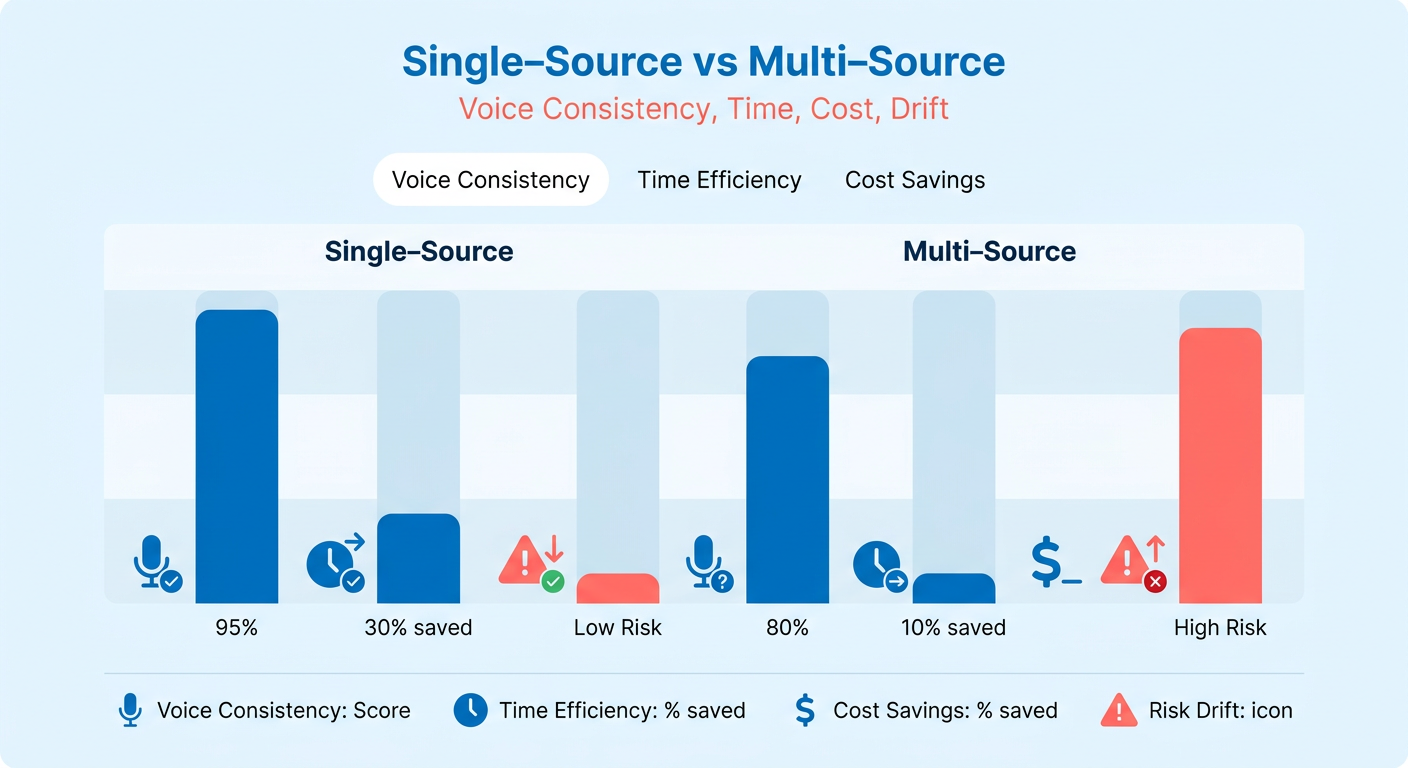
Why one draft protects your voice
Every channel inherits the same source persona, tone, and message. Formats change. The underlying voice doesn't. That single-source design is the consistency mechanism, not a happy side effect.
This is what AnyPost's Persona Engine is built to do. We crawl your entire site to build a Business Context Graph of your products, messaging, and audience, capturing how you actually sound so every piece reads like you wrote it. From that single read, AnyPost turns one article into carousels and posts across LinkedIn, X, Instagram, TikTok, and YouTube.
The alternative bakes in drift. When each channel starts from its own separate input, you're off-voice from the first word. An AI editor rewriting a tweet in isolation can drag it off-brand just as easily as it can make it pop.
The single-draft model fans one source out to every format. Our take: it's the only approach that enforces voice by construction. Everything downstream is a variation on a fixed core, so your newsletter and your X post sound like the same brand.
How much manual work this actually saves
AnyPost automates the repetitive part: turning one piece into many. Instead of rewriting the same message for each channel, you generate and publish SEO-ready content and let the tool spin it into blog posts, newsletters, and social copy.
The saved time compounds. AnyPost runs an entire SEO agency workflow inside one dashboard, from context extraction and taxonomy generation to SERP competitor analysis and multi-channel production, at a tenth of what agencies charge.
But the point isn't just speed. It's that consistent, high-frequency output across your owned channels stops requiring a separate bench of writers, SEO specialists, and social managers.
Full auto, or a human in the loop?
Keep a human in the loop, and put them at the brand-voice checkpoint. Fully autonomous publishing is the payoff, but a review gate before you go end-to-end is a sensible guardrail while the setup is new.
Both goals fit together. The review gate shouldn't only check facts. It should validate voice before anything auto-publishes.
The same editing power that sharpens a line can quietly push a YouTube description or a tweet off-brand. Your reviewer's job at that gate is one question: does this still sound like us? Because AnyPost publishes straight to your existing platforms and social channels, you approve on voice, then let automation handle distribution.
Skip full auto-publish while your voice model is still young. Once the review gate catches almost nothing off-voice for a few weeks running, that's your signal to go hands-off.
From draft to newsletter: turning long-form into email
Turning a 2,000-word draft into a newsletter isn't rewriting. It's extraction plus adaptation. You pull the structural pieces out of the source, reshape them for the inbox, and keep the same voice the draft was built on. That last part is the whole game.
Most teams miss the risk here: treat email as an isolated channel and you end up writing a separate summary that loses the nuance of your original argument. Anchor the newsletter directly to the master draft and the core insights and specific terminology carry over.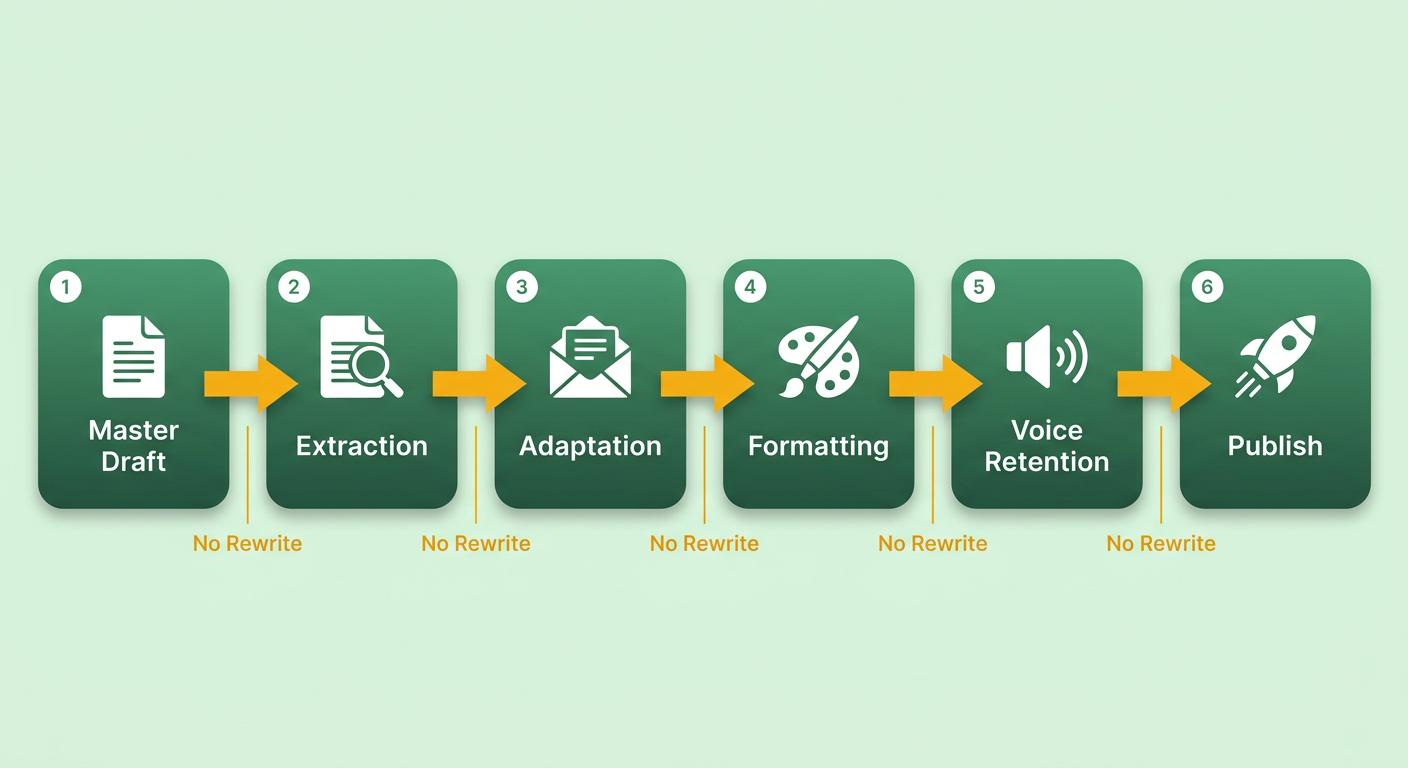
How to chunk a draft into a newsletter
Break the source into four reusable blocks, then map each one to a newsletter slot. Keeps the email tight without inventing new copy that could wander off-tone.
- Headline: pull the draft's strongest promise, compress it into a subject line.
- Hook: lift the opening tension or question. This becomes your first two lines, the part that decides opens.
- Value-prop bullets: convert the key sections into 3-4 scannable bullets.
- CTA: extract the single action the draft points toward and make it the one button.
Multi-step automation can cut this manual work substantially once it's built. Setup runs a few hours; after that the workflow runs on a timer. You're not rebuilding the newsletter each week, you're feeding a new draft into an existing pipeline.
Where the review gate lives for email
For newsletters, the review step is less rewriting, more final polish. Check that the layout holds up on mobile and that your CTA links are live. Instead of hours editing copy, a two-minute scan confirms the automated extraction caught your primary message before you schedule the send.
Subject lines and send times
Generate two or three subject line variants from the same headline block, then A/B test them on a small slice of your list before the full send. The winner ships to everyone else. Personalization tags like first name and industry, pulled from your CRM, let you tailor the same body copy per segment without writing new versions.
Skip heavy A/B testing if your list is under a few hundred people. The sample is too small to trust, and you'll chase noise instead of signal.
Email performance improves when your messaging lines up with your broader content strategy. If you're auditing your setup, our 4 checks your AI content tool must pass covers how to judge your workflow's output quality.
X (Twitter): threads, carousels, and real-time engagement
Repurposing a master draft for X means condensing complex arguments into short, high-impact statements. The platform rewards brevity, so a pre-approved source text keeps you from losing the substance of your argument when you squeeze it into character limits.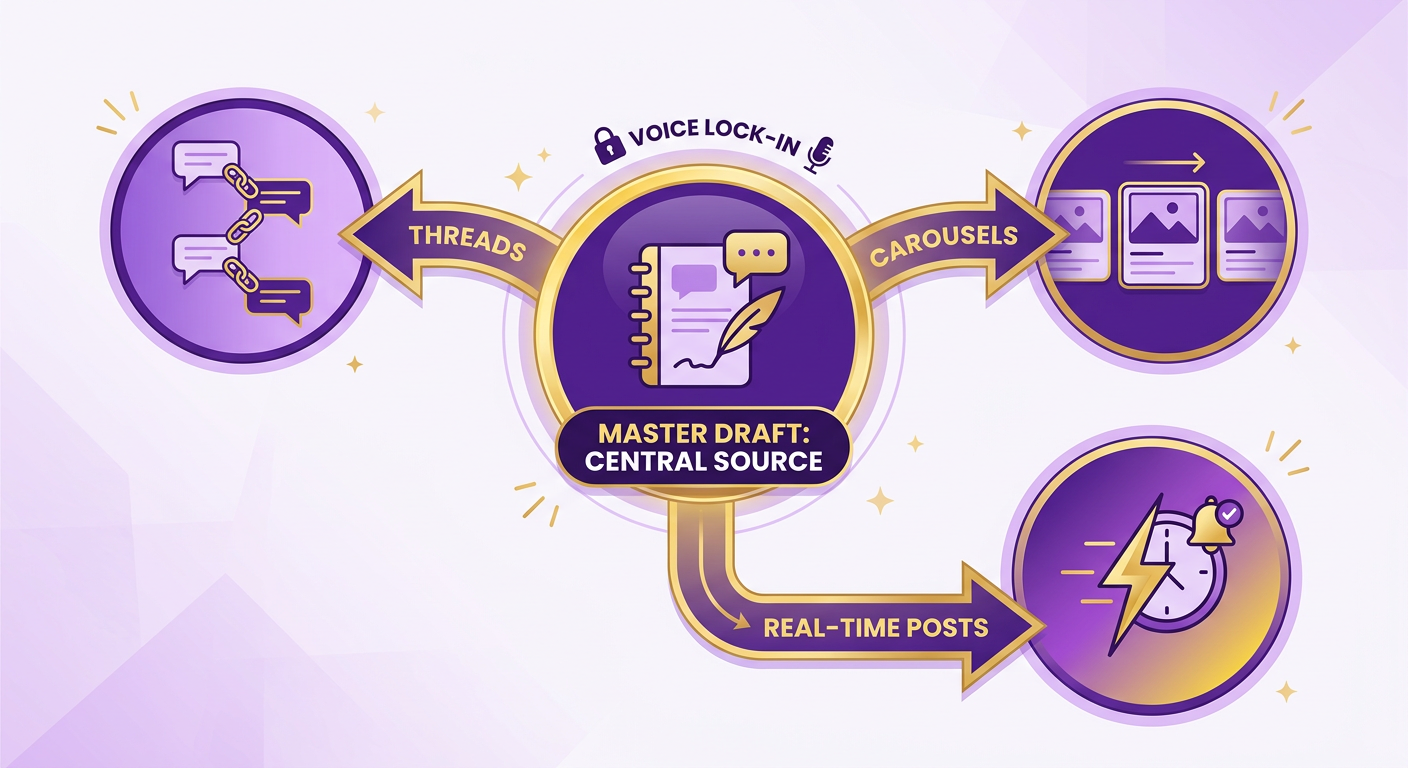
An efficient social workflow is structural adaptation, not conceptual reinvention. Map your core arguments to social templates and you can generate engaging threads in seconds, holding a steady cadence without starting from scratch.
The thread formula that actually converts
Use a four-part structure: hook → problem → solution → CTA, one idea per tweet, each under 280 characters. The hook stops the scroll. The problem builds tension. The solution delivers the payoff from your master draft. The CTA points somewhere useful.
Pull each beat straight from the source argument. The hook maps to the draft's opening claim. Problem and solution map to the body. The CTA echoes the draft's core message.
Structured this way, each tweet acts as a stepping stone, holding the logical flow of your original article while fitting the platform's fast-scroll reading style.
Where carousels fit in
Carousel slides turn a thread's key beats into visual snippets. AnyPost turns your content into carousels automatically, so each slide carries one point from the draft, matched to the copy so the visual and text reinforce the same message.
Keep the slide text short and voice-consistent. The generation handles the visual layout, but it works from the master draft, not a separate creative brief. That keeps the visuals in the same tonal family as your written channels.
Automate replies and scheduling?
Automate the mechanics of delivery, not the actual interactions. Scheduling tools can handle the timing of your threads for visibility, but real-time engagement, like replying to comments and joining discussions, needs genuine human input to build community.
Staggering posts through the day reaches different segments of your audience without flooding their feeds. Scheduling in advance keeps a consistent presence while freeing up time to actually engage in the replies.
Over time, this builds a coherent footprint. Your social channels become reliable entry points that guide people back to your long-form content, creating a self-sustaining traffic loop.
YouTube script and video from a single draft
Turning a written draft into a YouTube script means shifting from a reading-optimized structure to a speaking-optimized one. Spoken language leans on shorter sentences, active verbs, and natural pauses to hold attention.
Ground the video script in the same research as your written articles and the on-camera version delivers the same depth. That keeps the video from becoming a shallow summary and keeps your authority on the topic intact.
How to format the script for retention
Structure the spoken script in three blocks pulled straight from the draft: an intro hook in the first 10 seconds, a value ladder that delivers your points in ascending order, and a CTA at the close. Add timestamps so YouTube can auto-generate chapters. Chapters help discovery and let viewers jump to the part they came for.
The hook does the heavy lifting. Pull it from the same opening line your newsletter used, then tighten it for speech. Spoken sentences run shorter than written ones. The value ladder mirrors your draft's body sections, one point per beat, so a viewer who watched the intro has a reason to stay for each step.
A structured script cuts the rambling that loses viewers in the first minute. Some analytics providers report that videos with tighter pacing and clear structure tend to hold viewers longer than loosely scripted ones, though results vary by topic and audience.
What handles the avatar and SEO
Once the script is set, AnyPost's avatar cloning and generation creates an on-brand presenter, so the same persona that writes your copy also delivers it on screen. You can clone an existing avatar or generate a new one for branded content. Then the SEO layer generates the title, description, tags, and chapter markers from the draft's own keyword map, so the video ranks against the same terms your blog targets.
The payoff compounds across every video. YouTube's recommendation system tends to favor channels that publish consistently, so an automated pipeline can help hold a steady cadence without a human touching the render queue.
Where the human stays
Before rendering the final video, a human should review the generated script's pronunciation and pacing. Confirm the avatar's delivery sounds natural and that technical terms come out right, because mispronounced jargon reads as amateur fast.
Once the spoken delivery checks out, the video generation and SEO optimization can run. This keeps a high-frequency video schedule without the bottleneck of traditional production.
SEO blog publishing: from draft to rank-ready post
Turning your master draft into a published post means optimizing for search while keeping it readable. The work here is structuring the text so crawlers can index your main points and read the page's hierarchy.
Blog posts carry a lot of technical elements, from meta descriptions to header tags, and managing them by hand becomes a bottleneck fast. Automating those elements keeps your technical SEO clean without hours of manual entry.
How on-page SEO gets generated from the draft
The blog step pulls SEO elements straight from your source draft instead of a separate prompt. AnyPost bakes in keyword-optimized content, search-intent-aligned headings, and semantically correct HTML, so the post ships rank-ready. Each major topic sits inside semantic <section /> tags, and <h2 /> headings work in target keywords and their variations, built from the draft itself.
That last detail matters for voice. When your headings and copy come from the same draft your audience already reads, the search result sounds like you. Pull them from a fresh generation and you get a page that reads like a different company wrote it.
Internal linking runs off the same source. The engine reads your draft's topic, then suggests the pillar page and related posts it should connect to, alongside relevant internal and external links. You approve the links; the structure stays consistent with the rest of your site.
Where the review gate sits for blogs
For blog posts, the review step is about verifying the suggested internal links and checking the formatting against your style guide. A quick pass confirms the automated linking fits your current content architecture before the post goes live.
A brief preview also lets you check how embedded media, images or video, renders in the layout. With direct integrations into platforms like WordPress, the approved draft publishes with a single click.
What results to expect
Expect faster indexing and steadier organic growth when the SEO structure is built from a consistent draft. AnyPost shows you what changed straight out of Google Search Console, so the growth you see is measured, not guessed.
With a structured, repeatable publishing process, your site builds topical authority more efficiently, which is what turns into sustainable traffic over time.
The repeat loop: distribution, analytics, and refining the next draft
The loop closes when your published content feeds data back into the next draft. You schedule the fan-out, watch how each channel performs, then use those numbers to sharpen the source persona your next master draft is built on. That feedback path is what separates a loop from a one-way publishing pipe. It's where voice consistency gets validated, not just assumed.
The move most teams skip: the scheduler and the analytics dashboard aren't separate steps. They're two ends of the same wire.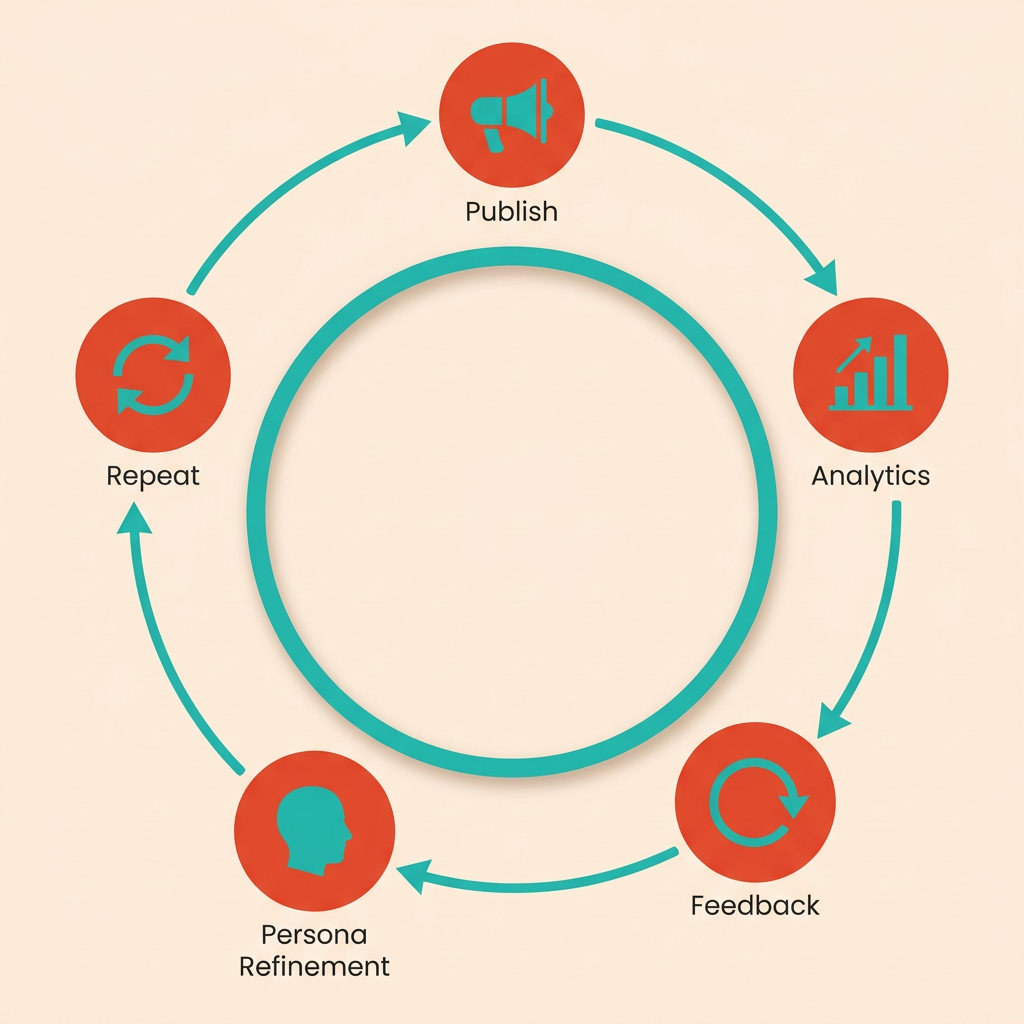
How the scheduler pushes one draft everywhere
A unified scheduler takes your approved master draft and its per-format adaptations, then pushes each to its home: X, your email service, YouTube, and your CMS, all on one calendar. Stagger the send times per platform instead of firing everything at once, so a morning newsletter and an afternoon thread each land in their own window.
Running distribution from a single dashboard cuts the risk of scheduling conflicts and keeps a multi-channel campaign launching in coordinated fashion.
What the dashboard should actually track
Track traffic, engagement, and lead metrics per channel, not in aggregate. Aggregate numbers hide the drift you care about. Per-channel views tell you which format is holding your voice and converting, and which one is quietly underperforming.
Wire every published link with UTM parameters. That's how you attribute a lead back to the exact newsletter section or thread it came from. Without UTMs, your feedback engine is guessing.
Watch which platforms generate the highest-quality leads, then adjust distribution accordingly.
How performance data feeds the next draft
Use performance data to refine your content angles. If specific topics or formats pull higher engagement, prioritize those themes in the upcoming calendar so production lines up with what your audience actually reads.
For evergreen pieces, run quarterly refresh cycles. The AI updates stats and internal links on a timer, but the refreshed draft still passes the same voice checkpoint before republishing.
ROI tracking, simply: watch two numbers over the loop's lifetime. Falling customer acquisition cost and rising lifetime value attributable to the automated workflow tell you the loop is compounding. Instead of piecing together a report from scattered tools, common enough at agencies, the dashboard already holds the per-channel data, showing what changed rather than just what was done. The time you claw back goes into sharpening the next draft, which is where the loop starts paying you back instead of just saving effort.
Frequently Asked Questions
1. Does starting from one draft make every channel sound identical and boring?
One draft protects voice, not format variety. The source persona and core message stay fixed, but each channel adapts to its own structure—threads for X, subject lines for email, spoken hooks for YouTube. You get the same recognizable brand voice expressed appropriately per platform, not five copies of identical text.
2. What happens if my brand voice changes or I rebrand mid-workflow?
You simply update your core brand guidelines and product details in your central profile. Because all downstream channels pull from this single source of truth, any updates to your messaging, positioning, or tone are automatically applied to future content generations across all platforms without manual reconfiguration.
3. Should small teams with tiny email lists bother with A/B testing subject lines?
Instead of running statistical tests on small samples, focus on qualitative feedback. Talk directly to your early subscribers to understand what resonates with them. Establishing a reliable publishing schedule and delivering consistent value will build a stronger foundation than premature optimization.
4. How do I know when it's safe to turn off the human review gate?
Transition to automation gradually. Once you find yourself approving drafts with zero modifications over several consecutive campaigns, you can confidently enable auto-publishing for that specific channel. You can always keep high-stakes channels, like your main blog, on manual approval while automating high-volume social channels.
5. Why track metrics per channel instead of looking at total performance?
Different platforms attract different audiences with distinct behaviors. Tracking metrics individually helps you understand where your content is truly driving business value—such as high-intent search traffic versus casual social engagement—allowing you to allocate your resources more effectively.
6. What's the difference between building a YouTube script from a transcript versus a master draft?
A master draft serves as the single source of truth, ensuring that your video's core arguments, data points, and terminology align perfectly with your written content. Relying on transcripts can introduce conversational tangents and informal phrasing that dilute your brand's authoritative positioning.
7. How does the feedback loop actually improve my next draft?
The feedback loop turns audience engagement into actionable insights. By analyzing which topics and formats drive the most conversions, you can adjust your content strategy to focus on high-performing themes, ensuring that each new campaign is more targeted and effective than the last.
