Orphan Pages: How to Find Them and Why They Hurt SEO

Key Takeaways
- Use site crawlers to identify orphan pages, as they are essential for diagnosing structural issues and unlinked content.
- Assess content quality and relevance to determine whether to link, redirect, or remove orphan pages based on their value and alignment with site goals.
- Link orphan pages with valuable content to boost SEO by integrating them into your site’s internal linking strategy.
- Redirect or remove low-quality orphan pages lacking traffic or backlinks to prevent SEO dilution and improve site performance.
- Check traffic and authority metrics before deciding on fixes, as pages with no backlinks or traffic should be removed or consolidated.
- Internal linking to orphan pages improves SEO and user experience by increasing visibility and guiding visitors to relevant content.
- Use bento grids or visual tools to analyze orphan pages’ metrics, helping prioritize fixes based on traffic, authority, and content quality.
Related Video
Watch: How To Fix Orphan Pages [URLs] on Your Website? by Sitechecker
Why Orphan Pages Hurt SEO
Orphan pages hurt SEO by breaking the internal linking structure that search engines rely on to find, crawl, and rank content. When a page isn’t linked to from anywhere on your site, it becomes invisible to crawlers unless it’s submitted directly through sitemaps or linked from external sources. This lack of visibility prevents search engines from indexing the page, wasting its potential to attract organic traffic. Worse, orphan pages can dilute your site’s authority by trapping link equity in isolated content that never contributes to broader SEO goals.
How Orphan Pages Disrupt Search Engine Crawling
Search engines like Google find pages by following internal links, creating a map of your site’s hierarchy. Orphan pages-those without internal links-exist outside this map. For example, consider publishing a blog post about “advanced SEO strategies” but never linking it from your homepage, category pages, or related articles. A crawler might never stumble upon it unless it’s linked externally, which is rare. This creates a visibility gap: your content exists, but search engines can’t access it.
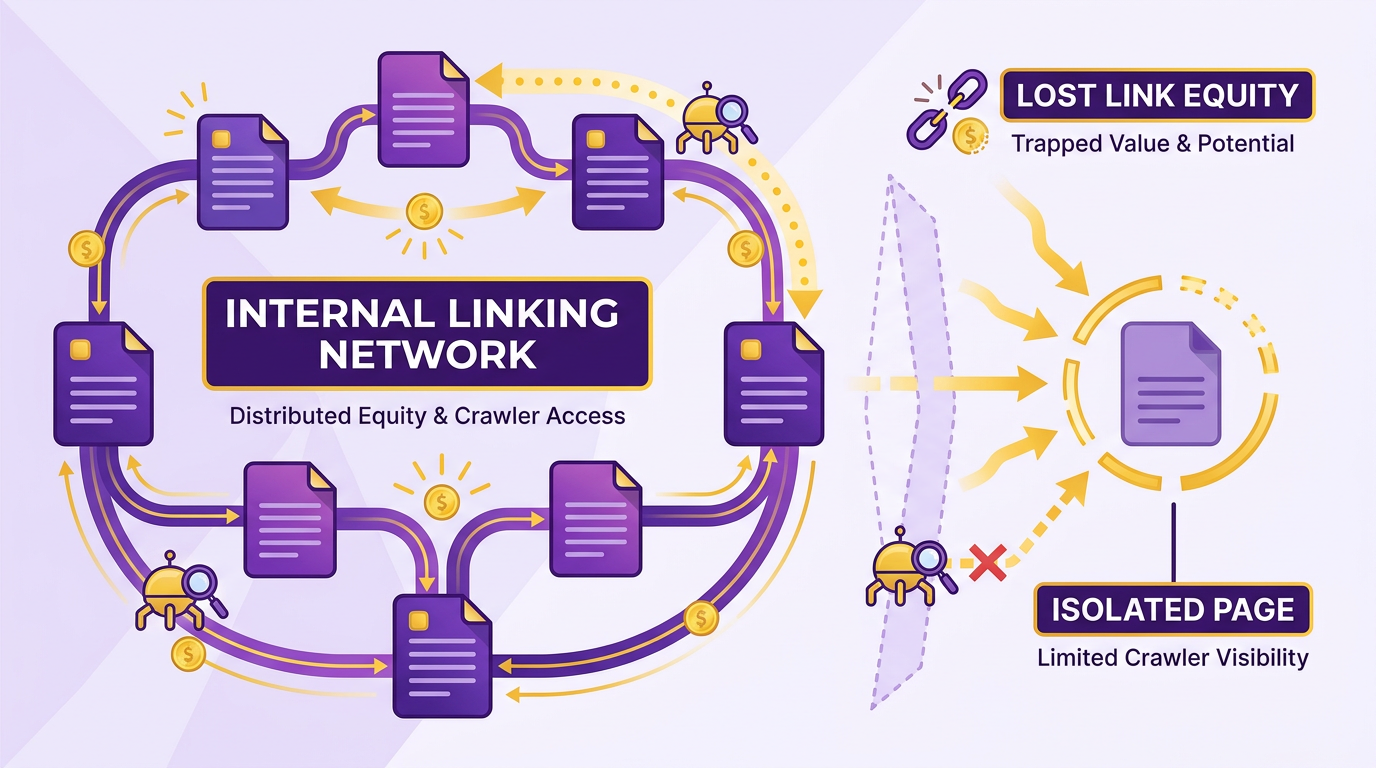
Crawl budget also suffers. Google allocates limited resources to crawl websites, prioritizing pages with strong internal linking. If crawlers get stuck on orphan pages or dead ends, they waste time on low-value content instead of indexing high-priority pages. Over time, this reduces the depth of your site’s crawl, meaning fewer pages are indexed and ranked.
The Impact on Link Equity and Internal Linking Structure
Internal links distribute link equity (the authority passed between pages) like a circulatory system. Orphan pages act as dead ends, trapping equity in content that can’t pass value to other pages. For instance, if a high-authority landing page links to an orphaned blog post, the blog gains no equity from that link-because crawlers don’t recognize it as part of the site’s structure. Conversely, the orphaned page can’t pass equity to relevant product or service pages either.
This fragmentation weakens your site’s topical authority. Search engines assess authority by analyzing how well pages connect around themes (e.g., “digital marketing tools”). Orphan pages disrupt this by isolating valuable content from related topics. A page about “SEO tools” might rank well on its own, but without links to pages about “content marketing” or “PPC strategies,” it fails to reinforce a cohesive subject area.
Real-World Consequences for SEO Performance
Consider a scenario where a company creates a comprehensive guide to “AI in marketing” but forgets to link it from its blog or resource hub. Despite being well-written and optimized, the page receives no organic traffic because it’s invisible to crawlers. Meanwhile, competitors audit their internal linking catch and fix similar issues, ensuring every piece of content contributes to their SEO strategy. As mentioned in the How to Find Orphan Pages section, tools like AnyPost.ai can identify these gaps by analyzing site structure and crawl data.
In another case, a retail site with hundreds of orphaned product pages saw a 30% drop in indexed pages after Google’s crawl budget was misallocated. Fixing internal links restored indexing and boosted rankings for key categories. Building on concepts from the Real-World Examples and Case Studies section, this example mirrors how a mid-sized outdoor gear retailer recovered traffic by resolving 23% of its orphaned URLs. While many businesses overlook orphan pages as a minor technical issue, they often become a major drag on organic growth when left unresolved.
By addressing orphan pages through regular audits and strategic internal linking, you ensure every page contributes to your site’s SEO health. As outlined in the How to Fix Orphan Pages section, this involves identifying root causes and implementing structured fixes. Tools like AnyPost.ai can automate this process, identifying gaps and suggesting fixes to strengthen your site’s architecture.
How to Find Orphan Pages
Start by downloading your website’s XML sitemap, typically found at yoursite.com/sitemap.xml. This file lists all URLs the site owner wants search engines to crawl. Compare these URLs with your site’s internal linking structure. Use a tool like Screaming Frog to crawl your site and export the list of internal links. Any URL in the sitemap that does not appear in the crawl report may be an orphan. For example, if a product page exists in the sitemap but no other pages link to it, users and crawlers can’t reach it. This method works best for websites with manually maintained sitemaps, as automated sitemaps may include outdated URLs, as mentioned in the Why Orphan Pages Hurt SEO section.
Combine crawl data from tools like Screaming Frog with traffic insights from Google Analytics to spot orphan pages. Export your site’s crawl data to identify all existing URLs, then cross-reference this list with Analytics’ "All Pages" report. Any URL in the crawl data with zero sessions over 6–12 months is likely an orphan. For instance, if a blog post appears in the crawl but has no traffic or internal links, it’s unreachable. Building on concepts from the How to Fix Orphan Pages section, you can decide whether to remove or redirect these pages.
Open Google Search Console and manage to the Index Coverage report. Filter by "Valid" URLs to see indexed pages. Manually search your site using the site:yoursite.com operator to check if these pages are linked internally. If a page is indexed but appears unlinked in your site search results, it’s an orphan. For example, a landing page might be indexed via a third-party backlink but have no internal links. Use the URL Inspection tool to confirm the page’s link structure. As highlighted in the Why Orphan Pages Hurt SEO section, indexed orphans can dilute SEO value by fragmenting link equity.
Consider a fictional e-commerce site selling outdoor gear. The XML sitemap includes /gear/ultimate-hiking-checklist, but a Screaming Frog crawl reveals no internal links to this page. Google Analytics shows zero sessions for the URL over six months. Using Search Console, you confirm the page is indexed but unlinked. This step-by-step approach ensures the page no longer wastes crawl budget or confuses users.
How to Fix Orphan Pages
Fixing orphan pages requires a strategic approach to ensure your site’s structure supports SEO and user experience. Start by identifying the root cause-why the page exists without links-and then choose the most appropriate solution from linking, redirecting, consolidating, or removing it. Each method serves a specific purpose, and your choice depends on the page’s content value, relevance, and alignment with your site’s goals. As mentioned in the How to Find Orphan Pages section, tools like site crawlers are essential for diagnosing these issues.
How Do You Decide Which Fix to Use?
Assess the page’s content quality and relevance to determine the best action. If the page contains valuable information that aligns with your site’s goals, link to it internally. If it’s outdated or duplicates another page, redirect or remove it.
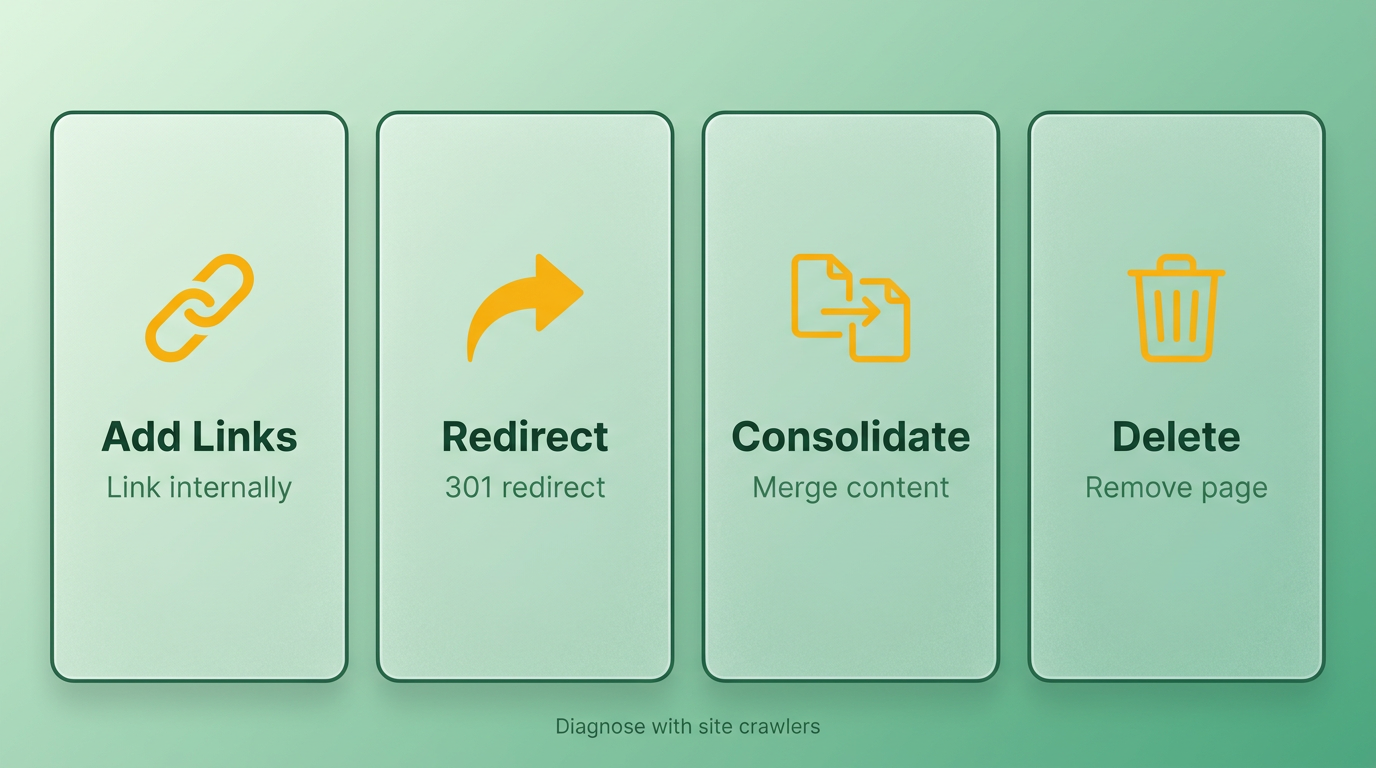
For example, a product page missing internal links might benefit from linking, while a low-quality blog post could be redirected to a more relevant page. Use tools like site crawlers to analyze traffic and authority metrics. If the page has no backlinks or traffic, removal or consolidation is often safest.
What Are the Best Practices for Internal Linking?
Add contextual links from high-authority pages to integrate orphan pages into your site’s structure. Use descriptive anchor text that matches user intent, as this helps search engines understand the page’s purpose. Avoid overloading links-focus on natural integration.
For instance, if an orphan page details “how to use a tool,” link to it from related guides or FAQs. If the content is outdated, update it first to ensure accuracy. Regularly audit your internal linking strategy using sitemap reviews or SEO tools to prevent future orphans, as outlined in the Preventing Orphan Pages from Recurring section.
How Do Redirects Preserve Link Equity?
Use 301 redirects to transfer authority from low-value or outdated pages to relevant, high-quality ones. This preserves SEO value and ensures users aren’t met with broken links. Redirects also help consolidate duplicate content. Building on concepts from the Why Orphan Pages Hurt SEO section, redirects mitigate the visibility issues caused by disconnected pages.
Suppose an orphan page about “summer marketing tips” exists alongside a comprehensive guide on “seasonal marketing.” Redirect the orphan to the guide, then update the guide’s content to include summer-specific advice. This merges value while improving user experience.
When Should You Consolidate or Remove Pages?
Consolidate pages with overlapping content or remove those with no SEO or business value. For example, if two pages rank for similar keywords, merge their content into one, then redirect the other. Removal is ideal for pages with errors, spammy backlinks, or no traffic.
Before deletion, check for external backlinks using tools like Ahrefs. If the page has referring domains, redirect it to preserve equity. If not, remove it and update any internal links pointing to it.
Example: Fixing an Orphan Page with Multiple Methods
Consider an orphan page at example.com/old-tool-guide that lacks internal links and has low traffic. Here’s how to fix it:
- Audit: find the page is outdated but has a few backlinks.
- Redirect: Set up a 301 redirect to example.com/new-tools, a page with updated content.
- Link: Add a contextual link from example.com/related-topic to the new page to reinforce relevance.
- Update: Improve the new page’s content to include the old guide’s unique insights.
This approach preserves link equity, improves user experience, and strengthens SEO. By combining redirect strategies with fresh internal linking, you ensure the content’s value isn’t lost.
Regularly audit your site for orphans using tools like Screaming Frog or Botify, and address them systematically. A well-structured site with intentional linking not only boosts SEO but also guides users to the right information effortlessly.
Preventing Orphan Pages from Recurring
Preventing orphan pages from recurring requires a proactive approach that combines technical diligence with strategic content planning. By integrating regular audits, automated tools, and disciplined internal linking, you can ensure your website maintains a healthy structure that supports SEO. Below, we break down actionable steps to lock out orphan pages permanently.
Why Are Regular Website Audits Essential?
A website audit identifies orphan pages by mapping internal link flows, uncovering pages with no incoming links. These audits should occur quarterly or after major content updates. Use crawl data analysis to flag pages with zero internal links, ensuring they’re either linked or removed. For example, a page created as a draft but never connected to the site’s navigation becomes an orphan-audits catch these gaps before they harm SEO.
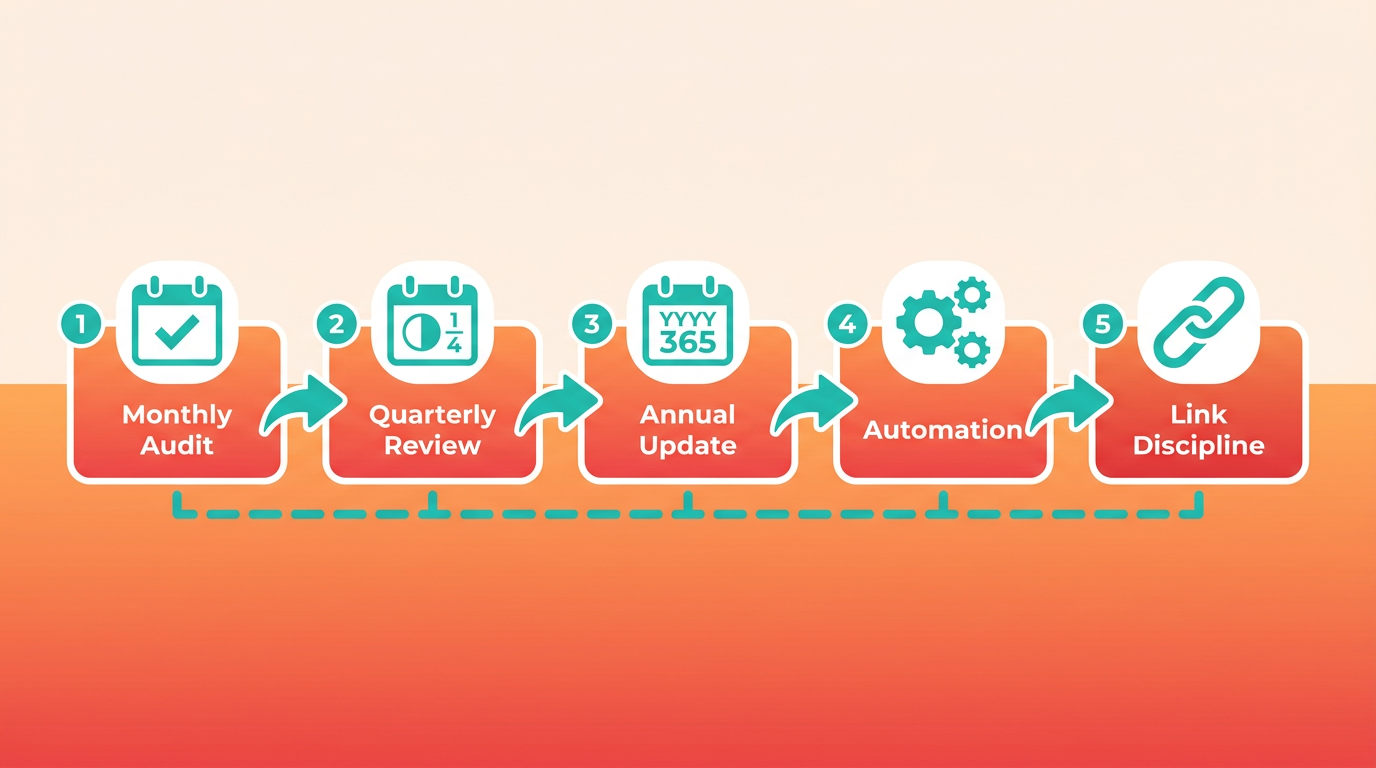
As mentioned in the How to Find Orphan Pages section, downloading and analyzing your XML sitemap is a foundational step in identifying disconnected content. Pairing this with crawl data ensures comprehensive coverage of potential orphans. One company reduced orphan pages by 60% within six months by using its automated audit reports to prioritize fixes.
How Do Automated Tools Prevent Orphan Pages?
Automated tools like AnyPost.ai eliminate manual errors by enforcing internal linking during content creation. When publishing new pages, the platform prompts authors to link to existing relevant content and vice versa. This ensures every new page is interconnected from launch. For instance, if you publish a blog post about "SEO strategies," AnyPost.ai might suggest linking to your "Beginner’s Guide to SEO," automatically creating bidirectional connections.
Building on concepts from the How to Fix Orphan Pages section, these tools also streamline post-publication remediation by flagging isolated pages for immediate linking. For example, outdated pages flagged by AnyPost.ai can be relinked using workflows outlined in the "Fix Orphan Pages" strategies.
Beyond publishing, these tools generate sitemap visualizations to highlight potential orphans. A mid-sized e-commerce site used this feature to reduce orphan pages from 15% to 3% of their site over a year. The tool’s AI also flags outdated pages that might become orphans after content updates, giving teams time to relink them.
What Role Does Internal Linking Discipline Play?
Internal linking discipline means every new page must have at least two incoming links immediately after publication. This requires a team-wide agreement: editors, writers, and developers must treat linking as part of their workflow. For example, when updating a product page, add a link to a related blog post, and vice versa.
As highlighted in the Why Orphan Pages Hurt SEO section, pages without internal links are effectively invisible to both users and search engines. By embedding linking rules into workflows, teams mitigate this risk. Document this process in a style guide. One organization embedded linking rules into its content creation templates, reducing post-publishing orphans by 80%. Discipline also means reviewing old pages during updates-relinking or archiving outdated content prevents accidental orphans.
Can Content Creators Avoid Orphan Pages From the Start?
Yes, by planning links before publishing. Before writing a new page, identify 3-5 existing pages that logically connect to it. For example, a "How to Choose a Hosting Provider" article should link to your "Website Speed Optimization Guide" and "Hosting Reviews" section.
AnyPost.ai aids here by suggesting relevant pages based on topic similarity. A marketing team reported that using these suggestions cut their orphan rate by half. Additionally, always add the new page to your main navigation or a category hub-this single link often prevents isolation.
Example: A Website That Eliminated Orphan Pages
A SaaS company with a 20% orphan page problem implemented three changes: quarterly audits, AnyPost.ai for automated linking, and mandatory internal linking checklists. Within eight months, their orphan rate dropped to 2%, and organic traffic increased by 22%. The key was combining technology with human accountability-every content update now includes a "link health" review.
By treating internal linking as a non-negotiable step in content creation and using tools that automate oversight, you turn orphan prevention into a routine part of your SEO strategy.
Real-World Examples and Case Studies
The most effective strategies share common elements:
- Prioritize high-authority pages for linking to orphaned content to boost their visibility, as outlined in the How to Fix Orphan Pages section.
- Use tools like AnyPost.ai to automate detection and monitor new content for isolation, building on concepts from the How to Find Orphan Pages section.
- Combine technical fixes (e.g., internal links, redirects) with editorial updates (e.g., blog mentions, navigation changes).
Websites that treated orphan pages as a one-time cleanup missed recurring issues. For example, one publishing company fixed 50+ orphans initially but failed to monitor new content, leading to a 20% traffic decline after six months. Reintroducing automated alerts and monthly audits, as detailed in the Preventing Orphan Pages from Recurring section, reversed this trend, proving sustained attention is critical.
By combining both methods, businesses can address existing orphans while preventing new ones. A travel booking platform, for example, used manual edits to fix urgent issues and automated tools to maintain long-term SEO health. This hybrid approach led to a 25% increase in indexed pages and a 17% boost in organic revenue.
Conclusion and Next Steps
Addressing orphan pages is critical for maintaining strong SEO performance. These pages, disconnected from your site’s internal linking structure, prevent search engines and users from discovering valuable content. By resolving them, you improve crawl efficiency, distribute link equity more effectively, and ensure all pages contribute to your site’s authority. Let’s break down the key actions you should take next and how to sustain progress over time.
How Do You Audit Your Site for Orphan Pages?
Start by using site crawlers or tools like Screaming Frog to identify pages with no internal links pointing to them. Cross-reference this data with your sitemap and analytics to determine which pages are underperforming or unreachable. As mentioned in the How to Find Orphan Pages section, downloading and analyzing your XML sitemap can help pinpoint these gaps. For example, if a product page exists but isn’t linked from your category pages, it becomes an orphan. Fixing this requires adding internal links to connect it to the rest of your site.
Once you’ve mapped out orphan pages, prioritize them based on their potential value. Pages with high-quality content but low visibility (e.g., detailed guides or niche resources) should be fixed first. Consolidate duplicate content or redirect irrelevant pages to maintain a clean site structure. Tools like AnyPost.ai’s free SEO audit resources can help streamline this process by highlighting technical issues and linking gaps.
What Strategies Prevent Future Orphan Pages?
Prevention starts with disciplined content creation and internal linking practices. Every new page should be linked from relevant sections of your site, such as navigation menus, blog categories, or related articles. Building on concepts from the Preventing Orphan Pages from Recurring section, establishing a review process for content updates ensures changes don’t accidentally disconnect content. For example, if you publish a case study, link it directly from your “Success Stories” page and any related blog posts.
Additionally, establish a review process for content updates. When editing existing pages, audit internal links to ensure changes don’t accidentally disconnect content. Use structured data and clear URL hierarchies to reinforce logical connections between pages. Regularly schedule audits with tools like Ahrefs or SEMrush to catch emerging issues before they impact rankings.
Why Should You Commit to Ongoing SEO Maintenance?
SEO isn’t a one-time fix-it requires continuous improvement. As discussed in the Why Orphan Pages Hurt SEO section, even minor gaps in linking can degrade crawl efficiency and dilute page authority. By integrating internal linking checks into your content workflow, you reduce the risk of future gaps. For instance, a newly added blog post might not be linked to your resource hub, making it invisible to crawlers.
Consider creating a content map to visualize how pages connect, which can help teams stay aligned on linking priorities. For example, if your site has 500 pages, a quarterly audit might uncover 10-15 orphans, each costing potential traffic. Fixing these could restore visibility for underperforming content and boost overall domain authority.
AnyPost.ai’s free SEO audit tools provide actionable insights to monitor progress and track improvements over time. Pair these with regular training for your team on internal linking best practices to build long-term SEO resilience.
Final Thoughts
Orphan pages may seem like small technical issues, but their cumulative impact on SEO can be significant. By addressing them systematically-auditing existing content, fixing broken connections, and preventing future gaps-you ensure your site remains fully optimized. Remember, a well-linked site isn’t just better for search engines; it enhances user experience by guiding visitors to relevant resources.
For further support, explore AnyPost.ai’s free SEO audit resources to identify hidden opportunities on your site. Stay proactive, and treat internal linking as an ongoing discipline rather than a one-time task. With consistent effort, you’ll maintain a site structure that supports both user engagement and search engine visibility.
Frequently Asked Questions
1. What are orphan pages and why do they hurt SEO?
Orphan pages are unlinked website pages that search engines can’t easily find. They harm SEO by reducing crawl efficiency, diluting link equity, and creating outdated or irrelevant content that doesn’t contribute to site authority or user experience.
2. How do you identify orphan pages on a website?
Use site crawlers (e.g., Screaming Frog, Sitechecker) to map your site’s structure. Look for pages with no internal links pointing to them in the crawl report, which highlights disconnected or unlinked content.
3. What tools help analyze orphan pages effectively?
Site crawlers like Screaming Frog or Ahrefs identify orphan pages, while bento grids or spreadsheet tools help prioritize fixes by analyzing traffic, authority, and content quality metrics.
4. When should you remove an orphan page instead of linking to it?
Remove orphan pages with no traffic, backlinks, or content value. If the page duplicates existing content or is outdated, redirect it to a relevant page or delete it to streamline your site’s SEO and user experience.
5. How does internal linking improve SEO for orphan pages?
Adding contextual internal links to orphan pages increases their visibility, distributes link equity, and guides users to relevant content. Aim for 2-3 strategic links from high-authority pages on your site.
6. What metrics determine whether to fix an orphan page?
Check traffic, backlinks, and page authority using tools like Sitechecker. Prioritize pages with low traffic or no backlinks for removal or consolidation to avoid SEO dilution.
7. Can orphan pages affect website performance?
Yes, orphan pages waste crawl budget, confuse users, and lower SEO rankings. Fixing them improves site structure, reduces bounce rates, and ensures search engines index your most valuable content.
