
People Also Ask: How to Optimize Content for the PAA Box

Key Takeaways
- To rank in the People Also Ask box, your content has to directly answer the specific questions Google is already surfacing next to search results.
- Landing in a PAA box can lift click-through rates by an estimated 12-15%, even when you don't hold the top organic spot.
- Answer formatting is the biggest lever. Concise responses in the 40-60 word range perform best.
- Put the question in an H2 or H3, then lead with a self-contained answer. That's most of the battle.
- One page can rank for several related questions inside a single box, giving you multiple ways in.
- PAA boxes expand into more questions as users click, which means repeated chances to appear.
- Match your phrasing to how people actually ask, and use lists and tables where the answer fits them.
The short version
Ranking in the People Also Ask (PAA) box comes down to writing content that answers the specific questions Google shows alongside search results. These expandable boxes sit near the top of the SERP. Earn a spot in one and your content shows up before searchers ever scroll to the blue links.
Three things do most of the work: clean answer formatting, structured data, and tracking that actually tells you what's landing. Get those right and the visibility compounds.
Why the PAA box is worth your time
The PAA box hands your content a second shot at visibility, even when you're not first organically. These boxes often sit high on the page, and showing up in one can bump click-through rates by an estimated 12-15%.
What makes them worth chasing:
- High placement: PAA boxes usually appear at or near the top of results, above a lot of organic listings.
- Multiple entry points: One page can rank for several related questions inside a single box.
- Compounding visibility: The questions expand into more questions as users click, so you get repeated chances to appear.
How to format answers that actually get picked
Formatting is the single biggest lever here. Google lifts short, direct answers straight from your content, so build each one to stand on its own in 40-60 words, then elaborate below.
Lead with the answer. Question goes in an H2 or H3. Then a tight, self-contained response in the first sentence or two. Supporting detail comes after, for readers who want it.
A few moves that consistently help:
- Match the phrasing to how real people ask the question.
- Use lists and tables when the answer suits a step or a comparison.
- Keep the core answer paragraph short so Google can lift it cleanly.
What structured data actually does
Adding FAQPage or QAPage structured data helps Google parse your Q&A content, which improves your odds of showing up. The schema flags exactly which parts of your page answer which questions.
But schema alone won't rank you. It works when the marked-up answers already exist as clear, useful text on the page. It's a signal, not a shortcut.
The strategies, side by side
Here's how the core moves stack up on effort and payoff:
| Strategy | Effort | Best For | Impact on PAA Visibility |
|---|---|---|---|
| Concise answer formatting | Low | Every page | High |
| FAQPage/QAPage schema | Medium | Q&A-heavy pages | Medium-High |
| Question-based headers | Low | Informational content | High |
| Real-time analytics tracking | Medium | Ongoing optimization | Measures impact |
One caveat: don't waste heavy PAA work on transactional or bottom-funnel pages where people want to buy, not ask questions. PAA rewards informational intent. Aim your effort at content that answers real curiosity.
Tracking closes the loop. Regular monitoring shows which questions you own, which you've lost, and where new gaps open up as Google refreshes the boxes. Skip it and you're guessing.
Why any of this pays off
PAA boxes show up in 70-80% of Google searches. That reach makes them one of the most reliable ways to get in front of searchers. Optimize well and you can lift organic traffic by 20-30%.
The payoff isn't just traffic numbers. These boxes shape how people move through the SERP, and they reward content built to answer real questions directly.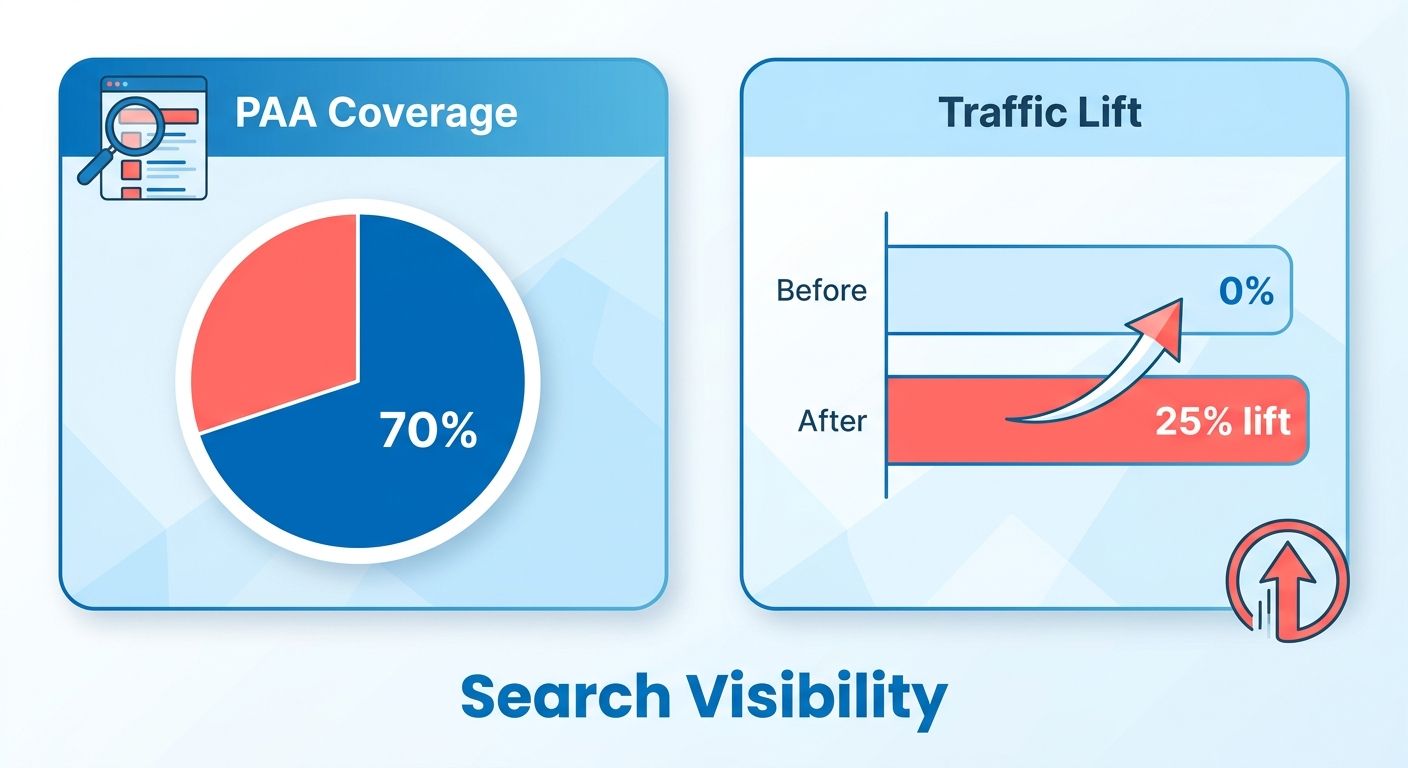
How it helps your SEO
PAA gives your pages extra placement on the results page, even for queries where you don't rank first. You show up in the question box, widen your footprint, and pull in clicks that would've gone to competitors.
Google's algorithm rewards helpful, people-first content. That's the whole logic behind the feature. Write clear, complete answers to the questions people actually type, and you're already aligned with what Google wants to surface.
How you format and present the answer decides whether Google picks it. Short, self-contained responses win.
Where it beats fighting for high-competition keywords
PAA earns its keep most when you're up against high-competition keywords. Ranking first for a crowded term is brutal. The PAA box is a side door onto page one, even when the top organic spots are locked up by big, established sites.
The practical angle: find queries where your site already ranks but doesn't appear in the PAA box. That gap is your opportunity list. You're not starting from zero. You're upgrading pages that already have traction.
Answer the follow-up questions your rivals ignore and you can end up more visible in the SERP than sites that outrank you on the main link.
How it sharpens your content strategy
PAA optimization improves user experience by anticipating what searchers want to know next. The questions in these boxes tell you exactly what your audience is thinking. Use them to read intent and build content that solves the actual problem.
Treat PAA research as fuel for your broader strategy. The questions expose gaps in your existing pages. Turn common ones into headings, structure content around them, cover what competitors skip.
Success comes from aligning PAA work with your overall strategy and watching performance over time. Regular tracking shows which answers stick and which need a second pass. Automated content generation earns its keep here. Tools that produce structured, question-focused drafts at scale cut down the manual formatting, so you can cover more queries without burning hours.
The ongoing playbook is simple: pick the right pages, answer questions clearly, add structure, track results. Do it consistently and PAA visibility turns into a steady traffic channel.
Finding the right questions to target
Start with the questions Google already surfaces for your topics. Pull them from your own search data, check what competitors cover, run keyword tools to expand the list. Then build content that answers each one directly.
Finding PAA questions in Google Search Console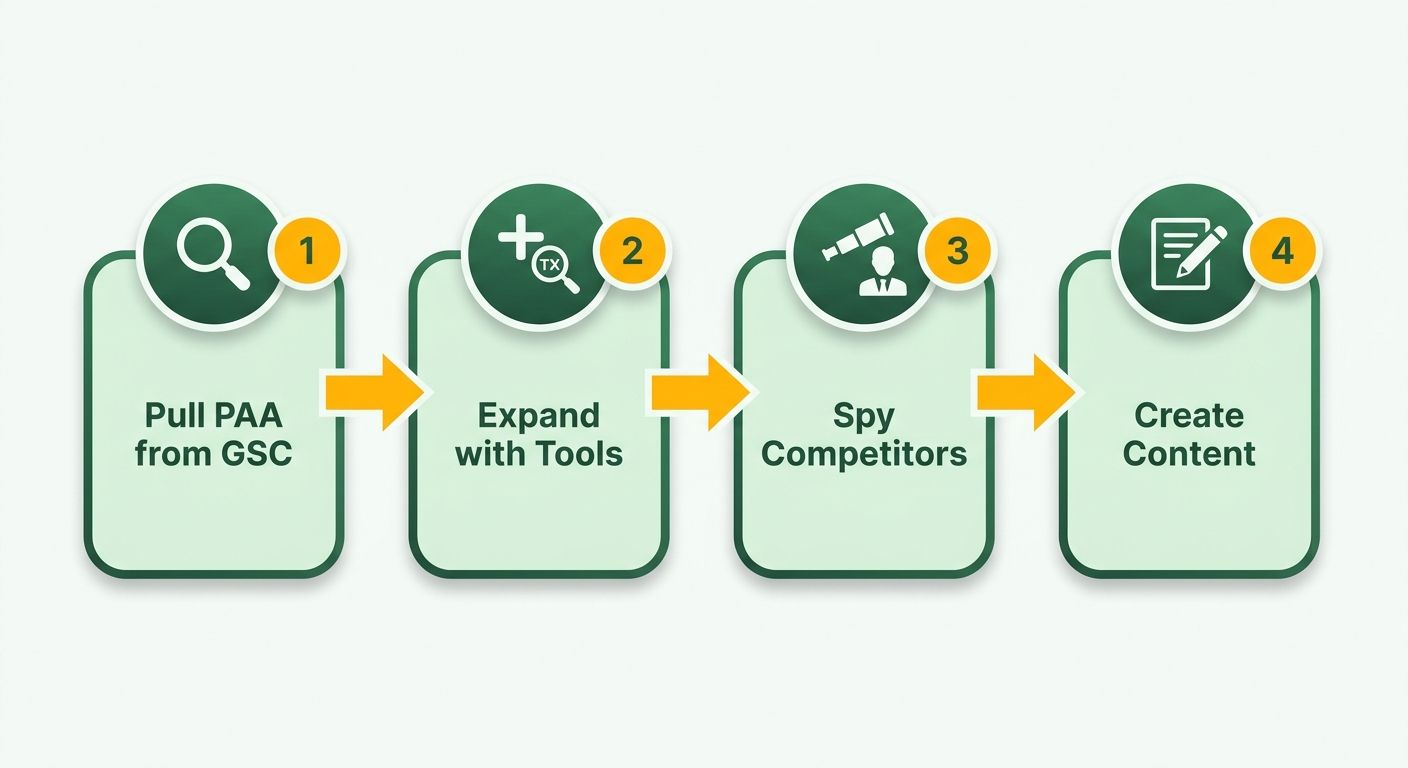
Google Search Console shows you where your site ranks but doesn't appear in the PAA box. Those gaps are your fastest wins. You already rank for the query, so Google trusts your page. You just need to reshape the content to fit the question format.
Start in the Performance report. Sort queries by impressions and look for question-based searches. Words like "how," "what," "why," and "can" signal PAA intent.
Then cross-reference against live results. If a PAA box shows up for a term you rank on page one for, but your page isn't inside it, that's an opportunity. List these mismatches and prioritize the ones with the highest impressions.
This works because you're not guessing. You're using real data on what people type and where your pages already have authority.
Reading competitor content for gaps
Competitor analysis shows which questions rivals answer and which they miss. Search your target keywords, expand every PAA box, note who Google pulls answers from. The pages that show up over and over reveal the format Google rewards.
Then hunt for gaps. Follow-up questions nobody answers well? Those thin spots are where you win placement.
Expand one PAA question and Google generates more underneath it. Keep clicking to map the full question tree around your topic. That's a running list of related queries to fold into your content.
Write your answers in language that doesn't sell. PAA answers stay informational and direct. A pitch-heavy paragraph rarely gets pulled into the box.
Tools that speed up the research
Keyword research tools expand your question list well past what you'd find by hand. They surface variations, search volumes, and related terms tied to your topic. The volume data helps you prioritize which questions to answer first.
Rank-tracking platforms let you monitor how often your content shows up in PAA boxes over time. Optimize a page, then watch whether it earns placement across the queries you targeted. That feedback loop is what tells you if it's working.
Use common PAA questions as headings, matching the exact phrasing where you can. When your H2 or H3 mirrors the question Google asks, you make it easy for the algorithm to connect your answer to the box.
Automated content generation can turn your question list into draft answers fast. Feed in what you found, and the tool produces short, complete responses formatted for PAA. That cuts the writing time on large question sets. The Blog Smith's guide covers which pages to optimize and how to add FAQ schema once your answers are in place.
How PAA boxes actually work
PAA boxes run on Google's natural language processing. The system reads a query, interprets intent, and generates related questions it figures searchers want answered next. Then it pulls short answers from pages that match those questions cleanly.
Understanding this changes how you write. You're not just targeting keywords. You're handing Google a clean question-and-answer pair it can extract with confidence.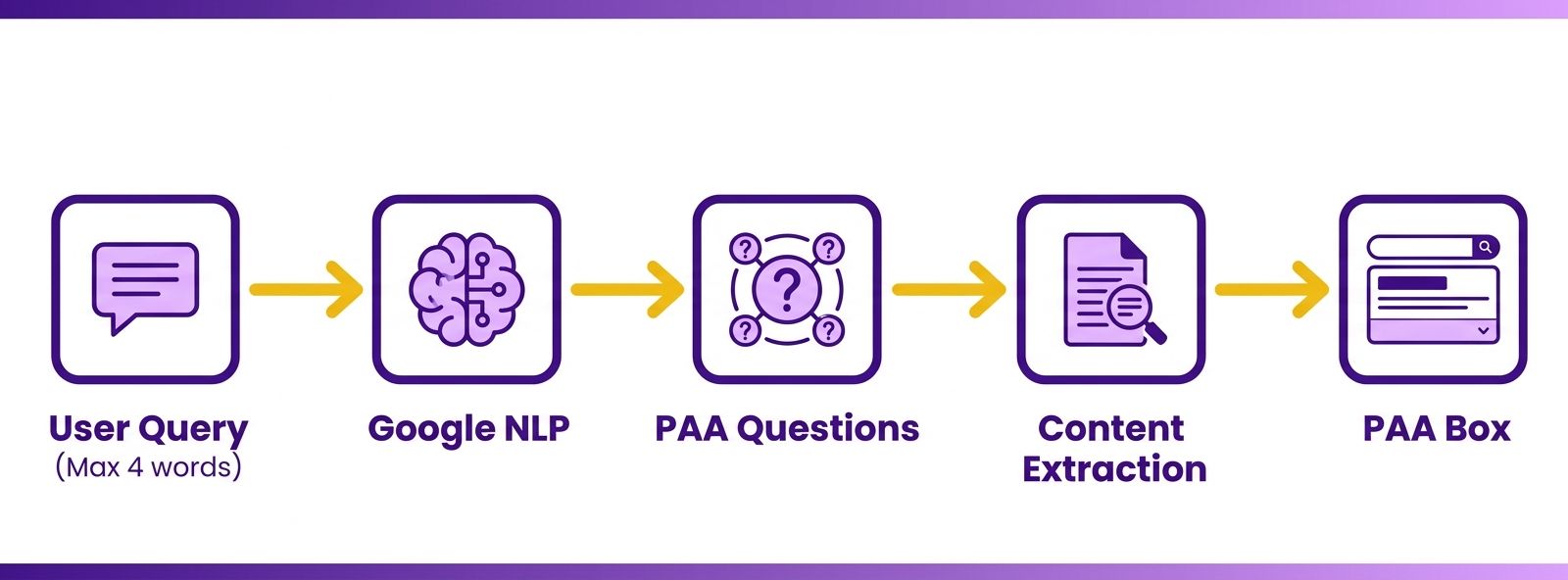
How Google generates the questions
Google's NLP scans a query, decodes the intent, and surfaces related questions that expand on the original search. These reflect what other people ask about the same topic, which is why the box shifts with the phrasing and context of each search.
The system pulls answers from indexed pages that address those questions directly. Click one question and the box often expands to reveal more below it. Each expansion opens new slots, which means more chances for your content to appear.
That's why coverage matters. A page answering one question well might trigger a spot. A page answering a cluster of related questions gives Google more reasons to surface you across the expanding box.
Why formatting decides everything
Formatting is the single biggest factor in PAA success. Google favors direct, concise answers under a clear question heading. Format your content that way and extraction gets easy.
The rule: lead with the answer. Question as a heading, then answer in the first two or three sentences. Skip the windup. Google rewards content that responds without making readers hunt for the point.
Write plain and informative. Don't sell. Salesy language and padded intros work against you here. One question, one tight answer, then elaborate below if the topic needs it. That pattern matches how the box displays content.
Does structured data help?
Yes. It helps Google understand your content and connect it to relevant questions. Schema markup labels your Q&A pairs explicitly, so the system doesn't have to guess what's an answer and what's filler.
FAQ schema tells Google "this block answers this question." That clarity improves your odds of getting pulled in, and it reinforces the topical signals your headings already send.
Pair schema with strong formatting and you cover both bases. The structured data handles machine comprehension. The 40-to-60-word answers handle extraction. Smart Taxonomy Detection can surface relevant PAA questions tied to your topic clusters, which takes some guesswork out of deciding which questions deserve a dedicated answer block.
Measuring and tracking PAA performance
Tracking starts with two questions: are you appearing in the box, and are people clicking through? You answer both by pairing Google Search Console with real-time analytics that watch your question rankings over time.
Optimization only works when you measure it. Monitor the metrics regularly and adjust content based on what the data says.
Tracking impressions and clicks in Search Console
Search Console shows the queries driving impressions and clicks to your pages. That reveals which question-based searches already send you traffic and which ones you're missing.
Open the Performance report and filter for question queries. Sort by impressions to spot high-visibility questions where your click-through rate lags. High impressions with low clicks signals a page that ranks but isn't winning the PAA answer.
Compare those queries against live SERPs. When you rank for a question but don't hold the PAA slot, that's a clear opportunity. Reshape the answer to match the question format, then watch whether impressions and clicks climb.
What real-time analytics adds
Real-time analytics tell you how often your content appears in the box and how those placements shift week to week. Search Console reports on a delay, so live rank tracking fills the gap between publishing a change and seeing its effect.
Rank-tracking tools let you watch a specific question, confirm your page holds the answer, and catch the moment a competitor displaces you. That speed matters when PAA positions rotate often.
Set up tracking for your priority questions. Log the baseline, apply your formatting changes, then check whether placement improves. A closed loop instead of guesswork.
Spotting where to improve
Compare where you rank organically against where you appear in PAA boxes. The gap between the two is your fastest path to more visibility.
Build a list of questions where your site ranks but doesn't own the PAA answer. Each one is a concrete task. You already have Google's trust for the query. You just need cleaner formatting to claim the slot.
Prioritize by impression volume. Fix the high-impression, low-click pages first, since those move the most traffic. For a deeper walkthrough, see How To Use Google's People Also Ask To Improve Your Content.
A tracking workflow that repeats
Say you run a local service business and rank sixth for "how do I choose a local plumber," but a competitor holds the PAA answer. Search Console shows steady impressions and weak clicks.
You rewrite the section with a direct, concise answer up top, then add structured data. Over the next few weeks, your rank tracker shows your page claiming the PAA slot. Clicks in Search Console rise to match.
That's the loop, run across every question on your list. Track the baseline, ship the fix, confirm the result, move to the next one.
Structuring content so Google can lift it
Structuring for the PAA box means writing a clean question-and-answer pair Google can pull straight from your page. Question as a heading, direct answer below, then expand with detail. That structure is what gets you extracted.
Formatting your question headings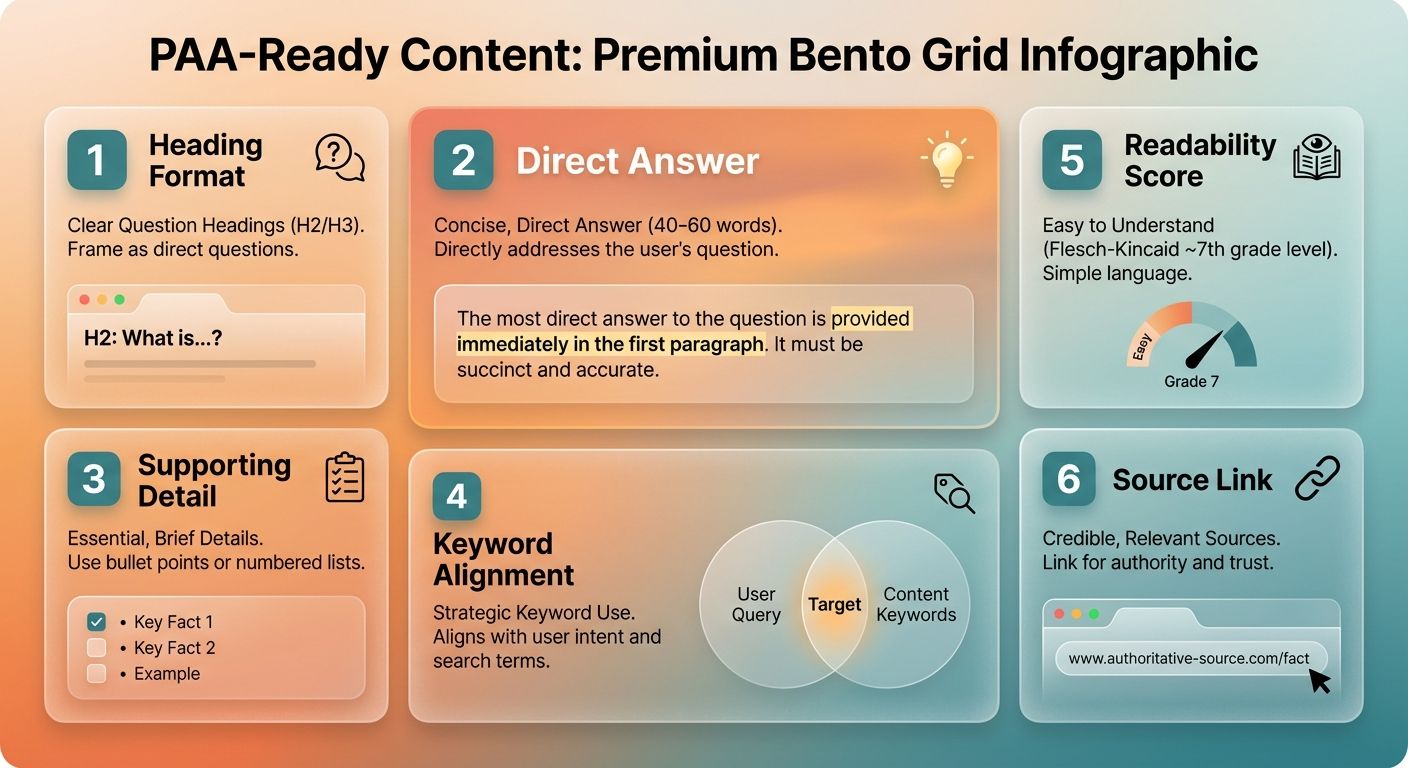
Use question-formatted H2 and H3 headings that mirror the exact phrasing searchers use. When your heading matches a real PAA query word for word, Google connects your content to the box with more confidence.
Pull the common PAA questions from your research and turn them into headings. Answer each one immediately below.
Keep the answer short and complete. Roughly 40 to 60 words works: enough to fully answer, short enough to extract. Direct answer first, context in the paragraphs after. For question clusters, FAQ schema reinforces the pattern by telling Google exactly which text answers which question.
Why tone matters more than you'd think
Write in language that doesn't sell. PAA answers reward an informative, neutral tone over promotional copy. Google surfaces content that helps the searcher, not content pushing a product.
Take two pages answering "How do you find PAA questions?" One opens with a plain, useful explanation. The other opens with a pitch. Google favors the first because it reads as a genuine answer.
Keep sentences short and direct. Front-load the answer. Skip jargon that clouds it. The cleaner the phrasing, the easier it is for the algorithm to pull your text into the box.
Covering the related questions too
Answer the related questions around your main topic on the same page. PAA boxes expand as users click, surfacing follow-ups. Cover those and you can hold multiple slots in a single box.
Build content to answer clusters, not single queries. If your primary question is "What is a PAA box?", also handle "Why does it matter?" and "How do you rank in it?" Each answered question is another extraction opportunity.
This also lifts your standing for the parent query. Pages that fully cover a topic signal depth, and depth helps you appear more often across the question set.
Repurposing the content across channels
PAA-optimized content already comes in a clean Q&A format, which makes it easy to move elsewhere. Each answer stands alone, so you can lift it into a social post, a newsletter segment, or a video script without a rewrite.
Social media: One question and its answer becomes a standalone post. The self-contained format fits short platforms.
Newsletters and email: Group three or four related questions into a Q&A digest. Readers get quick, scannable answers that match how they already search.
YouTube scripts: A cluster of PAA questions maps straight to a video outline. Each question is a segment, your existing answers are the talking points.
Automated content generation speeds this up. Draft the PAA answers once, then reformat them for each channel instead of writing fresh copy every time. Same message, more ground covered, less effort.
Frequently Asked Questions
1. How long does it take to appear in a PAA box after optimizing content?
Timing varies from a few days to several weeks, since Google refreshes PAA boxes frequently. Because Search Console reports on a delay, pair it with real-time rank tracking to catch placement shifts sooner. Pages already ranking for the query typically claim slots faster than brand-new content.
2. Can the same page rank in both a featured snippet and a PAA box?
A single page can hold both positions simultaneously, since featured snippets and PAA boxes are separate SERP features. Strong 40-60 word answers under clear question headings serve both. This dual placement expands your footprint significantly, letting one well-structured page capture multiple visibility slots on the same results page.
3. Does FAQ schema guarantee my content gets pulled into the PAA box?
Schema markup alone will not rank you. FAQPage or QAPage structured data only helps when the marked-up answers already exist as clear, useful on-page text. Google uses schema to understand which text answers which question, but the underlying content quality and formatting still determine whether your answer gets extracted.
4. Should I optimize product or checkout pages for PAA boxes?
Skip heavy PAA work on transactional or bottom-funnel pages where searchers want to buy, not ask questions. PAA rewards informational intent, so questions like "how," "what," and "why" trigger these boxes. Focus your effort on informational content that answers genuine curiosity rather than pages designed to convert buyers.
5. What if my page ranks well but never appears in the PAA box?
This gap is your fastest optimization opportunity. Reshape the existing content to match the question format: add a question-based H2 or H3 heading, then lead with a self-contained 40-60 word answer. You already have Google's trust for the query, so cleaner formatting often claims the slot.
6. How many PAA questions should I target on a single page?
Build content around question clusters rather than single queries. Since PAA boxes expand as users click, answering related follow-up questions on one page lets you hold multiple slots in the same box. Covering a full question cluster also signals topical depth, strengthening your standing for the parent query.
7. Can I reuse PAA-optimized content on other platforms?
PAA content already comes in a clean question-and-answer format, making it easy to repurpose without rewriting. Turn a single question into a social post, group three or four into a newsletter Q&A digest, or map a cluster to a YouTube video outline where each question becomes a segment.