Persona Prompts that Drive Conversions with AI Generated Content

Key Takeaways
- AnyPost's Persona Engine bakes role, industry, challenge, goal, and decision criteria into the prompt.
- The output maps to buyer intent instead of guessing.
- Name the role and industry for better tone and vocabulary.
- Vague input usually leads to vague copy.
- Spell out the primary challenge to target real pain points.
- Tie the prompt to a goal like lead-to-MQL conversion.
- Add buyer decision factors like budget, timeline, and risk.
- The template is three sentences: who it's for, what it does, next step.
- A/B test variants, watch engagement, and refine the prompt.
How to write a persona prompt that doesn't produce mush
AnyPost's Persona Engine lets you define the attributes that matter: role, industry, primary challenge, success goal, and decision criteria. It drops them straight into the prompt.
- Role and industry give the AI context for tone and terminology.
- Primary challenge tells the model what problem the copy must solve.
- Success goal (say, lead-to-MQL conversion) steers the CTA.
- Decision criteria (budget, timeline, risk) shape the persuasive angle.
Fill those fields with real campaign analytics and sales-qualified lead interviews. Then the persona better reflects actual buyer intent.
The language that makes a prompt clear and actionable
Use short, imperative sentences. Pair one audience descriptor with one content goal.
- Open with: "Write a 300-word blog post for a [role] who needs to [challenge]."
- Then: "Highlight how [product] delivers [success goal] within [timeframe]."
- Close with a specific CTA: "Encourage the reader to schedule a demo using the link [URL]."
This pattern removes ambiguity and improves conversion copy. When you leave the fields loose, the model fills gaps with generic filler.
How to test and iterate the templates
Run rapid A/B tests on the generated copy. Measure engagement, then refine the fields until results stabilize.
- Ship two variants of the same prompt — one with a broad challenge description, one with a narrow, data-backed pain point.
- Track CTR, time on page, and downstream conversions in your analytics stack.
- Adjust the persona fields (tighten the success goal, for instance) based on which variant wins.
Clients have seen engagement and conversion gains from this process. Not overnight. But it compounds.
You can adapt these prompt structures to different buyer types and industries — edit the persona attributes, then let the system auto-publish to blogs, LinkedIn, or email. That last step closes the loop most tools leave open.
Wiring personas into your actual content workflow
We embed AI personas by linking a validated persona file to a scheduled content slot. The AI writes the piece and pushes it live without extra hand-holding. Write and publish in one loop, with brand voice and SEO intent staying aligned.
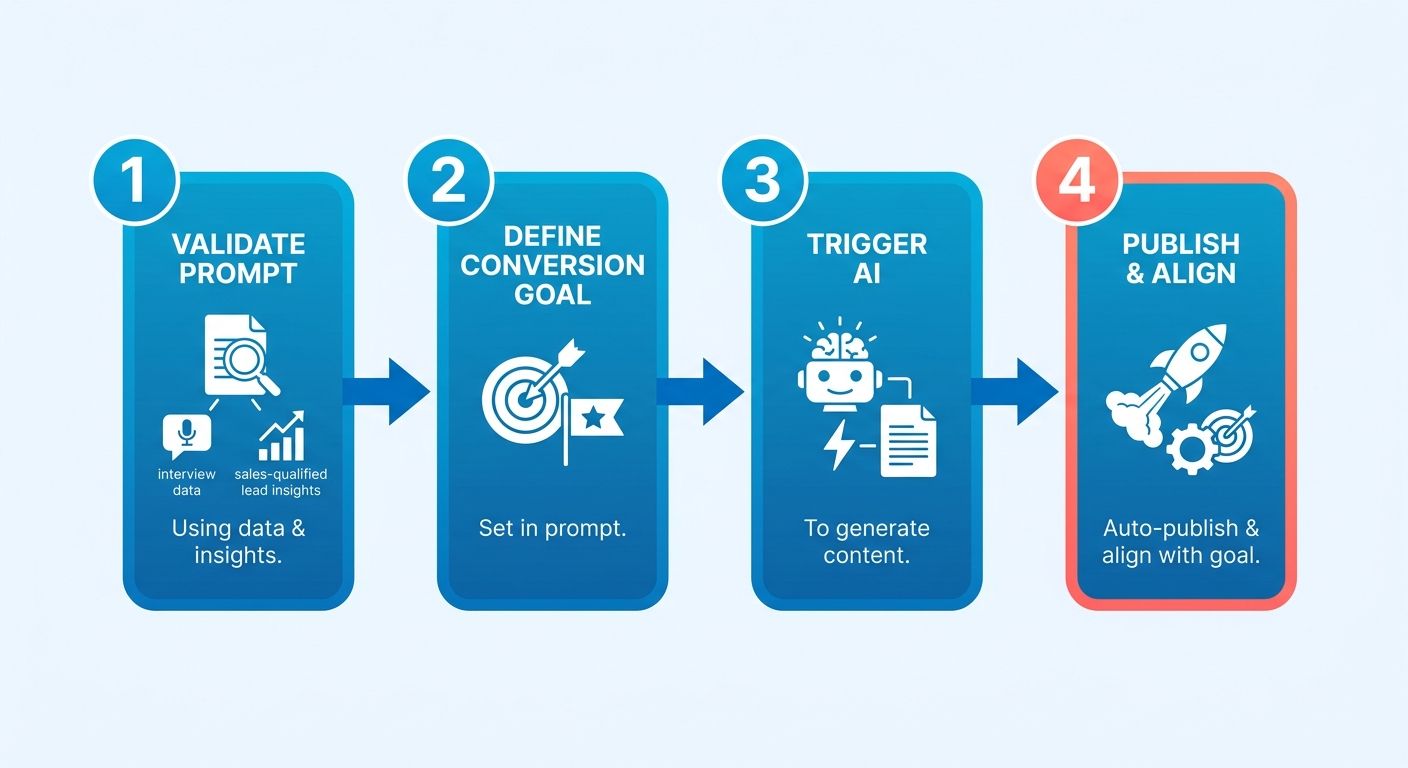
- Validate the persona against direct customer feedback and what your sales team hears on calls.
- Save it as a reusable prompt in your library, with fields for tone, target keyword, and CTA.
- Map the prompt to a calendar entry ("Wednesday blog on prospect-to-qualified-lead conversion"). The system generates the draft and queues it for the chosen channel.
- Enable auto-publish so the finished piece goes to the blog, newsletter, or social feed at the scheduled time.
The three metrics that prove this is working
Track content creation time, conversion lift, and alignment score. Those three show whether the persona is working.
- Time to publish: the interval from prompt selection to live post, straight from AnyPost's real-time analytics.
- Conversion rate: click-through and lead-to-MQL numbers before and after integration. That's your lift.
- Persona alignment score: survey readers or sales reps on how well the content matches buyer intent. A high score validates the interview data you started with.
Review these regularly to fine-tune prompts, shift channel timing, and keep the loop tight.
When to skip the automation entirely
Skip it when you don't understand the audience's emotional triggers, or when the content sits under strict regulatory rules.
Shallow buyer interviews or a heavily regulated product? Put a human review step before publish. Keep the AI draft as a first-pass aid, but let a copywriter finalize tone and compliance. The automation is a shortcut, not a substitute for judgment where the stakes are high.
Validated personas, prompt-linked scheduling, auto-publish, disciplined measurement — that's the workflow that turns persona prompts into something that shortens content cycles and moves qualified-lead numbers instead of just filling a calendar.
Optimizing content for conversion with persona insights
Conversion optimization means moving past static templates and using real behavioral data to sharpen your messaging. Watch how different segments interact with your published assets, then feed that back into the persona inputs to reach more specific buyer motivations.
- Read the engagement patterns, scroll depth, section drop-off, to spot where interest dies.
- Isolate the friction points where the persona's core challenges don't line up with the objections readers actually have.
- Refine the emotional triggers and value props in the prompt to answer those specific barriers.
- Redeploy the updated prompt to refresh high-traffic pages or spin up targeted follow-up assets.
What real-time analytics actually tells you about conversions
AnyPost's dashboard gives you quick visibility into which AI-generated assets are landing. Find the higher performers, push them wider, and reconsider the pieces that aren't earning their spot.
- Performance insights surface click-through rates and form submissions, so you can see which sections of the copy are doing the work.
- Conversion funnels update continuously, exposing drop-off points you can address by tweaking the prompt's language or CTA.
The point: you iterate on the prompt itself, adjusting tone, urgency, and benefit phrasing without rewriting the whole article.
How to A/B test with persona insights
Don't test entire articles. Use your analytics to run multivariate experiments on specific persona variables. Isolate individual fields, and you start to see the psychological drivers behind buyer behavior across channels.
- Isolate one persona variable — say, a "risk-mitigation" angle versus a "cost-efficiency" focus in the decision-criteria field.
- Send the variations to segmented lists so your performance data stays clean.
- Look at downstream pipeline impact, not just the click. Which variant drives better sales conversations?
- Fold the winning angle back into your master persona library, and update the broader marketing and sales enablement assets while you're at it.
Testing this way keeps content improving without giving up the time you save on automation.
For how these prompts fit into a broader content architecture, see our guide on topic clusters.
Measuring whether persona-driven content actually converts
The signals worth trusting are engagement depth, lead quality, and downstream revenue attribution.
- Engagement rate: page views, scroll depth, time on page — does the content hold attention?
- Click-through and CTA conversion: the share of readers who click the CTA and finish the form.
- Lead quality score: a numeric grade based on demographic fit and intent signals from the form.
- MQL-to-SQL progression: how many leads from a persona-driven piece move to sales-qualified.
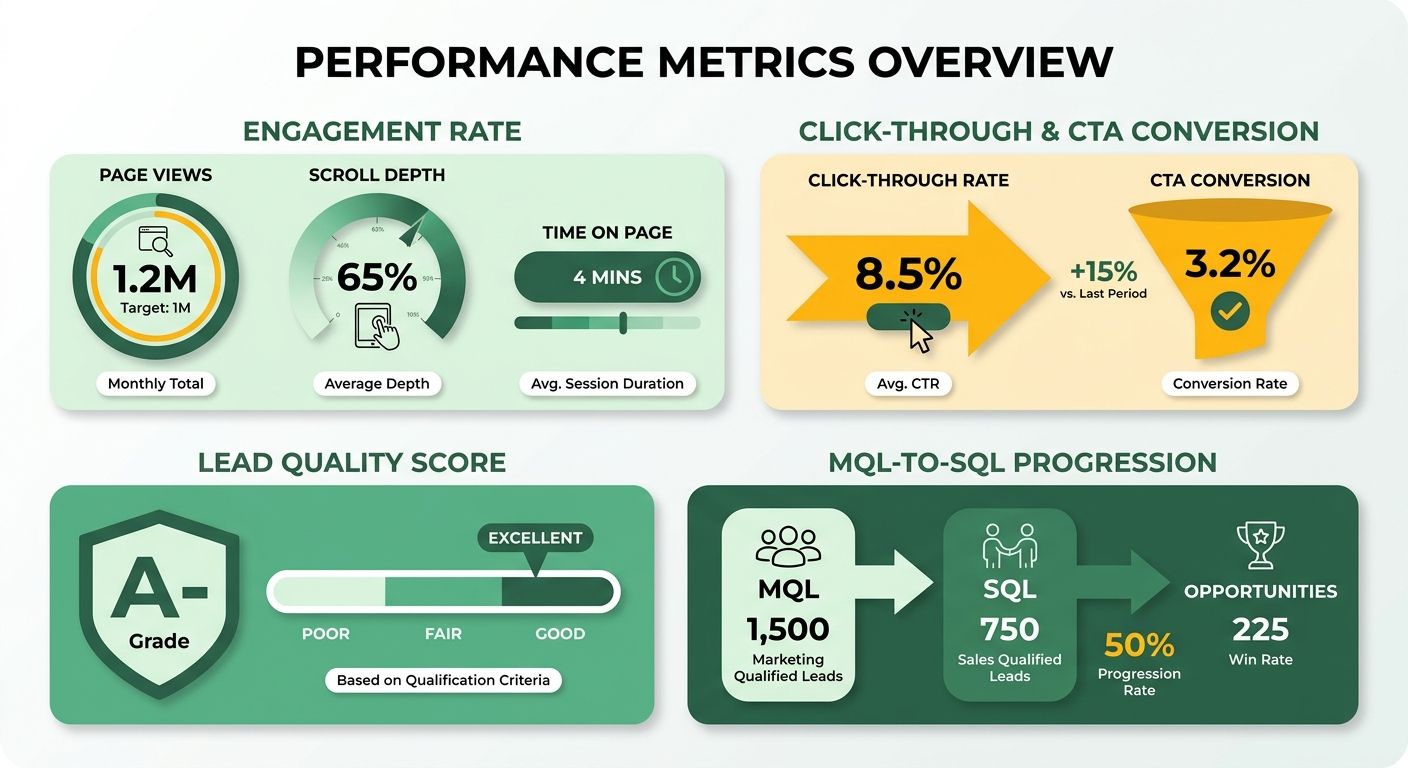
Pull these together in AnyPost's dashboard, and you can line up different persona prompts side by side.
Keeping personas fresh before they go stale
High conversion rates over time depend on managing persona evolution and heading off audience fatigue. AnyPost helps you scale one winning prompt into a library of micro-segmented buyer profiles.
- Watch for performance decay across multi-month campaigns — that's your early warning that a persona angle is wearing out.
- Sub-segment the winners with specialized variations for different company sizes or regions.
- Bake seasonal buyer trends into the decision-criteria field to keep the copy timely.
- Archive the stale variants so your asset library stays clean and your team isn't reaching for dead prompts.
The pitfalls that'll burn you
The usual failures: measuring the wrong funnel stage, ignoring attribution noise, and over-optimizing on short-term clicks at the expense of long-term fit.
- Skipping multi-touch attribution: pin a conversion on the last piece alone and you erase the influence of every earlier persona-driven touch.
- Chasing vanity metrics: high page views mean nothing if CTA conversion stays flat.
- Hard-coding assumptions: treating one high-performing prompt as universally optimal is how you drift away from your audience.
The fix: layer first-touch, lead-touch, and revenue-touch metrics, set baseline thresholds before you call anything a win, and run quarterly persona audits comparing prompt performance across campaigns.
Anchor every AI-generated asset to a real KPI, use the analytics to inform your prompt refinements, and guard against the measurement shortcuts. That's how a standard draft becomes an asset that scales with the same discipline as the model behind it.
Frequently Asked Questions
1. How can I adapt persona prompts for video scripts rather than blog posts?
Start with a concise visual brief, then specify speaker tone, scene focus, and call‑to‑action. Example: “Draft a 60‑second video script targeting a [job_title] struggling with [specific_pain_point]. Demonstrate how our [software_feature] resolves this issue, and conclude with a verbal call‑to‑action directing them to our interactive assessment page.” Keep the three-sentence structure, but replace “blog post” with “script”.
2. What privacy safeguards should I consider when feeding interview data into AnyPost’s Persona Engine?
Encrypt interview transcripts before uploading, and restrict access to the persona library to authorized users only. Review permissions regularly to reduce exposure of sensitive information.
3. Can I use persona prompts to generate multilingual copy, and does language affect conversion rates?
Translate the core persona fields—role, challenge, goal—into the target language, then keep the same three-sentence prompt pattern. Localized CTAs may perform differently by market, so review results for each language and audience.
4. How do I determine the ideal word count for AI‑generated copy at different stages of the sales funnel?
Top-of-funnel pieces benefit from 300-500 words to capture interest, middle-of-funnel assets perform best around 600-800 words for deeper education, and bottom-of-funnel calls-to-action should stay under 250 words to maintain urgency. Adjust based on average session duration for each audience segment.
5. How often should I refresh the persona attributes to keep AI output aligned with evolving buyer intent?
Review and update persona fields quarterly, or whenever a major product release or market shift occurs. Incorporating fresh interview snippets each cycle helps prevent drift, and a brief validation step with sales reps keeps the prompt aligned with current decision criteria.
6. What compliance checks does AnyPost perform to ensure generated copy meets industry regulations such as GDPR or FINRA?
AnyPost runs a rule-based scanner that flags personal data mentions, prohibited financial language, and required disclaimer placement. Users can add custom compliance clauses to the prompt, and a manual review step can help ensure flagged items are addressed before publishing.
