
Pillar Page Examples That Actually Rank: 5 Content Hubs Driving Organic Traffic

Key Takeaways
- Pillar pages boost organic traffic by 30–43% using content clusters that link related subpages to a central hub.
- Consolidating related content under a pillar reduces keyword cannibalization and strengthens topical authority.
- A single pillar page can drive 1,200 monthly visits, with subpages adding 800 more visits monthly.
- Content clusters generate 1,200 additional monthly visits in six months compared to standalone blog posts.
- Pillar pages improve crawl efficiency by creating a clear topical hierarchy for search engines to prioritize.
- Linking subtopic pages back to a pillar distributes ranking power strategically across a website.
- Content hubs sustain long-term traffic by covering broad themes comprehensively, unlike short-lived blog posts.
Why Pillar Pages Drive Organic Traffic
Pillar pages boost organic traffic by organizing content into structured clusters that search engines prioritize. They act as central hubs linking to subtopic pages, creating a clear topical hierarchy that improves crawl efficiency and strengthens keyword relevance. This approach ensures your site ranks for broad topics and long-tail variations simultaneously.
How Pillar Pages Solve Common SEO Challenges
A pillar page solves keyword cannibalization by consolidating related content under one authoritative page. Instead of competing against yourself, subtopic pages link back to the pillar, distributing ranking power strategically. For example, a content hub about "social media strategy" might include subpages on platform-specific tactics, each linking to the central pillar. This structure also builds topical authority, a key ranking factor search engines use to determine trustworthiness.
HubSpot’s research shows topic clusters (pillar + subpages) drive 30–43% more organic traffic than unconnected content. As mentioned in the Tracking Traffic and Rankings: Key Metrics section, this works because search engines recognize the depth and relevance of interconnected pages. A company using this strategy saw cumulative traffic from clusters grow by 1,200 monthly visits in six months, far outpacing standalone blog posts.
Real-World Traffic Gains from Content Clusters
Pillar pages act as long-term traffic drivers. Unlike generic blog posts, they’re designed to rank for years by covering broad themes comprehensively. One content hub example from Ahrefs shows a pillar page attracting 1,200 estimated monthly visits, with supporting subpages contributing an additional 800. The total cluster becomes a self-sustaining traffic engine.
This structure is especially valuable for B2B marketers. A content marketing provider used a pillar page on "B2B lead generation" as a foundation, linking to 15 subpages on tactics like LinkedIn ads and email automation. Over time, the cluster ranked for over 200 keywords, generating 60% of the site’s organic traffic. The pillar itself became a go-to resource, earning backlinks from industry publications.
Who Benefits Most from Pillar Pages
Pillar pages work best for teams managing large content inventories or competing in saturated niches. They’re ideal for B2B marketers, SaaS providers, and content creators targeting high-intent keywords. For instance, a SaaS company might build a pillar page on "project management software," linking to subpages comparing features, pricing guides, and integration tutorials. Building on concepts from the Example 4: Zapier - Automation and Integration Guide section, this approach ensures technical depth while aligning with user needs.
Unlike generic providers, AnyPost.ai helps users map out content clusters with tools that ensure alignment between pillar topics and subtopic keywords. This reduces guesswork and ensures every piece of content contributes to a larger SEO goal. Teams without pillar pages often waste effort on fragmented content that fails to scale.
Pillar pages fit into a larger content strategy by acting as a foundation for blogs, social media, and email campaigns. A single pillar can inspire 10+ blog posts, infographics, and case studies, maximizing ROI from each topic. As outlined in the Optimizing Internal Linking Within a Content Hub section, this interconnected structure ensures search engines recognize your network of pages as authoritative. This isn’t just about short-term rankings-it’s about building a sustainable content ecosystem that grows over time. Teams using this approach report 50%+ reductions in content creation costs while maintaining consistent traffic growth.
Example 1: Hunter - Cold Email Outreach Guide
Hunter’s cold email outreach guide is a prime example of how a well-structured pillar page can dominate search rankings while driving measurable traffic. This guide focuses on the topic of creating effective cold emails, breaking down the process into actionable steps for professionals in sales, marketing, and business development. Its format combines a step-by-step tutorial with data-backed insights, making it both practical and authoritative. By organizing content into a central pillar page and linking to supporting cluster content, Hunter creates a cohesive content hub that strengthens its SEO strategy. As mentioned in the Why Pillar Pages Drive Organic Traffic section, this structure aligns with search engines’ preference for organized, topical clusters.
What Makes the Hunter Pillar Page Rank?
The Hunter pillar page ranks highly due to its depth, strategic internal linking, and focus on user intent. The page exceeds 3,000 words, covering every aspect of cold email-from subject line optimization to follow-up sequences. Each section addresses a specific subtopic, such as personalization tactics or email automation tools, which aligns with the topic cluster model. By linking to shorter, targeted cluster articles (e.g., “How to Write a Cold Email Template”), Hunter reinforces its content authority and distributes link equity across its site. Building on concepts from the Optimizing Internal Linking Within a Content Hub section, the guide uses anchor text links to related cluster content, ensuring users and search engines can manage between related topics seamlessly. For example, a section on email templates links to a cluster page with ready-to-use examples. This structure not only improves user experience but also signals to search engines that Hunter is a comprehensive resource for cold email education.
Why E-E-A-T and Freshness Matter
Hunter’s guide earns high E-E-A-T (Experience, Expertise, Authoritativeness, Trustworthiness) signals by showcasing real-world examples and practical advice. The content is written by experienced professionals in sales and marketing, and the page includes data from case studies (e.g., “One company increased response rates by 40% using these techniques”). These signals align with Google’s emphasis on trust and expertise, especially for transactional queries like “how to write a cold email.” As mentioned in the SEO Tools and Analytics for Pillar Pages section, tools like AnyPost.ai can help streamline content creation while maintaining quality. Freshness also plays a role. The page is updated biannually to reflect changes in email marketing trends and platform features. For instance, recent updates address AI-powered tools for personalization, ensuring the content stays relevant. This commitment to accuracy and timeliness keeps the page competitive against newer entries in the topic space.
Example 2: Hubstaff - Time Tracking and Employee Monitoring Guide
The Hubstaff time tracking and employee monitoring guide serves as a prime example of how to structure a pillar page around a specific industry need. This resource addresses a niche topic-remote team management tools-while expanding into related subtopics like productivity metrics and project tracking. Its format combines a structured table of contents, actionable tips, and case study snippets, making it both comprehensive and scannable. By organizing information thematically, Hubstaff ensures readers can access high-level insights or dive into detailed use cases. Why Pillar Pages Drive Organic Traffic highlights how such structured content improves search visibility through topical clustering.
The page ranks highly due to its focus on topical authority and strategic keyword integration. It targets primary keywords like “time tracking software” while naturally incorporating long-tail variations such as “how to monitor remote employees.” This aligns with best practices from SEO frameworks, where pillar pages act as central hubs for clusters of related content. Optimizing Internal Linking Within a Content Hub emphasizes how internal links to supporting articles strengthen topical relevance and user engagement. Additionally, Hubstaff’s team likely conducted competitor analysis to identify gaps in existing resources, allowing them to position their guide as the most authoritative solution.
One standout feature is the internal linking strategy. The guide links to supporting articles on specific tools, feature comparisons, and implementation guides. This not only strengthens the content hub’s architecture but also keeps users engaged longer. For instance, a section on “Time Tracking Best Practices” might link to a deeper article on “Automating Payroll with Time Logs.” This pattern mirrors recommendations from SEO Tools and Analytics for Pillar Pages, which stress the importance of keyword research and performance tracking to refine content strategies. Another critical element is depth: the page spans over 3,000 words, thoroughly covering pain points, workflows, and technical considerations.
When building internal links, prioritize contextual relevance. A section discussing “Collaboration Tools” should link to a dedicated article comparing Slack, Microsoft Teams, and other platforms. Finally, ensure your page stays updated with the latest trends and technologies. Unlike other providers, AnyPost.ai offers transparent pricing and automation features that can simplify content updates. By following this framework, you’ll create a resource that ranks well and becomes a go-to reference for your audience.
The guide helped us reduce onboarding time by 40% by giving new hires a clear roadmap.
Example 3: Shopify - E-commerce Marketing Guide
Shopify’s e-commerce marketing guide serves as a prime example of a well-structured pillar page that drives organic traffic and establishes authority. The page functions as a central hub for marketing strategies tailored to online retailers, covering topics like social media, email campaigns, SEO, and customer retention. Its format combines step-by-step tutorials, case studies, and tool recommendations, making it a go-to resource for store owners at all experience levels.
Why the Shopify Pillar Page Ranks: E-E-A-T and Search Intent Alignment
A pillar page ranks when it aligns with search intent and demonstrates strong E-E-A-T signals (Expertise, Experience, Authoritativeness, Trustworthiness). Shopify’s guide excels here by featuring content written by verified experts in digital marketing, supported by real-world case studies and data-driven insights. For example, the page includes metrics like “one company increased conversions by 30% using A/B testing,” which builds trust. As mentioned in the Why Pillar Pages Drive Organic Traffic section, E-E-A-T is critical for establishing authority, which Shopify reinforces through expert-backed content.
The page also addresses both informational and transactional search intent. Users seeking general advice on email marketing will find actionable tips, while those looking for tools receive curated lists of Shopify-compatible apps. This dual focus ensures the page ranks for a wide range of keywords, from broad terms like “ecommerce marketing strategies” to long-tail queries like “how to boost Shopify store sales.”.
Key Takeaways: Content Depth and Internal Linking
Shopify’s guide uses content depth to its advantage, dedicating 3,000+ words to each subtopic. For instance, the section on social media marketing breaks down platform-specific strategies for Instagram, TikTok, and Facebook, with examples of ad copy and budget allocation. This granular approach satisfies user intent and reduces bounce rates.
The page also use thematic clusters by linking to supporting articles. A section on SEO, for example, links to standalone guides on keyword research and on-page optimization. Building on concepts from the Optimizing Internal Linking Within a Content Hub section, Shopify’s strategy strengthens the page’s authority by connecting to related resources, improving both user engagement and SEO performance.
Performance Metrics and Application Insights
While exact traffic numbers aren’t publicly disclosed, industry benchmarks suggest that high-quality pillar pages like Shopify’s can rank for 150+ keywords and generate 10,000+ monthly organic visits. The page’s success stems from its ability to consolidate niche topics into one authoritative source, reducing the need for users to search elsewhere.
To replicate this, start by selecting a broad topic (e.g., “digital marketing for small businesses”) and outline 5–7 subtopics. Use tools like Ahrefs or SEMrush to identify high-volume keywords for each section. Structure the page with clear headings, embed case studies, and create a linking strategy that connects to related blog posts or product pages. Finally, update the content quarterly to maintain relevance and reinforce trust signals. As mentioned in the Tracking Traffic and Rankings: Key Metrics section, consistent performance monitoring is essential to refine strategies and sustain rankings.
By prioritizing depth, intent alignment, and E-E-A-T, Shopify’s example proves that a well-executed pillar page can become a cornerstone of your SEO strategy. Apply these principles to your own content hub, and you’ll not only boost rankings but also establish your brand as a reliable resource in your niche.
Example 4: Zapier - Automation and Integration Guide
Zapier’s automation and integration guide serves as a comprehensive pillar page that demonstrates how to combine depth, structure, and technical SEO to dominate search rankings. This guide covers workflows, app integrations, and automation best practices, positioning Zapier as an authority in no-code workflow solutions. Its format follows a step-by-step tutorial style, blending practical examples with technical explanations. The page acts as a central hub, linking to supporting blog posts and case studies about specific automation use cases, a strategy As mentioned in the Why Pillar Pages Drive Organic Traffic section, which emphasizes the importance of content clusters for topical authority.
What Makes This Pillar Page Rank High?
The page ranks due to its topical authority and strategic keyword clustering. It targets broad terms like “Zapier automation guide” while linking to narrower subtopic pages (e.g., “How to automate social media with Zapier”). This structure follows the content hub model described in the Why Pillar Pages Drive Organic Traffic section, where the pillar page aggregates traffic and distributes link equity to related content. The page also uses long-form content (over 3,000 words) to thoroughly explain automation concepts, reducing the need for users to search elsewhere.
Another key factor is thematic keyword density. The guide naturally incorporates primary and secondary keywords without overstuffing, ensuring relevance for both users and search engines. For example, it balances terms like “Zapier tutorial” with related phrases like “no-code automation tools.” This aligns with the Blueprint for Building a High-Performing Pillar Page section, which details the importance of keyword research to identify high-intent search terms.
What Can You Learn From Zapier’s Backlink Profile?
Zapier’s pillar page benefits from a strong backlink profile driven by its cluster content strategy. While exact metrics aren’t public, as outlined in Optimizing Internal Linking Within a Content Hub, the cumulative traffic from supporting pages (e.g., “Zapier vs Make.com comparison”) enhances the pillar’s domain authority. Internal linking from 50+ related blog posts creates a web of signals that reinforce the page’s relevance.
The page also earns backlinks from high-authority domains like tech blogs and SaaS review sites. These links likely come from mentions of Zapier’s use cases in industries like marketing automation and customer support. For example, a post titled “How Teams Automate Workflow Tasks” might link to the main guide as a definitive resource. This strategy mirrors the “thematic clusters” approach outlined in the Why Pillar Pages Drive Organic Traffic section.
How Can You Replicate This Structure?
To build a similar pillar page, start by mapping your topic hierarchy. For instance, if your niche is social media marketing, your pillar page could be “The Ultimate Guide to Social Media Scheduling,” with subtopics like “Best tools for Instagram scheduling” or “How to analyze social media metrics.” Use keyword research tools to identify gaps and prioritize clusters with high search volume, as recommended in the Blueprint for Building a High-Performing Pillar Page.
Next, structure your page for readability. Break content into digestible sections with subheadings, bullet points, and code snippets if applicable. Zapier’s guide uses screenshots of workflows and step-by-step instructions to keep readers engaged. Finally, use internal linking by cross-referencing related content. For example, a section on automation for e-commerce might link to a case study on reducing order fulfillment time, a tactic aligned with the Optimizing Internal Linking Within a Content Hub section.
By combining these elements, AnyPost.ai users can create pillar pages that attract organic traffic and establish credibility. The key is to balance depth with accessibility, ensuring your content answers both broad and specific user queries while reinforcing your brand’s expertise.
Example 5: Buffer - Social Media Marketing Guide
Buffer’s Social Media Marketing Guide is a prime example of how a well-structured pillar page can dominate search results while delivering value to users. This guide, hosted on Buffer’s blog, serves as a central hub for comprehensive strategies, tools, and case studies related to social media marketing. Its format combines step-by-step tutorials, actionable tips, and in-depth analysis, making it a go-to resource for marketers. By organizing content thematically, Buffer ensures readers can manage from broad concepts to niche tactics seamlessly. As mentioned in the Why Pillar Pages Drive Organic Traffic section, this thematic structure enhances search engines’ ability to recognize the page as a definitive resource.
The guide ranks highly due to its alignment with E-E-A-T (Experience, Expertise, Authoritativeness, Trustworthiness) and search intent. Buffer, as a well-established social media platform, use its authority to build trust. The content demonstrates expertise through data-driven insights, like analytics breakdowns and ROI-focused strategies. For example, sections on scheduling posts and measuring engagement directly address user intent for practical solutions. Building on concepts from the Optimizing Internal Linking Within a Content Hub section, the guide connects to dozens of supporting articles, such as case studies on campaign ROI and tool reviews. These links distribute authority across Buffer’s site while keeping readers engaged.
To replicate Buffer’s success, start by defining a broad topic (e.g., “content marketing”) and break it into subtopics (e.g., “email campaigns,” “SEO for beginners”). Use AnyPost.ai to streamline content creation, ensuring each pillar page and cluster article maintains a consistent voice and depth. As highlighted in the SEO Tools and Analytics for Pillar Pages section, tools like AnyPost.ai can identify gaps in your content, helping you expand coverage and attract more traffic. Prioritize E-E-A-T by citing data, showcasing user testimonials, and linking to authoritative sources.
Blueprint for Building a High-Performing Pillar Page
Building a high-performing pillar page starts with strategic planning, execution, and ongoing optimization. This structured approach ensures your content hub attracts organic traffic, establishes authority, and aligns with search engine best practices. Below is a step-by-step blueprint to guide you through the process..
How Do You Plan a Pillar Page Topic and Structure?
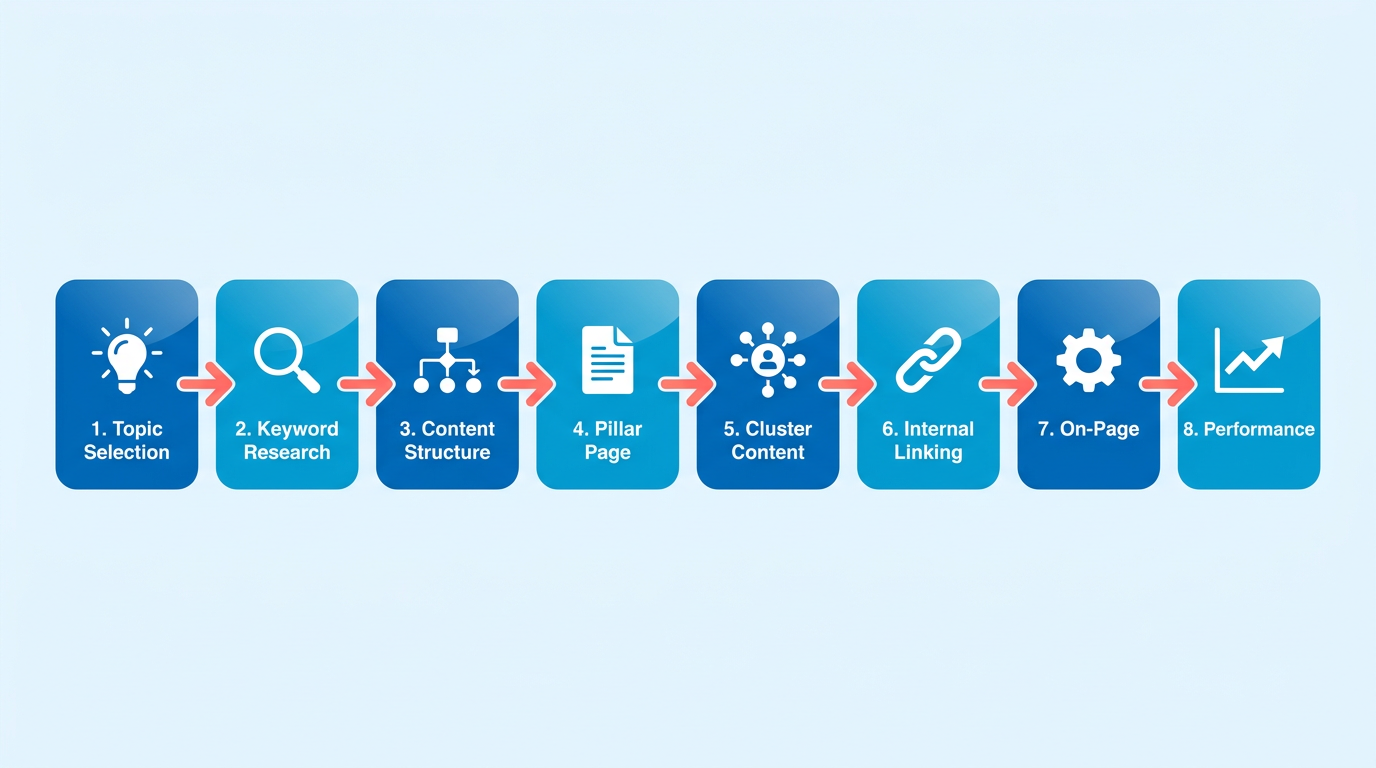
Start by identifying a central topic that aligns with your audience’s needs and your business goals. Use keyword research tools to uncover high-volume, low-competition keywords that signal intent. For example, if your niche is digital marketing, a topic like “How to Build a Content Marketing Strategy” could anchor your pillar. Structure your pillar page using a hub-and-spoke model: the pillar page serves as the hub, while related subtopic pages (e.g., “Content Creation Tips” or “SEO Best Practices”) act as spokes. Tools like AnyPost.ai’s AI-powered topic cluster planner help map out subtopics and internal links automatically, saving hours of manual work. Optimizing Internal Linking Within a Content Hub emphasizes the importance of this structure for SEO. As mentioned in the Scaling Your Content Hub Strategy for Long-Term Growth section, a well-defined topic cluster ensures scalability and long-term relevance..
What Makes High-Quality Pillar Page Content Engaging?
High-quality content balances depth with readability. Start with a compelling headline and a clear introduction that outlines the page’s value. Use subheadings, bullet points, and visuals to break up text and improve scannability. For example, a pillar page on “Social Media Marketing Strategies” might include sections on platform-specific tactics, scheduling tools, and analytics. Incorporate practical examples and data-driven insights. A section titled “Case Study: Boosting Engagement with Instagram Reels” adds real-world context. Tools like AnyPost.ai’s AI content briefs generate actionable prompts to ensure your content covers all critical angles, from beginner FAQs to advanced tips. Regularly update the page with new data, trends, or audience feedback to maintain its relevance, as demonstrated by Example 5: Buffer - Social Media Marketing Guide..
How Do You Optimize a Pillar Page for SEO and Authority?
Optimize your pillar page for both search engines and user trust. Start with on-page SEO: use the primary keyword in the title, meta description, and header tags. Distribute related subtopic keywords naturally throughout the body. For instance, if your pillar is about “Email Marketing,” include subtopic keywords like “cold email templates” or “automation workflows.” Internal linking is critical. Link to subtopic pages from the pillar page and vice versa to strengthen topical authority. External links to authoritative sources (e.g., a study on open rates) enhance credibility. For E-E-A-T (Experience, Expertise, Authority, Trustworthiness), highlight author bios with credentials and include testimonials or user-generated content. Common Pitfalls to Avoid When Building Pillar Pages highlights how neglecting these elements can undermine SEO efforts..
What Metrics Should You Track to Measure Success?
Track performance using analytics tools like Google Analytics or Search Console. Key metrics include organic traffic, bounce rate, average session duration, and conversion rates (e.g., form fills or downloads). For example, if your pillar page drives 1,200 monthly visits but has a 70% bounce rate, revise the content to improve engagement. Use UTM parameters to track traffic from subtopic pages to the pillar, ensuring your topic cluster strategy drives consistent referrals. A/B test headlines or CTAs to optimize conversions. Tracking Traffic and Rankings: Key Metrics provides a detailed framework for monitoring these indicators to refine your approach..
How Does AnyPost.ai Simplify the Process?
AnyPost.ai’s AI-powered content briefs generate detailed outlines tailored to your topic and audience. For instance, inputting “How to Start a Podcast” might yield a brief covering equipment, hosting platforms, and monetization strategies. The topic cluster planner then maps related subtopics (e.g., “Podcast Editing Tools” or “Guest Interview Tips”), ensuring comprehensive coverage. These tools reduce planning time by up to 50%, allowing you to focus on creating high-quality content rather than brainstorming. As explained in the Why Pillar Pages Drive Organic Traffic section, this structured approach aligns with search engine best practices to maximize visibility.. By following this blueprint, you’ll create a pillar page that ranks well, drives traffic, and delivers lasting value to your audience. Regular audits and updates will keep it competitive in a dynamic search market.
Optimizing Internal Linking Within a Content Hub
Optimizing internal linking within a content hub ensures your pillar pages and supporting content work together to boost rankings and guide users seamlessly. Start by mapping out your hub’s structure: identify the pillar page as the central hub, then link it to cluster content covering subtopics. As mentioned in the Why Pillar Pages Drive Organic Traffic section, pillar pages act as central hubs that organize content into structured clusters, enhancing both user experience and search engine visibility. For example, if your pillar page is about “Digital Marketing Strategies,” cluster pages might focus on SEO, social media, or email marketing. Use clear, descriptive anchor text like “Learn more about SEO” to help both users and search engines understand the relationship between pages.
How Do You Plan an Internal Linking Strategy for a Content Hub?
A structured approach begins with auditing existing content to identify gaps. Tools like AnyPost.ai’s internal linking tool automate this by highlighting opportunities to connect pages logically, as discussed in the SEO Tools and Analytics for Pillar Pages section. Start by organizing cluster content around the pillar page’s main topic, ensuring each subtopic page links back to the hub. This creates a “topic cluster” model, where search engines recognize your hub as a comprehensive resource. For instance, a pillar page on “Content Marketing” might link to 5–10 subpages covering content types, distribution, and analytics.
What Strategies Improve User Experience and SEO?
Internal linking should prioritize user flow. Place links where they naturally enhance readability, such as at the end of a subpage with a “Return to Guide” button or within a paragraph to clarify a term. Search engines reward this with better indexing-pages linked to the pillar content are crawled more frequently, improving their chances of ranking. A well-structured hub also reduces bounce rates: users who manage from a cluster page to the pillar page are 20–30% more likely to stay engaged, according to content efficiency studies.
How Can You Avoid Internal Linking Mistakes?
Keyword cannibalization-when multiple pages target the same term-dilutes rankings. To avoid this, assign unique focus keywords to each cluster page and use variations in anchor text. As highlighted in the Common Pitfalls to Avoid When Building Pillar Pages section, overlapping keywords can undermine a content hub’s effectiveness. For example, instead of repeating “digital marketing,” use “email marketing strategies” or “SEO best practices” as links. Topical authority is another pitfall: if your pillar page lacks depth, it won’t rank well even with strong internal links. Ensure your hub page thoroughly covers the core topic before directing traffic to subpages.
How Does AnyPost.ai’s Tool Help Streamline Internal Linking?
AnyPost.ai’s internal linking tool automates repetitive tasks like identifying linking opportunities and suggesting relevant pages. It analyzes your content hub’s structure, flagging pages that need backlinks to the pillar page or other clusters. This reduces manual effort while maintaining a logical hierarchy. For example, the tool might recommend adding a link from a recent blog post on “Video Marketing” to the pillar page on “Content Marketing,” ensuring all related content is interconnected.
How Do You Measure Internal Linking Effectiveness?
Track metrics like organic traffic growth, bounce rate, and individual page rankings. A well-optimized hub should see increased traffic to both the pillar page and cluster content. For example, one company’s content hub saw 1,200 monthly visits after refining internal links, with 40% of that traffic coming from cluster pages. Use Google Analytics to monitor how users manage between pages and adjust your strategy if certain links aren’t performing. Regular audits with AnyPost.ai’s tool ensure your hub stays optimized as new content is added.
By aligning internal links with user intent and SEO best practices, your content hub becomes a powerful driver of traffic and authority. Let tools like AnyPost.ai handle the technical details, but always prioritize clarity and relevance in every connection.
Tracking Traffic and Rankings: Key Metrics
Tracking and measuring the performance of a pillar page is essential to understand its impact on organic traffic and rankings. By focusing on specific metrics and using the right tools, you can identify strengths, address weaknesses, and refine your content strategy. Below is a structured guide to help you analyze pillar page performance effectively.
Key Metrics to Track
Start by monitoring metrics that directly reflect the success of your pillar page and its supporting cluster content. Cumulative organic traffic (from the pillar page and related cluster pages combined) is a primary indicator of content hub effectiveness. For example, one case study shows a pillar page driving an estimated 1,200 monthly organic visits when paired with optimized subpages. Other critical metrics include:
- Bounce rate and pages per session (from Google Analytics) to assess user engagement.
- Keyword rankings for primary and secondary keywords (tracked via Search Console or third-party tools).
- Backlink growth to evaluate authority and external trust signals.
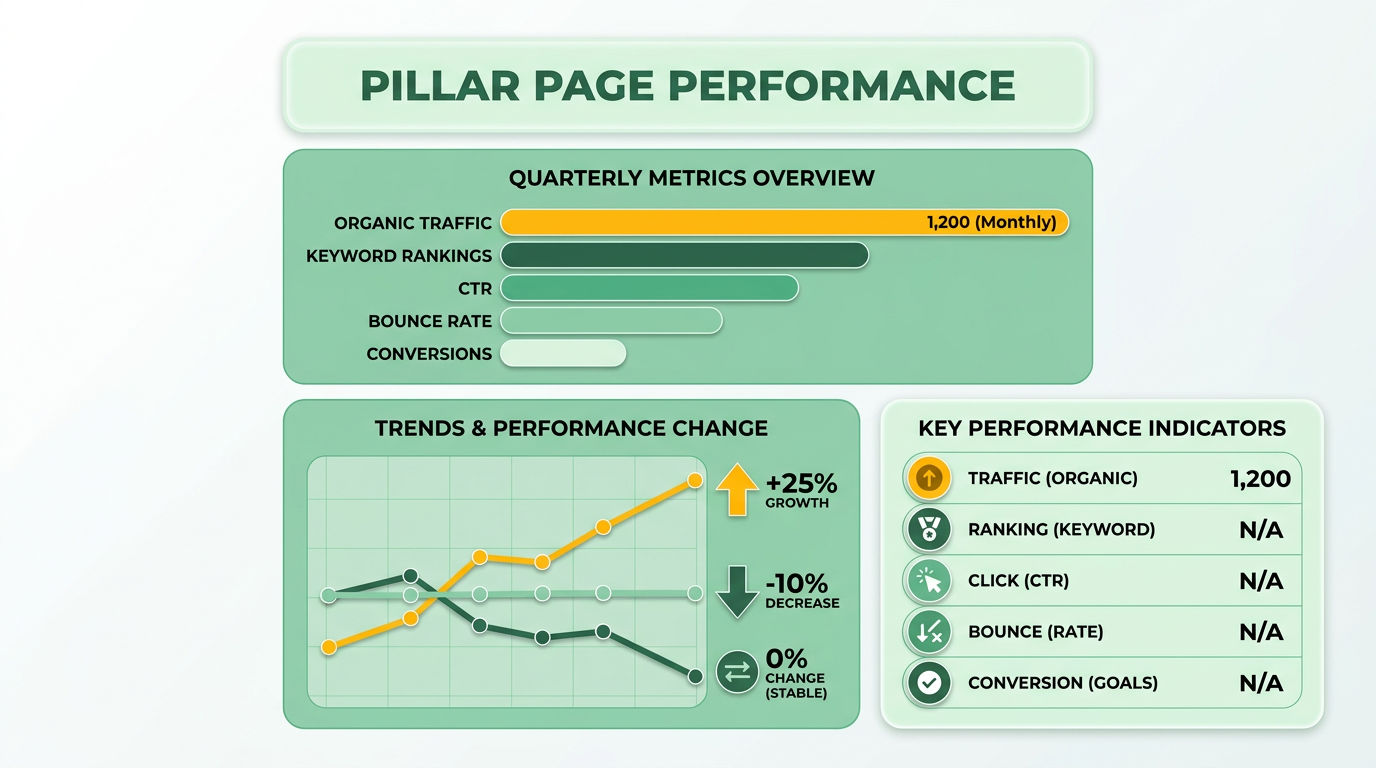
Use these metrics to compare performance against goals and competitors. If traffic is stagnant or rankings drop, it signals a need for content or technical adjustments. As mentioned in the Optimizing Internal Linking Within a Content Hub section, ensuring cluster pages link back to the pillar page strengthens topical authority and improves rankings.
Tools for Traffic and Ranking Insights
Google Analytics and Search Console are foundational for tracking performance. In Analytics, set up custom segments to isolate traffic from your pillar page cluster. Focus on metrics like:
- Sessions and average session duration to gauge user interest.
- Goal completions (e.g., form fills, PDF downloads) to measure conversions.
In Search Console, use the Performance Report to identify top-performing keywords and pages. Look for sudden drops in click-through rates (CTR) or impressions, which might indicate technical issues like broken links or meta description problems.
For a streamlined approach, integrate AnyPost.ai’s analytics tool. It automates cluster performance tracking by aggregating data on:
- Traffic trends for pillar pages and subpages.
- Internal linking gaps between cluster content.
- Technical SEO health (e.g., page speed, mobile usability). This tool simplifies identifying underperforming pages and prioritizing updates. For issues like slow load times, refer to the Common Pitfalls to Avoid When Building Pillar Pages section to address technical SEO barriers.
Addressing Common Performance Issues
Even high-quality pillar pages can struggle due to technical or content gaps. Use data to pinpoint problems:
- Thin content: If bounce rates are high and time on page is low, expand pillar pages with in-depth sections or additional cluster content. Building on concepts from the Blueprint for Building a High-Performing Pillar Page section, ensure your content aligns with user intent and covers subtopics comprehensively.
- Technical SEO issues: Slow load times or broken links reduce rankings. Use Search Console’s Coverage Report to fix crawl errors.
- Poor cluster alignment: Ensure all cluster pages link back to the pillar page and share relevant keywords. Disconnected clusters dilute authority. For guidance on structuring these links, see the Optimizing Internal Linking Within a Content Hub section.
For example, if a cluster page ranks well but drives no traffic to the pillar, adjust internal linking. Regular audits with tools like AnyPost.ai help catch these issues early.
Using Data to Improve Strategy
use insights to refine your approach. If a pillar page’s cluster content consistently underperforms, consider rewriting or repurposing it into another format (e.g., a video or infographic). For overperforming clusters, allocate more resources to expand the theme.
A/B testing headlines or CTAs on cluster pages can also boost engagement. Track results in Analytics to see which variations drive the most traffic. Over time, this data-driven cycle of testing, analyzing, and optimizing ensures your pillar pages remain competitive and valuable to users.
AnyPost.ai’s analytics helped us identify a 30% traffic drop in one cluster page, which we fixed by updating outdated content and improving internal links.
By combining manual audits with automated tools, you can maintain a content hub that drives sustainable organic growth.
SEO Tools and Analytics for Pillar Pages
SEO tools and analytics are essential for creating and optimizing pillar pages that rank well. These tools help identify high-value keywords, track performance metrics, and uncover technical issues that hinder visibility. By integrating tools like Ahrefs, SEMrush, and Moz with AnyPost.ai’s specialized features, you can streamline the optimization process and ensure your pillar pages meet both user and search engine expectations. Let’s break down how to use these tools effectively.
What Are the Key Functions of SEO Tools for Pillar Pages?
SEO tools serve three primary purposes for pillar pages: keyword research, technical auditing, and performance tracking. For example, tools like Ahrefs and SEMrush allow you to analyze competitors’ content strategies, uncover gaps in your own coverage, and validate keyword opportunities. Moz’s site crawler can flag issues like broken links or thin content that might weaken your pillar pages. These insights help you align your content with user intent and search engine algorithms.
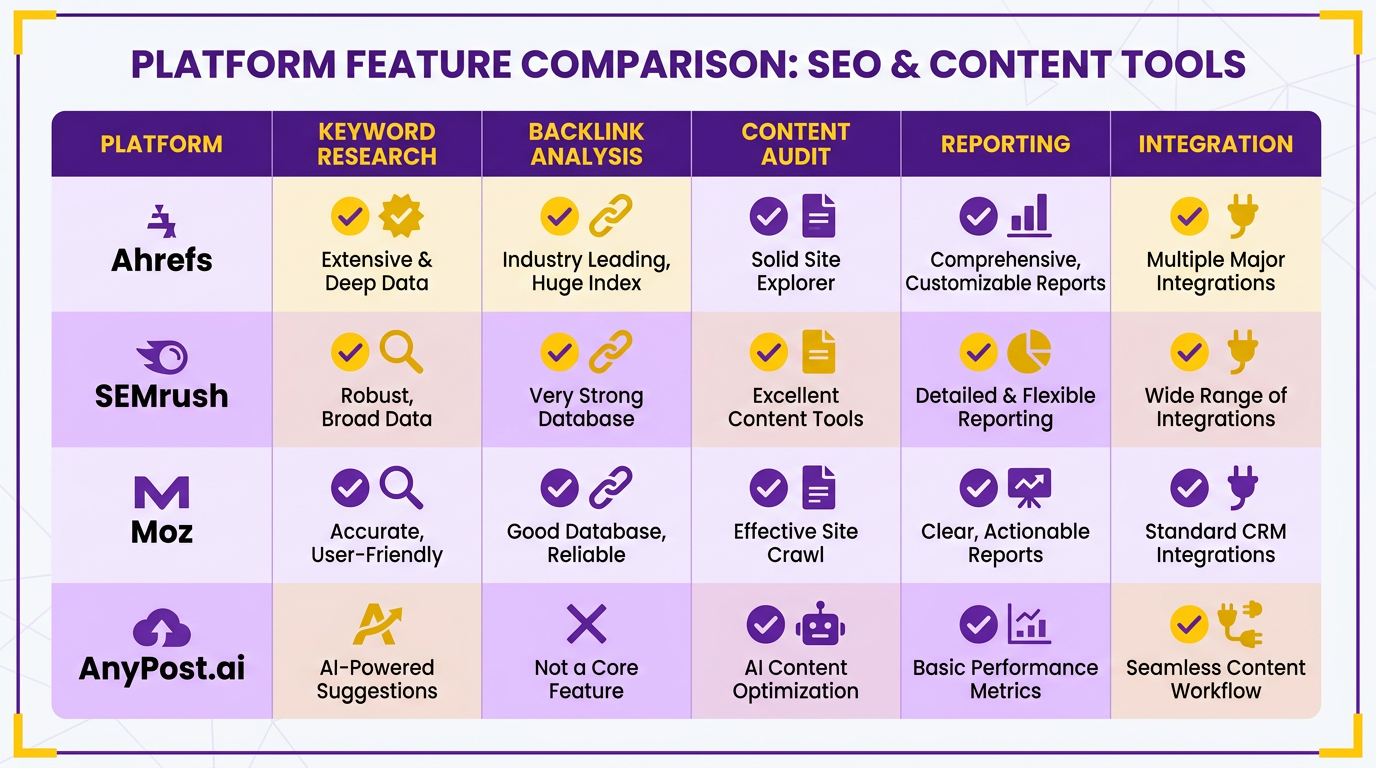
Start by using keyword research tools to identify terms with high search volume and low competition. Input your topic into a tool, and it will return a list of related keywords. Prioritize terms that align with your audience’s needs and your content goals. As mentioned in the Blueprint for Building a High-Performing Pillar Page section, strategic keyword selection forms the foundation of a content hub’s structure. Next, conduct technical audits to ensure your pillar pages load quickly, have clean code, and are mobile-friendly. Most tools offer detailed reports with actionable fixes for issues like slow page speed or poor internal linking. Addressing these technical missteps, as highlighted in the Common Pitfalls to Avoid When Building Pillar Pages section, is critical for SEO effectiveness.
How Does AnyPost.ai Streamline Pillar Page Optimization?
AnyPost.ai’s SEO tool simplifies content creation and optimization by offering real-time suggestions for keyword placement, readability adjustments, and structure improvements. For instance, as you draft a pillar page, the tool might highlight underused keywords or suggest splitting a dense section into subheadings for better readability. Unlike generic providers, AnyPost.ai integrates keyword targeting directly into the writing process, reducing the need for multiple revisions.
The platform also automates performance tracking, showing you how changes to your pillar page affect traffic and engagement. If a particular section isn’t driving conversions, the tool can flag it for refinement. This proactive approach saves time compared to manually sifting through analytics dashboards. Additionally, AnyPost.ai’s collaboration features let teams align on optimization priorities without switching tools.
How Do You Choose the Right SEO Tools for Your Needs?
Selecting the right tools depends on your budget, technical expertise, and content goals. Free tools like Google Analytics and Ubersuggest are great for beginners, while advanced platforms offer deeper insights into competitor strategies and technical SEO. For example, if your team lacks technical expertise, prioritize tools with user-friendly interfaces and automated audit features.
When evaluating AnyPost.ai or similar platforms, test their integration with your existing workflow. Does the tool sync with your CMS or content calendar? Can it provide actionable insights in real time? Transparent pricing is another non-negotiable-avoid solutions that hide fees for essential features. Start with a small project to gauge how effectively the tool supports your pillar page strategy before committing long-term.
How Can Data Improve Your Pillar Page Strategy?
Data from SEO tools should inform every stage of your pillar page lifecycle. Begin by analyzing traffic trends to determine which sections drive the most engagement. If a subsection has a high bounce rate, consider rewriting it to better match user intent. Use tools like SEMrush to monitor competitor updates, ensuring your content stays fresh and comprehensive.
For example, one company improved its pillar page rankings by 40% after using keyword data to expand its content from 2,000 to 5,000 words. Similarly, fixing technical issues identified by a site crawler boosted another page’s load time from 5 seconds to under 2, increasing conversions by 25%. These examples show how data-driven adjustments can turn underperforming pages into high-ranking hubs. As outlined in the Tracking Traffic and Rankings: Key Metrics section, continuous monitoring of these metrics is vital for sustained success.
By combining strong keyword research, technical optimization, and performance tracking, you can build pillar pages that attract traffic and retain users. Tools like AnyPost.ai make this process more efficient, but success ultimately depends on how well you apply the insights they provide.
Common Pitfalls to Avoid When Building Pillar Pages
Common pitfalls when building pillar pages often stem from technical missteps and content gaps that undermine SEO effectiveness. Addressing these issues ensures your pillar pages rank well and deliver value to users. Below, we break down key mistakes to avoid and how tools like AnyPost.ai can streamline fixes.
How Do Technical Pitfalls Impact Pillar Page Performance?
Technical errors can block search engines from crawling your content or dilute your SEO efforts. Keyword cannibalization-when multiple pages target the same keyword-splits ranking potential and confuses search intent. For example, if three blog posts and a pillar page all target “how to build a website,” Google may prioritize the wrong page. To fix this, audit your site for overlapping keywords using tools like AnyPost.ai’s topic cluster planner, which visually maps keyword relationships and highlights conflicts. As mentioned in the Optimizing Internal Linking Within a Content Hub section, this tool also helps structure interlinked content to reinforce topical relevance. Another common issue is lack of topical authority, where pillar pages fail to cover a topic comprehensively. This weakens trust signals and hurts rankings. Ensure your pillar page answers all foundational questions about the topic and links to subtopic clusters for depth.
What Content Mistakes Should You Avoid?
Thin content-pages with insufficient depth or repetitive information-is a red flag for search engines. A 500-word pillar page on “digital marketing strategies” won’t compete with 2,000-word guides from established sites. Use AnyPost.ai’s AI-powered content briefs to outline sections like “target audience analysis” or “ROI measurement,” ensuring each part adds unique value. Building on concepts from the Blueprint for Building a High-Performing Pillar Page section, ensuring E-E-A-T signals (Experience, Expertise, Authority, Trustworthiness) is critical. For instance, a healthcare pillar page without citations from medical experts or patient testimonials risks being labeled low-quality. Add author bios with credentials, link to peer-reviewed studies, and include user reviews where relevant. A real-world example: One company improved its pillar page’s ranking by 30% after adding a section authored by a certified SEO specialist and citing case studies.
How Can AnyPost.ai Tools Fix Common Issues?
AnyPost.ai’s topic cluster planner automates the creation of interconnected content, reducing keyword cannibalization by assigning unique focus keywords to each cluster. For example, a pillar page on “email marketing” might have subtopic clusters like “automation tools” and “open rate optimization,” each with distinct keywords. The tool also identifies gaps in topical coverage, ensuring your page answers all user intent variations. Meanwhile, the AI-powered content brief generates checklists for E-E-A-T compliance, such as prompting you to include expert interviews or data-driven examples. If performance issues arise-like low traffic or high bounce rates-use AnyPost.ai’s analytics to pinpoint underperforming sections. One user reported a 40% drop in bounce rates after restructuring their pillar page using the tool’s recommendations to add subheadings and internal links.
How Do You Diagnose and Improve Pillar Page Performance?
Start by auditing technical requirements: Ensure the page loads in under 3 seconds, is mobile-friendly, and has no broken links. Tools like Screaming Frog or Google’s PageSpeed Insights help here, though AnyPost.ai integrates these checks into its workflow. Next, evaluate content quality. If engagement metrics (time on page, scroll depth) are low, add interactive elements like FAQs or downloadable templates. For example, a pillar page on “project management software” saw a 25% increase in time on page after adding a comparison table and a free trial sign-up form. Regularly update the page with new data or trends-AnyPost.ai’s content briefs flag outdated sections automatically. Finally, track performance against competitors using tools like Ahrefs or SEMrush. If their pillar pages rank higher, analyze their backlink profiles and adjust your outreach strategy accordingly.
By avoiding these pitfalls and using AI-driven tools, you’ll create pillar pages that rank well, drive traffic, and establish your brand as an authority in your niche.
Scaling Your Content Hub Strategy for Long-Term Growth
A scalable content hub starts with defining a central theme and mapping subtopics that align with user intent. Begin by identifying high-volume keywords related to your core topic using tools like keyword research platforms. Organize these keywords into clusters that represent distinct aspects of your main theme. For example, if your hub focuses on digital marketing, clusters might include SEO, social media, and email marketing.
Next, prioritize clusters based on search demand and business goals. Use a topic cluster model where a pillar page serves as the central resource, linking to subtopic articles. As mentioned in the Blueprint for Building a High-Performing Pillar Page section, structuring this hierarchy with clear parent-child relationships strengthens SEO. Tools like AnyPost.ai’s topic cluster planner automate this process by suggesting relevant subtopics and mapping keyword gaps. This ensures your hub remains focused while leaving room for expansion.
What Makes High-Quality Content for a Hub?
High-quality content balances depth, usability, and SEO optimization. Pillar pages should be exhaustive, typically 3,000–5,000 words, covering foundational knowledge while linking to narrower subtopic articles. Supporting content, like blog posts or case studies, should dive deeper into specific questions or use cases. Building on concepts from the Example 1: Hunter - Cold Email Outreach Guide section, a pillar page on “Content Marketing Strategies” might link to subpages about “Email Campaigns” or “Social Media Analytics.”.
Engagement is key: mix formats like how-to guides, video tutorials, and infographics to cater to different preferences. Conductor’s example of a content marketing hub page uses clear headings, bullet points, and internal links to improve readability. AnyPost.ai’s AI-powered content briefs help maintain consistency by outlining required sections, keyword density, and tone for each piece. This ensures all content aligns with both user needs and search engine guidelines.
How Do You Optimize a Content Hub for SEO?
Optimization hinges on internal linking, E-E-A-T (Expertise, Experience, Authorship, Trust), and performance tracking. Use contextual links to connect pillar pages with subtopic content, creating a logical flow that search engines recognize as authoritative. As outlined in the Optimizing Internal Linking Within a Content Hub section, a subpage about “SEO Tools” should link back to the main “SEO Guide” pillar page.
E-E-A-T signals require showcasing expertise through author bios, citations, and up-to-date data. AnyPost.ai streamlines this by suggesting content gaps and highlighting areas to add expert insights. Once live, track metrics like organic traffic, bounce rate, and time on page using analytics tools. Regularly audit underperforming pages and update outdated information to maintain relevance.
By combining structured planning, varied content formats, and continuous optimization, your content hub becomes a self-sustaining asset that grows with your audience’s needs. Tools like AnyPost.ai reduce manual effort, letting you focus on strategic improvements while ensuring technical SEO stays on track.
Frequently Asked Questions
1. What is a pillar page?
A pillar page is a central hub that organizes related subtopic pages into clusters. It improves SEO by creating a clear topical hierarchy, helping search engines prioritize comprehensive content.
2. How do pillar pages increase organic traffic?
Pillar pages boost traffic by 30–43% using content clusters. Subpages link back to the hub, distributing ranking power and reducing keyword cannibalization.
3. What’s the benefit of content clusters?
Content clusters generate 1,200 extra monthly visits in six months. They outperform standalone blog posts by covering broad themes and long-tail keywords simultaneously.
4. How do pillar pages prevent keyword cannibalization?
Pillar pages consolidate related content under a single hub, linking subpages back to it. This avoids internal competition and strengthens topical authority for broader keywords.
5. Can you provide a traffic example?
Ahrefs’ case study shows a pillar page driving 1,200 monthly visits. Subpages contribute 800 more, creating a self-sustaining traffic engine for long-term growth.
6. How do pillar pages improve crawl efficiency?
Pillar pages streamline crawling by structuring content hierarchically. Search engines prioritize clusters, ensuring comprehensive indexing of broad topics and subthemes.
7. How to create a content cluster?
Start with a broad pillar page on a core topic. Create 10–15 subpages on subtopics, linking each to the pillar. Use internal links to reinforce topical relevance and authority.