
Product Feed Optimization for Google Shopping and AI Search

Key Takeaways
- Product feed optimization structures your data so both Google Shopping and AI search surfaces can read, rank, and cite individual products.
- Title, description, and price carry most of the weight. The title is your single biggest visibility lever.
- Front-loading brand, product type, and key specs in titles beats vague marketing headlines, because Google matches queries directly against that text.
- Mismatched pricing between a feed and its landing page gets flagged fast and drags products into disapproval.
- AI surfaces like ChatGPT and Google's AI Overviews pull from structured product data. They don't guess which items to surface.
- Optimizing for Shopping and optimizing for AI citation now overlap heavily. One clean feed satisfies both.
- Stale data and format errors are the fastest route to disapprovals. Feed freshness is a baseline, not a bonus.
The Short Version
Product feed optimization means structuring your product data so both Google Shopping and AI search surfaces can read, rank, and cite it. Get the core attributes right and your products show up more often, disapprove less, and stand a real chance of getting pulled into an AI Overview or a ChatGPT answer.
Here's what matters most, before the guide breaks each piece down.
What actually drives feed performance
Three attributes carry the weight: title, description, and price. The title is your biggest lever for visibility. Google matches queries against it, so front-loading brand, product type, and key specs beats a vague marketing headline every time.
Description and price matter for a different reason. AI search surfaces read structured product data to decide what to cite, and accurate pricing keeps you out of disapproval trouble. A feed that says one price while your landing page says another gets flagged fast.
Why AI search surfaces need structured data
Surfaces like ChatGPT and Google's AI Overviews don't guess. They pull from structured, machine-readable product data to decide what to surface and cite. Thin or missing attributes, and you don't get considered.
That's the shift worth absorbing. Optimizing for Google Shopping and optimizing for AI citation now overlap heavily. The same clean, complete feed that wins the Shopping tab is what makes your products eligible to appear in an AI-generated answer.
Feed format and freshness sit underneath all of it. Stale data and format errors are the fastest route to disapprovals, so keeping your feed current is table stakes.
Feed optimization at a glance
| Element | What It Controls | Optimization Priority |
|---|---|---|
| Title | Query matching and visibility | Front-load brand, type, and key specs |
| Description | Context for ranking and AI citation | Include specs, materials, use cases |
| Price | Eligibility and approval | Match feed to landing page exactly |
| Structured data | AI Overview and LLM citation | Add all recommended attributes |
| Feed format | Approval and data accuracy | Follow Merchant Center spec |
| Freshness | Disapproval prevention | Update on a regular schedule |
Who can skip the deep feed work
Running a handful of SKUs with stable pricing and no plans to scale? Heavy feed automation is overkill. Manual attribute cleanup in Merchant Center gets you 90% of the way there.
But if you carry hundreds or thousands of products, or your prices and inventory move often, feed optimization stops being optional. At that scale, the gap between a clean feed and a messy one shows up directly in visibility and revenue.
The rest of this guide walks each step: writing titles that match real queries, structuring descriptions for both Shopping and AI, picking the right feed format, and setting a freshness cadence that keeps disapprovals down.
Why this work pays off
Product feed optimization decides whether your products show up at all. A clean, complete, well-structured feed earns more impressions, fewer disapprovals, and a real shot at appearing inside AI-generated answers. The work isn't glamorous. It pays off in visibility and revenue anyway.
What to optimize first
Start with your highest-impact attributes, then work outward toward data hygiene and freshness. The feed lives and dies on how accurately it describes each product, so your first pass should hit the fields search engines and AI surfaces read most closely.
The priority order that gets you moving:
- Titles: Front-load brand, product type, and key specs. Your single biggest visibility lever.
- Descriptions: Write full, specific copy that AI surfaces can parse and cite. Vague marketing lines get skipped.
- Product identifiers and attributes: Fill in GTINs, MPNs, color, size, material, condition. Missing values cause disapprovals and shrink eligibility.
- Image quality: Use clean, high-resolution shots that match the product exactly.
- Data freshness: Keep price and availability in sync with your site. Mismatches trigger disapprovals and erode trust.
Nail these in sequence and you've covered the attributes that drive both Shopping performance and AI citation eligibility.
Where content generation and analytics fit
At scale, manual feed work breaks down. A single store can carry thousands of SKUs, each needing an optimized title, a detailed description, and structured attributes. That's where content generation, automated publishing, and feed analytics earn their keep.
Content generation tools help you produce consistent, attribute-rich titles and descriptions across the whole catalog without rewriting each one by hand. Publishing keeps those updates flowing into Merchant Center on a schedule, so the feed stays current.
Analytics closes the loop. You see which products get impressions, which get disapproved, where visibility drops. That feedback tells you what to fix next instead of guessing.
How to get started
Set up the foundation first, then optimize in passes. You need a working Merchant Center account and a clean feed before any attribute tuning matters.
- Set up Google Merchant Center: Create your account and connect your store. This is where the feed lives and where disapprovals surface.
- Submit and validate your feed: Upload your product data and clear errors and warnings. Fix disapproved items before chasing new visibility.
- Optimize your priority attributes: Rework titles and descriptions first, then fill gaps in identifiers, attributes, and images.
- Automate freshness and publishing: Sync price and availability so your feed never drifts from your live site.
- Track and iterate: Watch impressions, visibility rate, and disapproval trends. Adjust based on what the data shows.
For a deeper walkthrough of the fundamentals, the product feed optimization guide for e-commerce brands is a solid next read.
Feed optimization isn't a one-time project. Search surfaces and AI answers keep shifting, and your catalog changes constantly. Treat the feed as a living asset. Keep it clean, keep it current, keep testing what earns visibility.
Why the stakes keep climbing
Product feed optimization controls whether your products get seen at all. Google Shopping drives over 50% of Google's e-commerce traffic, and AI search surfaces now pull product data straight from your feed to build answers. A weak feed means fewer impressions, more disapprovals, and zero presence in the AI results shoppers increasingly trust.
Two channels, one feed
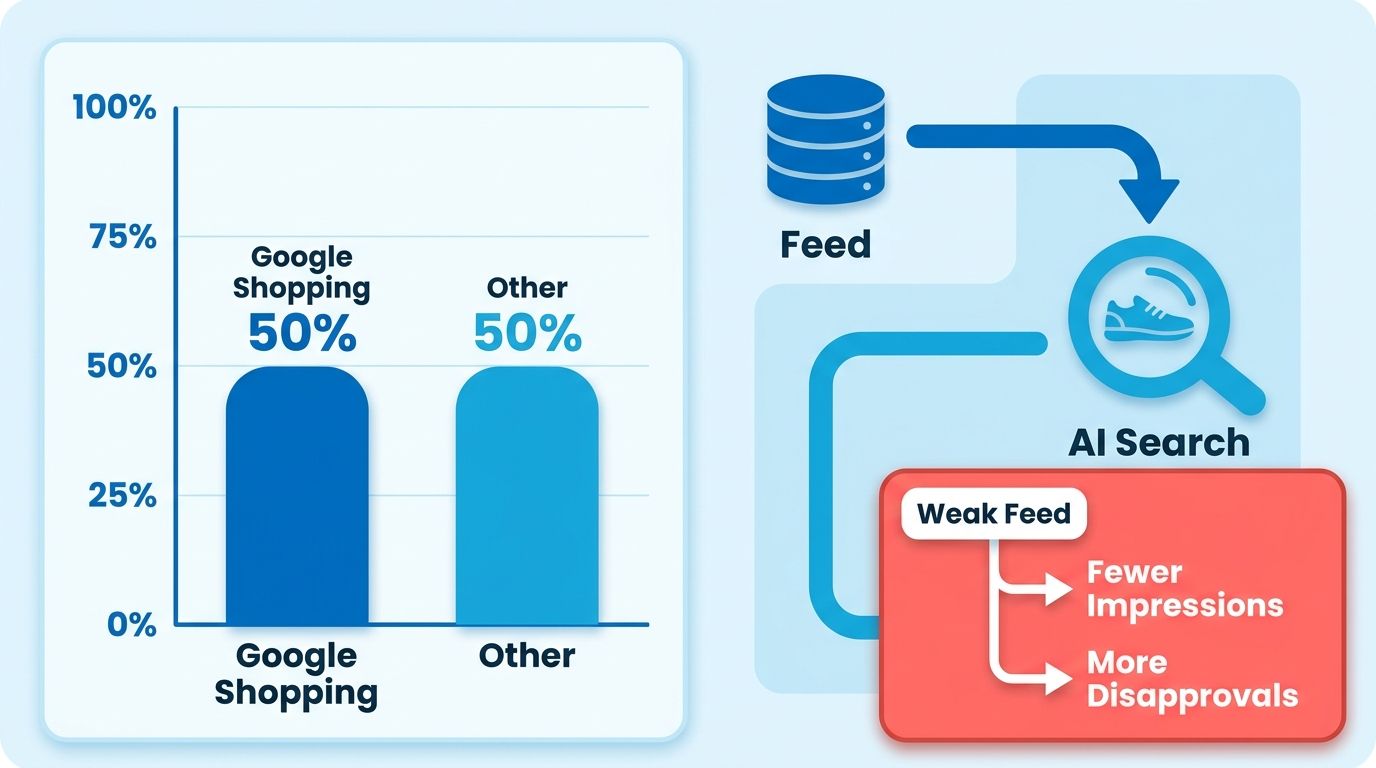
The stakes rise because two channels now depend on the same data. Google Shopping remains the biggest e-commerce traffic source on the platform, and generative AI features read the same structured data to decide which products to surface. One clean feed feeds both.
Voice and conversational search add pressure. Around 71% of consumers use voice assistants for product research, and those queries hit the same underlying product data. When someone asks an assistant for the best waterproof running shoe under a certain price, your feed attributes decide whether you make the shortlist.
AI Overviews raised the bar again. Google has quietly called out specific feed attributes that flow into its AI-driven results, and most merchants are missing them. If your feed lacks those fields, you don't appear in the answer. Doesn't matter how good the product is.
What you actually gain
Optimized feeds pay off on both sides of the ledger. Clean, complete product data can lift conversion rates by up to 25% and cut costs by up to 30%. You spend less serving irrelevant impressions and earn more from the ones that convert.
The gains come from accuracy. When your data precisely describes each product, Google matches it to better queries and shows it to buyers with real intent. That tighter match improves click-through rate and return on ad spend at the same time.
Visibility rate is the metric that ties it together. The goal is simple: get as many eligible products seen as possible. A well-structured feed keeps more of your catalog active and in front of shoppers instead of stuck in disapproval limbo. This complete guide to Google Shopping feed optimization covers the mechanics.
What trips merchants up
Three problems block most feeds: data quality, formatting errors, and no visibility into performance. Each one quietly drains impressions and inflates cost with no obvious warning sign.
Data quality is the most common failure. Missing attributes, vague titles, stale pricing. All of it reduces how often Google and AI surfaces trust your listings. If the feed contradicts your product page, Google may disapprove the item outright.
Formatting errors break the machine reading. Feeds are structured data, and one malformed field can knock products out of eligibility. These errors rarely announce themselves. You notice them only when impressions drop.
No performance visibility leaves you guessing. Without clear metrics on which products get seen, clicked, and converted, you can't tell whether a fix worked. Closing that blind spot is the first real step toward a feed that earns its keep.
Data freshness and how disapprovals happen
Stale data gets your products disapproved. When the price or availability in your feed doesn't match what's on your product page, Google flags the mismatch and pulls the listing. Fresh, accurate data keeps your products eligible across both Shopping and AI-generated results.
Why price and availability sync matters so much
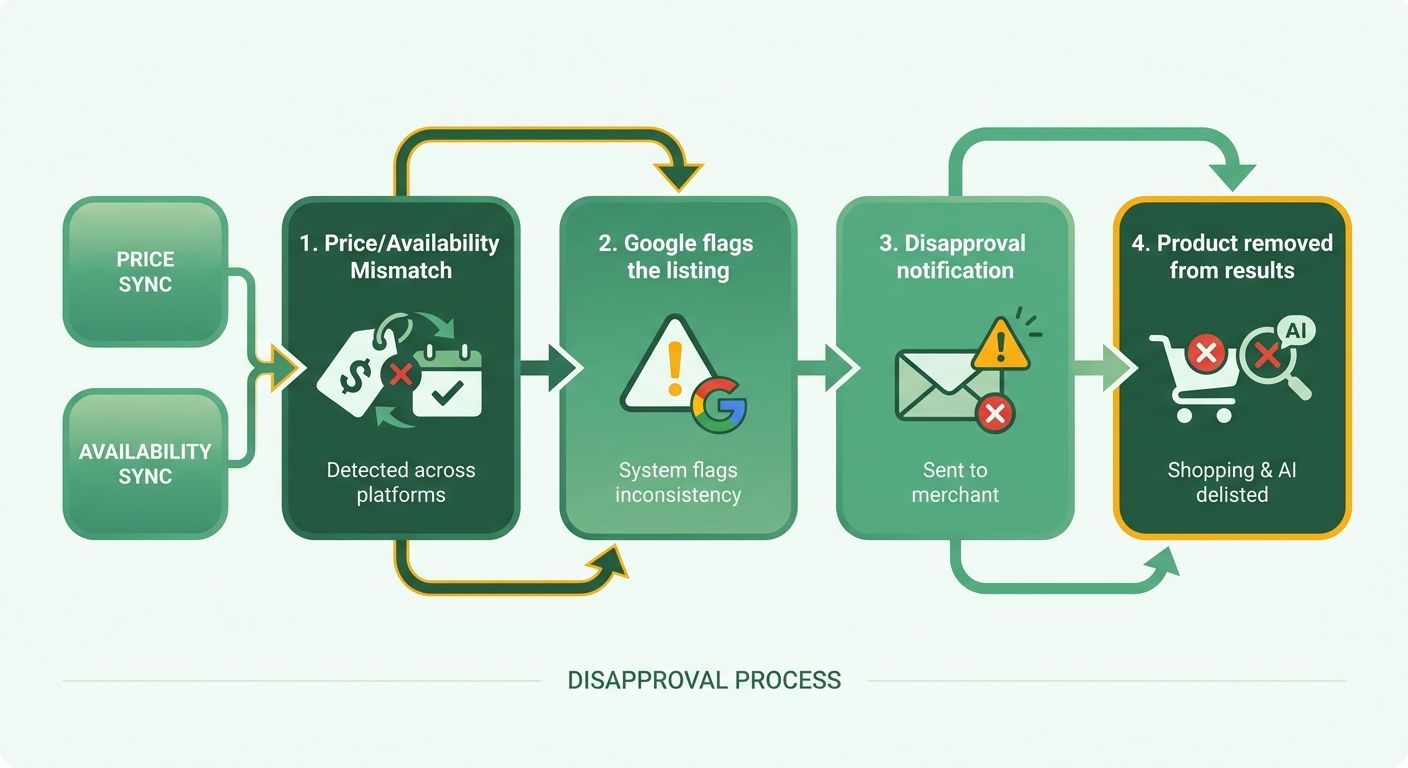
Price and availability are the two attributes Google checks most aggressively. If a shopper clicks through and finds a different price than the one advertised, that breaks trust and violates policy. Google catches these mismatches automatically and disapproves the offending items.
Price sync: Your feed price must match your landing page price exactly, including currency and any tax display rules.
Availability sync: Your in stock, out of stock, or preorder status must reflect real inventory in near real time.
The problem gets worse at scale. A store with thousands of SKUs and frequent price changes can pile up disapprovals fast when the feed lags behind the site. Sales events and flash promotions are the biggest culprits, since prices shift faster than a daily feed refresh can capture.
What causes disapprovals
Disapprovals fall into three buckets: formatting errors, data quality issues, and policy violations. Each one blocks a product from showing until you fix the root problem.
- Formatting errors: Missing required attributes, wrong data types, or malformed values like an invalid GTIN. Easiest to catch and fix, because Merchant Center tells you exactly which field failed.
- Data quality issues: Price and availability mismatches, broken image links, or landing pages that return errors. These usually trace back to a feed that hasn't refreshed against live site data.
- Policy violations: Prohibited products, misleading claims, or missing contact and returns info on your site. These require you to change the product or the store, not just the feed.
Run a weekend sale and the trap is easy to fall into. Your site drops prices Friday night, but your feed only updates Saturday morning. For those hours, every discounted product shows a mismatch and risks disapproval. The fix: sync price and availability more often than once a day during promotions.
How often to refresh
Refresh cadence should match how fast your data changes. Stable catalogs can update daily. Volatile pricing or fast-moving inventory needs more frequent updates to stay accurate and avoid disapprovals.
Google supports scheduled fetches and direct API updates for the attributes that change most. Use frequent updates for price and availability, and reserve full feed rebuilds for structural changes like new products or revised titles.
Frequency affects visibility, not just compliance. A feed that consistently reflects live data earns more trust from ranking systems and stays eligible across more surfaces. AI search results read the same structured data, so an outdated price can push you out of an answer entirely. Keep the feed current and you protect both your eligibility and your shot at getting cited.
Feed formats and structured data for AI search
Your feed can arrive in two main formats, and your structured data lives in a separate layer on your site. Both feed Google Shopping and AI search surfaces, but they do different jobs. Get the format right, then back it up with schema markup so AI experiences can read your products directly.
What formats Google supports
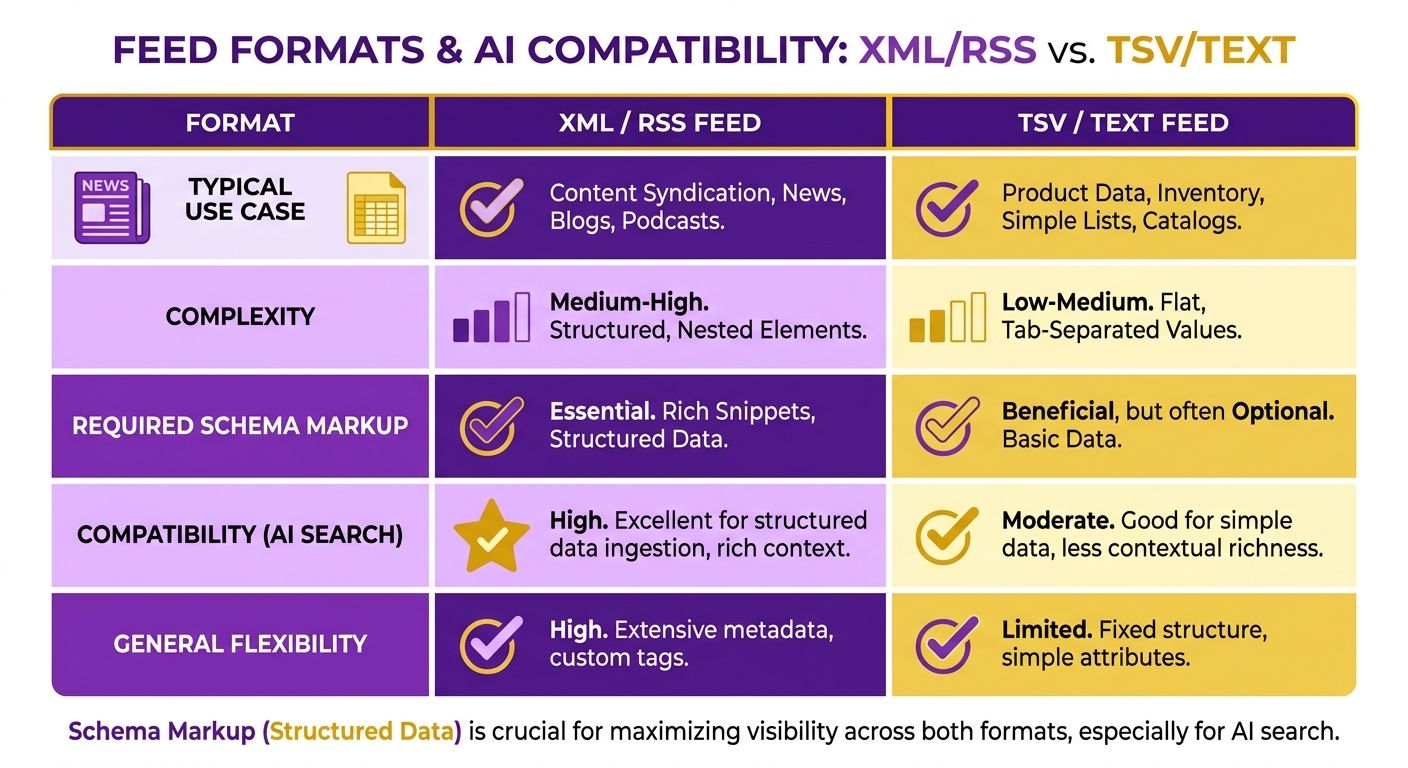
Google accepts two primary feed formats: XML/RSS and TSV/text. XML/RSS is the most common and handles complex product data with nested attributes cleanly. TSV (tab-separated values) works well if you manage products in a spreadsheet and want a simpler, flat file.
XML/RSS suits large catalogs and automated feeds from most e-commerce platforms. It structures each product as an item with clearly tagged attributes, so parsing stays reliable even as your catalog grows.
TSV/text feeds trade flexibility for simplicity. Each row is a product, each column an attribute. If your team lives in spreadsheets, TSV keeps the workflow fast and readable without the XML overhead.
How supplemental feeds add value
Supplemental feeds let you add or override product information without rebuilding your primary feed. Use them to layer in extra data like reviews, ratings, custom labels, or corrected attributes, all matched to your main feed by product ID.
This matters when your primary feed comes from a platform you can't fully edit. Instead of fighting the source, you attach a supplemental feed that fills the gaps. Add promotional labels, patch missing GTINs, push updated titles to a subset of products.
Reviews and ratings deserve special attention. They influence both click-through on Shopping listings and how AI surfaces judge product credibility. A supplemental feed is the clean way to feed that signal in.
Why schema.org JSON-LD is critical for AI search
Structured data using schema.org JSON-LD tells AI search surfaces exactly what your product is, in a format they read natively. Google's guidelines point to the Product and Offer types as the core markup for e-commerce. Without it, AI Overviews and LLM-driven answers have to guess at your product details.
The feed handles Shopping. Schema handles your actual product pages, which is where generative AI features on Google Search pull context. Both should agree on price, availability, and product identity so nothing conflicts.
A basic Product schema JSON-LD snippet:
{
 "@context": "https://schema.org/",
 "@type": "Product",
 "name": "Product Name",
 "description": "Clear product description with key specs",
 "offers": {
 "@type": "Offer",
 "price": "49.99",
 "priceCurrency": "USD",
 "availability": "https://schema.org/InStock"
 }
}
Include name, description, and the nested Offer with price, priceCurrency, and availability. These are the properties AI surfaces read first when deciding whether to cite your product.
Keep your schema in sync with your feed and landing page. If your JSON-LD says one price and your feed says another, you undercut the trust both Google and AI answers place in your data. Consistency across all three layers is what earns you a spot in AI-generated results.
Measuring and refining feed performance
You can't refine what you don't measure. Feed performance comes down to a handful of metrics that tell you which listings pull their weight and which drag down your results. Track them consistently, act on what they reveal, and the feed gets sharper over time.
Which metrics actually matter
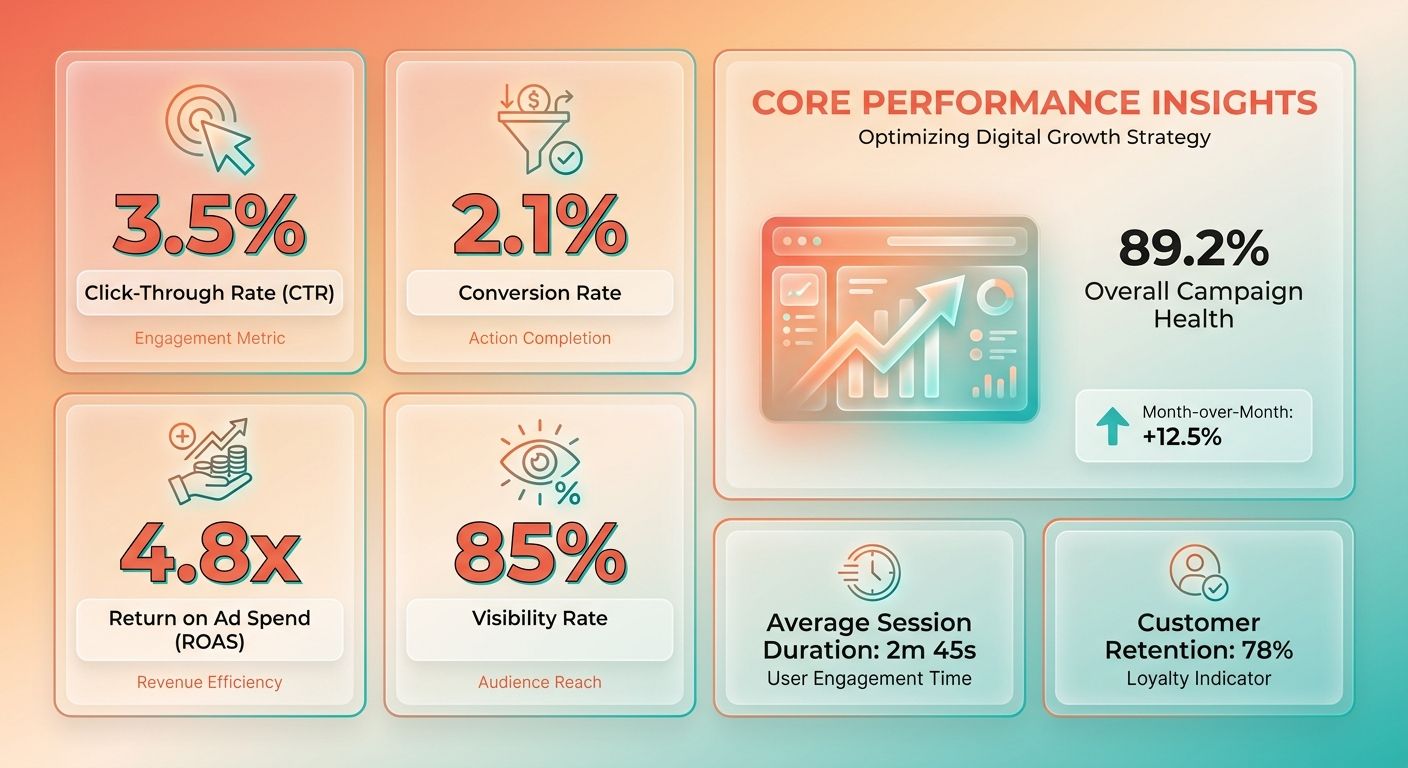
Four metrics tell you how the feed is performing: click-through rate, conversion rate, return on ad spend, and visibility rate. Together they show whether shoppers see your products, click them, and buy.
Click-through rate (CTR): The share of impressions that turn into clicks. A weak CTR usually points to a poor title, a flat image, or an off-market price.
Conversion rate: The share of clicks that end in a purchase. Low conversions after strong clicks often mean the landing page or price fails to match the promise in your listing.
Return on ad spend (ROAS): Revenue earned per dollar spent. This is the number that decides whether a campaign scales or gets cut.
Visibility rate: How many of your eligible products actually get seen. The goal of feed optimization is to push this number up so as many products as possible reach shoppers.
What tools to use
Two tools cover most of what you need: Google Merchant Center and Google Analytics. Merchant Center shows you feed health, disapprovals, and product-level performance. Analytics connects that data to on-site behavior and revenue.
Merchant Center is where you catch problems early. It flags disapprovals, surfaces attribute warnings, and shows which products drive Shopping and Performance Max results. Check it often, because a stalled feed there quietly kills visibility across every surface.
Google Analytics fills the gap Merchant Center leaves. It ties clicks to sessions, cart adds, and purchases, so you can see which products convert and which just burn budget. Pair the two and you get a full loop from feed to sale.
How to refine based on what you find
Refinement starts with data analysis, moves to attribute fixes, ends with better content. Read your metrics, spot the weak products, rework the fields that hold them back.
Start by isolating low performers. If a product gets impressions but no clicks, rewrite the title and swap the image. If it gets clicks but no sales, check the price and the landing page for mismatches.
AI-driven optimization takes this further. An AI-optimized feed uses machine learning to enhance product data based on real performance, and testing shows it can lift both CTR and ROAS. The system learns which title structures and attribute combinations win, then applies those patterns across your catalog.
Content creation closes the loop. Richer descriptions, cleaner attributes, sharper titles give both Google and AI surfaces more to work with. For a deeper walkthrough of these fixes, the complete guide to Google Shopping feed optimization breaks down the attribute-level work in detail.
Make this a habit, not a one-off. Feeds decay as prices shift and products change. Review your metrics every few weeks, act on the outliers, and your visibility and ROAS keep climbing.
Optimizing feeds for AI search surfaces
AI search surfaces like ChatGPT and Google's AI Overviews pull product data straight from your feed to build answers. To get cited, your data has to be structured, complete, and rich enough for a language model to parse and trust. The feeds that win aren't the flashiest. They're the most machine-readable.
What AI Overviews actually read
AI Overviews rely on specific feed attributes that most merchants skip. Google has quietly called out fields that feed into its AI-driven results, and filling them out separates cited products from invisible ones.
Focus on these first:
- Product type and Google product category: These tell the AI exactly where your product fits. Precise categorization helps the model match your item to conversational queries.
- Detailed descriptions: AI surfaces read your description text to summarize and recommend. Thin descriptions give the model nothing to work with.
- GTIN, brand, and identifiers: Structured identifiers let AI systems cross-reference your product against known catalogs and pull it into answers with confidence.
Add the attributes competitors leave blank and you gain an edge before touching anything else. Most merchants ignore these fields entirely, so the bar to stand out is low.
How to optimize for AI citation
Optimize for AI citation by combining keyword research, attribute completeness, and rich content. Machine learning can enhance product data based on real performance, improving both CTR and ROAS as the feed learns which phrasing converts.
Start with keyword research. Study how shoppers phrase conversational and voice queries, then work those terms into titles and descriptions. AI surfaces answer questions, so your data should mirror the language of the questions being asked.
Next, attack attribute completeness. Fill every relevant field with accurate, specific values. An AI-optimized feed uses performance data to refine titles and categories over time, so the more complete your starting point, the faster it improves.
Then create content that reads well for both humans and models. Descriptions should answer the practical questions a shopper asks: what it's made of, who it's for, how it compares. Google's own guidance on optimizing for generative AI features rewards clear, useful content over keyword stuffing.
Where AI does the heavy lifting
AI does the heavy lifting on scale and refinement. Optimizing hundreds or thousands of product entries by hand isn't realistic, so tools that generate and publish structured content close the gap. Top agencies already use machine learning to sharpen titles, visuals, and categorization at volume.
Content generation matters most here. Writing unique, attribute-rich descriptions for a large catalog is where automation earns its keep. Systems that generate feed content and publish it directly keep your data fresh and consistent across every listing.
The payoff is concrete. An AI-optimized feed lifts CTR and ROAS, which means more of your eligible products get seen and more clicks turn into sales. This Google Shopping feed optimization guide covers the groundwork that makes AI optimization possible.
Get the structure right first. AI can only amplify a feed that's already clean and complete.
Google Merchant Center product data attributes
Google Merchant Center requires a set of core product attributes before your items can show up anywhere. Get these right and Google can read, match, and rank your products. Get them wrong and you face disapprovals or invisibility. The attributes that matter most: title, description, id, gtin, and brand.
Building a product title that ranks
The best titles follow a simple formula: Brand + Product Type + Key Attributes + Model. Key attributes cover color, size, and material. Google matches search queries against your title text, so the order and specificity of those words decide whether you show up.
Front-load the details shoppers actually type. A title like "Women's Handmade Leather Backpack – Red Travel Bag with Laptop Compartment" works because it names the material, color, use case, and a distinctive feature. Compare that to a vague marketing line like "The Perfect Everyday Bag," which gives Google nothing to match.
Use your character budget wisely. Google shows roughly the first 70 characters in most placements, so put the words that drive clicks near the front. Numbers, sizes, and specs belong early, not buried at the end.
Title rule of thumb: Write for the search query, not the brand campaign. If a shopper wouldn't type it, it doesn't belong in the first half of your title.
What goes in a strong description
Your description should expand on the title with unique selling points and relevant keywords, without repeating the title word for word. This is where you explain the features, benefits, and use cases a shopper needs before buying.
Include keywords naturally, but skip the stuffing and duplication. Google reads the description to understand context, and AI search surfaces pull from it to build answers. Redundant phrasing wastes space and signals low-quality data.
Focus on what makes the product different. For the red leather backpack above, a good description calls out the handmade construction, the padded laptop sleeve, the interior organization, and the full-grain leather. Those specifics help both Google and AI models understand exactly what you're selling.
Keep it readable. Lead with the most important details in the first sentence or two, since that's what gets surfaced most often in compact placements.
Why GTIN and brand matter so much
GTIN and brand are the two attributes Google leans on to identify and categorize your product against the wider catalog. A valid GTIN (Global Trade Item Number) links your listing to a specific manufactured product, which helps Google match it to competing offers and pull in richer data.
GTIN: The unique product identifier, usually the barcode number, that ties your item to a known product record.
Brand: The manufacturer or label name, required for nearly all new products with a recognized maker.
Missing or wrong GTINs cause disapprovals and weak matching. If Google can't identify your product, it struggles to place you in the right comparisons or surface you for the right queries.
Google's official Merchant Center product data specification lists every attribute, its requirements, and its character limits. Check it before you build your feed. The complete guide to Google Shopping feed optimization walks through how these attributes work together to lift visibility and ROAS.
Treat the required attributes as your baseline. Fill them accurately, match them to your live product pages, and you clear the bar for eligibility across both Shopping and AI-driven results.
Frequently Asked Questions
1. How do I handle product variants like size and color in my feed?
Submit each variant as a separate item with a unique ID, but share a common item group ID to link them. Fill color, size, and material attributes accurately for each variant. This lets Google and AI surfaces match specific queries like "blue medium jacket" to the exact variant a shopper wants.
2. Can I use the same feed for international markets and currencies?
Create separate feeds or country-specific supplemental feeds for each target market. Price and currency must match the landing page shown to that region, including local tax display rules. A single feed with mismatched currencies triggers disapprovals, since Google verifies pricing against the localized page each shopper actually sees.
3. What image specifications reduce the risk of feed disapprovals?
Use high-resolution images with a white or plain background, no promotional text, watermarks, or overlays. The image must show the exact product, matching color and variant. Broken or low-quality image links are a common data quality disapproval, so verify every URL resolves and reflects the item accurately.
4. How is optimizing for voice search different from standard text queries?
Voice queries are longer, conversational, and often phrased as full questions like "best waterproof running shoe under $100." Structure titles and descriptions to mirror natural spoken phrasing and include specific qualifiers such as use case and price context. This helps assistants match your product to spoken product research requests.
5. Should small stores with under 50 SKUs bother with schema.org markup?
Add schema.org JSON-LD markup regardless of catalog size, since it directly affects AI Overview and LLM citation eligibility. Even small stores benefit because manual implementation on a few product pages takes minimal effort. Skip heavy feed automation at small scale, but never skip structured data on your product pages.
6. What is the difference between a supplemental feed and just editing my primary feed?
A supplemental feed layers extra or corrected data onto your primary feed without rebuilding it, matched by product ID. Use it when your primary feed comes from a platform you can't fully edit, letting you patch missing GTINs, add reviews, or override titles for specific products without touching the source.
7. How quickly does Google re-approve a product after I fix a disapproval?
Re-approval typically happens after Google's next feed fetch or crawl of your landing page, which can range from hours to a few days. Frequent scheduled fetches or API updates speed this up. During sales events, sync price and availability more than once daily to prevent mismatch disapprovals from recurring.