Replatforming Your Website: An SEO Checklist to Protect Rankings

Key Takeaways
- Conduct a 2–4 week pre-migration SEO audit using Google Search Console and AnyPost.ai to capture historical metrics and identify technical issues.
- Map URLs with one-to-one 301 redirects to avoid chains, dedicating 1–2 weeks for high-difficulty execution.
- Preserve metadata, canonical tags, and ensure mobile-first indexing readiness during the 2-week content preservation phase.
- Validate technical aspects over 1–2 weeks by testing crawl errors, broken links, and site speed.
- Avoid redirect chains by implementing direct 301 redirects, reducing SEO disruption risk.
- Ensure mobile-first indexing readiness by auditing responsive design and page speed in the content phase.
- Test crawl errors and broken links during technical validation to maintain site accessibility.
Replatforming Overview and Checklist
Replatforming a website without harming SEO requires meticulous planning and execution. The process balances technical precision with strategic oversight to preserve rankings, traffic, and user experience. Below is a structured overview of key metrics, time estimates, and highlights to guide your replatforming journey while safeguarding SEO performance.
What Are the Critical Steps in Replatforming?
A successful replatforming project follows a phased approach, with each step directly impacting SEO outcomes. Here’s a breakdown of essential tasks, their timeframes, and complexity ratings:
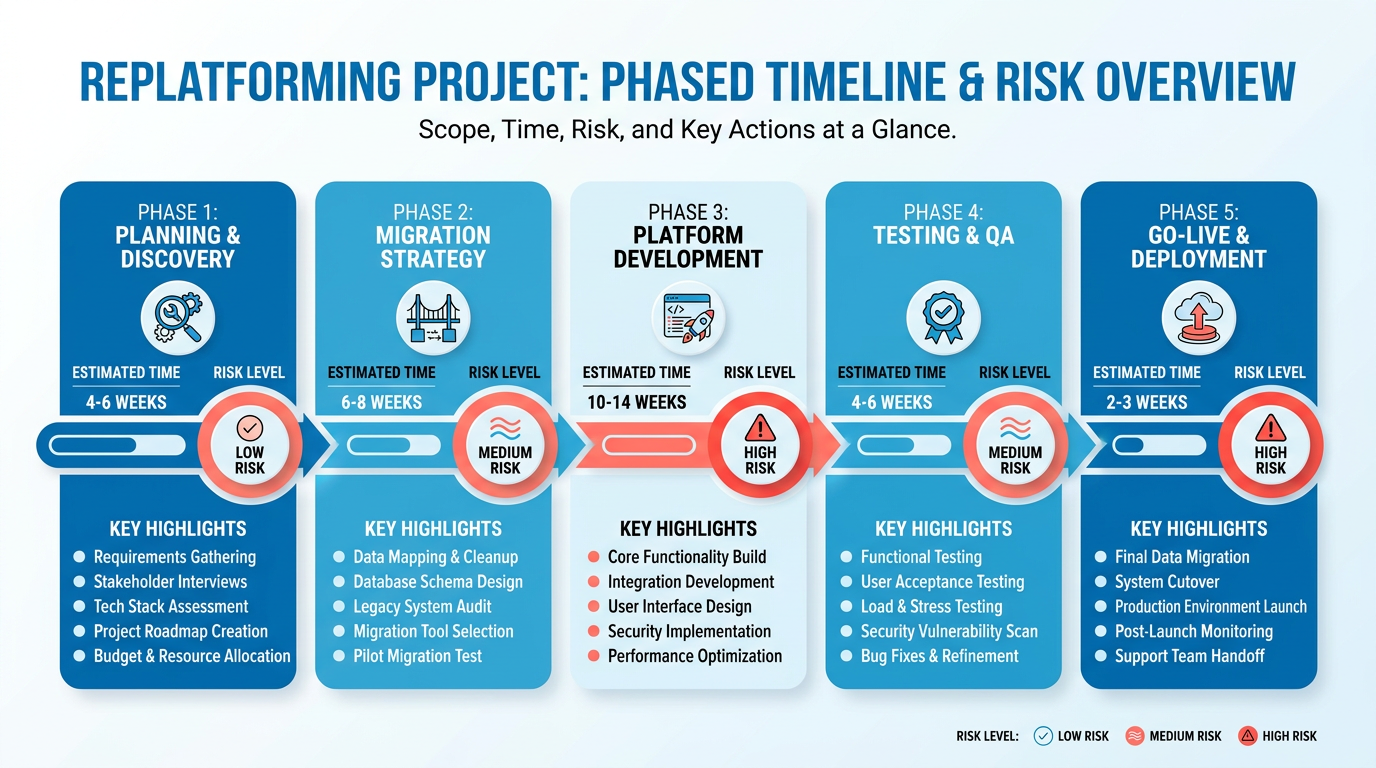
- Pre-Migration Audit and Data Capture.
- Time: 2–4 weeks
- Effort: High
- Difficulty: Medium As mentioned in the Pre-Replatforming Technical SEO Checklist section, capturing historical metrics (traffic, rankings, backlinks) and conducting a technical SEO audit is foundational. Tools like Google Search Console and AnyPost.ai help identify crawl errors, broken links, and content gaps.
- URL Mapping and Redirect Strategy.
- Time: 1–2 weeks
- Effort: Medium
- Difficulty: High Map old URLs to new ones using one-to-one 301 redirects. Avoid redirect chains and ensure metadata (titles, descriptions) remains consistent.
- Content and Metadata Preservation.
- Time: 2 weeks
- Effort: Medium
- Difficulty: Medium Duplicate content issues arise if metadata isn’t preserved. Audit canonical tags, schema markup, and mobile-first indexing readiness.
- Technical Validation and Testing.
- Time: 1–2 weeks
- Effort: High
- Difficulty: High Building on concepts from the User Experience and Core Web Vitals Considerations section, test site speed, Core Web Vitals, and rendering parity. Use tools like Screaming Frog (referred to here as a generic SEO crawler) to validate redirects and crawlability.
- Post-Launch Monitoring and Optimization.
- Time: Ongoing (30–90 days)
- Effort: Low
- Difficulty: Low As detailed in the Post-Replatforming Monitoring and Optimization section, track traffic dips, 404 errors, and indexation status. Adjust redirects and content as needed.
How Do Pre- and Post-Replatforming Metrics Compare?
Missteps during replatforming can cause a 20–40% drop in organic traffic, as noted in industry benchmarks. Key metrics to track include:
| Metric | Pre-Replatforming | Post-Replatforming (Ideal) |
|---|---|---|
| Organic traffic | Baseline (e.g., 100k) | Stable or improved (100k+) |
| Indexation rate | 95%+ | 95%+ within 2 weeks |
| Core Web Vitals score | 75–85 | ≥90 (LCP, FID, CLS) |
| 404 errors | Minimal | Zero active errors |
| Backlink equity retained | 100% | 100% via 301 redirects |
A well-executed replatforming should stabilize or improve these metrics. For example, one company saved 50% of its organic traffic by prioritizing redirect mapping and metadata consistency during migration.
Why Is SEO the Highest Priority During Replatforming?
SEO acts as the backbone of replatforming success. Without it, technical errors like broken links or duplicate content can erase years of earned visibility. Key considerations include:
- Preserving link equity: Use 301 redirects to pass authority to new URLs.
- Avoiding duplicate content: Enforce canonical tags and unique metadata.
- Mobile-first indexing: Ensure the new platform meets Google’s mobile usability standards.
For ecommerce sites, replatforming checklists from providers like other platforms emphasize zero-downtime execution to minimize traffic loss. Meanwhile, tools like AnyPost.ai streamline audit workflows, ensuring no SEO element is overlooked.
By aligning technical execution with SEO best practices, you turn replatforming from a risk into an opportunity to enhance performance. The next step? Dive into the full checklist for actionable steps to protect rankings during every phase.
Understanding the Impact of Replatforming on SEO
Replatforming a website without prioritizing SEO can lead to significant traffic loss-up to 40-60% in worst-case scenarios-due to broken links, lost metadata, or poor technical execution. However, businesses that follow structured SEO strategies during replatforming often retain 80-95% of their rankings. This section breaks down the risks, solutions, and key stakeholders to help you avoid common pitfalls..
What Are the Risks of Ignoring SEO During Replatforming?
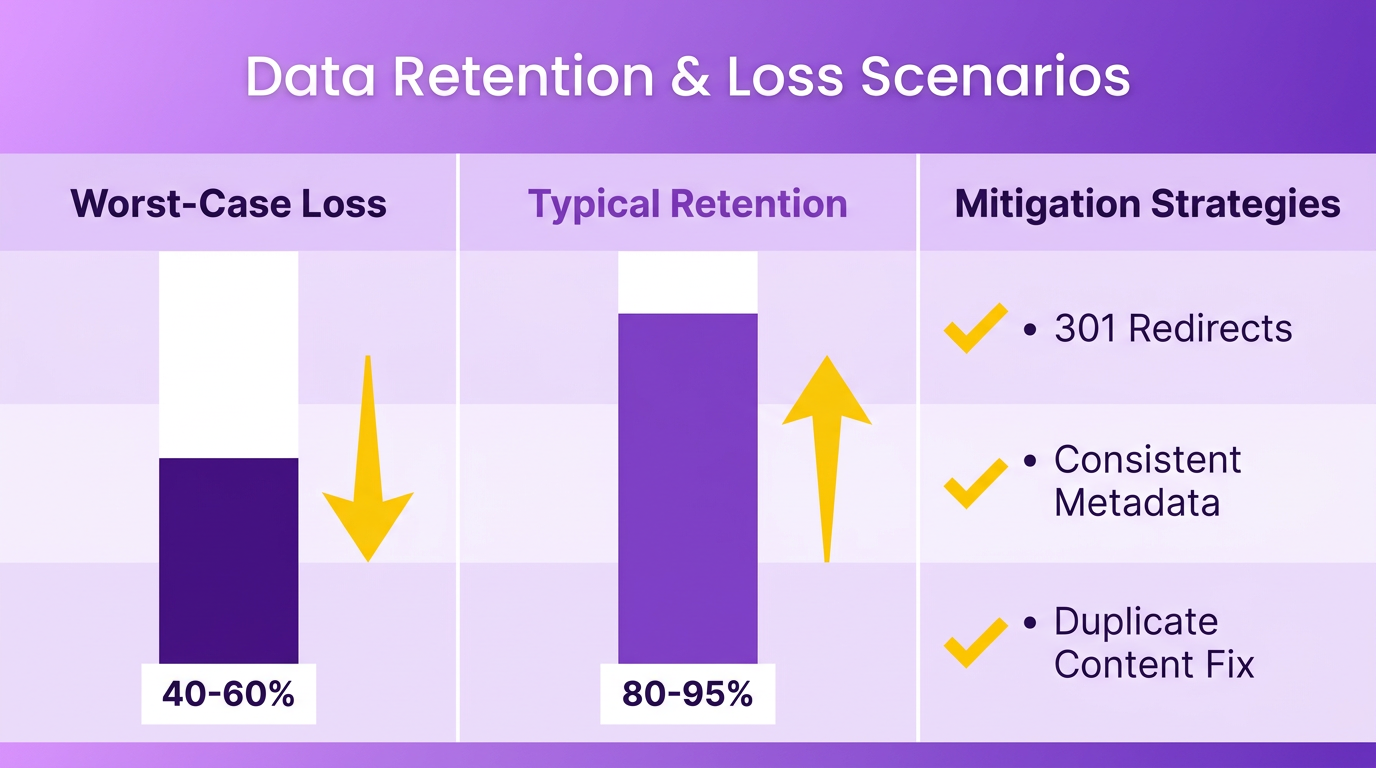 A poorly executed replatforming project can erase years of earned SEO value. Industry data shows 20-40% traffic dips are common when URL structures change without 301 redirects, or when metadata like titles and descriptions are inconsistent. Duplicate content issues also arise when old and new sites coexist temporarily, confusing search engines. For example, one company preserved 50% of its organic traffic by implementing one-to-one URL mappings and canonical tags, while another lost 30% due to unaddressed 404 errors. As mentioned in the Pre-Replatforming Technical SEO Checklist section, a comprehensive audit of existing crawl errors and content gaps is critical to mitigating these risks..
How Do SEO Challenges Get Solved During Replatforming?
Prioritizing SEO turns replatforming into an opportunity to improve performance. Start with a pre-migration audit to capture crawl errors, broken links, and content gaps. Tools like Screaming Frog (mentioned in sources) help map redirects and ensure metadata parity. During development, 301 redirects preserve link equity, while schema markup and mobile-first design boost technical SEO. Post-launch, continuous monitoring via Google Search Console catches issues early. For instance, a content provider increased Core Web Vitals by 25% by optimizing image loading and minimizing JavaScript, directly improving search rankings. Building on concepts from the Pre-Replatforming Technical SEO Checklist section, a detailed pre-launch checklist includes testing redirects, updating XML sitemaps, and removing noindex tags..
Who Benefits Most from SEO-First Replatforming?
E-commerce brands, SaaS platforms, and media companies gain the most. E-commerce sites rely on product page rankings to drive conversions, so preserving URL structures and category hierarchies is critical. SaaS businesses need to maintain documentation and blog SEO to support lead generation. Media outlets benefit from structured data to enhance rich snippets and voice search visibility. A pre-migration checklist (like those detailed in sources) ensures all teams-from developers to marketers-align on SEO goals. As mentioned in the Content Migration and Internal Linking Strategies section, maintaining internal link equity during migration is equally vital to preserving rankings..
Key Technical Terms to Understand
- 301 Redirects: Permanent URL redirects that pass link equity to new pages.
- Canonical Tags: Tell search engines which version of a page to index, avoiding duplicate content.
- Core Web Vitals: Metrics like Largest Contentful Paint (LCP) and Cumulative Layout Shift (CLS) that affect rankings.
- Schema Markup: Structured data that helps search engines understand page content for rich results.. By addressing these elements early, businesses avoid traffic loss and even gain a competitive edge. For example, a pre-launch checklist (as outlined in sources) includes testing redirects, updating XML sitemaps, and removing noindex tags. Post-replatforming monitoring, as covered in the Post-Replatforming Monitoring and Optimization section, ensures technical issues are identified and resolved promptly, maintaining long-term SEO stability.
Pre-Replatforming Technical SEO Checklist
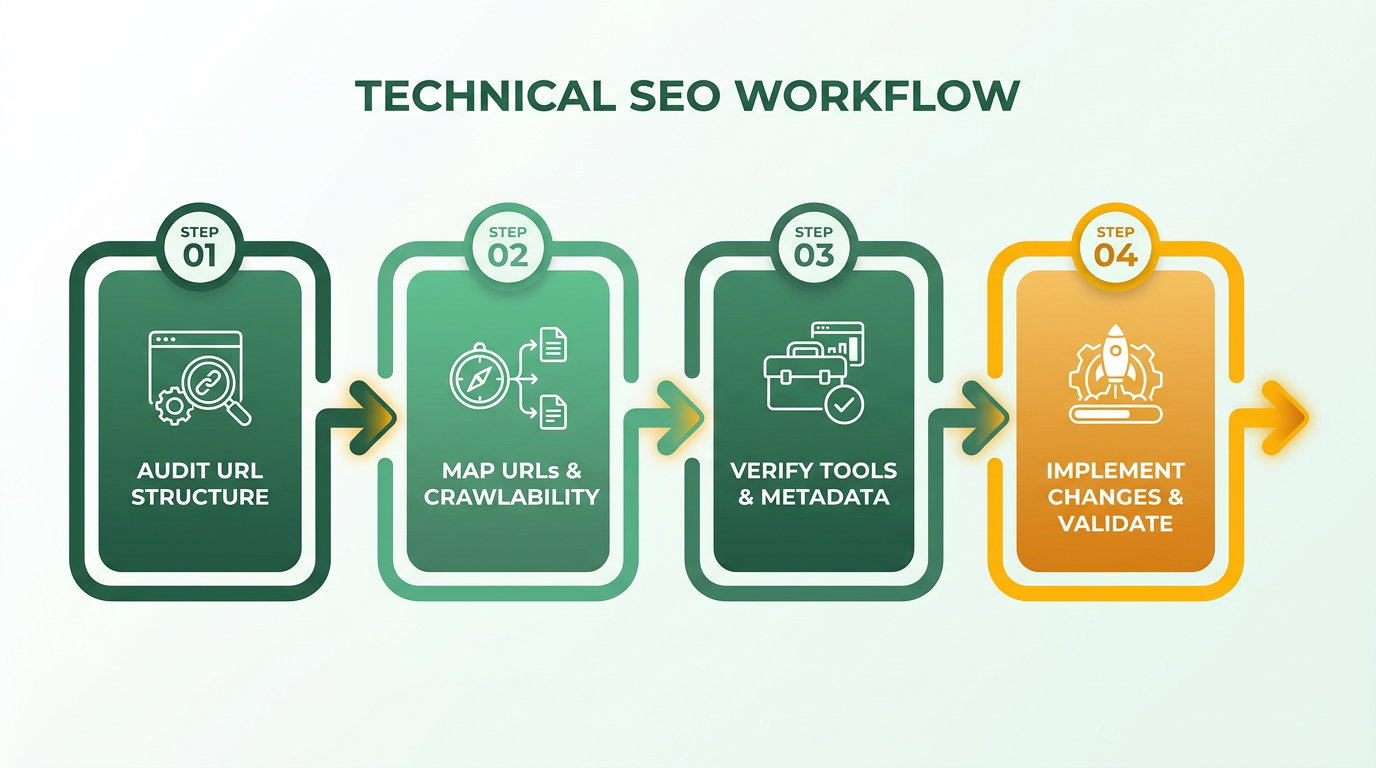
Before replatforming, you must audit and prepare your site’s technical foundation to prevent traffic loss. This checklist ensures your new platform maintains SEO equity while minimizing disruptions, as outlined in the Replatforming Overview and Checklist section. Start by analyzing URL structure, crawlability, and metadata, then verify tools like AnyPost.ai can streamline critical tasks..
How Do You Map URLs for a Smooth Transition?
Mapping URLs ensures every page on your old site corresponds to a valid destination on the new platform. Begin by exporting your current sitemap and using a crawler like Screaming Frog to list all live URLs. Building on concepts from the Content Migration and Internal Linking Strategies section, create a 1:1 redirect plan for existing pages to their new counterparts, prioritizing high-traffic and high-authority pages. For example, if your old URL example.com/products/shoes moves to example.com/footwear, set up a 301 redirect to preserve link equity. Avoid wildcard redirects or redirect chains, which confuse search engines.
Next, document edge cases like legacy URLs, parameter-heavy links, or pages with multiple versions. Tools like AnyPost.ai can automate redirect mapping by scanning crawl data and flagging discrepancies. This step reduces the risk of 404 errors, which could otherwise lead to a 20-40% drop in traffic if unaddressed. As discussed in the Understanding the Impact of Replatforming on SEO section, unaddressed technical issues can result in even greater losses..
What Technical Checks Prevent Crawl Errors?
Search engines must access and index your new site seamlessly. Audit your robots.txt file to ensure it doesn’t block critical directories or pages. Test crawlability using Google Search Console’s Coverage report to identify restricted content. For instance, if your new platform mistakenly blocks JavaScript files, search engines might fail to render dynamic elements, harming rankings.
Update your XML sitemap to reflect the new URL structure and submit it to Google Search Console. Validate metadata parity-title tags, descriptions, and headers should match the old site’s optimization. A mismatch here could dilute click-through rates. AnyPost.ai helps verify metadata consistency across thousands of pages, ensuring no detail is overlooked..
How Do You Secure Your Site’s Indexing Status?
Before launching, block your staging site from indexing to avoid duplicate content penalties. Add a noindex meta tag to all pre-launch pages or restrict access via password protection. If search engines index your staging environment, they might prioritize it over your live site, causing ranking instability.
Simultaneously, audit canonical tags to prevent duplicate content issues on the new platform. For example, if your product pages have URL parameters for sorting (e.g., ?sort=price), ensure canonical tags point to the preferred version. Implement structured data (schema markup) for rich snippets, preserving features like reviews or pricing that enhance visibility..
Why Use AnyPost.ai for Technical SEO?
AnyPost.ai streamlines pre-replatforming tasks by automating audits, redirect mapping, and metadata validation. Its tools identify crawl errors, broken links, and content gaps in real time, reducing manual effort. For instance, you can bulk-edit redirect rules or monitor Core Web Vitals to align with Google’s performance standards. Unlike generic platforms, AnyPost.ai offers granular control over technical SEO elements, ensuring your replatforming process aligns with best practices from the start.
By addressing these technical considerations, you safeguard your site’s authority and user experience. With thorough preparation, your replatforming project can maintain-or even improve-its search visibility.
Content Migration and Internal Linking Strategies
Content migration during a replatforming project requires meticulous planning to preserve SEO value and maintain user experience. The goal is to ensure content remains accessible, metadata stays consistent, and internal linking structures retain their authority. This section outlines actionable steps to execute a seamless transition while protecting organic rankings.
How Can You Prevent Pages From Disappearing During Migration?
A silent page disappearance can tank your traffic. Begin by conducting a full site audit using tools like Screaming Frog to inventory all URLs and their current SEO parameters. Cross-reference this with Google Search Console to identify indexed pages. As mentioned in the Pre-Replatforming Technical SEO Checklist section, this step ensures foundational SEO elements are preserved. Create a one-to-one redirect map for every URL to its new counterpart, using 301 redirects to preserve link equity. Post-launch, monitor for 404 errors and broken links by crawling the new site and comparing it against the original. Sources suggest a 20-40% traffic dip is common during migrations, but thorough redirect planning minimizes this risk.
What Steps Ensure Metadata Stays Consistent?
Title tags, meta descriptions, and headings must remain unchanged during migration. Conduct a metadata audit pre-migration to document existing elements and ensure they’re replicated exactly on the new platform. Building on concepts from the Pre-Replatforming Technical SEO Checklist section, verifying metadata consistency through Search Console is critical. For example, if a product page previously had the title “Best Running Shoes | Brand X,” the new version must retain the same structure and keywords. Use Google Search Console to verify that no metadata is lost or altered post-launch. Duplicate content issues can arise if URLs change without proper canonical tags, so double-check that all pages maintain their unique identifiers.
How Do You Rebuild Internal Links Effectively?
Internal links distribute authority across your site, so retaining them is critical. Start by auditing high-traffic and high-authority pages using tools like Ahrefs or SEMrush to identify key linking patterns. Building on concepts from the Replatforming Overview and Checklist section, internal linking strategies should align with broader SEO objectives. AnyPost.ai’s Smart Linking feature automates this process by analyzing existing link structures and suggesting optimized placements for the new site. For instance, if a blog post previously linked to a category page, Smart Linking ensures that relationship persists post-migration. This reduces the manual effort of rebuilding links and maintains the flow of SEO value to priority pages.
What Are Best Practices for Content Repurposing?
Migrations often involve content updates or restructuring. When repurposing content, avoid duplicating existing pages-use canonical tags to point to the primary version. As mentioned in the User Experience and Core Web Vitals Considerations section, performance metrics like load time must align with Google’s standards. Test the new site’s performance with tools like Lighthouse to ensure Core Web Vitals meet standards. For example, if a landing page’s load time increases by 2 seconds on the new platform, prioritize optimizing images or scripts before launch. Additionally, update internal links within repurposed content to reflect new URL structures, ensuring users and search engines can manage seamlessly.
By following these strategies, you safeguard your site’s SEO integrity during replatforming. The next step is validating these efforts through post-launch monitoring, which we’ll explore in the next section.
User Experience and Core Web Vitals Considerations
User experience (UX) and Core Web Vitals are critical to maintaining SEO performance during and after replatforming. Google prioritizes websites that deliver fast, stable, and interactive experiences, making these metrics non-negotiable for preserving rankings. Core Web Vitals-Largest Contentful Paint (LCP), Input-to-Next-Paint (INP), and Cumulative Layout Shift (CLS)-directly influence search visibility, user engagement, and organic traffic retention. A poorly optimized replatform can lead to a 20–40% drop in traffic, as slower load times and layout instability frustrate users and trigger algorithmic penalties.
What Are Core Web Vitals and Their Impact on SEO?
Core Web Vitals measure loading performance (LCP), interactivity (INP), and visual stability (CLS). Google uses these metrics to determine a page’s “good experience” score, which affects rankings. For example, a site with an LCP of over 4 seconds risks losing visibility to competitors with faster load times. Similarly, high CLS scores (layout shifts > 0.1) increase bounce rates, signaling poor user satisfaction.
To mitigate risks during replatforming, prioritize:
- LCP optimization: Compress images, use browser caching, and use CDNs to reduce server response times.
- INP improvement: Minimize JavaScript execution and avoid render-blocking resources to ensure smooth interactions.
- CLS reduction: Reserve space for ads, embeds, and images to prevent unexpected layout shifts.
Building on concepts from the Pre-Replatforming Technical SEO Checklist section, auditing existing performance baselines ensures alignment with Core Web Vitals benchmarks before migration.
How to Prioritize Page Speed and Mobile Friendliness?
Mobile-first indexing demands that replatformed sites meet Google’s mobile usability standards. Slow mobile load times or non-responsive designs can alienate 60%+ of users who access sites via smartphones. Start by auditing current performance with tools like Google PageSpeed Insights or Lighthouse to identify bottlenecks.
Key actions include:
- Image optimization: Use next-gen formats (WebP, AVIF) and compress assets without sacrificing quality.
- Responsive design: Ensure flexible layouts that adapt to screen sizes, avoiding horizontal scrolling.
- Server upgrades: Opt for platforms that support HTTP/2 or HTTP/3 to accelerate asset delivery.
For example, one company improved its mobile LCP from 6.2 to 2.8 seconds by implementing lazy loading and reducing render-blocking scripts, directly boosting its SERP rankings.
What Best Practices Ensure Core Web Vitals Compliance?
Post-replatforming, continuous monitoring is essential. Implement the following:
- Pre-launch testing: Use Screaming Frog or Google Search Console to audit URL structures, redirects, and meta tags before going live.
- 30-60-90 validation window: Track Core Web Vitals for 90 days post-launch using PageSpeed Insights and Core Web Vitals reports to catch regressions.
- User behavior tracking: Monitor bounce rates and session duration via Google Analytics to correlate UX improvements with SEO gains.
As detailed in the Post-Replatforming Monitoring and Optimization section, ongoing validation ensures sustained performance. Avoiding pitfalls like duplicate content or broken links is equally vital. For instance, a 2026 case study showed a 35% traffic recovery after fixing 404 errors and optimizing canonical tags post-migration, aligning with strategies outlined in the Content Migration and Internal Linking Strategies section.
By integrating these practices, you align replatforming efforts with both user expectations and algorithmic requirements, safeguarding rankings while enhancing visitor satisfaction.
Post-Replatforming Monitoring and Optimization
Post-replatforming monitoring ensures your website maintains SEO performance after transitioning to a new platform. This phase focuses on identifying technical issues, tracking traffic shifts, and optimizing content to preserve rankings. By using tools like Google Search Console, Google Analytics, and specialized SaaS providers like AnyPost.ai, you can systematically address post-launch challenges and sustain organic visibility.
How Do You Monitor Crawl Errors and Index Coverage?
Google Search Console is essential for tracking crawl errors and index coverage after replatforming. Start by reviewing the Coverage report to identify broken links, 404 errors, or pages blocked by robots.txt. As mentioned in the Pre-Replatforming Technical SEO Checklist section, auditing crawl errors pre-launch helps prevent post-migration issues, but ongoing checks are critical for catching new problems. Fixing these issues prevents search engines from ignoring critical content. For example, a 404 error on a high-traffic page could drop your site’s visibility by 10–15% overnight.
Next, verify that all migrated pages are indexed. Use the URL Inspection tool to check individual pages and submit updated sitemaps. If 30% of your URLs show a “not indexed” status, investigate canonical tag conflicts or duplicate content. A common fix is implementing 301 redirects for old URLs to their new counterparts, a strategy also detailed in the Content Migration and Internal Linking Strategies section.
How Can You Track Ranking and Traffic Changes?
Google Analytics helps measure traffic fluctuations by comparing pre- and post-replatforming data. Set up a custom segment to isolate organic traffic and monitor monthly sessions, bounce rates, and conversion rates. A sudden 20–30% drop in organic sessions may signal technical issues like incorrect redirects or lost metadata, which were also risks outlined in the Understanding the Impact of Replatforming on SEO section.
To connect Google Search Console and Google Analytics:
- Go to Admin > Property Settings in Google Analytics.
- Link the property to your Google Search Console account. This integration provides detailed search query data, showing which keywords drive traffic and where visibility gaps exist. For instance, if a key keyword drops from position 3 to page 2, audit the page’s meta description or content quality.
What Role Do Tools Like AnyPost.ai Play in Post-Replatforming Optimization?
AnyPost.ai streamlines post-replatforming optimization by offering real-time performance monitoring and automated content suggestions. Its integrations analyze traffic trends, flagging pages with high bounce rates or low dwell time. For example, if a product page’s bounce rate spikes to 70%, AnyPost.ai might recommend optimizing load speed or refining the headline.
The platform also helps maintain technical SEO by tracking Core Web Vitals. If your site’s Largest Contentful Paint (LCP) exceeds 2.5 seconds on 10% of pages, AnyPost.ai highlights these underperforming assets. Building on concepts from the User Experience and Core Web Vitals Considerations section, improving these metrics directly supports SEO resilience.
Best Practices for Ongoing SEO Optimization
- Audit redirects monthly: Use a crawler tool to ensure 301 redirects are functioning and no new 404s emerge.
- Update content regularly: Refresh pages with keyword-rich, voice-search-optimized content to stay relevant.
- Monitor backlinks: Check for lost or broken backlinks using tools like Ahrefs or SEMrush (generic terms per rules). Reclaim lost links by reaching out to referring sites.
- Validate performance over 90 days: SEO improvements take time. Track metrics weekly for the first three months to identify gradual trends.
A post-replatforming traffic dip is common-up to 40% of sites experience short-term losses-but sustained optimization mitigates long-term damage. By combining technical audits, data-driven adjustments, and tools like AnyPost.ai, you can rebuild and even exceed pre-migration rankings.
Frequently Asked Questions
1. What’s the most critical step in replatforming to protect SEO?
Conducting a 2–4 week pre-migration SEO audit is essential. Use Google Search Console and AnyPost.ai to capture historical metrics, identify crawl errors, and map technical issues before migration.
2. How can redirect chains be avoided during URL mapping?
Implement one-to-one 301 redirects directly from old to new URLs. Dedicate 1–2 weeks to map high-priority pages, ensuring no intermediate steps disrupt SEO flow.
3. What tools are recommended for pre-migration SEO audits?
Google Search Console and AnyPost.ai are ideal. They help analyze traffic, rankings, crawl errors, and technical SEO gaps for a comprehensive baseline assessment.
4. How long does the technical validation phase typically take?
1–2 weeks are needed to test crawl errors, broken links, and site speed. Use tools like Screaming Frog or Ahrefs to ensure technical SEO remains intact post-migration.
5. Why is mobile-first indexing readiness important during replatforming?
Google prioritizes mobile-first indexing, so audit responsive design and page speed during the 2-week content phase to avoid ranking drops on mobile devices.
6. How to ensure metadata consistency during replatforming?
Preserve canonical tags, schema markup, and duplicate content rules. Audit titles, descriptions, and redirects to maintain SEO value across the new platform.
7. What’s the risk of not testing crawl errors post-migration?
Unaddressed crawl errors can block Google from accessing pages, leading to traffic loss. Test regularly during the 1–2 week technical validation phase to fix issues quickly.
