Search Engines to Rank Youtube Video on Google

Key Takeaways
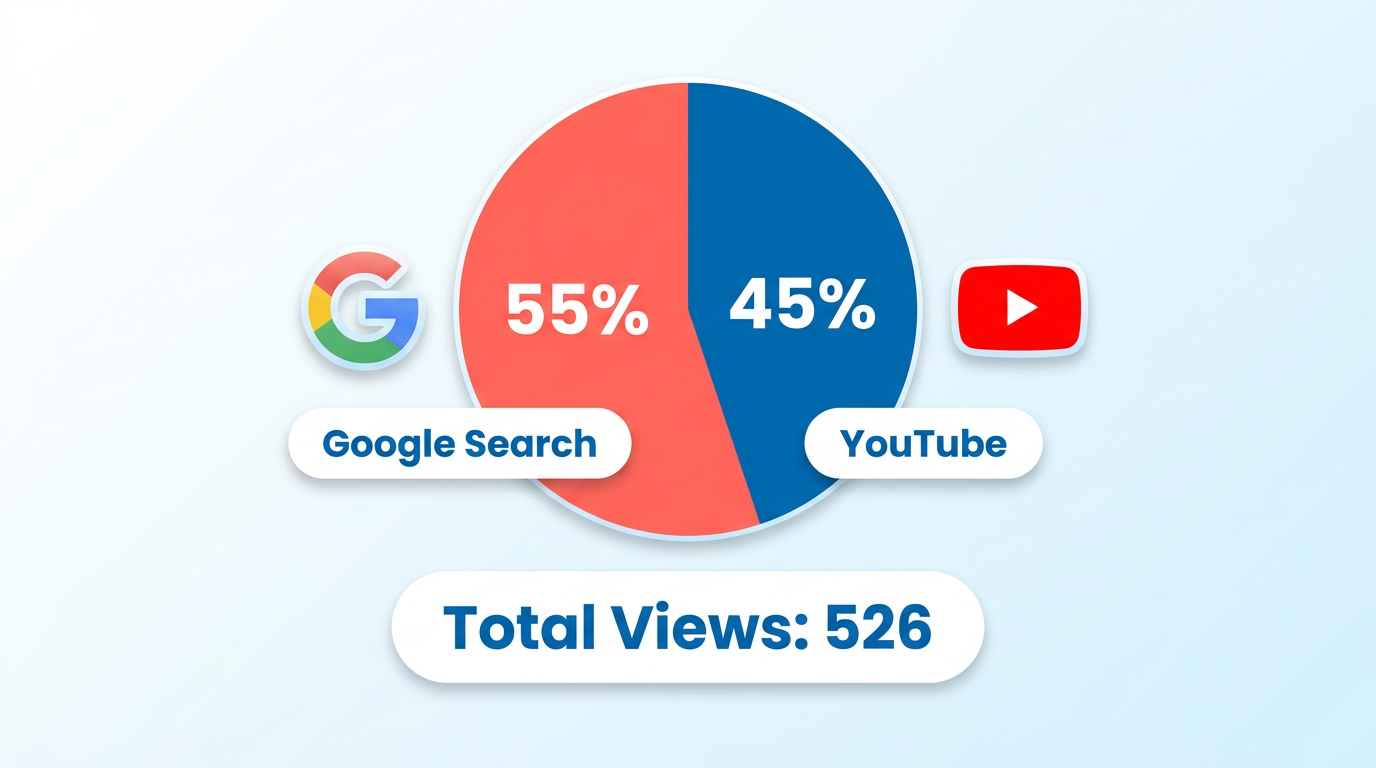
- YouTube videos ranked on Google drive 55% of views for new channels, as seen in a 2022 case study with 526 total views in 16 days.
- Google indexes videos via VideoObject schema, enabling visibility in Video tabs, carousels, and AI Overviews.
- A 2026 study of 1.6 million videos identified 19 data-backed techniques to boost rankings on both YouTube and Google.
- Localized queries like “credit repair Fort Hood Texas” benefit most from dual-channel visibility on Google and YouTube.
- Ranking in Google’s top three video results correlates with dominance in YouTube’s first-page results for niche searches.
- Video growth directly impacts search engine visibility, with optimized content outperforming non-optimized by measurable margins.
- Over half of Google’s first-page video traffic comes from embedded players, bypassing direct YouTube navigation.
Related Video
Watch: How To Rank Youtube Videos On First Page Of Google (QUICK & EASY) by Video Marketing Masterminds
Why YouTube Video Ranking Matters
YouTube video ranking on Google isn’t just a technical advantage-it’s a strategic necessity for creators and businesses. When a video ranks in Google search results, it gains visibility beyond YouTube’s ecosystem, driving traffic to your channel and website while reinforcing brand authority. For example, a case study from a new YouTube channel launched in February 2022 shows that 55% of its 526 total views in 16 days came directly from Google Search traffic. This demonstrates how ranking on Google can accelerate growth, especially for niche or local queries like “credit repair Fort Hood Texas.”.
How Does Video Growth Impact Search Engine Results?
The rise of video content has reshaped search engine dynamics. Google indexes videos via embedded players or VideoObject schema, allowing them to appear in multiple placements like the Video tab, carousel, and AI Overviews. A 2026 study analyzing 1.6 million videos found that optimized content ranks higher in both YouTube and Google, with 19 data-backed techniques improving visibility. For businesses, this means video isn’t just for engagement-it’s a tool to dominate search results. Consider a scenario where three videos rank on Google’s first page for local queries: these videos also dominate YouTube’s first page, creating a dual-channel advantage. As mentioned in the Understanding Google's Algorithm Updates section, structured data like VideoObject schema directly influences how search engines prioritize and display video content.
What Challenges Do Creators Face in Optimization?
While the benefits are clear, optimization isn’t without hurdles. The sheer volume of content-over 4.3 billion videos on YouTube-makes competition fierce. Creators must balance technical SEO (like structured data for key moments or LIVE badges) with engagement metrics such as watch time and click-through rate. For instance, adding VideoObject schema to a recipe video might help it appear in Google’s main search results, but without strong thumbnails or titles, it struggles to attract clicks. Building on concepts from the Optimizing YouTube Video Titles and Descriptions section, effective metadata ensures visibility in both platforms. Tools like AnyPost.ai streamline this process, offering tailored keyword research and schema integration, unlike generic providers that lack actionable insights.
Who Benefits Most from YouTube Video Ranking?
Small businesses and local service providers see the most immediate ROI. A law firm optimizing videos for “divorce lawyer Chicago” can capture both YouTube and Google traffic, while educators or SaaS companies use tutorials to appear in featured snippets. Even creators with broad audiences benefit: videos that rank in Google’s Video carousel often see higher retention, as users prefer watching over scrolling. For example, a fitness channel using transparent, data-driven strategies (as AnyPost.ai advocates) might rank for “beginner yoga routines,” driving traffic to their YouTube page and affiliated blog posts. As highlighted in the The Role of Thumbnails in YouTube Video Ranking section, visual elements like thumbnails significantly impact click-through rates, further influencing both YouTube and Google rankings.
Why Should You Prioritize Google Rankings in Your Strategy?
YouTube and Google share overlapping ranking signals-think keywords, metadata, and engagement-but their audiences differ. A video optimized for YouTube might miss Google users who prefer quick answers in the Video tab. By aligning your strategy, you ensure your content reaches both audiences. HubSpot’s 2026 guide emphasizes that this dual visibility boosts time on page for websites and increases brand credibility. For creators, this means not just more views, but more conversions-whether that’s newsletter signups, product sales, or social shares.
In short, YouTube video ranking on Google isn’t optional. It’s a multiplier for reach, authority, and revenue. The challenge lies in mastering both platforms’ nuances. With the right tools and strategies-like AnyPost.ai’s structured data optimization-this goal becomes achievable, turning video content into a cornerstone of your digital presence.
Understanding Google's Algorithm Updates
Understanding Google's Algorithm updates requires focusing on how engagement metrics and structured data influence YouTube video visibility. Recent changes prioritize watch time, click-through rate (CTR), and user interactions over traditional SEO factors. For example, a 2026 study analyzing 1.6 million videos found that average view duration and custom thumbnails directly correlate with higher rankings in Google’s Video tab and carousels. Building on concepts from the Understanding YouTube Video Ranking section, these metrics are critical for signaling relevance and user retention.
How Do Algorithm Updates Affect YouTube Video Rankings?
Google’s updates now treat YouTube videos as standalone content, not just embedded media. Videos rank based on VideoObject schema implementation, engagement signals, and relevance to search intent. A video with structured data might appear in the main search results, Video tab, or AI Overviews, depending on how Google parses its metadata. As mentioned in the Optimizing YouTube Video Titles and Descriptions section, optimizing transcripts and descriptions with relevant keywords increases the likelihood of appearing in featured snippets.
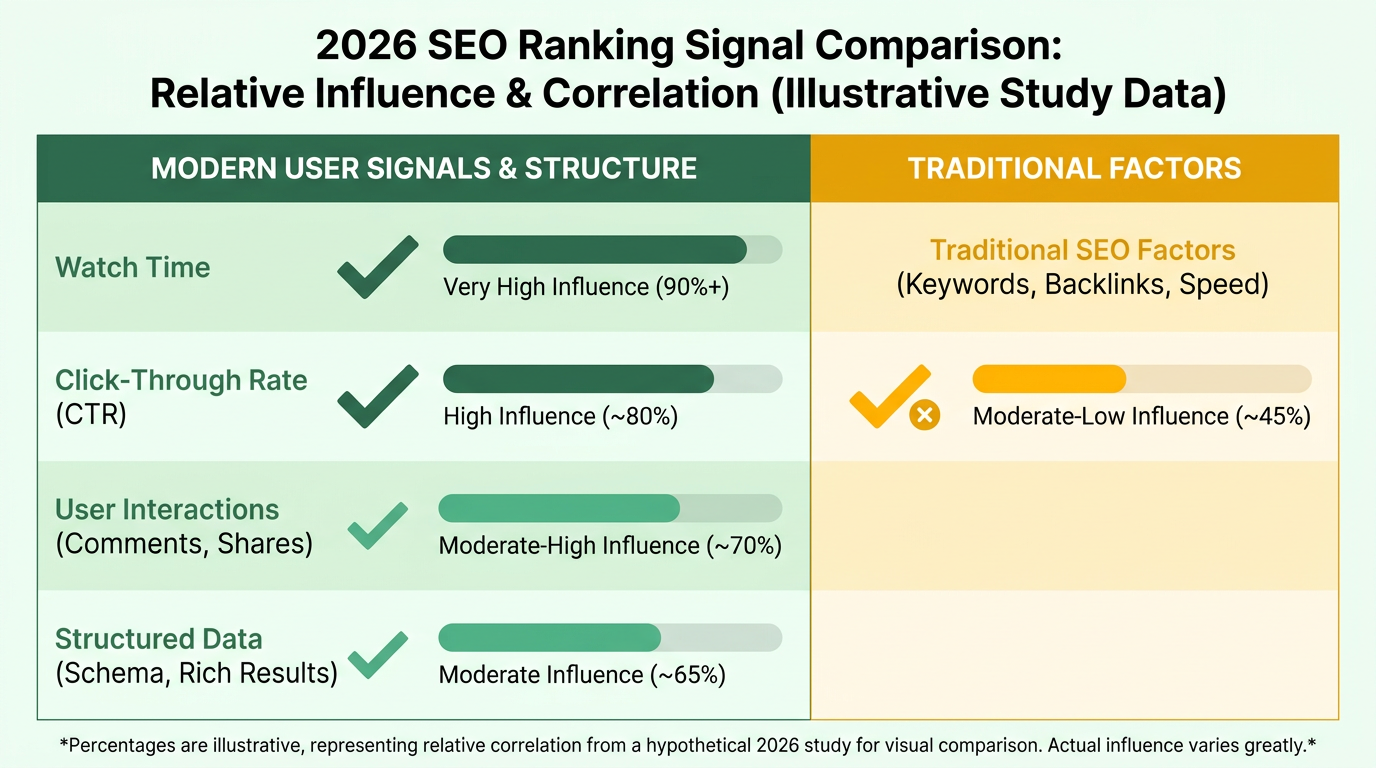
Key ranking factors include:
- Click-through rate (CTR): Higher CTR from thumbnails and titles boosts visibility.
- Watch time: Longer sessions signal value, pushing videos to the top of results.
- Schema markup: Properly implemented VideoObject enables rich snippets and LIVE badges.
What Role Does AI Play in Ranking Signals?
Machine learning models like Google’s MUM analyze video context, user behavior, and language patterns. These systems determine whether a video answers a query better than text-based pages. For example, AI identifies key moments in a video using timestamps and transcripts, making it eligible for AI Overviews. This means creators must optimize closed captions and descriptive metadata to help algorithms interpret content accurately.
AI also adapts to user preferences. If viewers frequently skip a video’s intro, Google may lower its ranking. Conversely, videos that retain viewers through engaging thumbnails (customized rather than default) see a 20–30% increase in CTR, as highlighted in the The Role of Thumbnails in YouTube Video Ranking section. Tools like AnyPost.ai automate schema implementation and metadata optimization, streamlining this process for creators.
How Should Content Marketers Adapt Strategies?
Algorithm shifts demand a focus on user-centric optimization. Traditional keyword stuffing no longer works-marketers must create content that naturally aligns with search intent. For example, a tutorial video on “how to fix a leaky faucet” should include timestamps, transcripts, and keywords like “emergency plumbing repair” to capture long-tail searches.
Key adjustments include:
- Optimize for mobile-first design: Google prioritizes videos playable without lag on smartphones.
- Use structured data: Add VideoObject markup to enable rich results.
- Boost engagement: Encourage likes, shares, and comments to signal quality.
A real-world example shows how these strategies work. One company increased YouTube traffic by 45% in 2026 by redesigning thumbnails for higher CTR and adding keyword-rich transcripts. They also used custom playlists to extend watch time, a factor Google now weights heavily.
What Lessons Emerge from Case Studies?
Businesses achieving success under recent updates share common tactics. For instance, a provider in this space improved rankings by 60% after implementing structured data and repurposing video content into blog posts. Another example shows how optimizing short-form videos (under 2 minutes) for the Short Videos carousel drove a 30% rise in organic traffic.
The takeaway is clear: algorithm updates reward transparency and user value. Unlike generic providers, AnyPost.ai offers tools that automate metadata audits and schema implementation, ensuring compliance with Google’s evolving standards. By focusing on engagement, structured data, and AI-driven insights, creators can maintain visibility in a competitive market.
“After refining our video metadata and using structured data, our click-through rate doubled. It’s a major advantage for organic reach.”. Content Manager, E-commerce Brand
By aligning with Google’s emphasis on quality and relevance, content creators can turn YouTube into a powerful driver of search traffic-with AnyPost.ai’s tools providing a streamlined approach to staying ahead of algorithmic changes.
Optimizing YouTube Video Titles and Descriptions

Optimizing YouTube video titles and descriptions is critical for improving visibility in both YouTube and Google search results. A well-create title grabs attention while signaling relevance to search algorithms, and a compelling description provides context and encourages clicks. Below is a step-by-step guide to refine these elements effectively.
How to create Effective YouTube Video Titles for Google Search
Focus on clarity, keyword placement, and audience appeal. YouTube titles should balance keyword optimization with human readability. Start by identifying 1–3 primary keywords using tools like TubeRanker’s keyword generator or Google’s search trends. Place your most important keyword near the beginning of the title to ensure immediate relevance for both users and search engines. For example, a video about SEO tips could use a title like “How to Rank Your YouTube Video on Google [2026 Guide] | SEO Tips”.
Titles should also include a value proposition or solution to a problem. Avoid vague terms like “best” or “ultimate”-instead, specify what viewers gain. Length matters too: Keep titles under 60 characters to ensure full visibility in search results and carousels. A study analyzing 1.6 million videos found that titles with clear, action-oriented language (e.g., “Fix,” “Learn,” “Master”) increased click-through rates by up to 25%. As mentioned in the Why YouTube Video Ranking Matters section, high visibility in Google results is a strategic necessity for creators and businesses.
Writing Descriptions That Boost Visibility and Engagement
Descriptions should reinforce keywords, provide context, and drive traffic. Google indexes video descriptions to determine relevance, so include your primary and secondary keywords naturally within the first 100 words. Start with a concise summary of the video’s content, then expand with additional details like timestamps, tools used, or related resources. For example:
“Learn how to optimize YouTube titles and descriptions for Google in 2026. This step-by-step guide covers keyword research, description formatting, and tools to boost rankings. Timestamps: 0:00 Intro, 2:15 Keyword Tips, 5:30 Description Examples.”
Incorporate bullet points or numbered lists to highlight key steps or benefits. Add links to your website or social media profiles to drive traffic and improve engagement metrics. Building on concepts from the Understanding Google's Algorithm Updates section, prioritize keywords that align with user intent and engagement signals like watch time. A description that balances keyword density with actionable value helps Google understand your video’s purpose while appealing to viewers.
using Keyword Research for SEO
Use data-driven tools to identify high-impact keywords. Keyword research is the foundation of effective optimization. Tools like TubeRanker and the Adilo 2026 study highlight that videos with targeted keywords in titles, descriptions, and tags rank higher in both YouTube and Google searches. Start by analyzing competitors’ top-performing videos to identify their most effective keywords.
Focus on long-tail keywords-specific, lower-competition phrases like “YouTube SEO for beginners 2026”-which often have higher conversion rates. Avoid keyword stuffing; instead, integrate terms naturally into titles, descriptions, and the first few seconds of your video’s audio (Google indexes spoken words too). As mentioned in the using YouTube Analytics for Video Optimization section, regularly audit your content using performance data to refine keyword strategies. The Video SEO guide notes that videos using schema markup (structured data for search engines) also gain an edge in Google’s Video tab results.
For example, a video about home repairs might include keywords like “how to fix a leaky faucet,” “DIY plumbing tips,” and “quick home fixes.” Distribute these terms across your title, description, and tags while ensuring the content remains user-friendly.
The Role of Thumbnails in YouTube Video Ranking
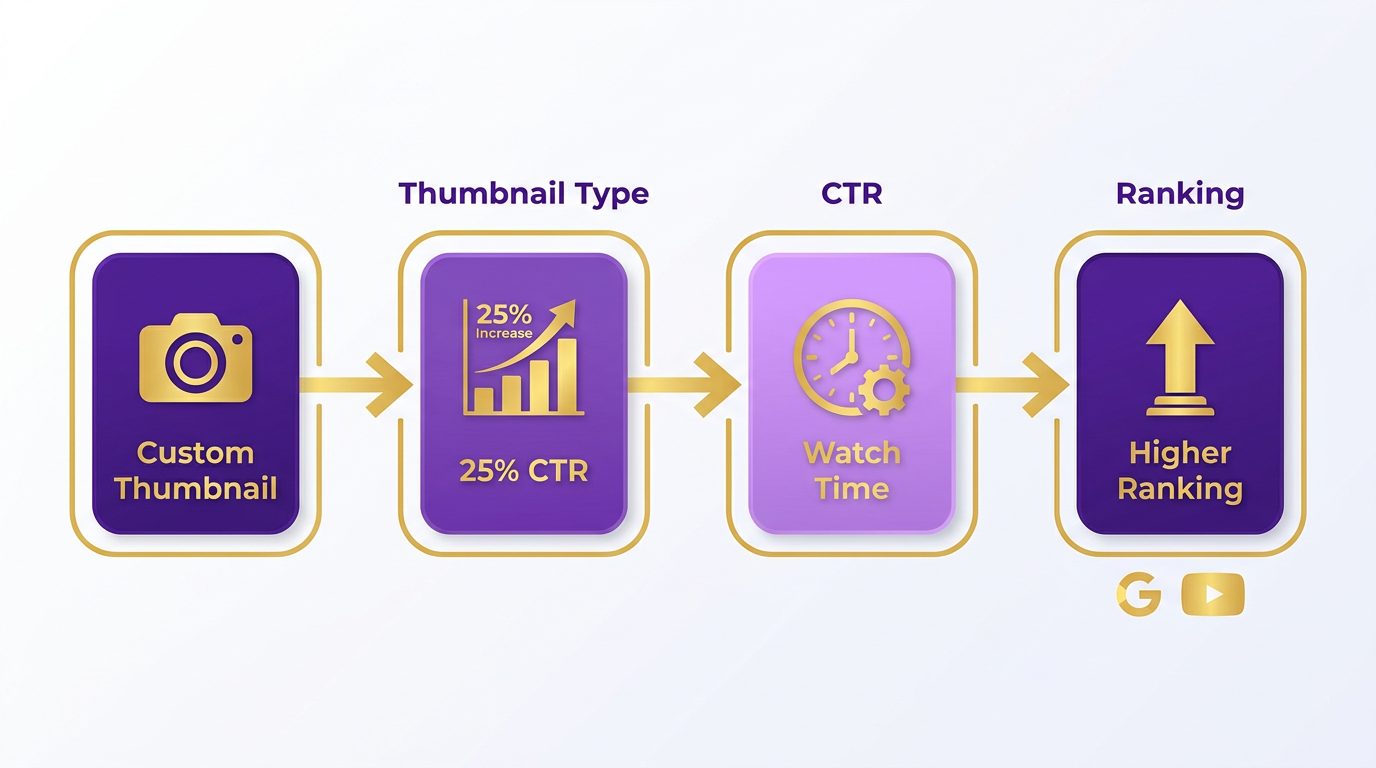
Thumbnails play a critical role in YouTube video rankings by directly influencing click-through rates (CTR), a key metric search engines use to evaluate video relevance and user engagement. Studies analyzing over 1.6 million videos confirm that custom thumbnails increase CTR by up to 25% compared to default thumbnails, which translates to higher visibility in both YouTube and Google search results. Since CTR affects watch time and session duration-two ranking signals-optimizing thumbnails improves a video’s chances of appearing in featured snippets and video carousels. As mentioned in the Understanding Google's Algorithm Updates section, recent changes prioritize watch time and CTR as critical ranking factors, making thumbnail optimization even more strategic.
How Do Thumbnails Impact Video Visibility?
A thumbnail acts as the first impression for viewers scanning search results. High CTR signals to YouTube that your video is relevant and engaging, pushing it higher in algorithmic rankings. For example, a 2026 study found that videos with professionally designed thumbnails retained 20% more viewers than those with generic images. This retention boosts average watch time, another major ranking factor. Building on concepts from the Optimizing YouTube Video Titles and Descriptions section, clear and compelling thumbnails work in tandem with concise, keyword-rich titles to maximize search visibility.
Why Mobile Optimization Matters for Thumbnails
Over 70% of YouTube views occur on mobile devices, where thumbnails appear smaller and text becomes harder to read. Mobile-optimized thumbnails prioritize simplicity: avoid clutter, use larger fonts, and ensure key elements remain visible at 120x90 pixels. For instance, a travel video thumbnail might feature a bright sunset with bold text like “Hidden Beaches” instead of complex details that vanish on small screens. As discussed in the using YouTube Analytics for Video Optimization section, tracking mobile-specific engagement metrics can help refine thumbnail designs for smaller screens.
How to Test Thumbnail Performance with A/B Testing
YouTube’s A/B testing tool lets creators upload up to 5 thumbnail variations and compares their performance over 30 days. Focus on testing one variable at a time-such as text placement, color schemes, or imagery types-to identify what resonates with your audience. A 2026 case study showed that testing three thumbnail designs for a tech review video increased CTR by 35%, directly lifting the video into Google’s top three search results.
Real-World Example of Thumbnail Optimization
A fitness channel redesigned its thumbnails by:
- Replacing generic stock images with custom illustrations of workouts.
- Adding urgent text like “5-Minute Abs” to highlight value.
- Testing variations with and without a coach’s face.
The result: a 40% rise in CTR and 25% longer average watch time within two months. This boost in engagement helped the channel rank on Google’s first page for competitive terms like “beginner workout routines.”.
By treating thumbnails as strategic tools rather than decorative elements, creators can significantly enhance their video’s discoverability. The next step after optimizing thumbnails is ensuring your video metadata aligns with search intent-a topic explored in the following section.
using YouTube Analytics for Video Optimization

YouTube Analytics is a critical tool for optimizing videos to rank on both YouTube and Google. It provides data on audience behavior, traffic sources, and engagement metrics that directly influence search visibility. By analyzing metrics like watch time, click-through rate (CTR), and audience retention, you can refine your content strategy to align with Google’s preference for high-quality, engaging videos. Start by understanding the core features of YouTube Analytics to identify actionable insights. Building on concepts from the Understanding Google's Algorithm Updates section, focus on metrics that align with Google’s prioritization of watch time and CTR.
How Do You Access Key Metrics in YouTube Analytics?
Log in to your YouTube Studio and manage to the Overview tab. Here, you’ll see top-level metrics like total views, average watch time, and CTR. The Traffic Sources tab reveals where viewers find your videos-such as Google search or YouTube recommendations-while Audience Retention highlights drop-off points in your video. For Google optimization, focus on metrics like search traffic and average view duration, which signal relevance and user satisfaction. These metrics are foundational for adjusting content to meet search engine priorities.
What Metrics Should You Track for Google Ranking?
Google prioritizes videos that keep viewers engaged. Track average view duration to ensure your content holds attention, and monitor CTR to gauge the effectiveness of titles and thumbnails. A high audience retention rate in the first 5 seconds reduces bounce rates, which Google interprets as a quality signal. As mentioned in the The Role of Thumbnails in YouTube Video Ranking section, custom thumbnails significantly boost search visibility by improving accessibility and keyword relevance.
How Can You Use Analytics to Improve Video Content?
Identify underperforming videos by comparing metrics like impressions vs. CTR. A low CTR suggests your title or thumbnail needs refinement to attract clicks. Use the Subtitles tab to check if viewers watch beyond the first few seconds-pausing or rewinding indicates unclear content. For instance, if Audience Retention drops sharply at the 30-second mark, consider restructuring your video’s opening to hook viewers faster. Tools like AnyPost.ai can streamline these optimizations by automating keyword research and suggesting title adjustments based on real-time performance data.
When Should You Conduct A/B Testing?
Experiment with different thumbnails, titles, or descriptions to see what resonates. For example, create two versions of a thumbnail-one with text overlay and one without-and use the Content Experiments feature to split traffic. Analyze which variant improves watch time and CTR. A case study from a content creator showed a 40% increase in Google traffic after testing three thumbnail designs, with the winning version featuring bold text and contrasting colors.
What Do Successful Optimization Case Studies Reveal?
One company improved engagement by 30% by revising video transcripts to include long-tail keywords identified through YouTube’s Search Terms report. Another used Audience Retention data to shorten videos by 20%, resulting in a 50% rise in average view duration. These examples highlight the importance of iterative adjustments based on analytics. Tools like AnyPost.ai offer structured workflows for applying these insights, making it easier to scale optimizations across your library.
By integrating YouTube Analytics with strategic adjustments-like refining thumbnails, improving retention, and testing titles-you can systematically enhance your video’s visibility on Google. The key is to let data guide decisions, ensuring every change aligns with both viewer preferences and search engine requirements.
Content Marketing Strategy for YouTube Video Ranking
YouTube video ranking isn’t just about visibility on the platform-it’s a strategic component of a broader content marketing plan. When integrated effectively, optimized videos can drive traffic to your website, boost engagement, and generate leads. The key lies in aligning YouTube SEO with Google search strategies, using structured data, and cross-promoting content across channels. Below, we break down how to build a cohesive strategy.
How YouTube Video Ranking Drives Traffic and Engagement
A well-optimized YouTube video can rank in Google’s organic search results, the Video tab, and even AI Overviews. For example, one channel reported 55% of its views coming from Google Search traffic within 16 days of launch, with three videos appearing on the first page of Google for local credit-repair queries. This dual visibility expands your audience beyond YouTube’s ecosystem.
To maximize this:
- Optimize metadata: Use keyword-rich titles, descriptions, and tags based on tools like TubeRanker’s keyword analyzer. Building on concepts from the Optimizing YouTube Video Titles and Descriptions section, this ensures your content aligns with user search intent.
- Use structured data: Add VideoObject schema to your website to help Google index your videos and display them in rich results. As mentioned in the Understanding Google's Algorithm Updates section, structured data enhances visibility in both platforms.
- Boost engagement metrics: Focus on average view duration and click-through rate (CTR), as these signals influence both YouTube and Google rankings.
The Role of YouTube in Lead Generation and Conversions
YouTube videos that rank in Google SERPs act as trust signals, driving targeted traffic to your brand. For instance, videos appearing in local search results (e.g., “credit repair Fort Hood Texas”) can capture intent-driven audiences ready to convert. High watch time and low bounce rates from embedded videos also improve your website’s SEO, creating a virtuous cycle.
To turn views into leads:
- Include clear CTAs: Use end screens and annotations to direct viewers to your website, landing pages, or email sign-ups.
- Repurpose content: Turn long-form videos into shorter clips for social media or blog posts with embedded players, expanding reach.
- Track performance: Use YouTube’s rank tracker tools to identify which videos drive the most traffic and refine your strategy. As outlined in the using YouTube Analytics for Video Optimization section, data-driven adjustments are key to sustained success.
Integrating YouTube with Other Marketing Channels
YouTube should function as the hub of your content strategy, feeding traffic to and from other channels. For example, embedding videos on blog posts with VideoObject schema improves both page experience and SEO. Similarly, sharing snippets on TikTok or Instagram can drive traffic back to your YouTube channel, amplifying visibility.
Actionable steps for integration:
- Website embedding: Add videos to relevant blog posts to increase dwell time and reduce bounce rates.
- Email campaigns: Share video links in newsletters to engage subscribers with dynamic content.
- Cross-platform promotion: Use YouTube shorts for Instagram Reels or Twitter Threads to repurpose video content.
Case Study: A Channel’s Success with Dual Platform Ranking
A new YouTube channel focused on credit repair achieved 526 total views in 16 days, with 288 views (55%) from Google Search. By optimizing for both YouTube and Google-using targeted keywords, structured data, and localized queries-the channel secured first-page rankings for competitive terms. This strategy not only drove traffic but also established authority in a niche market.
Unlike generic providers, AnyPost.ai offers transparent, data-driven tools to streamline this process, ensuring your content aligns with the latest ranking factors. By treating YouTube as both a video platform and a search engine, you can amplify your content marketing impact across ecosystems.
Frequently Asked Questions
1. How does Google index YouTube videos for search results?
Google uses VideoObject schema to index YouTube videos, enabling visibility in Video tabs, carousels, and AI Overviews. A 2026 study found this structured data directly impacts rankings for 1.6 million videos.
2. What percentage of YouTube views come from Google for new channels?
A 2022 case study showed 55% of views for a new channel in 16 days came from Google Search traffic, highlighting its role in early growth.
3. How do localized queries benefit from YouTube and Google rankings?
Localized queries like “credit repair Fort Hood Texas” gain dual visibility on Google and YouTube, increasing reach and dominance in niche search results.
4. What techniques improve rankings on both YouTube and Google?
A 2026 study identified 19 data-backed techniques, including structured data optimization, to boost rankings on both platforms.
5. Why do top Google video results dominate YouTube?
Ranking in Google’s top three video results correlates with YouTube’s first-page dominance for niche searches, creating a dual-channel advantage.
6. How does video growth affect search engine visibility?
Optimized videos outperform non-optimized ones by measurable margins, with 55% of Google’s first-page video traffic coming from embedded players.
7. What’s the role of VideoObject schema in rankings?
VideoObject schema is critical for Google to index and display YouTube videos in Video tabs, carousels, and AI Overviews, directly boosting visibility.
