SEO Automated Reporting: Best Practices for Faster Client Updates

Key Takeaways
- Manual reporting can eat a large share of a team's month. Automation can pull that down substantially.
- The analyst hours poured into building reports add up to real money, and larger teams running many accounts feel it most.
- Most automated SEO reporting tools stop at pulling data into a dashboard. Real-time tracking keeps metrics current across platforms without manual refreshes.
- The bigger cost isn't payroll. It's the new-client work your best analysts can't take on while they're assembling slides.
- Reports that ask the same questions every cycle are your highest-value automation targets. Start there.
- Connect Google Search Console and Google Analytics once, and scheduled refreshes can handle the rest of the month for you.
Why automated reporting matters (and where most tools quit)
I run an agency, and for years manual report prep quietly ate the hours I should have been spending on strategy. Whole days went into pulling data, formatting slides, and rewriting the same client summaries every month. That grind caps how many accounts one analyst can carry, which puts an artificial ceiling on growth.
Here's where the angle sharpens. Most seo automated reporting stops at pulling numbers into a dashboard. The step that actually matters is keeping performance data live across every platform you publish to, so the metrics that count stay visible without a manual refresh. The data pull is the easy part. Keeping it current and consistent is where retention lives.
What manual reporting actually costs you
Manual reporting drains money, not just time. When high-salaried SEO specialists spend their days copy-pasting numbers into decks, you're paying premium rates for data entry. Automate that and the budget goes back where it belongs, into optimization work that moves the needle.
The hidden cost is opportunity, not payroll. When your best people build reports by hand, they can't take on new work. Reporting becomes a revenue ceiling. Automation flips it into a growth multiplier.
- Audit how many hours your team spends on reports each month, then price those hours against what a new client is worth.
- Find the reports that ask the same questions every cycle. Those are your first automation wins.
- Set up direct API connections for your primary analytics platforms so data flows continuously.
What should automated reports actually track?
Track fewer metrics with more meaning. The instinct to report everything backfires. In my experience, trimming vanity metrics and adding narrative context helps clients understand more and renew more often.
Here's the principle I keep coming back to:
"If you don't control the story in your report, clients fill in the gaps themselves."
That's why a consistent voice matters across everything you send. The content around your numbers should sound like you, not a wall of generic charts.
- Report keyword rankings for priority terms, with month-over-month net gains and losses.
- Show organic traffic trends tied to content launches, so cause and effect stays visible.
- Include technical health and backlink profiles, but only when they inform a decision.
- Add AI search visibility next to traditional metrics for a fuller picture of where you're found.
Who gets the biggest payoff?
B2B marketers, content creators, and growth leaders tend to gain the most. If you send recurring client updates or juggle multiple accounts, automation can turn your slowest task into your most consistent one.
Take an e-commerce team watching rankings and backlinks: that feedback loop lets them double down on high-performing keywords to lift both search visibility and sales, but it only works when reporting is fast enough to run every cycle.
- Match your report cadence (daily, weekly, monthly) to how stable your data actually is.
- Pair a live dashboard for self-service access with a written narrative that explains what the numbers mean for each client's goals.
Skip full automation for one-off audits or brand-new accounts with thin data. There, hand-built context still wins. Everywhere else, let the system handle assembly and spend your saved hours on the strategy clients actually pay for.
Choosing the Right Automation Tool
Teams lose weeks evaluating platforms that promise identical features but deliver completely different workflows. The real filter isn't the feature checklist. It's whether the tool can auto-generate narrative from your raw data. SEO automated reporting stops being useful the moment you still have to write the client summary by hand.
Data integration: the part you can't fake
Your tool needs to pull from every platform where your SEO work lives. Google Search Console, Google Analytics, and rank tracking are the baseline. One tool I looked at connected to a huge number of data sources, and the client still complained about manual exports because their proprietary CRM wasn't one of them. The question isn't how many integrations exist. It's whether your specific stack is covered without middleware patches.
Live dashboards add transparency between formal reports, but they don't remove the need for strategic framing. Hand a client raw data with no guidance and you often get confusion, since stakeholders struggle to connect technical metrics to their business goals. Real efficiency comes from pairing automated data retrieval with clear, contextual explanation.
AI content generation: where the hours come back
- Check that the platform can auto-generate written summaries from metric changes, not just fill charts. This is where the biggest time savings actually happen.
- Test whether AI-generated content matches your brand voice without a manual rewrite for every client.
- Confirm the tool allows custom narrative templates, so automation doesn't flatten every report into the same generic output.
Some agencies cut reporting time considerably using tools that turned keyword rank shifts into client-ready explanations automatically. The savings came from killing the "stare at the spreadsheet, write what it means" step that manual processes disguise as analysis.
Customization vs. template rigidity
White-label branding matters less than whether you can structure reports around client-specific KPIs. Agencies running large portfolios often find their tool forces a one-size-fits-all dashboard that satisfies no one. The hidden cost isn't the monthly subscription. It's the hours spent hand-annotating automated reports because the tool can't adjust its logic to different client goals.
The platforms worth your money let you define which metrics trigger narrative flags. When a client cares about local pack rankings but the tool keeps auto-generating paragraphs about backlink velocity, you're back to manual editing. Good automation takes a counterintuitive discipline: restricting what you report. Tools that pull everything don't help unless they also let you suppress the noise.
Scalability and the capacity test
- Work out whether pricing scales linearly with client count or hits tier cliffs that punish growth.
- Check whether adding new data sources or custom dashboards needs a developer or stays in-house.
- Confirm the platform handles higher report frequency without slowing generation.
Automation lets agencies scale operations without hiring more staff, but only if the tool doesn't become the bottleneck. The common trap: a platform that works fine for standard setups, then falls over when a new account needs a custom integration locked behind an expensive enterprise tier.
AI search visibility: the metric most tools still miss
Traditional metrics track Google's SERP, but AI-powered search engines like Perplexity and ChatGPT search are shifting where visibility happens. Client dashboards need both traditional rankings and AI search presence for a complete picture. Many platforms haven't caught up. If yours can't track AI visibility, you're reporting on an incomplete market.
Skip tools that claim "AI-powered" features but only mean predictive analytics on existing SERP data. The distinction matters. You need platforms that track whether your content shows up in AI-generated answers, not whether an algorithm guesses your rank might improve.
Cost reality: when free plans hide the dealbreaker
- Test the free or trial tier with your full data volume. Many tools throttle integrations or report frequency on lower plans.
- Identify which features need add-on purchases versus what's in the base price.
- Calculate the true cost at your current client count, then at 2x, to model what growth does to your bill.
Entry-level pricing can look affordable, but white-label branding, custom domains, or higher API limits can push it much higher depending on the provider. The value isn't in the base price. It's whether the mid-tier plan unlocks the features that actually save time.
For a full breakdown of how different platforms stack up on these criteria, see our analysis in Top Automated SEO Reporting Tools for Efficiency Growth.
Setting Up and Customizing SEO Automated Reports
Setting up seo automated reporting starts with direct API connections to your analytics suite. Link GA4, Google Search Console, and your rank tracker to a central hub and you've built a continuous pipeline that feeds your templates on its own. That's the foundation that keeps everything updated without manual work.
The payoff shows up fast. Once the sources are wired in, a report that used to need several separate exports reconciled by hand rebuilds itself on schedule. The copy-paste cycle disappears, and account managers get to spend that time on performance trends and recommendations for the next campaign phase instead.
How do you set up automated SEO reports step by step?
Four moves: connect, define, template, schedule. Get them right once and every future report inherits the structure.
- Connect your core data sources (GA4, Google Search Console, rank tracking, site audits) so metrics pull straight from the origin databases. Direct pulls keep the numbers accurate and cut copy-paste errors.
- Define your cadence early. Daily, weekly, or monthly all work. Pick the rhythm that matches how often the client actually makes decisions.
- Lock in a consistent metric set so month-over-month comparisons stay clean. Keyword rankings, organic traffic, top pages, and technical issues are the stable core.
- Layer narrative summaries on top of the data. This is where prep time can drop substantially, because the summary that used to take a while gets streamlined with AI-assisted tools.
How do you customize client-ready report templates?
Customization is where automation earns client trust. A templated dashboard shows the numbers. A customized report explains what those numbers mean for one specific business.
- White-label every report with the client's logo, colors, and domain. That signals the work is yours, not a generic tool export.
- Restrict what you report. Tools can surface hundreds of metrics, but focus beats volume. Cut the vanity numbers and add narrative context around the three or four that drive the client's goals.
- Include emerging search channels alongside traditional organic metrics. As discovery patterns shift, dashboards need to reflect where users actually find the brand, conversational search engines included.
- Frame data as a story, not a spreadsheet. Plain-language summaries a non-technical stakeholder can follow are what keep contracts renewing.
What about scheduling and cross-channel integration?
Scheduled delivery plus a live dashboard covers both formal updates and self-service access. A continuous view helps manage expectations, while scheduled reports carry the deep-dive analysis that guides long-term strategy.
- Schedule automatic delivery and client notifications so reports land on time without anyone hitting send.
- Integrate SEO data with social and email metrics for a full marketing view. Clients rarely care about SEO in isolation. They want to see how organic ties into every channel.
- Give clients live dashboard access between formal reports to build transparency and trust.
For a deeper look at platform options, our guide to top automated SEO reporting tools breaks down what to weigh.
Communicating Insights to Clients
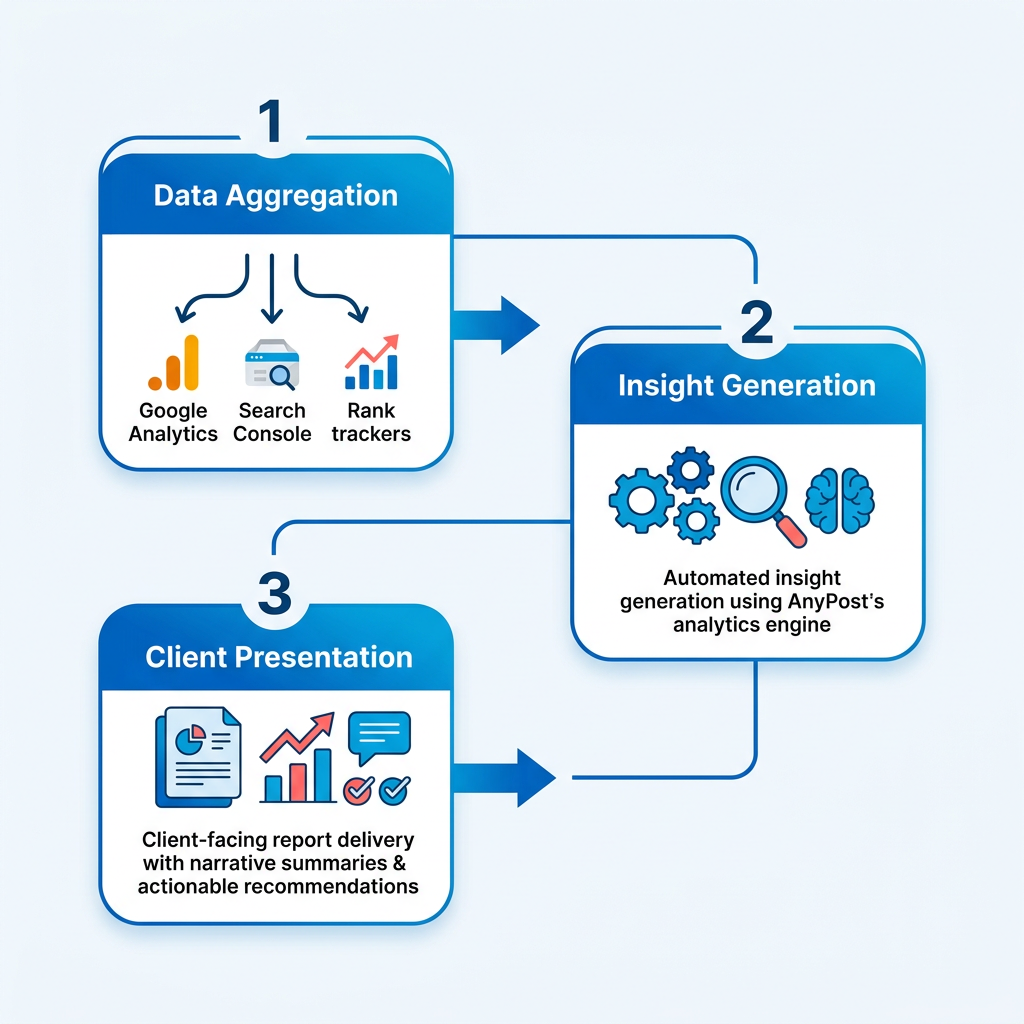
The hardest part of seo automated reporting isn't pulling the data. It's translating it into language stakeholders care about. A client who doesn't live in Search Console won't read a sudden CTR drop the way you do. They want to know whether it means lost revenue, whether it's reversible, and what you're doing next. Clear, proactive explanations head off the misreads and keep everyone focused on progress.
First rule: connect every metric to a business outcome. Say organic traffic went up. Good, but what does that do for lead volume or trial sign-ups? Tie the SEO movement back to conversion data or pipeline in the same sentence. Agencies that move from "rankings improved" to "rankings improved, which drove X new qualified leads this month" are answering the question stakeholders are actually asking.
Turn raw data into recommendations
Reports that stop at the numbers feel unfinished. Always include a short next steps section that names the specific action you'll take based on what the data showed. If rankings dropped for a cluster of high-intent terms, state the exact content refresh or technical fix you're planning and when it ships. That turns the report from a performance log into a strategy document.
When you write from analytics data, frontload the why before the what. Instead of "backlinks increased this month," write "we secured new backlinks from industry publications, strengthening domain authority in the SaaS category." The second version gives context a non-technical reader can act on. Stakeholders remember the story, not the metric.
Consistent touchpoints without the manual overhead
Monthly reporting is still a common cadence, and live dashboards clients can check between reviews supplement it well. That access can cut down the "how are we tracking?" emails, because the client already knows the current state. The formal report becomes the place for interpretation and planning, not a status update.
Set up automated delivery so reports land the same day every month. Retention tends to improve when clients know exactly when their update arrives. Teams that schedule the workflow and reserve manual effort for the commentary sections can drop a lot of repetitive hours.
Watch for data validation pitfalls
The most common error: keyword tracking mismatches, where the tool watches a slightly different search term than the one actually generating traffic. Check that your rank tracker and Search Console agree on exact-match keywords, especially for long-tail queries. A report showing gains for terms nobody searches is worse than no report at all.
Backlink analysis can drift too if the tool's crawl frequency lags Google's index updates. Cross-check high-value link acquisitions by hand periodically to confirm they're still live and passing authority. Automated tools sometimes flag a backlink as "new" when it's really a recrawl of an existing one, which can inflate your growth numbers.
Visualization helps here. Trend charts that overlay multiple metrics on the same timeline let you spot anomalies fast. If organic traffic spiked but conversions stayed flat, that's a signal to check whether the new visitors match your target persona or whether they're bouncing on arrival.
- Tie every metric to a business outcome stakeholders care about (revenue, leads, conversions) rather than reporting SEO-only metrics in isolation.
- Include a next steps section in every report that names the specific action you'll take based on the data.
- Frontload the "why" before the "what" so non-technical readers get context they can act on.
- Set up live dashboards clients can check between formal reports to cut status-check emails and keep meetings on strategy.
- Schedule automated delivery for the same day each month to build consistency and trust.
- Verify keyword tracking alignment between your rank tracker and Search Console to catch exact-match discrepancies.
- Cross-check high-value backlink acquisitions by hand periodically to confirm they're still live and passing authority.
- Use trend charts that overlay metrics on the same timeline to spot anomalies like traffic spikes with flat conversions.
Future-Proofing SEO Automated Reporting
Future-proofing your seo automated reporting means building for two shifts at once: algorithm changes that reshape rankings, and the rise of AI search results that traditional metrics ignore. The reports that age well track both. The ones that don't keep answering last year's question while clients quietly lose visibility they can't see.
There's a discipline most teams miss. Automation tempts you to report everything, because pulling more data costs nothing. Resist it. The strongest automated reports show fewer metrics with more narrative. That's the part machines can't fake yet, and it's exactly where content generation with a consistent brand voice earns its keep, turning raw numbers into a story clients actually read.
What emerging trends should your reports track?
AI search visibility is the new baseline. Google and other engines now surface AI-generated answers above classic results, so a report built only on organic rankings tells half the story. Add citation tracking and answer-engine presence before clients ask why traffic dipped without a ranking drop.
- Track AI search visibility and citations, not just blue-link rankings, so you catch shifts classic SEO metrics miss.
- Add answer-engine presence as a standing metric, since clients can gain or lose traffic through AI overviews you won't see in rank data.
- Build in month-over-month comparisons that connect performance to traffic, leads, and revenue, not vanity counts.
How do you keep reports aligned with algorithm changes?
Treat your report template as a living document. Algorithm updates change what matters overnight, and a report that never evolves slowly drifts into noise. Review your KPI set every quarter and cut anything that no longer maps to a client goal.
- Audit your reported metrics quarterly and drop ones that stopped signaling business impact.
- Keep a short changelog of major algorithm shifts so client narratives can explain movement instead of leaving gaps.
- Pair every metric with a plain-language "what this means" line, because a report without recommendations feels incomplete.
Clear, proactive explanations keep clients from misreading normal data fluctuations.
Should you integrate reporting across channels?
Yes. SEO rarely moves alone, so connect your reporting to the channels that influence it: social, email, and paid. A cross-channel view shows clients how content on one platform lifts search performance on another, which lands far better than a siloed rankings chart.
- Pull social and email performance into the same report so SEO gains read as part of a wider content effort.
- Attribute assisted conversions across channels to show the full path, not just last-click organic wins.
- Reuse one brand-voice narrative layer across every channel report to keep client updates consistent.
I've watched teams reduce their reported metrics but multiply the written context around each one, and retention climbed because the updates finally explained the why. That's the future-proof play: less data, more story, delivered automatically.
Frequently Asked Questions
1. When should you avoid automating SEO reports?
Manual reporting is best reserved for initial website audits and early-stage campaigns where historical data is limited. These scenarios require deep, customized analysis to establish a baseline. Once a campaign matures and transitions into a recurring monthly cycle, automated workflows can take over the routine data collection.
2. How much does automated SEO reporting software typically cost?
Pricing varies widely depending on the scale of your agency. While basic tiers offer affordable entry points, advanced features like custom domains, white-labeling, and high-volume API access generally require mid-to-high-tier subscriptions. It is critical to evaluate how pricing scales as you add more accounts and data sources.
3. Does a live dashboard replace a written report?
No. While dashboards offer real-time transparency, they lack the strategic context that clients need to understand performance. Without written summaries explaining the business impact of the data, clients may struggle to see the value of your work. The best approach is to use dashboards for daily tracking and written reports for strategic reviews.
4. Why don't more integrations guarantee my tools are covered?
A tool with hundreds of integrations is only useful if it supports the specific platforms your clients use. If a key marketing tool or custom database is missing, you will still end up performing manual exports. Always verify direct compatibility with your core tech stack before committing to a platform.
5. What is AI search visibility and why should reports track it?
This metric tracks how often your brand is cited in conversational search results and AI-generated summaries. Because search behavior is shifting toward direct answers rather than traditional blue links, monitoring this presence helps you demonstrate value in channels that standard rank trackers overlook.
6. How do you choose the right reporting cadence?
Align the frequency of your updates with your client's operational pace and the volatility of their campaign. High-tempo campaigns, such as product launches, benefit from weekly check-ins, whereas long-term organic strategies are often best evaluated on a monthly cycle to allow meaningful trends to develop.
7. How does automation let agencies take on more clients?
By automating data collection and report generation, agencies free up staff hours that were previously spent on administrative tasks. This reclaimed capacity allows existing teams to manage a larger portfolio of accounts. However, this growth is only sustainable if your reporting software scales without hitting restrictive account limits or requiring costly custom development.
