SEO Workflow Automation: 10 Tedious Tasks to Offload in 2026

Key Takeaways
- SEO automation is a strategic necessity in 2026, freeing teams for creative strategy.
- AI-driven automation boosts organic traffic by 4–5x through optimized workflows.
- SEO professionals save 30% of time by automating content updates and backlink monitoring.
- AI tools analyze data 20x faster than manual methods, reducing human error in audits.
- B2B marketers save 20 hours weekly automating content refresh and backlink prospecting.
- Automation handles repetitive tasks like keyword research and technical audits efficiently.
- Automated workflows reduce burnout and accelerate results for competitive advantage.
Related Video
Watch: 5 SEO Tasks You Can Automate Right Now by SERPrecon
Why SEO Workflow Automation Matters
SEO workflow automation isn’t just a convenience-it’s a strategic necessity in 2026. By handling repetitive tasks like keyword research, rank tracking, and technical audits, automation tools free up teams to focus on creative strategy and high-impact projects. For example, one company reported a 4–5x increase in organic traffic after integrating AI-driven automation into their SEO process. Time savings are equally compelling: SEO professionals spend up to 30% less time on manual tasks like content updates and backlink monitoring when using automation. These efficiencies translate to faster results, reduced burnout, and a stronger competitive edge.
How Does AI Enhance SEO Workflow Automation?
AI isn’t just streamlining workflows-it’s redefining what’s possible. Tools powered by artificial intelligence can analyze vast datasets in seconds, identify content gaps, and even suggest optimizations for underperforming pages. For instance, AI-powered tools automate content refresh recommendations and backlink prospecting, tasks that once required hours of manual analysis. This level of automation ensures consistency and precision, reducing human error in tasks like keyword categorization or technical audits. For B2B marketers and content creators, these capabilities mean faster iteration cycles and more time spent refining messaging for target audiences. As mentioned in the Understanding the 10 Tedious Tasks to Offload section, automation tackles tasks like content audits and competitor analysis, which AI enhances with precision and speed.
What Challenges Does Automation Solve?
Manual SEO workflows are inherently time-consuming and prone to errors. Teams often struggle with:
- Repetitive data entry for keyword tracking and performance reports.
- Inconsistent content updates due to limited bandwidth.
- Delayed technical audits caused by resource constraints.
By automating these processes, teams eliminate bottlenecks. For example, rank tracking tools pull daily data from platforms like Ahrefs or SEMrush, sending alerts for significant ranking shifts. This proactive approach prevents teams from reacting to issues after they’ve impacted traffic. Similarly, AI-driven tools like AnyPost.ai simplify content creation by generating keyword-rich drafts, slashing the time needed for initial research. Building on concepts from the Choosing What to Automate First section, prioritizing these tasks ensures teams address the most impactful areas first.
Who Benefits Most from SEO Automation?
While all digital marketers can benefit, specific roles gain the most:
- B2B marketers managing complex buyer journeys can automate content personalization and pillar page updates.
- Content creators use AI to draft outlines, repurpose blog posts into social media snippets, and identify topic clusters.
- E-commerce teams automate product page optimizations and seasonal keyword adjustments.
Small businesses with limited SEO resources also gain parity with larger competitors. One example: a mid-sized e-commerce brand automated its technical audit process, uncovering 200+ broken links in a week-a task that would have taken a team days to complete manually. This scalability makes automation essential for teams of all sizes.
Why AnyPost.ai Stands Out in Automation
Unlike generic providers, AnyPost.ai integrates AI into every step of the SEO workflow, from keyword research to performance tracking. Its transparent pricing and user-friendly interface make it ideal for teams transitioning from manual processes. One user, a content marketer at a SaaS startup, noted, “We cut our onboarding time in half by automating client-specific keyword research with AnyPost.ai.” This level of customization ensures teams address their unique challenges without relying on one-size-fits-all solutions. As highlighted in the Implementing SEO Workflow Automation section, AnyPost.ai’s features like the Persona Engine streamline workflows while maintaining adaptability.
In short, SEO automation isn’t optional-it’s foundational. By reducing manual effort, accelerating insights, and scaling capabilities, it empowers teams to focus on innovation rather than repetitive tasks. As AI continues to evolve, the businesses that adopt automation now will lead the pack in 2026 and beyond.
Understanding the 10 Tedious Tasks to Offload
How Does Automation Streamline Headline Ideation?
Automation tools generate topic ideas by analyzing keyword trends, search intent, and competitor content gaps. This reduces time spent brainstorming while ensuring topics align with audience needs. For example, AI can suggest headlines optimized for click-through rates by testing variations against historical performance data.
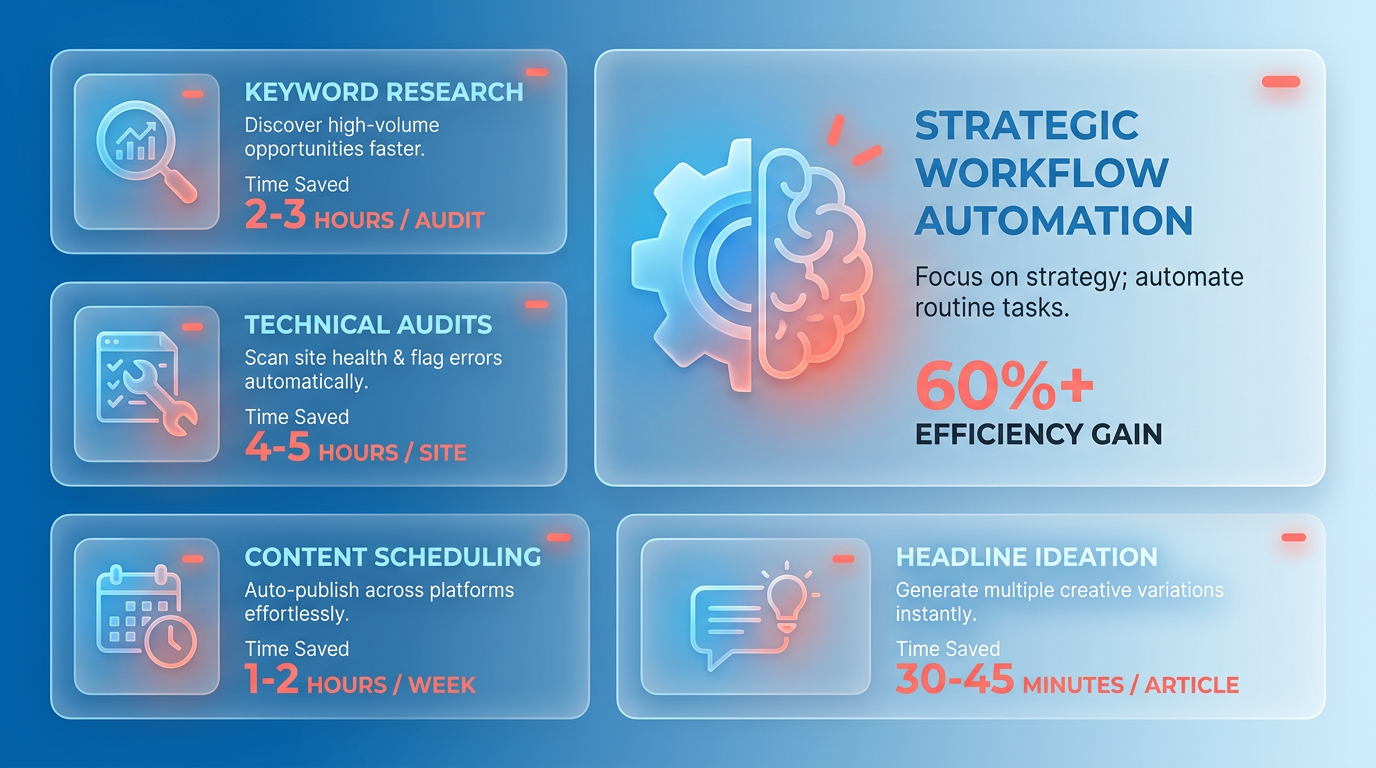
Key benefits include faster ideation cycles and reduced reliance on manual keyword research. Tools often integrate with content calendars to prioritize topics based on SEO value, a strategy emphasized in the Why SEO Workflow Automation Matters section. However, human oversight remains critical to refine ideas and ensure brand alignment..
How Can AI Improve Long-Form Drafting and Brand Consistency?
AI-powered writing assistants draft long-form content while maintaining brand voice, tone, and style guidelines. These tools use training data from existing brand materials to replicate consistency across blog posts, case studies, and more. For instance, AnyPost.ai’s SaaS service ensures drafts adhere to predefined brand parameters, minimizing revisions.
Automation speeds up drafting but requires human editors to review for nuance and accuracy. This hybrid approach balances efficiency with quality, especially for complex topics requiring subject-matter expertise, as outlined in the Implementing SEO Workflow Automation section..
What Role Does Automation Play in Content Repurposing?
Automated workflows repurpose blog posts into social media snippets, infographics, or YouTube scripts by extracting key points and adapting them for different formats. This reduces redundancy while maximizing content reach. For example, a tool might split a 2,000-word article into LinkedIn posts, Twitter threads, and email newsletter summaries in minutes.
The key advantage is scalability: teams can distribute content across channels without creating new material from scratch. Metrics tracking this reach is further detailed in the Measuring the Success of SEO Workflow Automation section..
Why Automate Internal Linking and Taxonomy Mapping?
Automated tools map internal links by analyzing content themes and suggesting contextual connections. This improves site navigation and SEO performance while reducing manual effort. For example, a taxonomy mapper might recommend linking a new blog post to relevant category pages based on keyword overlap.
Automation ensures consistency in linking strategies but may miss nuanced editorial decisions. Human reviewers should audit suggestions to avoid over-optimization or irrelevant connections, a practice highlighted in the Why SEO Workflow Automation Matters section..
How Does Auto-Publishing Save Time Across Platforms?
Auto-publishing tools schedule content for WordPress, LinkedIn, YouTube, and Instagram using a centralized dashboard. This eliminates the need to log into each platform individually. For example, a tool could publish a blog post to WordPress, generate a LinkedIn summary, and upload a YouTube video with synchronized timestamps.
Limitations include platform-specific formatting quirks that may require manual adjustments. However, automation drastically reduces scheduling time, especially for teams managing multiple channels, as discussed in the Implementing SEO Workflow Automation section..
What Are the Benefits of Automating Meta Descriptions and Summaries?
AI generates meta descriptions by extracting key phrases from content and optimizing for click-through rates. It also creates concise summaries for articles, ensuring consistency in messaging. For instance, a tool might draft a 150-character meta description that highlights the article’s unique value proposition.
While automation speeds up these tasks, final reviews are necessary to avoid generic or duplicate descriptions. This hybrid approach balances efficiency with precision, a principle covered in the Choosing What to Automate First section..
What Are the Limits of Automated Technical Site Audits?
Automation identifies technical issues like broken links, site speed bottlenecks, and canonicalization errors. Tools can scan thousands of pages in minutes, flagging actionable fixes. However, manual audits are still required for complex issues such as content quality, user experience, and advanced schema implementation.
Automation provides a baseline for health checks but cannot replace human judgment in diagnosing deeper technical challenges, as noted in the Why SEO Workflow Automation Matters section..
How Does Competitor Analysis Automation Work?
Automated tools track competitors’ keyword strategies, backlink profiles, and content updates in real time. For example, a system might alert teams when a competitor ranks for a new long-tail keyword. This enables data-driven decisions without manual monitoring.
Limitations include the inability to analyze qualitative factors like brand sentiment or user engagement. Teams should supplement automated reports with strategic interpretation, a recommendation aligned with the Choosing What to Automate First section..
What Role Does AI Play in Rank Tracking?
AI-driven rank tracking tools monitor keyword positions across search engines and adjust strategies based on performance trends. For instance, machine learning models can predict ranking drops caused by algorithm updates or content gaps.
Automation provides real-time alerts and historical trend analysis, but human input is needed to prioritize fixes and align changes with business goals, a balance described in the Measuring the Success of SEO Workflow Automation section..
How Does Automation Simplify Analytics and Reporting?
Automated reporting tools compile SEO metrics-like traffic, bounce rates, and conversion data-into visual dashboards. These systems generate weekly or monthly reports with insights on what’s working and what needs adjustment.
The main benefit is saving time on data aggregation while ensuring consistency in reporting. However, teams must interpret results contextually to avoid acting on misleading metrics, a principle reinforced in the Measuring the Success of SEO Workflow Automation section.
By offloading these tasks, SEO teams can focus on strategic work like content optimization and user experience improvements, while tools handle the repetitive groundwork.
Implementing SEO Workflow Automation
Implementing SEO workflow automation starts with selecting a tool that streamlines repetitive tasks while maintaining quality and adaptability. AnyPost.ai stands out for its Persona Engine and auto-publishing features, which simplify content creation, keyword optimization, and workflow scheduling. By automating tasks like competitor analysis, content drafting, and performance tracking, AnyPost reduces manual effort while improving consistency. Teams using the platform have noted a significant decrease in time spent on content production, allowing for faster scaling of SEO initiatives. Below is a structured approach to deploying automation effectively.
How Do You Set Up AnyPost for SEO Automation?
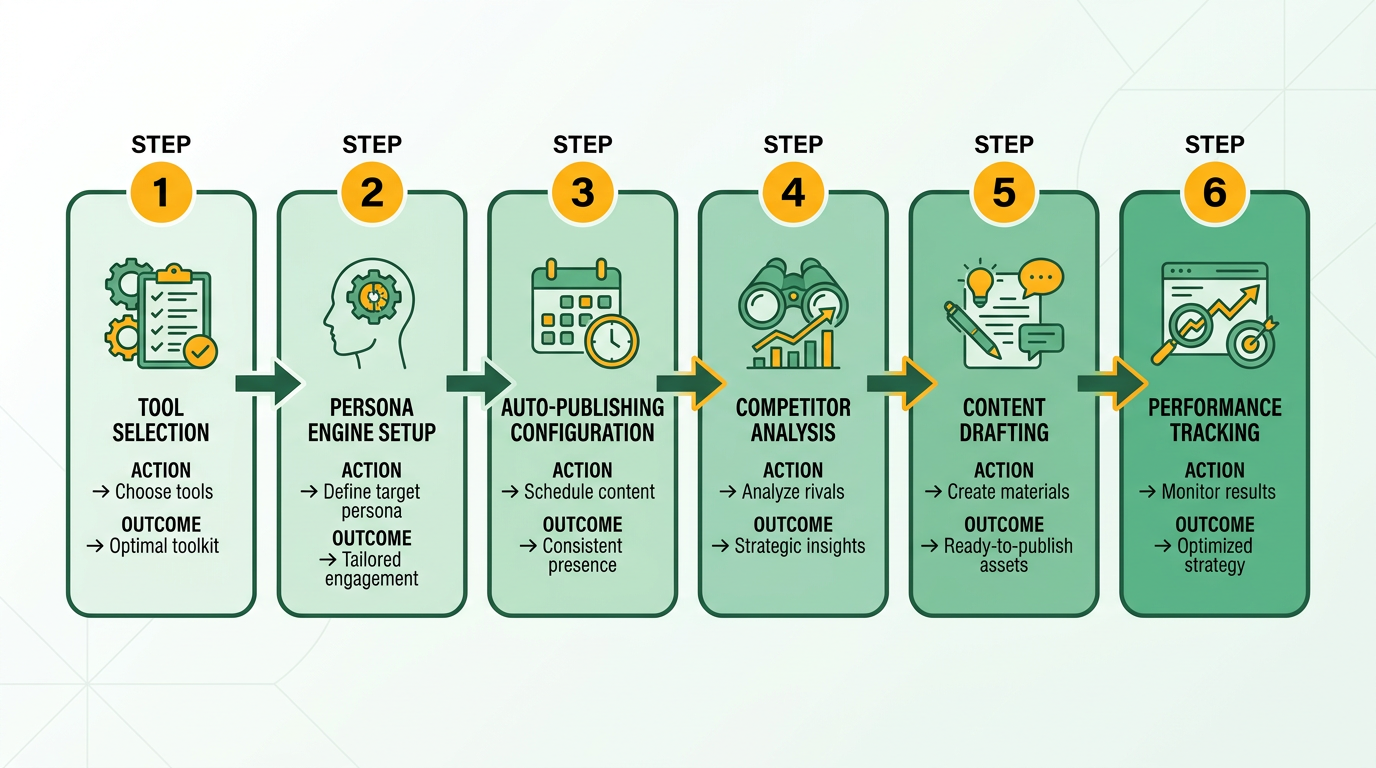
Begin by integrating AnyPost with your content management system (CMS) and analytics tools. The Persona Engine allows you to define target audiences, ensuring content aligns with user intent from the start. For instance, you can input a topic like “AI in marketing” and generate tailored content for different audience segments-such as beginners or industry experts-using predefined personas. Next, connect AnyPost to your CMS to enable auto-publishing, which schedules posts based on your editorial calendar. This eliminates delays caused by manual uploads.
To configure workflows, assign tasks to AnyPost’s automation engine. For example:
- Keyword research: Use built-in tools to identify low-difficulty keywords and map them to specific content categories.
- Content drafting: Generate first drafts using the Persona Engine, which adjusts tone and depth based on your audience definitions.
- Performance tracking: Set up alerts for keyword rank changes or traffic dips, allowing for quick adjustments.
What Workflows Can You Automate With AnyPost?
AnyPost streamlines 10 common SEO tasks, including:
- Content ideation: Generate topic clusters using historical data and trending queries.
- On-page optimization: Auto-insert meta tags, headers, and internal links based on keyword guidelines.
- Backlink outreach: Identify authoritative websites for guest posting and draft outreach emails.
- Competitor analysis: Track competitors’ content strategies and suggest gaps to exploit.
- Technical SEO audits: Flag broken links, page speed issues, and mobile usability errors.
- Repurposing content: Turn blog posts into social media snippets or video scripts.
- User intent alignment: Adjust content structure (e.g., FAQs vs. tutorials) based on search intent.
- Reporting: Compile monthly performance dashboards with metrics like traffic, rankings, and conversion rates.
- Forming content calendars: Schedule posts around seasonal trends and business goals.
- A/B testing: Auto-generate variations of headlines or CTAs to test engagement.
As mentioned in the Understanding the 10 Tedious Tasks to Offload section, these workflows address repetitive, time-intensive processes that benefit most from automation. Each task uses a combination of AI and predefined rules. For instance, the Persona Engine ensures content matches audience preferences, while auto-publishing handles scheduling without manual intervention.
How Do You Overcome Common Automation Challenges?
Automation isn’t foolproof. To avoid pitfalls:
- Balance AI with human review: Use AnyPost to draft content but assign editors to refine nuance, humor, or brand-specific language.
- Train the system: Feed AnyPost high-performing examples of your existing content to improve its output quality.
- Set thresholds for alerts: Avoid being overwhelmed by notifications by defining clear triggers, such as a 10% drop in traffic or a new competitor ranking for your keywords.
- Audit workflows monthly: Update automation rules to reflect changes in search algorithms or business priorities.
Best Practices for Monitoring Automation Effectiveness
Track these metrics to evaluate AnyPost’s impact:
- Keyword rankings: Use AnyPost’s built-in tools to measure rank improvements for target keywords.
- Traffic growth: Compare organic search traffic before and after automation, aiming for steady month-over-month increases.
- Engagement rates: Monitor bounce rates, time on page, and conversion rates to ensure content resonates.
- Content production speed: Calculate how automation reduces time spent on drafting, research, and scheduling.
Building on concepts from the Measuring the Success of SEO Workflow Automation section, regularly compare automated workflows to manual ones to identify gaps. For example, if a piece generated by AnyPost underperforms, review its structure and adjust the Persona Engine’s settings for that topic.
By combining AnyPost’s automation with strategic oversight, teams can focus on high-value tasks like strategy development and creative problem-solving. The key is to view automation as a collaborator, not a replacement, for human expertise.
Choosing What to Automate First
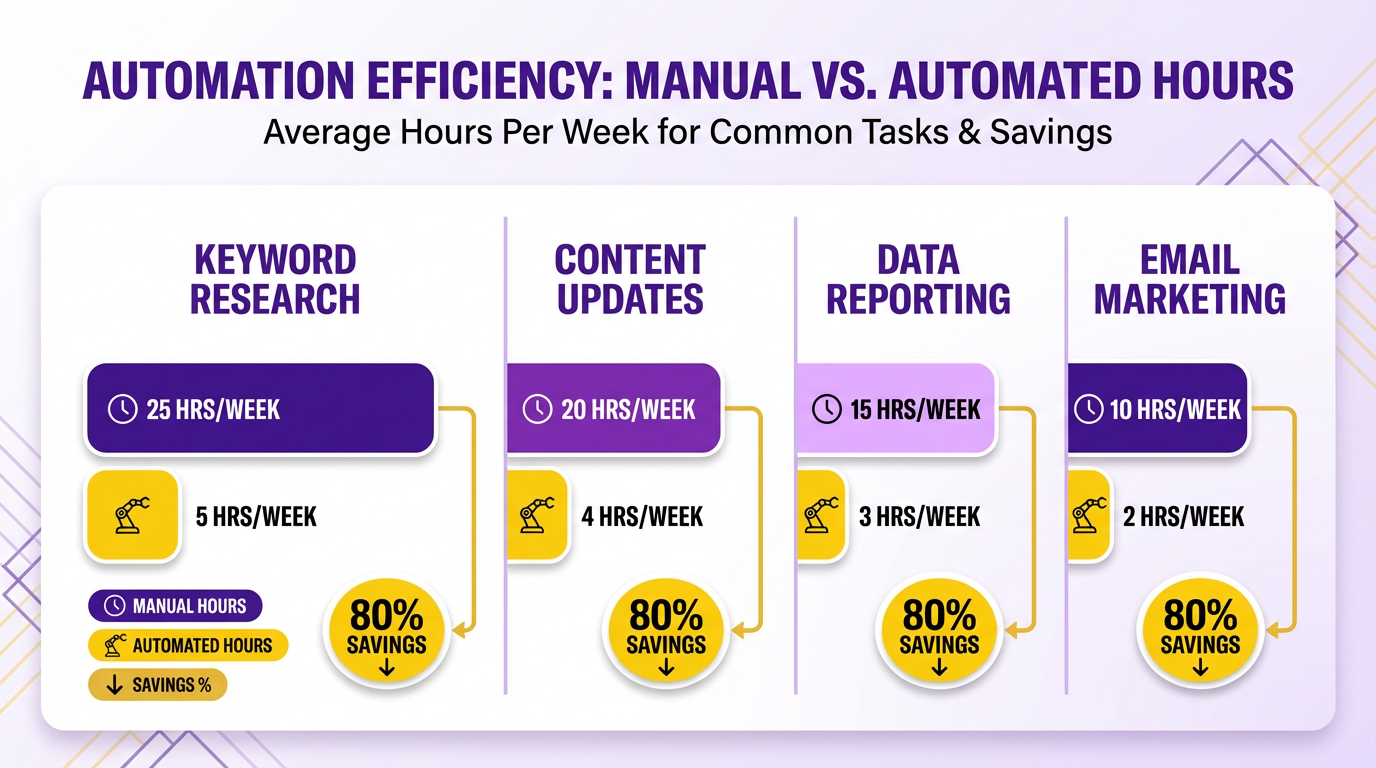
Prioritizing automation ensures you focus on tasks that save the most time while minimizing errors. Start by identifying workflows that are repetitive, time-consuming, and prone to human mistakes. For example, manual keyword research or content updates can eat hours weekly, while automation tools reduce this to minutes. The goal is to free up your team’s capacity for strategic work like competitor analysis or user experience improvements.
What Factors Should You Consider?
Three key criteria help determine which tasks to automate first: effort, frequency, and error rate.
- Effort: Automate tasks requiring high manual input with low cognitive value. For instance, tracking keyword rankings daily across tools is tedious but formulaic.
- Frequency: Prioritize tasks done regularly, like content audits or backlink monitoring. Understanding the 10 Tedious Tasks to Offload highlights that repetitive SEO work, such as technical audits, is prime for automation.
- Error rate: Tasks with high manual error risks-like data entry for SEO metadata-benefit most from automation. Understanding the 10 Tedious Tasks to Offload explains how AI reduces inconsistencies in repetitive workflows.
Which Tasks Are Best for Automation?
Focus on workflows where tools like AnyPost.ai excel, such as:
- Headline and topic ideation: LLMs generate content ideas at scale. How Does Automation Streamline Headline Ideation? notes that AI-driven brainstorming tools can suggest 10–20 topic variations in seconds.
- Keyword rank tracking: Automating daily rank checks with SaaS providers like AnyPost.ai eliminates manual data aggregation from Ahrefs or SEMrush.
- Content validation: Tools analyze on-page SEO elements (meta tags, internal links) to ensure compliance with best practices, reducing rework.
A real-world example from Understanding the 10 Tedious Tasks to Offload shows an SEO team automating monthly content refreshes using AI workflows, cutting editing time by 40%.
How Do You Evaluate Automation’s Limitations?
Not all tasks are ideal for automation. For example, creative copywriting still requires human nuance, even with AI assistance. Why SEO Workflow Automation Matters warns that while tools can draft content, they may miss context-specific tone or brand voice. Always test automation on a small scale first. Ask:
- Will automation improve accuracy or speed significantly?
- Does it integrate smoothly with existing tools?
- Can you monitor its output for quality control?
What’s the Best Way to Build an Automation Roadmap?
Start small, then expand. Begin with high-frequency, low-complexity tasks like automated categorization of content requests (Understanding the 10 Tedious Tasks to Offload). Once that’s stable, move to more complex workflows, such as hub-and-spoke content planning (Implementing SEO Workflow Automation). Why SEO Workflow Automation Matters recommends a phased approach:
- Audit: List all current tasks and their time costs.
- Pilot: Automate one task (e.g., weekly backlink prospecting) and measure results.
- Scale: Replicate success to other workflows, prioritizing tasks with the highest error rates.
By aligning automation with these principles, you’ll avoid overcomplicating workflows while maximizing efficiency. Tools like AnyPost.ai can streamline this journey, offering templates for common SEO automation scenarios.
Measuring the Success of SEO Workflow Automation
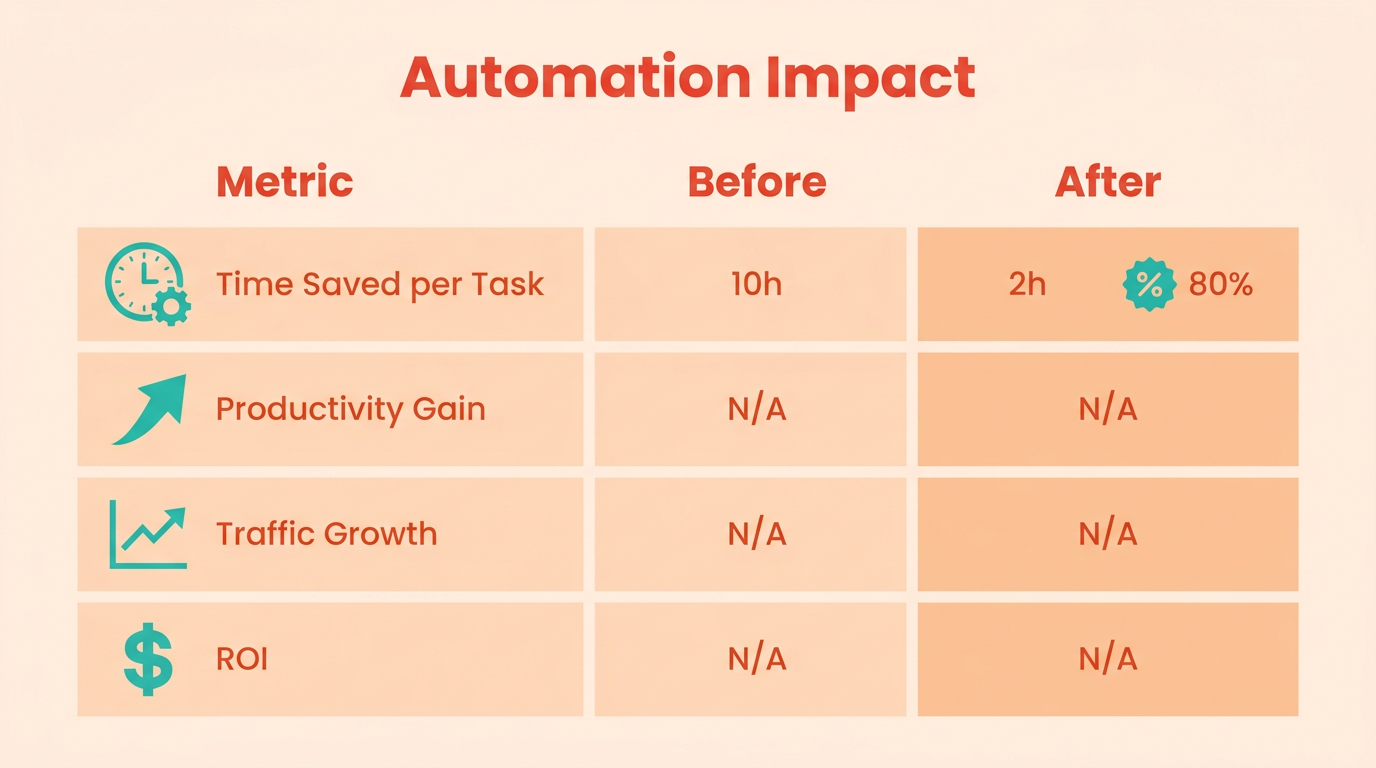
Measuring the success of SEO workflow automation ensures you’re maximizing efficiency and achieving tangible results. Start by identifying core metrics like time savings, productivity gains, and traffic growth, then use tools like Google Analytics and Search Console to track progress. Regularly reviewing these metrics helps refine workflows and demonstrate ROI to stakeholders.
What Metrics Should You Track to Evaluate Automation Success?
Focus on time saved per task, productivity improvements, and traffic growth. For example, if keyword research once took 10 hours weekly but now takes 2 hours thanks to automation, that’s an 80% time reduction. As mentioned in the Choosing What to Automate First section, prioritizing repetitive tasks like keyword research aligns with automation’s core value proposition. Track productivity by counting tasks completed-such as content optimizations or backlink outreach-before and after automation. Traffic growth, like a 4–5x increase in organic visits after automating keyword targeting, directly ties to automation effectiveness.
How Do You Track and Analyze Key Metrics?
Use Google Analytics to monitor organic traffic trends, conversion rates, and user engagement. Set up custom dashboards to compare metrics pre- and post-automation. For instance, track how automation impacts bounce rates or time on page after optimizing meta tags. In Search Console, monitor indexing status and crawl errors to ensure automated tools aren’t causing technical issues. Building on concepts from the Understanding the 10 Tedious Tasks to Offload section, technical audits and indexing checks remain critical for validating automation’s reliability. AnyPost.ai users reported streamlined workflows and measurable traffic gains by integrating these tools with their automation systems.
Automating SEO tasks with AnyPost.ai reduced our keyword research time by 80% while boosting organic traffic.
How Can Data Improve Your Automation Workflows?
Regularly audit automation outputs using performance data. If automated content optimizations aren’t improving rankings, adjust the tools’ parameters or retrain AI models. For example, if rank tracking shows stagnant keyword positions, refine the automation’s focus on high-intent keywords. Use A/B testing to compare manual vs. automated strategies for specific tasks, like meta description generation, and scale what works.
What Are Best Practices for Reporting Automation Results?
Create clear, visual reports for stakeholders using tools like Google Data Studio. Highlight metrics like hours saved, tasks automated, and traffic growth in monthly summaries. For instance, show how automating on-page SEO reduced content editing time by 50% while increasing page rankings. Share these insights with cross-functional teams to align on goals and secure continued support for automation initiatives.
By focusing on actionable metrics and continuous refinement, you’ll ensure your SEO automation delivers measurable value over time.
Conclusion and Next Steps
Automating your SEO workflow in 2026 isn’t just about saving time-it’s about enable strategic focus and scalability. The key takeaway is to identify repetitive tasks like content audits, backlink monitoring, and keyword research, then replace them with AI-driven tools. SaaS providers like AnyPost.ai streamline these processes, letting you prioritize high-impact work. Start by evaluating which tasks eat into your productivity the most.
What Should You Do First?
The next step is to pilot automation with a single tool. Begin by integrating AnyPost.ai into your workflow to handle content creation, on-page SEO adjustments, or competitor analysis. For example, use its AI workflows to generate draft content for underperforming pages, then refine the output manually. This approach lets you test efficiency gains without overhauling your entire system. Once you see results, expand automation to other tasks like rank tracking or technical SEO audits. As mentioned in the Choosing What to Automate First section, prioritizing tasks that save the most time while minimizing errors ensures a strategic return on investment.
Explore additional resources to deepen your understanding. Moz’s guide on AI-powered SEO workflows offers practical examples of automated content refresh strategies. Gumloop’s article on AI-driven task automation explains how to build custom workflows for niche challenges. Pair these insights with SEO Bot’s best practices , which emphasize aligning automation with long-term goals. Remember, automation isn’t a one-size-fits-all solution-tailor tools to your team’s specific pain points.
How Can You Stay Updated on Automation Trends?
The SEO market evolves rapidly, so staying informed is critical. Subscribe to industry newsletters or follow thought leaders who discuss AI advancements in SEO. Platforms like Marketer Milk’s 2026 tool roundups highlight emerging trends, while online tutorials (e.g., AnyPost.ai’s documentation) provide step-by-step guidance. Joining communities like Reddit’s SEO forums or Slack groups for digital marketers can also help you troubleshoot challenges and share insights.
Finally, start small. Begin with one automation tool and measure its impact over 30–60 days. Track metrics like time saved, keyword rankings, or content output volume to quantify success. Building on concepts from the Measuring the Success of SEO Workflow Automation section, focus on core metrics that align with your business objectives. As confidence grows, layer in more advanced features like predictive analytics or bulk on-page optimization. Automation isn’t a replacement for human expertise-it’s a multiplier. By pairing AI tools with your strategic insights, you’ll future-proof your SEO efforts while staying agile in 2026 and beyond.
Automation let us repurpose 80% of our content in half the time-now we focus on data-driven strategy.
Building on the Implementing SEO Workflow Automation section, ensure your chosen tool integrates seamlessly with existing workflows and scales with your needs.
Frequently Asked Questions
1. What are the most common SEO tasks that can be automated in 2026?
SEO automation in 2026 handles keyword research, rank tracking, technical audits, content updates, backlink monitoring, content refresh, and backlink prospecting. These tasks reduce manual effort by 30%, saving SEO teams significant time while improving accuracy and efficiency.
2. How much time can SEO automation save professionals?
SEO automation saves professionals 30% of their time on manual tasks like content updates and backlink monitoring. B2B marketers specifically save 20 hours weekly by automating content refresh and backlink prospecting, enhancing productivity and reducing burnout.
3. What are the benefits of using AI in SEO workflows?
AI-driven SEO tools increase organic traffic by 4–5x and analyze data 20x faster than manual methods. They reduce human error in audits, identify content gaps, and automate tasks like keyword research, enabling teams to focus on strategic initiatives rather than repetitive work.
4. How does automation reduce human error in SEO?
Automation minimizes human error by using AI to perform precise data analysis and audits. For example, AI tools handle keyword categorization and technical audits 20x faster than manual methods, ensuring accuracy and consistency in SEO tasks like content optimization and backlink monitoring.
5. What challenges does SEO automation solve?
SEO automation tackles repetitive tasks like data entry, reduces human error in audits, and prevents burnout by handling time-consuming processes. It streamlines workflows for keyword research and technical audits, allowing teams to focus on creative strategies and high-impact projects instead of manual labor.
6. Can automation handle technical SEO audits?
Yes, automation efficiently handles technical SEO audits by analyzing site structure, crawl errors, and performance metrics. AI tools perform these audits 20x faster than manual methods, identifying issues like broken links and page speed problems with high accuracy, saving teams significant time and effort.
7. How does automation help in content strategy?
Automation frees SEO teams from tedious tasks like content updates and backlink monitoring, allowing them to focus on creative strategy. By automating data-heavy processes, teams can refine messaging for target audiences and prioritize high-impact projects that drive long-term growth and engagement.
