Small IT Business Idea: Sell Automated SEO Content Pipelines to Local Firms

Quick Summary
The software is the cheap part of this business. The expensive part is the person who reads every draft before it goes live on a local firm's site. Automated content creation can turn one keyword record into a full draft far faster than writing it by hand, as builders sharing their own pipelines have shown. Manual production tends to swallow hours per article once you count research, drafting, and formatting.
The table uses our published monthly prices where they apply. The effort and revenue columns are our own working assumptions, not researched benchmarks.
| Feature | Effort (our assumption) | Cost | Revenue potential (our assumption) | Risk |
|---|---|---|---|---|
| Automated drafting and publishing | Low setup, steady review time | Our plans run $399/mo (200 credits, up to 40 articles) to $5,000/mo (3,300 credits, up to 660 articles), at 5 credits per article | Core of a monthly retainer | Drafts need fact and citation checks |
| Local listings and reviews | Low to medium | Google Business Profile Optimization, Google Maps Optimizer, and Review Optimizer are included on our Scale plan ($699/mo) and above | Recurring, since listings drift | Multi-location Google Maps sits on the Enterprise plan ($5,000/mo), so multi-site clients cost more to serve |
| Automated backlinks | Low once enabled | Paid from unused credits on Scale and above | Upsell after month six | Needs 6 months of subscription, enough published articles, PSEO page clusters, and 200 unused credits |
| Technical audits | Medium | Separate crawler tool; pricing varies by vendor | Add-on | Adds another tool to manage |
| Search Console reporting | Low | Free | Renewal evidence | Our published example: 19K impressions but 169 clicks over 90 days |
What the numbers mean for your offer
- The recurring work outlasts the launch. Listings drift, reviews keep arriving, pages need refreshes, and credit-funded backlinks only unlock after six months. That leaves billable work long after the first batch of pages ships.
- Impressions aren't profit. The 19K impressions against 169 clicks in our own example show how far visibility and clicks can drift apart. Vendor traffic figures like these shouldn't be sold as ROI.
Why automated SEO content pipelines fit local IT providers
The writing is the part everyone pictures. The hours hide in the stages around it: keyword research, optimization, publishing, and getting the page indexed. Writing and editing service pages also takes hours away from paying work.
That workload is why automated content creation suits a small IT provider. These firms already sell recurring, process-driven services such as patching and backups. A content pipeline runs on the same logic. The same structured inputs go in each month, and drafts come out ready for review.
Software is the cheap line on the invoice
Tool costs tend to stay modest next to labor. Traditional SEO agencies can charge up to $5,000 a month, largely because they rely on slow, manual workflows. Our platform pulls content generation, SEO-optimized publishing, backlinking, and Google Business Profile management into one place, so you aren't stitching together a separate tool for each stage. Whichever stack you pick, though, your margin depends on reviewer hours more than on subscription fees.
Consistency comes from the inputs. Every draft starts from the same record: primary keyword, keyword clusters, search intent, and notes on what currently ranks. The generator also writes in the client's brand voice, so tone and structure stop drifting from one article to the next.
What we'd actually sell
Sell a repeatable workflow with a review step, and price it on the review time. The software is the smaller line on your cost sheet, so a quote built around it will undercharge for the part that takes real hours.
Skip this model if a client expects you to replace their in-house marketer. That's a different job, and a pipeline with a reviewer attached won't fill it. Go in with a focused scope instead: most local firms need a short set of pages mapped to real local searches, not hundreds of posts.
The five-step pipeline you can sell
The step resellers tend to skip happens before any writing starts: deciding what the plumber should sound like. Skip it, and automated content creation turns out pages that could belong to any trade in any town.
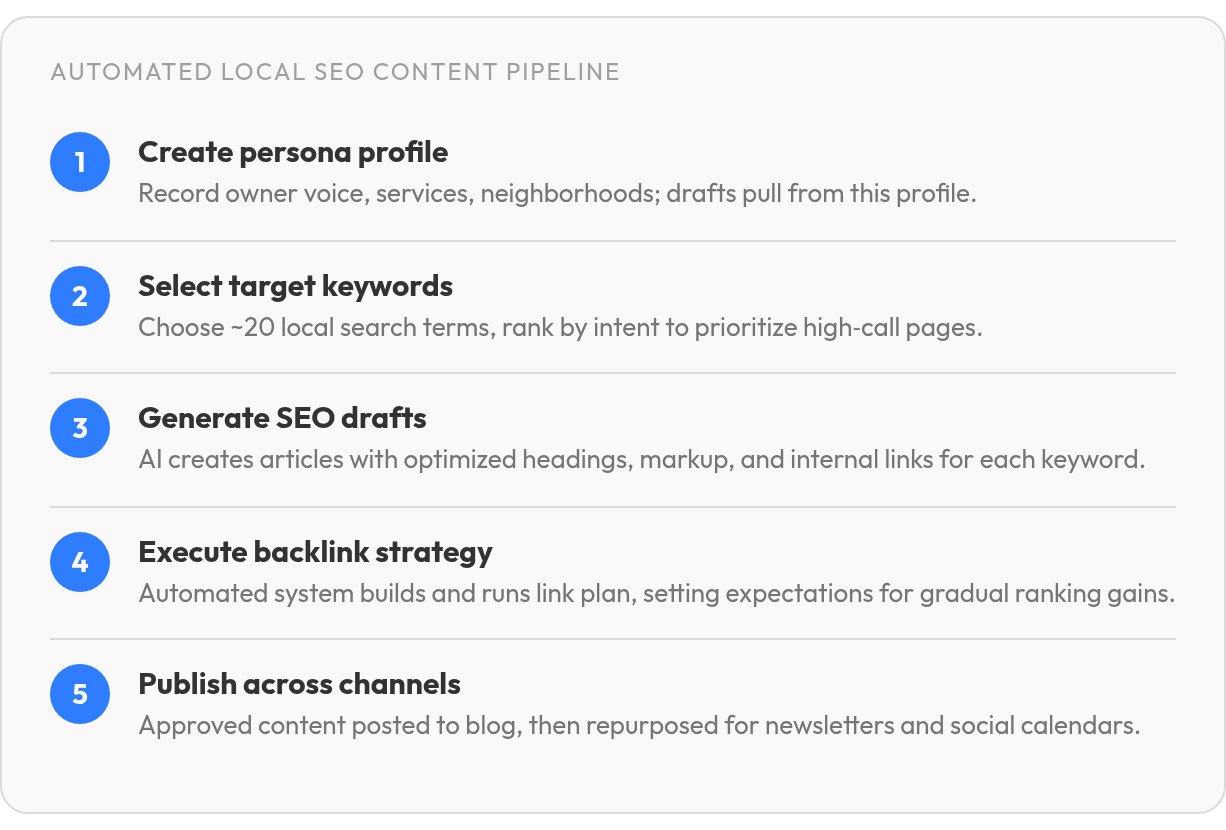
We treat the pipeline as five setup tasks. You configure them once per client, then run them every month.
- Build the persona profile. Record how the owner talks to customers, which services they offer, and which neighborhoods they cover. Load their service sheets as reference documents. Every draft pulls from this profile, so a thin profile weakens every page.
- Pick the right 20 keywords. A local plumber rarely needs hundreds of articles. They need a short list tied to real local searches, for example "water heater repair [suburb]" or "emergency plumber open Sunday [city]." Rank the list by intent so the pages most likely to bring calls go live first.
- Generate drafts with on-page SEO built in. Each keyword becomes a draft with keyword-optimized headings, semantic HTML (markup that tells search engines what each part of the page is), and relevant internal links already in place. Pages that go live half-optimized can lose weeks of ranking time while that cleanup waits in someone's queue.
- Run the backlinking strategy alongside publishing. Automated backlinking builds and executes a link plan to strengthen the client's search visibility, so nobody on your team is sending outreach emails by hand. Tell clients before they sign that links tend to pay off gradually. It sets honest expectations for the first few months.
- Schedule publishing across web and social. Each approved article goes to the blog first. It then gets cut into a newsletter item and a LinkedIn post or Instagram carousel on a fixed calendar.
Where does human review belong?
Builders disagree on this. Some send any draft that fails a quality check back to the AI for revision. Others block publishing until a person has verified every citation.
We split the work by type of failure. Title tags, schema, internal links, alt tags, and keyword coverage can loop back to automated revision, because those are mechanical fixes. Prices, service areas, citations, and factual claims need a human to approve them. Errors in those details are what cost a local firm its customers' trust, and no retry loop catches a wrong service area as reliably as the person who knows the client.
Pricing blueprint and ROI snapshot for a local firm
The tier that looks like the volume discount is often the wrong one for a local firm. Our Agency plan costs $1,999 for 1,000 credits, about $2.00 per credit, which works out to more per credit than Scale. The Agency premium pays for extras like a private support channel and an enterprise account manager. It does not make automated content creation cheaper per page.
Quote clients in credits. An article costs 5 credits, a one-minute video costs 15, and a restyle costs 1. On Agency, that puts a video at about $30 and a restyle at about $2. A 1,000-credit month covers 200 articles, or a mix such as 120 articles plus 26 videos. Enterprise runs $5,000 for 3,300 credits, enough for 660 articles in a month. The pricing page has a monthly/yearly selector, so check the yearly figure before you promise anyone a discount.
What does a per-client software stack cost?
Listing tools often sit on top of the content plan, so check what the plan already covers before you add one:
- Standalone listing tools tend to price by profile, so the bill grows with every client you add.
- Local suites often charge per location, which can add up fast for multi-location clients.
- Our Scale plan already includes Google Business Profile Optimization, the Google Maps Optimizer, the Review Optimizer, and local SEO automation.
- Enterprise adds multi-location Google Maps for clients with several storefronts.
A separate listing tool that duplicates features already in the plan is a hidden tax on your margin, so compare the two before you build a quote. Review responses can still take staff hours on top of any software cost.
Backlinks and press releases have no add-on price you can mark up. They start at the Scale plan and spend unused credits. They're also gated: six months of active subscription, enough published authority articles, established programmatic landing-page clusters (groups of templated pages built around related searches), and at least 200 spare credits. That gating is the case for a six-month minimum term, and the reason backlinks shouldn't appear in any month-one promise.
What results can you actually show?
Our published Search Console snapshots include one site with 237K impressions over six months and only 271 clicks. Impressions grew. Clicks stayed thin. These are vendor-reported figures, not a forecast, so don't build a traffic-to-leads ROI calculator on them. Report what moved in Search Console and let the client judge lead quality.
Before the first client signs: checklist and pitfalls
The checklist usually breaks at the first box, not the last. If the onboarding form comes back with three keywords and "friendly tone," automated content creation won't produce a page anyone should approve.
Send every new client an intake questionnaire before any work starts. Treat it as a working template you adapt over time, not an industry standard. It should ask for:
- Brand voice notes and phrases the owner actually uses with customers
- Primary keywords, keyword clusters, and the search intent behind each
- Local positioning, meaning why customers pick this firm over the next one Next, configure the research step to fill source gaps before drafting begins. Then set every output to save with a "draft" status. Nothing goes live until a person changes it.
Every draft stops at draft status
Builders sharing open pipelines stop at draft status for the reason covered above: the facts, citations, prices, and local details need a reviewer who opens each source. The open question is how often that reviewer sits down. Pick a cadence you can sustain, such as a regular batch review plus a periodic audit, and adjust it as you learn where each client's drafts tend to fail. Some clients' drafts will trip on pricing. Others will trip on service areas. The pattern usually shows up within a few batches.
Volume and impressions both mislead
Thirty thin articles a month can leave pages competing for the same keywords and dilute the site's authority. A smaller set of verified pages tends to hold up better, and it costs you fewer review hours.
Impressions mislead the same way, as the Search Console numbers above show. Your monthly report should cover impressions, clicks, click-through rate, average position, and local-pack rankings, written in plain language. Add the pages published, the reviews completed, and next month's actions. That gives the client something to judge besides a rising impressions line.
Keep backlinks out of the launch pitch. Links often take time to show up in rankings, so frame the first months around steady progress rather than a launch-day win.
When you're ready to scope a client, open the discovery call with this question: "Which three services pay your bills, and which towns do you want calls from?"