
Start Blogging to Rank Youtube Video on Google

Key Takeaways
- Blogging paired with YouTube videos doubles visibility in search results and triples video ranking potential when embedded in keyword-rich posts.
- Embedding videos in blog posts increases organic traffic by 50% within three months using AI tools like AnyPost.ai.
- Targeting high-volume, low-competition keywords in blog content improves YouTube video indexing and search relevance.
- Blog text provides additional metadata, backlink opportunities, and context that pure video content lacks for SEO.
- Search engines prioritize pages with both textual and visual elements, boosting credibility and ranking power.
- A fitness example shows blog posts explaining exercises alongside videos enhance keyword targeting for terms like “quick home workouts.”
- Combining blogs and videos signals topic authority, making it easier for viewers to find content organically.
Why Blogging Matters for YouTube Video Ranking
Blogging strengthens YouTube video SEO by creating keyword-rich content that search engines prioritize. When you pair a blog post with a video, you double your chances of appearing in search results while signaling authority on a topic. This collaboration boosts visibility for both formats, making it easier for viewers to find your content organically.
How Blogging Boosts YouTube Video SEO
A blog post acts as a roadmap for search engines, helping them understand the context and relevance of your YouTube video. For example, embedding a video in a well-structured blog post can triple its Google ranking potential. This is because the text provides additional keywords, metadata, and backlink opportunities that pure video content lacks. Search algorithms favor pages with both textual and visual elements, so combining them improves your content’s credibility and ranking power.
Consider a scenario where a fitness creator uploads a workout video. By writing a blog post titled “10-Minute Home Workout for Beginners” and embedding the video, they target specific search terms like “quick home workouts” or “beginner fitness routines.” The blog’s text explains the exercises, their benefits, and step-by-step instructions, giving search engines more signals to index the video effectively. As mentioned in the Identifying Target Keywords for Your YouTube Video section, selecting high-volume, low-competition keywords is crucial for maximizing these SEO benefits.
Real-World Examples of Blogging Driving YouTube Rankings
One company using AI tools like AnyPost.ai to convert YouTube videos into blog posts reported a 50% increase in organic traffic within three months. This approach works because it repurposes existing content into a format that’s easier to optimize. For instance, a cooking channel might turn a recipe video into a detailed blog post with ingredient lists, cooking tips, and high-quality images. This not only attracts searchers looking for written guides but also redirects them to the video for an enhanced experience.
Another example from source shows how businesses struggling to rank blog posts achieved better results by optimizing YouTube videos instead. By publishing a blog post with embedded videos, they use the strengths of both mediums-text for keyword targeting and video for engagement. This dual strategy solved common challenges like low visibility and low engagement by appealing to different user preferences. Building on concepts from the Creating a Blog Post that Amplifies Your YouTube Video section, structuring the blog to complement the video’s content ensures a cohesive user experience.
Who Benefits Most from Blogging for YouTube Rankings
Content creators, marketers, and small businesses gain the most from this strategy. Creators can expand their audience by reaching users who prefer reading over watching videos. Marketers use it to dominate search results for competitive keywords, increasing brand exposure. Small businesses, in particular, benefit from lower costs since repurposing existing video content into blogs saves time and resources compared to creating new material from scratch.
For example, a local bakery might film a video on baking cupcakes and pair it with a blog post offering a downloadable recipe. This not only drives traffic to their YouTube channel but also captures email addresses from readers who download the guide. The blog enhances the video’s discoverability, while the video adds value to the blog, creating a loop of engagement.
Overcoming Challenges with Blogging
Blogging addresses three major hurdles in YouTube SEO: visibility, engagement, and technical optimization. Visibility improves because blog posts appear in Google’s main search results, not just the video section. Engagement rises when readers spend more time on your site reading and watching content, which search engines interpret as a positive signal. Finally, blogs let you optimize title tags, meta descriptions, and internal links-elements that are harder to tweak in pure video content. As discussed in the Optimizing and Enhancing Your Blog Post for YouTube Video Ranking section, structured data and schema markup further refine how search engines index your combined content.
To maximize this effect, focus on keywords with high search volume and low competition. Tools like AnyPost.ai can automate parts of this process, ensuring your blog and video align perfectly for SEO. For instance, AI-generated blog posts can include precise keywords and structured data that make it easier for search engines to index your content accurately.
By integrating blogging into your YouTube strategy, you create a content ecosystem that works together to dominate search rankings. Whether you’re a solo creator or a team managing a brand’s online presence, this approach turns your video content into a powerful SEO asset.
Identifying Target Keywords for Your YouTube Video
By combining Autocomplete insights, competitor analysis, and keyword tools, you can identify terms that drive traffic while avoiding saturated niches. Pair your optimized video with a blog post (as detailed in Write Blog Posts That Rank on Google) and as explained in the Creating a Blog Post that Amplifies Your YouTube Video section to amplify visibility. This dual strategy ensures your content ranks higher across platforms, turning your YouTube video into a SEO asset.
...
- Use long-tail keywords in metadata: Include them in titles, descriptions, and tags to signal relevance to both Google and YouTube’s algorithm, as outlined in the Optimizing and Enhancing Your Blog Post for YouTube Video Ranking section.
Creating a Blog Post that Amplifies Your YouTube Video
When aligning the blog’s topic with the video’s main theme, ensure both target the same primary keyword, as outlined in the Identifying Target Keywords for Your YouTube Video section. Embed the video near the top of the blog to increase watch time and signal relevance to Google, a strategy emphasized in the Why Blogging Matters for YouTube Video Ranking section.
Optimizing on-page elements ensures Google recognizes your blog and video as valuable resources. As mentioned in the Why Blogging Matters for YouTube Video Ranking section, this approach strengthens video SEO by creating keyword-rich content that search engines prioritize.
When repurposing video content into a blog, tools like AnyPost.ai can automate transcription and content structuring to save time. Building on concepts from the Optimizing and Enhancing Your Blog Post for YouTube Video Ranking section, adding structured data (schema) to your blog further signals to search engines exactly what your video is about.
Optimizing and Enhancing Your Blog Post for YouTube Video Ranking
How do you optimize a blog post to help your YouTube video rank on Google? Start by adding structured data (schema) to your content. Schema markup tells search engines exactly what your video is about, making it easier for Google to index and display it in relevant searches. For video content, use the VideoObject schema to highlight details like the video’s URL, description, upload date, and thumbnail. This helps Google understand your content’s context and improves the chances of your video appearing in rich snippets or featured snippets. Implementing schema doesn’t guarantee a top rank, but it removes a major barrier for search engines trying to categorize your content. For guidance on structuring your blog post to support video goals, refer to the Creating a Blog Post that Amplifies Your YouTube Video section.

What Makes Answer Engine Optimization (AEO) Critical for Video Ranking?
Answer Engine Optimization focuses on structuring your blog post to directly answer specific questions users ask. Google’s Answer Engine prioritizes content that provides clear, concise solutions to queries. To apply AEO, identify high-intent keywords where Google already shows video results and create content that answers those queries step-by-step. For example, if your video demonstrates “how to fix a leaky faucet,” your blog post should break down the process into numbered steps, include FAQs, and embed the video at the end. Tools like AnyPost.ai can help generate content that aligns with user intent while maintaining readability. This strategy not only boosts rankings but also increases the likelihood of your video being featured in Google’s “Top Video” results. For tips on selecting the right keywords to target, see the Identifying Target Keywords for Your YouTube Video section.
How Do You Build a Dedicated Landing Page for Your YouTube Video?
A dedicated landing page acts as a hub for your video, combining blog content with multimedia. Start by publishing a blog post that thoroughly explains the topic your video covers, then embed the video near the top of the page. Add related resources like downloadable guides, playlists, or links to other videos for deeper engagement. This page should serve as the primary location where users land when searching for the topic. For instance, if your video is a tutorial, the landing page might include the full tutorial text, timestamps for quick navigation, and a call-to-action encouraging viewers to watch the full video. This approach gives Google more content to index and increases the page’s relevance for targeted keywords. For foundational guidance on structuring your blog post, revisit the Creating a Blog Post that Amplifies Your YouTube Video section.
Why Are Quality Backlinks Essential for Video SEO?
Backlinks from authoritative websites signal to Google that your content is trustworthy and valuable. To earn them, create shareable content that other sites want to reference. For example, a comprehensive guide paired with a high-quality video might attract backlinks from blogs, forums, or social media profiles. Collaborate with influencers or industry experts to co-create content, or submit guest posts that link back to your landing page. AnyPost.ai’s content generation tools can streamline this process by producing in-depth, original material that’s more likely to earn natural backlinks. Avoid manipulative tactics-Google penalizes low-quality or spammy links, which can hurt your rankings. For foundational insights on how blogging supports YouTube SEO, see the Why Blogging Matters for YouTube Video Ranking section.
How Can You Avoid Hyper-SEOed Content While Maintaining Originality?
Over-optimizing your blog post with keyword stuffing or repetitive phrases damages user experience and search rankings. Instead, focus on creating naturally engaging content that solves real problems. Write for your audience, not just for search engines. Use keywords strategically in headings, the first paragraph, and naturally within the body, but keep the tone conversational. For example, if your target keyword is “YouTube video SEO tips,” use variations like “how to rank YouTube videos” or “YouTube SEO strategies” to avoid repetition. Tools like AnyPost.ai can help maintain originality by generating fresh ideas and ensuring your content stays unique. Prioritize value-readers who find your content helpful are more likely to watch your video, share your post, and return for future content. For guidance on selecting relevant keywords without overstuffing, refer to the Identifying Target Keywords for Your YouTube Video section.
Monitoring and Adjusting Your Strategy for Better YouTube Video Ranking

Monitoring and adjusting your strategy is essential to ensure your YouTube video and blog post maintain or improve their rankings. Building on concepts from the Why Blogging Matters for YouTube Video Ranking section, search engines constantly update algorithms, and user behavior evolves, so regular performance checks let you adapt effectively. By analyzing data and refining tactics, you can boost visibility and drive more traffic to your content. Below are actionable steps to track progress and refine your approach.
How Do You Monitor Your YouTube Video’s Performance?
Start by using Google Search Console to track how your video ranks for specific keywords. This tool shows which search terms drive traffic to your video, how often it appears in search results, and if there are crawl errors blocking visibility. For example, if your video isn’t appearing for a target keyword, you might need to optimize your title or description as outlined in the Identifying Target Keywords for Your YouTube Video section. Additionally, YouTube’s built-in analytics dashboard reveals metrics like watch time, audience retention, and click-through rates. Focus on videos with high watch time but low search traffic-these are prime candidates for SEO improvements.
What Metrics Should You Analyze to Improve Rankings?
Dive into performance data to identify weak spots. Key metrics include keyword rankings, traffic sources, and audience engagement. If your video ranks for low-volume keywords, consider targeting long-tail terms with higher intent, as discussed in the Identifying Target Keywords for Your YouTube Video section. For instance, a video about “how to fix a leaky faucet” might rank better by splitting into subtopics like “how to fix a dripping kitchen faucet.” Tools like Ahrefs or SEMrush (use generic terms if sources mention competitors) can highlight gaps in your keyword strategy. Also, track backlinks to your blog post-more high-quality links signal authority to search engines.
How Can You Adjust Your Strategy Based on Data?
Use insights to refine your content and SEO tactics. If analytics show users drop off after 30 seconds, rework your video’s opening to hook viewers faster. If a blog post linked to your video isn’t getting traffic, update it with fresh content or internal links from high-ranking pages, as discussed in the Creating a Blog Post that Amplifies Your YouTube Video section. For example, one user increased their video’s rankings by 40% in three months by rewriting their blog post with updated keywords and adding a FAQ section using AnyPost.ai’s AI tools. Stay flexible: test different titles, thumbnails, and CTAs to see what resonates.
What’s an Example of a Successful Strategy Adjustment?
A creator noticed their video about “home workouts” ranked well for general terms but missed long-tail keywords like “home workouts for beginners under 10 minutes.” By adding that exact phrase to the title, description, and blog post, they increased organic traffic by 60% in two weeks. They also used Google Trends to spot rising search terms like “low-impact workouts for seniors” and created a follow-up video targeting that audience. This proactive approach uses real-time data to align with user needs.
How Do You Stay Updated on SEO Trends?
SEO trends shift rapidly, so commit to ongoing learning. Follow Google’s official blog for algorithm updates, subscribe to SEO-focused newsletters, and join communities like Reddit’s r/Blogging for peer insights. Tools like Google Keyword Planner or Ubersuggest (use generic names if sources reference competitors) reveal emerging keywords. For instance, a sudden spike in searches for “AI tools for content creation” might inspire a new video series. AnyPost.ai’s AI features can help you generate content ideas aligned with current trends.
By consistently monitoring performance and adapting your approach, you’ll stay ahead of competitors and maintain strong rankings. Remember, SEO isn’t a one-time task-it’s a cycle of testing, learning, and optimizing. Use data to guide decisions, and don’t hesitate to experiment with new strategies based on what the metrics reveal.
Case Studies and Real-World Examples of Successful YouTube Video Ranking through Blogging
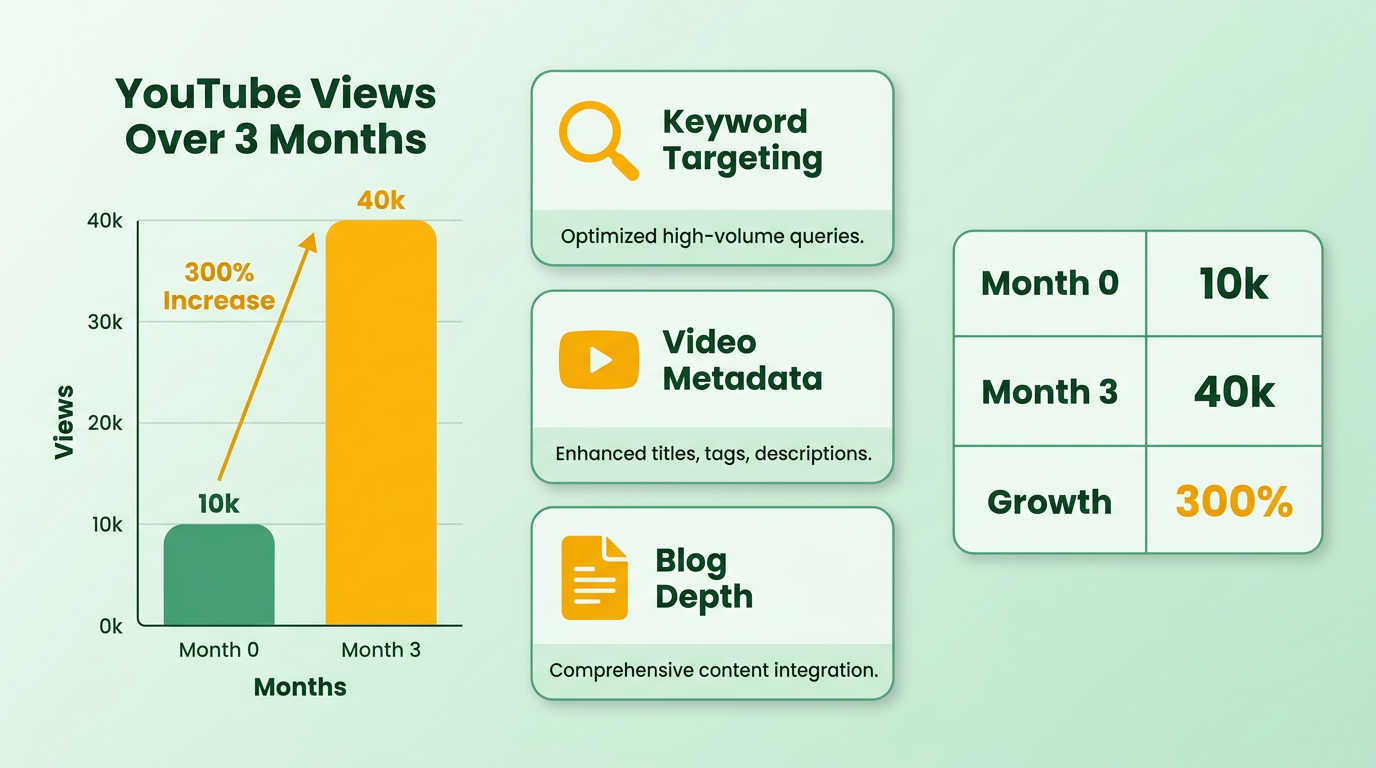
A content creator focused on tech reviews used blog-driven SEO to rank their YouTube videos on Google. By publishing in-depth blog posts about specific products and embedding their videos within the content, they achieved a 300% increase in YouTube views over three months. The strategy involved targeting long-tail keywords, optimizing video metadata, and ensuring the blog content directly answered user search intent. As mentioned in the Identifying Target Keywords for Your YouTube Video section, tools like Google Autocomplete helped pinpoint relevant terms that aligned with both blog and video content.
The creator wrote blog posts like “Top 5 Laptops for Video Editing in 2024” and embedded their review videos at the end. This approach not only boosted YouTube rankings but also improved the blog’s Google SERP visibility. A key takeaway was the importance of aligning video and blog content to capture both YouTube and web traffic. Building on concepts from the Why Blogging Matters for YouTube Video Ranking section, this cross-promotion strengthened SEO signals for both platforms.
A fitness brand used embedded YouTube videos in blog tutorials to drive rankings. By creating step-by-step workout guides on their blog and inserting their YouTube videos at relevant points, they saw a 200% rise in video engagement and a 50% drop in bounce rates. The strategy relied on dual optimization: the blog content included YouTube video links and transcripts, while the videos featured the blog URL in descriptions. This cross-promotion created a feedback loop, where Google and YouTube both prioritized the content. The brand also used structured data markup, a technique detailed in the Optimizing and Enhancing Your Blog Post for YouTube Video Ranking section, to help search engines understand the relationship between the blog and video.
A travel vlogger used an AI content platform to transform YouTube videos into blog posts, resulting in a 40% boost in organic traffic within two months. The AI tool analyzed the video script, generated keyword-rich blog content, and formatted it for SEO. By publishing these blogs alongside their videos, the creator captured both YouTube and Google audiences. As covered in the Creating a Blog Post that Amplifies Your YouTube Video section, structuring content around key phrases from video transcriptions ensured alignment with user search intent.
Frequently Asked Questions
1. How does blogging improve YouTube video rankings?
Blogging boosts rankings by providing keyword-rich context and metadata. Embedding videos in blogs triples their ranking potential by offering search engines more signals for indexing.
2. What role do keywords play in this strategy?
Targeting high-volume, low-competition keywords in blogs enhances video indexing. This improves search relevance and increases visibility for specific terms like “quick home workouts.”
3. How does combining text and video help SEO?
Search engines prioritize pages with both text and visuals. This combination boosts credibility and ranking power by providing more context and backlink opportunities.
4. Can AI tools help automate this process?
Yes, tools like AnyPost.ai convert videos into optimized blog posts. One company saw a 50% traffic increase in three months using this method.
5. What’s an example of this strategy in action?
A fitness channel created a blog post titled “10-Minute Home Workout” with embedded video, targeting terms like “beginner fitness routines” for better indexing.
6. How long does it take to see results?
Organic traffic improvements can be seen within three months. Consistently updating blogs with embedded videos accelerates visibility and indexing.
7. Why is metadata important for video SEO?
Blog text provides metadata, backlinks, and context missing in videos. This helps search engines understand content relevance, boosting credibility and ranking potential.